A store that sells 20 orders a month and a store that sells 200 orders a month do not need the same platform, even when the products are identical. Wix Core costs 29 dollars a month billed annually, and it handles the first store well. Shopify Basic costs 39 dollars a month billed monthly, or 29 dollars a month billed annually, and it handles the second store well. That difference is the starting point for how to switch from Wix to Shopify, because the right platform depends on order volume, not on the badge on the pricing page.
The monthly price is almost the same. The difference is what happens when orders rise, when a discount code fails at checkout, when a customer asks where a parcel is, and when the owner tries to run a sale that actually works. That is the moment a small store starts asking how to switch from Wix to Shopify, and the data behind the question is worth reading before the move.
Wix is a website builder that added a store. Shopify is a store that added a website. That order of building shapes everything. Wix makes it easy to design a beautiful site, and its store tools are good for a small catalogue. Shopify makes it easy to sell at volume, and its checkout, discount engine, shipping tools, and app store are built for a business that lives on orders. A store with 30 products and a local audience can stay on Wix for years and be happy. A store with 300 products, repeat customers, and a plan to run ads at scale will outgrow Wix, and the outgrowing usually shows up first at checkout.
This guide walks through how to switch from Wix to Shopify in full. You will see why stores switch, a side by side comparison of plans and fees, the real cost at 50, 200, and 500 orders a month, what transfers and what does not, and a seven step workflow that moves products, customers, and orders without losing a sale. Prices are US list prices checked in October 2026. Wix plans run from 17 dollars a month for Light to 159 dollars for Business Elite on annual billing. Shopify plans run from 39 dollars a month for Basic to 399 dollars for Advanced on monthly billing, with about 25 percent off on annual billing.
Why Stores Move From Wix to Shopify
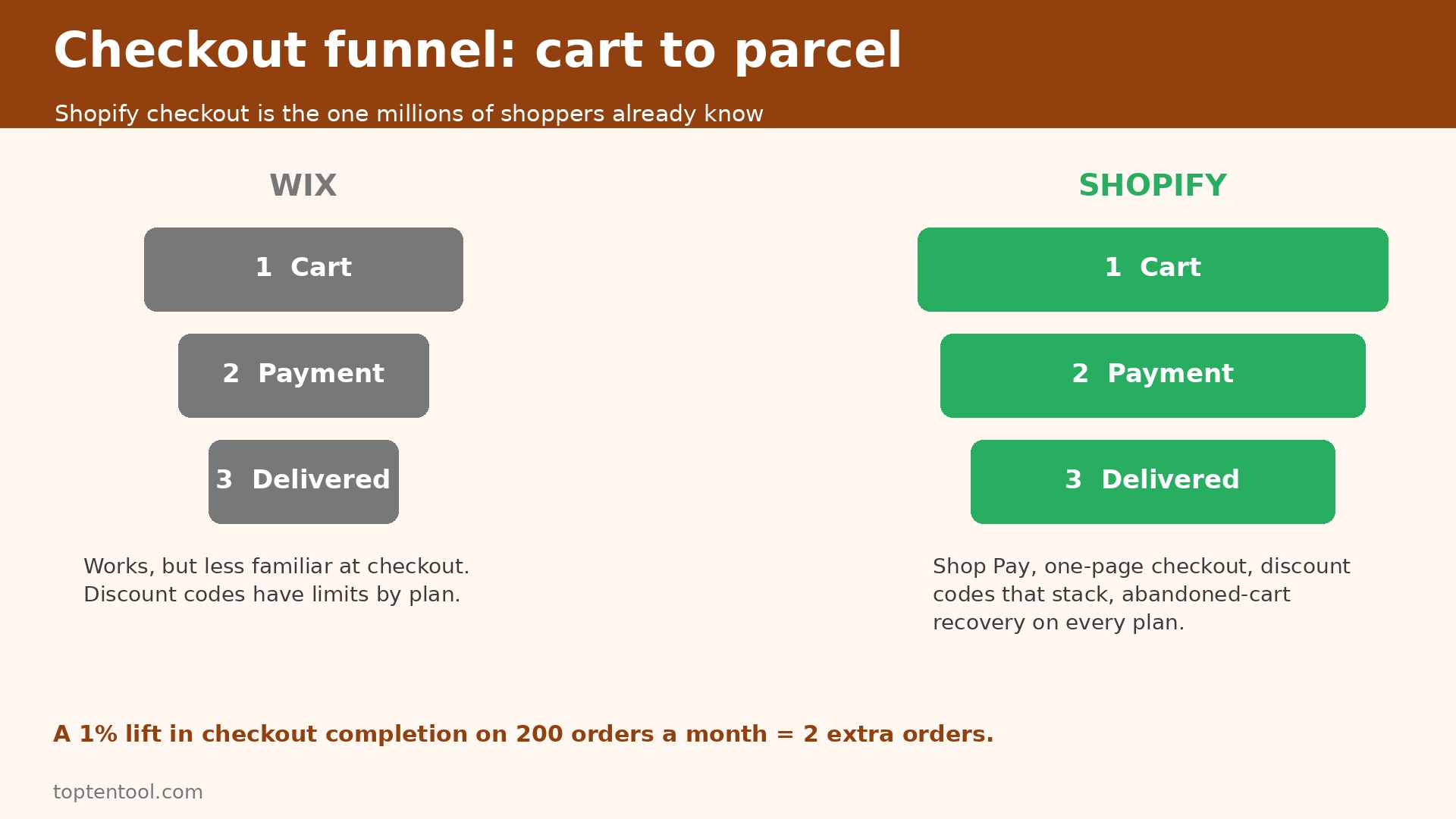
The first reason is checkout. Shopify checkout converts better for most stores, because it is the same checkout millions of shoppers already know. It supports Shop Pay, one page checkout, discount codes that stack cleanly, and abandoned cart recovery on every plan. Wix checkout works, and it has improved, but it does not carry the same familiarity, and familiarity matters when a shopper is deciding whether to finish a purchase on a phone. A one percent lift in checkout completion on 200 orders a month is two extra orders, and two extra orders a month pay for the platform gap many times over.
The second reason is scale. Wix Business at 39 dollars a month billed annually handles a growing store, and Business Elite at 159 dollars handles a larger one. Shopify Grow at 105 dollars a month, or 79 dollars billed annually, adds staff accounts and lower card rates, and Advanced adds advanced reports and lower rates again. Shopify handles thousands of products and high traffic spikes without the store slowing down, because selling at volume is its core job.
The third reason is the app store. Shopify has thousands of apps for shipping, email, loyalty, reviews, and subscriptions, built by teams that only serve Shopify stores. Wix has an app market too, but it is smaller, and the best apps usually launch on Shopify first. When you plan how to switch from Wix to Shopify, list the three apps you need most and check they exist on Shopify before you move.
The fourth reason is shipping and fulfilment. Shopify integrates with the major carriers, prints labels, calculates rates at checkout on Advanced, and connects to fulfilment services that pick and pack orders. Wix covers the basics, including shipping rules and label printing through partners, but the depth is thinner. A store that ships 20 parcels a week can live on either platform. A store that ships 200 parcels a week needs the deeper shipping tools, and the time saved on labels alone justifies the move.
There are good reasons to stay on Wix. The design freedom is greater, the editor is more visual, and a store that sells a small number of high value products with a strong brand story may prefer Wix. Wix also bundles hosting, a domain for the first year, and a website builder in one bill, which is simple for a business that wants one login for everything. If your store sells under 50 orders a month, if your catalogue is under 100 products, and if you have never felt the checkout or the shipping tools hold you back, stay on Wix. The switch costs a weekend, and a store that is not held back should not spend it.
Wix and Shopify Side by Side
| Area | Wix | Shopify |
|---|---|---|
| Entry store plan | Core 29 dollars a month billed annually | Basic 39 dollars a month, 29 billed annually |
| Mid store plan | Business 39 dollars a month billed annually | Grow 105 dollars a month, 79 billed annually |
| Top self serve plan | Business Elite 159 dollars a month billed annually | Advanced 399 dollars a month, 299 billed annually |
| Online card rate | Card processing through providers, about 2.9 percent plus 30 cents | Basic 2.9 percent plus 30 cents, Grow 2.7, Advanced 2.5 |
| Third party gateway fee | No separate Wix fee on ordinary sales | Basic 2 percent, Grow 1 percent, Advanced 0.6 percent |
| Products | Large catalogue, limits by plan | Unlimited products on every plan |
| Staff accounts | 5 collaborators on Core, 10 on Business, 100 on Elite | Owner only on Basic, 5 on Grow, 15 on Advanced |
| Abandoned cart | Available on store plans | Included on every plan |
| Discounts and gift cards | Available, with limits by plan | Full discount engine, gift cards on every plan |
| Shipping | Rules, labels through partners | Carrier rates, labels, fulfilment integrations |
| App store | App market, smaller range | Large app store, thousands of apps |
| Free trial | 14 day money back on paid plans | 3 days free, then 1 dollar a month for 3 months |
Read the card rate row with the gateway fee row together. Shopify charges less per card sale on higher plans, but it adds a fee of 2 percent on Basic if you use a payment provider other than Shopify Payments. Wix does not add that separate fee on ordinary sales. A store that cannot use Shopify Payments, because of its country or its product type, should add the 2 percent fee to the Shopify cost before comparing. A store that uses Shopify Payments pays no gateway fee, and the comparison turns on the plan price and the card rate alone.
Read the staff row too. Wix Core includes five collaborators, which is generous for a small team. Shopify Basic includes the owner only, and the first staff accounts arrive on Grow at 105 dollars a month. A store with three people who all need to edit products will pay more on Shopify than the Basic price suggests, because Grow is the first plan that fits the team. Price the decision on the plan that fits your team, not on the cheapest plan in the table.
How to Switch from Wix to Shopify in Seven Steps
Plan how to switch from Wix to Shopify over a weekend at a quiet time, with Wix kept live for 30 days after cutover. Do not close the Wix store until the first full week in Shopify has taken real orders without a missing product.
Step 1. Audit the Wix store before you export anything
List every product, every collection, every discount code, every shipping rule, and every page that ranks in search. Export the product list to a spreadsheet and check for duplicate names, missing prices, missing weights, and images that are too small. Count the products with variants, because variants are the most common source of import errors. Mark the ten best selling products, and check that each one has a clear title, a clear price, and at least three good images. Fix those ten first, because they carry the revenue.
Step 2. Export products, customers, and orders in the right order
Export products first, then customers, then orders. Wix exports products to CSV, and Shopify imports CSV with a known format. Open the product CSV in a spreadsheet and check the columns against the Shopify template. Fix the headers before you import, because a wrong header maps a price to a weight and the error only shows up when a customer checks out. Export customers with email, name, and address, and export orders for the current year as a record, not as live data, because order history does not import as live orders in Shopify.
Step 3. Set up Shopify and import in small batches
Create the Shopify store on the plan that fits your team and your order volume. Set the currency, tax settings, shipping zones, and payment provider before you import products. Import products in batches of 50, and check the count and the images after each batch. Then import customers, and check that the email addresses are valid. Then set up collections to match the Wix categories, and assign each product to the right collection. Small batches make errors easy to find. A single import of 500 products hides a bad row until a customer reports a wrong price.
Step 4. Rebuild the theme, the pages, and the checkout settings
Pick a Shopify theme that is close to your Wix design, and rebuild the homepage, the product page, and the checkout settings. Do not try to copy the Wix design pixel for pixel. Shopify themes have their own layout, and a theme that fights the platform will slow the store down. Set the logo, the colours, the fonts, and the navigation to match the brand. Test the checkout with a real card for a one dollar product, then refund it, because a checkout that has never been tested is a checkout that will fail on the first real order.
Step 5. Rebuild discounts, shipping, and taxes
Discount codes do not transfer as live codes. List every active discount in Wix, with the code, the amount, the expiry, and the products it applies to. Recreate each one in Shopify and test one code at checkout. Rebuild shipping zones and rates, and test a rate for each zone with a real address. Check tax settings for every region you sell to, because a tax rate that is wrong by one percent creates a filing problem later. This step takes longer than the product import, and it is the step most stores rush. Do not rush it.
Step 6. Redirect the domain and test every link
Point the domain to Shopify, and set up redirects for every Wix URL that ranks in search or that appears in an email or an ad. A product URL that changes without a redirect loses its search ranking and breaks every link that pointed to it. Test the homepage, the ten best selling products, the cart, and the checkout on a phone and on a desktop. Ask a friend to place a test order, because a fresh pair of eyes finds the broken button that the owner has stopped seeing.
Step 7. Run both stores for 30 days, then close Wix
Keep Wix live for 30 days after cutover. Send all new orders through Shopify. Use Wix only to check an old order or to answer a customer question about a purchase made before cutover. At the end of the 30 days, run the sales reports in both systems, confirm the customer list matches, export a final backup from Wix, and only then cancel the Wix subscription. Cancelling early saves one month of fees and risks a lost order record you cannot recover.
Pre Switch Checklist
Before You Start
– Count products, variants, collections, and active discount codes, and confirm the numbers before you export. – List the ten best selling products and check each one has a clear title, price, weight, and at least three images. – Export the product list, the customer list, and the order history for the current year, and store the files outside both tools. – List every shipping zone, rate, and rule in Wix, with the countries and the prices for each one. – List every page that ranks in search, and plan a redirect for each URL that will change.
Right Before the Move
– Confirm Shopify Payments is available for your country and product type, or budget for the 2 percent third party gateway fee on Basic. – Check that your email tool, accounting tool, and shipping app have a Shopify integration, or a manual export you can live with. – Pick a cutover date at a quiet time, and block two hours on the following Monday to check the first orders. – Tell repeat customers that the store will look different, and confirm their accounts and order history will carry over. – Keep the Wix login active for 30 days after cutover, with a calendar reminder for the cancellation date.
If the product count is over 500, add a day to the plan.
What You Lose and What You Gain
What you gain is a store built for selling at volume. Checkout is familiar to shoppers, discount codes work cleanly, abandoned cart recovery is included, and the app store covers almost every selling job a store will face. A store that runs ads, runs sales, and ships daily will feel the difference in the first month, because the tools that were workarounds on Wix become native features on Shopify. The gain is not a single feature. It is the removal of friction at every step from product page to parcel.
What you gain next is scale without a rebuild. Shopify handles a traffic spike, a large catalogue, and a high order volume without the store slowing down. A store that grows from 50 orders a month to 500 orders a month does not need to switch platforms again, because the platform was built for that growth. That saves a second migration, and a second migration is far more expensive than the first, because the customer list is larger and the search ranking is worth more.
What you lose is design freedom. Wix lets you place almost anything anywhere on the page. Shopify themes are more structured, and a design that needs a custom layout will need a developer or a paid theme. A store with a strong visual brand may find Shopify themes restrictive at first, and the fix is to pick a theme that fits the brand rather than forcing a theme to copy the old site. Budget for a paid theme if the free themes do not fit, because a theme that looks wrong costs sales every day.
What you lose next is the single bill simplicity. Wix bundles hosting, a domain for the first year, and a website builder in one plan. Shopify charges for the plan, for apps, and for a theme. A store that adds three paid apps at 20 dollars a month each has added 60 dollars to the monthly bill. That is the hidden cost to price into how to switch from Wix to Shopify, so list the apps first and add their cost to the Shopify total.
What you lose last is some control over the URL and the page structure. Wix URLs and Shopify URLs follow different patterns, and every changed URL needs a redirect. A store with strong search traffic should treat redirects as a core part of the switch, not as an afterthought. A missed redirect loses a ranking that took months to earn, and the loss shows up in traffic weeks after the switch, when the cause is harder to trace.
Data Migration in Detail
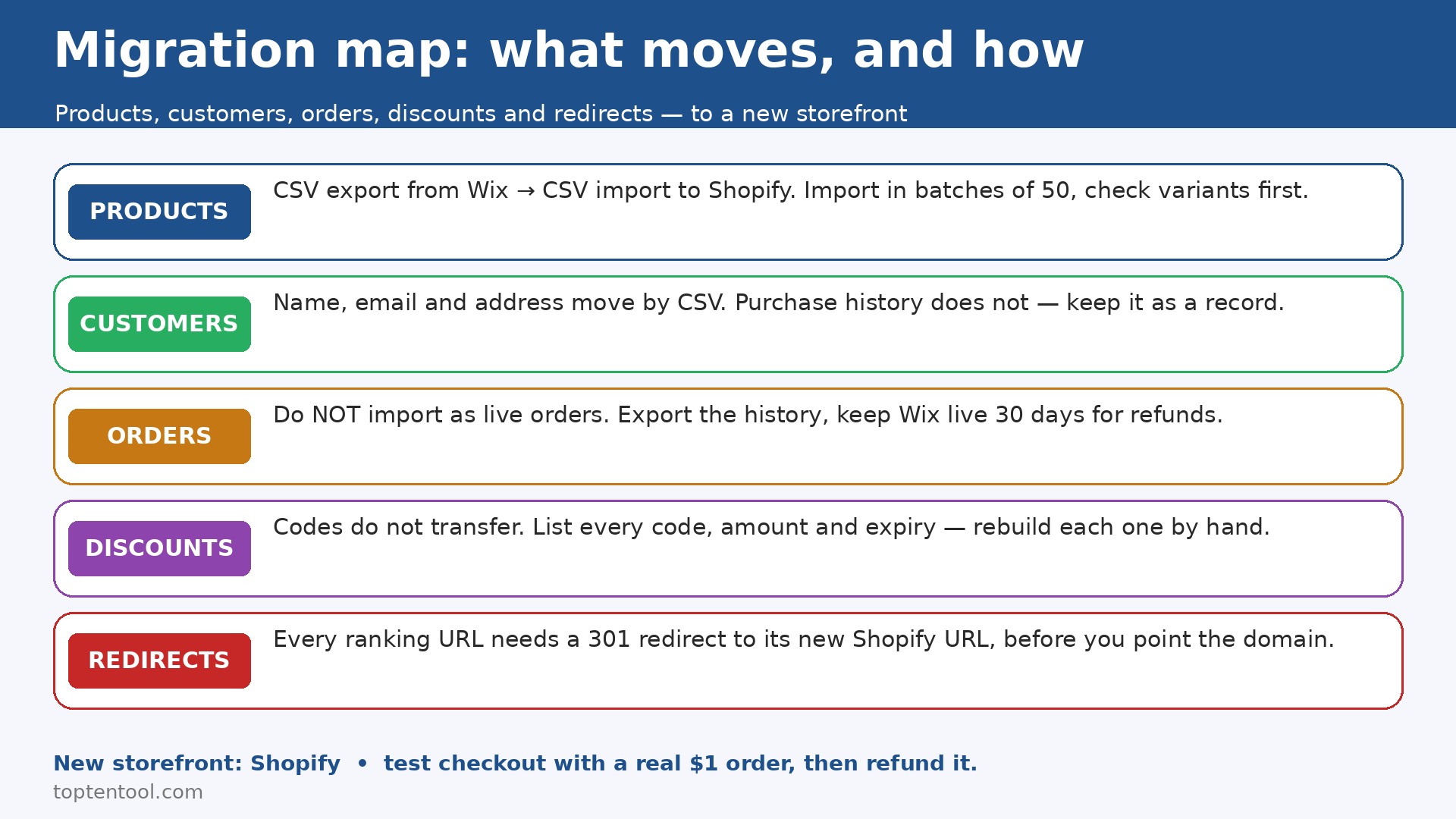
Products transfer well, with care. Wix exports products to CSV, and Shopify imports CSV in a known format. Title, description, price, SKU, weight, and images map cleanly when the headers match. Variants transfer too, but they are the most common source of errors, because a variant with a missing price or a missing SKU will fail the import or land with the wrong price. Check the variant rows in the spreadsheet before you import, and test the import with ten products first. If the ten land correctly, import the rest in batches of 50.
Customers transfer cleanly. Name, email, and address move in a CSV import, and Shopify matches on email to avoid duplicates. What does not transfer is the full purchase history attached to each customer, or any custom field you added in Wix. Export the order history for the current year and keep it as a record, so a question about a past order can still be answered. Tell customers their account will carry over, and test the login for one customer before cutover, because a login that fails on day one creates support tickets that could have been prevented.
Orders do not transfer as live orders. Shopify does not import past orders as live records that can be refunded or edited in the normal flow. Export the order history from Wix and keep it as a file, and keep Wix live for 30 days so a refund for a pre cutover order can still be processed there. This is the most misunderstood part of the switch, and stores that expect order history to move as live data are disappointed. Plan for it, and the disappointment disappears.
Discount codes, shipping rules, and tax settings do not transfer at all. They must be rebuilt by hand in Shopify, and the rebuild is the longest part of the move. List every discount code with its amount and expiry, list every shipping zone with its rates, and list the tax settings for every region. Rebuild each one, test one discount at checkout, test one shipping rate per zone, and check the tax on a test order. A discount that is wrong by ten percent costs money on every order until someone notices.
Images transfer, but check the quality. Wix may have compressed an image on upload, so upload the original to Shopify instead of the exported copy where you still have it. Check the ten best selling products first, because those images are the ones customers see most.
The Real Cost Comparison
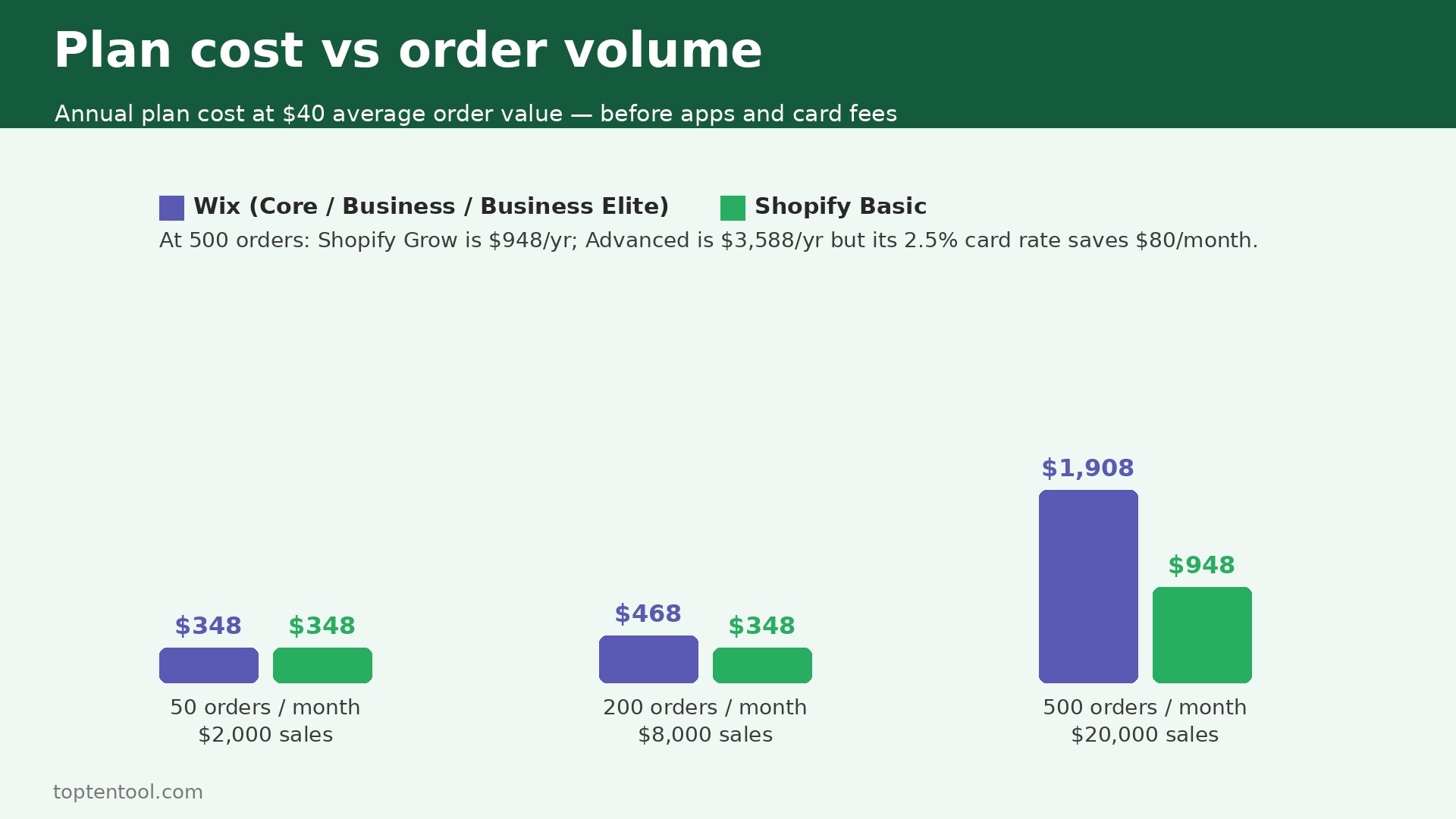
Price the switch at 50, 200, and 500 orders a month, on list prices, for a full year, before app costs and before card fees. Card fees depend on the plan and the payment provider, so the comparison below uses the plan price plus the card rate on Shopify Payments, and notes where Wix differs.
A store with 50 orders a month at an average order value of 40 dollars takes 2,000 dollars a month in sales. On Wix Core at 29 dollars a month, the plan costs 348 dollars a year. On Shopify Basic at 29 dollars a month billed annually, the plan also costs 348 dollars a year. The plan price is identical. The difference is the card rate, which is about 2.9 percent plus 30 cents on both, and the app cost, which is higher on Shopify if the store adds paid apps. At this size, the switch is not about price. It is about whether the store needs the Shopify checkout and app store yet.
A store with 200 orders a month at 40 dollars takes 8,000 dollars a month in sales. On Wix Business at 39 dollars a month billed annually, the plan costs 468 dollars a year. On Shopify Basic at 29 dollars a month billed annually, the plan costs 348 dollars a year, and on Grow at 79 dollars billed annually it costs 948 dollars a year.
Most stores at this size stay on Basic until the staff limit forces Grow, because Basic includes the owner only and Grow adds five staff accounts. The card rate on Basic is 2.9 percent plus 30 cents, which is 232 dollars a month in card fees on 8,000 dollars of sales, plus 60 dollars in fixed per order fees. The total cost is close, and the decision turns on checkout conversion and shipping time, not on the plan price.
A store with 500 orders a month at 40 dollars takes 20,000 dollars a month in sales. On Wix Business Elite at 159 dollars a month billed annually, the plan costs 1,908 dollars a year. On Shopify Grow at 79 dollars billed annually, the plan costs 948 dollars a year, with a card rate of 2.7 percent plus 30 cents. On Advanced at 299 dollars billed annually, the plan costs 3,588 dollars a year, with a card rate of 2.5 percent. The rate saving on Advanced is 80 dollars a month, or 960 dollars a year, so move to Advanced only when you also need its reports or calculated shipping rates.
Add the app costs to every size. A store that needs a loyalty app, a review app, and a shipping app should budget 40 to 80 dollars a month for apps on Shopify. Wix has fewer paid apps, so the app bill is lower, but the features are thinner. A saving on apps that leaves the store without a loyalty program is not a saving if loyalty drives repeat orders.
Frequently Asked Questions
Will I lose my products when I switch?
No, if you export before you cancel. Products move in a CSV export from Wix and a CSV import to Shopify, with title, price, SKU, and images. Check the variant rows before you import, and test with ten products first. Keep the Wix export file, so a failed import can be fixed in the spreadsheet and run again without starting over.
How long does the switch take?
A clean switch for a store with under 100 products takes one weekend plus one week of checking. A store with 500 products takes three to four days of checking, because each variant row needs a look. The 30 day parallel run is not extra work, it is the safety net that catches a missed redirect or a wrong shipping rate before it costs a sale.
Will my search ranking drop after the switch?
It can, if redirects are missed. Every Wix URL that ranks in search or that appears in an email or an ad needs a redirect to the matching Shopify URL. Set up the redirects before you point the domain, and check the ten most visited pages in the first week. A redirect done right preserves most of the ranking. A redirect missed loses it, and the loss takes weeks to recover.
Can I keep my domain name?
Yes. The domain moves to Shopify, and the DNS change takes a few hours to spread. Do the change at a quiet time, and test the site from a phone on mobile data as well as from a desktop, because the two can show different results while the change spreads. Keep the Wix site live until the domain has fully moved, so customers do not see a broken page.
Is Shopify cheaper than Wix for a small store?
Not always. At 50 orders a month the plan price is the same, at 29 dollars a month billed annually on both. Shopify becomes cheaper at higher volumes when the card rate falls, and more expensive when paid apps are added. Price the decision on the plan plus the apps plus the card fees at your real order volume, not on the headline plan price alone.
Verdict
Switch if you sell more than 100 orders a month, if your catalogue is growing, if you run sales and discount codes often, or if shipping takes a real part of your week. The checkout, the app store, and the scale are built for that store, and the seven step workflow in this guide keeps the move safe. Test the checkout with a real order, set up every redirect, and run both stores for 30 days. That is how to switch from Wix to Shopify without losing products, without losing customers, and without losing the search traffic you already earned.
Stay if you sell under 50 orders a month, if your catalogue is under 100 products, and if the Wix editor is the reason your site looks the way it does. The plan price is the same, the design freedom is greater on Wix, and the switch costs a weekend that a small store should spend on products and customers instead. Revisit the question when orders rise past 100 a month, because that is the point where the Shopify checkout and shipping tools start to pay for themselves.
For a store in the middle, the test is simple. Run Shopify for the 3 day trial plus the 1 dollar a month period, import your ten best sellers, place a test order, and time how long it takes to process. If the checkout feels faster and the shipping tools feel easier, switch. If the design feels wrong and the apps feel like extra cost, stay on Wix and check again in six months. The platform should fit the store you have, not the store you hope to have next year.