
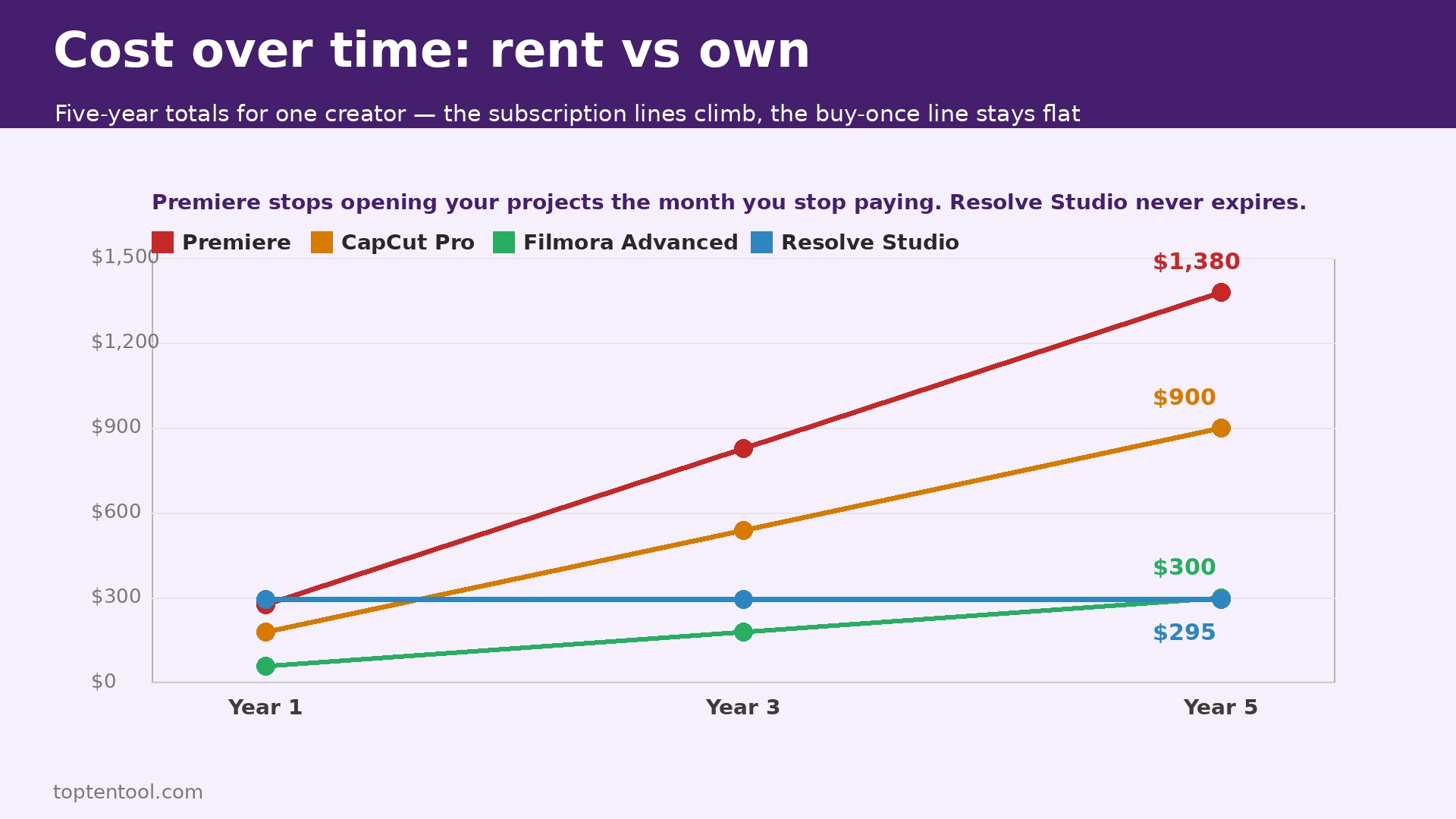
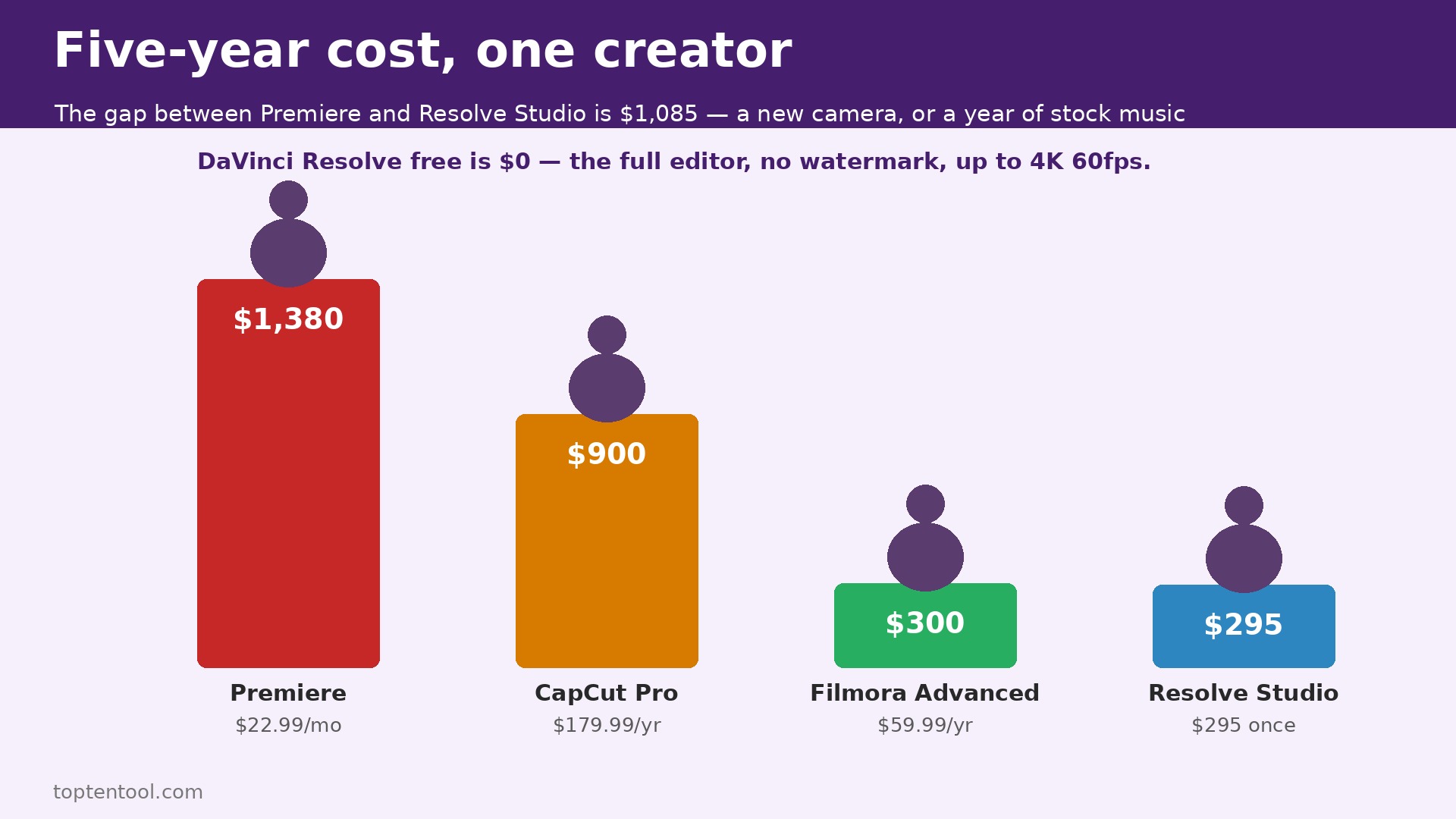
You pay for your video editor every month, or you pay for it once, and the difference over five years is more than 1,000 dollars for a single creator. That is the problem with video editing software pricing for creators in 2026. Adobe Premiere costs 22.99 dollars a month on an annual plan, which is 276 dollars a year and about 1,380 dollars over five years, and the app stops opening your projects the month you stop paying. DaVinci Resolve Studio costs 295 dollars once, and it never expires.
CapCut Pro costs 19.99 dollars a month, or 179.99 dollars a year. Filmora Advanced costs 59.99 dollars a year. The cheapest editor that can do the job is not always the cheapest editor to own, and the most expensive editor is not always the one with the highest monthly price. This guide compares 10 leading editors, works out the true cost for one creator and for a five person team, and shows you which one is cheapest for the videos you actually make.
Video editing software pricing for creators falls into three groups in 2026, and the group matters more than the headline price. The first group is subscription only. Premiere, CapCut Pro, Descript, and the Creative Cloud bundle charge every month, and the cost never ends. The second group is buy once. DaVinci Resolve Studio, Final Cut Pro, and LumaFusion charge one payment, and the license is yours.
The third group is mixed. Filmora sells an annual plan and a perpetual license, and CapCut sells a free plan with paid tiers above it. A subscription that costs 20 dollars a month sounds cheap next to a 295 dollar one time payment, until you multiply 20 dollars by 60 months and get 1,200 dollars. A one time payment that sounds expensive sounds cheap once you pass month 15.
Free plans hide limits that matter. DaVinci Resolve free is the exception, because it ships the full editor with no watermark and no expiry, and the paid Studio license adds AI tools, higher resolutions, and collaboration. CapCut free exports clean 1080p video with no watermark, but templates and effects marked Pro export with a watermark unless you pay.
Descript free gives you 60 media minutes a month and 720p watermarked export. Filmora free exports with a watermark. The free plan is only free if the limit does not touch your work, and the limit that touches most creators first is the watermark, because a watermarked video cannot go on a client channel, and a 1080p cap cannot serve a channel that publishes in 4K.
How Video Editing Software Pricing for Creators Works Over Time
The honest comparison in video editing software pricing for creators is the total cost over three years, because three years is how long most creators keep an editor before they switch or upgrade. Premiere at 22.99 dollars a month costs 828 dollars over three years. CapCut Pro at 179.99 dollars a year costs 540 dollars over three years. Filmora Advanced at 59.99 dollars a year costs 180 dollars over three years.
DaVinci Resolve Studio at 295 dollars once costs 295 dollars over three years, and 295 dollars over five years, and 295 dollars over 10 years. Final Cut Pro at 299.99 dollars once costs the same 299.99 dollars over any period. The subscription tools look affordable month to month and expensive year to year, and the buy once tools look expensive once and cheap forever.
Team pricing changes the ranking. Premiere for teams costs 37.99 dollars a month per license, so a five person team pays about 190 dollars a month, or 2,280 dollars a year. DaVinci Resolve Studio for five people costs 295 dollars per license, or 1,475 dollars once, and nothing after that.
CapCut Pro for five people costs about 100 dollars a month, or 1,200 dollars a year, and the team plan adds shared cloud storage. Filmora team pricing runs about 155.88 dollars per user per year, so five people cost about 779 dollars a year. A team that buys subscriptions pays every year for the privilege of opening its own projects, and a team that buys once pays once and keeps the tools.
Hidden costs sit in storage, AI credits, and asset libraries. Premiere includes 100GB of cloud storage and 25 generative credits a month on the single app plan, and the Creative Cloud Pro plan at 69.99 dollars a month raises that to 4,000 generative credits. CapCut Pro includes up to 1TB of cloud storage, and the Ultra tier at 79 dollars a month adds more AI capacity.
Filmora Advanced includes 1,000 AI credits a month, and the Creative Assets add on costs 79.99 dollars a year for the full premium effects and stock library. Descript charges by media minutes, so a creator who records long interviews burns through the allowance faster than a creator who records short clips. Always check the storage, the AI allowance, and the asset library before you compare prices, because the plan that looks cheapest can cost the most once you add the extras your workflow needs.
Video Editing Software Pricing Compared at a Glance
The table below uses list prices checked in October 2026. Prices vary by country and by app store, and CapCut notes that its displayed pricing is for reference only, so confirm the price at checkout before you buy.
| Tool | Free plan | Paid plan | Billing model | Export limits on free plan | Best for |
|---|---|---|---|---|---|
| Adobe Premiere | 7 day trial only | 22.99 dollars a month annual, 34.49 month to month | Subscription | No free plan | Teams and client work |
| DaVinci Resolve | Yes, full editor | Studio 295 dollars once | One time | None, up to 4K 60fps | Color grading and pro editing |
| Final Cut Pro | 90 day trial | 299.99 dollars once | One time | No free plan | Mac creators |
| CapCut | Yes | Standard about 9.99 dollars a month, Pro 19.99 dollars a month or 179.99 dollars a year | Subscription | 1080p, Pro assets watermarked | Short form social video |
| Filmora | Yes, watermarked | Basic 49.99 dollars a year, Advanced 59.99 dollars a year, Perpetual 79.99 dollars once | Annual or one time | Watermarked exports | Template driven beginners |
| Descript | Yes, 60 minutes a month | Hobbyist 16 dollars a month annual, Creator 24 dollars a month annual | Subscription | 720p, watermarked | Talking head and podcast video |
| LumaFusion | No free plan | 29.99 dollars once | One time | No free plan | iPad and iPhone editing |
| Shotcut | Yes, fully free | No paid plan | Free | None | No budget editing |
| iMovie | Yes, free on Mac and iPhone | No paid plan | Free | None | Simple Mac edits |
| PowerDirector | Yes, watermarked | Annual and monthly plans, price varies by store | Subscription | Watermarked exports | Windows beginners |
Adobe Premiere
Premiere, now sold as Adobe Premiere after Adobe dropped Pro from the name in January 2026, costs 22.99 dollars a month on an annual plan billed monthly, or 34.49 dollars month to month, with a seven day trial. The single app plan includes Premiere on desktop and mobile, Adobe Express Premium, Frame.io, 100GB of cloud storage, and 25 generative credits a month. Creative Cloud Standard costs 54.99 dollars a month for more than 20 apps, and Creative Cloud Pro costs 69.99 dollars a month with 4,000 generative credits. Premiere for teams costs 37.99 dollars a month per license.
A single creator pays 276 dollars a year on the annual plan, or 414 dollars a year month to month, and the month to month plan costs 138 dollars more a year for the same app, which is a steep price for flexibility. A five person team pays 2,280 dollars a year on the team plan.
Over five years, one seat costs about 1,380 dollars, and five seats cost about 11,400 dollars, and every dollar of that is rent, because the app stops when the subscription stops. Premiere is still the pick for teams and agency work, because it is the tool most studios standardize on, and because project files move between editors, clients, and post houses without conversion. If you work alone and you do not need that compatibility, the subscription is the most expensive way to edit video in this guide.
DaVinci Resolve
DaVinci Resolve free is the best deal in video software, and that is not an exaggeration. The free edition ships the same editing page, the Color page with node based grading, Fairlight for audio, and Fusion for visual effects, at up to 4K and 60fps, with no watermark and no time limit. Resolve Studio costs 295 dollars once, and it adds Neural Engine AI tools like Magic Mask and noise reduction, resolutions and frame rates beyond 4K 60fps, film grain, and Blackmagic Cloud collaboration. There is no subscription, and the license never expires.
A single creator pays zero dollars for the free edition, or 295 dollars once for Studio, and that 295 dollars is the total cost over one year, three years, and five years. A five person team pays 1,475 dollars once for five Studio licenses, against 11,400 dollars over five years for Premiere, a saving of about 9,925 dollars. The trade off is the learning curve.
Resolve is a professional tool with five pages, a node based color workflow, and a manual that runs to thousands of pages, and a beginner will take weeks to feel fast in it. A creator who edits every week will repay that learning time many times over. A creator who edits once a month may prefer a simpler tool.
Final Cut Pro
Final Cut Pro costs 299.99 dollars once on the Mac, with a 90 day free trial, and it is also available through Apple Creator Studio at 12.99 dollars a month, which bundles Final Cut Pro with other Apple creative apps. The one time license costs less than the 12.99 dollar a month plan after about 23 months, so a creator who keeps the app for two years or more should buy it outright. A five person team on Mac pays 1,500 dollars once, or about 780 dollars a year on Creator Studio, and the buy once route wins after the second year.
Final Cut Pro is the fastest editor in this guide on Apple silicon, with magnetic timeline editing, background rendering, and proxy workflows that make 4K editing smooth on a MacBook Air. It runs only on Mac and iPad, so a Windows creator cannot use it, and project files do not open in Premiere or Resolve without conversion. For a Mac based YouTuber or a wedding videographer who edits every week, it is the best buy once option alongside Resolve. For a team that mixes Mac and Windows, it is the wrong choice.
CapCut
CapCut restructured its paid plans, and the restructure confuses people, so here it is plainly. The free plan exports clean 1080p video with no watermark, and it includes the full manual timeline, multi track editing, keyframes, and basic AI voiceover. Standard costs about 9.99 dollars a month, and it removes the watermark from premium assets and unlocks more templates, but it keeps the 1080p cap.
Pro costs 19.99 dollars a month or 179.99 dollars a year, and it adds 4K and HDR export, the full AI toolkit with camera tracking, vocal isolation, speaker ID captions, avatars and voice cloning, the full asset library, and cloud storage up to 1TB. Ultra costs 79 dollars a month or 900 dollars a year, and it adds more AI capacity for heavy users.
A single creator on Pro pays 180 dollars a year on annual billing, or 240 dollars a year month to month, and the annual plan saves 60 dollars. A five person team on Pro pays about 900 dollars a year. Over five years, one Pro seat costs about 900 dollars on annual billing. CapCut is the easiest start for Shorts, Reels, and TikTok, because it runs on phone, desktop, and web, and because its auto captions and templates are built for vertical video. The cost to watch is the commercial use rule. CapCut terms require a paid plan for commercial use, and paid materials carry license limits, so a business channel should not build its workflow on the free plan.
Filmora
Filmora Advanced costs 59.99 dollars a year, Basic costs 49.99 dollars a year, and a perpetual license costs 79.99 dollars once. The free plan exports with a watermark. One Basic or Advanced license covers both Mac and Windows, which is a genuine advantage for a creator who edits on two machines, while the perpetual license is device specific, so a Mac license will not run on Windows. Advanced includes 1,000 AI credits a month, 10GB of cloud storage, watermark free exports, and all future major updates. The Creative Assets add on costs 79.99 dollars a year for the full premium effects, templates, and stock library, and extra AI credit packs cost from 9.99 dollars.
A single creator on Advanced pays 60 dollars a year, or 180 dollars over three years, which makes Filmora the cheapest paid desktop editor in this guide for a beginner. The perpetual license at 79.99 dollars is cheaper than two years of Advanced, but it excludes future versions, and buyers of earlier lifetime licenses were asked for an annual fee for version 12, so treat the word perpetual with care and read the current terms before you buy.
Filmora sits between CapCut and the pro editors, with a simple timeline, a large template library, and built in AI tools, without Resolve learning curve. It is the best value for a beginner who publishes weekly and wants watermark free 4K exports without a 20 dollar a month subscription.
Descript
Descript charges by media minutes, which makes it the hardest tool in this guide to compare at a glance, and the most honest to compare by workload. The free plan gives you 60 media minutes a month and 720p watermarked export. Hobbyist costs 16 dollars a month billed annually, or 24 dollars billed monthly, with 600 media minutes a month and 1080p watermark free export. Creator costs 24 dollars a month billed annually, or 35 dollars billed monthly, with 1,800 media minutes a month and 4K export. Business costs 50 dollars a month billed annually, or 65 dollars billed monthly, with 2,400 media minutes a month.
A creator who records 30 minutes of raw footage per video gets two videos a month on Free, 20 videos on Hobbyist, and 60 videos on Creator, so Creator is the first plan that covers a daily vlog. A single creator on Creator pays 288 dollars a year. A five person team on Creator pays 1,440 dollars a year.
Descript edits video by editing text, which makes it the fastest tool here for talking head video, podcast video, and captioned clips, because you cut a sentence by deleting the words. It is not a general purpose editor, and a creator who needs color grading, motion graphics, or multi camera editing should pair it with Resolve or Premiere, not replace them with it.
LumaFusion, Shotcut, iMovie, and PowerDirector
LumaFusion costs 29.99 dollars once on the App Store, with in app purchases and a Creator Pass subscription for extra features, and it runs on iPhone, iPad, Apple silicon Macs, Android, and Chromebooks. It is a touch first editor with a magnetic timeline, keyframing, and a stabilizer, and it is the best option for a creator who edits on an iPad first and finishes on a Mac. A single creator pays 29.99 dollars once, and a five person team pays about 150 dollars once, which makes it the cheapest paid editor in this guide by a wide margin, and the only one that fits in a pocket.
Shotcut is fully free, with no paid plan, no watermark, and no export limit, and it runs on Windows, Mac, and Linux. It is less polished than Resolve or Filmora, and its interface shows its open source roots, but it edits 4K video, supports a wide range of formats, and costs nothing forever. iMovie is free on every Mac and iPhone, with no paid plan, and it handles simple edits, titles, and trailers with almost no learning curve. PowerDirector offers a free plan with watermarked exports and annual and monthly paid plans whose price varies by store, so check the current price in your app store before you compare it, and treat it as a Windows beginner option alongside Filmora.
Total Cost of Ownership for One Creator and for a Team
The table below works out the cost for one creator over one year, three years, and five years, using the list prices above. Annual billing is used where a discount applies, and one time licenses are counted once.
| Tool | One year, one creator | Three years, one creator | Five years, one creator | Five years, five creators |
|---|---|---|---|---|
| Adobe Premiere annual | 276 dollars | 828 dollars | 1,380 dollars | 11,400 dollars team plan |
| DaVinci Resolve Studio | 295 dollars once | 295 dollars | 295 dollars | 1,475 dollars once |
| Final Cut Pro | 299.99 dollars once | 299.99 dollars | 299.99 dollars | 1,500 dollars once |
| CapCut Pro annual | 179.99 dollars | 539.97 dollars | 899.95 dollars | 4,499.75 dollars |
| Filmora Advanced | 59.99 dollars | 179.97 dollars | 299.95 dollars | 1,499.75 dollars |
| Descript Creator annual | 288 dollars | 864 dollars | 1,440 dollars | 7,200 dollars |
| LumaFusion | 29.99 dollars once | 29.99 dollars | 29.99 dollars | 149.95 dollars once |
| Shotcut | 0 dollars | 0 dollars | 0 dollars | 0 dollars |
| iMovie | 0 dollars | 0 dollars | 0 dollars | 0 dollars |
The cheapest editor that can do professional work is DaVinci Resolve free at zero dollars, followed by Resolve Studio at 295 dollars once. The cheapest paid subscription for a beginner is Filmora Advanced at 60 dollars a year. The most expensive common choice is Premiere, at 1,380 dollars over five years for one seat, and the gap between Premiere and Resolve Studio over five years is 1,085 dollars for one creator, which buys a better camera, a better microphone, or a year of stock music. That gap is the real price of staying in the Adobe ecosystem, and for a team it becomes a five figure decision.
Add ons change the totals in video editing software pricing for creators. A Filmora creator who adds the Creative Assets library at 79.99 dollars a year pays 140 dollars a year, not 60 dollars, and over five years that is 700 dollars, which is more than Resolve Studio.
A CapCut creator who needs Ultra at 79 dollars a month pays 948 dollars a year, which is more than three times the Pro price. A Descript creator who records long interviews and exceeds the media allowance pays for extra minutes or a higher tier. Always add the asset library, the AI credits, and the storage to the headline price before you decide, because the headline price is the floor, not the total.
Cheapest Video Editing Software by Situation
| Situation | Cheapest honest pick | Cost | Why it wins |
|---|---|---|---|
| Beginner on a phone, short form video | CapCut free, then Pro | 0 dollars, then 179.99 dollars a year | Best vertical video workflow, free start |
| Beginner on desktop, weekly publishing | Filmora Advanced | 59.99 dollars a year | Cheapest paid desktop editor, easy to learn |
| Serious creator who wants pro tools free | DaVinci Resolve free | 0 dollars | Full pro editor, no watermark, no expiry |
| Creator who wants pro tools plus AI, one payment | DaVinci Resolve Studio | 295 dollars once | Cheapest pro total over five years |
| Mac creator, YouTube and client work | Final Cut Pro | 299.99 dollars once | Fastest on Apple silicon, buy once |
| Talking head, podcast, captioned clips | Descript Creator | 288 dollars a year | Edit by editing text, fastest for speech |
| iPad first creator | LumaFusion | 29.99 dollars once | Best touch editor, cheapest paid option |
| No budget at all | Shotcut or iMovie | 0 dollars | Real editing, zero cost, no watermark |
| Team or agency, client compatibility matters | Adobe Premiere team | 2,280 dollars a year for five seats | Industry standard, shared projects |
Video editing software pricing for creators rewards the buyer who thinks in five year totals, not monthly prices. A 20 dollar a month subscription is not a 20 dollar tool. It is a 1,200 dollar tool over five years, and a 295 dollar one time license is a 295 dollar tool over five years, and the difference is a new lens, a new light, or a month of rent on a studio. Buy the subscription only when the workflow it unlocks earns more than the rent it charges.
Frequently Asked Questions
How much is video editing software pricing for creators per month?
A creator can edit for free with DaVinci Resolve, Shotcut, or iMovie. A paid beginner plan costs 60 dollars a year for Filmora Advanced or 180 dollars a year for CapCut Pro. A professional subscription costs 276 dollars a year for Premiere. A one time professional license costs 295 dollars for Resolve Studio or 299.99 dollars for Final Cut Pro, and that payment covers every year after.
Is there a free video editor with no watermark?
Yes. DaVinci Resolve free exports up to 4K at 60fps with no watermark and no time limit. Shotcut and iMovie are also free with no watermark. CapCut free exports clean 1080p video with no watermark, but Pro templates and effects export with a watermark unless you pay. Filmora free and PowerDirector free both export with a watermark.
Is DaVinci Resolve Studio worth 295 dollars?
Yes, for a creator who edits every week. The free edition already covers most needs, and Studio adds AI tools, higher resolutions and frame rates, film grain, and cloud collaboration for a single payment that never expires. Over five years it costs 295 dollars, against 1,380 dollars for Premiere, so the value is clear for anyone who keeps the tool for more than a year.
Is CapCut Pro worth 19.99 dollars a month?
Yes, for a short form creator who publishes daily on TikTok, Reels, or Shorts. Pro adds 4K and HDR export, the full AI toolkit, the full asset library, and up to 1TB of cloud storage, and the annual plan at 179.99 dollars saves 60 dollars against monthly billing. A long form creator who edits on desktop will get more value from Resolve or Filmora at a lower total cost.
Should I choose Premiere or DaVinci Resolve?
Choose Premiere if you work in a team, share projects with clients or post houses, or need Adobe integration with After Effects and Audition. Choose Resolve if you work alone, you want the lowest five year cost, and you want the best color grading tools available at any price. Resolve free alone beats Premiere on price, and Resolve Studio beats it on five year total by more than 1,000 dollars per seat.
Verdict
Video editing software pricing for creators is a choice between rent and ownership, and ownership wins for most solo creators. DaVinci Resolve free is the best editor at zero dollars, and Resolve Studio at 295 dollars once is the best professional purchase in this guide, because it never expires and it never asks for another payment. Filmora Advanced at 59.99 dollars a year is the best value for a beginner who wants an easy desktop editor. CapCut Pro at 179.99 dollars a year is the best value for a short form creator.
Before you pay for anything, run the free edition for two projects, because a trial on one short clip hides the problems that show up on a deadline. Export a video, check the render time on your machine, and open the project again the next day to see whether the workflow feels fast. If your computer struggles with 4K timelines, a cheaper plan will not fix that, and the money is better spent on more storage or faster drives first. Pick the tool that fits the videos you make each week, not the one with the longest feature list, and recheck the price on the vendor site before you buy, since plans and renewal terms change without notice.
Final Cut Pro at 299.99 dollars once is the best value for a Mac creator. Premiere at 22.99 dollars a month is the best value only when client compatibility and team workflows earn back the subscription, and for everyone else it is the most expensive way to edit video. Work out your five year total before you buy, and confirm the price at checkout, because these prices change, and the price you saw last year is not the price you will pay this year.