The renewal notice arrives, the price is 99 dollars per user per month, and the team only uses scheduling and basic analytics. That is the moment most teams start asking how to switch from Hootsuite to Buffer, and it is a fair question. Hootsuite is a full social media management suite with an inbox, listening, and paid social tools. Buffer is a scheduler that charges per channel instead of per user. A small team that only schedules posts pays for a suite it does not use, and the gap grows with every teammate added.
The switch is not about which tool is better in general. It is about which billing model and which feature set match the way the team actually works. Hootsuite charges per user seat, so a five person team pays five seats. Buffer charges per connected channel, so the same team pays for the accounts it manages, with unlimited team members on the Team plan. For a team with many people and few accounts, that difference alone can cut the bill by hundreds of dollars a month. For a team that needs listening, approvals at scale, or a unified inbox for DMs, Hootsuite still wins, and the guide says so plainly.
This guide walks through how to switch from Hootsuite to Buffer in seven steps, with a checklist, a cost comparison, and a clear account of what transfers, what does not, and what to test before cancelling Hootsuite. Follow the steps in order, run both tools side by side for two weeks, and the move will be boring in the best way. Skip the steps, cancel early, and scheduled posts, analytics history, and inbox conversations can vanish without a trace.
Why Teams Switch from Hootsuite to Buffer
Cost is the reason most teams switch, and the numbers explain why. Hootsuite Standard costs 99 dollars per user per month on annual billing, or 149 dollars on monthly billing, for up to 10 social accounts. Professional costs 199 dollars per user per month on annual billing, and Advanced costs 399 dollars. Buffer Essentials costs 5 dollars per channel per month on annual billing, or 6 dollars monthly, and Team costs 10 dollars per channel per month on annual billing, or 12 dollars monthly, with unlimited team members. A one person team with three channels pays nothing on Buffer Free, or 15 dollars a month on Essentials, against 99 dollars on Hootsuite Standard.
Simplicity is the second reason. Buffer does scheduling, analytics, and engagement for comments, and it does them fast. A small team that opens the tool, schedules the week, and closes it does not need listening searches, competitor benchmarking, or paid social tools. Hootsuite includes those features on every plan, which is a strength for a marketing department and a burden for a small team that never opens them. The extra features slow the workflow rather than improving it.
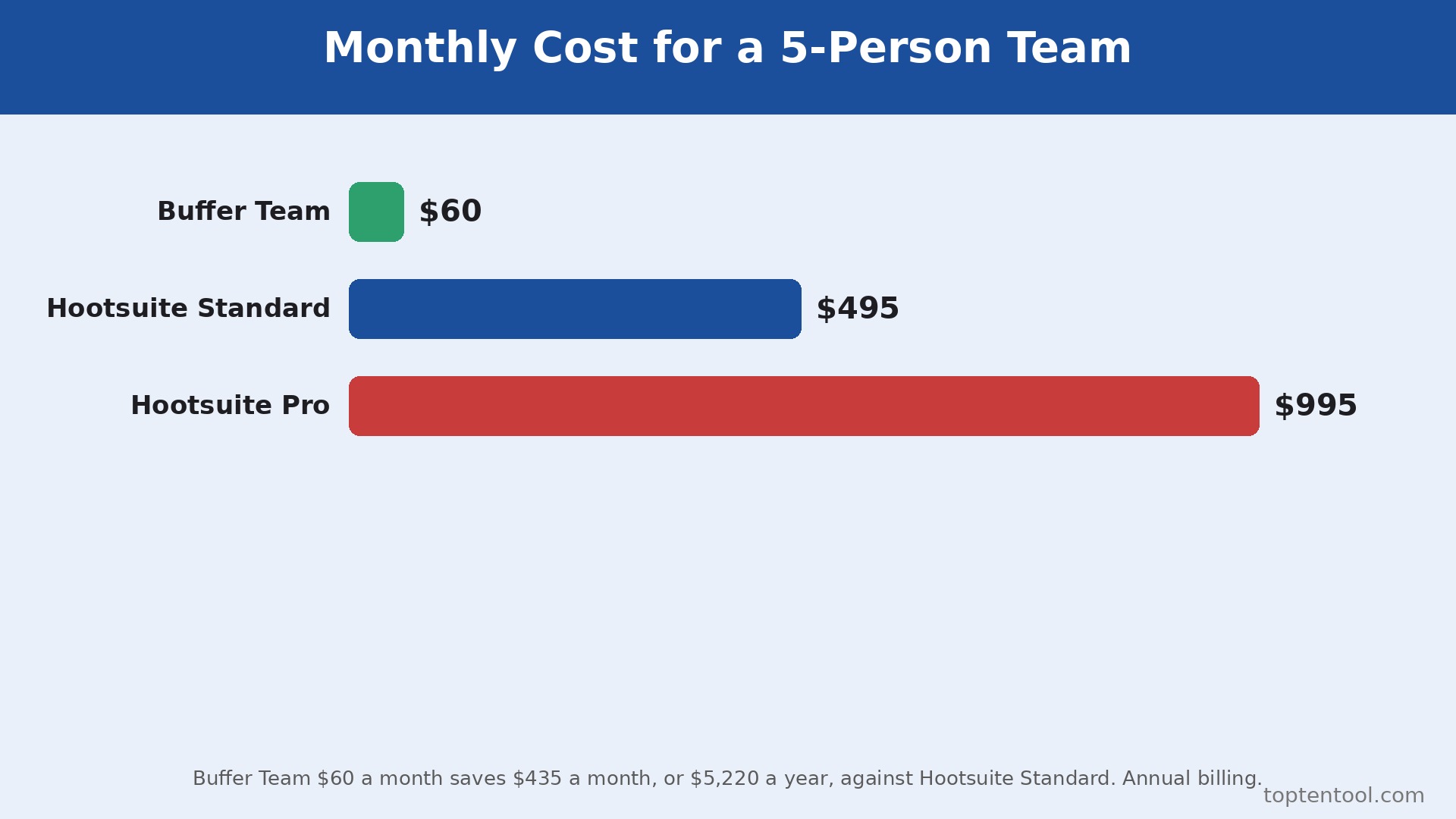
The third reason is the billing unit itself. Buffer charges for the accounts managed, Hootsuite charges for the people who log in. A team with five people managing six accounts pays far less on Buffer, because the Team plan covers unlimited users at 10 dollars per channel. The same team on Hootsuite pays five seats at 99 dollars or more, which is 495 dollars a month before any add on. That gap is the whole business case for the switch, and it holds at almost every team size below an agency.
Teams also switch for the free plan. Buffer offers a genuinely usable free plan for three channels, one user, 10 scheduled posts per channel, AI Assistant, and 30 days of analytics history. Hootsuite has no free plan, only a 14 day trial with no credit card required. A solo creator or a tiny team can run on Buffer Free indefinitely, and upgrade only when the channel count or the post volume forces it. That low risk start is hard to match.
Hootsuite vs Buffer Side by Side
| Feature | Hootsuite | Buffer |
|---|---|---|
| Pricing model | Per user seat | Per connected channel |
| Free plan | None, 14 day trial only | 3 channels, 10 posts per channel |
| Entry paid plan | Standard 99 dollars per user a month annual | Essentials 5 dollars per channel a month annual |
| Team plan | Professional 199 dollars, Advanced 399 dollars | Team 10 dollars per channel a month annual |
| Social accounts | 10 on Standard, unlimited from Professional | No cap on paid plans, billed per channel |
| Unified inbox | Yes, DMs and comments on all plans | Community inbox for comments |
| Social listening | Yes, 7 day searches on Standard | No |
| Approvals | Advanced and Enterprise only | Team plan |
| Analytics | Deep, custom reports from Professional | Advanced analytics on Essentials |
| Networks | 9 networks | 11 networks plus Start Page |
Buffer publishes to 12 networks including Instagram, Facebook, TikTok, LinkedIn, X, YouTube Shorts, Threads, Pinterest, Google Business Profile, Bluesky, Mastodon, and Substack Notes. Hootsuite publishes to 9 networks, including Facebook, TikTok, Instagram, X, LinkedIn, YouTube, Threads, Bluesky, and Pinterest. Check that every network the team uses is covered on Buffer before switching, because a missing network can force a second tool.
Before You Switch. The Honest Comparison
A switch guide that only lists the savings is not honest, so this section states the trade plainly. Hootsuite is a suite, Buffer is a scheduler, and the difference shows in the daily work. A marketing department that runs listening searches every morning, routes DMs to the right person, benchmarks five competitors, and publishes paid social from the same dashboard will feel the loss of those tools on Buffer from the first day.
A small team that schedules posts, reads basic analytics, and replies to comments will not miss them at all, because it never opened them in the first place. The question is not which tool is better. The question is which weekly workflow the team actually lives in, and learning how to switch from Hootsuite to Buffer starts with answering that question honestly.
The billing difference deserves a second look, because it decides the saving more than any feature. Hootsuite charges per user seat, so adding a teammate always adds a seat, and the price rises with headcount even when the account count stays flat. Buffer charges per channel, so adding a teammate on the Team plan costs nothing extra, and the price rises only when a new social account is connected.
That difference favors teams with many people and few accounts, and it penalizes a solo manager with many accounts. A freelancer managing twenty client accounts can pay more on Buffer than on Hootsuite, and that freelancer should stay. A five person team managing six accounts saves hundreds a month on Buffer, and that team should switch. Count both numbers before deciding, and the math will make the choice.
The free plan also changes the risk. Buffer Free covers three channels with 10 scheduled posts per channel, which is enough for a solo creator to run the whole switch as a trial without paying anything. Hootsuite offers no free plan, so a team that switches back after a trial has paid for the return journey. That asymmetry makes the Buffer trial cheap and the Hootsuite trial dear, which is itself a reason to test Buffer first.
Run the free plan for two weeks with real posts, and the team will know whether the simpler tool fits before any money moves. That test is the cheapest way to learn how to switch from Hootsuite to Buffer without committing to the move.
What You Lose and What You Gain
The switch trades depth for simplicity, and the team should name that trade before starting. What you gain is a lower bill, a faster scheduling workflow, unlimited team members on the Team plan, a free plan for small teams, and per channel pricing that scales with accounts rather than headcount. The scheduling experience is quicker, the interface is calmer, and the analytics cover the metrics a small team actually reads.
What you lose is real, and it matters for some teams. Hootsuite includes a unified inbox for DMs and comments on every plan, with DM automations from Professional and message routing from Advanced. Buffer has a community inbox for comments, but it does not match the Hootsuite inbox for DM heavy teams. Hootsuite includes social listening and competitor benchmarking on every plan, with 7 day searches on Standard and 30 day searches on Professional. Buffer sells no listening tool. Hootsuite includes bulk scheduling of up to 350 posts from a CSV, ad publishing, and 100 AI credits a month. Buffer has no bulk CSV upload at the same scale and no ad publishing.
Approvals also change. Buffer includes approval workflows on the Team plan at 10 dollars per channel, which is far cheaper than Hootsuite, where approvals start on Advanced at 399 dollars per user a month. For a team that needs approvals but cannot pay Advanced prices, Buffer is actually the better tool. For a team that needs listening, DM automation, or paid social, Buffer is the weaker tool, and the switch will hurt. Name the loss before the move, and the team can plan around it instead of discovering it in week two.
How to Switch from Hootsuite to Buffer in 7 Steps
Step 1. Audit the Hootsuite account before touching anything
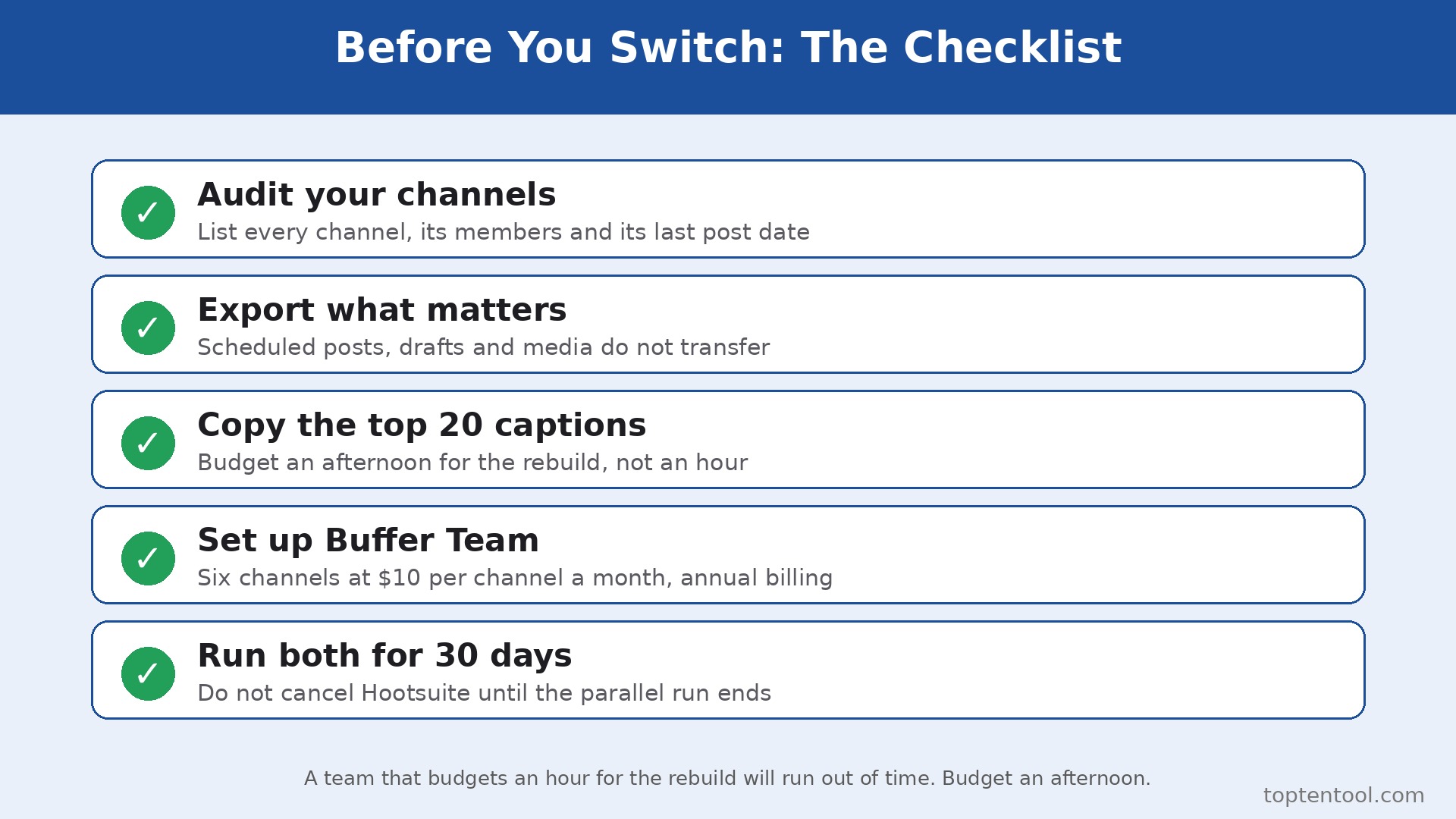
Open Hootsuite and list every connected social account, every user seat, every scheduled post, every draft, every stream, and every saved report. Export the scheduled post queue as a CSV or a screenshot, and export the last 90 days of analytics for each account. Note the renewal date and the contract terms, because cancelling mid contract can carry a fee. This audit takes an hour and prevents the most common switch failure, which is discovering a scheduled campaign only after it was deleted.
Step 2. Set up Buffer and connect the channels
Create the Buffer account, choose the plan that matches the channel count, and connect each social account one by one. Buffer Free covers three channels, Essentials costs 5 dollars per channel a month on annual billing, and Team costs 10 dollars per channel a month with unlimited team members. Connect the accounts in the same order as Hootsuite, and confirm each connection shows the right profile and the right permissions. Do not disconnect Hootsuite yet. The two tools will run side by side for the next two weeks.
Step 3. Rebuild the posting schedule in Buffer
Recreate the posting calendar in Buffer from the audit in step 1. Use the queue, the posting schedule, and the first comment feature for Instagram, and set the hashtag manager for the tags the team reuses. Buffer allows unlimited scheduled posts on paid plans, subject to a fair use cap of 5,000 per channel, which covers almost every small team. Schedule the next two weeks of posts in Buffer, and leave Hootsuite running the current week so nothing goes out twice.
Step 4. Move the team and set permissions
Invite the team to Buffer and set access levels. Essentials covers one user, so a team needs the Team plan for unlimited members, approval workflows, and custom permissions. Assign each person the channels they manage, and test the approval workflow with a draft post before the team relies on it. A teammate who cannot find their channel or cannot submit a post for approval will fall back to Hootsuite, and the switch will stall.
Step 5. Move the content library and templates
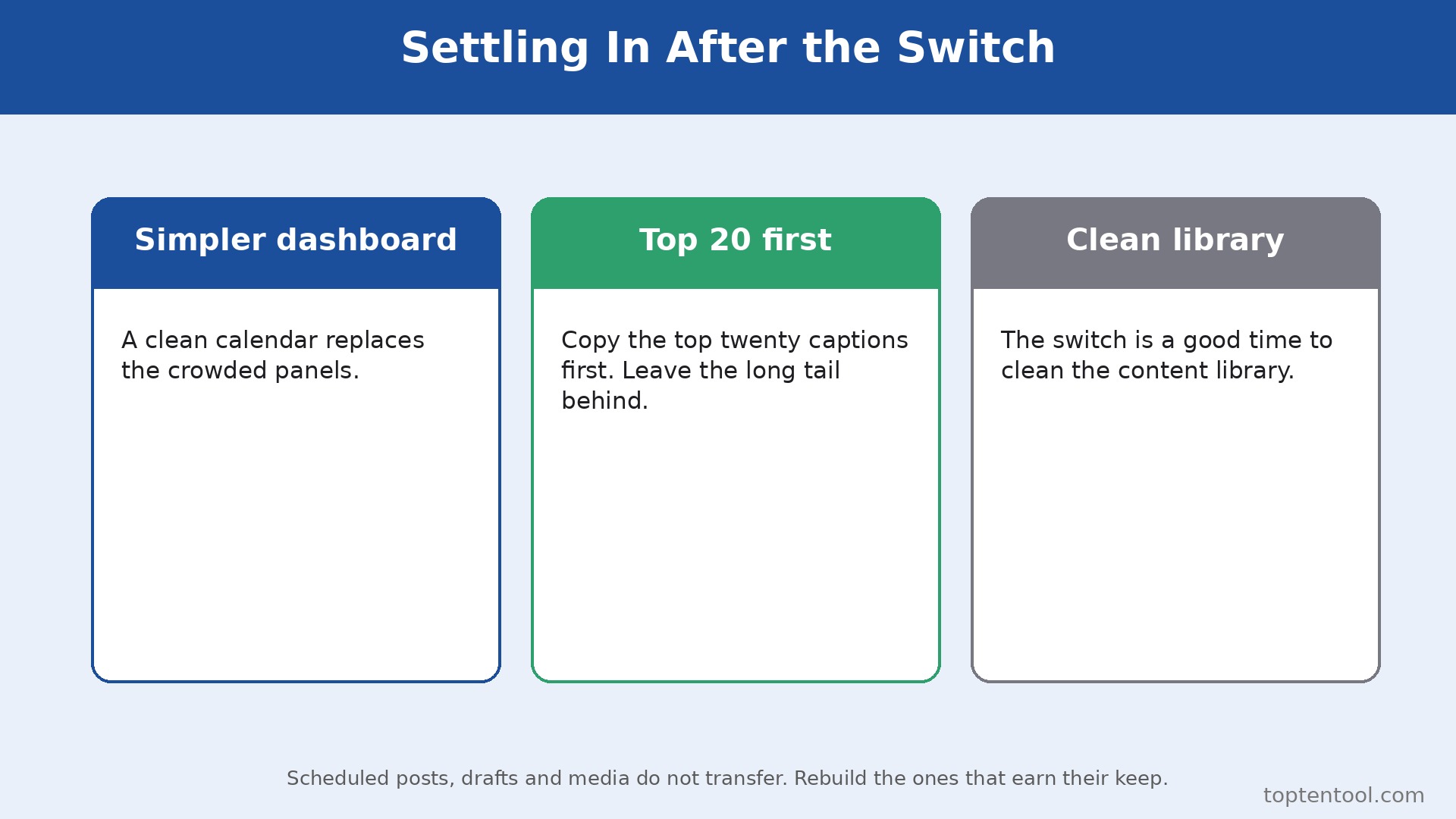
Export the reusable content from Hootsuite, including saved captions, hashtag sets, image templates, and link settings, and rebuild them in Buffer. Buffer has no direct import for Hootsuite drafts or media libraries, so this step is manual. Copy the top twenty captions, the hashtag sets, and the UTM templates first, because those cover most posts. Leave the long tail of old drafts behind. A switch is a good time to delete content that nobody uses.
Step 6. Run both tools side by side for two weeks
Publish from Buffer for two weeks while Hootsuite stays connected and the old scheduled posts finish. Watch the analytics daily, check that posts go out on time, and confirm the engagement inbox catches comments. Compare Buffer analytics with the Hootsuite export from step 1 to spot any gap in reach or engagement reporting. Fix the problems while Hootsuite is still available as a fallback, not after it is cancelled.
Step 7. Cancel Hootsuite and confirm the data is safe
Once two weeks of Buffer publishing look clean, export the final analytics and any remaining scheduled posts from Hootsuite, then cancel the subscription before the renewal date. Confirm the cancellation email arrives, and check that no auto renewal is set. Keep the Hootsuite export files for six months, because analytics history does not transfer to Buffer and the old reports are the only record of past performance. The switch is done when Buffer has published cleanly for two weeks and Hootsuite is cancelled without a surprise charge.
Pre Switch Checklist
Use this checklist before starting step 1, and do not skip a line.
– List every Hootsuite connected account, user seat, and scheduled post. – Export 90 days of analytics for each account. – Note the Hootsuite renewal date and any contract term. – Confirm every network the team uses is supported on Buffer. – Choose the Buffer plan by channel count, not by team size. – Confirm the approval workflow need and the plan that covers it. – List the Hootsuite features the team actually uses, including inbox and listening. – Plan a replacement for any Hootsuite feature Buffer lacks. – Set a switch date in a quiet week, not during a campaign. – Tell the team the switch date and the new workflow before step 1.
Data Migration. What Transfers and What Does Not
Scheduled posts do not transfer automatically. There is no import tool that moves a Hootsuite queue into Buffer, so the team rebuilds the schedule manually from the audit in step 1. That work takes an afternoon for a normal queue, and it is the largest single task in the switch. Plan for it, and do not promise a one hour migration. Drafts do not transfer either, and the media library does not transfer. Export the captions and download the images that matter, and leave the rest behind.
The media library is the last thing to move, and it is worth doing properly rather than quickly. Download the images the team reuses most, check the file sizes and dimensions against Buffer upload limits, and rebuild the most used templates in Buffer before the first campaign post. Old images that nobody has used in six months can stay in the Hootsuite export archive. A tidy library in Buffer saves more time than a complete one, because the team finds the right image in seconds instead of scrolling through years of old files.
Analytics history does not transfer. Buffer starts its analytics from the day the channels connect, with 30 days of history on the free plan and advanced analytics on Essentials. The Hootsuite export from step 1 is the only record of past performance, so keep it. Follower counts, past post performance, and campaign reports all live in that export after the switch. A team that cancels Hootsuite before exporting loses that history permanently.
What does transfer is the audience itself, because the social accounts stay the same. Followers, page likes, and channel subscribers belong to the social networks, not to Hootsuite, so nothing is lost there. The team also keeps its content, its captions, and its images, because those files can be downloaded and reused. The only things lost are the Hootsuite specific records, which are the schedule, the drafts, the streams, and the analytics history. Export them all before cancelling, and the switch loses nothing that matters.
Cost Comparison. What the Switch Actually Saves
The saving depends on team size and channel count, because the two tools charge in different units. A one person team with three channels pays 0 dollars on Buffer Free against 99 dollars a month on Hootsuite Standard annual billing, a saving of 99 dollars a month. The same person with ten channels pays 60 dollars a month on Buffer Essentials monthly billing, or 50 dollars on annual billing, against 99 dollars on Hootsuite Standard, a saving of about 40 to 50 dollars a month.
A five person team with six channels pays 60 dollars a month on Buffer Team annual billing, at 10 dollars per channel, against 495 dollars a month on Hootsuite Standard at 99 dollars per user, a saving of 435 dollars a month or 5,220 dollars a year. The same team on Hootsuite Professional would pay 995 dollars a month, so the saving is larger still. Those figures use annual billing on both tools, and monthly billing widens the gap further, since Hootsuite Standard costs 149 dollars a month on monthly billing against 6 dollars per channel for Buffer Essentials.
The saving shrinks when the channel count grows and the team stays small. A one person team with twenty channels pays about 200 dollars a month on Buffer Team, against 99 dollars on Hootsuite Standard, so Hootsuite is cheaper in that narrow case. That is the only common case where the switch costs money, and it is worth checking before moving. Count the channels, count the people, run the two totals, and the answer will be clear. For most small teams, Buffer saves hundreds of dollars a month. For a solo manager with many accounts, Hootsuite can still win on price.
What to Test in the First Two Weeks on Buffer
The parallel run only helps if the team tests the right things, so set the tests before the first Buffer post goes out. Schedule posts across every channel the team uses, including one video, one link post, and one post with a first comment, and confirm each one publishes at the right time with the right image.
Then compare the Buffer analytics against the Hootsuite export from step 1, checking reach, clicks, and engagement on the same posts. That test plan is the part of how to switch from Hootsuite to Buffer that most teams skip, and it is the part that catches the problems while Hootsuite is still available as a fallback.
Test the inbox and the approvals next, because those are the workflows that break quietly. Reply to a comment through the Buffer community inbox, submit a draft post for approval, and have a second teammate approve it, then check that the approved post goes out on schedule. Also test a post that needs a link in the first comment, since that flow differs between the two tools and trips up teams that rely on it. A test that covers publishing, analytics, inbox, and approvals in the first week leaves the second week for fixing what failed, which is exactly how a quiet switch is supposed to work.
Common Switch Mistakes and How to Avoid Them
The first mistake is cancelling Hootsuite before the Buffer schedule is built. A team that cancels on day one loses the scheduled posts, the drafts, and the analytics history in one move, and the rebuild takes days instead of hours. Keep Hootsuite until step 7, and the switch stays boring. The second mistake is connecting the wrong social profile. A business with several similar pages can connect a personal profile instead of the business page, and posts go to the wrong audience. Confirm each connection shows the right profile name before scheduling anything.
The third mistake is forgetting the inbox. A team that relies on Hootsuite unified inbox for DMs will miss messages after the switch, because Buffer community inbox covers comments rather than DMs at the same depth. Plan a replacement before the switch, whether that is native apps, a dedicated inbox tool, or a rota for checking DMs directly. The fourth mistake is skipping the two week parallel run. A team that switches overnight discovers the gaps during a live campaign, when fixing them costs the most. Two quiet weeks of parallel running cost nothing and catch every problem early.
The fifth mistake is underestimating the manual rebuild. Scheduled posts, drafts, and media do not transfer, and a team that budgets an hour for the rebuild will run out of time. Budget an afternoon, copy the top twenty captions first, and leave the long tail behind. The switch is a good time to clean the content library, not a reason to move every old draft into the new tool.
The sixth mistake is forgetting the links and the tracking. Hootsuite and Buffer handle link shorteners and UTM parameters differently, so a team that rebuilds the schedule without checking the link settings can lose campaign tracking on every post. Copy the UTM templates from Hootsuite into Buffer before scheduling anything, and click one published link to confirm the tracking lands in analytics. A team that treats how to switch from Hootsuite to Buffer as a tools only job will miss the tracking and the team habits that actually carry the posts, and the gap only shows up in the monthly report.
Frequently Asked Questions
How long does it take to switch from Hootsuite to Buffer?
Most small teams finish the switch in one to two weeks. The setup takes an afternoon, the manual rebuild of the schedule takes another afternoon, and the two week parallel run catches the problems while Hootsuite is still available. A team with many channels or a large scheduled queue should budget three weeks. Do not promise a one day switch, because the manual rebuild and the parallel run are what make the move safe.
Will I lose my scheduled posts when I switch from Hootsuite to Buffer?
Scheduled posts do not transfer automatically, so export the queue from Hootsuite before cancelling and rebuild it in Buffer manually. That is the largest task in the switch, and it takes an afternoon for a normal queue. Keep Hootsuite running until the Buffer schedule is built and tested, and no post will be missed.
Is Buffer really cheaper than Hootsuite?
For most small teams, yes, by a wide margin. Buffer charges per channel and Hootsuite charges per user, so a five person team with six channels pays about 60 dollars a month on Buffer Team against 495 dollars on Hootsuite Standard. The only common case where Hootsuite is cheaper is a solo manager with many accounts, where per channel pricing can exceed the single seat price. Count the channels and the people before deciding.
Does Buffer have a unified inbox like Hootsuite?
Buffer has a community inbox for comments, but it does not match the Hootsuite unified inbox for DMs at the same depth. Hootsuite inbox covers DMs and comments on all plans, with automations from Professional. A DM heavy team should plan a replacement before switching, whether that is native apps or a dedicated inbox tool, rather than discovering the gap after the switch.
Can I keep my analytics history when I switch from Hootsuite to Buffer?
No, analytics history does not transfer. Buffer starts its analytics from the day the channels connect. Export 90 days of Hootsuite analytics before cancelling, and keep the files for at least six months. That export is the only record of past performance after the switch, so do not cancel Hootsuite until the export is saved and checked.
Verdict. Who Should Switch and Who Should Stay
Switch to Buffer if the team is small, the work is mostly scheduling and basic analytics, the channel count is low, and the bill is the problem. A team of one to five people managing three to ten accounts will save hundreds of dollars a month, get a faster workflow, and lose nothing it actually uses. The free plan alone covers a solo creator, and the Team plan at 10 dollars per channel covers unlimited members with approvals. For those teams, learning how to switch from Hootsuite to Buffer is worth an afternoon, and the saving repeats every month.
Stay on Hootsuite if the team relies on the unified inbox for DMs, needs social listening and competitor benchmarking, runs paid social from the same tool, or manages many accounts with one person. A solo manager with twenty accounts can pay less on Hootsuite Standard than on Buffer Team, and a marketing department that lives in listening and inbox tools will miss them daily on Buffer. Stay also if the contract renewal is close and the team is mid campaign. A switch during a launch costs more in chaos than it saves in subscription fees.
The decision rule is simple. Count the people, count the channels, list the features the team actually opens every week, and run the two totals. If Buffer covers the weekly workflow and costs less, switch in a quiet week and follow the seven steps. If Hootsuite covers a weekly workflow that Buffer cannot, stay and renegotiate the Hootsuite plan instead. The right tool is the one that matches the work, not the one with the lower headline price.