Your store sends the same email to everyone, and the revenue per email has stopped growing. You open Mailchimp, you build a campaign, you send it to 5,000 people, and the sales that come back are the same sales that came back last month. Meanwhile a competitor sends a different email to a customer who abandoned a cart, a different email to a customer who bought twice, and a different email to a customer who has not opened anything in 60 days, and each of those emails earns more than your broadcast. That gap is the reason ecommerce stores start asking how to switch from Mailchimp to Klaviyo, and it is a question about revenue, not about email design.
Mailchimp is a general email tool that serves every kind of business. Klaviyo is an ecommerce email and SMS tool that serves stores. That difference shapes everything. Mailchimp charges by contact count, and it counts every contact you store, including unsubscribed contacts, unless you archive them. Klaviyo charges by active profile, meaning a contact that can receive marketing, and its pricing bands rise with the size of that list.
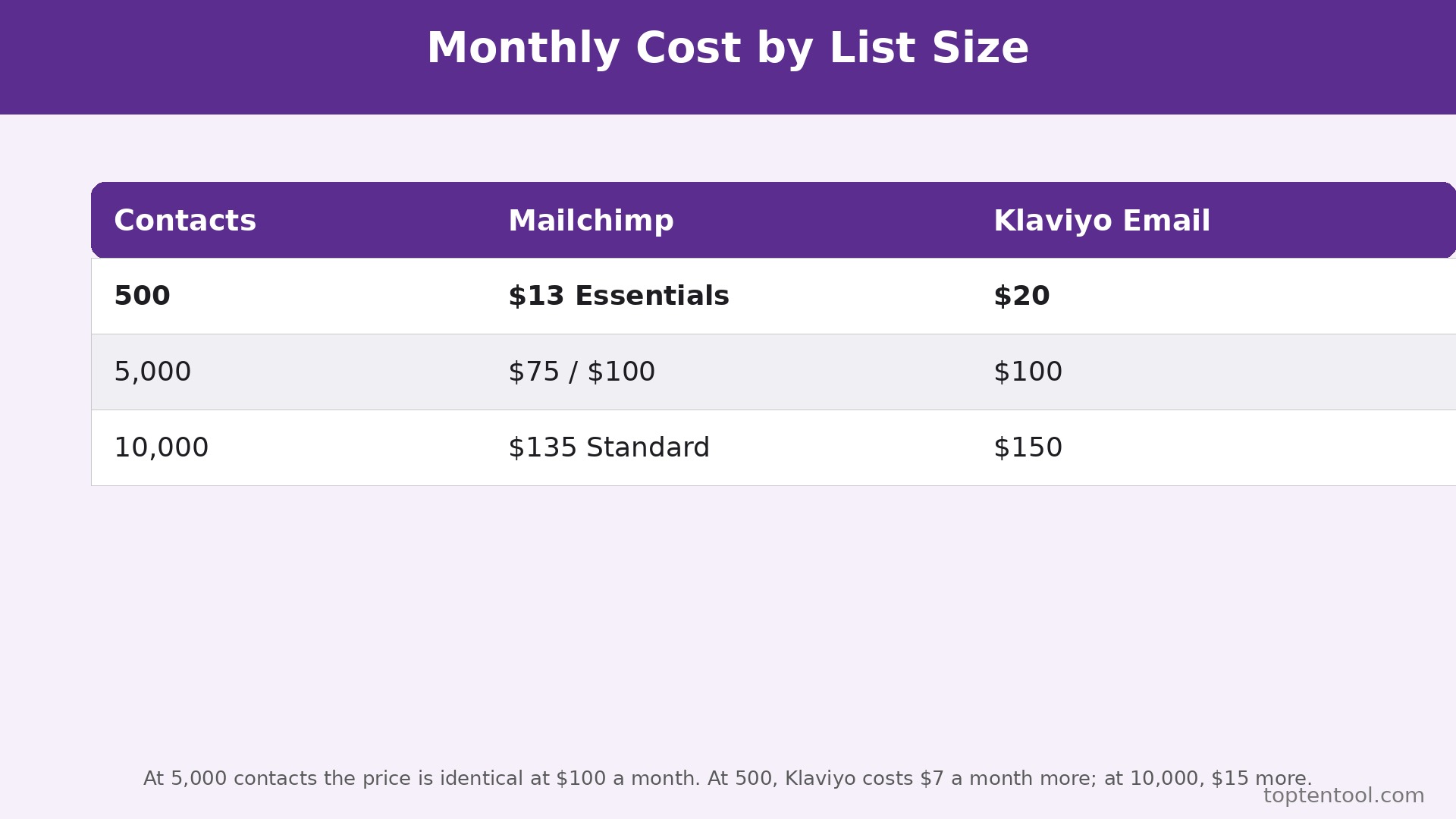
At 500 contacts, Mailchimp Essentials costs 13 dollars a month and Klaviyo Email costs 20 dollars a month. At 5,000 contacts, Mailchimp Standard costs 100 dollars a month and Klaviyo Email costs 100 dollars a month. At 10,000 contacts, Mailchimp Standard costs 135 dollars a month and Klaviyo Email costs 150 dollars a month. The prices are close. The difference is what the tool does with the list once you pay.
This guide walks through how to switch from Mailchimp to Klaviyo in full. You will see why stores switch, a side by side comparison, the real cost at 500, 5,000, and 10,000 contacts, what transfers and what does not, and a seven step workflow that moves subscribers, segments, and automations without losing a single buyer. Prices are US list prices checked in October 2026. Mailchimp Free covers 250 contacts and 500 sends a month. Klaviyo Free covers 250 active profiles and 500 sends a month. Both free plans were cut to 250 contacts in 2026, so neither one is a long term home for a growing store.
Why Stores Move From Mailchimp to Klaviyo
The first reason is ecommerce data. Klaviyo connects to Shopify, WooCommerce, and the other major store platforms, and it pulls in what each customer bought, how much they spent, when they last bought, and what they left in a cart. That data drives segments that Mailchimp cannot build as easily, because Mailchimp was not built around a store catalogue. A segment of customers who bought in the last 30 days and spent over 100 dollars is a few clicks in Klaviyo. In Mailchimp it is a manual export, a spreadsheet, and a hope that the data is still current when the campaign sends.
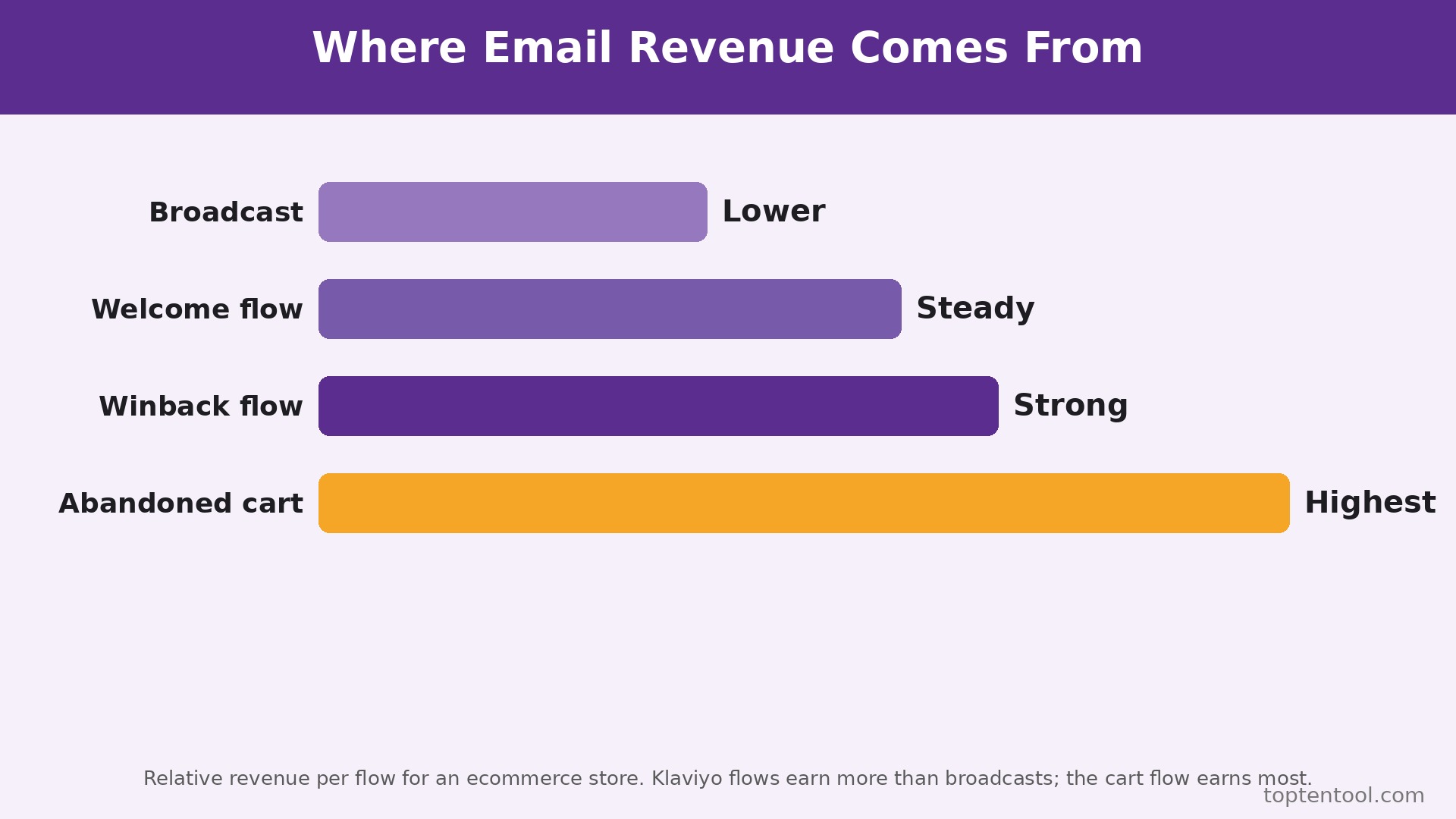
The second reason is flows. Klaviyo flows are the automations that earn money while the owner sleeps. Abandoned cart, browse abandonment, welcome series, post purchase, winback, and back in stock flows are built in, tested, and easy to change. Mailchimp has automations too, and its Customer Journey builder covers the basics, but the flows are thinner, the triggers are fewer, and the ecommerce triggers are less precise. A store that earns 30 percent of its email revenue from flows will earn more from Klaviyo flows, because the triggers fire on the right event at the right time.
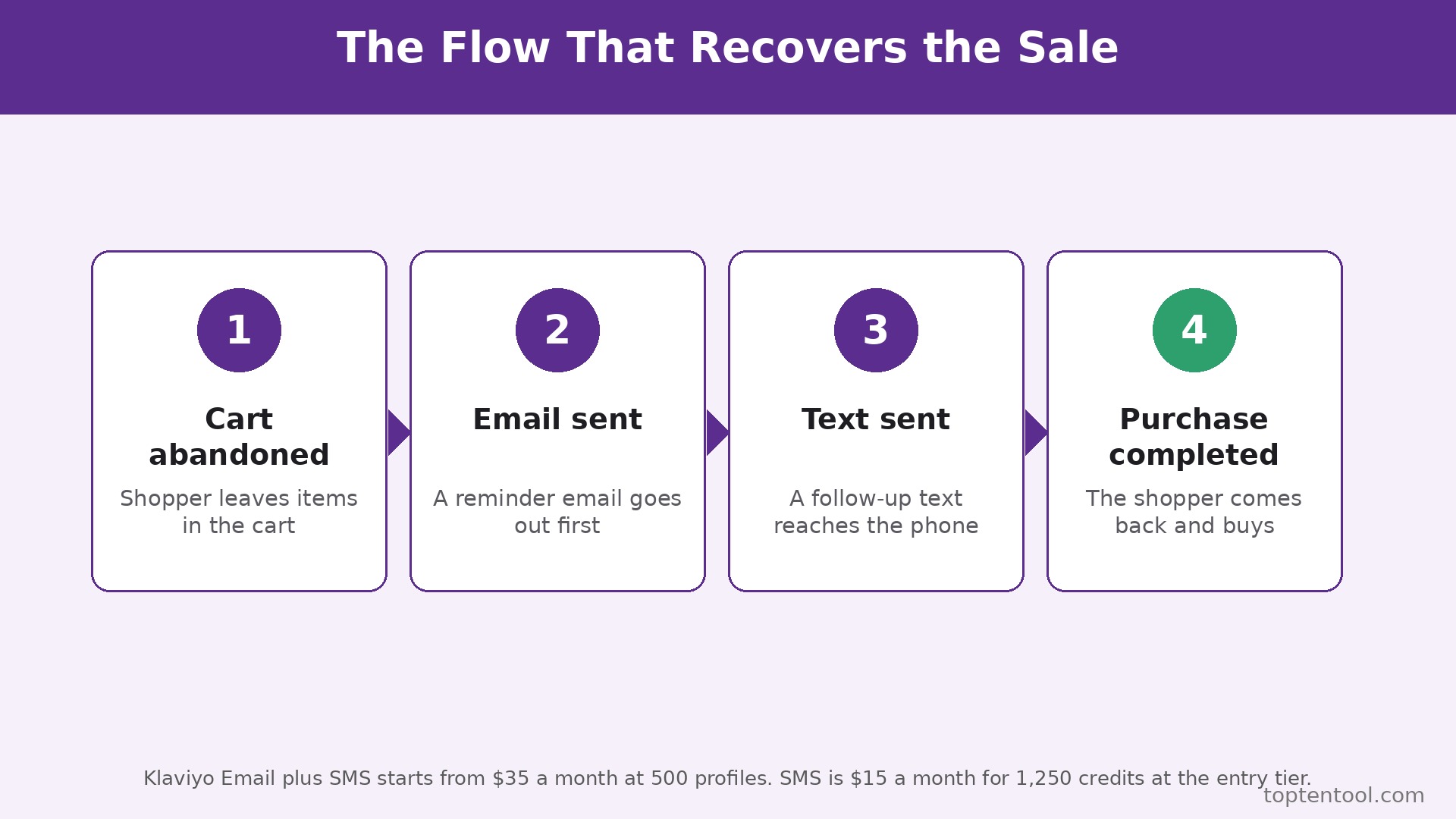
The third reason is SMS in the same place. Klaviyo sells Email and Email plus SMS as one account, with SMS credits starting at 15 dollars a month for 1,250 credits on top of the email plan. A store can send an email and a text from the same customer profile, with the same segment, and the reporting shows both. Mailchimp has no native SMS marketing as of October 2026, so a store that wants SMS needs a second tool and a second bill. When you plan how to switch from Mailchimp to Klaviyo, count that second tool in the Mailchimp total.
The fourth reason is revenue reporting. Klaviyo attributes revenue to each campaign and each flow, and it shows the number clearly on the dashboard. A store owner can see that the abandoned cart flow earned 2,400 dollars last month, and that the welcome series earned 800 dollars. Mailchimp reports opens, clicks, and revenue too, but the attribution is less precise for ecommerce, and the reporting is built for a general audience rather than for a store owner who needs to know which email paid for itself. When the question is which email to send more of, Klaviyo answers it faster.
There are good reasons to stay on Mailchimp. It is simpler, it covers non ecommerce businesses well, and its template builder is easy for a team that sends a weekly newsletter. A store that sends one broadcast a week, that has no abandoned cart flow, and that has never segmented by purchase history will not gain much from Klaviyo, because the features that make Klaviyo better are the features that store does not use. If your list is under 500 contacts and your email revenue is under 500 dollars a month, stay on Mailchimp and revisit the question when the list grows.
Mailchimp and Klaviyo Side by Side
| Area | Mailchimp | Klaviyo |
|---|---|---|
| Free plan | 250 contacts, 500 sends a month, 250 a day cap | 250 active profiles, 500 sends a month, 150 SMS credits |
| Entry paid plan | Essentials 13 dollars a month at 500 contacts | Email 20 dollars a month at 251 to 500 profiles |
| Mid plan at 5,000 | Essentials 75, Standard 100 dollars a month | Email 100 dollars a month |
| At 10,000 contacts | Standard 135 dollars a month | Email 150 dollars a month |
| Pricing basis | Total contacts stored, including unsubscribed | Active profiles that can receive marketing |
| SMS | No native SMS marketing | Email plus SMS from 35 dollars a month at 500 profiles |
| Ecommerce data | Basic store connection | Deep store data, purchase history, cart events |
| Automations | Customer Journey, up to 200 flows on Standard | Flows for cart, browse, welcome, winback, back in stock |
| Segments | Segments by tags and activity | Segments by purchase, value, recency, and behaviour |
| Users | Essentials 3, Standard 5, Premium unlimited | Team access by plan, with roles |
| Support | Email and chat on paid plans, phone on Premium | Email on free for 60 days, chat and support on paid |
Read the pricing basis row first, because it decides the real bill. Mailchimp counts every contact you store, including unsubscribed contacts, unless you archive them. A list of 10,000 contacts with 30 percent inactive still bills at the 10,000 tier. Klaviyo counts active profiles, so a contact that cannot receive marketing does not count in the same way. Clean your list before you compare prices, because a dirty list costs more on Mailchimp and less on Klaviyo, and the cleaning itself is part of the switch.
Read the SMS row second. A store that wants SMS on Mailchimp needs a second tool. A store that wants SMS on Klaviyo adds 15 dollars a month for 1,250 credits at the entry tier. That 15 dollars is the cheapest SMS add on in the category, and it is also the simplest, because the list, the segment, and the reporting stay in one place. A store that sends SMS for abandoned carts and for drops will earn back the 15 dollars on the first campaign.
How to Switch from Mailchimp to Klaviyo in Seven Steps
Plan how to switch from Mailchimp to Klaviyo over two weeks, with Mailchimp kept live until the Klaviyo flows have sent real emails and earned real revenue. Do not cancel Mailchimp until the first full month in Klaviyo has been reported.
Step 1. Clean the list before you export it
Open Mailchimp and export the full audience. Count the contacts, the subscribed, the unsubscribed, and the non subscribed. Archive every unsubscribed contact that has not opened in 12 months, and delete the contacts that bounced twice. A clean list is smaller, cheaper, and more accurate, and it is the single step that saves the most money on Klaviyo, because Klaviyo charges by active profile. Save the cleaned list as a spreadsheet, and keep a copy of the original export, so a contact that was archived by mistake can be restored.
Step 2. Export subscribers, tags, and segments the right way
Export the audience to CSV, with email, first name, last name, tags, signup source, and signup date. Export the segments as lists, with the rules written down, because a segment rule does not export as a file. Write down every segment in plain words, such as customers who bought in the last 30 days, or subscribers who opened the last three campaigns. Those words become the Klaviyo segment rules in step four. Check the CSV in a spreadsheet for blank emails, duplicate rows, and bad dates, and fix those rows before you import.
Step 3. Set up Klaviyo and import in small batches
Create the Klaviyo account on the Email plan that matches your active profile count, not the cheapest plan. Connect the store first, so purchase data flows in before you import the list. Import the cleaned list in batches of 1,000, and check the count after each batch. Tag the imported contacts with their Mailchimp tags, so the old segments can be rebuilt. Do not send to the imported list on day one. Let the store data sync for 24 hours, so the segments that depend on purchase history have data to work with.
Step 4. Rebuild segments and flows, not campaigns
Rebuild the segments first, using the rules you wrote down in step two. Test each segment by checking the count against Mailchimp. A segment that had 800 people in Mailchimp should have close to 800 in Klaviyo, after cleaning. Then rebuild the flows. Start with abandoned cart, welcome, and post purchase, because those three earn the most. Set each flow to live, but set the first send to a small test segment, and check the email, the discount code, and the timing. A flow that sends the wrong discount to the wrong segment costs money on every order until someone notices.
Step 5. Rebuild templates and test every email
Templates do not transfer as editable files. Rebuild the top three templates in Klaviyo, using the same colours, fonts, and logo as Mailchimp. Test each template by sending it to your own email and opening it on a phone and on a desktop. Check the images, the links, and the unsubscribe footer. A template that looks right on a desktop and breaks on a phone will lose sales every time it sends. Keep the Mailchimp templates as a reference, but do not try to copy them pixel for pixel. Use the Klaviyo template that is closest, and accept small differences in spacing.
Step 6. Warm the sending and run a real campaign
Send the first campaign to your most engaged segment, the people who opened in the last 30 days. That segment is the safest, because it has the lowest spam complaint rate. Check the open rate, the click rate, and the spam complaints after the first send. Then send to a larger segment, and then to the full list over the next week. Do not send to the full list on day one, because a sudden send to 10,000 people from a new domain can hurt deliverability. Warming the send protects the domain, and a protected domain is worth more than a fast launch.
Step 7. Run both tools for 30 days, then close Mailchimp
Keep Mailchimp live for 30 days after cutover. Send all new campaigns from Klaviyo. Use Mailchimp only to check an old campaign or to answer a question about a subscriber who joined before cutover. At the end of the 30 days, run the revenue reports in both systems, confirm the subscriber count matches, export a final backup from Mailchimp, and only then cancel the subscription. Cancelling early saves one month of fees and risks a lost subscriber record you cannot recover.
Pre Switch Checklist
Before You Start
– Count active profiles, subscribed contacts, and unsubscribed contacts, and archive the unsubscribed contacts that have not opened in 12 months. – List every segment in Mailchimp, with the rule written in plain words, so it can be rebuilt in Klaviyo. – List every automation in Mailchimp, with the trigger, the delay, and the email in each step. – Export the full audience, the segment lists, and the campaign reports for the last 90 days, and store the files outside both tools. – Confirm Klaviyo connects to your store platform, and check that purchase data syncs before you import the list.
Right Before the Move
– Check that your discount codes, your SMS plan, and your sender domain are ready in Klaviyo before the first send. – Rebuild the top three email templates, and test each one on a phone and on a desktop. – Pick a cutover date, and plan the first campaign for your most engaged segment, not for the full list. – Tell the team the cutover date, and name one person to check the first flows for the right discount and the right timing. – Keep the Mailchimp login active for 30 days after cutover, with a calendar reminder for the cancellation date.
If the list has more than 20 percent inactive contacts, clean it twice.
What You Lose and What You Gain
What you gain is revenue per email. Klaviyo flows earn money while the owner sleeps, because abandoned cart, welcome, and winback emails send at the moment a customer is most likely to buy. A store that earns 30 percent of its email revenue from flows will see that share rise in Klaviyo, because the triggers are more precise and the segments are built on purchase data. The gain is not a single campaign. It is the compounding effect of ten flows sending the right email at the right time, every day, without manual work.
What you gain next is SMS in the same place. Email plus SMS from 35 dollars a month at 500 profiles means a store can send a text for an abandoned cart and an email for a welcome series from the same profile, with the same segment, and the reporting shows both. That single view prevents the mistake of texting a customer about a product they already bought, and it saves the cost of a second tool, a second list, and a second bill.
What you gain last is reporting that answers the right question. Klaviyo shows revenue per campaign and per flow, so a store owner can see which email paid for itself. Mailchimp reports opens and clicks well, but the revenue attribution is less precise for ecommerce.
What you lose is simplicity. Mailchimp is easier to learn, and its template builder is friendlier for a team that sends a weekly newsletter. Klaviyo is more powerful, and more powerful means more settings, more segments, and more flows to manage. A store that sends one broadcast a week and never uses flows will find Klaviyo harder than Mailchimp, and the extra power will sit unused. If that is your store, stay on Mailchimp. The switch only pays when the flows are used.
What you lose next is the free plan as a long term home. Both free plans now cover only 250 contacts, so a growing store will pay on either tool. Klaviyo Email at 20 dollars a month for 500 profiles is 7 dollars more than Mailchimp Essentials at 13 dollars. That 7 dollars buys the ecommerce data and the flows, and it is worth paying only if the flows earn more than 7 dollars a month. That test is part of how to switch from Mailchimp to Klaviyo with a clear head.
What you lose last is some template variety. Mailchimp has a larger library of general templates, and its builder is more forgiving for a non designer. Klaviyo templates are built for ecommerce, and they look best when the store data fills them. A team that needs a beautiful newsletter for a non ecommerce audience may prefer Mailchimp templates. A team that needs a product email with a buy button will prefer Klaviyo.
Data Migration in Detail
Subscribers transfer cleanly. Email, name, tags, signup source, and signup date move in a CSV import, and Klaviyo matches on email to avoid duplicates. What does not transfer is the full engagement history, the open and click record for each subscriber, and any custom field that Mailchimp added. Export the campaign reports for the last 90 days and keep them as a record, so a question about a past campaign can still be answered. The engagement history in Klaviyo starts fresh, and the first month of sends builds the new record.
Segments do not transfer as files. A segment is a rule, and the rule must be rebuilt in Klaviyo by hand. Write down every segment rule in plain words before you switch, and rebuild each one in Klaviyo, checking the count against Mailchimp after each rebuild. A segment that had 800 people in Mailchimp should have close to 800 in Klaviyo, after cleaning. If the count is far off, the rule is wrong, and the fix is to check the rule, not to import more contacts.
Automations do not transfer at all. A Mailchimp Customer Journey must be rebuilt as a Klaviyo flow, step by step, with the trigger, the delay, and the email in each step. Start with abandoned cart, welcome, and post purchase, because those three earn the most. Set each flow to live, but test it with a small segment first, and check the discount code and the timing. A flow that sends the wrong discount costs money on every order, and a flow that sends at the wrong time loses the sale it was meant to save.
Templates do not transfer as editable files. Rebuild the top three templates in Klaviyo, using the same colours, fonts, and logo. Test each template on a phone and on a desktop, and check the unsubscribe footer and the links. A template that breaks on a phone will lose sales every time it sends, and the break is easy to miss if the test is only on a desktop.
What does not transfer at all is the sender reputation, the domain warmup, and the campaign history. Klaviyo starts with a fresh sending record, so warm the send by starting with the most engaged segment and growing to the full list over a week. Do not send to the full list on day one, because a sudden send to 10,000 people from a new domain can hurt deliverability. The warmup is the most important step in the whole switch, and it is the step most stores rush.
Export steps are simple. In Mailchimp, export the audience to CSV, with email, name, tags, signup source, and signup date. Export the segment lists and the campaign reports. In Klaviyo, connect the store first, import the list in batches of 1,000, rebuild the segments, rebuild the flows, and test the templates. Check the counts after each batch, and do not send to the full list until the most engaged segment has received a campaign without a spike in spam complaints.
The Real Cost Comparison
Price how to switch from Mailchimp to Klaviyo at 500, 5,000, and 10,000 contacts, on list prices, for a full year, before SMS and before any add on. SMS costs 15 dollars a month for 1,250 credits on Klaviyo at the entry tier, and Mailchimp has no native SMS, so a store that wants SMS on Mailchimp must buy a second tool.
A store with 500 contacts pays 13 dollars a month on Mailchimp Essentials, which is 156 dollars a year, and 20 dollars a month on Klaviyo Email, which is 240 dollars a year. Klaviyo costs 84 dollars a year more at this size. The extra cost buys ecommerce data, flows, and revenue reporting, and it pays for itself if the abandoned cart flow earns more than 7 dollars a month, which is one small order. A store with no abandoned cart flow should stay on Mailchimp at this size, because the extra cost buys features it does not use.
A store with 5,000 contacts pays 100 dollars a month on Mailchimp Standard, which is 1,200 dollars a year, and 100 dollars a month on Klaviyo Email, which is also 1,200 dollars a year. The price is identical. The difference is what the tool does with the list. Klaviyo segments by purchase history, sends flows that earn revenue, and reports revenue per flow. Mailchimp segments by tags and activity, and its flows are thinner. At identical prices, the store should choose the tool that earns more, and for an ecommerce store that tool is Klaviyo.
A store with 10,000 contacts pays 135 dollars a month on Mailchimp Standard, which is 1,620 dollars a year, and 150 dollars a month on Klaviyo Email, which is 1,800 dollars a year. Klaviyo costs 180 dollars a year more. A store that adds SMS on Klaviyo pays 15 dollars a month for 1,250 credits, so the total with SMS is 165 dollars a month. A store that adds SMS on Mailchimp pays for a second tool, usually more than 15 dollars a month, with the list in two places.
Add the hidden costs to every size. Klaviyo charges by active profile, so a list with many inactive contacts costs more until it is cleaned. Mailchimp charges by total contacts stored, including unsubscribed, so the same dirty list costs more there too. Clean the list before you switch, and clean it every quarter after, because a clean list is the cheapest list on either tool. Budget an hour a month for list cleaning, because that hour saves more than it costs.
Frequently Asked Questions
Will I lose subscribers when I switch?
No, if you export before you cancel. Subscribers move in a CSV export from Mailchimp and a CSV import to Klaviyo, with email, name, and tags. Clean the list first, archive the unsubscribed contacts, and import in batches of 1,000. Keep the Mailchimp export file, so a contact that was archived by mistake can be restored.
How long does the switch take?
A clean switch for a store with under 5,000 contacts takes two weeks, including one week of warming the send. The import takes a day, the segments and flows take three to four days, and the warmup takes a week. A store with 10,000 contacts takes three weeks, because the segments are more complex and the warmup needs more steps. Do not rush the warmup, because a rushed warmup hurts deliverability for months.
Will my automations transfer to Klaviyo?
No. Automations must be rebuilt as Klaviyo flows, step by step. Start with abandoned cart, welcome, and post purchase, because those three earn the most. Test each flow with a small segment first, and check the discount code and the timing. A flow that is rebuilt carefully earns more than the automation it replaces, because the triggers are more precise.
Does Klaviyo work with my store platform?
Klaviyo connects to Shopify, WooCommerce, and the other major store platforms, and it pulls in purchase data, cart events, and product data. Connect the store before you import the list, so the segments that depend on purchase history have data to work with. Check the connection in the first 24 hours, and confirm that a test purchase appears in Klaviyo.
Is Klaviyo more expensive than Mailchimp?
At 500 contacts, yes, by 7 dollars a month. At 5,000 contacts, the price is identical at 100 dollars a month. At 10,000 contacts, Klaviyo costs 15 dollars a month more. The price gap is small, and the revenue gap is larger, because Klaviyo flows earn more for an ecommerce store. Price the decision on revenue per email, not on the monthly bill alone.
Verdict
Switch if you run an ecommerce store, if you earn revenue from email, if you have an abandoned cart flow or you should have one, and if you want SMS in the same place as email. The flows, the segments, and the revenue reporting are built for a store, and the seven step workflow in this guide keeps the move safe. Clean the list, rebuild the flows, warm the send, and let the first month of revenue decide. That is how to switch from Mailchimp to Klaviyo without losing subscribers, without losing automations, and without losing the revenue that email already earns.
Stay if you send a weekly newsletter to a non ecommerce audience, if your list is under 500 contacts, and if you have never used an automation. Mailchimp is simpler, cheaper at the entry tier, and better for a general newsletter. Revisit the question when the list grows past 5,000 contacts, because that is the point where the price is identical and the Klaviyo flows start to pay for themselves.
For a store in the middle, the test is simple. Run Klaviyo for the free trial, rebuild the abandoned cart flow, and send it to a small segment for a week. If the flow earns more than the Mailchimp automation it replaces, switch. If the flow earns the same and the extra cost feels like a burden, stay on Mailchimp and check again in six months. The tool should fit the store you have, and the revenue you already earn from email.