

Accountants do not lose time on judgment. They lose it on data entry, receipt chasing, invoice coding and month end checklists, and those are exactly the jobs AI now does well. The best AI tools for accountants cut routine work by half or more for many practices, by reading documents, coding transactions, drafting client emails and flagging the exceptions that need a human. Our research compared vendor pricing and documentation in November 2026, and the range runs from free to quote only enterprise contracts.
The market split sharply in 2025 into two camps. One camp automates transactional bookkeeping, with tools such as Dext, Botkeeper and Vic.ai. The other extends into practice management and reporting, with tools such as Karbon, Financial Cents and TaxDome. Most firms need at least one from each camp, and the mistake is buying a bookkeeping tool when the real problem is client workflow, or vice versa.
This guide compares ten tools on real prices, automation depth and fit, and it ends with a pick for each common situation. Start with the comparison table, then read the reviews that match your practice.
The Lineup in Brief
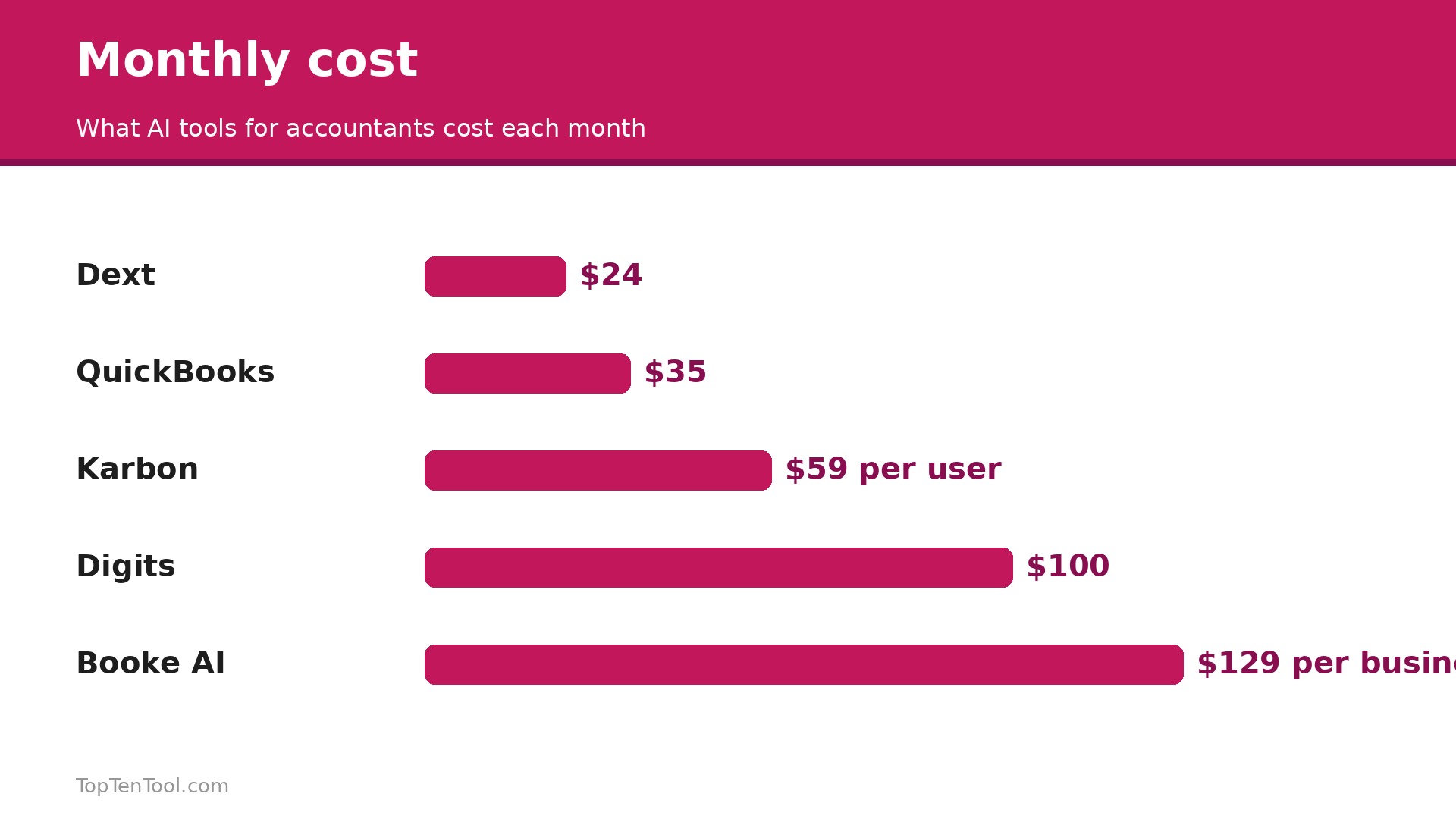
The table below shows the starting price of each tool, who it suits best, and the one thing to watch. Quote only tools have no published price. Prices are monthly list prices unless noted, and per user tools cost far more once a team grows. Use the table to shortlist the best AI tools for accountants options that fit your budget before reading the full reviews.
| Tool | Starting price | Best for | Watch out |
|---|---|---|---|
| QuickBooks Online with Intuit Assist | $35 a month for Simple Start | General practice on QuickBooks | AI features vary by tier and Intuit changes tiers often |
| Xero with JAX | $15 a month for Early | Multi user firms and multi currency | JAX features are newer and still maturing |
| Dext | $24 a month | Receipt and invoice capture chaos | Capture only, it does not run the practice |
| Karbon | $59 per user a month | Practice management for multi client firms | Team plan lacks reminders and API, most firms need Business at $89 |
| Vic.ai | Quote only | High volume accounts payable | No public price and no self serve trial |
| Botkeeper | Quote only, reported from about $490 a month | Hybrid AI plus human bookkeeping | Custom pricing and a high cost per client for small firms |
| Booke AI | $129 a month per business | AI bookkeeper inside QuickBooks and Xero | No annual contract, but $129 per business adds up fast |
| Digits | $100 a month | AI native autonomous bookkeeping | Newer platform with a smaller ecosystem |
| Ramp | Free tier available | Expense management with AI coding | Not a full bookkeeping platform |
| MindBridge | Quote only | AI audit analytics and fraud detection | Enterprise pricing, built for audit teams |
How We Compared These AI Tools
We judged each tool on five things that decide whether a practice keeps using it. First, the automation that actually saves hours, from receipt capture and invoice coding through to email drafting and capacity planning, rather than a chatbot badge on the homepage. Second, the real cost, including per user pricing and quote only contracts that hide the bill until a demo. Third, accuracy and human review, because an AI that codes confidently wrong is worse than one that asks. Fourth, integration with the ledger the practice already runs, usually QuickBooks Online or Xero, since a tool that does not connect to the ledger creates more work than it saves.
Fifth, the size of practice it fits, from a solo bookkeeper to a mid market firm. The best AI tools for accountants are the ones that remove routine work without removing the accountant judgment that clients pay for.
The 10 Best AI Tools for Accountants Reviewed
1. QuickBooks Online with Intuit Assist
Starting price $35 a month for Simple Start. Best for General practice on QuickBooks. Watch out AI features vary by tier and Intuit changes tiers often.
QuickBooks Online with Intuit Assist is the safest all round default for a practice already on QuickBooks. The AI categorises transactions, matches receipts, flags anomalies and drafts client messages inside the ledger the practice already uses, so there is no second system to learn. Simple Start costs about $35 a month, with higher tiers to $340, and the AI is baked into daily workflows rather than sold as a separate product.
The AI depth varies by tier, and Intuit changes tiers often, so the feature you buy today may move tomorrow. It is also tied to QuickBooks, so a Xero practice gains nothing from it. It earns its place as the default for a QuickBooks practice that wants AI without a new platform.
In practice, QuickBooks Online with Intuit Assist earns its place when general practice on QuickBooks. The main risk is aI features vary by tier and Intuit changes tiers often, so test that specific limit during your trial before you commit.
Pick it when your practice already runs on QuickBooks Online. Skip it when your practice runs on Xero or another ledger.
2. Xero with JAX
Starting price $15 a month for Early. Best for Multi user firms and multi currency. Watch out JAX features are newer and still maturing.
Xero with JAX is the natural AI pick for a Xero practice. JAX, the Just Ask Xero assistant, answers questions about the books, drafts client messages and helps with reconciliations inside Xero, while the ledger itself handles multi currency and unlimited users well. Early costs about $15 a month, with higher tiers to $90, and the pricing is fair for a growing firm.
JAX is newer than Intuit Assist and still maturing, with fewer automation features in some areas. It is also tied to Xero, so a QuickBooks practice gains nothing. It suits a Xero firm that wants AI inside the ledger it already trusts.
In practice, Xero with JAX earns its place when multi user firms and multi currency. The main risk is jAX features are newer and still maturing, so test that specific limit during your trial before you commit.
Pick it when your practice already runs on Xero. Skip it when your practice runs on QuickBooks.
3. Dext
Starting price $24 a month. Best for Receipt and invoice capture chaos. Watch out Capture only, it does not run the practice.
Dext is the document capture specialist, reading receipts, invoices and bank statements and turning them into coded transactions in QuickBooks or Xero. Plans start from $24 a month, with higher tiers to $100 depending on document volume. It solves the single most painful job in bookkeeping, which is chasing paper, and it does it well enough that many firms start their AI journey here.
Dext is capture only, so it does not manage clients, workflows or reporting, and the price rises with document volume. It is a point tool, not a platform. Pair it with a practice manager such as Karbon for the full workflow.
In practice, Dext earns its place when receipt and invoice capture chaos. The main risk is capture only, it does not run the practice, so test that specific limit during your trial before you commit.
Pick it when receipt and invoice chaos is your main pain. Skip it when you need practice management as well as capture.
4. Karbon
Starting price $59 per user a month. Best for Practice management for multi client firms. Watch out Team plan lacks reminders and API, most firms need Business at $89.
Karbon is the operating system for the firm itself, unifying email, tasks, clients, billing and reporting in one timeline, so a manager can see every job, who owns it and what was last said to the client without opening five apps. Karbon AI drafts client emails, flags missed time entries, automates reminders and triages inboxes. Team starts at $59 per user a month on annual billing, but it omits automatic client reminders and API access, which pushes most firms to Business at $89.
The price demands attention. A five person firm on Business pays $445 a month, which is a serious commitment, and the learning curve is real. Karbon is not a bookkeeping tool, so it does not replace Dext or QuickBooks. It earns its price when client workflow, not bookkeeping, is the bottleneck.
In practice, Karbon earns its place when practice management for multi client firms. The main risk is team plan lacks reminders and API, most firms need Business at $89, so test that specific limit during your trial before you commit.
Pick it when managing many clients is your main bottleneck. Skip it when bookkeeping automation is your main need.
5. Vic.ai
Starting price Quote only. Best for High volume accounts payable. Watch out No public price and no self serve trial.
Vic.ai is autonomous accounts payable, processing invoices end to end, extracting data, matching purchase orders, routing approvals and coding to the general ledger, with a model trained on more than a billion invoices. It learns from approver corrections over time, and it claims to bring the cost of processing an invoice from about $12 to below $2. It suits a mid market firm or business with 1,000 or more invoices a month.
There is no public price and no self serve trial, so you qualify through a demo, and one industry review cited an example 12 month contract near $25,000. It is an enterprise tool for high volume AP, not a solo bookkeeper. It earns its price only when invoice volume is the bottleneck.
In practice, Vic.ai earns its place when high volume accounts payable. The main risk is no public price and no self serve trial, so test that specific limit during your trial before you commit.
Pick it when you process 1,000 or more invoices a month. Skip it when you are a solo bookkeeper with a handful of clients.
6. Botkeeper
Starting price Quote only, reported from about $490 a month. Best for Hybrid AI plus human bookkeeping. Watch out Custom pricing and a high cost per client for small firms.
Botkeeper combines machine learning bookkeeping automation with a human review layer, positioning itself as a bookkeeping team rather than just software. The AI categorises and reconciles, and human accountants review the exceptions, which gives a firm the accuracy of a person with the speed of a machine. Reported pricing starts from about $490 a month, with custom contracts based on client volume.
Pricing is custom and typically reserved for firms with meaningful client volume, so a smaller practice may find the cost per client high. It is a service as much as a tool, which means less control than pure software. It suits a firm that wants to outsource bookkeeping, not just automate it.
In practice, Botkeeper earns its place when hybrid AI plus human bookkeeping. The main risk is custom pricing and a high cost per client for small firms, so test that specific limit during your trial before you commit.
Pick it when you want AI plus a human team to run bookkeeping. Skip it when you are a small practice with a few clients.
7. Booke AI
Starting price $129 a month per business. Best for AI bookkeeper inside QuickBooks and Xero. Watch out No annual contract, but $129 per business adds up fast.
Booke AI works inside QuickBooks Online and Xero as an AI bookkeeper, categorising transactions, reconciling accounts and flagging anomalies without replacing the ledger. It costs $129 a month per business, with no annual contract required, and firm pricing is available on request. It suits a bookkeeper who lives in QuickBooks or Xero and wants AI help without changing platforms.
At $129 per business, the cost adds up fast for a firm with ten clients, reaching $1,290 a month before any other software. It is a per business price, not a per firm price. It earns its fee when one business has enough volume to justify it.
In practice, Booke AI earns its place when aI bookkeeper inside QuickBooks and Xero. The main risk is no annual contract, but $129 per business adds up fast, so test that specific limit during your trial before you commit.
Pick it when you want an AI bookkeeper inside your existing ledger. Skip it when you manage many small clients on a tight margin.
8. Digits
Starting price $100 a month. Best for AI native autonomous bookkeeping. Watch out Newer platform with a smaller ecosystem.
Digits is an AI native bookkeeping platform, built from the ground up around automation rather than adding AI to an old ledger. AI Accounting costs $100 a month, with a full service option from $350 a month that adds human accountants. It gives a live financial picture, with dashboards and reports that update as transactions arrive, and it suits a growing firm that wants a modern ledger.
Digits is newer than QuickBooks or Xero, with a smaller ecosystem of add ons and fewer accountants who know it. It is a platform choice, not just a feature, so switching to it is a bigger decision than adding Dext to QuickBooks.
In practice, Digits earns its place when aI native autonomous bookkeeping. The main risk is newer platform with a smaller ecosystem, so test that specific limit during your trial before you commit.
Pick it when you want a modern AI native ledger from the start. Skip it when your practice and clients are settled on QuickBooks or Xero.
9. Ramp
Starting price Free tier available. Best for Expense management with AI coding. Watch out Not a full bookkeeping platform.
Ramp is expense management with AI transaction coding, and its free tier makes it the cheapest way to start with AI in accounting. It issues cards, tracks spending, codes transactions automatically and flags unusual expenses, which removes a large share of manual work for a firm or a business. It suits a practice that wants AI coding for expenses without paying for a full platform.
Ramp is not a full bookkeeping platform, so it does not replace QuickBooks, Xero or Dext for the whole ledger. It is an expense tool with strong AI, best used alongside a ledger rather than instead of one.
In practice, Ramp earns its place when expense management with AI coding. The main risk is not a full bookkeeping platform, so test that specific limit during your trial before you commit.
Pick it when expense coding and card control is your main pain. Skip it when you need a full AI bookkeeping platform.
10. MindBridge
Starting price Quote only. Best for AI audit analytics and fraud detection. Watch out Enterprise pricing, built for audit teams.
MindBridge is AI driven audit analytics, scanning whole ledgers for anomalies, fraud risk and unusual patterns that a human sample would miss. It works inside Excel and the audit workflow, and it suits a firm that does audit and assurance work and needs to test entire populations rather than samples. Pricing is custom and enterprise led.
MindBridge is built for audit teams, not for bookkeeping, and the price is enterprise only, with no self serve tier. A small practice doing tax and bookkeeping gains nothing from it. It earns its place only when audit analytics is the job.
In practice, MindBridge earns its place when aI audit analytics and fraud detection. The main risk is enterprise pricing, built for audit teams, so test that specific limit during your trial before you commit.
Pick it when you do audit work and need full population testing. Skip it when you do bookkeeping and tax for small clients.
Which Tool for Which Job
The right pick depends on your ledger, your practice size, and whether bookkeeping or client workflow is the bottleneck. Use this table as a shortcut, then read the full review of the tool it points to. Every pick below was judged against the best AI tools for accountants criteria set out in this guide.
| Job to be done | Best pick | Why it wins |
|---|---|---|
| Practice already on QuickBooks | QuickBooks with Intuit Assist | AI inside the ledger, from $35 |
| Practice already on Xero | Xero with JAX | AI inside the ledger, from $15 |
| Receipt chaos first | Dext | Capture from $24 a month |
| Client workflow is the bottleneck | Karbon | Practice management from $59 a user |
| High volume AP | Vic.ai | Quote only, trained on 1 billion invoices |
| Outsource bookkeeping entirely | Botkeeper | Reported from $490, AI plus humans |
| Modern AI native ledger | Digits | $100 a month, live financial picture |
| Free start, expense AI | Ramp | Free tier, AI expense coding |
How to Choose the Best AI Tools for Accountants
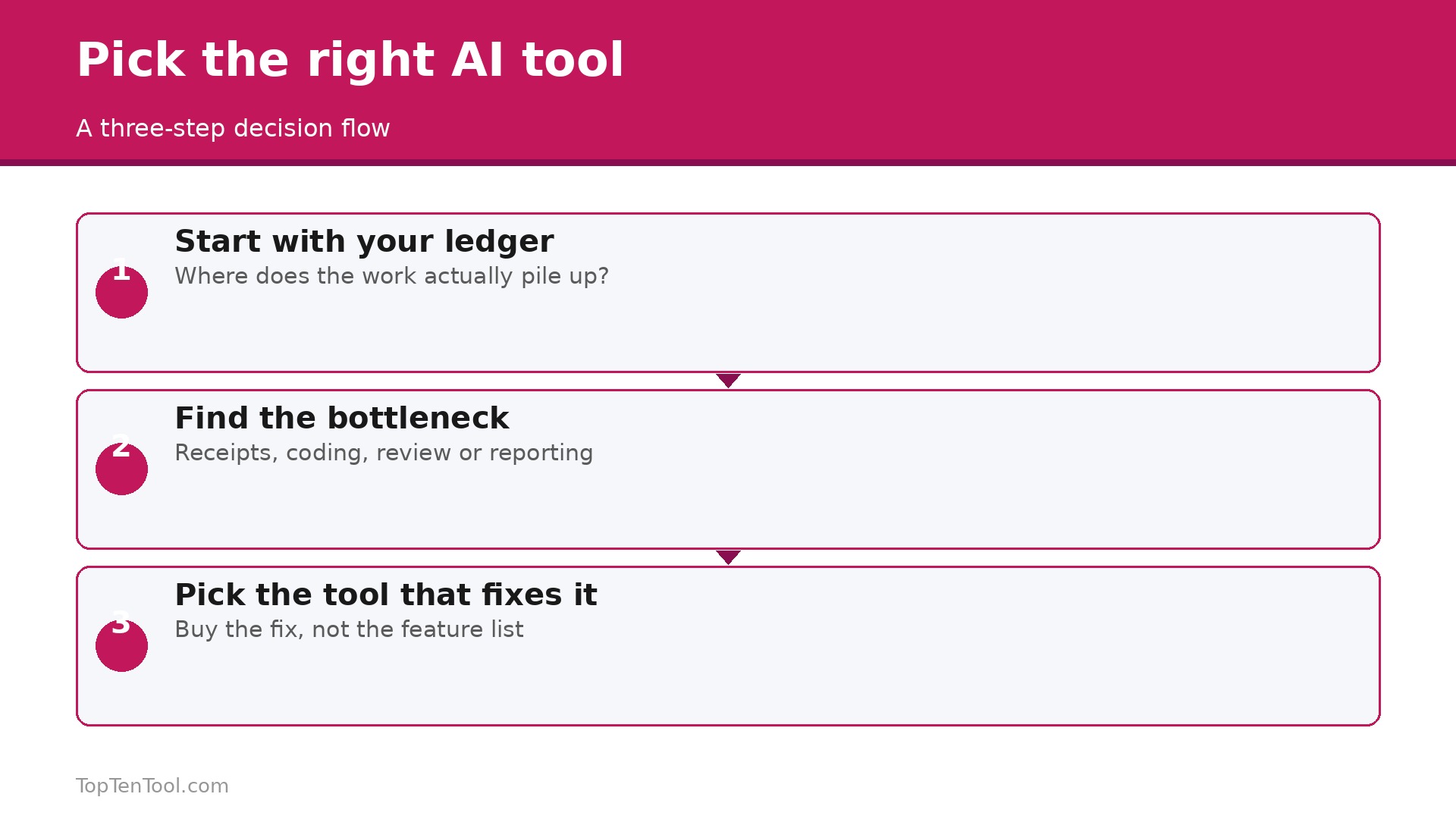
Start with your ledger, because the AI that lives inside QuickBooks or Xero will save more time than a standalone tool that needs a second login. A QuickBooks practice should start with Intuit Assist, a Xero practice with JAX, and only add a point tool when the ledger AI leaves a gap. The best AI tools for accountants are the ones that work where the work already happens.
Next, name the bottleneck honestly. If receipts and invoices are the pain, Dext at $24 a month is the first buy. If client emails, reminders and capacity are the pain, Karbon at $59 a user is the first buy. If invoice volume is the pain, Vic.ai is the conversation, but only at 1,000 invoices a month or more. Buying a bookkeeping tool when the real problem is workflow wastes the budget and leaves the bottleneck untouched.
Then check the price per client, not the headline. Booke AI at $129 per business costs $1,290 a month for ten clients, while Karbon at $89 a user costs $445 for five staff. Price the tool against the clients it will serve, and get quote only prices in writing before you commit, including the implementation timeline and the contract length. Keep this checklist beside you while you compare best AI tools for accountants options, and the right choice will be obvious by the end.
The Real Cost for a Five Person Firm
The headline price hides the team math, so run the numbers for your firm. Five staff on Karbon Team at $59 a user costs $295 a month, and on Business at $89 it costs $445. Five staff on QuickBooks Online varies by tier, from about $35 for one user to several hundred for a team, while Xero Early at $15 covers unlimited users on one ledger. Dext at $24 to $100 a month depends on document volume, and Booke AI at $129 per business depends on client count, not staff. Add the ledger, the capture tool and the practice manager together, and a five person firm can easily spend $600 to $1,000 a month on software.
Price the stack, not the single tool, and check which features sit on the higher tier before you commit.
Five Mistakes That Waste an Accounting AI Budget
The most common mistake is buying AI for a workflow that is broken, because automating a bad process just produces bad results faster. Fix the process first. The second is trusting AI output without review, because an AI that codes confidently wrong creates more cleanup than manual entry. Review the exceptions every week. The third is buying a per business tool for many small clients, which makes the cost per client absurd. Price per client before you buy. The fourth is skipping the human review layer, which is where Botkeeper earns its fee and where pure software fails.
The fifth is signing a quote only enterprise contract without a pilot, which locks a firm into a tool it has not tested. Run a pilot on real client data first.
A 30 Day Pilot Plan for One Practice
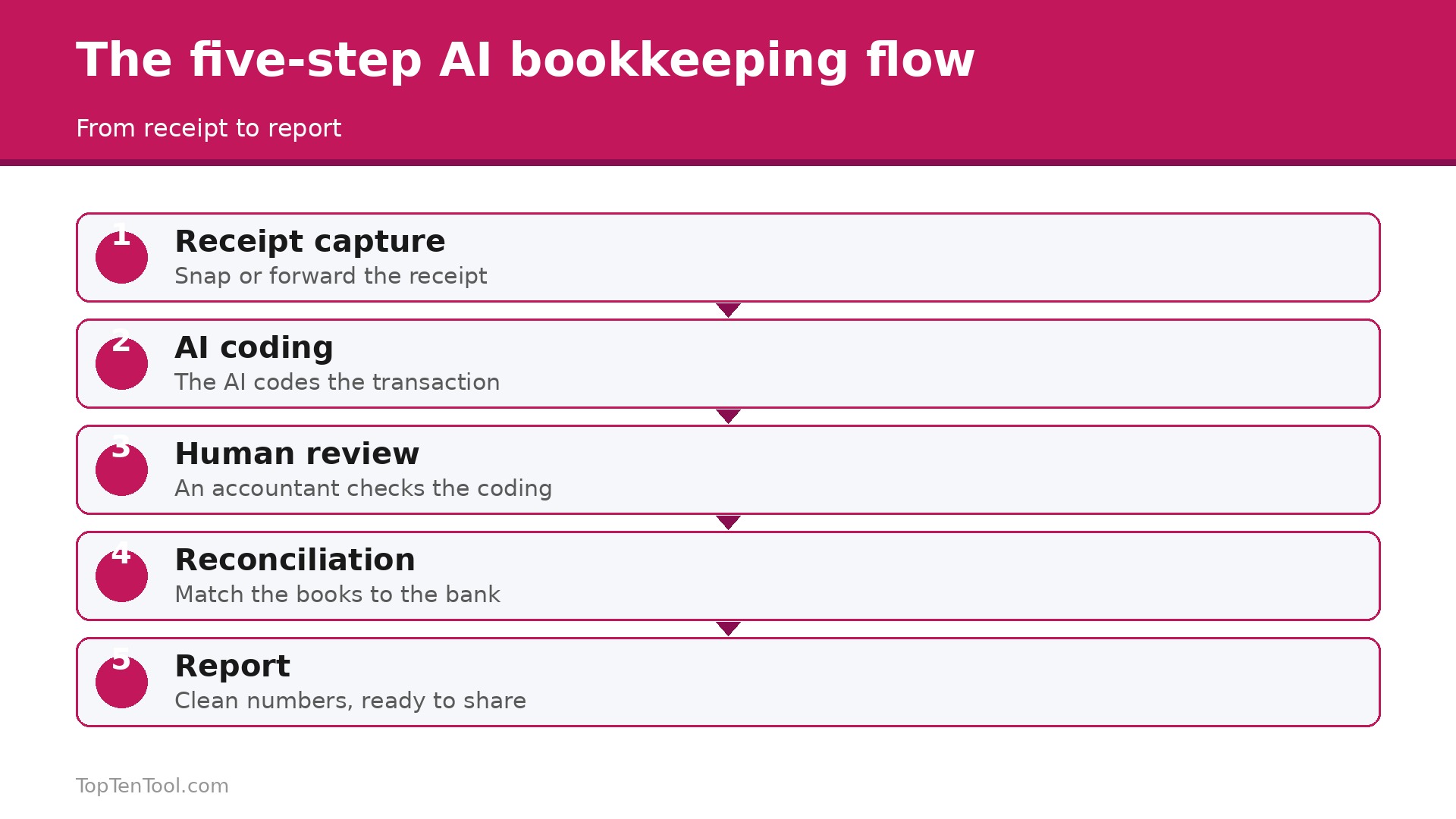
A pilot is how a practice tests AI without betting the firm on it. Week one, pick one bottleneck and one tool, because a pilot with three tools and no clear job proves nothing. If receipts are the pain, pilot Dext. If client emails are the pain, pilot Karbon. If expense coding is the pain, pilot Ramp. Write down the baseline first, how many hours the job takes now, and how many errors it produces.
Week two, run the tool on real client data for one client, not a demo, and have a human review every output. Count the hours saved and the errors caught, because those two numbers decide whether the tool earns its fee. If the AI codes confidently wrong, that is a finding, not a failure, and it tells you the review step matters more than the automation step.
Week three, expand the pilot to three clients and test the integrations, because a tool that does not connect cleanly to QuickBooks or Xero will create more work than it saves. Week four, decide with numbers. Multiply the hours saved per client by your client count, compare it with the monthly cost, and check whether the team actually likes using it. A pilot that saves five hours a week per person is worth paying for. A pilot that saves one hour and creates new complaints is not. Run the pilot, trust the numbers, and only then sign a contract.
The Call
For most practices, the smart start is the AI inside the ledger you already run, Intuit Assist for QuickBooks and JAX for Xero, plus Dext at $24 a month for receipt capture. Karbon at $59 to $89 a user is the pick when client workflow is the bottleneck, and Ramp free is the cheapest way to test AI expense coding. Vic.ai and MindBridge suit larger firms with volume or audit work, and Botkeeper suits a firm that wants to outsource bookkeeping rather than just automate it. The best AI tools for accountants are the ones that remove routine work without removing the judgment clients pay for, so start with the ledger, fix the bottleneck, and pilot before you sign.
That is the best AI tools for accountants shortlist we would hand to a friend starting today.
Frequently Asked Questions
What is the best AI tool for accountants in 2026?
QuickBooks Online with Intuit Assist is the best overall pick for a practice already on QuickBooks, and Xero with JAX is best for a Xero practice. Dext is best for receipt capture, Karbon is best for practice management, and Vic.ai is best for high volume accounts payable. The right pick depends on your ledger and your bottleneck.
How much do AI tools for accountants cost?
Entry tools start at $15 to $35 a month for the ledger AI, Dext starts at $24, Karbon at $59 per user, Digits at $100, and Booke AI at $129 per business. Botkeeper is reported from about $490 a month, and Vic.ai and MindBridge are quote only, with enterprise contracts that can reach tens of thousands a year.
Will AI replace accountants?
No. AI replaces data entry, receipt capture and routine coding, which frees accountants to do the judgment work clients actually pay for, such as advice, planning and review. A practice that uses AI well does more advisory work, not less. The firms at risk are the ones that sell only data entry.
Is Dext or Botkeeper better for bookkeeping?
Dext is better when you want a capture tool inside your existing ledger, at $24 a month and up. Botkeeper is better when you want to outsource bookkeeping entirely, with AI plus a human review team, at a reported $490 a month and up. Choose Dext to automate, Botkeeper to outsource.
What is Karbon AI used for?
Karbon AI drafts client emails, flags missed time entries, automates client reminders and triages inboxes, all inside the Karbon practice management platform. It reduces admin overhead rather than doing bookkeeping, and it suits a firm managing many clients where workflow, not data entry, is the bottleneck.
Should a solo bookkeeper buy AI tools?
Yes, but start small. Dext at $24 a month for capture, or the AI inside QuickBooks or Xero, will save hours without a big bill. Avoid per business tools such as Booke AI at $129 per client, and avoid quote only enterprise tools, until the client base justifies the cost.