
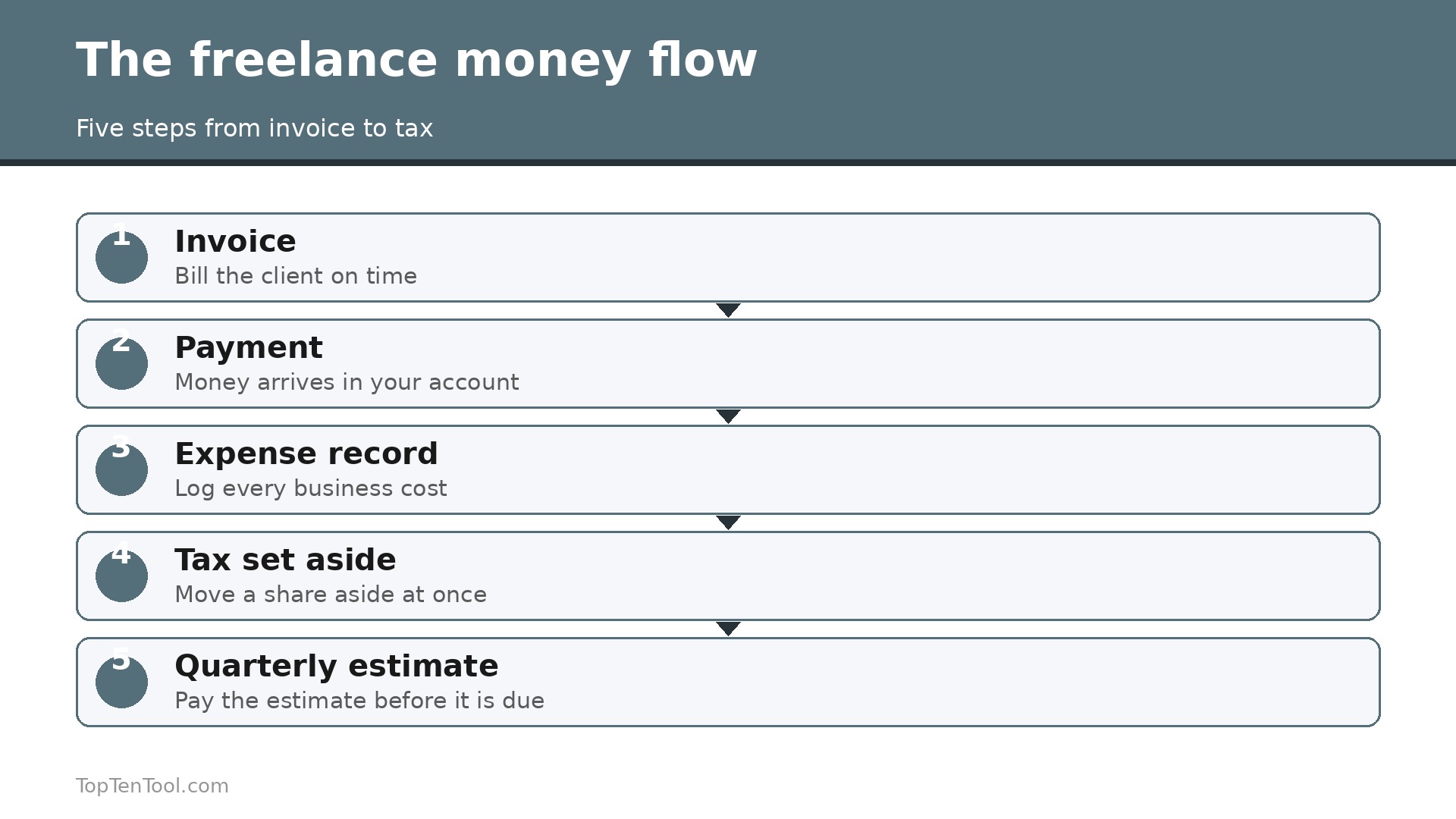
Freelance money has a habit of disappearing between the invoice and the tax return, in the expenses nobody recorded, the mileage nobody logged, and the quarterly tax nobody set aside. The best accounting software for freelancers stops that leak by keeping invoicing, expenses and taxes in one place that a non accountant can actually use. Our research compared vendor pricing pages in October and November 2026, and the range runs from free to $349 a month, depending on whether you want software or a bookkeeping service.
The first decision is not which tool, but which job. Some freelancers need beautiful invoices and time tracking, which points to FreshBooks. Some need a free ledger with no revenue cap, which points to Wave. Some need tax tracking for a Schedule C, which points to QuickBooks Solopreneur. And some need double entry accounting that an accountant will accept, which points to QuickBooks Online or Xero. Pick the job first and the tool follows.
This guide compares twelve tools on real prices, invoicing, expenses and tax help, and it ends with a pick for each common situation. Start with the comparison table, then read the reviews that match your work.
A Quick Look at the Lineup
The table below shows the starting price of each tool, who it suits best, and the one thing to watch. Prices are monthly list prices, and free plans are marked where they exist. Payment processing fees are extra on most tools. Use the table to shortlist the best accounting software for freelancers options that fit your budget before reading the full reviews.
| Tool | Starting price | Best for | Watch out |
|---|---|---|---|
| FreshBooks | $23 a month for Lite | Invoicing and time tracking for service freelancers | Lite caps you at 5 billable clients |
| Wave | Free Starter plan | Free accounting with no revenue cap | US and Canada only, and Pro is $19 for bank imports |
| QuickBooks Online | $38 a month for Simple Start | Working with an accountant | Most expensive route for a solo freelancer |
| Xero | $15 a month for Early | Growing businesses and multi currency | Early plan has tight invoice and bill limits |
| Zoho Books | $15 a month for Standard on annual billing | Best free plan for most countries | Free plan eligibility limits vary by country |
| QuickBooks Solopreneur | $20 a month for Lite | Simple tax tracking for one person | Lighter on invoicing depth than FreshBooks |
| Bonsai | $25 a month | Freelance business admin in one place | Accounting is one part of a wider suite |
| ZipBooks | $15 a month | Free starter with smart insights | Smaller ecosystem than QuickBooks or Xero |
| Kashoo | $16.65 a month | Simple double entry for solo owners | Less known, with fewer integrations |
| Invoice2go | $10 a month | Simple invoices on the go | Not a full accounting tool |
| Square Invoices | Free | Free invoicing for sellers who use Square | No expense or tax depth |
| Bench | $349 a month | Done for you bookkeeping with a human | Ten times the price of software alone |
How We Compared These Accounting Tools
We judged each tool on five things that decide whether a freelancer keeps using it. First, the real monthly cost, including client caps that force an upgrade, because FreshBooks Lite allows only 5 billable clients. Second, invoicing quality, from templates and online payment through to recurring invoices and late fee reminders. Third, expense and mileage tracking, since unrecorded expenses are lost deductions. Fourth, tax help, including quarterly estimates, Schedule C categories and reports an accountant can use. Fifth, the free plan, which matters when a freelancer is starting out. We checked which tools are US and Canada only and which work internationally.
The best accounting software for freelancers is the one that gets invoices paid, expenses recorded and taxes estimated without an accountant on staff.
The 12 Best Accounting Tools for Freelancers Reviewed
1. FreshBooks
Starting price $23 a month for Lite. Best for Invoicing and time tracking for service freelancers. Watch out Lite caps you at 5 billable clients.
FreshBooks is built for people who sell their time and expertise, and every plan includes unlimited time tracking and expenses, automatic bank imports, mileage tracking and tax time reports. Lite costs $23 a month but only allows 5 billable clients, while Plus at $43 a month raises that to 50 clients and adds proposals, retainers, receipt scanning, double entry reports and accountant access. Premium at $70 covers unlimited clients.
The client cap is the catch. An active freelancer with six clients must jump from $23 to $43, which is a steep step for one extra client. Payment processing fees are extra. FreshBooks remains the best all round choice for service freelancers who bill by the hour or by project.
In practice, FreshBooks earns its place when invoicing and time tracking for service freelancers. The main risk is lite caps you at 5 billable clients, so test that specific limit during your trial before you commit.
Pick it when you bill clients by the hour or by project. Skip it when you have more than 5 clients and want the cheapest plan.
2. Wave
Starting price Free Starter plan. Best for Free accounting with no revenue cap. Watch out US and Canada only, and Pro is $19 for bank imports.
Wave is the right answer when the budget is zero and the needs are simple. The Starter plan is free, with unlimited invoicing, estimates, bills and bookkeeping records, plus a mobile app for invoicing on the go. You only pay when you use Wave Payments at 2.9 percent plus $0.60 per card transaction, or Wave Payroll. Pro at $19 a month adds automatic bank imports, transaction auto categorisation and late payment reminders.
Wave is only available to businesses in the US and Canada, and the free plan needs manual bank imports. It is also lighter on tax features than QuickBooks Solopreneur. For a US or Canadian freelancer with simple needs and no budget, Wave is the best free option.
In practice, Wave earns its place when free accounting with no revenue cap. The main risk is uS and Canada only, and Pro is $19 for bank imports, so test that specific limit during your trial before you commit.
Pick it when your budget is zero and you are in the US or Canada. Skip it when you need strong tax estimates or work outside the US and Canada.
3. QuickBooks Online
Starting price $38 a month for Simple Start. Best for Working with an accountant. Watch out Most expensive route for a solo freelancer.
QuickBooks Online is the heavyweight in small business accounting and the right choice for freelancers who already work with an accountant or plan to incorporate. Simple Start at $38 a month covers core invoicing, expense tracking, mileage and tax categorisation, while Essentials at $85 and Plus at $140 add multi user access and project tracking. Almost every accountant knows QuickBooks, which makes year end far easier.
Simple Start is expensive for a solo freelancer compared with FreshBooks or Wave, and the free plan is very limited, with only 2 invoices a month. It is the safest pick when an accountant is involved, and overkill when one is not.
In practice, QuickBooks Online earns its place when working with an accountant. The main risk is most expensive route for a solo freelancer, so test that specific limit during your trial before you commit.
Pick it when you work with an accountant or plan to incorporate. Skip it when you want the cheapest invoicing tool.
4. Xero
Starting price $15 a month for Early. Best for Growing businesses and multi currency. Watch out Early plan has tight invoice and bill limits.
Xero Early costs $15 a month and suits a freelancer who wants proper double entry accounting with unlimited users, which is rare at this price. The interface is clean, the bank reconciliation is strong, and multi currency support is built in. Growing at $42 adds more invoices and bills, and the ecosystem of add ons is wide.
The Early plan has tight limits on invoices and bills, so an active freelancer will outgrow it fast. Payroll is an add on, and the learning curve is steeper than FreshBooks. Xero fits a freelancer who wants proper accounting and may grow into a small business.
In practice, Xero earns its place when growing businesses and multi currency. The main risk is early plan has tight invoice and bill limits, so test that specific limit during your trial before you commit.
Pick it when you want proper double entry accounting with unlimited users. Skip it when you want the simplest invoicing tool.
5. Zoho Books
Starting price $15 a month for Standard on annual billing. Best for Best free plan for most countries. Watch out Free plan eligibility limits vary by country.
Zoho Books has the most useful free plan for freelancers in most countries, free when revenue is under $50,000 a year, with 1,000 invoices a year and accountant access. Standard costs $15 a month billed annually, or $20 monthly, and adds more users and automation. It covers invoicing, expenses, bank reconciliation and reporting, and it connects to the whole Zoho ecosystem.
Free plan eligibility varies by country, and the interface is less polished than FreshBooks. It suits a freelancer outside the US and Canada who wants a real free plan without a revenue cap surprise.
In practice, Zoho Books earns its place when best free plan for most countries. The main risk is free plan eligibility limits vary by country, so test that specific limit during your trial before you commit.
Pick it when you want a free plan that works in most countries. Skip it when you want the most polished invoicing experience.
6. QuickBooks Solopreneur
Starting price $20 a month for Lite. Best for Simple tax tracking for one person. Watch out Lighter on invoicing depth than FreshBooks.
QuickBooks Solopreneur, formerly QuickBooks Self-Employed, is designed for one person businesses. The Lite plan costs $20 a month and includes unlimited invoicing and mileage tracking, plus tools to separate business and personal transactions and estimate quarterly tax. It is the simplest route to a clean Schedule C, and the free plan covers 2 invoices a month.
Solopreneur is lighter on invoicing depth than FreshBooks, with fewer templates and no double entry reports on the entry tier. It suits a US freelancer whose main worry is tax, not beautiful invoices.
In practice, QuickBooks Solopreneur earns its place when simple tax tracking for one person. The main risk is lighter on invoicing depth than FreshBooks, so test that specific limit during your trial before you commit.
Pick it when tax tracking and quarterly estimates are your main worry. Skip it when beautiful invoices and time tracking are your main need.
7. Bonsai
Starting price $25 a month. Best for Freelance business admin in one place. Watch out Accounting is one part of a wider suite.
Bonsai covers the whole freelance admin stack, with contracts, proposals, invoicing, time tracking and tax tools in one account. Plans start at $25 a month, and the tax features help a freelancer estimate quarterly payments and track deductible expenses. It suits a freelancer who wants one login for clients and money, rather than separate tools for each.
Bonsai accounting is lighter than QuickBooks Online or Xero, with no full double entry ledger on the entry tier. It is a business admin suite with accounting included, not a dedicated accounting platform. Choose it when you want one tool for everything.
In practice, Bonsai earns its place when freelance business admin in one place. The main risk is accounting is one part of a wider suite, so test that specific limit during your trial before you commit.
Pick it when you want clients, contracts and accounting in one tool. Skip it when you need full double entry accounting for an accountant.
8. ZipBooks
Starting price $15 a month. Best for Free starter with smart insights. Watch out Smaller ecosystem than QuickBooks or Xero.
ZipBooks offers a free starter plan with invoicing and basic bookkeeping, and paid plans from $15 a month add time tracking, reporting and automation. The interface is clean, the smart insights flag unusual spending, and the price is fair for what it covers. It suits a freelancer who wants a simple ledger with a free starting point.
The ecosystem is smaller than QuickBooks or Xero, with fewer integrations and fewer accountants who know it. It is a good simple tool, not a platform for growth into a larger business.
In practice, ZipBooks earns its place when free starter with smart insights. The main risk is smaller ecosystem than QuickBooks or Xero, so test that specific limit during your trial before you commit.
Pick it when you want a free start with smart expense insights. Skip it when you need an accountant who already knows your tool.
9. Kashoo
Starting price $16.65 a month. Best for Simple double entry for solo owners. Watch out Less known, with fewer integrations.
Kashoo is a simple double entry accounting tool for solo owners, with invoicing, expenses, bank reconciliation and reporting at $16.65 a month on annual billing. The interface is straightforward, the learning curve is short, and the price is fair for proper accounting. It suits a freelancer who wants a real ledger without the complexity of QuickBooks.
Kashoo is less known, with fewer integrations and fewer accountants who use it. The feature set is smaller than Xero or QuickBooks. It is a quiet, competent pick for a freelancer who values simplicity over ecosystem.
In practice, Kashoo earns its place when simple double entry for solo owners. The main risk is less known, with fewer integrations, so test that specific limit during your trial before you commit.
Pick it when you want a simple real ledger at a low price. Skip it when you need wide integrations or accountant familiarity.
10. Invoice2go
Starting price $10 a month. Best for Simple invoices on the go. Watch out Not a full accounting tool.
Invoice2go is the simplest invoicing tool on this list, with clean templates, online payment and a mobile app that lets a freelancer send an invoice from a job site. Plans start at $10 a month, and the focus is speed, with an invoice created in under a minute. It suits a freelancer who mostly needs to bill fast and track who has paid.
Invoice2go is not a full accounting tool, with no double entry ledger, no tax estimates and no expense tracking depth. It is an invoicing app, not an accounting platform. Pair it with a spreadsheet or a fuller tool at tax time.
In practice, Invoice2go earns its place when simple invoices on the go. The main risk is not a full accounting tool, so test that specific limit during your trial before you commit.
Pick it when you mostly need fast, clean invoices from your phone. Skip it when you need full accounting and tax help.
11. Square Invoices
Starting price Free. Best for Free invoicing for sellers who use Square. Watch out No expense or tax depth.
Square Invoices is free, with unlimited invoices, online payment and reminders, and it suits a freelancer who already takes payments through Square. The invoices look clean, clients can pay by card, and the reporting shows who has paid and who is overdue. It is the easiest free invoicing option for a seller already in the Square ecosystem.
Square Invoices has no expense tracking depth, no tax estimates and no double entry ledger, so it is not a full accounting tool. It is a free invoicing add on for Square sellers. Use it for billing, and keep a separate ledger for tax time.
In practice, Square Invoices earns its place when free invoicing for sellers who use Square. The main risk is no expense or tax depth, so test that specific limit during your trial before you commit.
Pick it when you already use Square and want free invoicing. Skip it when you need full accounting, expenses and tax help.
12. Bench
Starting price $349 a month. Best for Done for you bookkeeping with a human. Watch out Ten times the price of software alone.
Bench is a bookkeeping service, not just software, with a dedicated human bookkeeper who categorises transactions, reconciles accounts and prepares monthly reports. Plans start at $349 a month, which is ten times the price of software alone, but the service includes a real person who does the work. It suits a freelancer who earns well, hates bookkeeping, and would rather pay than learn accounting.
The price is the honest catch. A freelancer earning $3,000 a month should not spend $349 on bookkeeping, when FreshBooks at $23 or Wave free would cover the job. Bench earns its fee only when the freelancer earns enough that the time saved is worth more than the cost.
In practice, Bench earns its place when done for you bookkeeping with a human. The main risk is ten times the price of software alone, so test that specific limit during your trial before you commit.
Pick it when you earn well and want a human to do the books. Skip it when you are starting out and need the cheapest tool.
The Decision by Role
The right pick depends on how you bill, where you live, and whether you need tax help or just invoices. Use this table as a shortcut, then read the full review of the tool it points to. Every pick below was judged against the best accounting software for freelancers criteria set out in this guide.
| Job to be done | Best pick | Why it wins |
|---|---|---|
| Best overall for service freelancers | FreshBooks | Invoicing plus time tracking from $23 |
| Free, no revenue cap | Wave | Free Starter for US and Canada |
| Working with an accountant | QuickBooks Online | Simple Start at $38, every accountant knows it |
| Proper accounting, low price | Xero | Early at $15, unlimited users |
| Free plan, most countries | Zoho Books | Free under $50,000 revenue |
| Tax tracking for one person | QuickBooks Solopreneur | Lite at $20, quarterly estimates |
| One tool for clients and money | Bonsai | $25 a month, contracts plus accounting |
| Done for you bookkeeping | Bench | $349 a month, human bookkeeper included |
How to Choose the Best Accounting Software for Freelancers
Start with the job you need done most. If you bill by the hour, FreshBooks wins, because time tracking turns into an invoice in one click. If your budget is zero, Wave wins in the US and Canada, and Zoho Books wins almost everywhere else. If tax is your main worry, QuickBooks Solopreneur at $20 wins, because it separates business and personal spending and estimates quarterly tax. If an accountant is involved, QuickBooks Online or Xero wins, because your accountant already knows them. The best accounting software for freelancers is the one that matches your biggest pain, not the one with the longest feature list.
Next, check the client cap. FreshBooks Lite allows only 5 billable clients, so a freelancer with six clients must pay $43 for Plus. Xero Early has tight invoice limits, so an active freelancer will outgrow it. Count your clients and your monthly invoices before you choose, and price the tier you will actually need.
Then check where the tool works. Wave is US and Canada only, FreshBooks and QuickBooks work widely, and Zoho Books has the best free plan for most countries. Finally, add payment processing to the bill, because most tools charge 2.9 percent plus a per transaction fee, which adds about $29 on every $1,000 invoiced. Keep this checklist beside you while you compare best accounting software for freelancers options, and the right choice will be obvious by the end.
What Freelance Accounting Really Costs in a Year
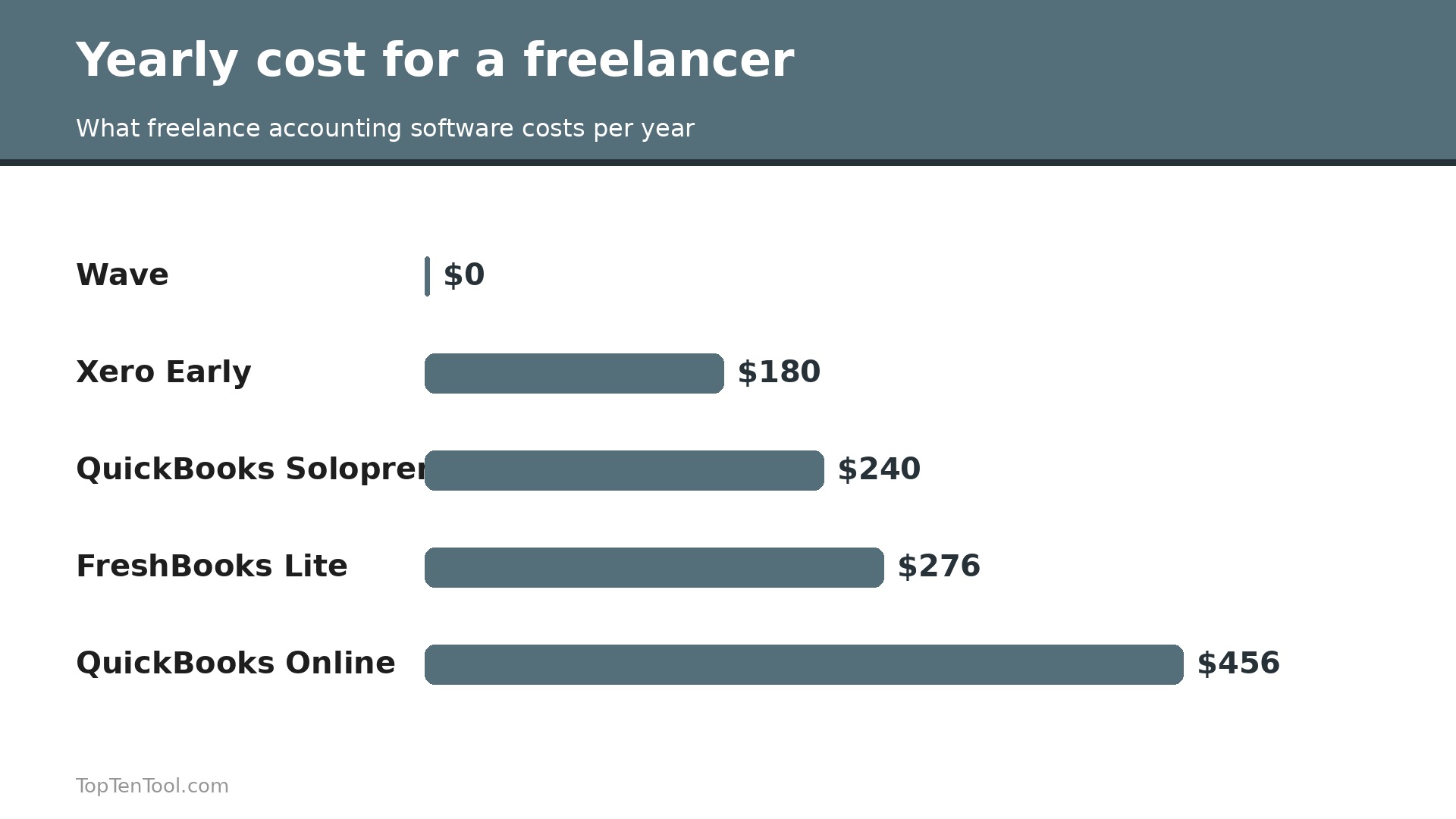
The monthly price is only part of the bill, so work out the year. FreshBooks Lite at $23 a month costs $276 a year, Plus at $43 costs $516, and Premium at $70 costs $840. Wave Starter is $0, Pro is $19 a month or $228 a year. QuickBooks Online Simple Start at $38 costs $456 a year, Xero Early at $15 costs $180, Zoho Books Standard at $15 costs $180, and QuickBooks Solopreneur Lite at $20 costs $240. Add payment processing next, because a freelancer who invoices $60,000 a year and takes half by card pays about $870 in processing fees at 2.9 percent.
Add an accountant if you use one, and the software cost becomes the smallest part of the total. Budget the full year, not one month.
Five Mistakes That Cost Freelancers Money at Tax Time
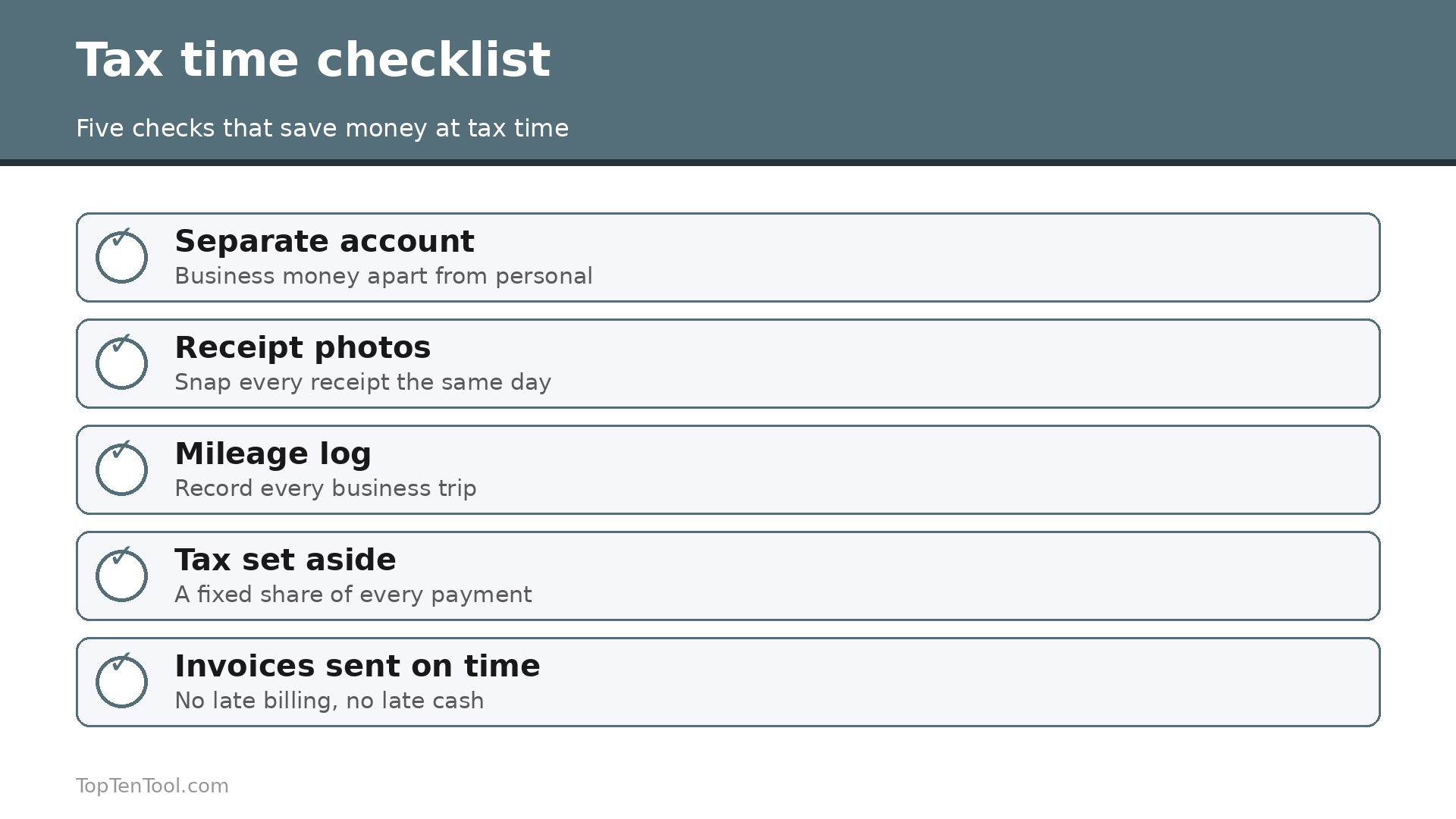
The most common mistake is mixing business and personal spending in one account, which makes every deduction a guessing game at tax time. Open a separate account and use it only for business. The second is not recording expenses as they happen, because a receipt lost in a drawer is a deduction lost forever. Photograph every receipt the day you get it. The third is forgetting mileage, which is often the largest deduction for a freelancer who drives to clients. Log every trip. The fourth is not setting aside tax, so April brings a bill you cannot pay. Put aside 25 to 30 percent of every payment when it arrives.
The fifth is sending invoices late, which pushes income into the next month and creates cash flow gaps. Invoice the day the work is done.
A Simple Monthly Routine That Keeps the Books Clean
A clean set of books is not a year end project, it is a monthly routine that takes an hour. On the first day of each month, reconcile the bank account, matching every transaction in the software to the bank statement, and fix the ones that do not match while you still remember them. A transaction you cannot explain in February is a mystery in December, so do it monthly.
Next, send every invoice for work finished last month, and chase every invoice that is more than 14 days overdue with a polite reminder. Late invoicing is the single biggest cause of freelancer cash flow problems, and a monthly routine fixes it. Then photograph and file every receipt from last month, log the mileage, and categorise the expenses while the trips are fresh in your mind.
Then set aside tax. Move 25 to 30 percent of last month income into a separate savings account, so the quarterly estimate never hurts. Finally, look at one report, the profit and loss for the month, and write down three numbers, income, expenses and the tax set aside. That is the whole routine, and it takes about an hour. A freelancer who does this every month will never dread tax time, because the books are already clean when April arrives.
What Matters Most
For most freelancers, the smart start is FreshBooks for service work, Wave free for a zero budget in the US and Canada, and Zoho Books free for a zero budget almost anywhere else. QuickBooks Solopreneur at $20 is the pick when tax tracking is the main worry, and QuickBooks Online or Xero is the pick when an accountant is involved. Bonsai at $25 suits a freelancer who wants clients and money in one tool, and Bench at $349 suits a high earner who would rather pay a human than do the books.
The best accounting software for freelancers is the one that gets invoices paid, expenses recorded and taxes estimated without an accountant on staff, so choose the tool that matches your biggest pain and start with the free plan where one exists. That is the best accounting software for freelancers shortlist we would hand to a friend starting today.
Frequently Asked Questions
What is the best accounting software for freelancers?
FreshBooks is the best all round choice for service freelancers, because it combines invoicing, time tracking and expenses from $23 a month. Wave is best free for the US and Canada, Zoho Books is best free for most other countries, and QuickBooks Solopreneur is best for tax tracking at $20 a month. Pick the tool that matches your biggest pain.
Is there free accounting software for freelancers?
Yes. Wave Starter is free with unlimited invoicing and bookkeeping for US and Canadian businesses, and Zoho Books is free when revenue is under $50,000 a year in most countries. Square Invoices is free for invoicing, and ZipBooks has a free starter plan. Free plans cover invoicing and basic bookkeeping, and paid plans add bank imports and automation.
How much does accounting software cost for a freelancer?
Most freelancers pay $0 to $43 a month. Wave and Zoho Books are free to start, Xero Early is $15, FreshBooks Lite is $23, QuickBooks Solopreneur is $20, and QuickBooks Online Simple Start is $38. Bench, a done for you service, starts at $349 a month. Add payment processing of about 2.9 percent per card transaction.
Do freelancers need double entry accounting?
Not at first. A simple ledger that tracks income, expenses and invoices is enough for most solo freelancers. Double entry accounting matters when you work with an accountant, plan to incorporate, or need proper financial reports. FreshBooks Plus, QuickBooks Online and Xero all offer it when you are ready.
What is the difference between FreshBooks and QuickBooks?
FreshBooks is built for service freelancers who bill by time or project, with beautiful invoices and time tracking from $23 a month. QuickBooks Online is built for small businesses with an accountant, with full double entry accounting from $38 a month. Choose FreshBooks for invoicing and ease, QuickBooks for accounting depth and accountant familiarity.
How do I handle taxes as a freelancer?
Separate business and personal spending, record every expense and mile as it happens, and set aside 25 to 30 percent of every payment for tax. Use a tool such as QuickBooks Solopreneur to estimate quarterly tax, and keep every receipt. A separate business account and a clean ledger make tax time far easier, and an accountant is worth the fee in the first year.