
Teachers who use AI weekly save an average of 5.9 hours a week, but only when the tool fits a specific teaching task rather than acting as a generic chatbot. The best AI tools for teachers draft lesson plans, level reading passages, give feedback inside Google Docs, and write parent emails, and most of them are free for individual teachers. Our research compared vendor pricing pages in November 2026, and the honest split is simple. The best tools are free or under $13 a month, and none of them is safe to use with student data by default.
The buying criterion that matters most is not the feature list. It is privacy, because FERPA, COPPA and SOC 2 compliance vary widely across these platforms, and districts increasingly require signed data processing agreements. A tool that is free and brilliant is still the wrong tool if it trains on student data or cannot sign the agreement your district needs.
This guide compares eight tools on real prices, classroom fit and privacy, and it ends with a pick for each common situation. Start with the comparison table, then read the reviews that match your subject and your school.
The Quick Take
The table below shows the starting price of each tool, who it suits best, and the one thing to watch. Prices are monthly list prices unless noted. Most tools are free for individual teachers, and districts pay for oversight and integrations. Use the table to shortlist the best AI tools for teachers options that fit your budget before reading the full reviews.
| Tool | Starting price | Best for | Watch out |
|---|---|---|---|
| MagicSchool AI | $8.33 a month billed annually for Plus | All in one classroom toolkit | 80 plus tools can feel like sprawl, most teachers use one or two |
| Brisk Teaching | Free for teachers | AI inside Google Docs and Slides | Individual Pro price is not published on the vendor site |
| Khanmigo | Free for US teachers | Free AI tutor and teacher aide | Free tier is limited to US teachers |
| Diffit | $14.99 a month for Premium | Differentiated reading passages | Free tier loses export and standards alignment after the trial |
| Eduaide | $49.99 a year for Pro | Cheapest unlimited plan for planning | Smaller toolset than MagicSchool |
| ChatGPT for Teachers | Free for verified US K-12 educators | General drafting and research | Free offer has an end date, and it is not classroom specific |
| Claude for Teachers | Free for verified US K-12 educators | Careful drafting with classroom connections | Free offer is for one year, and it is not classroom specific |
| Gemini for Education | Free for schools on Google | AI inside Google Workspace for Education | Only free if your school is on Google |
How We Compared These Teacher Tools
We judged each tool on five things that decide whether a teacher keeps using it. First, the free plan, including what a teacher actually gets without paying, because most classroom AI is free or freemium for individuals. Second, the specific teaching task it serves, from lesson planning and differentiation to grading feedback and parent communication, since a tool that does one job well beats a chatbot that does everything poorly. Third, where it works, because a tool that runs inside Google Docs saves more time than one that needs a new tab. Fourth, the paid price for one teacher, since most teachers pay out of pocket and $15 a month is a real decision.
Fifth, privacy, including FERPA, COPPA and SOC 2 statements and whether the tool trains on student or teacher data. The best AI tools for teachers are the ones that save hours on a real classroom task without putting student data at risk.
The 8 Best AI Tools for Teachers Reviewed
1. MagicSchool AI
Starting price $8.33 a month billed annually for Plus. Best for All in one classroom toolkit. Watch out 80 plus tools can feel like sprawl, most teachers use one or two.
MagicSchool AI is the most complete classroom specific toolkit available now, with more than 80 purpose built teacher tools covering lesson planners, rubric generators, quiz builders, IEP drafters, report card comment writers and parent email composers, plus 50 or more student tools and a chatbot called Raina. The free plan, which the pricing page calls Forever Free, includes all 80 tools with usage limits. Plus costs $8.33 a month billed annually, or $12.99 monthly, and adds unlimited generations, unlimited output history and 50 plus student tools.
The breadth is also the catch. Most teachers use one or two of the 80 tools, and the rest becomes sprawl. Output needs editing, and the free plan has usage limits that a heavy user will hit. MagicSchool is still the best first tool for a teacher who wants one login for most classroom jobs.
In practice, MagicSchool AI earns its place when all in one classroom toolkit. The main risk is 80 plus tools can feel like sprawl, most teachers use one or two, so test that specific limit during your trial before you commit.
Pick it when you want one tool for most teaching jobs. Skip it when you want a single focused tool for one job.
2. Brisk Teaching
Starting price Free for teachers. Best for AI inside Google Docs and Slides. Watch out Individual Pro price is not published on the vendor site.
Brisk Teaching works where teachers already are, as a Chrome and Edge extension that runs inside Google Docs, Slides, YouTube and the LMS, so you can level a reading, write feedback on a student essay or turn a video into a quiz without leaving the page. The free teacher plan has 20 or more tools and unlimited use, and its privacy centre is the plainest on this list, stating that it does not use student or teacher data to train or fine tune AI models. Pro lists around $9.99 a month in third party reports, though the vendor site does not publish an individual Pro price.
The individual Pro price is not published on the vendor pricing page, which makes budgeting harder, and the paid tiers are aimed at schools and districts. It is still the best pick for a teacher who lives in Google Docs and wants AI inside the document.
In practice, Brisk Teaching earns its place when aI inside Google Docs and Slides. The main risk is individual Pro price is not published on the vendor site, so test that specific limit during your trial before you commit.
Pick it when you live in Google Docs and want feedback where you grade. Skip it when you need a published individual price before you buy.
3. Khanmigo
Starting price Free for US teachers. Best for Free AI tutor and teacher aide. Watch out Free tier is limited to US teachers.
Khanmigo, from Khan Academy, is the rare classroom AI that is simply free for teachers in the US. It acts as an AI tutor for students and a teacher aide for planning, with tools that align to Khan Academy content and support real tutoring conversations rather than just drafting text. Parents and learners pay $4 a month, but teachers in the US pay nothing, which makes it the best free tutor on this list.
The free tier is limited to US teachers, and the tool is tied to Khan Academy content, so it is less flexible than MagicSchool for general planning. It is still the best pick when a free, trusted tutor is the job.
In practice, Khanmigo earns its place when free AI tutor and teacher aide. The main risk is free tier is limited to US teachers, so test that specific limit during your trial before you commit.
Pick it when you want a free AI tutor from a nonprofit you trust. Skip it when you teach outside the US or need general planning tools.
4. Diffit
Starting price $14.99 a month for Premium. Best for Differentiated reading passages. Watch out Free tier loses export and standards alignment after the trial.
Diffit levels any text or topic to a grade level, adds vocabulary and comprehension questions, and turns a single article into readings for different learners in minutes. Premium costs $14.99 a month or $149.99 a year, with a free basic tier and a free first year for first year teachers. It is the tool teachers name first for differentiation, because it does one job and does it well.
The free tier loses Google format export and standards alignment once the 60 day trial lapses, so the free version becomes limited fast. At $14.99 a month, Diffit is the most expensive single purpose tool on this list. It earns its price when differentiation is a daily job.
In practice, Diffit earns its place when differentiated reading passages. The main risk is free tier loses export and standards alignment after the trial, so test that specific limit during your trial before you commit.
Pick it when levelled readings are a daily job for you. Skip it when you need a broad toolkit rather than one focused tool.
5. Eduaide
Starting price $49.99 a year for Pro. Best for Cheapest unlimited plan for planning. Watch out Smaller toolset than MagicSchool.
Eduaide is the cheapest unlimited plan on this list, with Pro at $49.99 a year, or about $4.17 a month, for unlimited resources. The free plan allows 8 resources a month, which is enough to test properly. It covers lesson planning, feedback, translation and resource generation in a clean interface, and it suits a teacher who wants unlimited planning help at the lowest price.
Eduaide has a smaller toolset than MagicSchool, with fewer specialised tools for IEPs, rubrics and parent communication. It is a planning tool, not an all in one. It earns its place as the best value unlimited plan for a teacher who plans every week.
In practice, Eduaide earns its place when cheapest unlimited plan for planning. The main risk is smaller toolset than MagicSchool, so test that specific limit during your trial before you commit.
Pick it when you want the cheapest unlimited planning plan. Skip it when you need IEP tools, rubrics and parent emails in one place.
6. ChatGPT for Teachers
Starting price Free for verified US K-12 educators. Best for General drafting and research. Watch out Free offer has an end date, and it is not classroom specific.
ChatGPT for Teachers is a free education grade workspace for verified US K-12 educators, extended through June 2028, with no training on your data by default. It handles general drafting, lesson ideas, parent emails and research well, and it is the most capable general chatbot a teacher can use for free. It suits a teacher who wants a flexible assistant for any writing task.
The free offer has an end date, and ChatGPT is not classroom specific, so it lacks the purpose built tools in MagicSchool or Diffit. It is a general assistant, not a teaching toolkit. Use it for drafting, and pair it with a classroom tool for the specific jobs.
In practice, ChatGPT for Teachers earns its place when general drafting and research. The main risk is free offer has an end date, and it is not classroom specific, so test that specific limit during your trial before you commit.
Pick it when you want a free general assistant for drafting and research. Skip it when you need purpose built classroom tools.
7. Claude for Teachers
Starting price Free for verified US K-12 educators. Best for Careful drafting with classroom connections. Watch out Free offer is for one year, and it is not classroom specific.
Claude for Teachers launched on July 14, 2026, giving verified US K-12 educators a free year of premium Claude access, with standards aligned teaching skills and built in connections to nine classroom tools including Brisk Teaching, Canva Education, Diffit and MagicSchool. It is strong on careful, well structured drafting, and the classroom connections make it more useful than a standalone chatbot.
The free offer is for one year, and Claude is not classroom specific on its own, so the value depends on the connections to other tools. It is a drafting assistant with good taste, not a full toolkit. Use it for careful writing and pair it with MagicSchool or Brisk for the classroom jobs.
In practice, Claude for Teachers earns its place when careful drafting with classroom connections. The main risk is free offer is for one year, and it is not classroom specific, so test that specific limit during your trial before you commit.
Pick it when you want careful drafting with connections to classroom tools. Skip it when you need a full toolkit in one place.
8. Gemini for Education
Starting price Free for schools on Google. Best for AI inside Google Workspace for Education. Watch out Only free if your school is on Google.
Gemini for Education is free for schools on Google Workspace for Education, and it brings AI into Docs, Slides, Gmail and Classroom, where teachers already work. It drafts lesson plans, summarises documents, helps with grading rubrics and answers questions from school data, all inside the Google tools a teacher opens every day. It suits a school that already runs on Google and wants AI without a new platform.
Gemini is only free if your school is on Google, and it is a general assistant rather than a classroom specific toolkit. A teacher whose school uses Microsoft will gain nothing from it. It earns its place as the best pick for a Google school.
In practice, Gemini for Education earns its place when aI inside Google Workspace for Education. The main risk is only free if your school is on Google, so test that specific limit during your trial before you commit.
Pick it when your school runs on Google Workspace for Education. Skip it when your school uses Microsoft or another platform.
The Right Choice by Business Type
The right pick depends on your subject, your school platform, and whether you need one tool or a toolkit. Use this table as a shortcut, then read the full review of the tool it points to. Every pick below was judged against the best AI tools for teachers criteria set out in this guide.
| Job to be done | Best pick | Why it wins |
|---|---|---|
| One tool for most jobs | MagicSchool AI | 80 plus tools, free tier, Plus $8.33 |
| Grading inside Google Docs | Brisk Teaching | Free for teachers, works where you grade |
| Free AI tutor | Khanmigo | Free for US teachers |
| Levelled readings daily | Diffit | $14.99 a month, best at differentiation |
| Cheapest unlimited planning | Eduaide | $49.99 a year, about $4.17 a month |
| General drafting, free | ChatGPT for Teachers | Free for verified US educators |
| Careful drafting, connected | Claude for Teachers | Free year, nine classroom connections |
| School already on Google | Gemini for Education | Free, inside Google Workspace |
How to Choose the Best AI Tools for Teachers
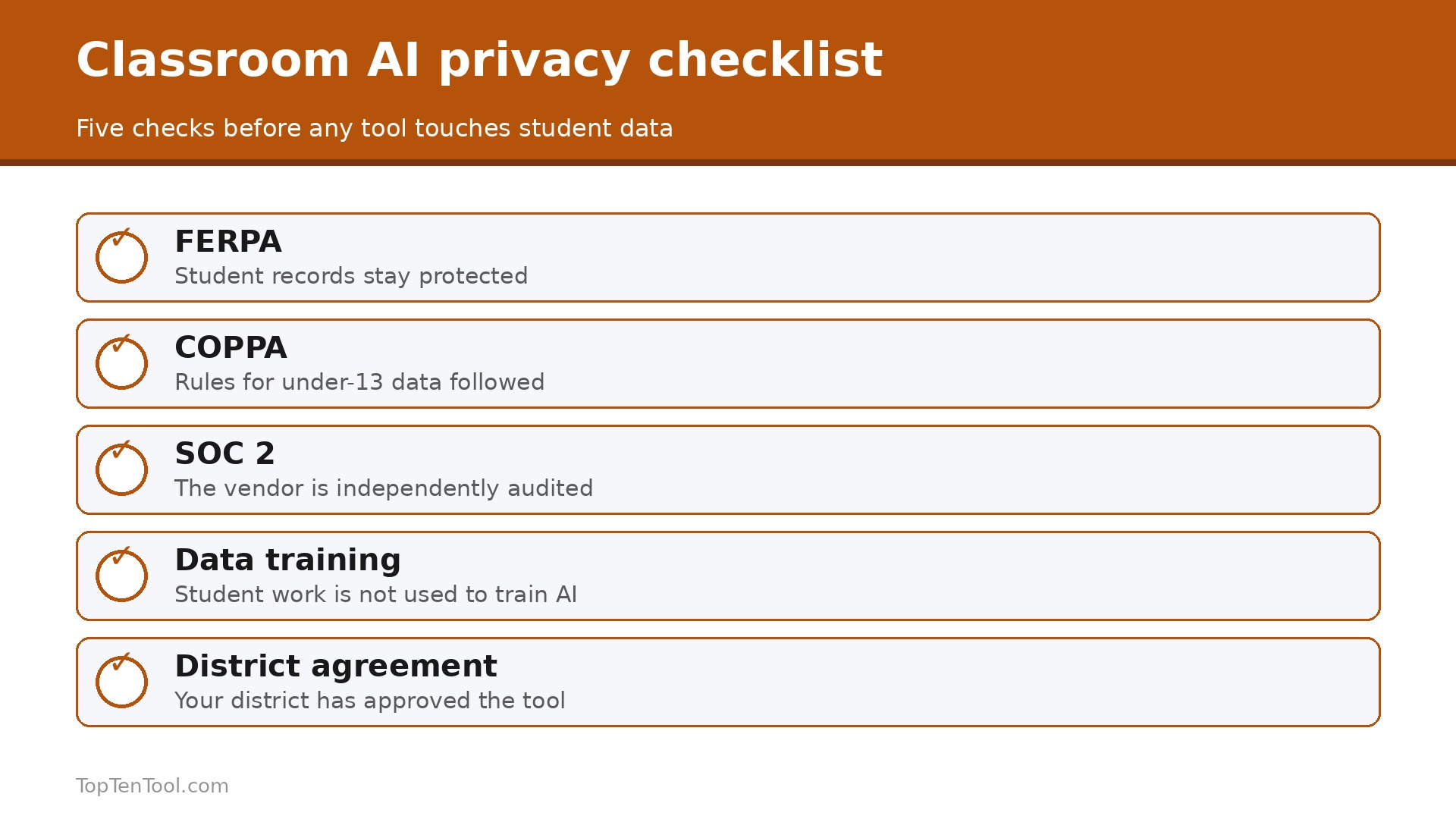
Start with privacy, because it is the real buying criterion for schools and it varies widely. Check whether the tool states FERPA, COPPA and SOC 2 compliance, whether it trains on student or teacher data, and whether your district requires a signed data processing agreement. Brisk states plainly that it does not train on student or teacher data, while other tools are less clear. The best AI tools for teachers are the ones your district can approve, not just the ones you like.
Next, match the tool to the task. Lesson planning points to MagicSchool or Eduaide, grading feedback inside Google Docs points to Brisk, levelled readings point to Diffit, and a free tutor points to Khanmigo. A general chatbot such as ChatGPT or Claude handles drafting and research, but it will not level a reading or write a rubric as well as a purpose built tool.
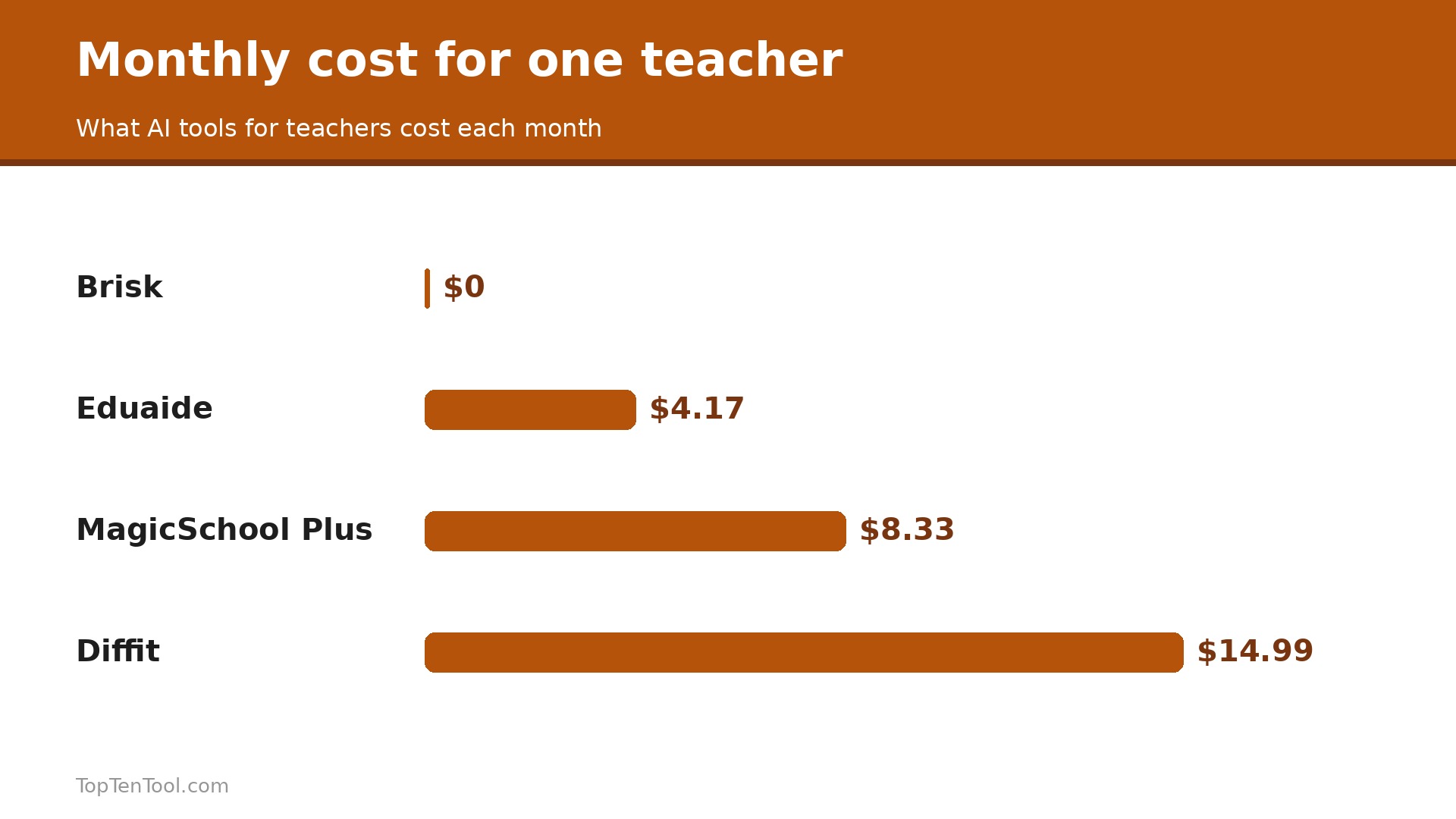
Then check the price for one teacher, because most teachers pay out of pocket. MagicSchool Plus is $8.33 a month billed annually, Diffit is $14.99, Eduaide is about $4.17, and Brisk, Khanmigo, ChatGPT, Claude and Gemini are free for eligible teachers. Start free, use the tool for a month, and upgrade only when you hit a limit you can name. Keep this checklist beside you while you compare best AI tools for teachers options, and the right choice will be obvious by the end.
A Simple Weekly Routine That Saves 5.9 Hours
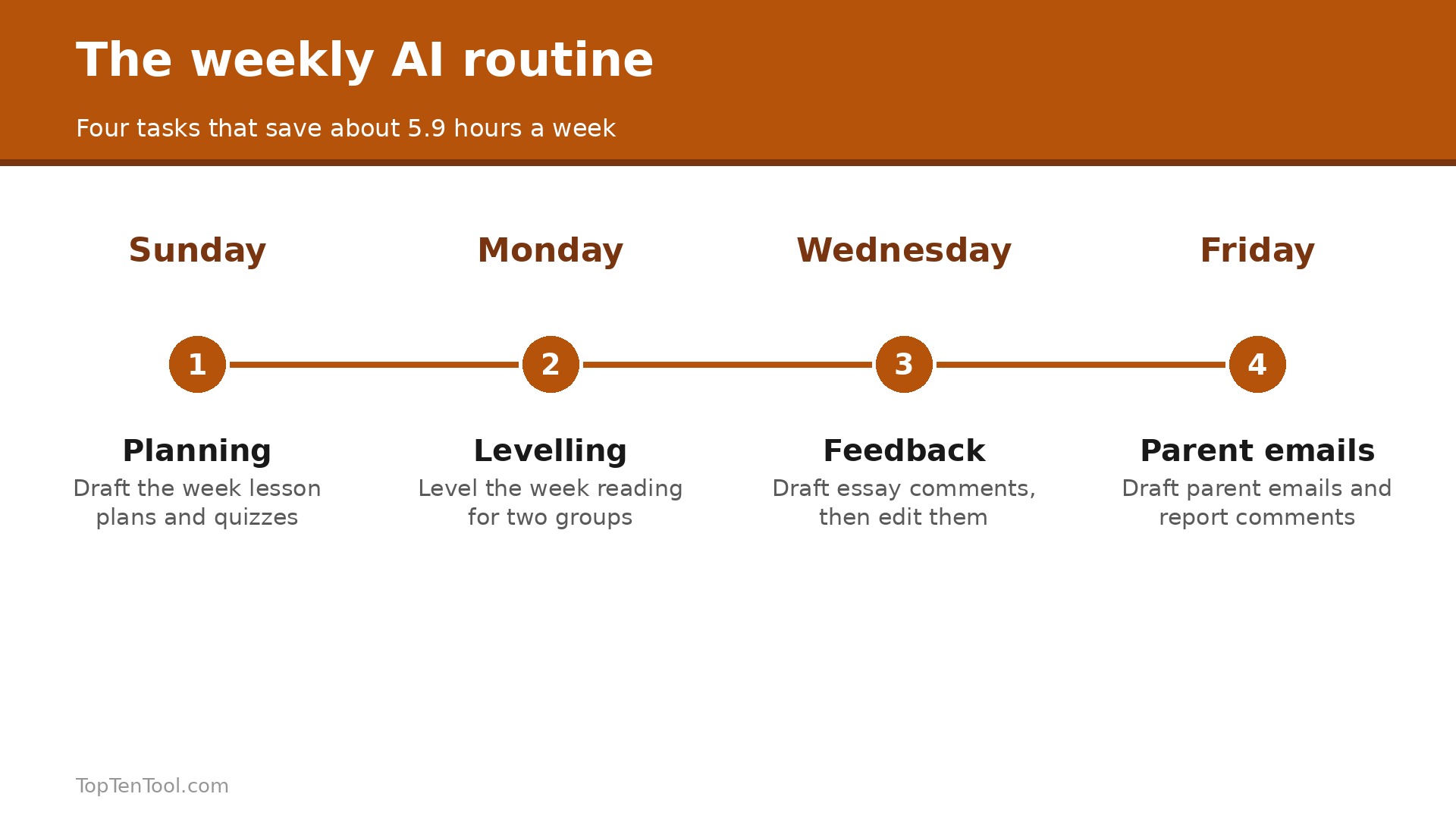
Teachers who use AI weekly save an average of 5.9 hours a week, but only when the tool fits a specific task. Here is a routine that earns that saving. On Sunday, use MagicSchool or Eduaide to draft the week lesson plans and quizzes, then edit them in 30 minutes rather than writing from scratch. On Monday, use Diffit to level the week reading for two different groups. On Wednesday, use Brisk inside Google Docs to give feedback on student essays, with the AI drafting comments you then edit. On Friday, use MagicSchool to draft parent emails and report card comments.
That is four tasks, four tools, and about an hour of AI help that replaces six hours of manual work. The key is using the tool for the task it serves, not asking a chatbot to do everything.
Five Mistakes That Waste Classroom AI
The most common mistake is pasting AI output without editing, because the output is a draft, not a finished lesson, and students notice generic text. The second is using a tool with student data before checking privacy, which can break district policy. Check FERPA and the data agreement first. The third is paying for a tool when the free tier covers the job, because most classroom AI is free for individual teachers. The fourth is using a general chatbot for a specific job, such as levelling a reading, when Diffit does it better. The fifth is never teaching students how AI works, which leaves them using it badly.
Show students how to check AI output, not just how to generate it.
How to Introduce AI to Students the Right Way
Students are already using AI, so the question is not whether to allow it, but how to teach it well. Start by showing students what AI does badly, because a student who has seen a confident wrong answer will check the next one. Give the class an AI generated paragraph with two factual errors in it, ask them to find the errors, and talk about why the AI made them. That single lesson teaches more about AI literacy than a term of warnings.
Next, set clear rules for each task. Some tasks are AI free, such as a first draft that shows the student thinking, and some tasks allow AI as a helper, such as brainstorming ideas or checking grammar. Write the rule on the assignment itself, so there is no guessing. A student who knows the rule will follow it, while a student who has to guess will assume the worst or the best, and both are wrong.
Then model good use. Show students how you use AI to draft a lesson plan and then edit it, pointing out what you changed and why. Show them how to ask for feedback on their own writing rather than asking for a finished essay. Finally, talk about data. Explain what the tool does with what they type, and why they should never paste personal information into a chatbot. A teacher who teaches AI well is not replacing teaching with technology, but teaching students to use a powerful tool with judgment.
What to Ask Your District Before You Pay
Before you pay for any AI tool out of pocket, ask your district four questions, because the answers decide whether the tool is usable at all. First, is the tool approved, and does the district have a signed data processing agreement with the vendor. A tool without an agreement cannot legally handle student data in many districts, no matter how good it is. Second, does the district already pay for a tool that does the same job, because many schools already have Gemini for Education or a district licence for MagicSchool, and paying twice is a waste.
Third, what are the rules for student data, including whether you can paste student work into the tool, whether names must be removed first, and whether the tool trains on what you enter. Get the answer in writing, because a verbal yes will not help if policy changes. Fourth, is there training or support, because a tool with a district training session and a colleague who uses it will save you far more time than a tool you learn alone at midnight. Ask these four questions before you pay, and you may find the district already provides the tool you were about to buy.
How to Save the Most Time in Your First Month
The first month with classroom AI should focus on one task, not five, because a teacher who tries every tool at once learns none of them. Pick the task that eats the most time, which for most teachers is lesson planning or grading feedback. If planning is the pain, use MagicSchool or Eduaide every Sunday for four weeks, drafting the week plans and editing them, and keep a note of how long each Sunday takes. If grading is the pain, use Brisk inside Google Docs for four weeks, letting it draft comments you then edit, and count the essays you finish per hour.
In week two, add one more task, but only one. If planning is working, add parent emails. If grading is working, add levelled readings with Diffit. The rule is simple, one new task per week, and never add a tool before the first one is a habit. By week four you will have three tasks running on AI, and the time saved will be real, not promised.
At the end of the month, do the honest maths. Add up the hours saved, subtract the time spent learning the tools, and compare the result with the price. A free tool that saves three hours a week is a clear win. A $15 a month tool that saves one hour is not. Keep the tools that pass the test, drop the rest, and spend the saved hours on the work only a teacher can do, which is knowing the students in front of you.
Our Conclusion
For most teachers, the smart start is MagicSchool free for breadth, Brisk free for grading inside Google Docs, and Khanmigo free for tutoring. Eduaide at $49.99 a year is the cheapest unlimited planning plan, Diffit at $14.99 is the pick when levelled readings are a daily job, and ChatGPT or Claude free covers general drafting. Gemini is the pick for a Google school. The best AI tools for teachers are the ones that save hours on a real classroom task without putting student data at risk, so start free, check privacy first, and upgrade only when you hit a limit you can name. That is the best AI tools for teachers shortlist we would hand to a friend starting today.
Frequently Asked Questions
What is the best AI tool for teachers in 2026?
MagicSchool AI is the best all in one, with 80 plus teacher tools and a free tier. Brisk Teaching is best for grading inside Google Docs, Khanmigo is best as a free tutor, Diffit is best for levelled readings, and Eduaide is best value at $49.99 a year. The right pick depends on the task you do most.
Are AI tools for teachers free?
Mostly yes. MagicSchool, Brisk, Khanmigo, ChatGPT for Teachers, Claude for Teachers and Gemini for Education are all free for eligible teachers. Paid plans are cheap, with MagicSchool Plus at $8.33 a month billed annually, Eduaide at $49.99 a year, and Diffit at $14.99 a month. Districts pay for oversight and integrations.
Is it safe to use AI with student data?
It depends on the tool. Check FERPA, COPPA and SOC 2 compliance, whether the tool trains on student data, and whether your district requires a signed data processing agreement. Brisk states it does not train on student or teacher data. Never put student names or grades into a general chatbot without checking your district policy first.
How much time can AI save a teacher?
Teachers who use AI weekly save an average of 5.9 hours per week, but only when the tool fits a specific teaching task rather than acting as a generic chatbot. Lesson planning, grading feedback, differentiation and parent emails are the tasks where the saving is real. A tool that does one job well saves more time than a chatbot that does everything poorly.
Which AI tool is best for lesson planning?
MagicSchool AI is best for lesson planning, with purpose built planners, rubric generators and quiz builders in one place. Eduaide is the cheapest unlimited option at $49.99 a year. ChatGPT and Claude are good for general drafting, but they lack the classroom specific templates that MagicSchool provides.
Should teachers pay for AI tools out of pocket?
Start free, because most classroom AI is free for individual teachers. Pay only when you hit a limit you can name, such as MagicSchool Plus at $8.33 a month for unlimited generations, or Diffit at $14.99 for daily differentiation. A tool that saves five hours a week is worth $10 a month, but a free tool that covers the job is worth more.