

A single outsourced hero render can cost 500 to 1,500 dollars, and a small studio that needs ten of them for a competition entry has already spent a month of software budget before the design is settled. The best ai tools for architects change that arithmetic, because a concept render that once took a visualisation specialist a day can now be tested in minutes, and a feasibility study that once took a week can be sketched against zoning and daylight in an afternoon.
This guide compares twelve tools across the way a project actually moves, from pitch to feasibility to design, visualisation, documentation and running the firm. Prices come from vendor pricing pages and third party roundups checked in November 2026, and where a vendor shows prices in euros or pounds, this guide says so. Start with the shortlist, then read the reviews that match the stage where your studio loses the most time. The reviews below are ordered by project stage, so the best ai tools for architects for the pitch, the feasibility study and the render each get their own section.
The Quick Shortlist
The table below matches each common studio job to the single tool that handles it best. Use it to narrow the best ai tools for architects to two or three candidates before you read the full reviews. Prices are monthly list prices unless noted, and annual billing is usually cheaper than paying month to month.
| Job | Best tool | Why it wins |
|---|---|---|
| Real time rendering with AI built in | D5 Render | Pro at 360 dollars a year, with a free Community plan |
| AI renders inside Revit and SketchUp | Enscape | Solo from 47 dollars and 90 cents a month billed annually |
| Model aware AI rendering from your BIM model | Veras | Pro at 29 dollars a month billed annually |
| Concept images and mood boards | Midjourney | Basic from 10 dollars a month |
| Site analysis and massing | Autodesk Forma | Site Design from 59 dollars a month, Building Design free for Revit users |
| Developer yield and parking studies | TestFit | Parking Solver from 175 dollars a month billed annually |
| Brief to BIM concept design | Snaptrude | Pro at 50 dollars a month billed annually, with a free plan |
| Floor plans from a conversation | Maket | Pro at 100 dollars a month, with a free credit allowance |
| Generative massing with real BIM output | Finch | Paid tiers from about 49 euros a month |
| Unlimited cloud renders on a budget | LookX | 20 dollars a month for unlimited generations |
| Team rendering canvas | Gendo | From 66 pounds a month billed annually |
| Running the practice | Monograph | Calculator range of 45 to 490 dollars a month by firm size |
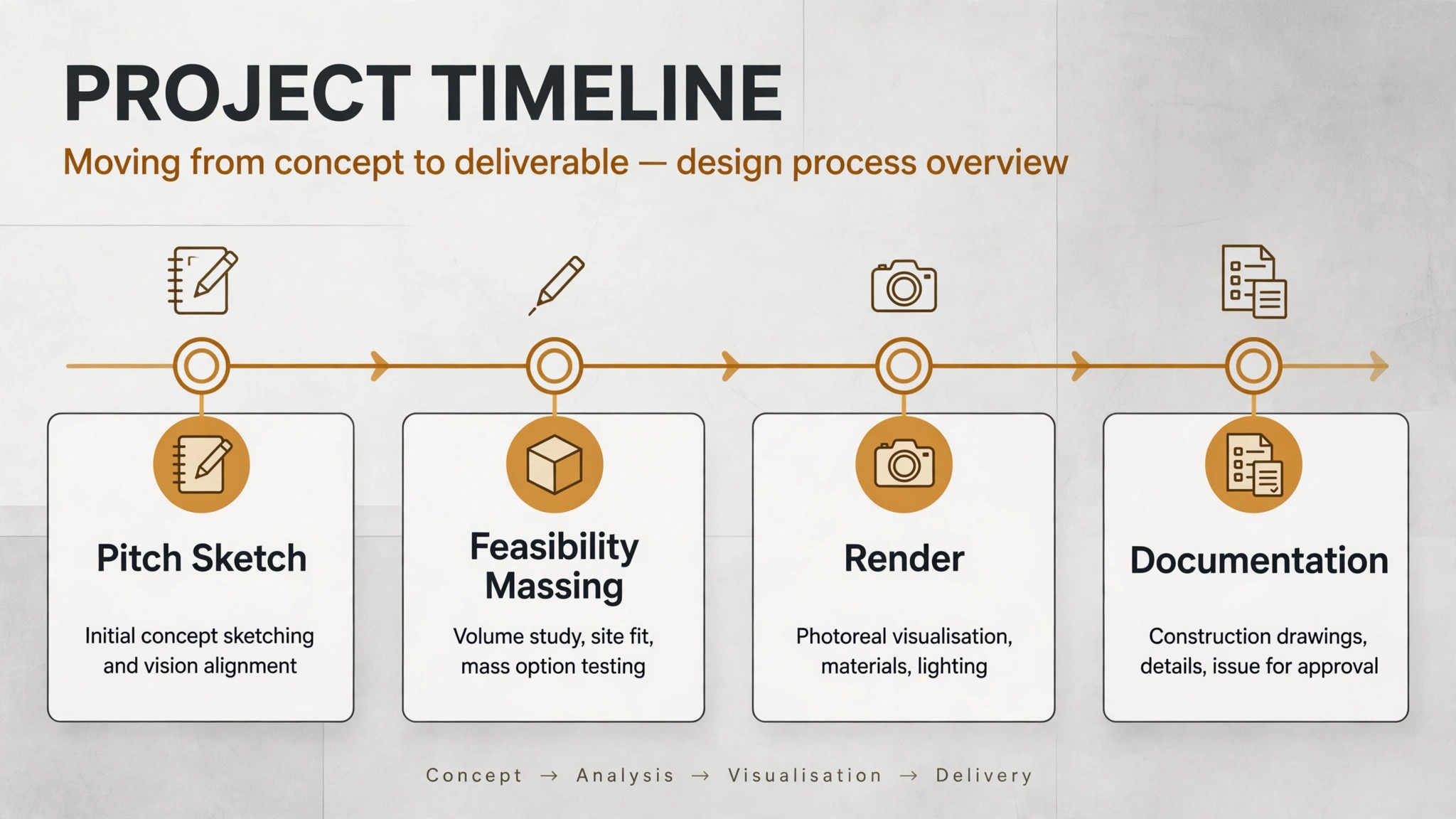
What We Tested Before Ranking the Best AI Tools for Architects
A tool earned a place here only if it does a real architecture job in 2026, not if it added an AI button to an old product. The best ai tools for architects were ranked on five things that decide whether a studio keeps paying after the trial.
First, the stage it serves, from concept imagery to feasibility to documentation, because a tool that serves one stage well beats a platform that serves five stages poorly. Second, whether the output respects the model, since a render that ignores your geometry is a mood board, not a design tool. Third, the starting price a small studio can actually buy, including whether a free plan covers commercial work or only learning. Fourth, where it fits in the stack, because a plugin that lives inside Revit saves more time than a browser tab that needs exports. Fifth, the catch, from credit limits that quietly cap renders to quote only pricing that hides the real cost.
| Check before you buy | What to ask | Why it matters |
|---|---|---|
| Model awareness | Does the render use your geometry | Model aware output stays true to the design |
| Credit model | What burns credits, and do they roll over | Credits that expire cap your render count |
| Commercial use | Does the free plan allow client work | Non commercial free tiers cannot bill a client |
| Host compatibility | Revit, SketchUp, Rhino, Archicad | A plugin for the wrong host is useless |
| Output rights | Who owns the image, and is it private | Client work needs private output |
| Contract terms | Annual only, or monthly available | Annual billing locks a studio in for a year |
The 12 Tools, Reviewed One by One
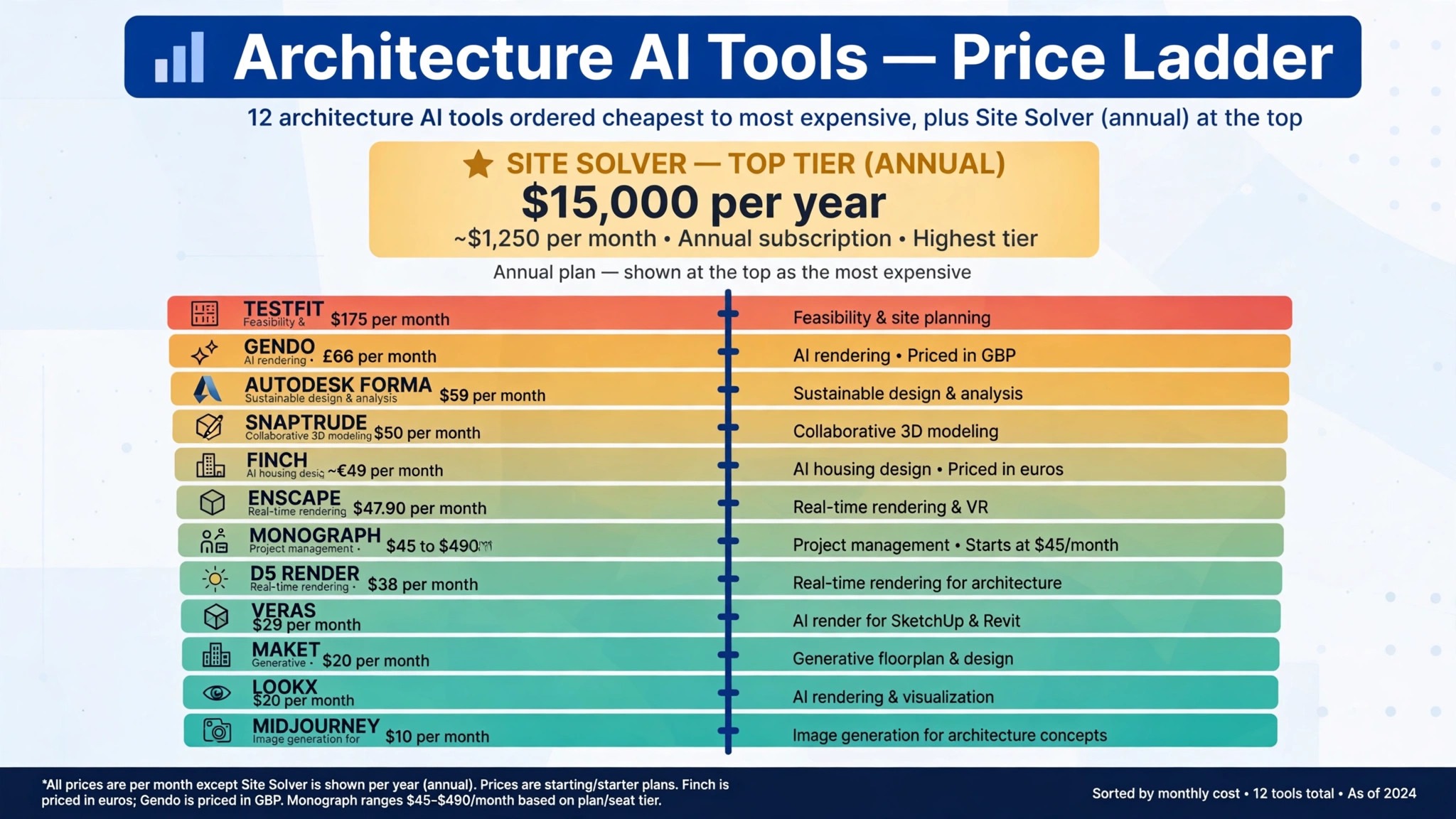
1. D5 Render
Starting price 38 dollars a month, or 360 dollars a year for Pro. Best for Real time rendering with AI built in. Watch out It is Windows focused, and team collaboration needs the Teams plan.
D5 Render is the best all round AI tool for most architecture practices, because it builds more than 15 AI features into a real time renderer that live syncs with SketchUp, Revit and Rhino. The Community plan is free for non commercial use, Pro costs 360 dollars a year, and the AI tools on Pro carry no per render credit cap, so a visualisation specialist can iterate without counting credits. User ratings back the position, with 4.8 from more than 1,000 reviews on G2.
The strength is the combination of speed and assets. Real time ray tracing, 16,000 plus assets, AI atmosphere matching and AI material generation sit in one license, and a scene can move from a grey model to a client ready still in a single session.
The catch is the platform. D5 Render is Windows focused, so a Mac only studio needs a different route, and multi editor collaboration needs Teams at 75 dollars a seat a month. D5 Render still earns the top spot for studios that want the most rendering for the least money.
2. Enscape
Starting price 47 dollars and 90 cents a month billed annually for Solo. Best for AI renders inside Revit and SketchUp. Watch out The AI credit allowance on Solo is only 100 credits a month.
Enscape is the better choice for practices that want generative AI inside their BIM or CAD tool, because every plan now includes Chaos Veras, which turns Revit, SketchUp, Rhino, Archicad and Vectorworks views into AI renders and video. Solo costs 47 dollars and 90 cents a month billed annually, Premium costs 55 dollars and 90 cents a month billed annually with five times the AI credits, and the Collection costs 60 dollars and 90 cents a month billed annually. It is rated 4.6 from more than 400 reviews on G2.
The advantage is the live walkthrough. A client can walk through the model while the architect changes materials in real time, and the AI render of that same view is one step away rather than an export to a second tool.
The catch is the credit cap. Solo includes 100 AI credits a month, which covers about five AI enhanced scenes, so a studio that leans hard on AI rendering will need Premium or the Collection. Enscape earns second place for studios that live inside their BIM tool and want AI where the design already lives.
3. Veras
Starting price 29 dollars a month billed annually for Pro. Best for Model aware AI rendering from your BIM model. Watch out The output is a design render, not photorealistic enough for as built documentation.
Veras, built by EvolveLAB and now part of Chaos, is the plugin for architects who want AI rendering that respects the model. It plugs into Revit, SketchUp, Rhino, Archicad, Vectorworks, Forma and Allplan, and it uses the model geometry as the base for diffusion rendering, so the walls, openings and massing in the render match the design rather than drifting into a pretty picture of a different building. Pro costs 29 dollars a month billed annually, and a 14 day trial lets a studio test it on a live project.
The value is iteration speed at the concept stage. An architect can test five material palettes or five lighting moods on the same view in the time a traditional render takes to set up once, and the client sees options rather than a single finished image. That speed changes the design conversation, because options arrive while the decision is still open.
The catch is realism limits. Veras renders are strong for concept and client presentations, and weaker for documentation where every detail must be exact. For the early stages of a project, it is the most direct AI rendering plugin on this list, and it pairs well with a full renderer for final output.
4. Midjourney
Starting price 10 dollars a month for Basic. Best for Concept images and mood boards. Watch out Companies with more than 1 million dollars a year in revenue must use Pro or Mega, and only those tiers keep images private.
Midjourney is the concept tool every studio reaches for first, because it turns a text prompt and a reference image into a mood board, a massing study or a facade exploration in minutes. Basic costs 10 dollars a month, Standard costs 30 dollars a month, Pro costs 60 dollars a month and Mega costs 120 dollars a month, with 20 percent less on annual billing. It is priced by fast GPU time rather than by image, so a studio that iterates heavily needs to watch the meter.
The strength is the sheer quality of the imagery for early thinking. A competition entry, a client pitch or a material study can start from a Midjourney board that sets the tone before a single line is modelled, and that tone then guides the whole design. No model aware tool matches it for pure visual exploration, because it is not constrained by geometry at all.
The catch is that freedom. Midjourney does not know your model, your site or your dimensions, so its images are inspiration rather than design, and the privacy rule matters for client work. Use it for the pitch and the mood, then move the approved direction into a model aware tool.
5. Autodesk Forma
Starting price 59 dollars a month for Site Design. Best for Site analysis and massing. Watch out Full standalone pricing requires a quote for larger deployments.
Autodesk Forma is the feasibility pick for Revit shops, because it moves a project from site analysis to massing to a Revit handoff without a manual file exchange. Site Design starts at 59 dollars a month with a 30 day trial, and Building Design launched in April 2026 is free for all Revit subscribers, letting architects set up a geolocated site, generate massing and unit mix options, run daylight and carbon checks and hand the result to Revit. That handoff is the point, since a feasibility study that dies in a separate tool has to be rebuilt.
The analysis depth is what justifies the price. Zoning, daylight, wind and carbon checks run against real site data, so a massing option is tested against the constraints that will actually decide whether it can be built.
The catch is the ecosystem. Forma is strongest inside the Autodesk world, and a studio that does not run Revit will get less from it. For a Revit practice, it is the fastest route from a site to a tested massing option, and the free Building Design tier makes the trial decision easy.
6. TestFit
Starting price 175 dollars a month billed annually for Parking Solver. Best for Developer yield and parking studies. Watch out Site Solver starts at 15,000 dollars a year, so the full product is priced for developer work.
TestFit is the specialist pick for site feasibility on developer led projects, because it generates site plans, unit mixes and parking layouts against real constraints in minutes. Parking Solver costs 175 dollars a month billed annually, and Site Solver starts at 15,000 dollars a year after a price rise in August 2026. It is rated 4.3 from 22 reviews on G2, a small sample that reflects its niche audience rather than its quality.
The value is yield. A developer wants to know how many units fit, how parking works and what the scheme earns, and TestFit answers those questions while the architect is still sketching.
The catch is the price jump. Parking Solver is affordable for a studio, Site Solver is priced for developers and large practices, so a small studio should confirm which tier its work actually needs. TestFit earns its place for any studio that does multifamily or developer feasibility on a regular basis.
7. Snaptrude
Starting price 50 dollars a month billed annually for Pro. Best for Brief to BIM concept design. Watch out The free plan covers only three projects, so active studios will need Pro.
Snaptrude takes a project from brief to program to BIM in one browser workspace, with an AI design agent that helps shape the concept before the model gets heavy. Pro costs 50 dollars a month billed annually, and the free plan covers three projects with no card required, which is enough to judge whether the workflow fits your studio. It sits at the feasibility and BIM stages at once, which is unusual on this list.
The strength is the early BIM output. A concept built in Snaptrude is not a sketch that has to be remodelled later, it is a model with program data that can move toward documentation. That continuity saves the rebuild step that kills momentum on so many projects, and it is why studios that do a lot of early stage work adopt it.
The catch is maturity. Snaptrude is younger than the Autodesk stack, so a studio that needs deep documentation tooling will still finish in Revit or Archicad. For the brief to concept stage, it is the most complete AI design agent on this list, and the free plan makes the test cost nothing.
8. Maket
Starting price 20 dollars a month for Homeowner, 100 dollars a month for Pro. Best for Floor plans from a conversation. Watch out Multi story projects are capped at four floors on Pro.
Maket is the cheapest way to generate real floor plans with AI, because it builds editable plans from a conversation rather than from a blank canvas. The free allowance covers 30 one time credits, Homeowner costs 20 dollars a month and Pro costs 100 dollars a month. A studio can describe the brief, get a plan, edit the rooms and export a working layout in a single session.
The value is residential volume. A practice that produces many residential plans can test layouts against zoning and room schedules far faster than by hand, and the conversational input lowers the barrier for junior staff to produce a first draft. That speed matters most on small projects where the fee does not cover a week of manual planning.
The catch is the ceiling. Four floors on Pro limits larger residential work, and a complex project will still need a full BIM tool to finish. For small residential plans and fast feasibility layouts, Maket earns its place as the lowest cost entry on this list.
9. Finch
Starting price Reported from about 49 euros a month for paid tiers. Best for Generative massing with real BIM output. Watch out Full generative AI requires a paid or Enterprise plan, and pricing is shown in local currency.
Finch 3D is the generative engine for studios that want massing options with real BIM output rather than images. It runs a true generative engine across Rhino, Revit and Grasshopper, producing massing and unit mix options that carry data forward instead of dying as pictures. The free tier covers manual work only, and paid tiers start from about 49 euros a month, with full generative AI behind the paywall.
The strength is the output. A Finch option is a model with areas, counts and relationships, so the architect can test it, change it and hand it on without rebuilding. That data rich output is what separates a generative design tool from a render tool, and it is why studios that do housing at scale take Finch seriously.
The catch is price clarity. The vendor shows prices in local currency and the full generative tier needs a paid or Enterprise plan, so a buyer should confirm the figure at checkout in their own currency. Finch earns its place for studios that generate massing at volume and need the output to survive into BIM.
10. LookX
Starting price 20 dollars a month for unlimited generations. Best for Unlimited cloud renders on a budget. Watch out It is a cloud render tool, not a BIM plugin, so the model stays outside it.
LookX is the budget pick for studios that want unlimited AI rendering without buying a GPU workstation. The paid plan costs 20 dollars a month, or 199 dollars a year, for unlimited image generations, and the free Basic plan starts with 100 points and no card required. It works from a sketch, text or reference image in the browser, so the laptop a studio already owns is enough.
The value is the flat rate. A studio that renders heavily can stop counting credits and stop worrying about the meter, and the cloud route means no hardware spend and no render queue on a local machine. For a small studio that needs many renders for client presentations, that flat rate is the cheapest way to keep the work flowing.
The catch is the workflow. LookX does not live inside a BIM tool, so the architect exports a view, renders it in the browser and brings the result back, which adds a step that D5 Render and Enscape avoid. For the price, it is the lowest unlimited option on this list, and it suits studios that render from sketches and photos as often as from models.
11. Gendo
Starting price 66 pounds a month billed annually. Best for Team rendering canvas. Watch out The free tier allows unlimited generations but the paid tier is priced in pounds, so confirm the converted cost.
Gendo is the team rendering pick, because it gives a whole studio one shared canvas for AI rendering rather than a render button inside one person’s model. The free tier allows unlimited generations, and the paid plan costs 66 pounds a month billed annually, which buys the team workspace, shared styles and commercial use. A studio can keep a consistent visual language across a project instead of each architect rendering in a different style.
The strength is consistency. Client presentations look like they came from one studio rather than five freelancers, because the canvas, the prompts and the styles are shared.
The catch is the currency and the positioning. The price is shown in pounds, so a studio outside the UK should confirm the converted figure, and Gendo is a rendering canvas rather than a full BIM renderer. For a studio that presents as a team and wants one visual voice, it earns its place.
12. Monograph
Starting price Calculator range of 45 to 490 dollars a month by firm size. Best for Running the practice. Watch out It is practice management, not a design tool, so it solves a different problem.
Monograph is the business pick for small and mid size practices, because it covers pipeline, time tracking, invoicing and capacity in one system built for architects. The pricing page shows a calculator range of 45 to 490 dollars a month depending on firm size, and a live demo is the way to confirm the figure for your team. It does not design anything, and that is the point, since the firm side of a practice is where profit leaks.
The value is visibility. A principal can see which projects are profitable, who is over capacity and which proposals are still open, without building a spreadsheet every Friday.
The catch is that Monograph names no AI on its product page as read in October 2026, so a buyer looking for AI features specifically should ask what is new. As a practice management tool for architects, it closes the list as the best way to run the business that pays for all the design tools above it.
Side by Side Comparison
The table below puts the best ai tools for architects side by side on price, best job and free option, so a studio can compare the published prices against the quote only tools before shortlisting.
| Tool | Starting price | Best for | Free option |
|---|---|---|---|
| D5 Render | 38 dollars a month, 360 dollars a year | Real time rendering with AI built in | Community, non commercial |
| Enscape | 47 dollars and 90 cents a month, annual | AI renders inside Revit and SketchUp | Trial only |
| Veras | 29 dollars a month, annual | Model aware AI rendering from your BIM model | 14 day trial |
| Midjourney | 10 dollars a month | Concept images and mood boards | No |
| Autodesk Forma | 59 dollars a month | Site analysis and massing | Building Design free for Revit users |
| TestFit | 175 dollars a month, annual | Developer yield and parking studies | Demo |
| Snaptrude | 50 dollars a month, annual | Brief to BIM concept design | Yes, 3 projects |
| Maket | 20 dollars a month | Floor plans from a conversation | 30 credits |
| Finch | About 49 euros a month | Generative massing with real BIM output | Manual only |
| LookX | 20 dollars a month | Unlimited cloud renders on a budget | Basic, 100 points |
| Gendo | 66 pounds a month, annual | Team rendering canvas | Yes, unlimited generations |
| Monograph | 45 to 490 dollars a month | Running the practice | Demo |
How to Pick the Right Tool for Your Studio
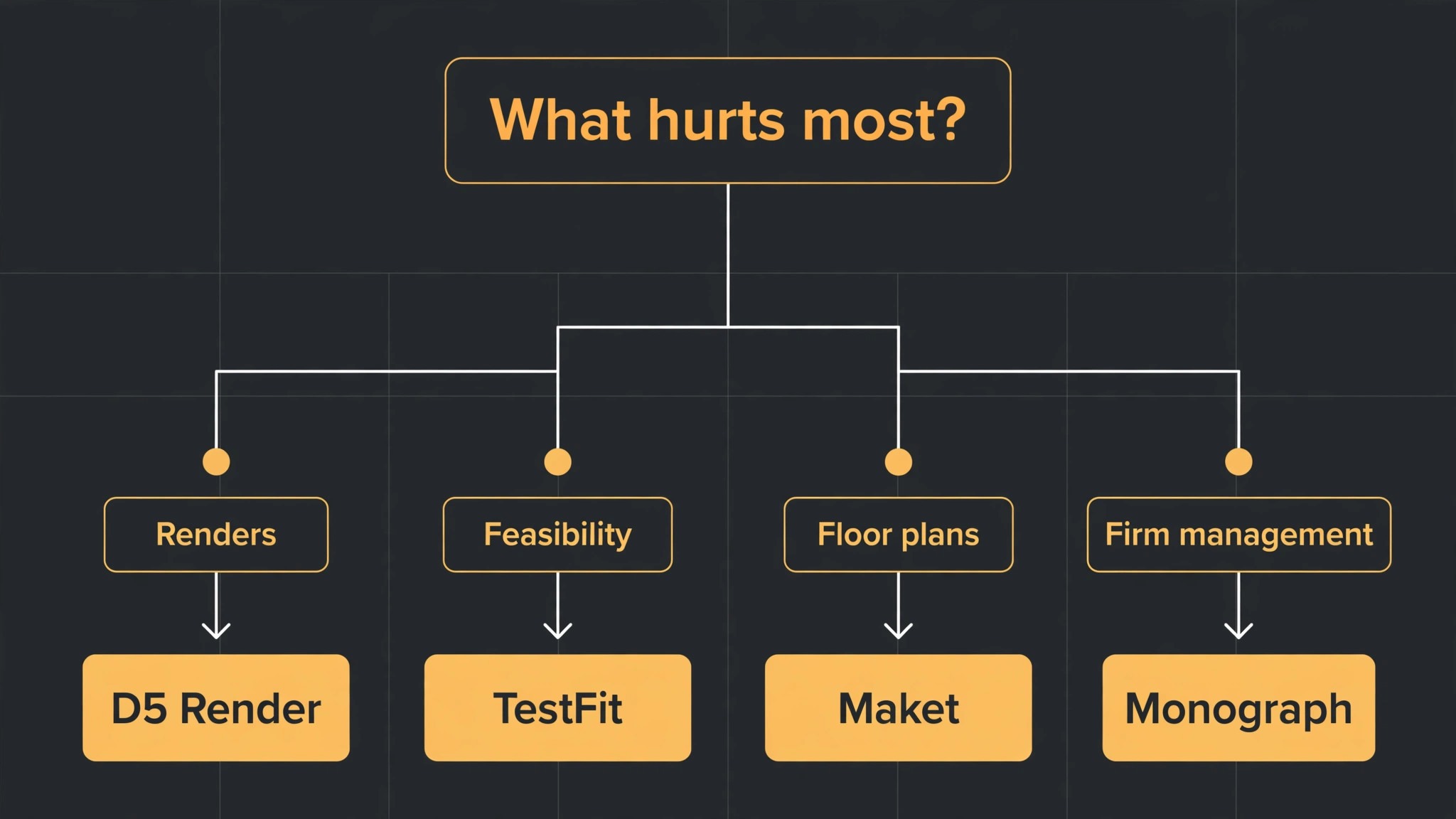
The best ai tools for architects are not the ones with the longest feature list. They are the ones that fix the stage where your studio loses the most time. A studio that cannot produce client ready renders should buy D5 Render or Enscape. A studio that loses days to feasibility should buy Forma or TestFit. A studio that needs floor plans fast should buy Maket or Snaptrude. A studio that cannot see its margins should buy Monograph. Start from the bottleneck, not from the vendor homepage.
Budget the full stack, not the headline seat price. The table below shows what a five person studio actually pays in year one for the most common combinations, using starting annual prices. Credits, platform fees and hardware are the lines that surprise buyers, so ask for them in writing before you sign.
| Stack for a five person studio | Yearly cost, annual billing | What it covers |
|---|---|---|
| D5 Render Pro, 5 seats | 1,800 dollars | Real time rendering with AI built in |
| Enscape Solo, 5 seats | 2,874 dollars | AI renders inside Revit and SketchUp |
| D5 Render plus Veras Pro | 708 dollars for one seat each | Rendering plus model aware AI renders |
| LookX plus Midjourney Basic | 360 dollars for one seat each | Unlimited renders plus concept imagery |
| TestFit Parking Solver | 2,100 dollars | Yield and parking studies for one seat |
Frequently Asked Questions
What is the cheapest good AI tool for an architecture studio
Midjourney Basic at 10 dollars a month is the cheapest paid entry, and it covers concept imagery and mood boards. D5 Render Community is free for non commercial use, and Pro at 360 dollars a year is the cheapest full renderer for billable work. LookX at 20 dollars a month for unlimited generations is the cheapest unlimited render route. The cheapest stack that actually works for a small studio is usually D5 Render Pro plus Midjourney Basic, which costs about 40 dollars a month for one seat.
Do AI renders replace the architect
No, and the studios that treat them as replacements get the worst results. AI replaces the repetitive rendering, massing and layout work that sits around designing, which is a large share of a junior architect week. The design judgment, the client relationship and the technical resolution still belong to a person.
Which tool is best for floor plans
Maket is the best single tool for most studios, because it generates editable floor plans from a conversation at a published price, with a free credit allowance to test. Snaptrude is better when the floor plan must become BIM without a rebuild, and Finch is better when the plan is part of a generative massing study at housing scale. Pick Maket if you want fast plans, Snaptrude if you want BIM continuity, and Finch if you need generative volume.
How much should a five person studio budget for AI tools
A realistic year one budget for the best ai tools for architects is 360 to 1,800 dollars for one or two rendering seats, and 2,100 dollars or more once you add a feasibility tool like TestFit Parking Solver. Credit based tools can push the bill higher in heavy render months, so set a monthly credit cap and review usage in the first 90 days. Quote only tools need a sales call to price, so budget a range and get the full stack figure in writing.
Our Verdict
If you buy one tool this quarter, buy D5 Render Pro. It covers the most of the visualisation job at a published price a small studio can afford, it carries no per render credit cap on Pro, and it is the fastest way to find out whether AI rendering works for your market. The best ai tools for architects earn their keep by giving architects design hours back, and D5 Render does that from the first week, without an enterprise contract or a hardware purchase beyond the GPU machines a studio already owns.
Whatever you pick, start with the bottleneck, trial with a live project, and keep a human in the loop on client facing images for the first month. The tools on this list all work. The difference is whether the tool matches the stage your studio actually needs help with, and whether you measure the return in options tested and presentations won rather than in features used.