
If you plan weddings for a living, the honest answer is that you need two things. A planning platform that holds the timeline, the budget and the vendor list in one place, and a general AI assistant for the writing. Everything else is a bonus. The best ai tools for wedding planners do exactly that, and the planners who adopted them early now spend their weeks on design and client care instead of chasing RSVPs and rewriting the same vendor email for the tenth time.
This guide compares the best ai tools for wedding planners on real prices, the job each one does best and the catch that only shows up after the trial. Prices come from vendor pricing pages and independent roundups checked in November 2026, and where a vendor sells by quote only, this guide says so instead of guessing. Start with the shortlist table, then read the reviews that match your practice size and your biggest weekly headache.
The Quick Shortlist
The table below matches each common planning job to the single tool that handles it best. Use it to narrow the best ai tools for wedding planners to two or three candidates before you read the full reviews. Prices are monthly list prices unless noted, and annual billing is usually cheaper than paying month to month.
| Job | Best tool | Why it wins |
|---|---|---|
| All in one wedding planning | Aisle Planner | Timelines, vendors, budgets and seating in one login, from 29 dollars a month |
| Client experience and contracts | HoneyBook | Polished proposals and AI drafted replies, from 39 dollars a month |
| Full service studio operations | Ayyla | AI through the whole event workflow, Solo from 75 dollars a month |
| AI generated timelines and budgets | Ripluo | Its Buildr assistant drafts schedules and budgets for you |
| Custom workflows and flexibility | Dubsado | Deep workflow control for planners who do weddings and corporate, from 35 dollars a month |
| Invitations, mood boards and signage | Canva | Fast visual design with AI built in, Pro from 13 dollars a month |
| Proposals, emails and run of show drafts | ChatGPT | The general assistant for every writing job, Plus from 20 dollars a month |
| Client call notes and action items | Otter.ai | Records and summarizes every planning call, Pro from around 17 dollars a month |
| Floor plans and seating layouts | Prismm | Serious layout tools for complex venues, quote only |
| Planning notes and shared knowledge | Notion AI | One workspace for every wedding, Business from 20 dollars a user a month |
What We Looked For in the Best AI Tools for Wedding Planners
A tool earned a place here only if it does a real planning job in 2026, not if it added an AI button to an old product. The best ai tools for wedding planners prove their value in the first wedding, not in a demo. We judged each one on five things that decide whether a planner keeps paying after the trial.
First, the job it does, from building a timeline to drafting a vendor email to laying out a floor plan, because a tool that does one job well beats a platform that does five jobs poorly. Second, the starting price a solo planner can actually buy, including whether a free plan exists and what the paid plan really includes.
Third, where it fits in the practice, because a tool that lives inside your planning platform saves more time than one that needs a new tab and a new login. Fourth, the quality of its AI output, from timelines that respect real vendor lead times to emails that sound like you wrote them. Fifth, the catch, from per event pricing that quietly grows with your calendar to quote only pricing that hides the real cost until the sales call.
| Check before you buy | What to ask | Why it matters |
|---|---|---|
| Per event or per seat pricing | Does the bill grow with every wedding you book | Stops a 29 dollar plan becoming a 200 dollar plan |
| Client portal | Can couples see the timeline and pay from one link | A clumsy portal means more emails, not fewer |
| Vendor communication | Does it track replies, or just send them | Untracked emails mean follow up slips |
| AI accuracy | Who reviews AI drafts before they go to a couple | A wrong date in a vendor email costs real money |
| Free plan limits | How many weddings, projects or minutes before you pay | Tells you if the trial is a real test |
| Export and exit | Can you take your timelines and client data with you | Lock in hurts when you outgrow a tool |
The 10 Tools, Reviewed One by One
1. Aisle Planner
Starting price From 29 dollars a month. Best for All in one wedding planning. Watch out AI features are lighter than on the newer AI first platforms, so pair it with a general assistant for heavy writing.
Aisle Planner is the go to for wedding professionals who want structured, template driven project management, and it understands wedding workflows in a way generic tools never will. Timelines, vendor management, guest lists, budgets, design inspiration and seating arrangements all live in one workspace, so a planner stops juggling a spreadsheet, a notes app and an email thread for every wedding. The platform has folded AI features into that structure, helping with planning suggestions and drafting.
The strength is the structure. A new planner can take the templates and run a wedding professionally from the first booking, and an experienced planner can standardize the workflow across a team so nothing depends on one person’s memory. The client portal is unlimited, so couples can see their timeline and checklist without the planner forwarding documents.
The catch is that the AI is an assistant inside a planning platform, not the headline. It will not write your proposals or run your vendor outreach the way a dedicated AI agent might. At 29 dollars a month, it is the cheapest full planning platform on this list. Buy it when you want one solid system for the whole wedding, and add ChatGPT for the writing. For a planner running her first season, that combination is the cheapest way to look professional from day one.
2. HoneyBook
Starting price From 39 dollars a month. Best for Client experience and contracts. Watch out The AI features sit on Essentials plans and above, so the cheapest tier does not include them.
HoneyBook is the most polished platform in this category from a branding and client experience perspective, and it is the pick for solo planners who win work on presentation. Proposals, contracts, invoices and questionnaires all carry your brand, and HoneyBook AI drafts emails and automates the administrative tasks that eat a solo planner’s evenings. A couple signs the contract, pays the deposit and fills in the questionnaire from one branded link.
The strength is the client journey. From the first inquiry to the final payment, the couple experiences one smooth flow instead of a chain of separate tools. That polish wins bookings, especially with couples comparing two or three planners at once. The AI drafting is genuinely useful for the repetitive replies, like confirming a tasting or chasing a questionnaire.
The catch is the price ladder. The AI features need an Essentials plan or above, and the fuller AI suite sits higher still, so the real cost is more than the headline 39 dollars a month. HoneyBook is also a business platform for creatives generally, not a wedding only tool, so its timeline and seating features are lighter than Aisle Planner’s. Buy it when the client experience is your selling point, and pair it with a dedicated planning tool for complex weddings.
3. Ayyla
Starting price Solo 75 dollars a month. Studio 120 dollars a month. Agency 199 dollars a month. Best for Full service studio operations. Watch out The Solo price is high for a planner running two weddings a year, so measure it against your booking volume.
Ayyla is built from the ground up for professional wedding planners and studios, not adapted from a generic CRM, and it is the most complete AI operating system for event planners on this list. The platform combines event management, client portals, supplier coordination, contract management and financial tracking in a single workspace, with AI automation woven through it rather than bolted on. A studio running ten weddings a season can see every event, every vendor and every payment in one place.
The strength is the depth. Where other tools handle one part of the job, Ayyla runs the whole operation, and the AI helps across it, from drafting supplier messages to flagging budget overruns before the couple notices. The 14 day free trial needs no credit card, so a studio can test it on a live wedding before committing.
The catch is the price. At 75 dollars a month for Solo, it costs more than Aisle Planner or HoneyBook, and a planner with a light calendar will not use enough of it to justify the spend. Ayyla earns its place for full service studios and multi planner teams, where the time saved across several people pays the bill many times over.
4. Ripluo
Starting price 0.5 percent payment processing fee model. Best for AI generated timelines and budgets. Watch out The fee model means the cost scales with your revenue, so do the math on a big wedding before you commit.
Ripluo has built its identity around its AI assistant, Buildr, which automates the generation of event schedules and budgets. Tell it the wedding details and it drafts a timeline and a budget that a planner can refine, instead of starting from a blank spreadsheet every time. For a planner who takes on a wedding with a short runway, that head start is worth real money.
The strength is the AI itself. Buildr is the most genuinely AI first feature among the planning platforms here, and it handles the two documents every wedding needs first. The pricing model is also unusual, a 0.5 percent payment processing fee instead of a flat monthly subscription, which keeps the fixed cost at zero for a planner between bookings.
The catch is that a percentage fee grows with every payment you process, and on a large wedding that can exceed a flat subscription. Ripluo is also younger and narrower than Aisle Planner or HoneyBook, so its client portal and contract features are limited. Buy it when you want AI generated schedules and budgets above all else, and check the fee math against your average wedding value first.
5. Dubsado
Starting price From 35 dollars a month. Best for Custom workflows and flexibility. Watch out The flexibility takes setup time, so expect a weekend of building before it feels effortless.
Dubsado is the customization pick for planners who do both weddings and corporate events, because it does not force you into wedding only workflows. Its workflow engine lets a planner build exactly the sequence they want, from inquiry to contract to final payment, with automated emails, forms and reminders at every step. A planner who runs a distinctive process can encode it once and let Dubsado repeat it perfectly for every couple.
The strength is control. Where HoneyBook gives you a polished path, Dubsado gives you the pieces to build your own, and that matters for planners whose service is unusual or whose clients expect something bespoke. The client portal is included, and the forms and questionnaires are among the most flexible in the category.
The catch is the learning curve. Dubsado rewards a planner who enjoys building systems and punishes one who wants to open the app and start working. AI features are also limited compared with the newer platforms, so pair it with ChatGPT for drafting. At 35 dollars a month, it is a fair price for the depth, and it suits planners who treat their workflow as a craft.
6. Canva
Starting price Pro from 13 dollars a month. Free tier available. Best for Invitations, mood boards and signage. Watch out It is a design tool, not a planning platform, so it will not track your timeline or your vendors.
Canva is the workhorse for wedding visuals, and its 2026 AI features make it the fastest path from an idea to a finished invitation, mood board, seating card or social graphic. Magic Design generates complete layouts from a description, Magic Eraser cleans up photos, and the brand kit keeps every piece consistent across a wedding. A planner can mock up a tablescape concept for a couple in an afternoon instead of waiting a week for a designer.
The strength is speed and price. The free tier is genuinely useful, and Pro at 13 dollars a month unlocks the brand kit and the heavier AI tools. For a planner who presents design concepts to couples, Canva turns a vague idea into something the couple can react to, which shortens the decision cycle on florals, signage and stationery.
The catch is scope. Canva does not plan weddings. It designs the pieces around them, and a planner who buys it expecting project management will be disappointed. It is also worth proofreading every AI generated piece before it goes to a client, because a misspelled name on a seating card is the kind of error a couple never forgets. Pair it with Aisle Planner or HoneyBook and it covers the visual half of the job.
7. ChatGPT
Starting price Plus 20 dollars a month. Free tier available. Best for Proposals, emails and run of show drafts. Watch out It does not know your vendors, your margins or your contracts unless you tell it.
ChatGPT is the general assistant that handles the writing job every planner does daily, from proposals and vendor emails to run of show drafts and client updates. A planner can paste in a vendor’s reply and get a polished response in the planner’s own tone, or turn a rough set of notes into a structured timeline document. For a solo planner, it is the closest thing to a junior assistant that costs 20 dollars a month.
The strength is the paid tier. The Plus plan gives longer context and the better model, which matters when you are pasting in a long brief and want the model to hold the whole event in its head. The free tier is usable, but the paid plan is worth it for event work, because you will be pasting in long vendor lists and floor plans.
The catch is the honest limitation. The model does not know your vendors, your margins or your contracts unless you tell it, and it will invent a plausible vendor name or price if you are not specific. Keep a human review step on anything a couple or a vendor will read, and build a small library of your real vendor details to paste in. Used that way, it is the best value on this list.
8. Otter.ai
Starting price Pro from around 17 dollars a month, or around 8 dollars a month on annual billing. Free tier covers 300 minutes a month. Best for Client call notes and action items. Watch out Accuracy drops on calls with heavy accents or background noise, so check the summary before it goes to a client.
Otter.ai records and transcribes client calls, then gives you a searchable record and an AI summary with action items. A planner who takes a ninety minute design call with a couple no longer has to scribble notes and hope she captured the floral brief correctly. The summary lands in the inbox with the decisions, the open questions and the deadlines, ready to paste into the planning platform.
The strength is the paper trail. Wedding planning runs on verbal decisions, and a searchable transcript settles the argument about whether the couple chose blush or burgundy. The free tier covers 300 minutes a month, which is enough for a planner with a light calendar to test it on real calls.
The catch is that the free tier limits are real, and a busy planner will need Pro. Transcription is also good but not perfect, so a planner should still check the summary before it becomes the official record. For the price, Otter.ai is the best call memory for a planner whose work happens on the phone, and it pairs well with any planning platform on this list.
9. Prismm
Starting price Quote only. Best for Floor plans and seating layouts. Watch out Enterprise pricing means a solo planner should ask for the price before investing time in a trial.
Prismm, formerly AllSeated and now part of Cvent, is the serious layout tool for planners who work complex venues. It builds to scale floor plans, places tables and seating, and lets couples and vendors see the room before the day. A planner laying out a 300 guest reception with a dance floor, a stage and three bars needs a real layout tool, not a sketch on graph paper.
The strength is the visual sell. A couple who sees their reception laid out in 3D approves the plan faster and changes their mind less often, which saves the planner the revision rounds that eat a week. Vendors also work better from a shared layout, because the florist, the lighting team and the caterer all see the same room.
The catch is the price. Prismm is quote only and sits in the enterprise bracket, which puts it out of reach for many solo planners. It earns its place for planners who handle large or complex events regularly, and for those planners it is the only tool here that does the job properly. A solo planner with small weddings should use Canva or a simple seating tool instead.
10. Notion AI
Starting price Business 20 dollars a user a month billed annually. Best for Planning notes and shared knowledge. Watch out It is a workspace, not a wedding platform, so it will not send contracts or track payments.
Notion is a workspace platform combining note taking, databases, timelines and project management, and Notion AI adds automatic summarization, writing assistance and smart database features. A planner can build a wedding database with every couple, vendor, budget line and deadline in one place, and the AI helps draft the documents and summarize the meeting notes that feed it.
The strength is flexibility. A planner who likes to design her own system can build a wedding operating system in Notion that fits exactly how she works, and the AI agents can search across the whole workspace to answer questions like which vendors are still unpaid for the June wedding. Business at 20 dollars a user a month billed annually includes the full AI access.
The catch is that Notion is a blank page with powerful tools, and building a good wedding system takes real setup time. It also has no contracts, no payments and no client portal, so it cannot replace HoneyBook or Aisle Planner on its own. Buy it when you want one shared brain for your practice, and pair it with a platform that handles the money.
Side by Side Comparison
| Tool | Starting price | Best for | Free plan |
|---|---|---|---|
| Aisle Planner | From 29 dollars a month | All in one wedding planning | Yes |
| HoneyBook | From 39 dollars a month | Client experience and contracts | No |
| Ayyla | Solo 75 dollars a month | Full service studio operations | Trial only |
| Ripluo | 0.5 percent payment processing fee | AI generated timelines and budgets | No |
| Dubsado | From 35 dollars a month | Custom workflows and flexibility | Trial only |
| Canva | Pro from 13 dollars a month | Invitations, mood boards and signage | Yes |
| ChatGPT | Plus 20 dollars a month | Proposals, emails and run of show drafts | Yes |
| Otter.ai | Pro from around 17 dollars a month | Client call notes and action items | Yes |
| Prismm | Quote only | Floor plans and seating layouts | No |
| Notion AI | Business 20 dollars a user a month | Planning notes and shared knowledge | Yes |
Picking the Right Tool for Your Practice
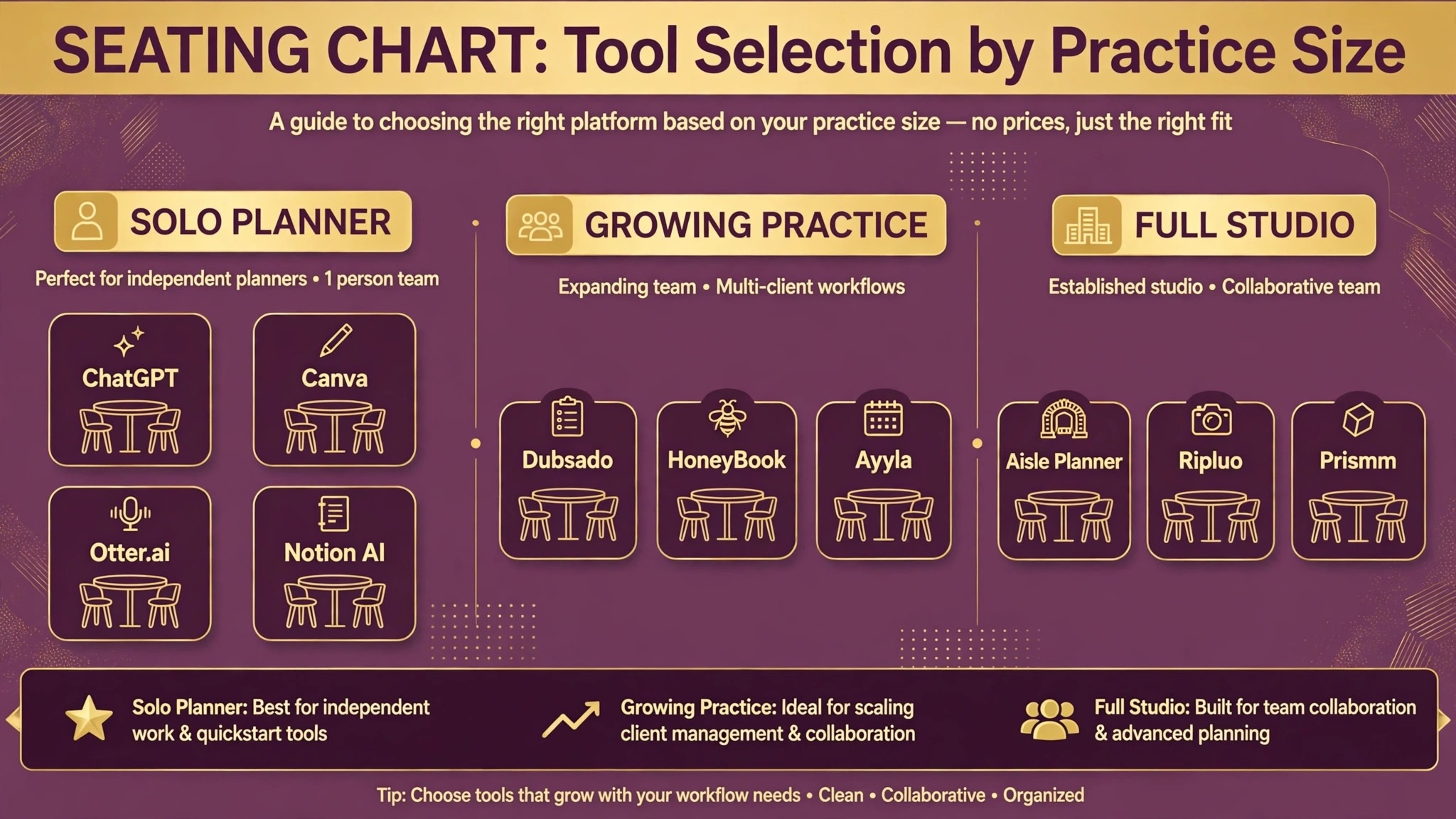
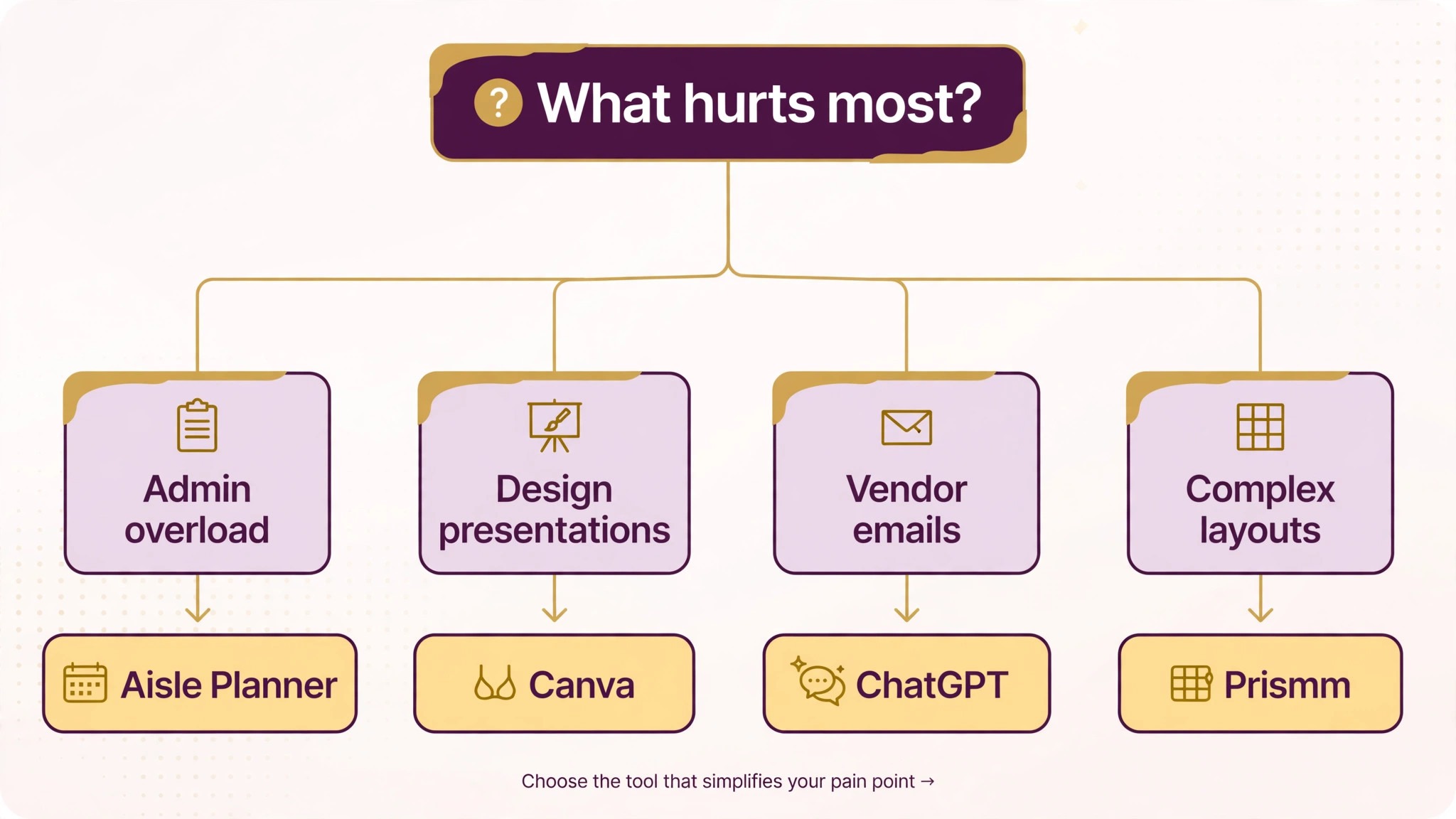
The best ai tools for wedding planners are not the ones with the longest feature list. They are the ones that fix the bottleneck your practice feels every week. A planner who loses hours to admin should buy Aisle Planner or HoneyBook. A planner who struggles with design presentations should buy Canva. A planner who cannot keep up with vendor emails should buy ChatGPT and Otter.ai. A planner who runs a studio with several weddings a season should buy Ayyla. Start from the bottleneck, not from the vendor homepage. The best ai tools for wedding planners are the ones your couples never notice, because the wedding simply runs on plan.
Budget the full stack, not the headline price. The table below shows what a solo planner and a small studio actually pay in year one for the most common combinations, using starting prices. Per event fees and higher tier AI features are the lines that surprise buyers, so ask for them in writing before you sign.
| Stack for a planner | Monthly cost | What it covers |
|---|---|---|
| Aisle Planner plus ChatGPT Plus | 49 dollars | Planning plus all the writing |
| HoneyBook plus Canva Pro | 52 dollars | Client experience plus visuals |
| Aisle Planner plus Canva Pro plus Otter.ai Pro | 59 dollars | Planning, visuals and call notes |
| Ayyla Solo plus ChatGPT Plus | 95 dollars | Studio operations plus writing |
| Dubsado plus Canva Pro | 48 dollars | Custom workflows plus visuals |
| HoneyBook plus Notion AI Business | 59 dollars | Client flow plus shared knowledge |
Frequently Asked Questions
What is the cheapest good AI tool for a wedding planner
Canva Pro from 13 dollars a month is the cheapest paid entry with a real free tier behind it, and ChatGPT Plus at 20 dollars a month covers the most writing work in one login. Aisle Planner from 29 dollars a month is the cheapest full planning platform. The cheapest stack that actually works is usually Aisle Planner for the planning plus ChatGPT for the writing, which costs less than 50 dollars a month for a solo planner.
Do AI tools replace wedding planners
No, and the planners who treat them as replacements get the worst results. AI replaces the drafting, chasing, logging and scheduling work that sits around planning, which is roughly a third of a planner’s week. The design judgment, the vendor relationships and the calm on the wedding day still belong to a person. Buy AI to give yourself more hours with couples and vendors, not to cut corners, and measure the return in weddings delivered smoothly rather than in subscriptions saved.
Which tool is best for wedding timelines and budgets
Aisle Planner is the best single tool for most planners, because it holds timelines, budgets, vendors and seating in one structured system. Ripluo is better when you want AI to draft the timeline and budget for you from the wedding details. Ayyla is better when you run a studio with several weddings at once. Pick Aisle Planner if you want one solid system, Ripluo if you want AI generated drafts, and Ayyla if you need studio operations.
How much should a solo planner budget for AI tools
A realistic year one budget for the best ai tools for wedding planners is 50 to 100 dollars a month for a solo planner using self serve tools, and 150 dollars a month or more once you add a studio platform like Ayyla or a layout tool like Prismm. Per event fees can push the bill higher in a busy season, so check whether the price scales with weddings booked and review usage after your first full season. Quote only tools need a sales call to price, so budget a range and get the fee in writing.
Can AI write vendor emails that sound like me
Yes, if you give it your voice to copy. Paste three or four of your best vendor emails into ChatGPT and ask it to match the tone, then review every draft before it goes out. The drafts will be close, but the details still need your eye, especially dates, times and prices. Never let an AI email go to a vendor without checking the numbers, because a wrong load in time in a vendor email costs real money on the day.
The Bottom Line
If you buy one tool this quarter, buy Aisle Planner. It holds the whole wedding in one place at a price a solo planner can afford, and it is the fastest way to find out whether a structured planning system works for your practice. The best ai tools for wedding planners earn their keep by giving you your evenings back, and Aisle Planner does that from the first wedding, without an enterprise contract or a migration project.
Whatever you pick, start with the bottleneck, trial with a real wedding, and keep a human in the loop on anything a couple or a vendor will read for the first month. The best ai tools for wedding planners on this list all work. The difference is whether the tool matches the job your practice actually needs done, and whether you measure the return in smooth weddings and happy couples rather than in features used.