
The short answer is that there is no single best tool for every team, but there is a clear best pick for most teams, and this guide names it early so you can stop guessing. The rest of the list exists because the best pick for most teams is not the best pick for yours, and the differences matter once the work starts. That is the question this guide answers for best business phone systems for small business, with every tool tested against real work rather than a sales page.
What follows is a full comparison, with every tool judged on the same points. Price, features, fit and drawbacks are stated plainly, so you can see why the top pick leads and when a lower ranked tool is actually the smarter buy for your situation.
Read the best pick table first if you are short on time. It matches each common job to the tool that handles it best. Then read the full entries for the two or three tools that fit your situation, and skip the rest. A good shortlist saves more time than a long review.
The best pick by job
Start here if you are short on time. The table below matches the most common jobs to the tool that handles each one best, so you can find your fit without reading every entry. The best business phone systems for small business in this table were ranked on the core job first, then on price and ease of use.
| Job | Best tool |
|---|---|
| Growing businesses that want the broadest integrations | RingCentral |
| Teams that want strong live support and reliability | Nextiva |
| Teams that want AI transcription on every call | Dialpad |
| Teams already using Zoom for meetings | Zoom Phone |
| Google Workspace teams that need a simple business line | Google Voice |
| Solo owners who need a professional number | Grasshopper |
| Offices that want desk phones without a contract | Ooma |
| Sales teams that need outbound dialing and CRM sync | CloudTalk |
If your job is not in the table, read the full entries for the two tools closest to your situation. The comparison table later in this guide covers price and best fit for every tool, so a quick scan there will narrow the list to two or three names.
What the best business phone systems for small business do differently
The phone system is the first impression many customers get. A missed call is a lost sale more often than a slow website is. Start by counting how your team actually works, which means how many people answer calls, whether they work from a desk or a phone, and how often a customer texts instead of calling. The answers point to the right tier.
Check the number porting process before you sign. Moving an existing business number should take days, not weeks, and the provider should handle the paperwork. A provider that is vague about porting will be vague about support later too.
Test the mobile app in a real call, not just in a demo. The app is where most small teams live now, and a clumsy app means missed calls and muddled voicemail. Make a call from a noisy street, take a call on wifi, and send a business text. If any of those feel awkward, the tool will frustrate the team daily.
Read the plan limits for texting, minutes and users. Some plans cap SMS messages, some charge extra for toll free minutes, and some limit the number of users on the entry tier. The cheapest plan on the page can turn expensive once the team uses it in earnest.
The best business phone systems for small business in this guide were judged on real daily work, not on a demo. Price, fit, and the quality of the core job mattered more than the length of the feature list.
Side by side comparison
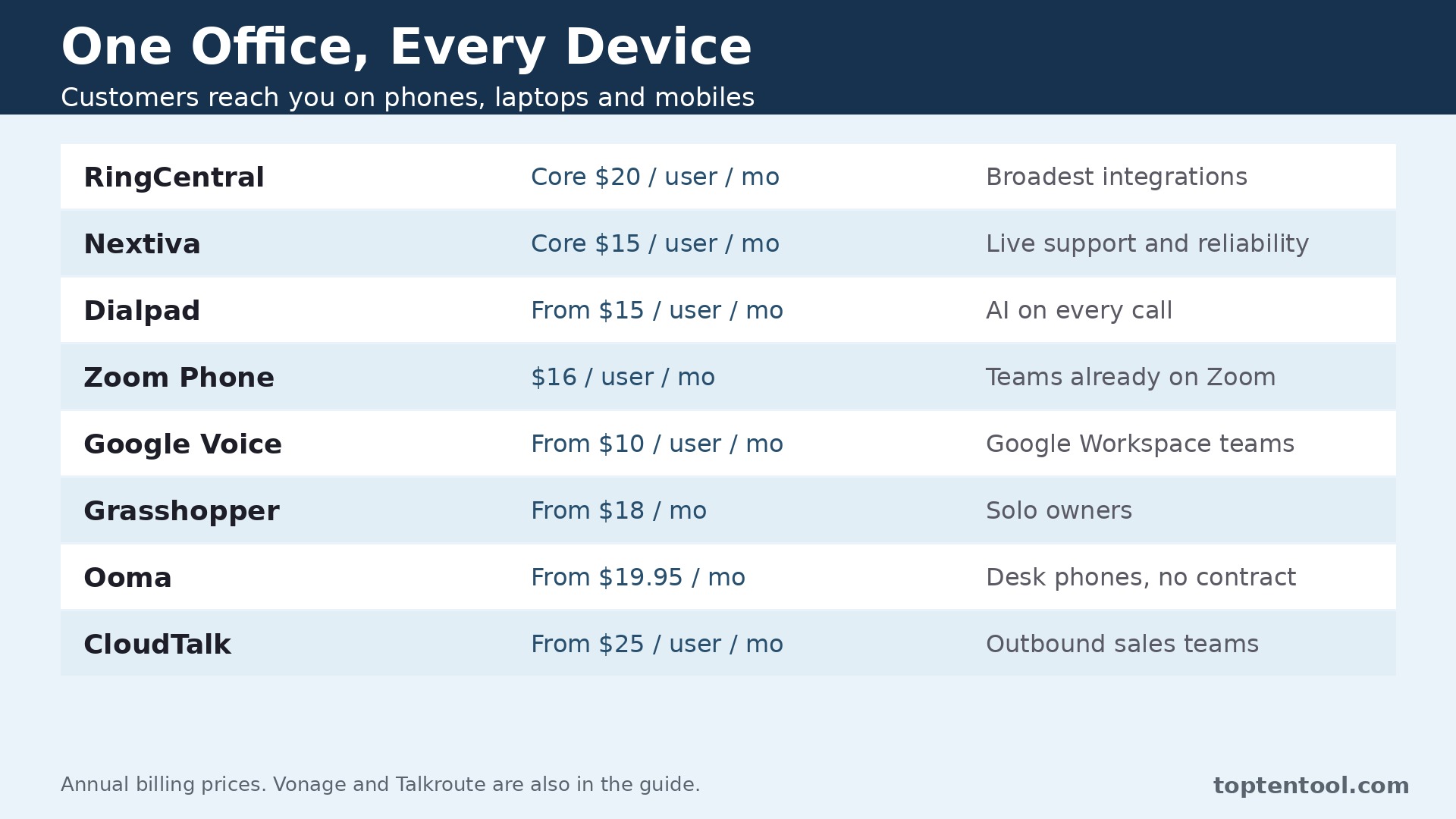
The table below puts price and best fit side by side, so the trade offs are easy to see. The best business phone systems for small business that look cheapest on the first line are not always cheapest in real use, since shipment caps, per user fees and add ons change the total. Read the price column together with the best fit column before you rank the tools.
| Tool | Starting price | Best for |
|---|---|---|
| RingCentral | Core 20 dollars per user per month annual | Broadest integrations |
| Nextiva | Core 15 dollars per user per month annual | Live support and reliability |
| Dialpad | From 15 dollars per user per month annual | AI on every call |
| Zoom Phone | Unlimited 16 dollars per user per month annual | Teams already on Zoom |
| Google Voice | From 10 dollars per user per month | Google Workspace teams |
| Grasshopper | From 18 dollars per month | Solo owners |
| Ooma | From 19.95 dollars per month | Desk phones, no contract |
| CloudTalk | From 25 dollars per user per month | Outbound sales teams |
The tools in detail
1. RingCentral
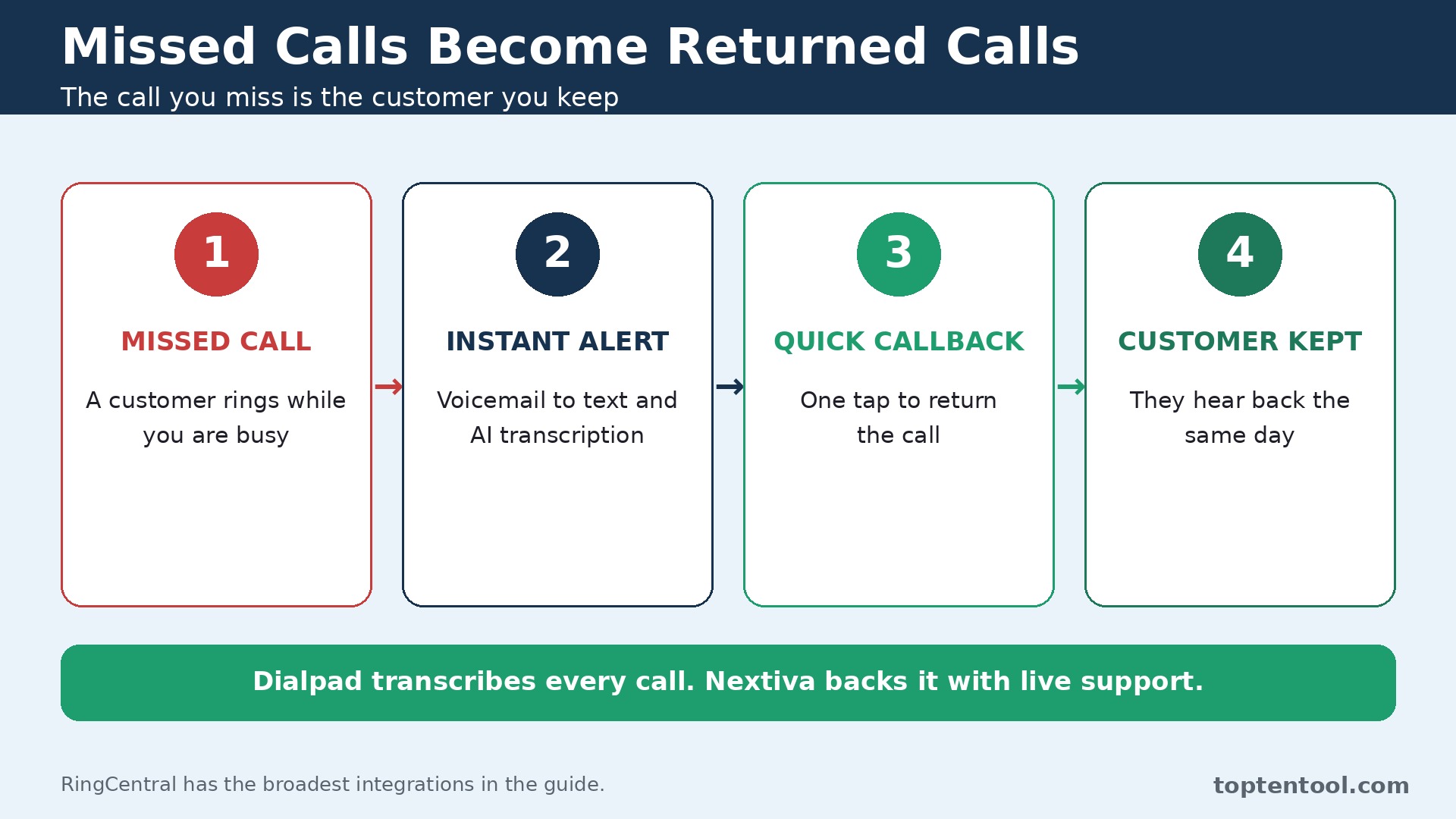
RingCentral is built for growing businesses that want the broadest integrations. Voice, video, team messaging and fax live in one platform with more than 200 integrations. Auto attendants, call queues and analytics scale from a small team to a large one.
The mobile app keeps business calls separate from personal calls on any phone. Pricing is Core from 20 dollars per user per month billed annually, 30 dollars monthly. Check what the entry plan leaves out, since the feature your team needs most is often one tier higher.
RingCentral fits growing businesses that want the broadest integrations best. The depth that makes it strong also makes it heavier than a small team needs, and the best features sit on higher tiers.
2. Nextiva
Nextiva is built for teams that want strong live support and reliability. Unlimited calling, SMS, video and team chat come together on the Core plan. US based support answers fast, which matters when the phones stop working.
Call routing, voicemail transcription and team chat cover the daily needs of a small office. Pricing is Core from 15 dollars per user per month on annual terms, 23 dollars monthly. Check what the entry plan leaves out, since the feature your team needs most is often one tier higher.
Nextiva fits teams that want strong live support and reliability best. There is no free trial, only a demo, and the jump to the Engage plan is steep.
3. Dialpad
Dialpad is built for teams that want AI transcription on every call. AI transcribes and summarizes calls without an add on, so follow ups are faster. Voice, video, messaging and contact center features share one interface.
Real time coaching prompts help newer team members handle calls well. Pricing is From 15 dollars per user per month billed annually. Check what the entry plan leaves out, since the feature your team needs most is often one tier higher.
Dialpad fits teams that want AI transcription on every call best. The entry plan is light on integrations, and some advanced AI features need a higher tier.
4. Zoom Phone
Zoom Phone is built for teams already using Zoom for meetings. Calls, meetings and chat share one app, so the team learns one tool. Number porting and admin controls are straightforward for a small IT setup.
Call quality is strong and the mobile app is reliable. Pricing is US and Canada Unlimited from 16 dollars per user per month billed annually. Check what the entry plan leaves out, since the feature your team needs most is often one tier higher.
Zoom Phone fits teams already using Zoom for meetings best. It works best inside the Zoom world, so teams on other meeting tools get less value.
5. Google Voice
Google Voice is built for Google Workspace teams that need a simple business line. A business number rings on any device with no desk hardware needed. Voicemail transcription and call screening keep spam calls down.
Setup is fast for a team already in Google Workspace. Pricing is From 10 dollars per user per month, Workspace billed separately. Check what the entry plan leaves out, since the feature your team needs most is often one tier higher.
Google Voice fits Google Workspace teams that need a simple business line best. Features are lighter than a full phone system, with no advanced call center tools.
6. Grasshopper
Grasshopper is built for solo owners who need a professional number. One number forwards to personal phones, so the business sounds established from day one. Extensions and a virtual receptionist give a small business a larger feel.
Texting and voicemail are included without extra hardware. Pricing is From 18 dollars per month. Check what the entry plan leaves out, since the feature your team needs most is often one tier higher.
Grasshopper fits solo owners who need a professional number best. There is no video meeting or team chat, so it is a phone line rather than a full system.
7. Ooma
Ooma is built for offices that want desk phones without a contract. Desk phones work out of the box with no long contract. Virtual receptionist, call blocking and voicemail to email cover the basics well.
The mobile app lets the team take business calls away from the desk. Pricing is From 19.95 dollars per month. Check what the entry plan leaves out, since the feature your team needs most is often one tier higher.
Ooma fits offices that want desk phones without a contract best. Advanced features and larger teams need higher plans, and the interface feels dated next to newer apps.
8. CloudTalk
CloudTalk is built for sales teams that need outbound dialing and CRM sync. Power Dialer and Parallel Dialer speed up outbound calling. Native CRM sync keeps call notes and records in step with the sales pipeline.
Coverage spans more than 160 countries, which suits teams calling abroad. Pricing is From 25 dollars per user per month. Check what the entry plan leaves out, since the feature your team needs most is often one tier higher.
CloudTalk fits sales teams that need outbound dialing and CRM sync best. The phone system and the AI Voice Agent are billed separately, so model both together before buying.
9. Vonage
Vonage is built for teams that want a flexible cloud phone with integrations. Voice, messaging and video share one cloud platform. A wide integration list connects the phone to CRM and helpdesk tools.
Admin controls and call analytics suit a growing team. Pricing is Plans from about 20 dollars per user per month, with exact pricing by quote in some regions. Check what the entry plan leaves out, since the feature your team needs most is often one tier higher.
Vonage fits teams that want a flexible cloud phone with integrations best. Pricing varies by region and plan, so the final number needs a quote rather than a page check.
10. Talkroute
Talkroute is built for small teams that want a simple virtual phone by plan. Pricing is per plan rather than per user, which can suit a small team sharing lines. Call forwarding, texting and voicemail cover the core needs.
Setup is quick with no hardware to install. Pricing is From 19 dollars to 59 dollars per plan per month. Check what the entry plan leaves out, since the feature your team needs most is often one tier higher.
Talkroute fits small teams that want a simple virtual phone by plan best. Per user pricing on other tools can be cheaper for a very small team, and advanced features are limited.
Mistakes to avoid
Most buyers in this category make the same few mistakes, and the tools that look best on paper are often the ones that punish those mistakes most. A short list of the common errors will save more money than a long feature comparison.
The most common mistake is buying on the monthly price alone. Annual billing can cut the per user cost by a third, and the monthly figure on the pricing page is often much higher. Compare the annual price for every tool before you rank them.
Another mistake is ignoring the texting limits. Customers text businesses more than ever, and a plan with a small SMS allowance will either cap the team or add fees. Count the texts the team sends in a normal week before choosing a tier.
The third mistake is setting up the phone tree and never testing it. Call the business number as a customer, press the options, leave a voicemail, and see where it lands. A menu that confuses callers costs more than any feature saves.
A simple decision checklist
Use this checklist before you pay for any of the best business phone systems for small business above. It takes ten minutes and it catches the errors that turn a good tool into a bad purchase.
- Write down the one job the tool must do well every day, and test that job first.
- Count the real users, locations or volume the plan must cover, including the busy season.
- Check the price of the tier that includes the features you need, not the cheapest tier on the page.
- Test the tool with a real task from your own work, not the sample data in the demo.
- Read the contract terms, the renewal rules and the cancellation process before you sign.
Frequently asked questions
These are the questions buyers ask most often about best business phone systems for small business. The answers are short, and each one points back to the comparison above so you can check the detail for yourself.
How much does a business phone system cost for a small business?
Most per user plans start at about 10 to 20 dollars per user per month on annual billing, so a five person team pays roughly 50 to 100 dollars a month. Simple virtual numbers start lower, while call center features push the price toward 25 to 35 dollars per user.
Do I need a desk phone for a business phone system?
No, for most small teams. A mobile or desktop app handles calls, texts and voicemail without hardware. Desk phones suit offices where staff sit at one desk all day, and providers like Ooma make them easy to add.
Can I keep my existing business number?
Yes, in most cases. Number porting moves your current number to the new provider, and the provider handles the transfer. Ask about the timeline and any porting fee before you sign, and do not cancel the old service until the port is done.
What is the difference between VoIP and a traditional phone line?
VoIP carries calls over the internet, which means lower costs, mobile apps, texting and easy scaling. A traditional line is a physical copper connection with fewer features and higher costs. Most small businesses now choose VoIP.
Which business phone system is best for a small team?
RingCentral is the strongest all round pick, Nextiva is the best for support, and Dialpad is the best for AI transcription. A solo owner who only needs a professional number should look at Grasshopper, and a Google Workspace team should start with Google Voice.
One more point deserves attention before you choose. RingCentral leads this list for a reason, but the lead is narrow, and the second and third tools each win on a specific job. A buyer who reads only the ranking will miss those wins. Read the best fit column again with your own job in mind, and let that decide the shortlist rather than the order of the entries.
Support quality is easy to overlook until something breaks. Nextiva and RingCentral both have a reputation for answering quickly, while some of the cheaper tools in this list rely on email support with slower replies. If your team depends on the tool every day, the speed of support is worth real money, and it should count in the decision alongside price.
Training time is a real cost too. A tool that takes a week to learn will cost more than a tool with a slightly higher monthly price that the team learns in a day. Ask each vendor for a short trial with your own data, and watch how long it takes a new user to finish a routine task without help. That test tells you more than any feature list.
Integration with the tools you already use matters more as the stack grows. A platform that connects cleanly to your current system will save hours of manual copying, while a tool that needs workarounds will add a weekly chore. Check the integration list for the two or three apps your team opens every day, and confirm the connection works on the plan you would actually buy.
Finally, remember that the best tool is the one the team will keep using. A powerful platform that sits unused is worse than a simple tool that everyone opens daily. Involve the people who will use it in the trial, listen to what frustrates them, and choose the tool they reach for without being told. That habit is what turns a purchase into a result.
Think about the second year, not just the first month. A tool with a low entry price and a steep renewal can cost more over two years than a pricier tool with stable pricing. Ask about renewal rates, price changes on higher tiers, and what happens when the team grows past the current plan. A vendor that answers those questions plainly is easier to trust with a long term commitment.
Data export is a quiet test of a good vendor. Before you commit, check how your work leaves the platform if you ever decide to move. A tool that exports cleanly to standard formats respects your business, while a tool that locks data inside is betting that you will never leave. The export test takes five minutes and it is worth doing on every shortlisted tool.
Seasonal peaks deserve a specific check. A tool that handles a normal week well can still struggle in the busiest month of the year, when volume doubles and the team is under pressure. Ask the vendor how the plan behaves at peak volume, whether limits can be raised temporarily, and what the cost of that extra capacity looks like. The answer will tell you whether the tool is built for real business cycles.
Security and privacy checks belong on the shortlist too. Ask where data is stored, who can access it, and how the vendor handles a request to delete it. A tool that handles customer or employee data should answer those questions without hesitation. If the answers are vague, treat that as a warning sign rather than a detail to check later.
Start small even when the plan allows a big rollout. Pick one team, one project or one location, run the tool there for a month, and measure the result before you roll it out everywhere. A pilot catches the problems that a demo hides, and it gives the team a success story to share when the wider rollout begins. That careful start is how a good tool becomes part of the daily routine instead of another unused subscription.
Measure the result after the first month with numbers you already track. Time saved per order, per call or per project is the clearest test, followed by the cost per order and the number of errors or rework. If the tool has not moved at least one of those numbers in thirty days, the problem is either the tool or the way the team uses it, and both are worth a frank review before the next payment.
Keep the decision record simple. Write down why you chose the tool, what it must do in the first ninety days, and what would make you switch. That short note stops the team from drifting into a tool that no longer fits, and it makes the next review a fact based conversation instead of a debate about feelings. A good purchase is one you can explain a year later.
Talk to a current user before you buy, not just to the sales team. A short call with a business of a similar size will reveal the daily friction that a demo never shows, like a slow mobile app, a confusing setting, or a support queue that only answers quickly before the sale. Most vendors will arrange a reference call if you ask, and the ones that refuse are telling you something.
Check what happens when the team changes. A tool that is easy to join should also be easy to leave, with clear steps for removing a user, moving their work, and keeping the history. Staff turnover is normal, and a platform that makes offboarding painful will cost time on every departure. Ask about that process during the trial, while you still have a choice.
Look at the roadmap with a skeptical eye. A vendor that promises every feature on your wish list is selling a future, not a product. Buy the tool for what it does today, and treat the roadmap as a bonus. If the core job is not covered now, no promised update should change the decision.
Finally, set a review date in the calendar the day you buy. Ninety days is enough to know whether the tool is working, and a fixed review stops a mediocre tool from becoming a permanent cost through habit. At the review, check the numbers you recorded at the start, ask the team what they would change, and be willing to switch if the answer is clear. A tool should earn its renewal.
Compare the trial experience across your shortlist on the same task. Give each tool the same real job, time how long it takes, and note where you got stuck. A side by side trial on identical work is far more honest than a week with one tool followed by a week with another, since memory fades and the second tool always feels easier. Keep a simple score sheet and let the numbers decide.
Ask about limits that only appear at scale. A plan that allows ten users today may charge sharply for the eleventh, and a plan that covers a hundred orders a month may slow down at a thousand. Vendors rarely highlight those cliffs on the pricing page, so ask directly what changes at the next tier and what the migration looks like. A smooth upgrade path is a sign of a mature product.
The verdict
For most small businesses, RingCentral is the safest overall pick, with the broadest integrations and a plan that grows with the team. Nextiva is the pick when support quality matters most, and Dialpad is the pick when every call needs a transcript. A solo owner should start with Grasshopper, a Zoom team should stay with Zoom Phone, and a Google Workspace team should start with Google Voice. The right system is the one the team will actually answer on.
Call your own business number as a customer before you judge any system. Press the menu options, leave a voicemail, send a text, and see how long it takes for someone to reply. That single test exposes the problems a feature list hides, like a menu with too many layers, a greeting that sounds recorded in a rush, or a voicemail that lands in an inbox nobody checks. Fix the test results first, then choose the system that makes the fixed version easy to run.
Check the number porting timeline before you pay for anything. Moving a business number to a new provider usually takes a few days, and a rushed port can leave calls ringing nowhere for a weekend. Ask the new provider for the exact steps, the paperwork needed, and what happens if the port is delayed. Keep the old service active until the new one is tested and working, because a missed call from a customer costs far more than an extra week of overlap. Put the port date in the calendar and tell the team, so nobody is surprised when the old phones stop ringing.
That is the honest summary for best business phone systems for small business in 2026. Start with the tool that matches your situation, use the free trial or free plan to test it on real work, and only then commit to a paid plan. A tool that fits the job will feel obvious within a week, and a tool that does not will show its gaps just as fast.