

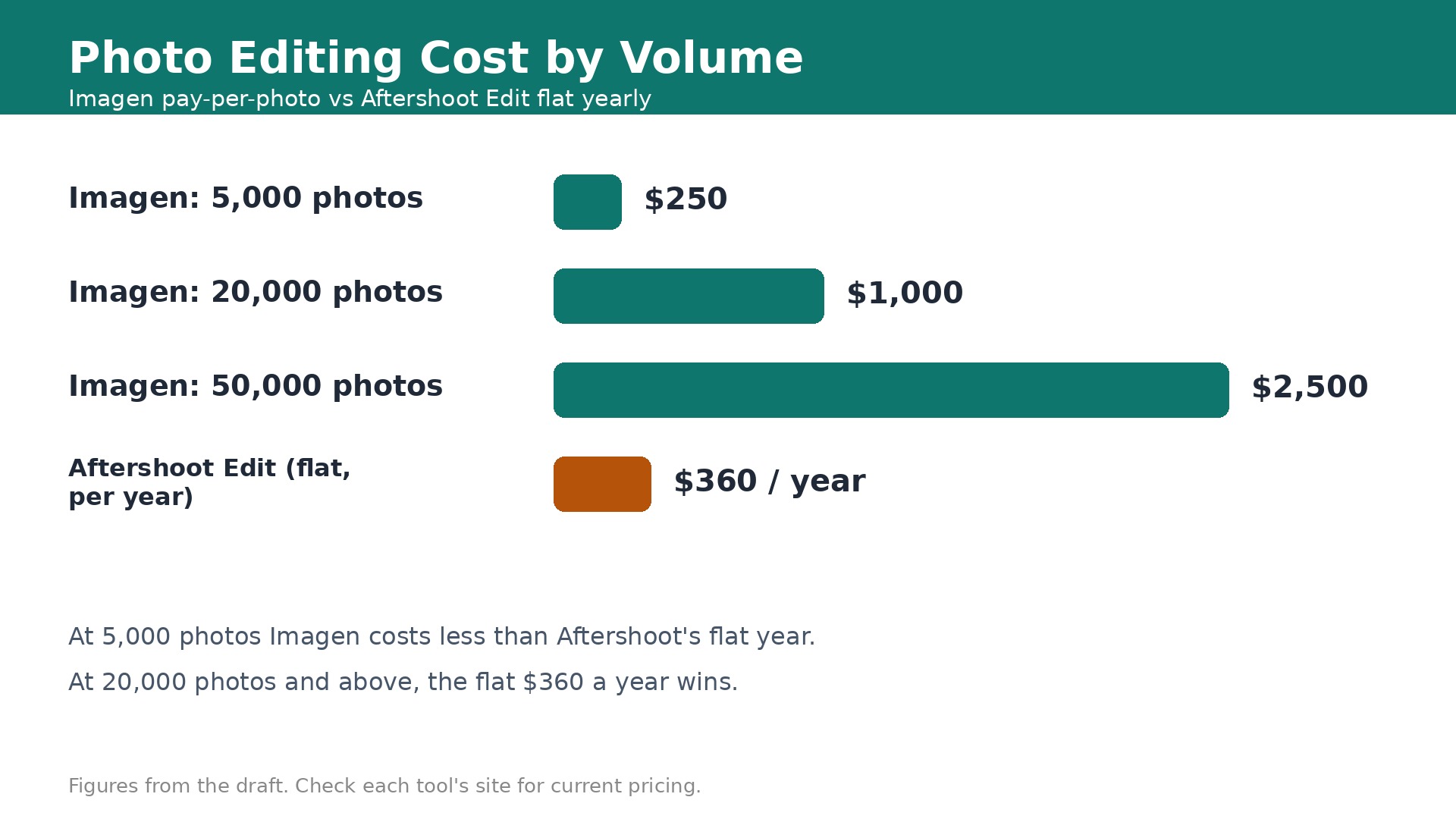
Do the math before you buy anything. At 5 cents a photo, Imagen pay as you go costs 360 dollars for 7,200 photos a year, which is exactly what Aftershoot Edit costs as a flat subscription. Below that volume, per photo wins. Above it, flat wins, and the gap grows fast. At 20,000 photos a year, Imagen costs about 1,000 dollars while Aftershoot Edit still costs 360 dollars. The best AI tools for photographers are priced by volume, and the right choice depends on how much you shoot.
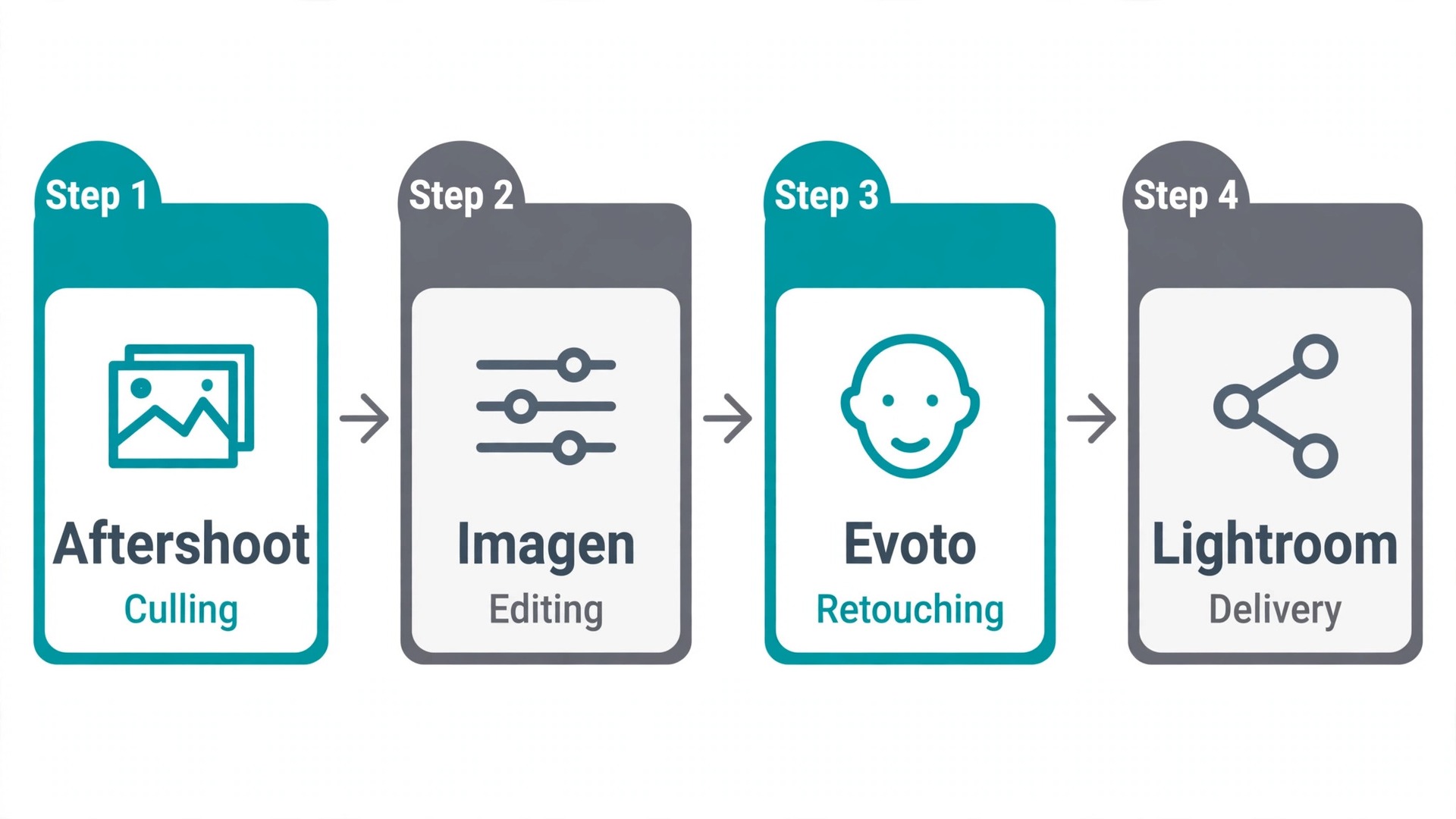
Culling, editing, retouching and delivery are four different jobs, and each one now has an AI specialist. Culling removes the blurry shots and closed eyes. Editing applies your style across a whole wedding. Retouching cleans skin at scale. Delivery gets galleries to clients. A tool that does one of those jobs brilliantly beats a suite that does all four averagely.
This guide compares eight tools with prices checked in November 2026. Each review states the real pricing model, what the AI actually does, and where it falls short. Read the pricing model first, since per photo, flat and credit pricing change the answer completely.
How we judged each tool
We judged tools by three things. Cost at your volume, where the processing happens, and how well it learns your style. Per photo pricing suits low volume. Flat subscriptions suit high volume. Credit packs suit uneven work. A tool that is cheap at 5,000 photos a year can be the most expensive choice at 50,000.
We also checked where files go. Aftershoot processes locally on your computer, so client photos never leave your machine. Imagen processes in the cloud, so files upload first. That matters for privacy, for slow internet, and for turnaround time on a wedding weekend.
The best AI tools for photographers also respect the craft. AI should apply your style faster, not replace it with a generic look. Tools that train on your past Lightroom edits earned extra credit, while tools that push every image toward the same bright preset lost points.
The best AI tools for photographers at a glance
Use the table to match the tool to your volume and workflow, then read the full review. Check the pricing model column first, since it decides the real cost.
| Tool | Starting price | Best for | Watch out |
|---|---|---|---|
| Aftershoot | From $10/mo | High volume culling and editing in one app | No cloud processing, needs a decent computer |
| Imagen AI | $0.05/photo | Lightroom Classic editing in your style | Per photo costs grow fast at volume |
| Adobe Lightroom | From $9.99/mo | All round RAW editing and catalog | AI features are helpers, not automation |
| Topaz Photo AI | Around $39/mo | Denoise, sharpen and upscale rescue | Pricing model changed in late 2025 |
| Luminar Neo | From $99 one-time | Creative AI edits without a subscription | Generative tools need a yearly pass |
| Evoto AI | From $0.14/image | Portrait retouching at scale | Costs add up on large weddings |
| Narrative | From $20/mo | Culling with editing built in | Premium needed for custom presets |
| ON1 Photo RAW | $99.99/yr | RAW library and editing without subscription | AI feels a generation behind rivals |
1. Aftershoot
Starting price. Select culling costs 10 dollars a month billed annually. Edit costs 30 dollars a month billed annually. Complete costs 45 dollars a month billed annually and bundles culling, editing and retouching.
Aftershoot covers culling, editing, retouching and RAW editing in one offline app with flat pricing. It is the best all in one pick for high volume wedding, event and portrait photographers, because one subscription handles the whole post shoot workflow without per photo charges.
Pricing is modular and flat. Select at 10 dollars a month billed annually covers culling only. Edit at 30 dollars a month covers AI editing with personal or marketplace profiles. Complete at 45 dollars a month bundles culling, editing and portrait retouching. All three plans allow unlimited images, and all processing runs locally on your computer, so files never leave your machine.
The 30 day free trial with full access and no card required is the best way to test it. Run a full wedding through the trial and time it. Most photographers find the culling alone saves hours, since Aftershoot reports 90 percent accuracy in spotting technical flaws such as closed eyes and soft focus.
The limit is your hardware. Local processing needs a decent computer, and a slow machine will feel it on a 3,000 photo wedding. Aftershoot also works with Lightroom Classic and Capture One, which is broader than Imagen, but it cannot match Imagen for photographers who want cloud processing and nothing installed locally.
Pick it when you shoot high volume and want flat unlimited pricing with local processing.
Skip it when you shoot under 5,000 photos a year, since per photo pricing will cost less.
2. Imagen AI
Starting price. Pay as you go costs 5 cents per edited photo with a 7 dollar a month minimum. Limitless costs 129 dollars a month billed annually for solo photographers.
Imagen is the strongest pick if you want to stay inside Lightroom Classic. It learns your style from your past edits, builds a personal AI profile, and applies it across a whole shoot with consistent skin tones. Wedding and portrait photographers rate its editing quality very highly.
Pay as you go costs 5 cents per edited photo with a 7 dollar a month minimum, and AI add ons such as crop, straighten, subject mask and smooth skin cost 1 cent per photo each. With all four add ons, editing rises from 5 cents to 9 cents a photo. Limitless costs 129 dollars a month billed annually for solo photographers and covers unlimited editing, AI tools, retouching and culling.
The break even math decides it. Below roughly 7,200 photos a year, pay as you go costs less than Aftershoot Edit at 360 dollars a year. At 14,000 photos, pay as you go costs 700 dollars before add ons, and Limitless costs 1,548 dollars a year. High volume shooters should compare carefully.
Imagen is cloud based, so files upload for processing. That suits photographers with fast internet and no wish to tie up their own computer. It works with Lightroom Classic only, not Capture One, and the 1,000 free edits with no card are enough to test the profile on a real shoot.
Pick it when you live in Lightroom Classic and shoot moderate volume with a distinct style.
Skip it when you shoot over 20,000 photos a year, since flat pricing will save hundreds.
3. Adobe Lightroom
Starting price. Photography plan from 9.99 dollars a month. Lightroom alone is listed at 19.99 dollars a month in some 2026 comparisons.
Adobe Lightroom is the all round editor most photographers already own, and its AI features keep getting stronger. AI masking selects subjects, skies and backgrounds in one click. Denoise AI cleans high ISO files. Generative Remove erases distractions and fills the gap. Auto settings give a sensible starting point for every image.
The Photography plan from 9.99 dollars a month is the cheapest entry into professional RAW editing with a catalog. That price covers Lightroom and Photoshop with 20GB of storage on some plan versions, which makes it the best value in this list for a photographer who needs a full editor rather than a specialist.
Lightroom AI assists rather than automates. It will not cull a wedding, apply your style across 2,000 photos, or retouch fifty portraits while you sleep. Those jobs belong to Aftershoot, Imagen and Evoto. Lightroom is the home base where you finish the work, not the factory that does it.
Use Lightroom as the hub. Cull in Aftershoot or Narrative, batch edit in Imagen, retouch in Evoto, then finish and deliver from Lightroom. That chain plays to every tool strength and keeps your catalog in one place.
Pick it when you need a full RAW editor and catalog with strong AI helpers.
Skip it when you need batch automation, since Lightroom will not cull or batch edit for you.
4. Topaz Photo AI
Starting price. Current pricing is subscription based, listed around 39 dollars a month in October 2026 comparisons. It was previously sold as a 199 dollar one time licence.
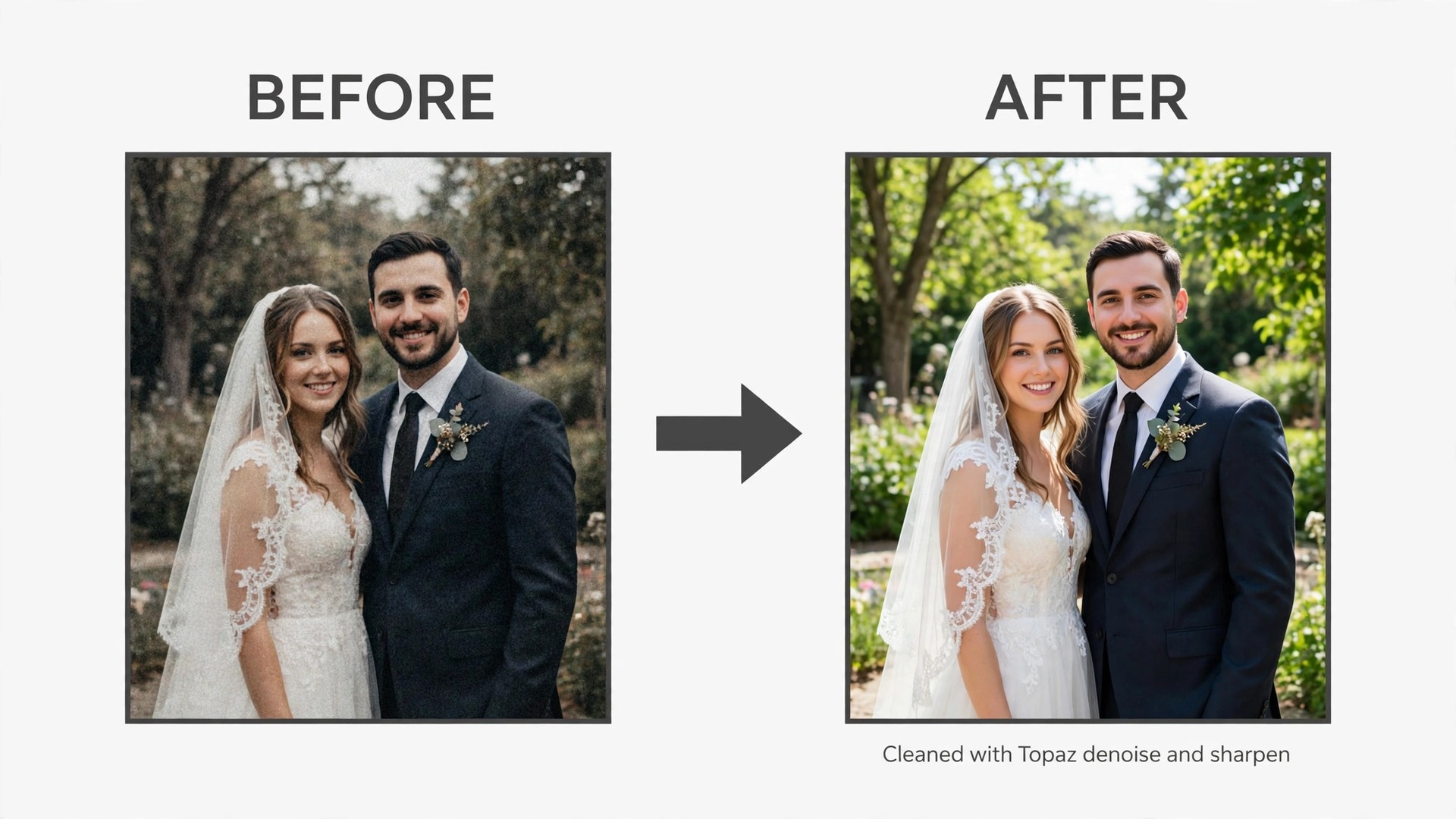
Topaz Photo AI does one job better than anything else on this list. It rescues flawed images. Denoise cleans high ISO noise, sharpen fixes motion blur and missed focus, upscale adds detail to low resolution files, and face recovery rebuilds soft faces. Reviewers consistently rate its quality at the top of the field.
It works standalone or as a Lightroom plugin, so it fits into a normal workflow without changing how you edit. Run the keepers through Topaz after culling, and the difference on a noisy reception shot or a slightly soft portrait is often dramatic.
The pricing changed in late 2025 from a 199 dollar one time licence to a subscription model, and published figures conflict between sources. Current comparisons list it around 39 dollars a month, with a Topaz Studio bundle at 399 dollars a year and a web version from 12 dollars a month. Check the live price before you budget, since it has moved before.
Topaz is also slow on large batches and can add its own texture artifacts if pushed too far. Use it on the images that need rescue, not on every file in a wedding. A hundred Topaz images is sensible. Three thousand is a waste of time and money.
Pick it when you have noisy, soft or low resolution shots that must be saved.
Skip it when your images are already clean, since Topaz solves a problem you do not have.
5. Luminar Neo
Starting price. One time licences from 99 dollars. Subscription options also exist from about 19.95 dollars a month.
Luminar Neo is the best one time purchase for creative AI edits. Sky AI replaces skies with automatic relighting. Relight AI fixes exposure on the subject separately from the background. GenErase removes unwanted objects and fills the gaps. Portrait AI retouches faces and skin with natural looking results.
A desktop licence from 99 dollars is a rarity in a subscription market, and it suits photographers who hate monthly bills. A 7 day full trial lets you test everything before paying, and the interface presents AI as sliders rather than layers, which keeps the learning curve gentle.
The catch is the extension pass. Generative tools are included for one year, then need an upgrade pass to keep receiving new features. Prices also vary between sources, from 99 to 129 dollars one time, so confirm the current offer on the Skylum site.
Luminar cannot match Photoshop for layered compositing, and its presets can push an image too far if you accept the defaults. Use it for fast creative edits and sky work, dial the sliders back from the default, and keep Lightroom as the home for catalog and fine work.
Pick it when you want strong creative AI edits without a monthly subscription.
Skip it when you need layered compositing or precise masking for commercial work.
6. Evoto AI
Starting price. Pay per export, from about 14 cents an image. Credit packs and subscriptions are also available, with free trial credits.
Evoto dominates AI portrait retouching at scale. It cleans skin, evens tones, whitens teeth, removes blemishes and applies makeup style adjustments across hundreds of portraits with consistent results. Wedding and portrait photographers use it for the retouching stage that used to take days.
Pricing is pay per export from about 14 cents an image, with credit packs and subscriptions available. That model suits uneven work. A portrait studio with a busy month pays for what it exports, and a quiet month costs almost nothing. Free trial credits let you test it on a real session first.
The per image cost is also the risk. A 500 portrait wedding at 14 cents an image costs 70 dollars for retouching alone, and that adds up across a season. Compare it with Aftershoot Complete at 45 dollars a month flat, which bundles retouching with culling and editing.
Evoto is a specialist, not a home base. Cull and edit first, then send only the keepers for retouching. Retouching every frame wastes money. Retouching the delivered set is where Evoto earns its price.
Pick it when you deliver many portraits and retouching eats your evenings.
Skip it when you shoot landscapes or events with few close portraits.
7. Narrative
Starting price. Standard costs 20 dollars a month billed annually. Premium costs 40 dollars a month billed annually and adds custom AI presets trained on your own edits.
Narrative folds editing into its culling tiers, which makes it a neat two in one choice. Standard at 20 dollars a month billed annually includes culling with core presets and editing. Premium at 40 dollars a month billed annually adds custom AI presets trained on your own edits, plus a second user.
The culling is fast and visual, with star ratings and a clean interface that suits photographers who want to move through a wedding quickly. The editing presets give a consistent starting point, and the custom presets on Premium learn your style in a way that is close to Imagen approach.
Narrative is less known than Aftershoot and Imagen, and its editing depth is thinner than a dedicated batch editor. It suits photographers who want culling first and editing second, in one app, without the full Aftershoot workflow.
Compare the tiers carefully. Standard at 20 dollars a month is good value for culling plus editing. Premium at 40 dollars only pays when custom presets save real time across many shoots, so test Standard first and upgrade when the presets prove themselves.
Pick it when you want culling and editing in one simple app at a fair price.
Skip it when you need deep batch editing or offline processing, since Aftershoot covers those better.
8. ON1 Photo RAW
Starting price. 99.99 dollars a year, or 179.99 dollars for a perpetual licence.
ON1 Photo RAW is the subscription free all rounder. It combines a RAW library, editing and AI tools in one app for 99.99 dollars a year or 179.99 dollars perpetual. Photographers who refuse monthly bills and want one app for everything often land here.
The AI covers the basics, with noise reduction, portrait tools and masking that handle daily editing well. The library tools are solid, and the perpetual licence means your editor keeps working even if you stop paying, which no subscription tool can promise.
The trade off is that the AI feels a generation behind Imagen, Aftershoot and Evoto. Batch automation is thinner, style learning is weaker, and the interface carries more clutter than modern rivals. It is a good editor with AI attached, not an AI first workflow.
Pick ON1 when ownership matters more than cutting edge automation. It is the right home for a photographer who edits a few hundred photos a month, wants no subscription, and values a perpetual licence over the fastest AI.
Pick it when you want a full RAW editor you own outright, with no monthly bill.
Skip it when you need the fastest AI culling or style matched batch editing.
Choosing by Job Type
Match the tool to the job and to your volume. These are our first picks for each stage of a photography workflow, and the best AI tools for photographers change completely with how much you shoot.
| Job to be done | Best pick | Why it wins |
|---|---|---|
| Culling a big wedding | Aftershoot Select | Flat 10 dollars a month, unlimited images |
| Batch editing in your style | Imagen AI | 5 cents a photo under 7,200 a year |
| High volume editing | Aftershoot Edit | Flat 30 dollars a month, unlimited |
| All round RAW editing | Adobe Lightroom | Full catalog from 9.99 dollars a month |
| Rescuing noisy or soft shots | Topaz Photo AI | Best denoise and upscale quality |
| Creative edits, no subscription | Luminar Neo | One time licence from 99 dollars |
| Portrait retouching at scale | Evoto AI | Pay per export from 14 cents an image |
| Culling plus editing in one app | Narrative | Standard 20 dollars a month annual |
| Owning your editor outright | ON1 Photo RAW | 179.99 dollars perpetual |
The cost math at three volumes
At 5,000 photos a year, Imagen pay as you go costs 250 dollars, Aftershoot Edit costs 360 dollars, and Narrative Standard costs 240 dollars. Imagen wins, and the gap is small enough that workflow preference should decide. Add Lightroom at 9.99 dollars a month and the total stays under 400 dollars a year.
At 20,000 photos a year, Imagen costs about 1,000 dollars, or 900 dollars on volume tiers, while Aftershoot Edit still costs 360 dollars and Narrative Premium costs 480 dollars. Flat pricing wins clearly, and the saving pays for Topaz or Evoto on top. At 50,000 photos a year, Imagen costs 2,500 dollars before volume discounts, while Aftershoot Edit still costs 360 dollars. The choice is no longer close.
Run this math with your own numbers before you buy. Count last year delivered photos, not photos taken, since culling removes a third or more before editing. Then compare the per photo cost against the flat cost, and pick the model that wins at your real volume, not at an imagined one.
Mistakes that waste money on photo AI
The first mistake is paying per photo at high volume. A wedding photographer shooting 30,000 photos a year can spend 1,500 dollars on per photo editing when a 360 dollar flat plan does the same work. The second mistake is retouching every frame. Cull first, edit the keepers, and retouch only the delivered set.
The third mistake is trusting vendor accuracy claims. Aftershoot reports 90 percent accuracy on technical flaws and Imagen reports 99.2 percent on closed eyes and soft focus, but those figures are self reported and measured differently. Judge tools on your own test wedding, not on marketing numbers. The fourth mistake is letting AI set the style. A preset that makes every wedding look the same will cost you the clients who booked your eye, not your software.
How to test a tool on one real shoot
Pick one real wedding or portrait session and run it through the trial end to end. Cull it, edit it, retouch the keepers and deliver the gallery, all inside the trial window. A test on your own work tells you more than any review, because your style, your volume and your computer are the variables that matter.
Time every stage with a stopwatch. Note how long culling takes, how long batch editing takes, and how long retouching takes. Compare those times with your current workflow on the same shoot. A tool that saves two hours on culling but adds one hour of fixing bad edits has saved one hour, not two.
Check the results on a calibrated screen and on a phone. AI edits can look good on a laptop and wrong on a phone, where most clients view their galleries. Look at skin tones, skies and shadows closely, and show the test gallery to one trusted client before you commit.
Test the failure cases too. Feed the tool a noisy reception shot, a backlit portrait and a photo with closed eyes. See what it does with the hard images, not just the easy ones. A tool that handles the hard 10 percent well is worth more than a tool that is fast on the easy 90 percent.
Decide with numbers, not feelings. Multiply the hours saved per shoot by your shoots per year, then compare the yearly saving with the yearly price. If the tool saves twenty hours a year and costs 360 dollars, it pays when your hour is worth more than 18 dollars. If it does not clear that bar, keep your current workflow.
Deliver the test gallery to the client exactly as you would a paid gallery, and watch how they respond. A tool that produces files clients love is worth more than a tool that is merely fast. Ask the client which images they picked as favorites, and check whether the AI edits held up on the images that mattered most to them.
Keep your old workflow as a backup for the first month after you switch. Edit one real job in the new tool and one in the old tool, and compare the time and the results side by side. A new tool should prove itself on paid work before the old workflow is retired, since a deadline is the worst time to discover a missing feature.
The Stack, Priced for Real
A part time photographer can run Lightroom at 9.99 dollars a month plus Imagen pay as you go, which totals about 120 dollars a year plus 5 cents per edited photo. That covers editing, catalog and style matched batch work for under 400 dollars a year at 5,000 photos.
A full time wedding photographer should budget 45 to 60 dollars a month. Aftershoot Complete at 45 dollars a month billed annually covers culling, editing and retouching with unlimited images, and Lightroom at 9.99 dollars adds the catalog. Add Evoto per export for portrait heavy months, and the stack stays under 700 dollars a year while handling 20,000 or more photos. The best AI tools for photographers earn that money in weekends returned, and any tool that does not save a full evening a week should be cancelled.
Our Recommendation
Under 7,200 photos a year, pick Imagen pay as you go with Lightroom as the hub. That is the short version of the best AI tools for photographers, and the volume math behind it is what decides the answer. Over that line, pick Aftershoot Edit or Complete for flat unlimited pricing. Add Topaz for rescue work and Evoto for portrait retouching only on the images that need them.
Test before you commit. Run one full wedding through the trial of your top pick and time it. The tool that saves the most hours on your real work is the right one, whatever the marketing claims say.
Frequently Asked Questions
What is the best AI tool for photographers?
It depends on volume. Among the best AI tools for photographers, Imagen AI is best under 7,200 photos a year at 5 cents a photo. Aftershoot Edit is best above that line at a flat 30 dollars a month. Lightroom is the best all round editor, and Topaz is the best rescue tool for noisy or soft images.
Is Aftershoot or Imagen better?
Aftershoot is better for high volume and for photographers who want culling, editing and retouching in one offline app with flat pricing. Imagen is better for Lightroom Classic users who want cloud processing and a personal style profile. Below 7,200 photos a year Imagen costs less, above it Aftershoot wins.
How much does AI photo editing cost?
A part time photographer using the best AI tools for photographers can spend under 400 dollars a year with Lightroom plus Imagen pay as you go. A full time wedding photographer should budget 45 to 60 dollars a month for Aftershoot Complete plus Lightroom. Per photo pricing suits low volume, flat pricing suits high volume.
Can AI cull my wedding photos?
Yes. Aftershoot and Narrative both cull by detecting closed eyes, soft focus, duplicates and technical flaws, with Aftershoot reporting 90 percent accuracy. Always review the rejects once before deleting anything, since AI can discard a meaningful moment that is technically imperfect.
Does AI editing learn my style?
Yes, in the better tools. Imagen builds a personal profile from your past Lightroom edits, and Narrative Premium trains custom presets on your work. Aftershoot also supports personal profiles. Test with a real shoot, since a profile trained on ten edits will be weaker than one trained on a hundred.
Is Topaz Photo AI still a one time purchase?
No, not anymore. Topaz moved to subscription pricing in late 2025, and current comparisons list it around 39 dollars a month. It was previously sold as a 199 dollar one time licence. Check the live price before you budget, since the model has changed before.