
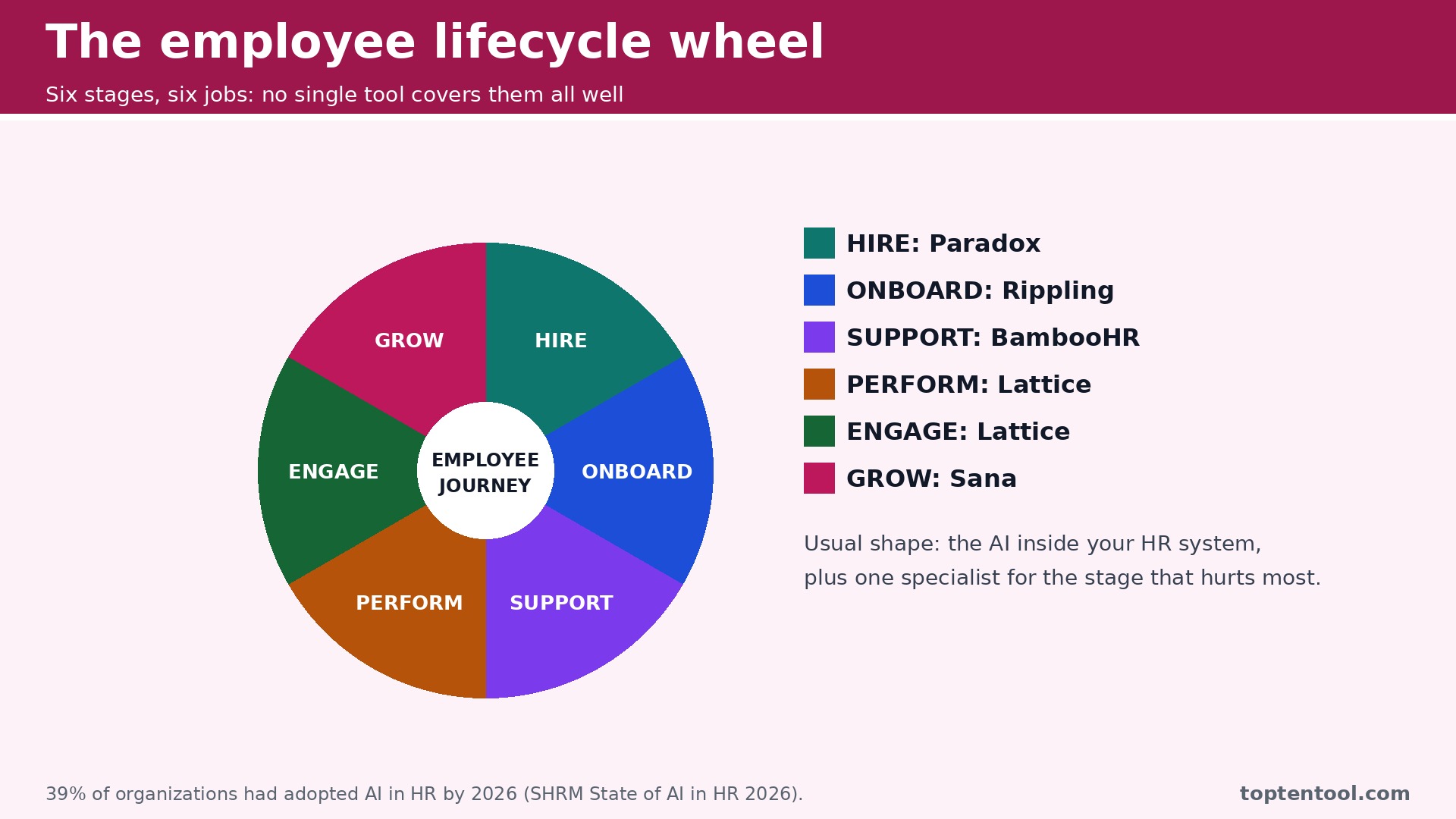
The best AI tools for HR teams are spreading fast. Thirty nine percent of organizations had adopted AI in HR by 2026, up from about one in four employers in a 2024 survey, according to the SHRM State of AI in HR 2026 report. The growth is not a fashion trend. It is a response to the same pressure every HR team feels. More hiring, more onboarding, more policy questions, more performance reviews, and the same number of people to do it all. AI does not replace the HR team. It takes the repetitive work off the pile so the team can spend time on the people work that actually needs a person.
The best AI tools for HR teams cover six stages of the employee journey, from sourcing and screening to interview scheduling, onboarding, the HR helpdesk, performance and engagement. No single tool among the best AI tools for HR teams covers all six well, which is why most teams end up with two or three. The usual shape is the AI already inside your HR system, plus a drafting assistant for policies and job posts, plus one specialist for the stage that hurts most, usually high volume hiring or onboarding.
There is a compliance line running through this category that matters more than any feature. AI used for recruitment, screening and performance is classed as high risk under the EU AI Act, with obligations applying from December 2027, and New York City requires a yearly bias audit for automated hiring tools. The practical rule is the same as in recruiting. Use AI freely for drafting, onboarding and answering policy questions, and treat anything that scores candidates or employees as a compliance project with a human deciding.
The Shortlist by HR Job
The table below matches each common HR job to the tool that handles it best. The best AI tools for HR teams are the ones that match the stage that hurts most in your team, so use this table to narrow ten tools to two or three before you read the reviews. Prices are monthly list prices unless noted, and annual billing is usually cheaper than paying month to month.
| Job | Best tool | Why it wins |
|---|---|---|
| HR records and policy answers | BambooHR | Pro plan answers questions from your own handbook |
| Onboarding across HR, IT and payroll | Rippling | One record drives payroll, laptop and app access |
| Payroll plus HR for small teams | Gusto | Simple all in one from 49 dollars a month plus 6 dollars per employee |
| Performance and engagement | Lattice | AI summaries for reviews from 4 dollars a seat |
| High volume hiring and onboarding | Paradox | Olivia screens, schedules and onboards around the clock |
| Structured video interviews | HireVue | Competency based AI scoring at enterprise scale |
| Global hiring and onboarding | Deel | AI assisted compliance across 130 plus countries |
| Small business HR plus AI ATS | Factorial | Full suite from 8 dollars a user a month |
| Interview scheduling without the emails | GoodTime | Coordinates calendars across candidates and interviewers |
| Onboarding and training knowledge | Sana | AI answers from your own docs, free tier available |
How We Ranked the Best AI Tools for HR Teams
A tool earned a place here only if it does a real HR job in 2026, not if it added a chatbot to an old HR system. We judged each one on five things that decide whether an HR team keeps paying after the trial.
First, the lifecycle stage it serves, from hiring to onboarding to performance, because a tool that does one stage well beats a platform that does five stages poorly. Second, the starting price a small team can actually buy, including whether a free plan exists and what the paid plan really includes. Third, where it fits in the stack, because the AI inside your HR system saves more time than a standalone tool that needs syncing. Fourth, the quality of its AI output, from policy answers that cite your handbook to onboarding plans that fit the role. Fifth, the compliance posture, including bias audit support and data handling, since screening and performance AI carry duties that drafting AI does not.
The other test was small team fit. Several tools on this list are built for enterprises with thousands of employees, and a team of five will pay enterprise prices for features it never uses. The checklist below is the fastest way to compare any two tools on this list before you trial them.
| Check before you buy | What to ask | Why it matters |
|---|---|---|
| Lifecycle stage | Hiring, onboarding, or performance | Each stage needs a different tool |
| Small team fit | Minimum seats, minimum spend | Enterprise minimums punish small teams |
| Data training | Does the vendor train on your data | Employee data must stay private |
| Screening duties | Bias audit and candidate notice | Screening AI is regulated |
| HRIS integration | Native or third party sync | A broken sync means double entry |
| Free plan | What can you test without paying | Drafting tools are cheap to test |
Ten Tools, Reviewed in Order
1. BambooHR
Starting price Around 10 dollars an employee a month, with plans varying by team size. Best for HR records and policy answers. Watch out Policy answers need the Pro plan, and the price rises with headcount.
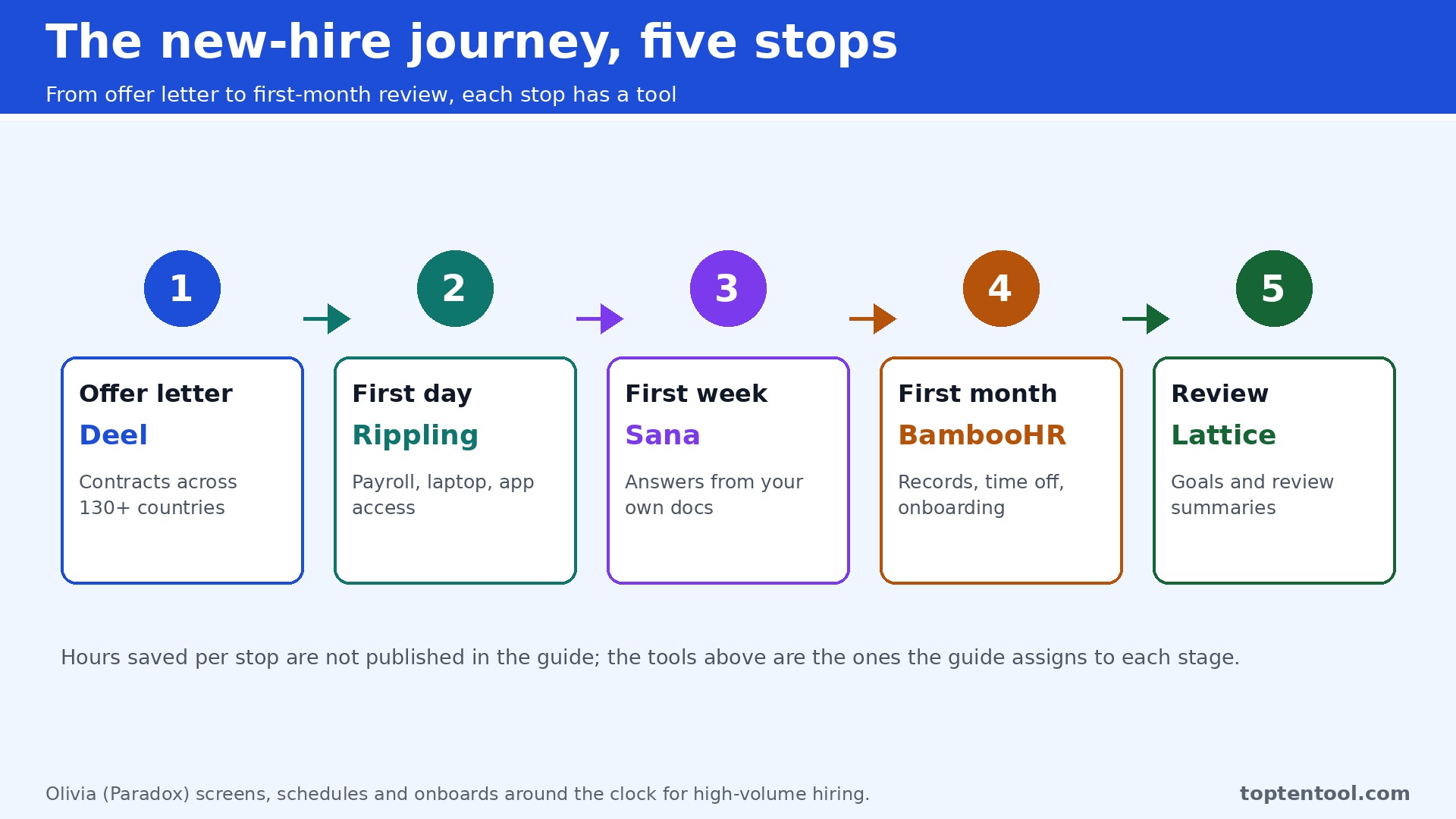
BambooHR is the HR suite most small teams start with, and its AI answers employee questions from your own handbook. An employee asks about parental leave or time off, and the assistant answers with a citation to the policy, instead of the HR team answering the same question for the twentieth time. The Pro plan unlocks that feature, and the core system covers records, time off, onboarding and reporting.
The strength is simplicity. A team of twenty to two hundred people can run its HR records in BambooHR without a dedicated administrator, and the interface is clean enough that managers actually use it. The AI is practical rather than flashy, and it works on the documents the team already owns.
The catch is the tier split. The policy answer feature needs Pro, and the price per employee means the bill grows with every hire. A very small team may find the flat priced options cheaper. BambooHR still earns the top spot for teams that want a calm, capable HR system with AI that answers from their own handbook.
2. Rippling
Starting price From 8 dollars an employee a month plus a monthly base fee. Best for Onboarding across HR, IT and payroll. Watch out The cost grows per module, so the full platform costs more than the headline rate.
Rippling ties HR, payroll and IT into one employee record, so a new hire’s payroll, laptop and app accounts are set up from the same workflow. The AI workflow builder automates onboarding across departments, which is the part of hiring that usually falls through the cracks between HR, IT and finance. A new hire starts on Monday with everything working, instead of waiting a week for access.
The strength is the single record. When one system owns the employee record, the AI can automate across departments instead of only inside HR. The onboarding checklists, device ordering and app provisioning run from the same trigger, and the reporting shows the whole picture rather than one department at a time.
The catch is modular pricing. The headline rate covers the core, and each module adds cost, so a team that wants the full platform should price the whole stack before signing. Rippling suits a company that wants HR, IT and finance onboarding unified. A team that only needs HR records will find BambooHR simpler and cheaper.
3. Gusto
Starting price 49 dollars a month plus 6 dollars per employee. Best for Payroll plus HR for small teams. Watch out AI features are lighter than the specialist tools, so it suits payroll first and AI second.
Gusto is the payroll first pick for a small team, and its HR tools cover the basics well. Payroll runs itself, benefits enrollment is simple, time tracking works, and the onboarding checklists get a new hire set up without a spreadsheet. The AI features help with drafting and admin, but the real value is that payroll and HR live in one system that a small team can run without an expert.
The strength is the price and the simplicity. At 49 dollars a month plus 6 dollars per employee, a team of ten pays just over 100 dollars a month for payroll and HR together, which is less than most HR suites charge for HR alone. The interface is friendly, the support is good, and the setup takes days rather than weeks.
The catch is AI depth. Gusto will not screen candidates, run structured interviews or answer deep policy questions the way the specialist tools do. Buy Gusto when payroll is the job and HR is the bonus. Buy a specialist when hiring volume or onboarding complexity is the problem.
4. Lattice
Starting price From 4 dollars a seat, with a 4,000 dollar a year minimum. Best for Performance and engagement. Watch out The annual minimum makes it expensive for a very small team.
Lattice is the performance and engagement pick, and its AI writes review summaries, suggests goals and flags engagement risks from survey data. A manager preparing for a review cycle gets a draft summary of the period, and the HR team gets a view of engagement across teams without running a separate survey tool. The performance, engagement and OKR modules share one system.
The strength is focus. Lattice does performance well, and the AI summaries save managers hours during review season. The engagement surveys and the feedback tools are built for teams that take development seriously, and the reporting is clear enough for a leadership meeting.
The catch is the minimum. From 4 dollars a seat sounds cheap, but the 4,000 dollar a year minimum means a team of ten pays far more per seat than the headline rate. Lattice suits a team of thirty or more that runs real review cycles. A smaller team should look at the all in one suites first.
5. Paradox
Starting price Quote only, from roughly 1,000 dollars a month. Best for High volume hiring and onboarding. Watch out It is built for volume, so a team hiring five people a year will pay for capacity it never uses.
Paradox, now part of Workday, runs Olivia, a conversational assistant that screens applicants, schedules interviews and collects onboarding documents around the clock. One conversation thread spans three lifecycle stages, so a candidate who applies at midnight can be screened, scheduled and sent onboarding paperwork before a recruiter starts work in the morning. That is the whole pitch, and for high volume hiring it works.
The strength is throughput. A team hiring hundreds of frontline workers a month cannot screen every applicant by hand, and Olivia does the first pass consistently, at any hour, in any time zone. The scheduling alone saves recruiters hours of email back and forth every week.
The catch is that Paradox is an enterprise tool sold by quote, with pricing from roughly 1,000 dollars a month. A small team hiring a few people a month should not buy it. A team hiring hourly and frontline workers at volume will find it the highest return tool on this list.
6. HireVue
Starting price Quote only, with a reported median near 20,900 dollars a year. Best for Structured video interviews. Watch out Video interviewing carries fairness duties, so the audit and notice features matter as much as the price.
HireVue runs structured, scored AI video interviews at scale, and it is the standard for enterprise teams that interview thousands of candidates. Candidates record answers to set questions, the AI scores them against competencies, and recruiters review the ranked shortlist with the recordings attached. The structured format means every candidate faces the same questions, which is fairer than a free form chat.
The strength is consistency at volume. A team hiring a thousand people cannot interview every applicant live, and HireVue gives every applicant the same structured chance while the recruiter focuses on the top of the pile. The assessments and the interview data feed the same record, so the hiring decision has evidence behind it.
The catch is cost and scrutiny. Pricing is quote only, with a reported median near 20,900 dollars a year, and AI video interviewing is one of the most scrutinized uses of hiring AI. Ask for the bias audit in writing, check the candidate notice process, and keep a human deciding. HireVue suits an enterprise team hiring at scale. A smaller team should use Metaview or structured live interviews instead.
7. Deel
Starting price 49 dollars per contractor a month, and 599 dollars per employee a month for employer of record. Best for Global hiring and onboarding. Watch out Employer of record pricing is high, so it suits the roles where it is genuinely needed.
Deel hires and onboards employees and contractors across borders, with AI assisted compliance in more than 130 countries. Contracts, payroll, benefits and tax documents run through one system, and the AI flags compliance risks before they become problems. A company hiring its first employee in a new country can do it in days rather than months.
The strength is coverage. A team that hires in five countries no longer needs five local entities or five payroll providers, and the onboarding experience is the same for every new hire wherever they sit. The contractor plan at 49 dollars a month is reasonable, and the employer of record plan at 599 dollars a month covers the roles where a local entity is genuinely needed.
The catch is the employer of record price. At 599 dollars an employee a month, it is a serious cost, and it only makes sense for roles where the company has no entity. Use Deel for contractors and for the countries where you truly need it, and use a local entity where the volume justifies one.
8. Factorial
Starting price From 8 dollars a user a month, with a tailored quote. Best for Small business HR plus AI ATS. Watch out The price is tailored, so the headline rate is a starting point rather than a promise.
Factorial is the small business all in one, covering HR records, time off, payroll, expenses and an AI powered ATS in one system. A team of twenty to two hundred people can run its whole people operation in Factorial without buying five tools, and the AI helps with candidate matching, document drafting and admin automation. The interface is built for small teams rather than enterprise HR departments.
The strength is breadth at a small business price. From 8 dollars a user a month, a team gets a suite that would cost far more as separate tools, and the ATS means hiring runs in the same system as onboarding. The setup is faster than the enterprise suites, and the support is built for teams without a dedicated HR operations hire.
The catch is the tailored quote. The headline rate is a starting point, and the real price depends on team size and modules, so get the full quote in writing. Factorial suits a small business that wants one system for HR and hiring. A team that needs deep performance tools should add Lattice alongside it.
9. GoodTime
Starting price Quote only, with estimates of 250 to 500 dollars a month or more for smaller teams. Best for Interview scheduling without the emails. Watch out It solves one job, so the price only makes sense when scheduling is a real bottleneck.
GoodTime eliminates the recruiter coordinator scheduling back and forth, and it does that one job very well. It coordinates calendars across candidates and multiple interviewers, finds slots that work for everyone, sends the invites and handles rescheduling when plans change. A coordinator who spends hours a week on scheduling gets those hours back.
The strength is focus. Scheduling is a small job that eats a surprising amount of recruiter time, and GoodTime removes it completely. The integrations with the major ATS and calendar systems mean it fits into the existing workflow rather than replacing it, and the candidate experience improves because the scheduling is fast and clear.
The catch is the price for a single job. Pricing is not published, with estimates of 250 to 500 dollars a month or more for smaller teams, which is a lot for scheduling alone. GoodTime suits a team that interviews constantly and feels the scheduling pain every week. A team that schedules a few interviews a month should use the scheduling inside its ATS.
10. Sana
Starting price Free tier available, with paid plans to 30 dollars a user a month. Best for Onboarding and training knowledge. Watch out The value depends on the quality of your own docs, so a team with no written knowledge gets less from it.
Sana connects AI to your own workplace knowledge, so onboarding and employee training run from the documents you already own. A new hire asks a question, and Sana answers from your onboarding docs, policies and training material, with a citation to the source. The learning platform covers courses, onboarding paths and knowledge search in one system.
The strength is the knowledge link. A team that has written good onboarding material gets an assistant that answers from it around the clock, and the learning tools turn that material into structured onboarding. The free tier is genuinely usable, and the paid plans run to 30 dollars a user a month.
The catch is the input. Sana is only as good as the docs you feed it, so a team with no written onboarding material will get thin answers. Write the docs first, or use Sana alongside a drafting tool to create them. Sana suits a team that is building a knowledge base for onboarding and training, and it is the cheapest way on this list to start.
Every Tool on One Page
The table below puts the whole list on one page. Prices are starting monthly list prices unless noted, and quote only means the vendor does not publish a price. Compare the lifecycle stage first, then the price.
| Tool | Starting price | Stage | Best for | Free plan |
|---|---|---|---|---|
| BambooHR | Around 10 dollars an employee a month | Records and policy | HR records and policy answers | No |
| Rippling | From 8 dollars an employee a month | Onboarding | HR, IT and payroll onboarding | No |
| Gusto | 49 dollars a month plus 6 dollars per employee | Payroll and HR | Small teams that need payroll | Trial |
| Lattice | From 4 dollars a seat | Performance | Reviews and engagement | No |
| Paradox | Quote only | Hiring and onboarding | High volume frontline hiring | No |
| HireVue | Quote only | Screening | Structured video interviews | No |
| Deel | 49 dollars per contractor a month | Global onboarding | Hiring across borders | No |
| Factorial | From 8 dollars a user a month | All in one | Small business HR plus ATS | Trial |
| GoodTime | Quote only | Scheduling | Interview scheduling | No |
| Sana | Free tier, to 30 dollars a user a month | Training | Onboarding knowledge | Yes |
What a Team of Twenty Actually Pays
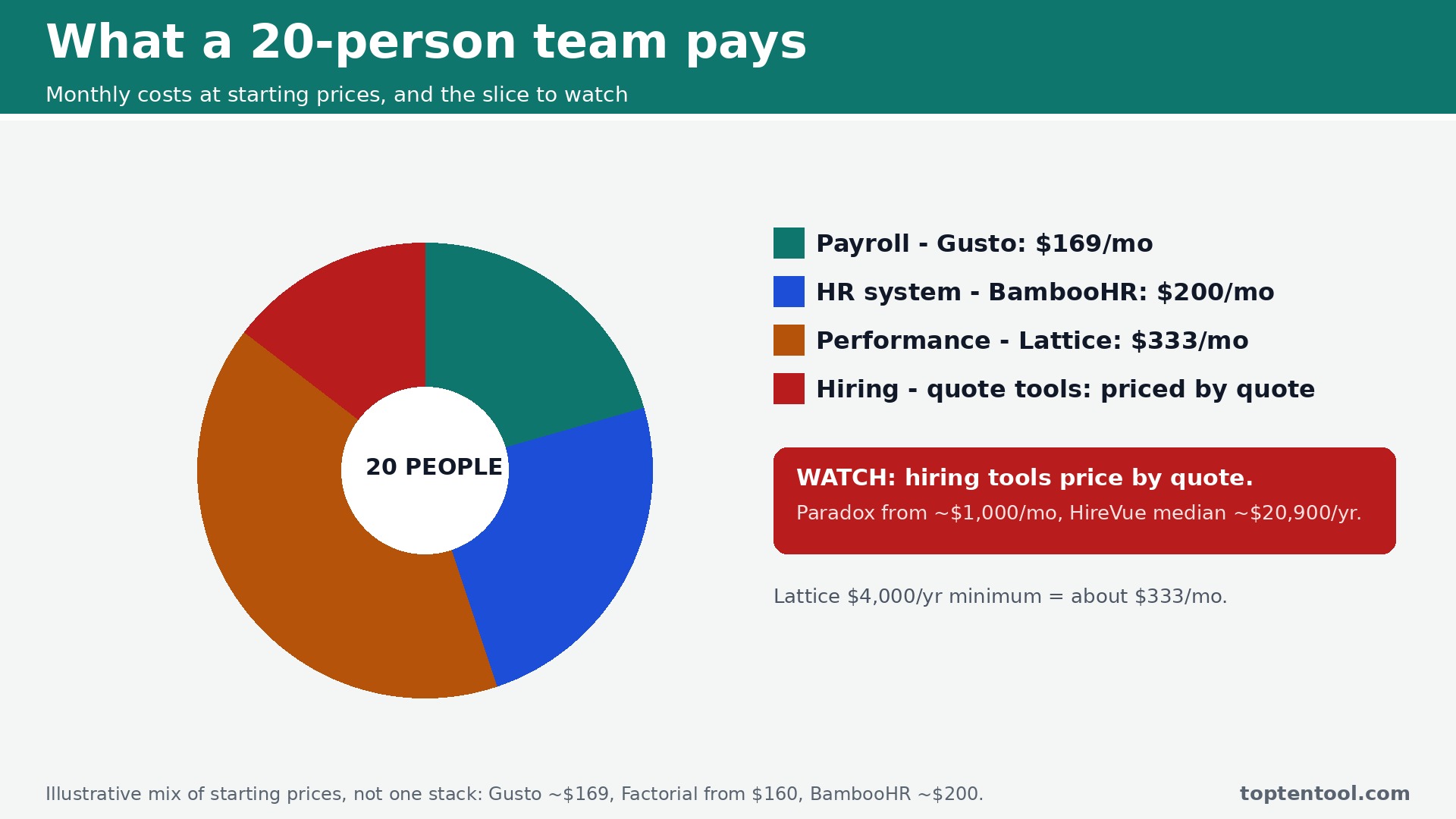
The best AI tools for HR teams are the ones that fit the team size, and the cost of a twenty person team is the right way to judge them. The table below shows what a twenty employee team pays in a month for the most common options, using starting prices. The spread is wide, from around 110 dollars to more than 200 dollars, before the enterprise tools that price by quote.
| Setup for 20 employees | Monthly cost | What it covers |
|---|---|---|
| Gusto | Around 169 dollars | Payroll plus HR for a small team |
| Factorial | From 160 dollars | All in one HR plus AI ATS |
| BambooHR | Around 200 dollars | HR records, policy answers on Pro |
| Rippling | From 160 dollars plus base fee | HR, IT and payroll onboarding |
| Lattice | 4,000 dollars a year minimum | Performance and engagement |
| Sana, paid tier | To 600 dollars | Onboarding knowledge and training |
Three rules keep the spend on the best AI tools for HR teams sensible. First, start with the AI inside the HR system you already run, because it costs nothing extra to trial and it sees your real data. Second, add one specialist for the stage that hurts most, usually high volume hiring or onboarding, and measure the hours it saves for a month before you add a second. Third, keep screening and performance AI under human review, and ask the vendor for its bias audit in writing before you sign, because the audit is your protection if an employee or a candidate ever asks why a decision was made.
Frequently Asked Questions
Which AI HR tool is best for a small team
Factorial is the best all in one for a small business, from 8 dollars a user a month, and Gusto is the best pick when payroll is the priority. BambooHR is the best choice when HR records and policy answers matter most. Start with the system that covers your biggest pain, and add a specialist only when one stage, usually hiring or onboarding, needs it.
Can AI answer employee policy questions
Yes, and it is one of the safest uses of HR AI. BambooHR Pro answers from your own handbook with citations, and Sana answers from your onboarding docs and training material. The key is the source. An assistant that answers from your own documents is trustworthy. One that answers from general knowledge will invent policy details, so keep it tied to your handbook and review the answers for the first month.
Is it safe to let AI screen job candidates
It is safe when a human reviews every rejection and the vendor can show a bias audit in writing. Screening AI is regulated, with New York City requiring a yearly bias audit and the EU AI Act classing employment AI as high risk. Use AI to rank and summarize, keep the final decision with a person, and check with counsel before you automate rejections. This guide is not legal advice.
How much should a twenty person team budget for HR AI
A realistic budget is 150 to 250 dollars a month for the HR system itself, using Gusto, Factorial or BambooHR at starting prices. Add the specialist tools only where they earn their keep, and budget separately for enterprise tools like Paradox and HireVue, which price by quote. The AI inside your HR system is often the cheapest starting point, because it is already included in the plan you pay for.
What is the best AI tool for onboarding new hires
Rippling is the best pick when onboarding spans HR, IT and payroll, because one record drives the whole workflow. Sana is the best pick when onboarding is mostly knowledge and training, because it answers from your own docs. Paradox is the best pick for high volume frontline onboarding, because Olivia handles screening, scheduling and documents around the clock.
Our Verdict
If you buy one tool this quarter, buy the AI already inside your HR system. BambooHR Pro for policy answers, Rippling for onboarding, or Factorial for the all in one, depending on the system you run. The best AI tools for HR teams earn their keep by taking repetitive work off the pile, and the AI inside your own system does that from day one without a new login or a migration.
The situation changes the pick. A team hiring frontline workers at volume should buy Paradox. A team hiring across borders should buy Deel. A team running real review cycles should buy Lattice. A team drowning in interview scheduling should buy GoodTime. A team building onboarding knowledge should buy Sana. A team that needs payroll first should buy Gusto.
Whatever you pick, start with the stage that hurts most, trial with real employees and real documents, and keep a human deciding on screening and performance. The best AI tools for HR teams on this list all work. The difference is whether the tool matches your team size and your lifecycle stage, and whether you measure the return in hours given back to people work rather than in features used.