

A freelancer with five clients does not have a time problem. The freelancer has a tracking problem, because every client lives in a different inbox, a different chat thread and a different deadline, and the work that slips is the work nobody can see. The best project management tools for freelancers fix that by putting every client in its own space, letting clients in without charging you a seat for them, and recording the hours you bill against the right client. Our research compared vendor pricing pages in November 2026, and the range runs from free to $22 a month for one person.
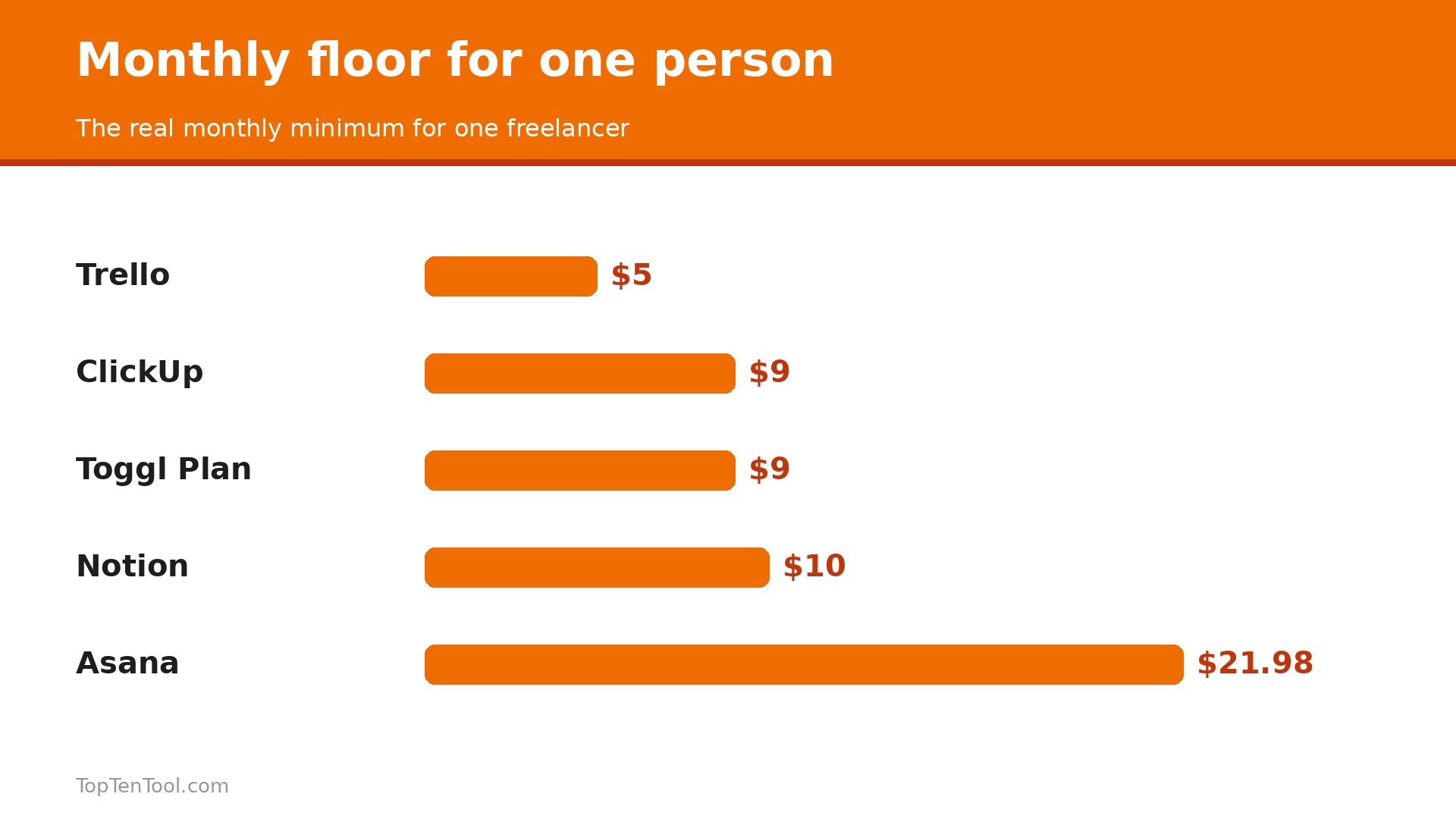
The seat arithmetic matters more than the headline price. Asana Starter advertises $10.99 a user a month but requires two seats, so one person pays $21.98. monday charges for three seats at the entry tier, so the real floor is $27. A tool with no seat minimum, such as ClickUp or Trello, costs what it says it costs. That gap is the whole decision for a solo operator.
This guide compares five tools in depth, with real prices, client access rules and time tracking, and it ends with a pick for each common situation. Start with the comparison table, then read the reviews that match how you work.
The Essentials
The table below shows the starting price of each tool, who it suits best, and the one thing to watch. Prices are monthly list prices on annual billing unless noted. Seat minimums are called out, because they decide what one person actually pays. Use the table to shortlist the best project management tools for freelancers options that fit your budget before reading the full reviews.
| Tool | Starting price | Best for | Watch out |
|---|---|---|---|
| ClickUp | $9 per user a month for Core on annual billing | Power users who want everything configurable | The depth can overwhelm a freelancer who wants simple boards |
| Asana | $10.99 per user a month for Starter, 2 seat minimum | Structured lists, timelines and dependencies | One person really pays $21.98 a month, not $10.99 |
| Trello | $5 per user a month for Standard on annual billing | A simple board per client | No native time tracking or dependencies on lower tiers |
| Notion | $10 per member a month for Plus | Briefs, docs and client hubs in one workspace | You build the system yourself, and time tracking needs a workaround |
| Toggl Plan | $9 per user a month for Starter on annual billing | Planning driven by real time data | Smaller feature set than ClickUp or Asana |
How We Compared These Project Tools
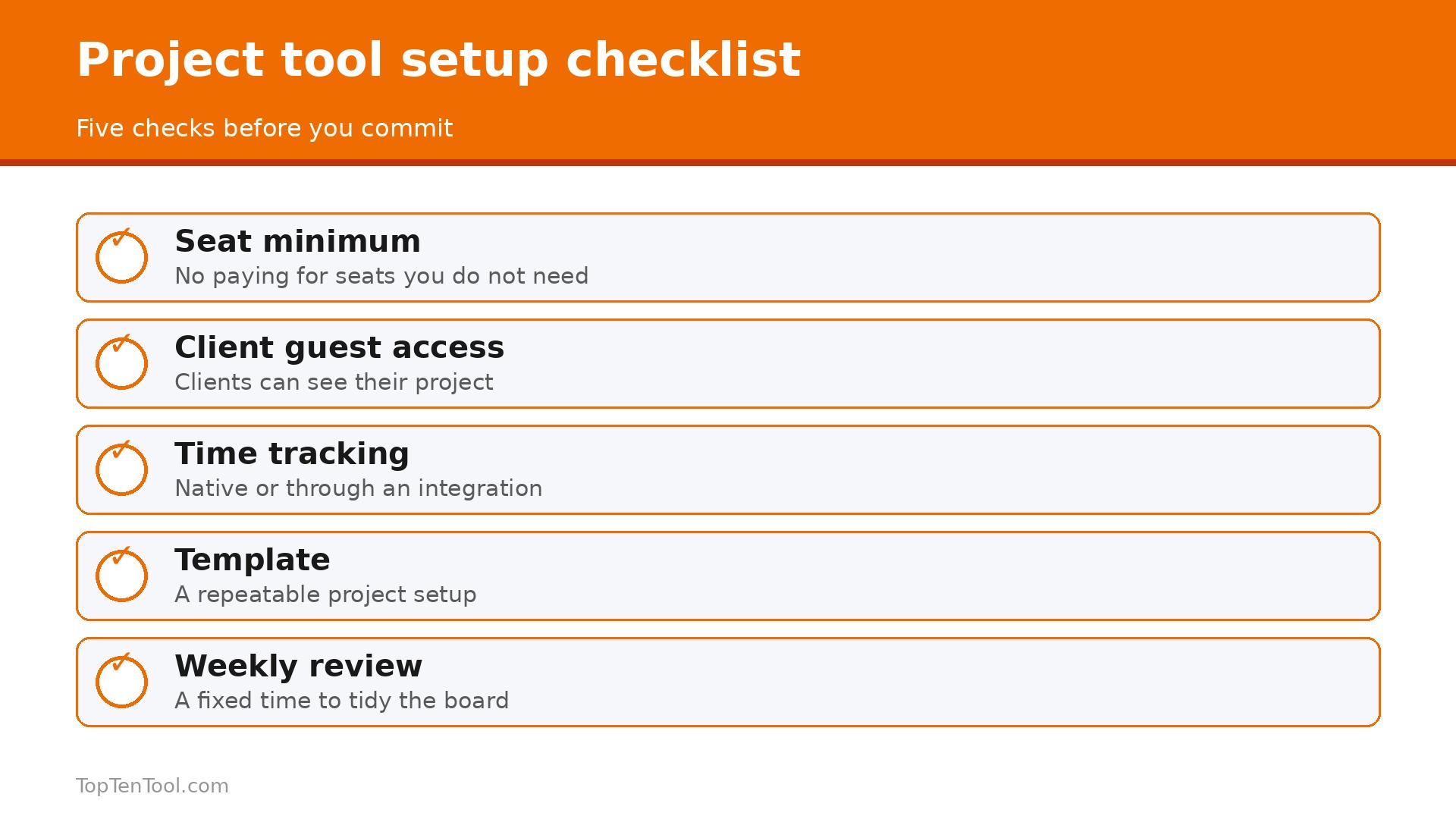
We judged each tool on five things that decide whether a freelancer keeps using it. First, the real monthly floor for one person, including seat minimums, because the advertised per seat price can be half the real bill. Second, client access, since a freelancer needs clients in the workspace without paying a seat for each one. Third, time tracking, because hours you cannot record are hours you cannot bill. Fourth, views and structure, from simple boards to timelines and dependencies, matched to how the freelancer thinks. Fifth, the free plan, which lets a new freelancer test properly before paying. We gave extra credit to tools with free client access and no seat minimum.
The best project management tools for freelancers are the ones that keep every client visible, billable and separate, without charging you for the clients themselves.
The 5 Best Project Management Tools Reviewed
1. ClickUp
Starting price $9 per user a month for Core on annual billing. Best for Power users who want everything configurable. Watch out The depth can overwhelm a freelancer who wants simple boards.
ClickUp is the all in one work hub that advertises itself as the software that replaces all software, and for a freelancer that claim is closer to true than most. It combines tasks, docs, goals, time tracking, automations and AI in one place, with a free forever plan for unlimited members and 60 MB of storage. Core costs $9 per user a month on annual billing, or $12 monthly, with no seat minimum, so one person pays $9. Business at $17 adds more automations and AI, and every paid tier bundles pooled AI credits.
The strength is also the risk. ClickUp is highly customisable, which means a freelancer can build exactly the system they want, but also means a week can disappear into configuration. The interface carries many features, and new users can feel lost. It suits a power user who enjoys building a system and wants tasks, docs and time in one bill, rather than a freelancer who wants a simple board in five minutes.
Pick it when you want one tool to replace tasks, docs and time tracking, and you enjoy configuring software. Skip it when you want the simplest possible board and will never use automations or AI.
ClickUp free plan is the only one on this list with unlimited members, which makes it the best free starting point for a freelancer who collaborates with clients and contractors. The paid Core tier adds Gantt charts, time tracking and docs in one bill, and the AI credits help draft task descriptions and summaries. The real cost for one person is $9 a month, with no seat minimum and no surprise.
The honest watch out is complexity. A freelancer who only needs a board per client will find Trello faster, and a freelancer who only needs a list will find Todoist faster. ClickUp earns its price when you use the depth every week, and it wastes money when you use ten percent of it. Start free, build one client workspace properly, and upgrade only when you hit a free plan limit.
In practice, ClickUp earns its place when power users who want everything configurable. The main risk is the depth can overwhelm a freelancer who wants simple boards, so test that specific limit during your trial before you commit.
Pick it when you want tasks, docs, goals and time tracking in one tool. Skip it when you want the simplest board and nothing else.
2. Asana
Starting price $10.99 per user a month for Starter, 2 seat minimum. Best for Structured lists, timelines and dependencies. Watch out One person really pays $21.98 a month, not $10.99.
Asana is the structured option, with lists, calendars, timelines, dependencies and forms that suit a freelancer who runs task heavy work with clear order. The free Personal plan covers up to 2 users with core tasks and views, which is enough to test properly. Starter costs $10.99 per user a month on annual billing and adds timelines with dependencies, forms and custom fields, while Advanced at $24.99 adds approvals and advanced workflows.
The seat minimum is the catch that decides the purchase. Asana sells paid seats with a 2 seat minimum, so a one person paid account costs $21.98 a month, not $10.99. Free external guests can see projects without a paid seat, which helps, but workspace collaborators are billed. Asana suits a freelancer who values structure and dependencies and is willing to pay the real floor for them.
Pick it when your work has dependencies and timelines that a simple board cannot show. Skip it when you are solo and the $21.98 real floor feels heavy for what you need.
Asana strength is clarity. A project with twenty tasks, five dependencies and a deadline is easier to manage in Asana than in any other tool on this list, and the timeline view shows slippage before it becomes a missed deadline. The mobile app is reliable, the integrations are wide, and the reporting is clean enough to share with a client.
The honest watch out is price for one person. At $21.98 a month, Asana Starter costs more than twice ClickUp Core and four times Trello Standard, for a freelancer who may not need dependencies every week. It also has no native time tracking or invoicing, so you will pair it with Toggl Track or FreshBooks. Choose Asana when structure is the job, and choose a cheaper tool when it is not.
In practice, Asana earns its place when structured lists, timelines and dependencies. The main risk is one person really pays $21.98 a month, not $10.99, so test that specific limit during your trial before you commit.
Pick it when your projects have dependencies and deadlines that need a timeline. Skip it when you are solo and want the cheapest good option.
3. Trello
Starting price $5 per user a month for Standard on annual billing. Best for A simple board per client. Watch out No native time tracking or dependencies on lower tiers.
Trello is the simplest tool on this list, and that simplicity is the point. Each client gets a board, each job gets a card, and the work moves from left to right. The free plan covers up to 10 collaborators and 10 boards per workspace, which is enough for a freelancer with a handful of clients. Standard costs $5 per user a month on annual billing, or $6 monthly, with no seat minimum, so one person pays $5. Premium at $10 adds timelines, calendars and more automation.
Trello is fast to learn, fast to use, and easy to show a client, because a board needs no explanation. Single board guests are free on Standard, though a guest on two or more boards is billed, which matters if a client touches several projects. It suits a freelancer who thinks in boards and wants the lowest friction tool available.
Pick it when you want a board per client and nothing else, and you value speed over depth. Skip it when you need dependencies, time tracking or complex workflows.
Trello weakness is depth. There is no native time tracking, no dependencies on the lower tiers, and no invoicing, so a freelancer will pair it with Toggl Track or Clockify for hours and FreshBooks for billing. The power ups and automations help, but they do not turn Trello into ClickUp or Asana.
The honest watch out is scale. A freelancer with twenty active boards will find Trello harder to manage than Asana or ClickUp, because there is no cross board reporting on the lower tiers. It is still the best pick for a freelancer with a few clients who wants a clean board per client at $5 a month.
In practice, Trello earns its place when a simple board per client. The main risk is no native time tracking or dependencies on lower tiers, so test that specific limit during your trial before you commit.
Pick it when you want the simplest board per client at the lowest price. Skip it when you need timelines, dependencies or time tracking built in.
4. Notion
Starting price $10 per member a month for Plus. Best for Briefs, docs and client hubs in one workspace. Watch out You build the system yourself, and time tracking needs a workaround.
Notion is the workspace option, where tasks, briefs, docs and client hubs live together. The free plan covers individuals with 10 guests, and Plus costs $10 per member a month with no seat minimum, so one person pays $10. Business at $20 adds more admin and AI. A freelancer can build a client database, a task board, a content calendar and a proposal template in one place, shaped exactly how they like it.
The strength is flexibility. Notion handles the messy middle of freelance work, where a brief becomes a task list becomes a deliverable, better than any other tool on this list. The templates are good, the editor is pleasant, and the client hub can be shared as a clean page that a client actually reads.
Pick it when your work is document heavy and you want briefs, tasks and docs together. Skip it when you need native time tracking, Gantt charts or dependencies without building them yourself.
Notion weakness is that nothing is ready made. There is no native time tracking, no built in invoicing, and no project template that matches a freelancer workflow out of the box. You build the system, which takes an afternoon, and you maintain it, which takes discipline. The database views are powerful once built, but the first build is work.
The honest watch out is that Notion rewards builders and punishes buyers who want a finished tool. A freelancer who enjoys building will love it. A freelancer who wants to start in an hour should choose Trello or ClickUp free instead.
In practice, Notion earns its place when briefs, docs and client hubs in one workspace. The main risk is you build the system yourself, and time tracking needs a workaround, so test that specific limit during your trial before you commit.
Pick it when your work is document heavy and you enjoy building your system. Skip it when you want time tracking and timelines ready made.
5. Toggl Plan
Starting price $9 per user a month for Starter on annual billing. Best for Planning driven by real time data. Watch out Smaller feature set than ClickUp or Asana.
Toggl Plan, formerly Toggl 2.0, is the planning tool built on time data, which makes it different from every other tool on this list. It puts accurate time at the centre of planning, so a freelancer can see whether the workload is realistic before promising a deadline. The free plan covers up to 5 users, Starter costs $9 per user a month on annual billing, and Premium is $20. Drag and drop timelines, calendars and capacity tracking show exactly how much work fits in a week.
The strength is honesty about capacity. A freelancer who tracks time in Toggl Track can plan the next week from real data, not optimism, and the workload view shows overload before it becomes burnout. It suits a freelancer whose main problem is saying yes to too much work.
Pick it when time data drives your planning and you want to stop overcommitting. Skip it when you need docs, CRM or invoicing in the same tool.
Toggl Plan weakness is breadth. It is a planning and capacity tool, not an all in one, so you will pair it with Toggl Track for time, and with FreshBooks or Bonsai for invoicing. The feature set is smaller than ClickUp or Asana, and the integrations are fewer.
The honest watch out is that Toggl Plan assumes you already track time. Without time data, the planning views are just calendars. It earns its price when you track every hour and plan from the numbers, and it is the best pick for a freelancer whose calendar is always fuller than it looks.
In practice, Toggl Plan earns its place when planning driven by real time data. The main risk is smaller feature set than ClickUp or Asana, so test that specific limit during your trial before you commit.
Pick it when you track time and want to plan from real hours. Skip it when you need an all in one with docs and invoicing.
Your Best Match by Task
The right pick depends on how you think, whether that is boards, lists, docs or time. Use this table as a shortcut, then read the full review of the tool it points to. Every pick below was judged against the best project management tools for freelancers criteria set out in this guide.
| Job to be done | Best pick | Why it wins |
|---|---|---|
| Cheapest good board | Trello | $5 a month, no seat minimum |
| All in one, best value | ClickUp | $9 a month, tasks plus docs plus time |
| Structured timelines | Asana | $21.98 real floor for one person |
| Docs plus tasks together | Notion | $10 a month, build it your way |
| Planning from real hours | Toggl Plan | $9 a month, capacity first |
How to Choose the Best Project Management Tools for Freelancers
Start with the real monthly floor for one person, because the advertised per seat price can be half the real bill. Trello Standard is $5 a month with no seat minimum, ClickUp Core is $9, Notion Plus is $10, Toggl Plan Starter is $9, and Asana Starter is $21.98 because of the 2 seat minimum. Price the floor, not the headline, and remember that monday Basic would be $27 for the same reason. The best project management tools for freelancers are the ones whose price is honest for one person.
Next, check client access, because a freelancer needs clients in the workspace without paying a seat for each one. Asana gives free external guests, Trello gives single board guests free, ClickUp gives 5 guests with one paid seat on Core, and Notion gives 10 guests free. A tool that charges you for every client who views a board will punish you for being transparent.
Then decide how you think. Board thinkers should choose Trello, list and timeline thinkers should choose Asana, document thinkers should choose Notion, and time thinkers should choose Toggl Plan. ClickUp suits the freelancer who wants all of those in one place and is willing to configure it. Finally, check time tracking, because hours you cannot record are hours you cannot bill, and only ClickUp and Toggl Plan treat time as a first class feature. Keep this checklist beside you while you compare best project management tools for freelancers options, and the right choice will be obvious by the end.
The Seat Minimum Trap, Worked Out in Dollars
The seat minimum is the most expensive detail in this category, so work it out before you buy. Asana Starter advertises $10.99 a user a month, but the 2 seat minimum makes the real floor $21.98 a month, or $263.76 a year. monday Basic advertises $9 a seat, but the 3 seat minimum makes the real floor $27 a month, or $324 a year. Trello Standard at $5, ClickUp Core at $9, Notion Plus at $10 and Toggl Plan Starter at $9 have no seat minimum, so one person pays exactly the advertised price. Over a year, the Asana minimum costs an extra $155.88 compared with ClickUp, and the monday minimum costs an extra $216 compared with Trello.
That money buys a year of Toggl Track or a month of FreshBooks, so check the minimum before you fall for a low per seat price.
A 30 Day Rollout Plan for One Freelancer
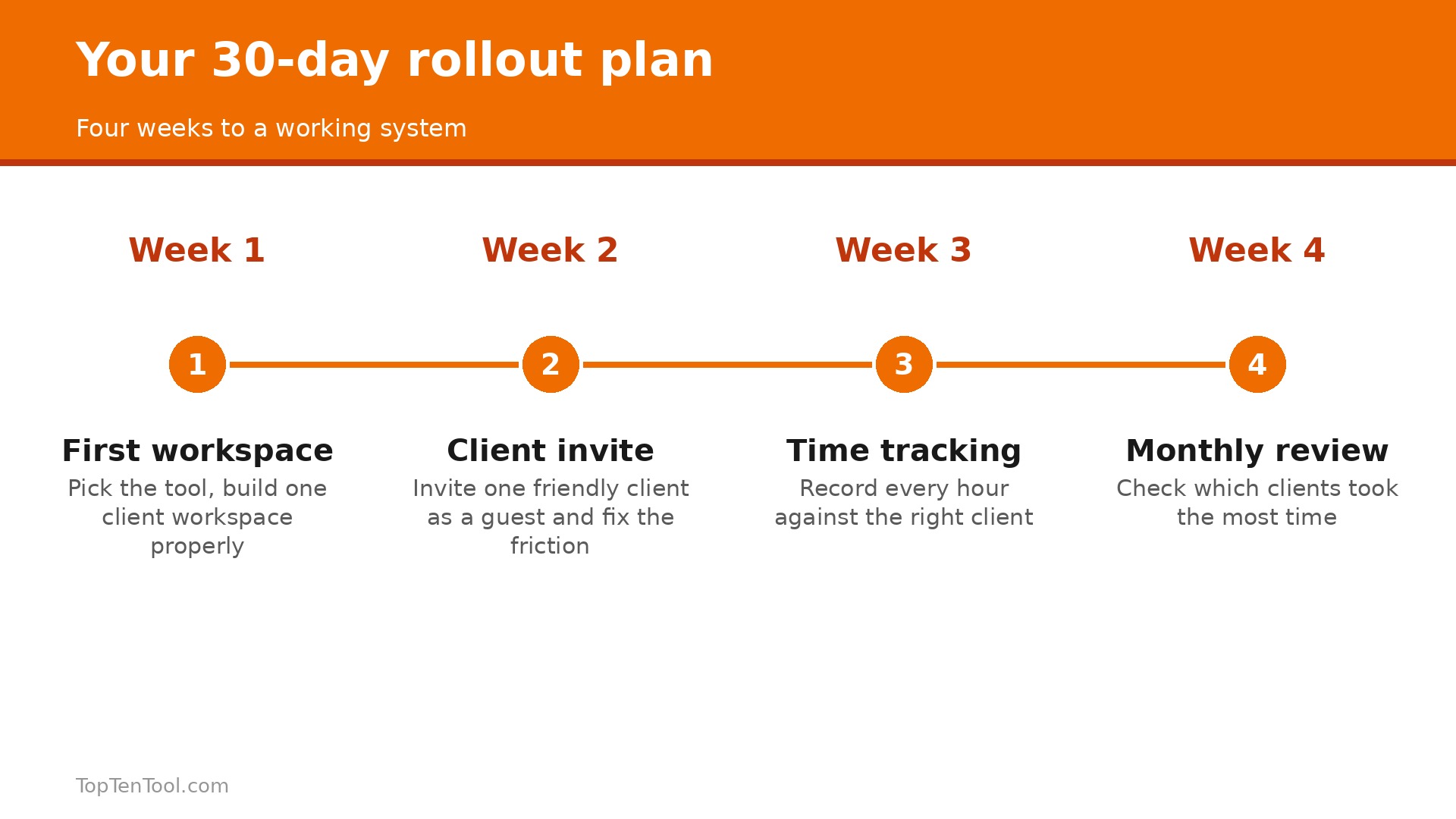
Week one, pick the tool and build one client workspace properly, with a board or list for the active project, a template for the next project, and a place for files. Do not migrate every old client at once. Week two, invite one friendly client as a guest and watch how they use it, then fix the friction they hit. Week three, add time tracking, either native in ClickUp or Toggl Plan, or through Toggl Track with Trello, Asana or Notion, and record every hour against the right client. Week four, review the month, check which clients took the most time, and use that data to price the next proposal.
By day 30 you will know whether the tool fits, and you will have the time data to prove it.
Five Mistakes That Make Freelance Project Tools Fail
The most common mistake is building a perfect system for twenty clients when you have five, which means the tool becomes a second job. Start with one client workspace and copy it. The second is charging yourself for client seats, by picking a tool that bills every guest, which punishes transparency. Check the guest rules first. The third is tracking tasks but not time, so you know what you did but not what it cost you. Record hours against the right client every day. The fourth is having no template, which forces you to rebuild the same project from scratch each time. Build one template and reuse it.
The fifth is never reviewing the week, which lets overload build silently until a deadline breaks. Spend 15 minutes every Friday reviewing capacity and next week deadlines.
How to Price Your Time With the Data You Collect
A freelancer who tracks time for a month learns something no rate calculator can teach, which is what each client actually costs. Start by recording every hour against the right client for four weeks, including the emails, the revisions and the meetings that never appear on an invoice. At the end of the month, divide what each client paid by the hours they took, and you will find that your best paying client is not always your most profitable one. A client who pays $2,000 and takes 40 hours earns you $50 an hour, while a client who pays $1,000 and takes 10 hours earns you $100 an hour.
Next, use that data to price the next proposal. Quote the profitable work higher, because you now know it is worth more, and quote the time heavy work higher still, or decline it. A freelancer who prices from time data stops competing on hourly rate and starts competing on value, because the numbers prove which work is worth doing.
Then use the data to fix your week. If meetings take 20 percent of your time and earn nothing, cut them to 15 minutes or move them to email. If revisions take 30 percent, add a revision limit to the next contract. If one client takes twice the time of the others, raise their price or reduce the scope. The project tool collects the data, but the pricing decision is yours, and it is the decision that turns a busy freelancer into a profitable one. Review the numbers monthly, not yearly, because a year of unprofitable work is a year you cannot get back.
The Recommendation
For most freelancers, the smart start is Trello free or ClickUp free, because both let you run real client work at zero cost and upgrade sensibly. Trello at $5 a month is the pick for a simple board per client, ClickUp at $9 is the pick for an all in one that replaces tasks, docs and time tracking, and Notion at $10 is the pick for document heavy work. Asana is worth $21.98 a month only when dependencies and timelines are the job, and Toggl Plan at $9 is the pick when time data drives your planning.
The best project management tools for freelancers are the ones that keep every client visible and billable without charging you for the clients themselves, so price the real floor for one person, test it with one client, and upgrade only when the work proves it. That is the best project management tools for freelancers shortlist we would hand to a friend starting today.
Frequently Asked Questions
What is the best project management tool for freelancers?
It depends on how you think. Trello is best for a simple board per client at $5 a month, ClickUp is best for an all in one at $9, Notion is best for document heavy work at $10, Asana is best for structured timelines, and Toggl Plan is best for planning from real time data. Start free with Trello or ClickUp and upgrade when you hit a limit.
How much does project management software cost for one freelancer?
The real floor for one person is $5 a month for Trello Standard, $9 for ClickUp Core or Toggl Plan Starter, $10 for Notion Plus, and $21.98 for Asana Starter because of the 2 seat minimum. Free plans from Trello, ClickUp, Asana, Notion and Toggl Plan cover a real freelancer, so many start free and pay only when they need more.
Why does Asana cost $21.98 for one person?
Asana sells paid seats with a 2 seat minimum, so a one person paid account costs twice the advertised $10.99 a user a month. The free Personal plan covers up to 2 users, and free external guests can view projects, but a paid solo account is $21.98 a month on annual billing.
Do freelancers need time tracking in their project tool?
Yes, if you bill by the hour or want to know which clients are profitable. Hours you cannot record are hours you cannot bill, and a tool that tracks time against the right client shows which work earns money and which work loses it. ClickUp and Toggl Plan include time tracking, while Trello, Asana and Notion need a separate tracker such as Toggl Track.
Can clients see my project management tool?
Yes, and they should, because transparency builds trust. Asana gives free external guests, Trello gives single board guests free on Standard, ClickUp gives 5 guests with one paid seat, and Notion gives 10 guests free. Check the guest rules before you buy, because some tools charge you for every client who views a board.
Is ClickUp too complex for a freelancer?
It can be, if you try to use every feature on day one. Start with one client workspace, a simple task list and time tracking, and ignore the rest until you need it. A freelancer who builds slowly will love ClickUp, while a freelancer who wants a simple board in five minutes should choose Trello instead.