
A client who walks into a tattoo studio with a vague idea and a phone full of screenshots is not asking the artist to copy a picture. They are asking for a design that fits their body, their story and the artist’s style, and they want to see it before the needle touches skin. The best ai tools for tattoo artists speed up that middle step, the part between the first conversation and the finished stencil, without replacing the artistry that makes a tattoo worth wearing for life.
This guide compares eight tools on published prices, the studio job each one does best and the catch that only shows up after the trial ends. One honest note runs through the whole guide. No AI generator produces a design that should go onto skin without an artist’s redraw. Treat every output as a concept to refine, check the commercial licence before using a generated image on a paying client, and keep the final design in your own hands.
The Quick Shortlist
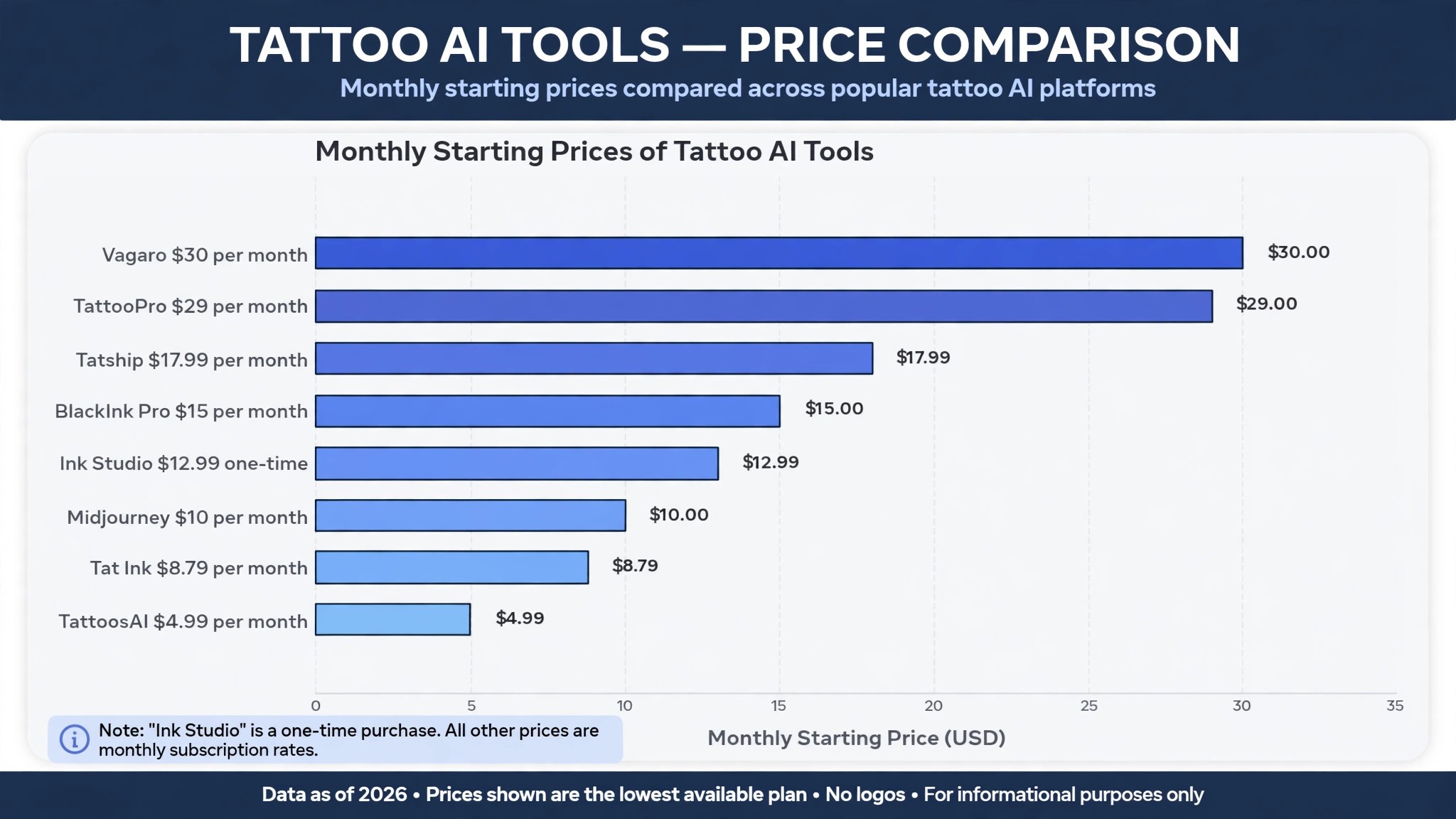
The table below matches each common studio job to the single tool that handles it best. Use it to narrow the best ai tools for tattoo artists to two or three candidates before you read the full reviews. Prices are monthly list prices unless noted, and annual billing is usually cheaper than paying month to month.
| Job | Best tool | Why it wins |
|---|---|---|
| Unlimited designs plus stencil converter | BlackInk AI | Pro Unlimited at 15 dollars a month, 72 dollars a year |
| Lowest month to month price | Tat Ink | Ink Pro at 8.79 dollars a month for 300 credits |
| One project with no subscription | Ink Studio AI | One time passes from 12.99 dollars for 7 days |
| Cheapest simple start | TattoosAI | Four free designs, then 4.99 dollars a month |
| 3D preview on the client’s body | Tatship | Unlimited try ons at 17.99 dollars a month |
| Reference concepts in any style | Midjourney | From 10 dollars a month, strongest tattoo imagery |
| Booking and payments for a studio | Vagaro | From 30 dollars a month, built for multi artist studios |
| Tattoo specific booking and waivers | TattooPro | From 29 dollars a month, deposits and consent forms included |
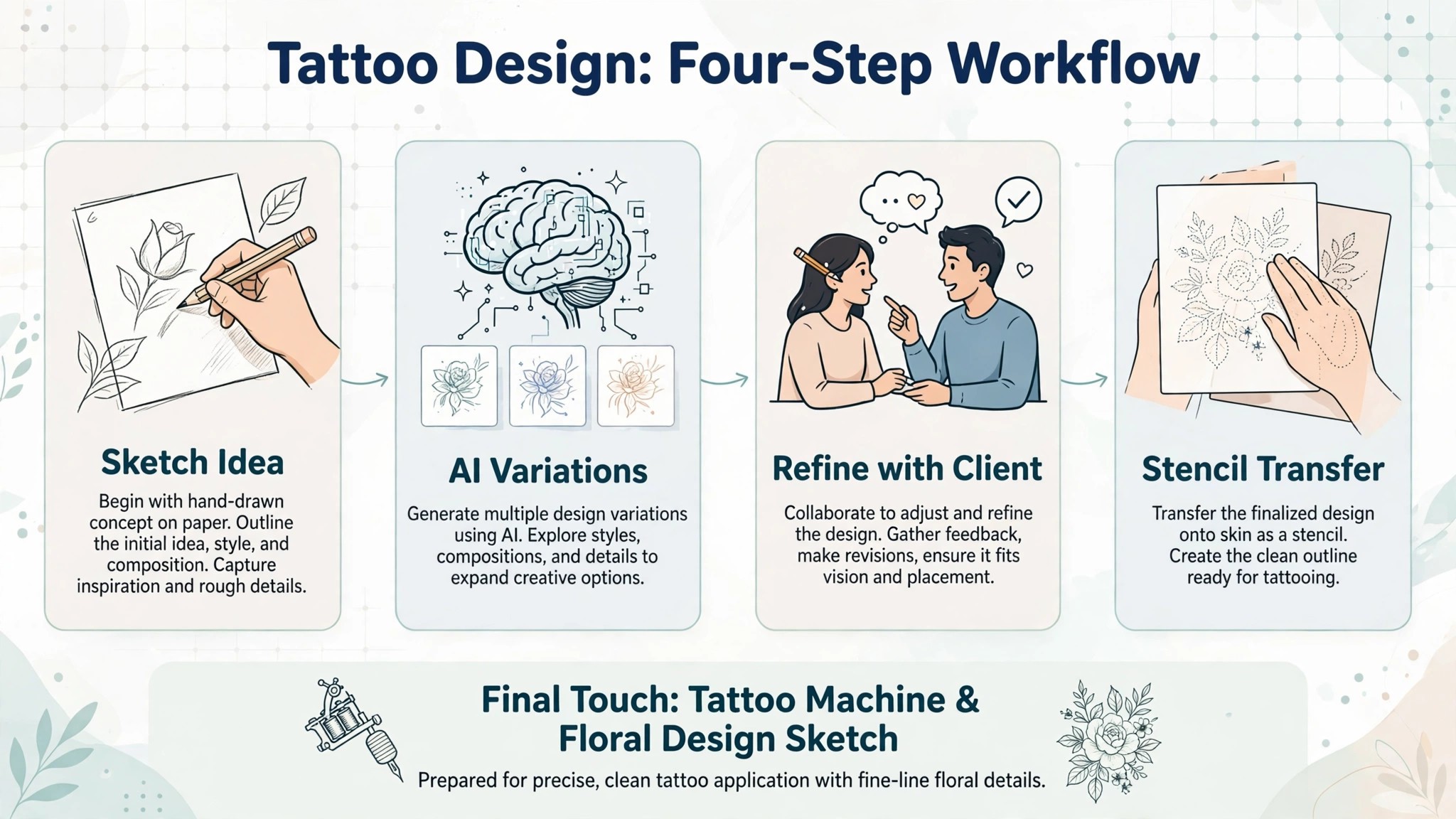
How We Judged the Best AI Tools for Tattoo Artists
A tool earned a place here only if it does a real studio job in 2026, not if it added an AI label to an old image app. The best ai tools for tattoo artists were judged on five things that decide whether an artist keeps paying after the first year.
First, the studio job it does, from generating a concept to converting it into a stencil to booking the client, because a tool that does one job well beats a platform that does five jobs poorly. Second, output quality, because a concept that looks good on a phone screen can still fail as line work on skin, and an artist who shows a client a weak concept loses trust fast.
Third, whether the price is published and how it scales, including credit caps that change the real bill as the studio generates more designs. Fourth, commercial rights, because a design used on a paying client needs a licence that clearly allows commercial use, and several tools in this category are vague about it. Fifth, the catch, from stencil converters that only work on simple designs to booking tools that charge per artist.
| Check before you buy | What to ask | Why it matters |
|---|---|---|
| Commercial licence | Which plans allow client work | A personal use plan cannot cover paid tattoos |
| Stencil output | Line art export or screen only | A stencil is what the artist actually needs |
| Credit caps | Monthly limit and what a design costs | A cap that runs out mid consultation stops the work |
| Try on preview | Flat photo or 3D body preview | A preview helps the client commit |
| Booking fit | Per artist price or flat studio price | Per artist bills multiply across a studio |
| Contract terms | Monthly or annual, and what year two costs | Annual billing locks the price but not the need |
The 8 Tools, Reviewed One by One
1. BlackInk AI
Starting price Pro Unlimited at 15 dollars a month, or 72 dollars a year. Best for Unlimited designs plus stencil converter. Watch out The free allowance is small, so test quickly before paying.
BlackInk AI is the best pick for most artists, because it is the only generator on this list built as a full tattoo planning suite rather than a single prompt box. Pro Unlimited costs 15 dollars a month billed monthly, 39.99 dollars every three months, or 72 dollars billed once a year, and it includes unlimited designs, body placement previews, detail and line weight controls, 4x downloads, a stencil converter and cover up and gap filler workflows. For an artist who generates concepts every day, that unlimited plan removes the credit anxiety that makes other tools feel expensive.
The strength is the stencil workflow. A generated concept can be turned into line work the artist can actually use, placed on a body template to check size and flow, and adjusted for the gaps and filler that real sleeves need. That planning matters, because a design that looks good as a square image can fail when it wraps around an arm, and BlackInk is the tool that catches that failure before the client sees it.
The catch is the free tier. It gives only eight free designs, so an artist should test with real client briefs rather than random prompts, and decide fast whether the output quality fits their style. For high volume planning with a stencil converter included, BlackInk earns the top spot, and the annual price at 6 dollars a month is the cheapest unlimited option on this list.
2. Tat Ink
Starting price Ink Pro at 8.79 dollars a month for 300 credits. Best for Lowest month to month price. Watch out Credits cap how many designs you can make, so heavy users pay more.
Tat Ink is the lowest month to month price on this list, and it earns its place by bundling more tools into one place than any rival at its price. Ink Pro costs 8.79 dollars a month for 300 credits, Ink Pro Plus costs 16.79 dollars for 900 credits, and Ink Max costs 34.99 dollars for 2,500 credits. The bundle includes an AI tattoo generator, a font creator, image to tattoo conversion, tattoo to stencil, cover up help and a try on preview, so one subscription covers most of the concept work a studio does.
The strength is value for a working artist who generates a moderate number of designs. Three hundred credits covers a steady flow of consultations, and the paid plans state a full commercial licence, which is clearer than several rivals in this category. For an artist who wants one tool for generation, stencil prep and try on, Tat Ink is the cheapest way to get all three without a second subscription.
The catch is the credit model. A busy week of consultations can burn through 300 credits faster than expected, and the artist then faces a choice between upgrading and waiting for the month to reset. For moderate volume work, Tat Ink is the best value on this list, and the logged in free allowance of 25 credits a month is enough to test the generator on real briefs.
3. Ink Studio AI
Starting price One time passes, 12.99 dollars for 7 days, 16.99 dollars for 14 days, 23.99 dollars for 30 days. Best for One project with no subscription. Watch out The pass expires, so an artist who pauses loses the remaining days.
Ink Studio AI is the best pick for an artist who needs a focused burst of generation without a monthly subscription. The one time passes give unlimited generations during the access period, with 10 to 30 premium credits depending on the pass, and the tool groups tattoo generation, image to tattoo conversion, flat body photo placement, stencil reference conversion and planning calculators in one browser product. For a guest spot, a flash event or a single large project, that one off payment fits better than a subscription that keeps billing after the work ends.
The strength is the guided workflow. Prompts are refined step by step, styles and colour options are chosen up front, and the stencil reference tool turns a concept into line work the artist can redraw. That guidance helps an artist who is new to AI generation get usable concepts on the first try instead of learning prompt craft through trial and error.
The catch is the clock. A 7 day pass at 12.99 dollars is good value only if the artist uses it in that week, and the commercial terms are not stated as clearly as BlackInk or Tat Ink. For a one off project, Ink Studio AI earns its place, and the first design is free, which is enough to check whether the styles match the artist’s work.
4. TattoosAI
Starting price Four free designs, then 4.99 dollars a month. Best for Cheapest simple start. Watch out Commercial terms are not stated clearly, so check before using designs on clients.
TattoosAI is the simplest and cheapest way to start generating tattoo concepts, and it earns its place for artists who want a low commitment first step. Each account gets four free designs with no card, and unlimited designs cost 4.99 dollars a month, or 14.99 dollars a month billed monthly in some listings, so the annual price is the one to take. The generator covers more than 18 styles, including watercolor, dotwork, minimalist and Japanese, plus a surprise me option for clients who cannot describe what they want.
The strength is simplicity. A client can describe an idea in plain words, pick a style, and see a concept in seconds, which makes the consultation faster and more fun for a first time client. For a small studio that generates a few concepts a week, the 4.99 dollar price is low enough to keep even in a slow month.
The catch is commercial clarity. The vendor does not state its commercial terms as clearly as Inker AI or Tat Ink, so an artist should confirm in writing whether generated designs can be used on paying clients. For a cheap start and simple generation, TattoosAI earns its place, and it is the best tool on this list for an artist who wants to test AI concepts before spending more.
5. Tatship
Starting price 17.99 dollars a month. Best for 3D preview on the client’s body. Watch out It is a preview tool, not a design generator, so pair it with a generator.
Tatship does one job that no generator on this list does well, which is showing a client how a design will actually look on their body. Its 3D body try on lets a client see placement, size and flow before committing, with unlimited try ons, designs and downloads on the paid plan at 17.99 dollars a month, plus advanced custom edits. For a studio that loses bookings because clients cannot picture the finished tattoo, that preview is the difference between a maybe and a deposit.
The strength is commitment. A client who has seen a design on their own arm is far more likely to book than one who has only seen it on a flat image, and the try on also catches placement problems early, such as a design that wraps badly or sits too close to a joint. Tatship also sells temporary tattoos, so a client can wear a test version for a few days before the real session.
The catch is scope. Tatship is a preview and try on platform, not a full design generator, so an artist still needs BlackInk, Tat Ink or Midjourney for the concept itself. For studios that struggle with client commitment, Tatship earns its place as the best preview tool on this list, and it pairs well with any generator above.
6. Midjourney
Starting price From 10 dollars a month. Best for Reference concepts in any style. Watch out It is a general image tool, not a tattoo tool, so it makes no stencils.
Midjourney produces the most tattoo relevant imagery of any general AI image tool, and it earns its place as the reference generator for artists who know how to prompt it. From 10 dollars a month, an artist can generate concepts in geometric, blackwork, fine line, botanical and dozens of other styles, and a prompt such as a geometric wolf tattoo design in blackwork with fine line and botanical elements gives a client something concrete to react to in seconds. For a consultation where the client says something in this direction, Midjourney is the fastest way to show them what that direction looks like.
The strength is image quality. No tattoo specific generator on this list matches Midjourney for detail, composition and style range, and an artist who learns its prompt style can produce reference images that clients love. It is also the best tool here for flash sheets, because a set of related designs in one style comes out coherent rather than random.
The catch is that Midjourney is not a tattoo tool. It makes no stencil, no placement preview and no booking, and its commercial terms need checking for client work. The output is a reference point, and the artist still redraws the final design. For reference generation at a low price, Midjourney earns its place, and it pairs well with BlackInk for the stencil step.
7. Vagaro
Starting price From 30 dollars a month. Best for Booking and payments for a studio. Watch out The price rises with add ons, so check the full bill.
Vagaro is the booking pick for studios with more than one artist, because it handles the business side that generators never touch. From 30 dollars a month, it covers online booking, payments, client records, reminders and marketing, with a marketplace that brings new clients to the studio. For a multi artist studio, that combination replaces a booking book, a payment terminal and a reminder system in one subscription.
The strength is the client experience. A client can book online, pay a deposit, get a reminder and leave a review without the studio chasing them by phone, and the front desk can see every artist’s chair at a glance. That matters in a studio where a missed booking is an empty chair and an empty chair is lost income for the day.
The catch is the bill. The starting price is fair, but add ons push it higher, and a studio should price the full setup before committing. Vagaro is also a general beauty and wellness platform, so some features are built for salons rather than tattoo studios. For booking and payments in a multi artist studio, Vagaro earns its place, and it is the most proven option on this list for the business side.
8. TattooPro
Starting price From 29 dollars a month. Best for Tattoo specific booking and waivers. Watch out Smaller user base means fewer integrations than Vagaro.
TattooPro is the only booking tool on this list built specifically for tattoo studios, and that focus shows in the features. From 29 dollars a month, it handles deposits, consent forms, waivers and aftercare messages, which are the paperwork steps that general booking tools handle badly or not at all. For a studio that spends too much time chasing deposits and paper forms, TattooPro removes the most annoying part of the day.
The strength is the tattoo workflow. A client books, pays a deposit, signs the consent form and gets aftercare instructions without the artist touching paper, and the studio keeps a record of every step for the day the paperwork matters. That record keeping is worth the subscription on its own, because a lost consent form is a real risk in this trade.
The catch is scale. TattooPro has a smaller user base than Vagaro, so there are fewer integrations and fewer tutorials to lean on, and a studio that also sells retail or runs a large marketplace may find Vagaro broader. For tattoo specific booking with deposits and waivers built in, TattooPro earns its place, and it is the best pick for a studio that wants booking shaped around tattoo work rather than salon work.
Side by Side Comparison
The table below puts the best ai tools for tattoo artists side by side on price, best job and free plan, so you can compare the published prices against the one time pass and subscription tools at a glance.
| Tool | Starting price | Best for | Free plan |
|---|---|---|---|
| BlackInk AI | 15 dollars a month | Unlimited designs plus stencil converter | Yes, 8 designs |
| Tat Ink | 8.79 dollars a month | Lowest month to month price | Yes, credits |
| Ink Studio AI | 12.99 dollars one time | One project with no subscription | Yes, 1 design |
| TattoosAI | 4.99 dollars a month | Cheapest simple start | Yes, 4 designs |
| Tatship | 17.99 dollars a month | 3D preview on the client’s body | Trial only |
| Midjourney | 10 dollars a month | Reference concepts in any style | Trial only |
| Vagaro | 30 dollars a month | Booking and payments for a studio | Trial only |
| TattooPro | 29 dollars a month | Tattoo specific booking and waivers | Trial only |
How to Pick the Right Tool for Your Studio
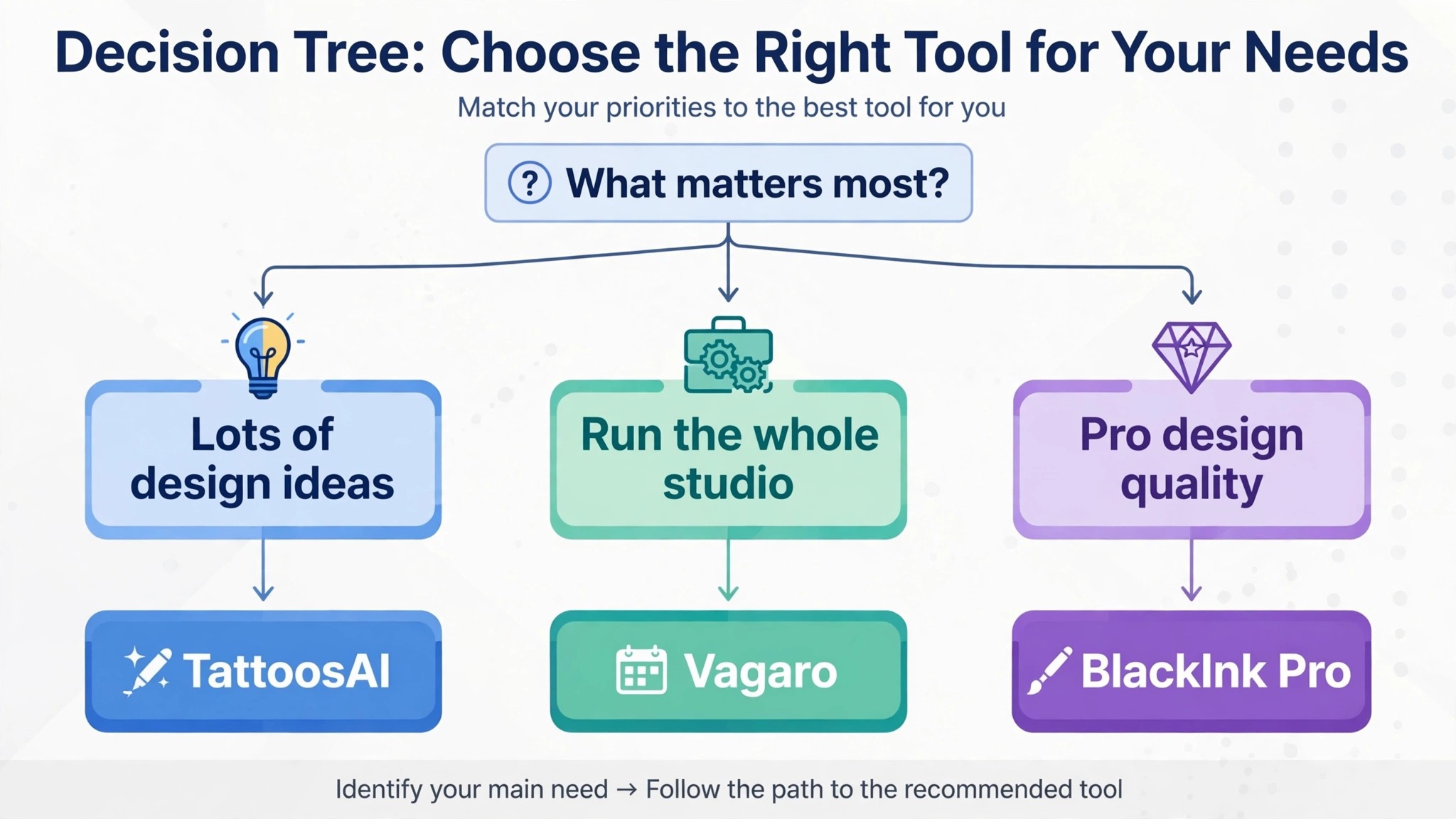
The best ai tools for tattoo artists are not the ones with the longest feature list. They are the ones that fix the bottleneck in your studio. An artist drowning in consultations should buy BlackInk AI or Tat Ink. An artist who needs one project done fast should buy an Ink Studio AI pass. A studio losing bookings to indecision should buy Tatship. A studio losing hours to paperwork should buy TattooPro. Start from the bottleneck, not from the vendor homepage.
Budget the full bill, not the headline price. The table below shows what a solo artist and a small studio actually pay in year one for the most common combinations, using published starting prices. Credit caps and per artist charges are the lines that surprise buyers, so ask for them in writing before you sign, and remember that annual billing usually saves about twenty percent against monthly billing.
| Stack | Monthly cost | What it covers |
|---|---|---|
| TattoosAI plus Tatship | About 23 dollars | Cheap generation plus 3D preview |
| BlackInk AI annual | 6 dollars | Unlimited designs and stencil converter |
| Tat Ink plus TattooPro | About 38 dollars | Generation plus tattoo booking |
| Midjourney plus BlackInk AI | About 25 dollars | Best references plus stencil planning |
| Vagaro for a studio | From 30 dollars | Booking, payments and reminders |
| BlackInk AI plus Vagaro | About 45 dollars | Full concept to booking stack |
The other mistake is buying a generator for the designs you wish clients asked for instead of the designs they actually bring in. Look at your last twenty consultations, count which styles paid, and buy the tool that makes those designs faster. A generator that excels at watercolor is no help to an artist whose clients want blackwork, and a booking tool built for salons is no help to a studio that lives on deposits and waivers. The best ai tools for tattoo artists are the ones that match the work on your books today, not the work on a vendor homepage.
Frequently Asked Questions
Can AI generate a tattoo that is ready to ink
No, and any tool that implies otherwise should be treated with caution. The best ai tools for tattoo artists generate concepts, and the artist redraws the final design, checks the line work, and adapts it to the client’s body before it goes near skin. A generated image can have lines that do not hold, shading that will blur, or details too small to tattoo cleanly. Treat every output as a starting point, and keep the final design in the artist’s hands, because the tattoo lasts a lifetime and the concept took seconds.
Which tool has the clearest commercial licence for client work
Inker AI has the clearest commercial licence on its Professional plan at 69.99 dollars a month, and Tat Ink states a full commercial licence on its paid plans. BlackInk AI Pro Unlimited is built for working artists, but an artist should still read the current terms before using generated designs on paying clients. TattoosAI and Ink Studio AI are less clear, so confirm in writing before you rely on them for paid work. When in doubt, use the generated image as a reference and redraw the final design yourself, because your own drawing carries no licence question at all.
What is the cheapest good AI tool for tattoo artists to start with
TattoosAI is the cheapest start, with four free designs and unlimited generation at 4.99 dollars a month. Tat Ink Ink Pro at 8.79 dollars a month is the cheapest paid plan with a clear commercial licence, and BlackInk AI annual at 6 dollars a month is the cheapest unlimited plan for an artist who generates every day.
Start with the studio job that costs you the most time each week, and add a second tool only when the first one cannot do a job you are paid to do. A free allowance is the right way to test output quality, but it is not the right way to serve a paying client, because most free plans exclude commercial use.
How much should a solo tattoo artist budget for AI tools
A realistic year one budget is 10 to 25 dollars a month for one generator such as BlackInk AI or Midjourney, and 40 to 60 dollars a month once you add booking with TattooPro or Vagaro. A small studio with several artists pays more for booking, because the price rises with chairs and add ons, so price the full studio rather than one artist. Budget for the stack, not for one tool alone, and trial each generator on real client briefs before you commit to annual billing.
Do I need a booking tool as well as a generator?
A generator and a booking tool solve different jobs, so most studios need both. The generator shortens the consultation, and the booking tool holds the deposits, the waivers and the chair schedule. The best ai tools for tattoo artists in this guide cover both jobs, and the year one budget above shows the split, 10 to 25 dollars a month for one generator and 40 to 60 dollars a month once booking is added.
Start with the generator if consultations eat your week, and add booking when missed deposits cost you money. A studio that lives on deposits and waivers should price booking first, because a booking tool built for salons will not hold a tattoo deposit properly.
Our Verdict
If you buy one tool this quarter, buy BlackInk AI. At 15 dollars a month, or 6 dollars a month billed annually, it is the best value on this list for an artist who generates concepts every day, with unlimited designs, placement previews and a stencil converter that turns a concept into something the artist can actually use. The best ai tools for tattoo artists earn their keep by shortening the consultation without shortening the artistry, and BlackInk does that from the first week, whether the saving is a faster concept or a stencil that fits the client’s arm on the first try.
Whatever you pick, start with the bottleneck today, trial with real client briefs, and keep the final design in your own hands. The tools on this list all work. The difference is whether the tool matches the studio work you actually do, and whether you measure the return in hours saved and chairs filled rather than in features used.