
A homeowner with a burst pipe does not leave a voicemail and wait. They call the next plumber on the list, and the job goes to whoever answers first. The best ai tools for plumbers exist because that first call, and the quote, the booking and the invoice that follow it, now decide who wins the work in a trade where the best plumber is often not the busiest one.
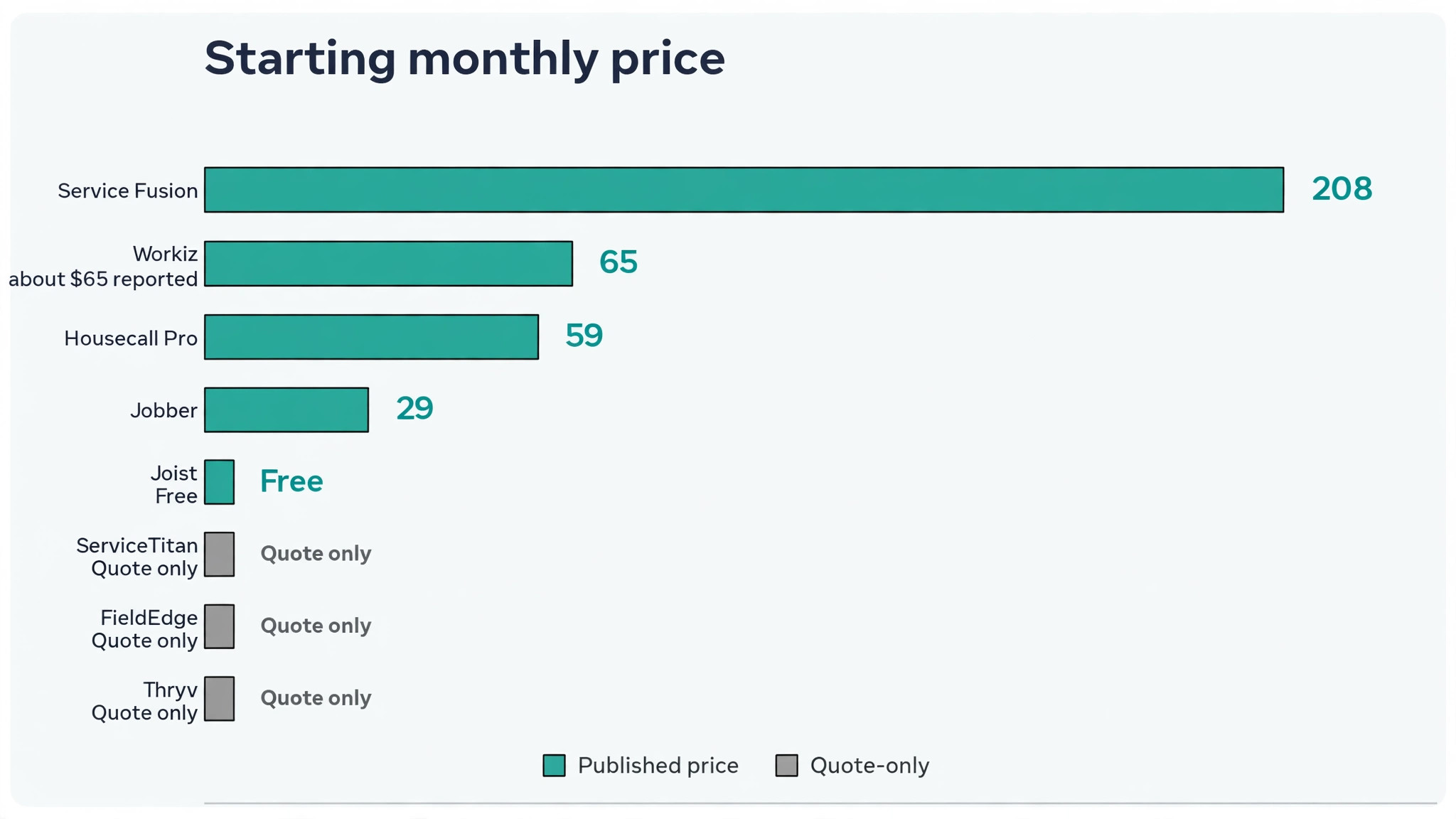
This guide compares eight tools on published prices where they exist, the job each one does best and the catch that only shows up after the contract is signed. Most of the big field service platforms in this category sell by quote or by team size, so where a price is reported by a third party roundup rather than published by the vendor, this guide says so. Start with the shortlist, then read the reviews that match the problem your crew feels most.
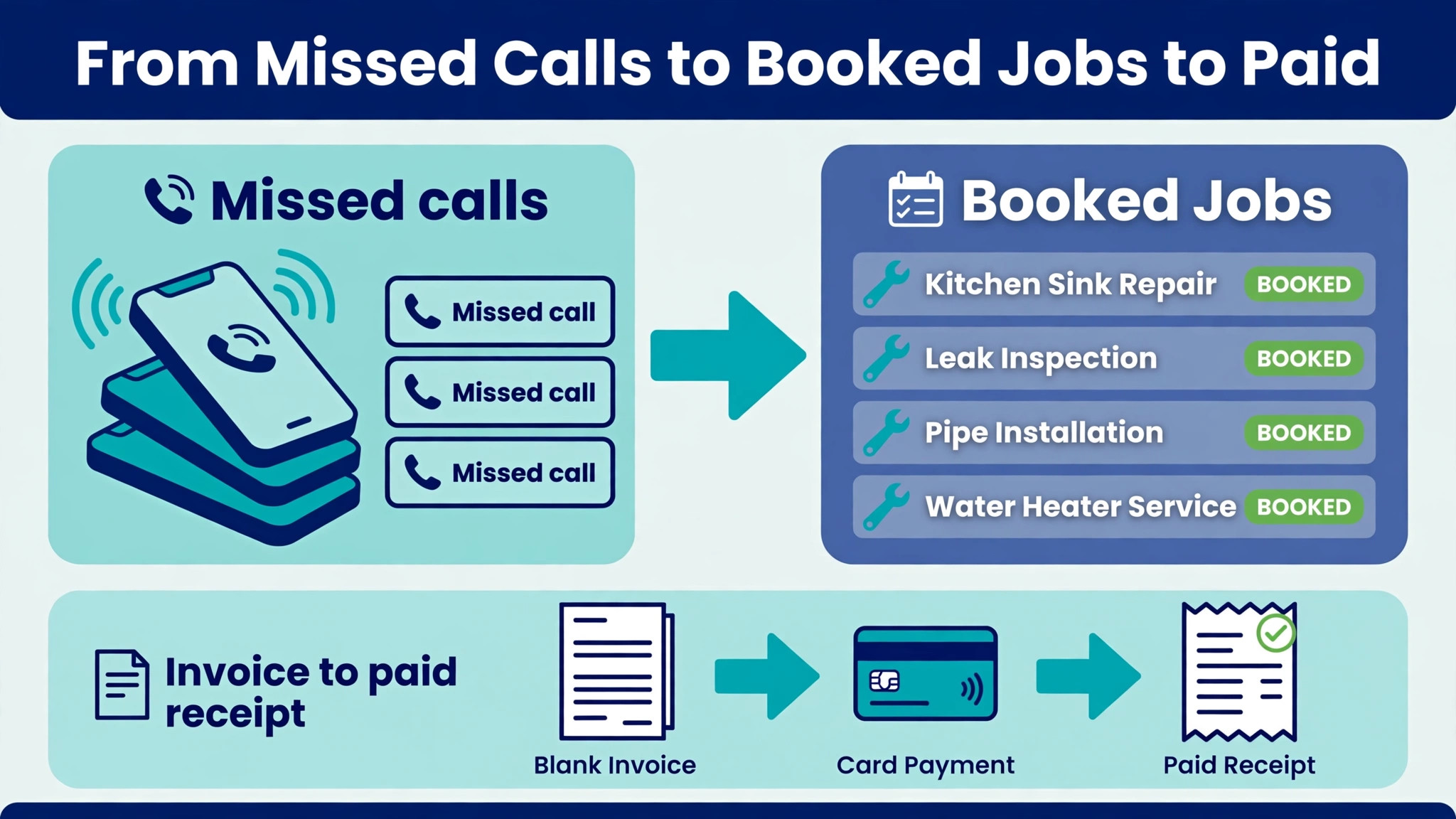
The pattern across all eight is simple. The tools that win are the ones that answer the phone after hours, send the quote before the customer forgets they asked, and get the invoice paid without a second visit. Everything else is a bonus, and a plumber who buys the bonus first usually keeps the leak.
The Quick Shortlist
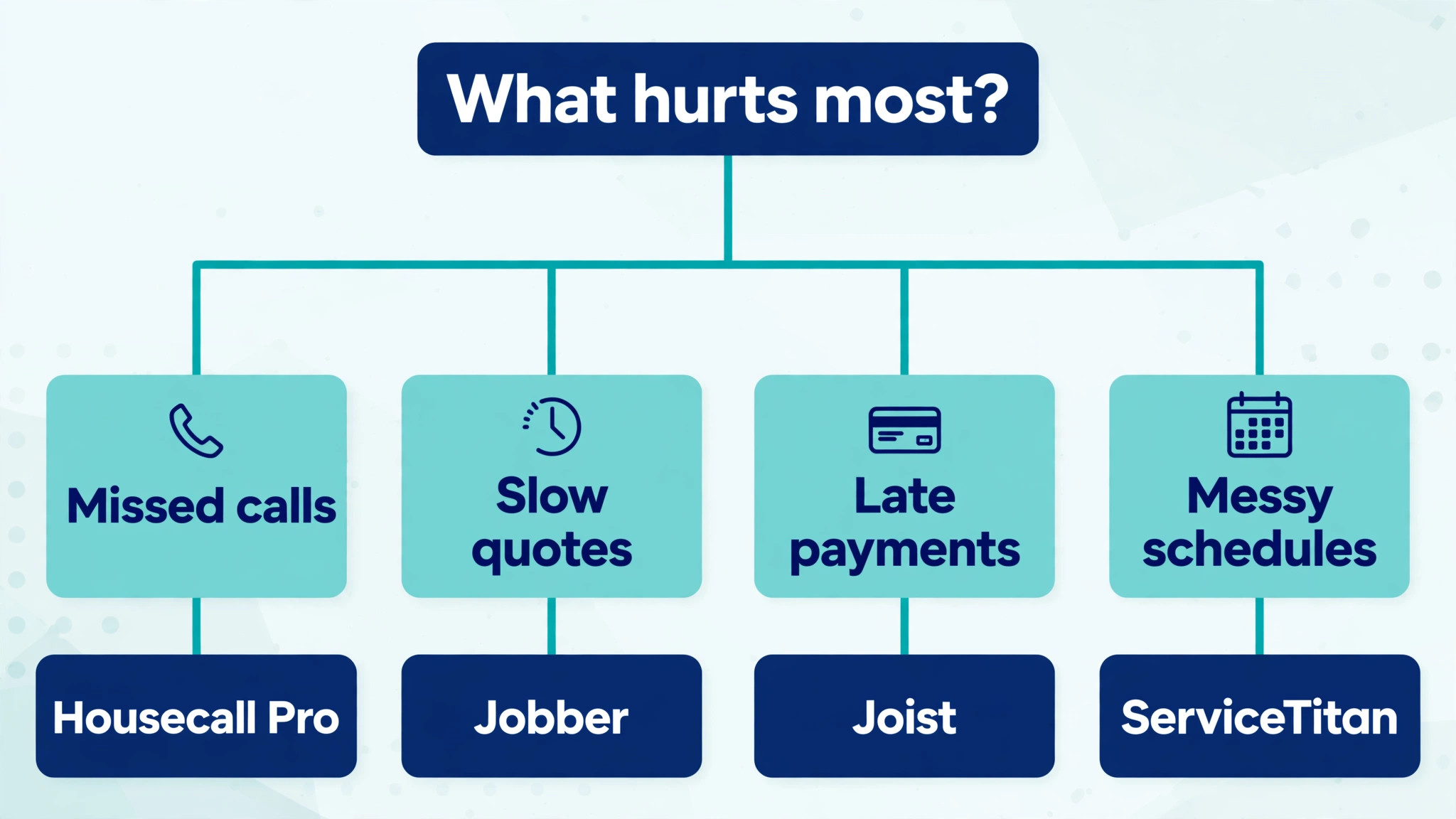
The table below matches each common plumbers job to the single tool that handles it best. Use it to narrow the best ai tools for plumbers to two or three candidates before you read the full reviews. Prices are monthly list prices unless noted, and annual billing is usually cheaper than paying month to month.
| Need | Best tool | Why it wins |
|---|---|---|
| small crews that want quotes, scheduling and invoicing in one place | Jobber | its AI drafts quotes from past jobs and price book items, so |
| high volume residential shops that live on the phone | Housecall Pro | its AI team is included on every plan and handles calls, booking |
| larger shops with five or more trucks and commercial work | ServiceTitan | its dispatch, capacity planning and price book are the deepest in the |
| shops that want unlimited users for one flat price | Service Fusion | every plan includes unlimited users, which changes the maths for a shop |
| shops that want dispatch and flat rate pricing built in | FieldEdge | its flat rate price book and dispatch board are built for the |
| shops that want a smart call system and online booking | Workiz | its phone system routes calls, records them and books jobs from the |
| shops that want marketing and the office in one subscription | Thryv | it pairs scheduling and invoicing with local marketing tools, review requests and |
| solo plumbers who need fast quotes and invoices for free | Joist | it turns a site visit into a branded quote in minutes, with |
How We Judged the best ai tools for plumbers
A tool earned a place here only if it does a real plumbing job in 2026, not if it added an AI label to an old product. The best ai tools for plumbers were judged on five things that decide whether a shop keeps paying after the first year.
First, the office job it does, from answering the phone at 8 in the evening to drafting a quote from past jobs and chasing the ones that went quiet. Second, whether the price is published or hidden behind a sales call, including per user charges and setup fees that change the real bill. Third, how it fits the van, because a tool the crew will not open on site is a tool that gets cancelled in month three.
Fourth, payment and invoicing, because a quote that never becomes a paid invoice is just paperwork. Fifth, the catch, from quote only pricing that hides the cost until the demo to per technician fees that multiply fast across a crew.
| Check before you buy | What to ask | Why it matters |
|---|---|---|
| Price transparency | Is the price published, or does it need a sales call | Hidden prices hide the real first year bill |
| Integration | Does it write back to the systems you already use | Write back saves double entry every day |
| Price structure | Per user, per seat, per location, or flat | Per user fees multiply across a team |
| Setup and renewal terms | Setup fee, and what year two costs | Renewal increases are common in this category |
| The catch | What does the cheapest plan leave out | The missing feature is usually the one you need |
| Trial on real work | Can you test it on real jobs before you pay | A trial on fake data proves nothing |
The 8 Tools, Reviewed One by One
Read the reviews that match the problem your plumbing business feels most, then check the price at your real team size before you trial anything. Each review names the starting price, the job the tool does best and the catch to ask about.
1. Jobber
Starting price From 29 dollars a month billed annually for Core with one user, with extra users at 29 dollars a month each. Its AI Receptionist is a 29 dollar a month add on. Best for small crews that want quotes, scheduling and invoicing in one place Watch out The cheapest plan is thin, and most crews need Connect or Grow to get quote follow ups and two way texting.
Jobber is the pick for plumbers who want small crews that want quotes, scheduling and invoicing in one place. its AI drafts quotes from past jobs and price book items, so a repeat job takes minutes instead of a fresh estimate every time. Its voice notes turn spoken job notes into written records, and the mobile app is the one crews actually open on site. For a crew that want one system for the office and the van, that combination covers the daily work without a second subscription.
Pricing is where buyers need care. From 29 dollars a month billed annually for Core with one user, with extra users at 29 dollars a month each. Its AI Receptionist is a 29 dollar a month add on. The cheapest plan is thin, and most crews need Connect or Grow to get quote follow ups and two way texting. The right move is a trial on real jobs, priced at your real team size, so the monthly bill you compare is the bill you will actually pay.
2. Housecall Pro
Starting price From 59 dollars a month billed annually for Basic with one user, 149 dollars for Essentials with five users and 299 dollars for Max with eight users. Best for high volume residential shops that live on the phone Watch out Its call answering AI price is not published, so ask for it in writing before you compare.
What sets Housecall Pro apart is its AI team is included on every plan and handles calls, booking and follow ups without a dispatcher in the middle. Two way texting, online booking and automated reminders keep the schedule full while the crew stays on the tools. The result is a tool that carries the job from the first call to the final payment, and most teams learn it in days rather than weeks.
The catch is worth knowing before the trial. Its call answering AI price is not published, so ask for it in writing before you compare. From 59 dollars a month billed annually for Basic with one user, 149 dollars for Essentials with five users and 299 dollars for Max with eight users. If that trade off fits the way your plumbers work, the tool earns its place, and if it does not, the next tool on this list probably fits better.
3. ServiceTitan
Starting price Quote only, priced per technician, with Starter, Essentials and The Works plans. Best for larger shops with five or more trucks and commercial work Watch out The bill runs into hundreds of dollars per technician a month once the full platform is loaded, so small shops should not start here.
ServiceTitan built its name on its dispatch, capacity planning and price book are the deepest in the trade, and its AI agents now handle calls, booking and follow ups across the whole business., and the 2026 version adds Marketing scorecards tie every lead to the campaign that produced it, so the owner sees which ads actually book jobs. The platform suits a shop with a dedicated dispatcher and a real volume of work, and it shows in the reporting. That mix suits a plumbers that wants the job done properly rather than the longest feature list.
The price is the honest part. Quote only, priced per technician, with Starter, Essentials and The Works plans. The bill runs into hundreds of dollars per technician a month once the full platform is loaded, so small shops should not start here. Ask for the full first year cost in writing before you sign, including any setup fee, because the headline price rarely tells the whole story.
4. Service Fusion
Starting price From 208 dollars a month billed annually for Starter, with unlimited users on every plan. Best for shops that want unlimited users for one flat price Watch out The starting price is high for a solo plumber, so it fits a team better than a one van business.
Service Fusion is the pick for plumbers who want shops that want unlimited users for one flat price. every plan includes unlimited users, which changes the maths for a shop adding office staff and technicians through the year. Scheduling, dispatch, invoicing and customer history sit in one system, and the flat price makes the monthly bill easy to forecast. For a crew that grow the team without the bill growing with it, that combination covers the daily work without a second subscription.
Pricing is where buyers need care. From 208 dollars a month billed annually for Starter, with unlimited users on every plan. The starting price is high for a solo plumber, so it fits a team better than a one van business. The right move is a trial on real jobs, priced at your real team size, so the monthly bill you compare is the bill you will actually pay.
5. FieldEdge
Starting price Quote only, priced by quote after a demo. Best for shops that want dispatch and flat rate pricing built in Watch out No published price means the sales call decides the number, so get the per technician figure in writing.
What sets FieldEdge apart is its flat rate price book and dispatch board are built for the way plumbing shops actually quote, with good better best options on the quote. The mobile app gives technicians the job details, the price book and the payment screen in one place, so the office stops chasing paperwork. The result is a tool that carries the job from the first call to the final payment, and most teams learn it in days rather than weeks.
The catch is worth knowing before the trial. No published price means the sales call decides the number, so get the per technician figure in writing. Quote only, priced by quote after a demo. If that trade off fits the way your plumbers work, the tool earns its place, and if it does not, the next tool on this list probably fits better.
6. Workiz
Starting price Reported at about 65 dollars a month for the entry plan, according to third party roundups. Confirm the current figure on the vendor site. Best for shops that want a smart call system and online booking Watch out The reported price is not published by the vendor, so the real quote may differ.
Workiz built its name on its phone system routes calls, records them and books jobs from the call, which suits a shop where the phone is the front door., and the 2026 version adds Online booking and automated messages keep the diary full, and the dispatch view shows every technician on one screen. The platform is a good fit for a shop that wants the phone handled properly without buying the biggest platform in the category. That mix suits a plumbers that wants the job done properly rather than the longest feature list.
The price is the honest part. Reported at about 65 dollars a month for the entry plan, according to third party roundups. Confirm the current figure on the vendor site. The reported price is not published by the vendor, so the real quote may differ. Ask for the full first year cost in writing before you sign, including any setup fee, because the headline price rarely tells the whole story.
7. Thryv
Starting price Quote only, with plans priced after a demo. Best for shops that want marketing and the office in one subscription Watch out The marketing features can distract from the core job tools, so check the scheduling depth before you buy.
Thryv is the pick for plumbers who want shops that want marketing and the office in one subscription. it pairs scheduling and invoicing with local marketing tools, review requests and a customer portal, so the shop markets and runs jobs from one login. Automated review requests after each job help the Google profile grow without anyone remembering to ask. For a crew that win local work as well as run it, that combination covers the daily work without a second subscription.
Pricing is where buyers need care. Quote only, with plans priced after a demo. The marketing features can distract from the core job tools, so check the scheduling depth before you buy. The right move is a trial on real jobs, priced at your real team size, so the monthly bill you compare is the bill you will actually pay.
8. Joist
Starting price Free for the basic plan, with paid plans for larger teams. Best for solo plumbers who need fast quotes and invoices for free Watch out The free plan is light on scheduling and dispatch, so a growing crew will outgrow it.
What sets Joist apart is it turns a site visit into a branded quote in minutes, with photos and line items the customer can approve on the spot. Invoices and payment links follow the same flow, so a small job can be quoted, approved and paid without an office visit. The result is a tool that carries the job from the first call to the final payment, and most teams learn it in days rather than weeks.
The catch is worth knowing before the trial. The free plan is light on scheduling and dispatch, so a growing crew will outgrow it. Free for the basic plan, with paid plans for larger teams. If that trade off fits the way your plumbers work, the tool earns its place, and if it does not, the next tool on this list probably fits better.
Side by Side Comparison
The table below puts the best ai tools for plumbers side by side on price, best job and free plan, so you can compare the published prices against the quote only tools at a glance. Use it after the reviews to narrow the list to two finalists, then trial both on real jobs before you sign anything.
| Tool | Starting price | Best for | Free plan |
|---|---|---|---|
| Jobber | From 29 dollars a month billed annually for Core with one user, with extra | small crews that want quotes, scheduling and invoicing in one place | No |
| Housecall Pro | From 59 dollars a month billed annually for Basic with one user, 149 dollars | high volume residential shops that live on the phone | No |
| ServiceTitan | Quote only, priced per technician, with Starter, Essentials and The Works plans | larger shops with five or more trucks and commercial work | No |
| Service Fusion | From 208 dollars a month billed annually for Starter, with unlimited users on every | shops that want unlimited users for one flat price | No |
| FieldEdge | Quote only, priced by quote after a demo | shops that want dispatch and flat rate pricing built in | No |
| Workiz | Reported at about 65 dollars a month for the entry plan, according to third | shops that want a smart call system and online booking | No |
| Thryv | Quote only, with plans priced after a demo | shops that want marketing and the office in one subscription | No |
| Joist | Free for the basic plan, with paid plans for larger teams | solo plumbers who need fast quotes and invoices for free | Yes |
How to Pick the Right Tool for Your plumbing business
The best ai tools for plumbers are not the ones with the longest feature list. They are the ones that fix the leak your plumbing business feels every week. Start from the leak, not from the vendor homepage, and budget the full bill rather than the headline price.
Budget the full bill, not the headline price. The table below shows what a single plumbing business actually pays in year one for the most common combinations, using published or reported starting prices. Setup fees, per user charges and renewal increases are the lines that surprise buyers, so ask for them in writing before you sign.
| Stack for one business | Monthly cost | What it covers |
|---|---|---|
| Jobber | From 29 dollars a month billed annually for Core with one user, | small crews that want quotes, scheduling and invoicing in one place |
| Housecall Pro | From 59 dollars a month billed annually for Basic with one user, | high volume residential shops that live on the phone |
| ServiceTitan | Quote only, priced per technician, with Starter, Essentials and The Works plans | larger shops with five or more trucks and commercial work |
| Service Fusion | From 208 dollars a month billed annually for Starter, with unlimited users | shops that want unlimited users for one flat price |
| FieldEdge | Quote only, priced by quote after a demo | shops that want dispatch and flat rate pricing built in |
Start with one tool and one job, then add a second tool only when the first one runs without daily fixes. Two half working tools cost more time than one working tool and a spreadsheet, and the team will tell you quickly which one they open every day and which one they avoid.
## What to Test in the Free Trial
A free trial answers one question only, and that question is whether the tool fits the way your plumbers actually work, not whether the demo looked good. Pick three real jobs from last week and run them end to end in the trial, from the first call or message through to the paid invoice or the finished booking. If the trial forces you to fake the data or skip a step your team does every day, that gap will still be there after you pay.
Time the jobs you test. Write down how long each one takes in Jobber and in Housecall Pro, then compare both against the old way of doing it on paper or in a spreadsheet. A tool that saves ten minutes per job and handles twenty jobs a week gives back more than three hours, and that number is the only honest way to judge the monthly price. If the trial cannot show that saving on real work, the tool is not ready for your business yet.
Invite one sceptical member of the team into the trial and ask them to break it. The person who books the jobs or answers the phone will find the awkward screens in an afternoon, and their complaints are worth more than any sales call. If they finish the trial week asking to keep the tool, you have your answer, and if they ask to go back to the old way, believe them.
## The Mistakes That Waste the First Month
The most common mistake is buying the biggest plan on day one. Teams pick the top tier for features they may need in a year, then spend the first month paying for dashboards nobody opens while the basic job of booking and billing still runs on paper. Start on the smallest plan that covers the real work, and upgrade only when a specific job keeps hitting the plan limit. The upgrade takes a day, while the wasted spend takes a month to notice.
The second mistake is importing a messy client list without cleaning it first. Duplicate names, old phone numbers and dead email addresses turn into duplicate bookings and messages sent to the wrong person, and the team blames the tool for a problem the old spreadsheet caused. Spend one afternoon removing duplicates and checking the top fifty clients before the import, and the first week in Jobber will run far more smoothly than a rushed start ever does.
The third mistake is training everyone at once in a single long session. People remember the first three screens and forget the rest, then fall back to old habits by Wednesday. Train one job at a time, starting with the job each person does most, and let them use it for real work the same day. Short sessions spread over a week beat one long session every time, and the team keeps the new habit because it never had a chance to fade.
Frequently Asked Questions
What is the cheapest good AI tool for a solo plumber to start with
Joist is free for basic quoting and invoicing, which makes it the cheapest honest start for a solo plumber. Jobber Core at 29 dollars a month billed annually is the cheapest paid platform with real scheduling and an AI receptionist add on, and Housecall Pro Basic at 59 dollars a month billed annually is the cheapest plan that includes its AI team. Start with the job that loses you the most money, not with the cheapest tool overall.
Do these tools answer the phone after hours
Jobber, Housecall Pro and ServiceTitan all offer AI receptionists that answer calls, book appointments and take messages outside office hours. The feature is an add on on Jobber at 29 dollars a month, included in the AI team on Housecall Pro, and part of the agent package on ServiceTitan. Test it with real calls before you rely on it, because a receptionist that books badly is worse than a voicemail that gets returned in the morning.
Which tool is best for a plumbing shop with five or more trucks
ServiceTitan is the strongest pick for a shop with five or more trucks, because its dispatch, capacity planning and marketing reporting are built for that size. Service Fusion suits a growing team that wants unlimited users for one flat price. Jobber Grow and Housecall Pro Max both work for a five truck shop, but the owner should compare the per user cost at the real team size before choosing.
How much should a small plumbing shop budget for this software
A realistic budget for the best ai tools for plumbers is 29 to 149 dollars a month for one platform on a small team, and 300 to 600 dollars a month once the crew passes five technicians or adds an AI receptionist and payment tools. Setup fees and per user charges are the lines that surprise buyers, so ask for the full first year figure in writing before you sign.
Our Verdict
If you buy one tool this quarter, buy Jobber. It covers the jobs a small plumbing shop feels every week, quoting, scheduling and invoicing, at a published price a solo plumber can afford, with an AI receptionist add on that answers the calls the office misses. The best ai tools for plumbers earn their keep by turning missed calls into booked jobs, and Jobber does that from the first week.
Whatever you pick, start with the leak, trial with real jobs, and measure the return in jobs booked and invoices paid rather than in features used. The best ai tools for plumbers on this list all work. The difference is whether the tool matches the job your shop actually needs done, and whether the crew will open it on site every day.