

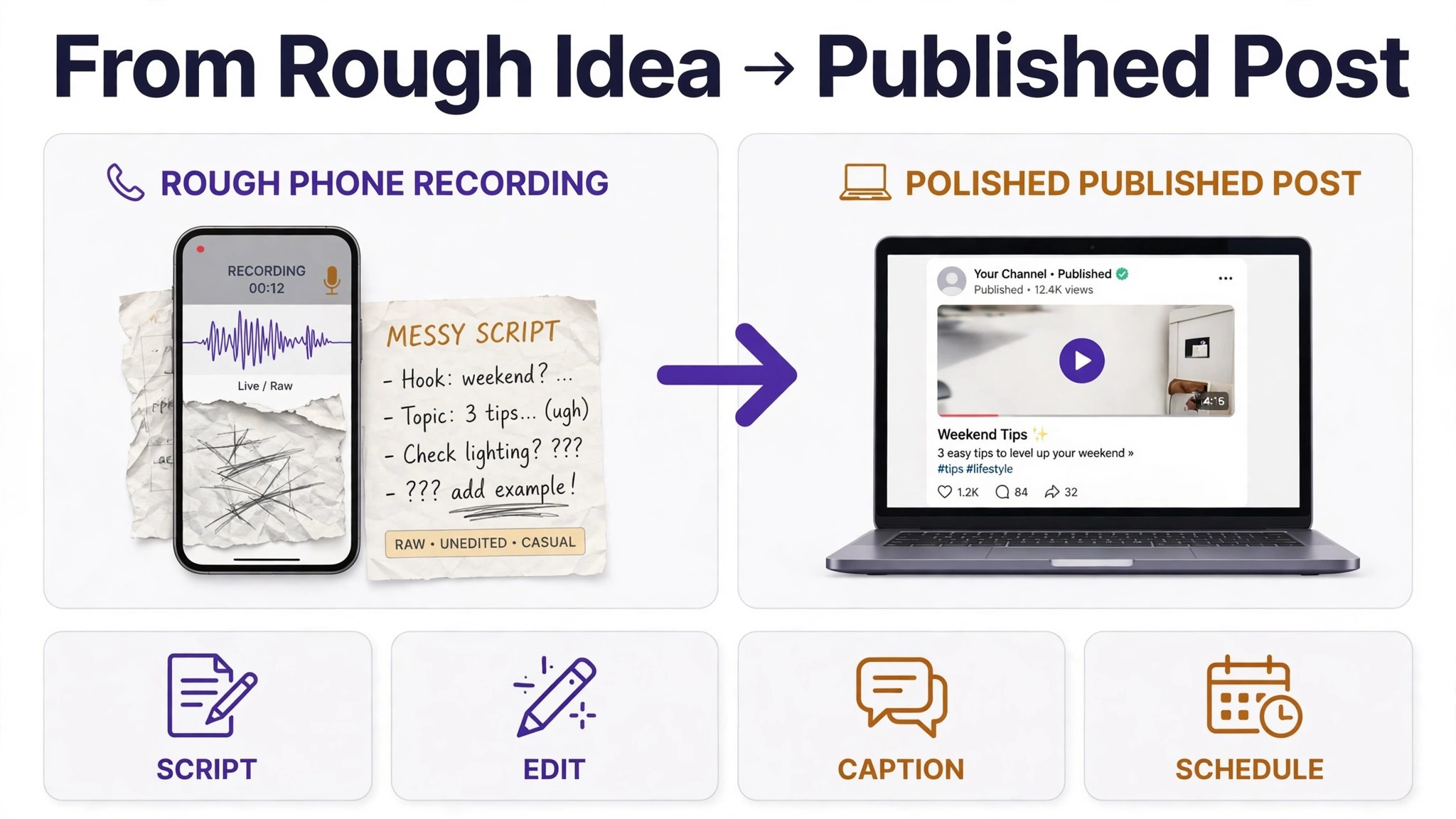
A creator who publishes once a week loses to a creator who publishes three times a week, and the gap is rarely talent. It is the hours lost to the blank page, the edit that takes a whole evening, the thumbnail that never gets made and the captions that get skipped because the video already took too long. The best ai tools for content creators exist because the work around the content now takes longer than the content itself. Drafting, editing, clipping, captioning and scheduling have all moved into software that does the repetitive half while the creator keeps the half that needs judgment.
This guide compares ten tools on published prices, the creator job each one does best and the catch that only shows up after the trial ends. Prices in this category move often, so every figure below is the published starting price as of late 2026, with annual billing noted where it changes the number. Start with the shortlist, then read the reviews that match the content you make most.
The pattern across all ten is simple. The tools that win are the ones that remove a specific bottleneck, whether that bottleneck is the first draft, the edit, the short clip or the thumbnail. Everything else is a bonus, and a creator who buys the bonus first usually keeps the leak.
The Quick Shortlist
The table below matches each common creator job to the single tool that handles it best. Use it to narrow the best ai tools for content creators to two or three candidates before you read the full reviews. Prices are monthly list prices unless noted, and annual billing is usually cheaper than paying month to month.
| Job | Best tool | Why it wins |
|---|---|---|
| All round drafting and ideas | ChatGPT | Fastest general drafter, free plan included |
| Natural long form prose and editing | Claude | Cleanest long form drafts, follows a style guide |
| Brand voice across a team | Jasper | Stored brand voices and team governance |
| Repeatable short form workflows | Copy.ai | Workflow builder from 24 dollars a month |
| Editing video by transcript | Descript | Cut the text and the video follows |
| Short form editing and captions | CapCut | Full editor free, Pro from 19.99 dollars |
| Long video into short clips | OpusClip | AI clipping with a virality score |
| Thumbnails and social graphics | Canva | Templates plus AI design, 10 dollars a month |
| Grammar and tone checks | Grammarly | Catches what a first pass edit misses |
| Grading drafts against ranking pages | Surfer | Content editor that scores drafts |
How We Judged the best ai tools for content creators
A tool earned a place here only if it does a real creator job in 2026, not if it added an AI label to an old text box. The best ai tools for content creators were judged on five things that decide whether a creator keeps paying after the first month.
First, the creator job it does, from a script to a short clip, because a tool that writes one format well beats a platform that writes five formats poorly. Second, whether the price is published and how it scales, including per seat charges that change the real bill as a team grows. Third, output quality, because a draft that needs a full rewrite costs more time than writing from scratch.
Fourth, the publishing workflow, because a creator who cannot move from draft to published post without five manual steps will skip the steps that matter. Fifth, the catch, from credit caps that run out mid month to free plans that watermark every export.
| Check before you buy | What to ask | Why it matters |
|---|---|---|
| Credit or word caps | Monthly limit and what happens at the cap | A cap that runs out mid project stops the work |
| Export quality | Watermark, resolution and format on the free plan | A watermarked export cannot be published |
| Brand voice | Stored voices, style guides, or none | Voice control keeps a channel consistent |
| SEO help | Briefs, scoring, or keyword tracking | Search content needs more than a draft |
| Team seats | Per seat price and approval flow | Per seat bills multiply across a team |
| Trial on real work | Can you test it on real content before you pay | A trial on demo data proves nothing |
The 10 Tools, Reviewed One by One
Read the reviews that match the content you make most, then check the price at your real publishing volume before you trial anything. Each review names the starting price, the job the tool does best and the catch to ask about.
1. ChatGPT
Starting price Free plan, then 20 dollars a month for Plus. Best for All round drafting and ideas. Watch out Output quality depends heavily on the brief you give it.
ChatGPT is the best all round drafter per dollar on this list, and it is the tool most creators already use every day. Plus at 20 dollars a month buys the stronger models, more capacity and file uploads, and the free plan is enough to test whether AI drafting fits a workflow. It handles scripts, outlines, hooks, captions, research summaries and rewrites, and it does so in a plain chat box that any creator can use without training.
The strength is flexibility. A creator can brief it like a junior writer, ask for ten hook angles, then push the best one further, and the back and forth is faster than any template based tool. For a solo creator who makes many formats, that flexibility is worth more than a specialist feature set.
The catch is that ChatGPT has no brand voice memory comparable to Jasper, no SEO scoring and no video editing, so a creator must supply the structure and the standards on every job. Output quality also varies with the brief, so a vague prompt gets vague copy. For all round drafting at 20 dollars a month, ChatGPT is the best value on this list, and it belongs in every creator’s stack.
2. Claude
Starting price Free plan, then 17 dollars a month billed annually for Pro. Best for Natural long form prose and editing. Watch out No SEO tools or video editing built in.
Claude is the prose pick, and creators who care about how copy reads tend to prefer it over every other generalist on this list. Its long form drafts sound more natural, its edits are more careful, and it follows a style guide more closely than most rivals when given one. For scripts, newsletters and articles where tone matters as much as information, that natural voice is the reason to choose it.
The strength is editing. Claude is unusually good at tightening a draft, cutting filler, and rewriting a paragraph in a specified tone without changing its meaning, which is the work a creator does most after the first draft exists. A creator can paste a rough script and get back a cleaner version in seconds, then edit from there.
The catch is scope. Claude has no brand voice system like Jasper, no SEO scoring like Surfer and no video tools, so it is a drafting and editing tool rather than a platform. For a creator who values prose quality above all, Claude earns its place, and it pairs well with Descript when the script also needs to become a video.
3. Jasper
Starting price 59 dollars a month per seat for Pro, billed annually. Best for Brand voice across a team. Watch out Per seat pricing adds up fast for a team of five.
Jasper is the enterprise friendly generalist, and it earns its place for teams that need AI content in a consistent brand voice. Its Pro plan buys the writing suite with brand voices that learn how a brand sounds, so a blog post, an email and an ad all read as if one writer produced them. For a team producing a steady stream of on brand content, that consistency is the whole value.
The strength is control. Templates cover ads, emails, landing pages and long form, and team governance keeps junior writers inside the brand rules instead of inventing a new voice per page. Jasper also handles long form better than most generalists, with documents that stay coherent across several thousand words when the writer guides the structure.
The catch is the bill. At 59 dollars per seat a month on annual billing, a five person team pays close to 3,500 dollars a year before any Business tier features. A solo creator will get better value from ChatGPT or Claude. For a team that needs brand voice and governance in one place, Jasper earns its place.
4. Copy.ai
Starting price From 24 dollars a month billed annually. Best for Repeatable short form workflows. Watch out Long form is weaker than the general chatbots.
Copy.ai is the workflow pick for creators who write the same formats every week. Its workflow builder turns a repeatable job, such as turning a blog post into five social posts or a product update into an email, into a one click routine. For a creator who publishes the same formats on a schedule, that automation is the time saving that matters.
The strength is the routine. A creator can build a workflow once, feed it a topic, and get back a set of short form outputs in the brand tone, ready for a quick edit. The tool also handles ad copy and product descriptions well, and the price from 24 dollars a month is fair for a team that runs many small writing jobs.
The catch is long form. Copy.ai is built for short form and workflows, so a creator who needs a 2,000 word article will get a better draft from Claude or ChatGPT. For repeatable short form work, Copy.ai earns its place, and it is the best second tool for a creator who already has a general drafter.
5. Descript
Starting price Free plan, then 16 dollars a month billed annually for Hobbyist. Best for Editing video by transcript. Watch out Hobbyist caps media hours at 10 a month.
Descript is the editing pick, and it changes how a creator cuts video. You edit the transcript like a document, delete a sentence, and the video follows. Filler words disappear with one click, and the overdub feature can fix a misspoken word without re-recording. For a creator who makes talk heavy video or podcasts, that transcript editing is the single biggest time saving on this list.
The strength is the workflow. A creator can record, transcribe, cut, caption and publish from one app, and the learning curve is shorter than a traditional editor. The free plan covers 60 media minutes a month, which is enough to test the workflow on a real video before paying.
The catch is the caps. Hobbyist at 16 dollars a month billed annually gives 10 media hours and 400 AI credits a month, so a creator publishing several long videos a week will need the Creator plan at 24 dollars a month billed annually. For editing by transcript, Descript earns its place, and it is the best tool here for creators who hate timelines.
6. CapCut
Starting price Free plan, then Pro from 19.99 dollars a month. Best for Short form editing and captions. Watch out Premium templates and assets need Pro at export.
CapCut is the free pick for short form video, and it is the tool most short form creators already have on their phone. The free editor covers cutting, auto captions, effects and templates, and the mobile app is fast enough to edit a reel on the train. For a creator starting out, CapCut does the job for nothing, which no other video tool on this list can say.
The strength is the breadth at zero cost. Auto captions, background removal, noise removal and a huge template library are all available without paying, and the desktop app matches the mobile app for most jobs. A creator can go from raw clip to captioned reel in one app, on one phone, in minutes.
The catch is the Pro wall. Premium templates, premium effects and some AI features need Pro at 19.99 dollars a month, and a project that uses them will ask for payment at export. For free short form editing, CapCut earns its place, and it is the easiest tool on this list to add to an existing stack.
7. OpusClip
Starting price Free plan, then 15 dollars a month for Starter. Best for Long video into short clips. Watch out The free plan watermarks exports and clips expire after 3 days.
OpusClip is the repurposing pick for creators with long videos. It takes a podcast, a stream or a webinar, finds the strongest moments, cuts them into short clips, adds animated captions and scores each clip with a virality score, then posts them to Shorts, TikTok and Reels. For a creator with a back catalogue of long videos, that is a month of short form content from work already done.
The strength is the ranking. The virality score tells the creator which clips to publish first instead of guessing, and the auto posting saves the manual upload step on three platforms. Starter at 15 dollars a month buys 150 credits, with one credit per minute of source video, which covers a weekly long video comfortably.
The catch is the free plan. It gives 60 credits a month with a watermark and no editing, and clips stop being exportable after 3 days, so the free tier is a demo rather than a workflow. For turning long video into shorts, OpusClip earns its place, and it is the best tool here for creators who already record long form.
8. Canva
Starting price Free plan, then 10 dollars a month billed annually for Pro. Best for Thumbnails and social graphics. Watch out The best AI features sit behind Pro.
Canva is the graphics pick, and it is the fastest way for a creator to make a thumbnail, a carousel or a channel banner that looks professional. The template library covers every platform, the AI tools generate images and rewrite text, and the brand kit keeps colours and fonts consistent across every post. For a creator who publishes daily, that speed is the value.
The strength is the template plus the brand kit. A creator can build a thumbnail style once, then produce a new version for every video in minutes, with the same fonts, colours and layout. The free plan is genuinely useful, and Pro at 10 dollars a month billed annually adds the AI features and the full asset library.
The catch is that Canva is a graphics tool, not a writing or video tool, so it solves one job and leaves the rest to the other tools on this list. For thumbnails and social graphics, Canva earns its place, and it is the tool most creators open every day.
9. Grammarly
Starting price Free plan, then 12 dollars a month billed annually for Premium. Best for Grammar and tone checks. Watch out It edits, it does not draft or research.
Grammarly is the editing layer that catches what a first pass edit misses. It checks grammar, spelling, tone and clarity across every app a creator writes in, from the browser to the document to the email client. For a creator who publishes fast, that safety net is worth more than it looks, because one public typo costs more credibility than the subscription.
The strength is the coverage. Grammarly works everywhere the creator writes, not just inside one app, so the same check applies to a caption, a newsletter and a script. The tone suggestions are practical, and the free plan covers the basic checks well enough for many creators.
The catch is scope. Grammarly does not draft, it does not research, and it does not write a script from a brief. A creator who buys it expecting a drafting tool will be disappointed. For grammar and tone, Grammarly earns its place as the cheapest editing specialist on this list.
10. Surfer
Starting price 49 dollars a month. Best for Grading drafts against ranking pages. Watch out Chasing a perfect score can wreck readable copy.
Surfer is the optimisation pick, and it does one job that no drafter on this list does. Its content editor scores a draft against the pages ranking for a target keyword, showing which terms to add, which headings to adjust and how long the piece should be. For a creator whose readers arrive from search, that score is the deliverable as much as the words are.
The strength is precision. A creator can see exactly where a draft falls short of the competition and fix it before publishing, instead of guessing why a piece did not rank. Surfer also audits existing content, so a creator can sell a refresh of old posts as well as new articles, which is a useful second revenue line.
The catch is the temptation to chase a perfect score. A draft stuffed with terms to hit 100 will read worse than a draft that scores 80 and sounds human, so a good creator treats the score as a check, not a target. For search content, Surfer earns its place, and it is the best tool on this list for proving a draft is built to compete.
Side by Side Comparison
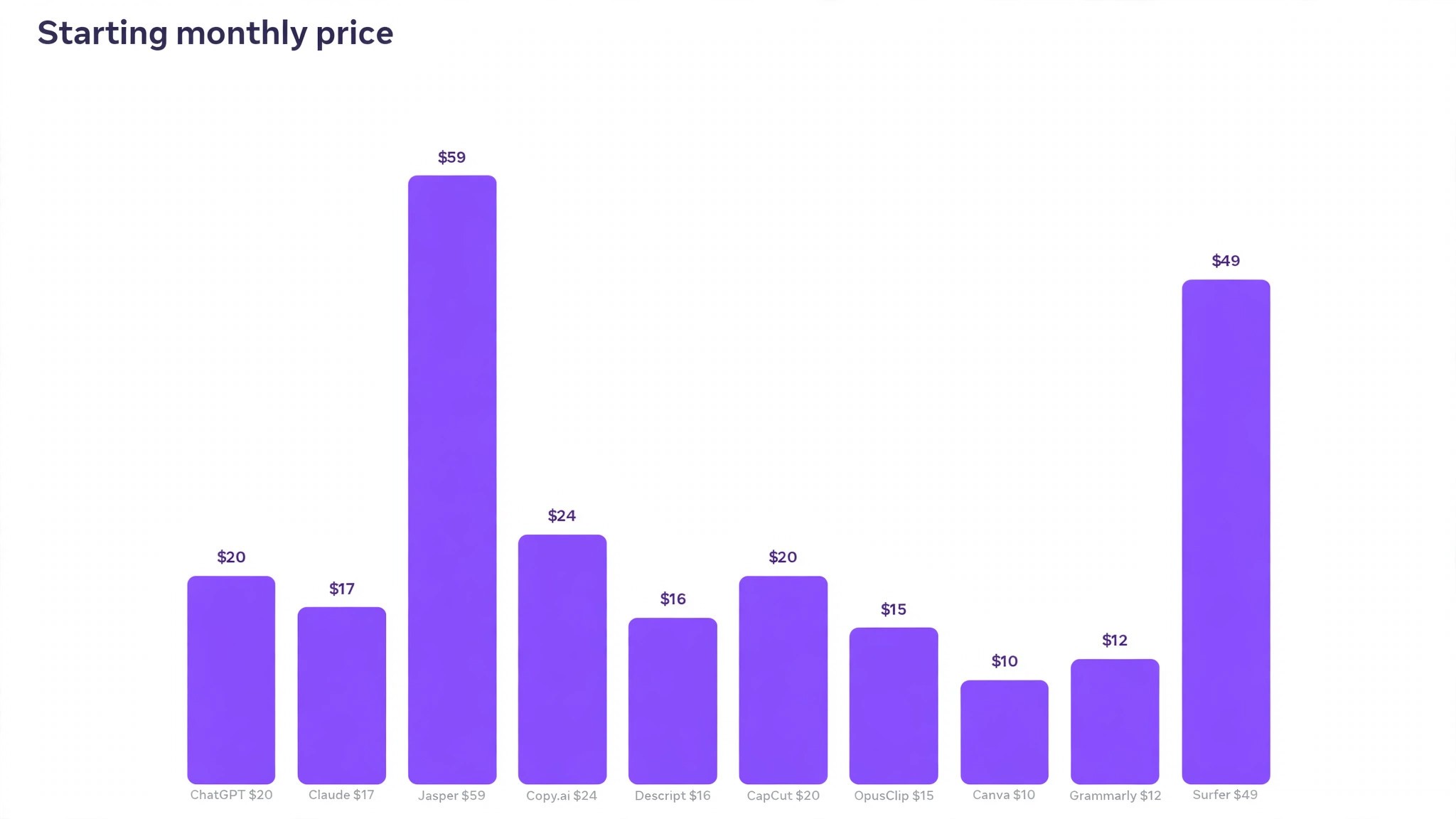
The table below puts the best ai tools for content creators side by side on price, best job and free plan, so you can compare the published prices against the per seat tools at a glance.
| Tool | Starting price | Best for | Free plan |
|---|---|---|---|
| ChatGPT | 20 dollars a month | All round drafting and ideas | Yes |
| Claude | 17 dollars a month | Natural long form prose | Yes |
| Jasper | 59 dollars per seat a month | Brand voice across a team | Trial only |
| Copy.ai | 24 dollars a month | Repeatable short form workflows | Yes |
| Descript | 16 dollars a month | Editing video by transcript | Yes |
| CapCut | 19.99 dollars a month | Short form editing and captions | Yes |
| OpusClip | 15 dollars a month | Long video into short clips | Yes |
| Canva | 10 dollars a month | Thumbnails and social graphics | Yes |
| Grammarly | 12 dollars a month | Grammar and tone checks | Yes |
| Surfer | 49 dollars a month | Grading drafts against ranking pages | Trial only |
How to Pick the Right Tool for Your Content
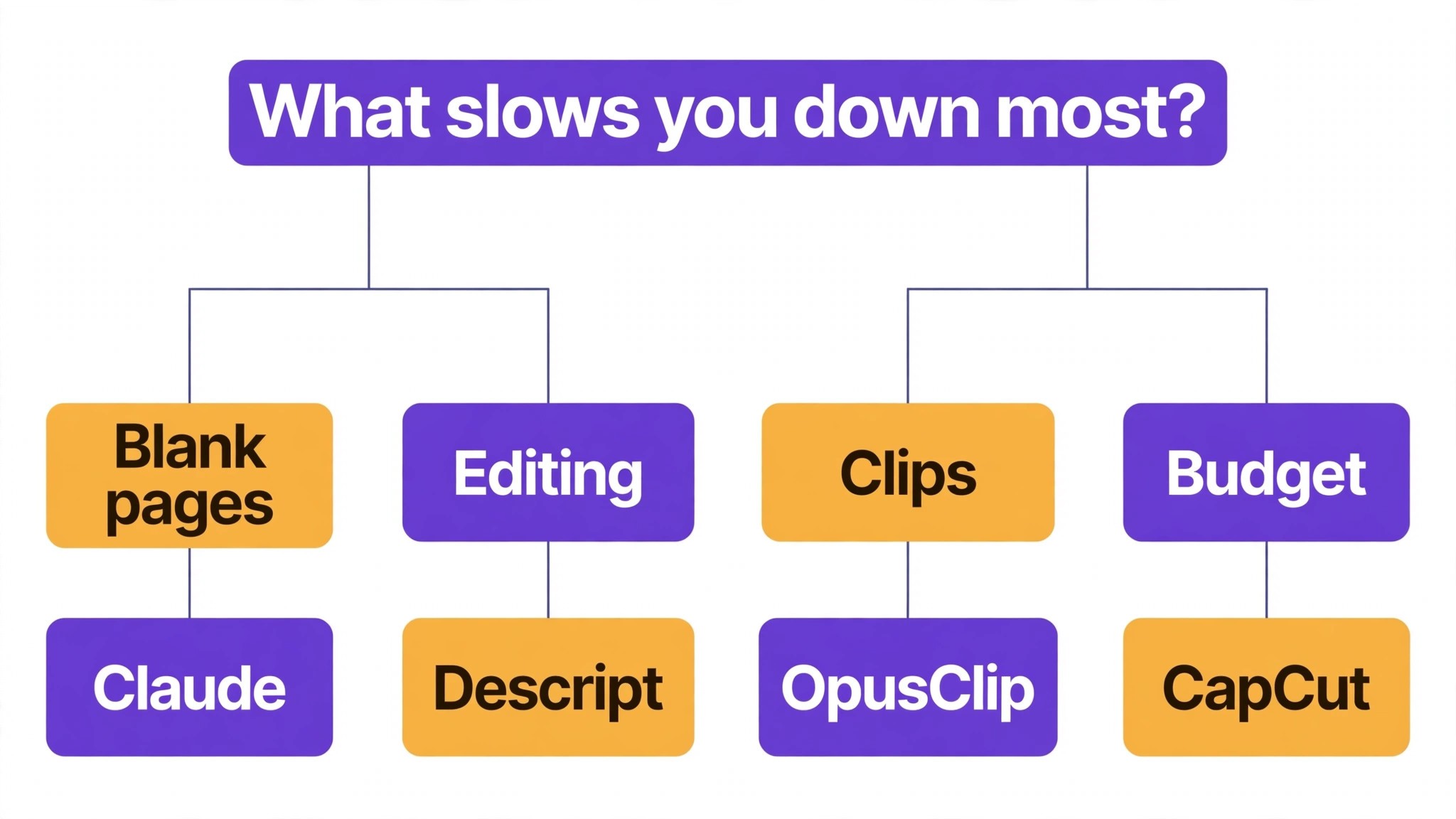
The best ai tools for content creators are not the ones with the longest feature list. They are the ones that fix the slowest part of your week. A creator drowning in first drafts should buy ChatGPT or Claude. A creator whose clients demand brand consistency should buy Jasper. A creator whose videos take too long to edit should buy Descript. A creator sitting on hours of long video should buy OpusClip. A creator on a small budget should buy CapCut. Start from the slow part, not from the vendor homepage.
Budget the full bill, not the headline price. The table below shows what a solo creator and a small team actually pay in year one for the most common combinations, using published starting prices. Per seat charges are the lines that surprise buyers, so ask for them in writing before you sign, and remember that annual billing usually saves about twenty percent against monthly billing.
| Stack for one creator | Monthly cost | What it covers |
|---|---|---|
| ChatGPT Plus plus CapCut free | About 20 dollars | Drafting plus short form editing |
| Claude Pro plus Descript Hobbyist | About 33 dollars | Prose plus transcript editing |
| ChatGPT Plus plus OpusClip Starter | About 35 dollars | Drafting plus long to short clips |
| Jasper Pro, one seat | 59 dollars | Brand voice and team drafting |
| Jasper Pro, five seats | 295 dollars | Brand voice for a team of five |
| Surfer plus Copy.ai | About 73 dollars | Draft scoring plus short form workflows |
Measure the return in hours, not in features. A tool that saves three hours a week is worth 50 dollars a month, while a tool that saves nothing is expensive at any price. Track the hours for a month after you buy, count the posts published and the edits avoided, and cancel anything that does not show up in those numbers. The creators who get the best return from AI are the ones who treat it as a hire, with a job description and a probation period, rather than as a subscription that runs forever because nobody remembered to cancel it.
Frequently Asked Questions
What is the cheapest good AI tool for content creators to start with
CapCut is the cheapest credible start for video, with a full free editor, and ChatGPT has a free plan with Plus at 20 dollars a month. Canva has a free plan and Pro at 10 dollars a month billed annually, and Claude Pro at 17 dollars a month billed annually is the best prose value for a creator who can only afford one paid tool. Start with the content you make most each week, and add a specialist only when the general tool cannot do a job you are paid to do. That is the cheapest way to build a stack from the best ai tools for content creators without paying for features you never open.
Will AI content sound the same as every other creator using the same tool
It will if you publish the first draft unchanged. The best ai tools for content creators produce a usable first draft, but the voice, the facts and the argument still come from the creator. A draft that goes live unedited will read generic, and audiences notice generic content fast. Use the AI to beat the blank page, then edit every line for your voice and your audience’s problem, and the content will sound like you, not like the tool.
Which tool is best for turning long videos into short clips
OpusClip is the strongest choice for long to short video, because it finds the best moments, cuts them, captions them and scores each clip before posting to three platforms. Descript is the best pick when the video also needs a careful transcript edit, and CapCut is the best free pick for manual short form edits. Price the combination, not one tool, and confirm the current plan limits before you buy, because both OpusClip and Descript have changed tiers in the past year.
How much should a solo creator budget for AI tools
A realistic year one budget is 20 to 40 dollars a month for one general drafter such as ChatGPT Plus or Claude Pro, and 60 to 90 dollars a month once you add an editing or scoring tool such as Descript or Surfer. A team of five on Jasper Pro pays close to 3,500 dollars a year, while the same team on Copy.ai pays 24 dollars a month for five seats. Budget for the stack, not for one tool, and trial each one on real content before you commit to annual billing.
Our Verdict
If you buy one tool this quarter, buy Claude Pro if you write solo and Descript if you make video. Claude is the best prose value on this list at 17 dollars a month billed annually, with drafts that need the least fixing and edits that respect the writer’s intent. Descript is the biggest time saving for video creators, turning a whole evening of timeline editing into a document edit. The best ai tools for content creators earn their keep by giving you back the hours that first drafts and slow edits used to eat, and both of these do that from the first week.
Whatever you pick, start with the slowest part of your week, trial with real content and real deadlines, and keep a human edit step on every AI draft for the first month. The tools on this list all work. The difference is whether the tool matches the content you actually make, and whether you measure the return in hours saved and posts published rather than in features used.