
Food cost eats a kitchen alive long before the dining room notices. A supplier raises the price of cream by a fifth, a special that sold well last month quietly loses money at the new portion size, and the menu that looked profitable on paper turns out to be guesswork with a garnish. The best ai tools for chefs exist because the arithmetic of a kitchen now moves too fast for a spreadsheet that gets updated once a month. Recipe costing, menu engineering, waste tracking and plating ideas have all moved into software that recalculates the moment a price changes.
This guide compares five tools on published prices, the kitchen job each one does best and the catch that only shows up after the trial ends. Prices in this category move often, so every figure below is the published starting price as of late 2026, with annual billing noted where it changes the number. Start with the shortlist, then read the reviews that match the problem your kitchen feels most.
The pattern across all five is simple. The tools that win are the ones that tie a recipe to its real cost, tie the cost to the menu price, and tell the chef which dishes earn their place and which ones quietly lose money. Everything else is a bonus, and a chef who buys the bonus first usually keeps the leak.
The Quick Shortlist
The table below matches each common kitchen job to the single tool that handles it best. Use it to narrow the best ai tools for chefs to two or three candidates before you read the full reviews. Prices are monthly list prices unless noted, and annual billing is usually cheaper than paying month to month.
| Job | Best tool | Why it wins |
|---|---|---|
| Recipe costing and menu engineering in one place | AI Chef Pro | 75 plus AI agents for costing, menus and waste |
| Recipe ideas, scaling and menu copy | ChatGPT | Fastest all round drafting and brainstorming |
| Recipe management across several sites | meez | Standardised recipes with live food cost |
| Home and small kitchen recipe scaling | BigOven | Huge recipe library with scaling and lists |
| New dish ideas with nutrition breakdowns | ChefGPT | Recipe generation with nutrition and plating notes |
How We Judged the best ai tools for chefs
A tool earned a place here only if it does a real kitchen job in 2026, not if it added an AI label to an old recipe box. The best ai tools for chefs were judged on five things that decide whether a chef keeps paying after the first month.
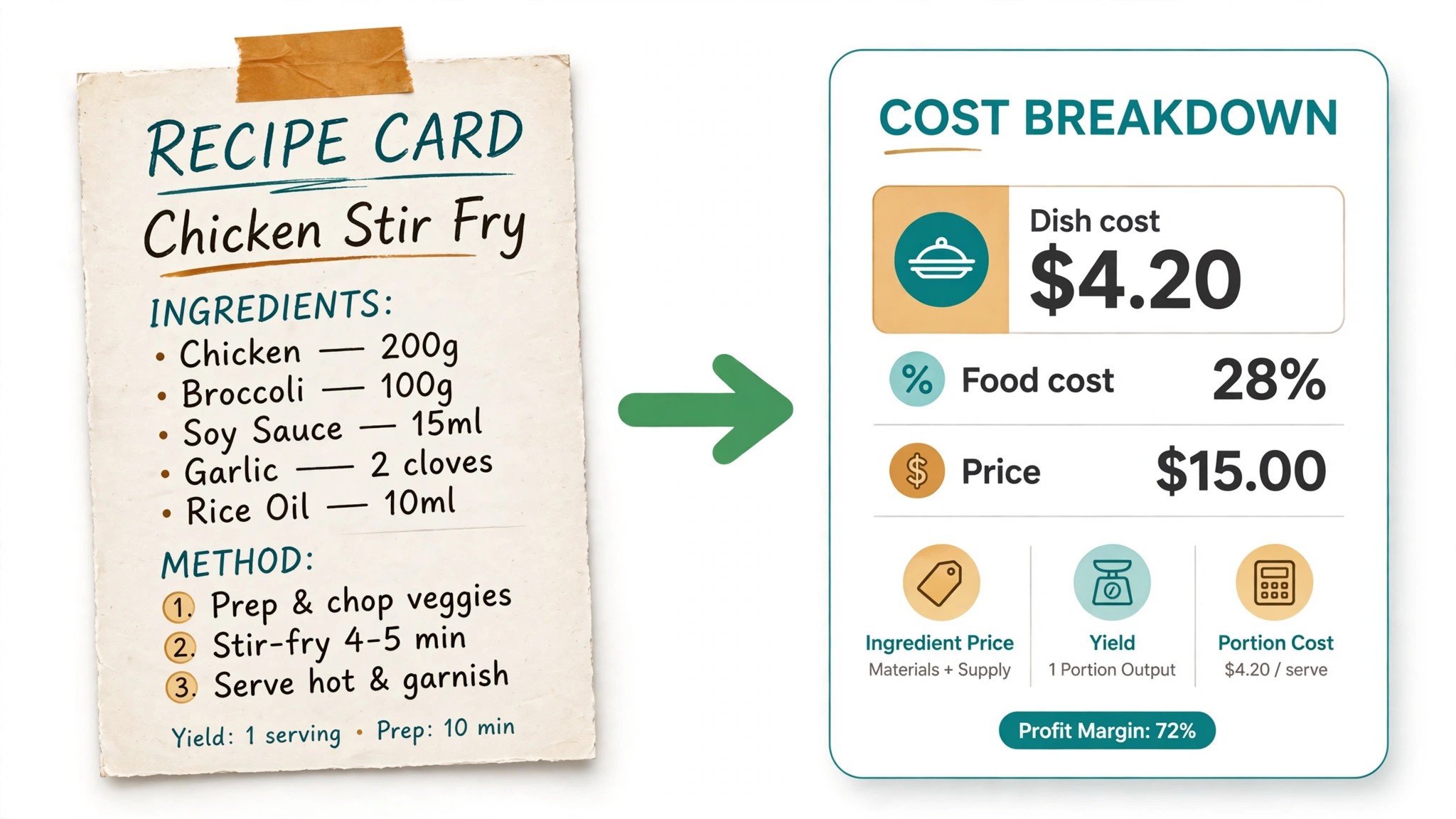
First, the costing job it does, from reading an ingredient price to recalculating a dish cost when a supplier invoice changes. A tool that costs a recipe once and never updates it is a prettier spreadsheet, not a kitchen system. Second, whether the price is published and how it scales, including per location charges that change the real bill as a group grows.
Third, recipe control, because a kitchen that cannot keep one standard recipe across two sites will drift on portion size and food cost within a month. Fourth, menu thinking, because a tool should say which dishes are stars and which ones are dogs, not just print the menu in a nicer font. Fifth, the catch, from credit caps that run out mid month to recipe libraries that look big until you search for the dish you actually cook.
| Check before you buy | What to ask | Why it matters |
|---|---|---|
| Cost updates | Does the dish cost update when a supplier price changes | A stale cost is worse than no cost at all |
| Yield and waste | Does it track trim, yield and waste per recipe | Yield is where most food cost leaks |
| Scaling | Does it scale a recipe from 4 covers to 400 cleanly | Banquets and events live or die on scaling |
| Menu analysis | Does it classify dishes by margin and popularity | Stars and dogs need different decisions |
| Allergen and nutrition | Does it flag allergens and give nutrition data | Menus now need both, printed accurately |
| Trial on real recipes | Can you test it on your own recipes before you pay | A trial on demo data proves nothing |
The 5 Tools, Reviewed One by One
Read the reviews that match the problem your kitchen feels most, then check the price at your real cover count before you trial anything. Each review names the starting price, the job the tool does best and the catch to ask about.
1. AI Chef Pro
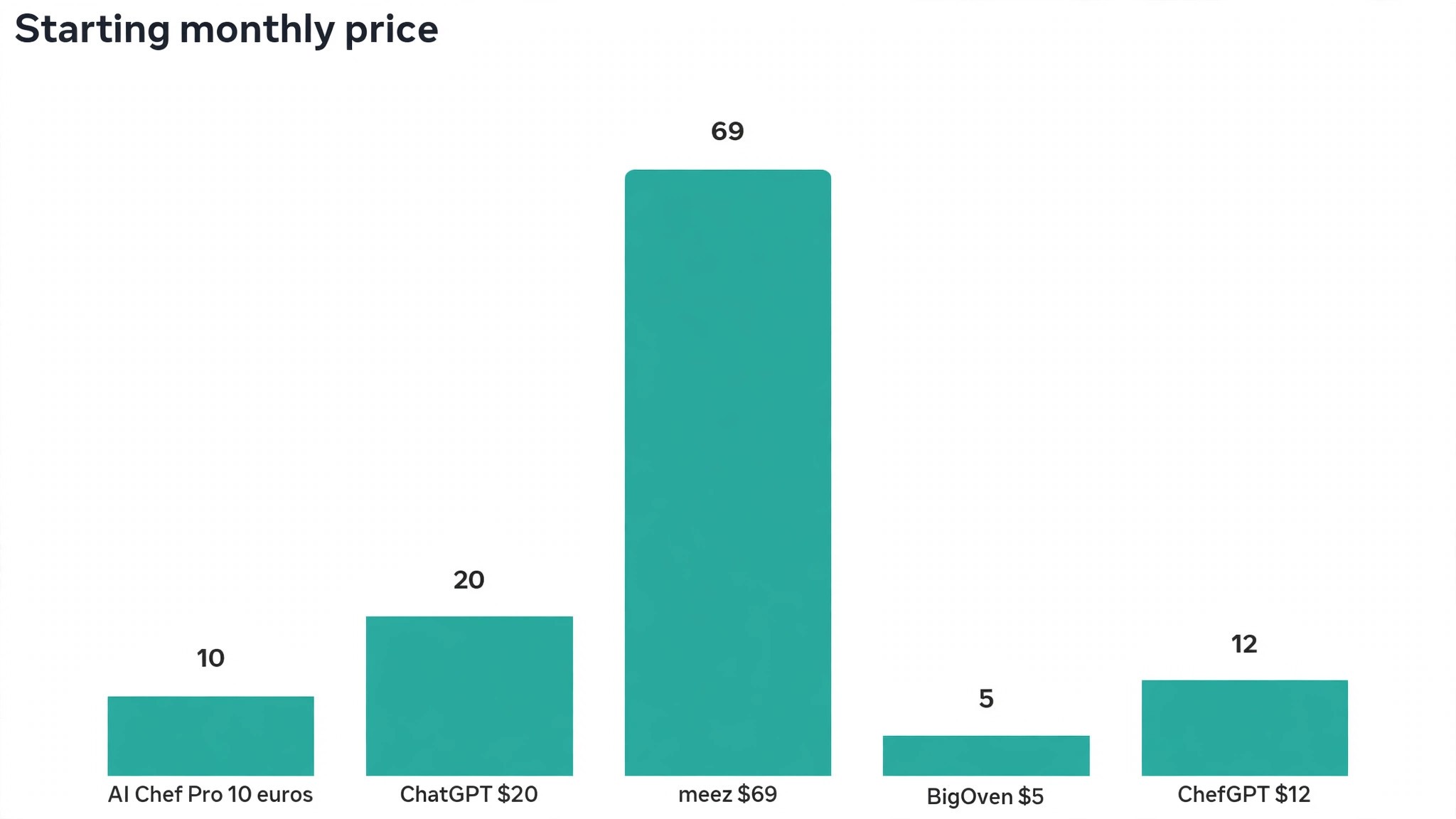
Starting price 10 euros a month for the Member plan, with 10,000 credits. Best for Recipe costing and menu engineering in one place. Watch out Credits cap monthly use, so heavy recipe work needs a higher tier.
AI Chef Pro is the specialist pick for chefs who want recipe costing, menu engineering and food cost in one workspace. Its library of more than 75 AI agents covers the daily math of a professional kitchen, from costing a recipe with yield adjustments to classifying dishes by popularity and contribution margin. For a chef who has been doing this work in a spreadsheet, the jump is the automation. Enter the ingredient price, the yield and the waste, and the agents recalculate the dish and pass that cost straight to menu engineering.
The strength is breadth inside one subscription. The same workspace that costs a recipe also writes a menu description, builds a prep list, scales portions for an event and drafts a business plan for a new concept. The Member plan at 10 euros a month buys 10,000 credits, which the vendor describes as about a month of recipes, costings and menus for one station. Higher tiers add more credits for kitchens doing weekly research and development across a full menu.
The catch is the credit model. A chef who costs fifty recipes in a week of menu development can burn through the Member allowance faster than expected, and the upgrade path runs to 25 euros a month for Premium Pro and 50 euros for Plus. The tool also assumes a chef is comfortable working inside an AI workspace rather than a familiar recipe app. For a working kitchen that needs costing and menu engineering together, AI Chef Pro earns the top spot, and it is the only tool on this list built for chefs first rather than adapted from a general assistant.
The second strength worth naming is the menu engineering itself. Most recipe apps stop at the dish cost. AI Chef Pro classifies each dish as a star, a plowhorse, a puzzle or a dog, using cost and popularity together, so the chef can price a puzzle up, move a star to a better menu position or take a dog off entirely. That classification is the decision a menu needs every season, and it is the part of the job that a general chatbot cannot do from a recipe alone.
2. ChatGPT
Starting price Free plan, then 20 dollars a month for Plus. Best for Recipe ideas, scaling and menu copy. Watch out It never sees your real supplier prices unless you paste them in.
ChatGPT is the best all round drafting and brainstorming tool a chef can buy for 20 dollars a month, and it is the tool most chefs already use every day. Plus buys the stronger models, more capacity and file uploads, and the free plan is enough to test whether AI drafting fits a kitchen workflow. It generates variations on a classic dish, suggests ingredient substitutions for dietary restrictions or supply gaps, and builds structured recipe cards with scaling logic, allergy callouts and wine pairing notes.
The strength is flexibility. A chef can brief it like a junior sous chef, ask for ten seasonal variations on a starter, then push the best one further with a cost target and a dietary constraint. It writes dish descriptions for printed menus, website copy for catering packages and proposal templates for private dining events. For a private chef with recurring clients, that writing is the difference between a plain menu and one that feels professional.
The catch is that ChatGPT has no live food cost data. It will cost a recipe only from the prices you give it, and it will happily invent a supplier price if you do not check it. It also has no recipe database of its own, no inventory link and no waste tracking. For recipe ideas, scaling and menu writing at 20 dollars a month, ChatGPT is the best value on this list, and it belongs in every chef’s stack as the second tool rather than the costing system.
The practical way to use it is as a prep partner. Ask it to scale a recipe from 40 covers to 400, to rewrite a dish description in plainer language, or to suggest three substitutes when a supplier runs out of an ingredient. Then run the numbers through a costing tool before the dish reaches the menu. Used that way, it saves hours a week without ever touching a price.
3. meez
Starting price From 69 dollars a month. Best for Recipe management across several sites. Watch out The price is per location, so a group pays for every site.
meez is the operations pick for kitchens that need one standard recipe everywhere. It is a recipe management platform built for multi unit operations, and it has become the standard for groups that need consistent recipe standardisation across locations. A recipe written once in meez carries its ingredients, method, yield, allergens and live food cost, and every site cooks from the same version.
The strength is discipline. When a supplier price changes, meez recalculates the food cost percentage on every affected recipe, so a head chef sees the margin impact before service rather than at month end. The platform also handles recipe scaling, prep lists and training, which is the unglamorous work that keeps a group consistent. For a restaurant group opening a third or fourth site, that consistency is worth more than any single recipe feature.
The catch is the bill. At 69 dollars a month per location as a starting point, a five site group pays well over 4,000 dollars a year before any higher tier features, and the platform is heavier than a solo chef needs. A single site restaurant will find AI Chef Pro cheaper and ChatGPT faster for ideas. For a group that needs every kitchen cooking the same dish at the same cost, meez earns its place, and it is the best tool on this list for stopping recipe drift.
The other strength is the way it treats food cost as a live number rather than a one off calculation. A chef can set a target food cost percentage per dish and see immediately which recipes sit above it, which is the same discipline a good head chef applies with a calculator, except it happens automatically across the whole menu. That is the feature that pays the subscription back.
4. BigOven
Starting price Free plan, with Pro from 5 dollars a month. Best for Home and small kitchen recipe scaling. Watch out It is a recipe library first, not a costing system.
BigOven is the budget pick, and it does one job better than any tool on this list. Its recipe library is enormous, and its scaling engine adjusts ingredient quantities when the serving size changes, then rebuilds the grocery list automatically. For a small kitchen, a private chef cooking for a family, or a chef testing ideas at home, that scaling is the feature that gets used every day.
The strength is the library plus the grocery list. A chef can save a recipe from anywhere, scale it from 4 servings to 40, and get a shopping list that matches the scaled quantities. The AI features add menu planning and nutrition analysis, and the free tier covers the basics well enough that many cooks never pay. At 5 dollars a month, Pro is the cheapest paid plan on this list by a wide margin.
The catch is scope. BigOven does not do live food costing from supplier invoices, it does not classify dishes by margin, and it has no multi site management. A chef who needs to know whether a dish makes money will outgrow it fast. For recipe organisation, scaling and shopping lists at the lowest price here, BigOven earns its place, and it is the easiest tool on this list to start using today.
The honest use case is the small operator. A personal chef with twenty regular clients, a small cafe with a short menu, or a chef developing recipes at home will get real value from BigOven for almost nothing. A restaurant group will not. Buy it for what it is, a fast recipe library with honest scaling, and do not expect it to run the business side of a kitchen.
5. ChefGPT
Starting price From 12 dollars a month. Best for New dish ideas with nutrition breakdowns. Watch out Recipe quality depends on how precisely you brief it.
ChefGPT is the recipe innovation pick, built specifically for chefs who need new dish ideas with nutrition data attached. It generates recipes from available ingredients, gives a nutritional breakdown for each dish, and adds plating notes that help a chef present the plate the way the recipe imagines it. For a chef staring at a walk in full of ingredients that need using before the weekend, that generation is genuinely useful.
The strength is the combination of invention and nutrition. Most recipe generators stop at the ingredient list. ChefGPT adds calories, macros and allergen flags, so a dish designed for a health conscious client or a dietary restricted table arrives with the numbers a menu needs. The tool also handles pantry led cooking, suggesting dishes from what is already in stock, which cuts waste in a direct and visible way.
The catch is that it is a single purpose tool. It does not cost recipes against supplier prices, it does not manage a menu across sites, and it does not write catering proposals. A chef who buys it expecting a full kitchen platform will be disappointed. For recipe generation and nutrition at 12 dollars a month, ChefGPT earns its place as the cheapest specialist on this list, and it pairs well with AI Chef Pro when the costing needs to follow the idea.
The other honest point is the brief. ChefGPT is only as good as the prompt, and a vague request gets a vague recipe. Give it the cuisine, the dietary limits, the available ingredients and the target food cost, and the output is usable. Give it one word and it will guess. Treat it like a junior cook with a good palate, brief it properly, and it delivers.
Side by Side Comparison
The table below puts the best ai tools for chefs side by side on price, best job and free plan, so you can compare the published prices against the per location tools at a glance.
| Tool | Starting price | Best for | Free plan |
|---|---|---|---|
| AI Chef Pro | 10 euros a month | Recipe costing and menu engineering | No |
| ChatGPT | 20 dollars a month | Recipe ideas, scaling and menu copy | Yes |
| meez | 69 dollars a month | Recipe management across sites | Trial only |
| BigOven | 5 dollars a month | Recipe scaling and grocery lists | Yes |
| ChefGPT | 12 dollars a month | New dishes with nutrition data | Trial only |
What a Kitchen Actually Pays in Year One
A solo chef and a small group pay very different bills for the same list, because meez charges per location and AI Chef Pro charges by credits. The table below shows what a solo chef and a five site group actually pay in year one for the most common combinations, using published starting prices. Credit caps and per location fees are the lines that surprise buyers, so ask for them in writing before you sign, and remember that annual billing usually saves money against paying month to month.
| Stack | Monthly cost | What it covers |
|---|---|---|
| ChatGPT Plus plus BigOven Pro | About 25 dollars | Ideas, scaling and grocery lists |
| AI Chef Pro Member plus ChatGPT Plus | About 30 dollars | Costing, menus and recipe ideas |
| ChefGPT plus ChatGPT Plus | About 32 dollars | New dishes, nutrition and menu copy |
| meez, one location | 69 dollars | Standard recipes and live food cost |
| meez, five locations | 345 dollars | Standard recipes across five kitchens |
How to Pick the Right Tool for Your Kitchen
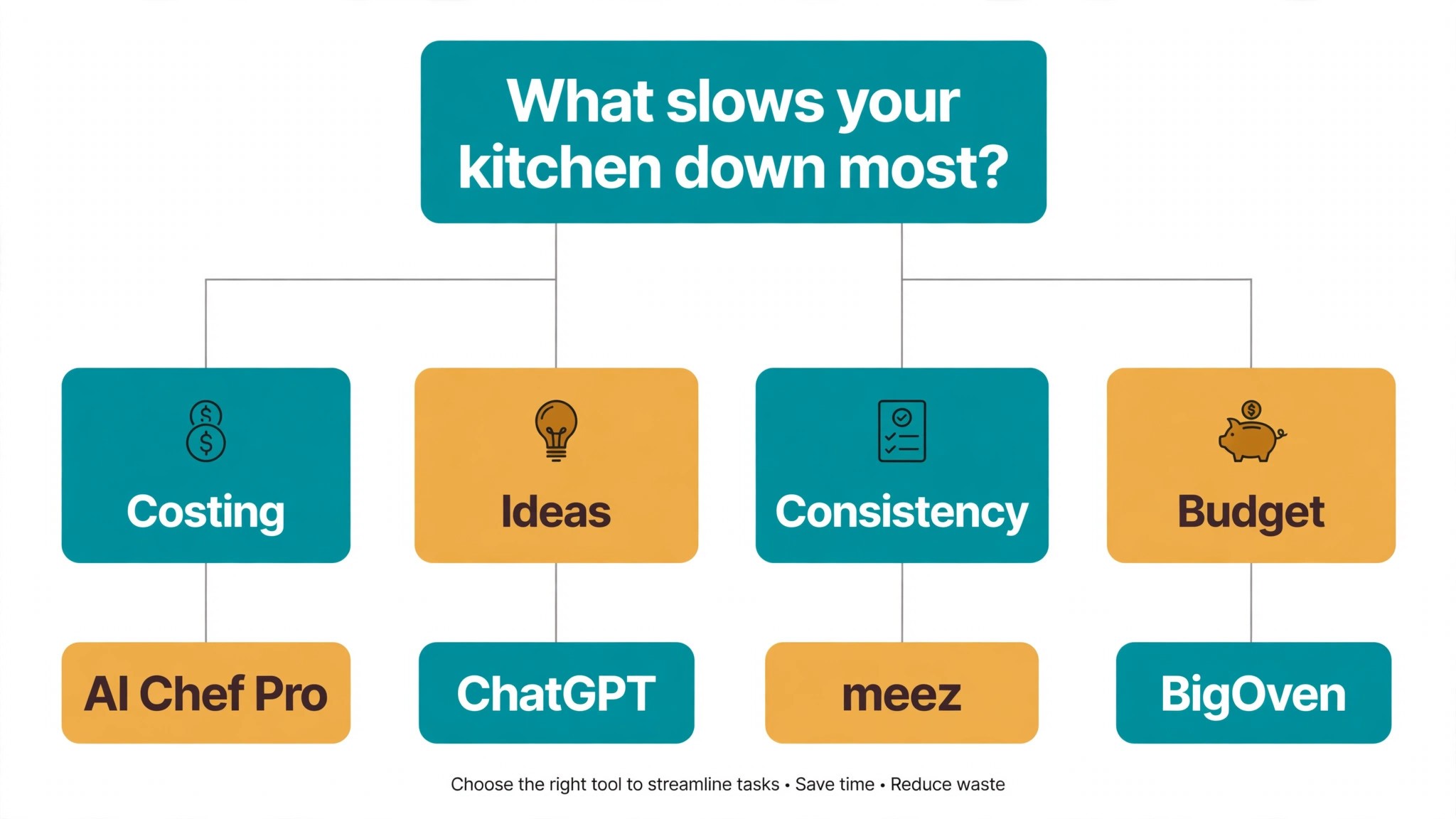
The best ai tools for chefs are not the ones with the longest feature list. They are the ones that fix the slowest part of your week. A chef drowning in menu costing should buy AI Chef Pro. A chef who needs ideas and menu copy should buy ChatGPT. A group whose recipes drift between sites should buy meez. A small kitchen on a tight budget should buy BigOven. Start from the slow part, not from the vendor homepage.
Budget the full bill, not the headline price. A 10 euro Member plan that runs out of credits mid month costs more than a 25 euro plan that lasts the month, and a 69 dollar per location tool costs 345 dollars a month for a five site group. Price the stack at your real cover count and your real recipe volume, trial each tool on your own recipes, and keep a human check on every AI generated cost before it reaches the menu. The tools on this list all work. The difference is whether the tool matches the kitchen you actually run.
Mistakes to Avoid When Buying Kitchen AI
The first mistake is buying a recipe generator and expecting it to cost the menu. Generation and costing are different jobs, and a tool that invents a beautiful dish at an unknown cost is a liability, not a help. Buy the costing tool first if margins are the problem, and add the generator second.
The second mistake is trusting an AI food cost without checking the supplier invoice behind it. Prices move weekly, and a tool that costs a dish from last month’s prices will tell you a losing dish is a winner. Update ingredient prices every week, or buy a tool that updates them for you.
The third mistake is letting recipes drift between sites. A group that writes a recipe in one kitchen and lets each site adapt it freely will end up with five versions of the same dish at five different food costs. Standardise the recipe in one system and lock the portion size.
The fourth mistake is paying for a platform when a 5 dollar tool would do. A solo chef with a short menu does not need multi site recipe management, and a 69 dollar a month subscription will sit unused while BigOven does the job for a tenth of the price. Match the tool to the size of the kitchen, not the size of the ambition.
When to Upgrade From a Free Tool
A free tool is the right start for a chef who is testing whether AI fits the kitchen at all. BigOven costs nothing to try, and ChatGPT has a free plan that covers the first month of recipe ideas and menu copy. The moment to upgrade is the moment the free tool starts costing time instead of saving it, which usually shows up in one of three ways.
The first sign is the costing gap. A chef who writes menus in ChatGPT and costs them by hand is doing the same arithmetic twice, and the second pass is where mistakes creep in. When the menu changes every week and the supplier prices change with it, a costing tool that recalculates automatically pays for itself in the first month, because one dish priced wrong costs more than a year of the subscription.
The second sign is the volume. A chef who costs fifty recipes for a seasonal menu change will burn through a credit allowance fast, and a group that cooks the same dish in five kitchens will drift on portion size without a standard recipe system. At that point the upgrade is not a luxury, it is the fix for a problem that is already costing money. The third sign is the event. A catering business that scales recipes from forty covers to four hundred by hand is one arithmetic error away from a very expensive evening.
Frequently Asked Questions
What is the cheapest good AI tool for chefs to start with
BigOven is the cheapest credible start, with a free plan and Pro from 5 dollars a month. ChatGPT has a free plan and Plus at 20 dollars a month, and AI Chef Pro at 10 euros a month is the cheapest real costing tool on this list. Start with the kitchen job you do most each week, and add a specialist only when the general tool cannot do a job you are paid to do. That is the cheapest way to build a stack from the best ai tools for chefs without paying for features you never open.
Will AI recipe costs be accurate enough to price a menu
They will if the ingredient prices behind them are current. An AI tool costs a recipe from the numbers you feed it, so a stale supplier price produces a wrong dish cost no matter how good the tool is. Update prices weekly, check yield and waste against real prep, and treat the AI cost as a draft until a human has checked it against the invoice. Used that way, AI costing is accurate enough to price a menu, and far faster than doing it by hand.
Which tool is best for a restaurant group with several sites
meez is the strongest choice for a group, because it standardises recipes across locations and recalculates food cost when a supplier price changes. AI Chef Pro is the best single site costing tool, and ChatGPT is the best second tool for ideas and menu copy across the group. Price the combination at your real number of locations, because per location billing multiplies fast, and confirm the current plan limits before you sign, because both meez and AI Chef Pro have changed tiers in the past year.
How much should a solo chef budget for AI tools
A realistic year one budget is 20 to 35 dollars a month for one general tool such as ChatGPT Plus plus a specialist such as AI Chef Pro or ChefGPT, and 69 dollars a month once you add a recipe management platform such as meez. A five site group on meez pays about 345 dollars a month, while the same group on AI Chef Pro plus ChatGPT pays about 30 dollars a month for one station. Budget for the stack, not for one tool, and trial each one on real recipes before you commit to annual billing.
Our Verdict
If you buy one tool this quarter, buy AI Chef Pro if costing is the problem and ChatGPT if ideas are the problem. AI Chef Pro is the only tool here that ties a recipe to its cost and the cost to the menu in one place, at 10 euros a month for the Member plan. ChatGPT is the best value drafter on this list at 20 dollars a month, with ideas and menu copy that need the least fixing. The best ai tools for chefs earn their keep by giving you back the hours that costing and menu writing used to eat, and both of these do that from the first week.
Whatever you pick, start with the slowest part of your week, trial with real recipes and real supplier prices, and keep a human check on every AI cost before it reaches the menu. The tools on this list all work. The difference is whether the tool matches the kitchen you actually run, and whether you measure the return in food cost saved and covers served rather than in features used.