
Which tool should a busy email marketers buy first? The answer depends on the size of the roster, the budget and the one job that eats the most time each week. The top 10 ai tools for subject lines in this guide are organised by that job, so you can start from your slowest hour rather than from a vendor homepage.
Every price below is the published starting price as of late 2026, with annual billing noted where it changes the current email price. Use the shortlist first, then read the reviews that match the email jobs teams do most. Most teams will only ever need a couple of these 10 tools. One general tool plus one specialist covers most of the email work, and a third tool only earns its place when it fixes a specific weekly pain.
The reviews below say plainly which email task type each tool does, so you can pick two and stop shopping. The top 10 ai tools for subject lines are not ranked by price alone, because the cheapest tool that cannot do your job is the most expensive mistake on this list.
The Tools at a Glance
The table below matches each common campaign send to the single tool that handles it best. Use it to narrow the top 10 ai tools for subject lines to two or three candidates before you read the full reviews. Prices are monthly list prices unless noted, and annual billing usually beats monthly billing for email teams.
| Job | Best tool | Why it wins |
|---|---|---|
| Enterprise language optimisation for subject lines. | Phrasee | Pricing on request, with third-party reports from 500 dollars a month. |
| Regulated industries that need compliant, high-performing language. | Persado | From 3,000 dollars a month for Persado Go, with enterprise plans by quote. |
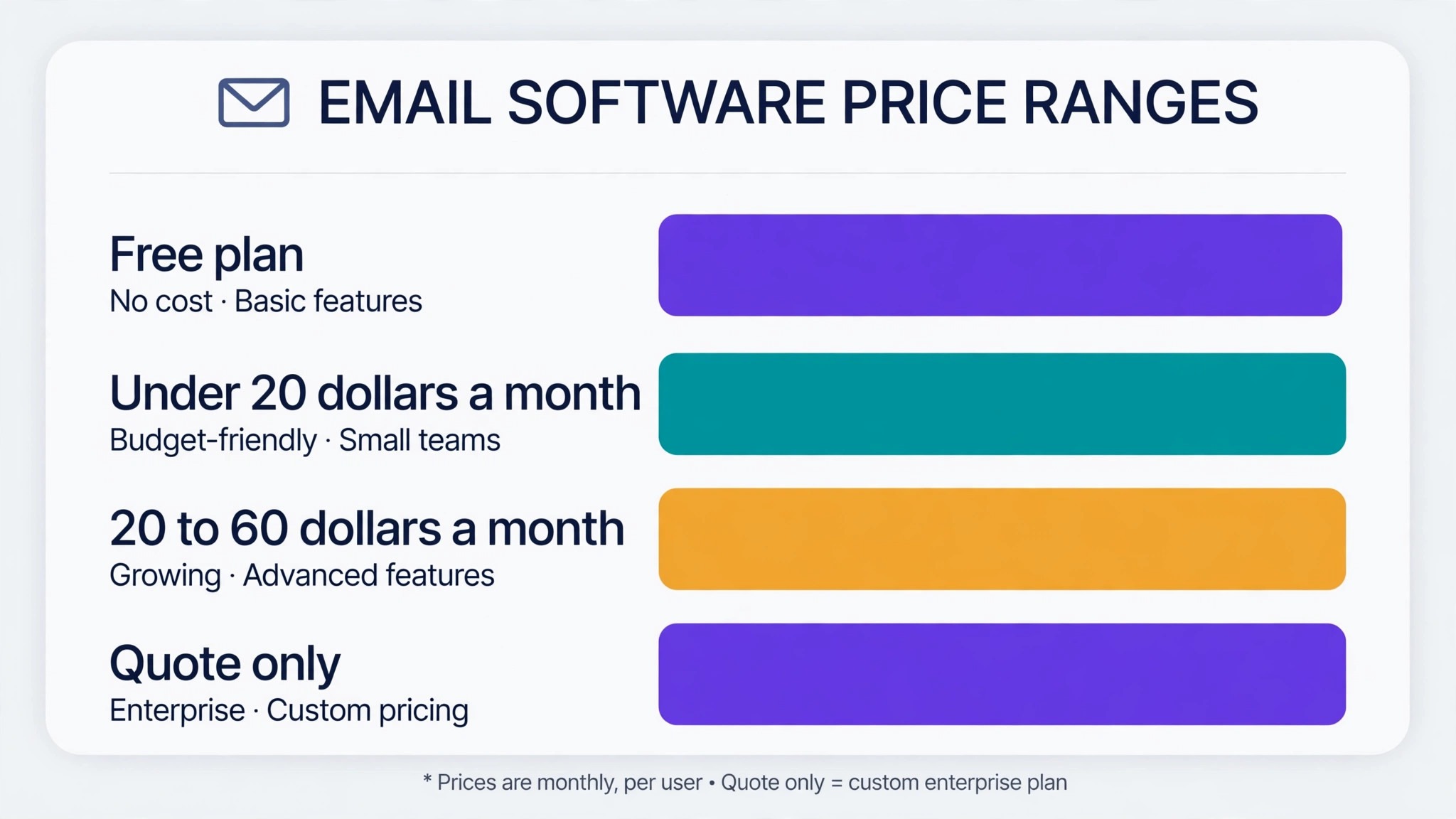
| Teams that want subject lines inside the email platform they already use. | Mailchimp | Free plan to 250 contacts, then Standard from 20 dollars a month for generative AI. |
| Small senders who want the cheapest built-in subject-line AI. | Brevo | Free plan with 300 emails a day, then Starter from 9 dollars a month. |
| Ecommerce stores that need subject lines plus product emails. | Omnisend | Free plan, then Standard from 16 dollars a month. |
| Ecommerce brands that want predictive subject lines. | Klaviyo | Free plan to 250 profiles, then paid plans from 20 dollars a month. |
| Teams that need subject lines inside full marketing automation. | ActiveCampaign | From 19 dollars a month, with a free trial and no free plan. |
| Creators who want light AI suggestions inside a creator platform. | Kit | Free plan to 10,000 subscribers, then Creator from 33 dollars a month billed annually. |
| Small teams that want an AI writing assistant at a low price. | MailerLite | Free plan to 250 subscribers, then Growing Business from 10 dollars a month for the AI assistant. |
| Teams that want brand-voice subject lines at scale. | Jasper | From 39 dollars a month. |
How We Chose the Top 10 AI Tools for Subject Lines
A tool earned a place here only if it does a real campaign send in 2026, not if it added an AI label to an old product. The top 10 ai tools for subject lines were judged on five things that decide whether a team keeps paying after the first year.
First, the job, because email teams get more from a tool that does one email file format well than from a platform that does five poorly. Second, published pricing and scaling, including per-seat charges that change the real bill as subject lines grow. Third, output quality, because errors cost email teams more in lost trust than the subscription saves.
Fourth came workflow fit, since subject lines need the tool inside their existing email work process, not a rebuild of it. Fifth came the catch, from free plans that watermark exports to template libraries that repeat the same ten email work designs. Those five checks become the questions in the table below, for email teams to ask before buying.
| Check before you buy | What to ask | Why it matters |
|---|---|---|
| Real job fit | Does it do my weekly job well | A poor fit wastes the subscription |
| Published price | What does year two cost | Hidden rises break the budget |
| Output quality | Is the result good enough to ship | Errors cost trust with clients |
| Workflow fit | Does it connect to my other tools | A disconnected tool adds manual work |
| Free plan limits | What is locked behind the paywall | A locked export cannot be used |
| Contract terms | Monthly or annual, and what changes | Annual billing locks the price, not the need |
The Reviews in Full
1. Phrasee
Starting price Pricing on request, with third-party reports from 500 dollars a month. Best for Enterprise language optimisation for subject lines. Watch out Enterprise pricing with no free plan.
Phrasee, now part of Jacquard, uses deep learning trained specifically on marketing language to generate subject lines, CTAs and promotional copy. Its models predict which phrasing will perform for a given audience, and the platform enforces brand voice across every variant. It is purpose-built for language, not a general writer with a subject-line template.
The strength is the specialisation. A model trained on marketing language beats a general chatbot at the narrow job of a subject line, and the predictions are grounded in performance data. The catch is access: enterprise pricing with no free plan puts it beyond small teams. For enterprise subject lines, Phrasee earns its place.
2. Persado
Starting price From 3,000 dollars a month for Persado Go, with enterprise plans by quote. Best for Regulated industries that need compliant, high-performing language. Watch out The price is enterprise-only, and the platform needs volume to learn.
Persado’s Motivation AI generates subject lines and marketing copy from a database of more than 60 billion data points, with a reported 96 percent outperform rate against human-written control lines. It is used by major banks and brands, and its compliance AI checks language against regulatory rules before a send. The platform learns from each campaign and improves over time.
The strength is the data and the compliance layer. A bank or insurer gets subject lines that perform and pass legal review in one step. The catch is the price: 3,000 dollars a month is the floor, and the platform needs send volume to learn. For regulated enterprise email, Persado earns its place.
3. Mailchimp
Starting price Free plan to 250 contacts, then Standard from 20 dollars a month for generative AI. Best for Teams that want subject lines inside the email platform they already use. Watch out Generative AI sits on Standard, not the free or Essentials plans.
Mailchimp’s Intuit Assist generates subject lines and preview text inside the campaign builder, alongside full email copy and send-time optimisation. Describe the campaign, pick a tone, and the AI drafts options that match the brand kit. The Subject Line Helper on the free plan gives simpler suggestions, while the full generator needs Standard from 20 dollars a month.
The strength is the in-editor workflow. A marketer writes the subject line where the email is built, with the audience data beside it. The catch is the tier wall for the real AI. For Mailchimp users, the built-in generator earns its place.
4. Brevo
Starting price Free for up to 300 emails a day; Starter then costs 9 dollars a month. Best for Small senders who want the cheapest built-in subject-line AI. Watch out The AI writes lines; it does not predict which will win.
Brevo’s AI content generator writes email copy and subject lines, and at 9 dollars a month on Starter it is the cheapest built-in AI on this list. The tool drafts options from a short description, and the marketer picks the best. Automations and SMS sit in the same account, so a small team can run the whole campaign from one place.
The strength is the price. Nine dollars a month buys subject-line help plus a full email platform. The catch is prediction: Brevo generates lines, it does not score which one will win before the send. For budget senders, Brevo earns its place.
5. Omnisend
Starting price Free plan, then Standard from 16 dollars a month. Best for Ecommerce stores that need subject lines plus product emails. Watch out Built for shops, so pure publishers pay for commerce features.
Omnisend includes a free AI subject-line generator on its free plan, which is rare on this list, alongside AI copywriting, segmentation and product recommendations. The generator drafts lines from the campaign description, and the segmentation targets them at buyers of a specific product. Standard from 16 dollars a month adds automation depth.
The strength is the free AI. A store gets subject lines, copy help and segmentation without paying, and the ecommerce data makes the lines specific. The catch is fit: the platform is built for shops. For stores that email, Omnisend earns its place.
6. Klaviyo
Starting price Free plan to 250 profiles, then paid plans from 20 dollars a month. Best for Ecommerce brands that want predictive subject lines. Watch out Pricing scales with profiles, so a large list costs more.
Klaviyo generates subject lines inside its email and SMS platform, with predictive analytics that estimate lifetime value and churn risk for each segment. The AI drafts lines tuned to the segment, and the platform tests them against each other. Paid plans start from 20 dollars a month, with the AI composer as a 20-dollar add-on on some tiers.
The strength is the prediction layer. A subject line aimed at high-value buyers can differ from one aimed at at-risk customers, and Klaviyo knows which is which. The catch is the profile-based pricing, which climbs with the list. For ecommerce brands, Klaviyo earns its place.
7. ActiveCampaign
Starting price From 19 dollars a month, with a free trial and no free plan. Best for Teams that need subject lines inside full marketing automation. Watch out No free plan, and the price scales with contacts.
ActiveCampaign generates subject lines and email copy inside its automation platform, with predictive sending that picks the hour each contact opens. The AI builds automation workflows from a prompt, so a subject line is one step in a sequence that segments, times and follows up. Plans start from 19 dollars a month.
The strength is the automation context. A subject line is not a one-off, it is the first step in a workflow that adapts to behaviour. The catch is the lack of a free plan and contact-based pricing. For automation-led teams, ActiveCampaign earns its place.
8. Kit
Starting price Free plan to 10,000 subscribers, then Creator from 33 dollars a month billed annually. Best for Creators who want light AI suggestions inside a creator platform. Watch out The AI is light, so heavy testing needs a dedicated tool.
Kit offers light AI help with subject lines and content suggestions, inside a platform built for creators who sell. The free plan covers up to 10,000 subscribers, and Creator from 33 dollars a month billed annually adds automations and the full AI suggestions. A creator can draft a subject line, send the issue and sell a product from the same account.
The strength is the creator fit. A writer gets subject-line help without leaving the tool that holds the list and the shop. The catch is depth: the AI is a suggestion engine, not a prediction platform. For creators, Kit earns its place.
9. MailerLite
Starting price Free plan to 250 subscribers, then Growing Business from 10 dollars a month for the AI assistant. Best for Small teams that want an AI writing assistant at a low price. Watch out The AI sits on a paid tier, and it drafts rather than predicts.
MailerLite’s AI writing assistant drafts subject lines and email copy, and it sits on the Growing Business plan from 10 dollars a month. The editor is clean, the templates are modern, and the platform covers automations and landing pages. At 1,000 subscribers the price stays among the lowest on this list.
The strength is the low price for a polished tool. Ten dollars a month buys an AI assistant inside a newsletter platform a small team can learn in a day. The catch is that the assistant drafts, it does not predict winners. For small teams, MailerLite earns its place.
10. Jasper
Starting price From 39 dollars a month. Best for Teams that want brand-voice subject lines at scale. Watch out No free plan, and it is a copy platform, not an email sender.
Jasper is an AI copy platform with brand voice training, templates and a knowledge base, and its subject-line templates generate on-brand options in bulk. A team can train Jasper on its voice, then generate fifty subject lines for a campaign and pick the best. Plans start from 39 dollars a month, with no free plan.
The strength is brand consistency at volume. A team that sends often gets lines that sound like the brand every time, not like a generic generator. The catch is that Jasper writes copy, it does not send email, so it pairs with a sender. For brand-voice copy at scale, Jasper earns its place.
The Top 10 AI Tools for Subject Lines Side by Side
The table below puts the top 10 ai tools for subject lines side by side on price, best job and free plan, so you can compare the published prices at a glance. Check the best-for column before the price, since a five-dollar tool that fails the email job itself costs subject lines more than a dearer tool that does it well.
| Tool | Starting price | Best for | Free plan |
|---|---|---|---|
| Phrasee | Pricing on request, with third-party reports from 500 dollars a month. | Enterprise language optimisation for subject lines. | No |
| Persado | From 3,000 dollars a month for Persado Go, with enterprise plans by quote. | Regulated industries that need compliant, high-performing language. | No |
| Mailchimp | Free plan to 250 contacts, then Standard from 20 dollars a month for generative AI. | Teams that want subject lines inside the email platform they already use. | Yes |
| Brevo | Free plan with 300 emails a day, then Starter from 9 dollars a month. | Small senders who want the cheapest built-in subject-line AI. | Yes |
| Omnisend | Free plan, then Standard from 16 dollars a month. | Ecommerce stores that need subject lines plus product emails. | Yes |
| Klaviyo | Free plan to 250 profiles, then paid plans from 20 dollars a month. | Ecommerce brands that want predictive subject lines. | Yes |
| ActiveCampaign | From 19 dollars a month, with a free trial and no free plan. | Teams that need subject lines inside full marketing automation. | Yes |
| Kit | Free plan to 10,000 subscribers, then Creator from 33 dollars a month billed annually. | Creators who want light AI suggestions inside a creator platform. | Yes |
| MailerLite | Free plan to 250 subscribers, then Growing Business from 10 dollars a month for the AI assistant. | Small teams that want an AI writing assistant at a low price. | Yes |
| Jasper | From 39 dollars a month. | Teams that want brand-voice subject lines at scale. | No |
Best Pick by Job
The top 10 ai tools for subject lines are not the ones with the longest feature list. They are the ones that fix the slowest part of the email work week. Begin with the slowest email work job, not the vendor homepage, and price the full bill, not the headline.
Check the export second, for subject lines. A flawless editor result that exports with a watermark is unusable, and a single-format export covers one email work channel only. Read the export formats on the pricing page before paying, since the format decides where each email work result can travel.
| Stack for one person | Monthly cost | What it covers |
|---|---|---|
| Phrasee plus Persado | See prices above | General tool plus specialist |
| Mailchimp alone | See price above | The strongest single pick |
| Brevo plus a free plan | Low cost | Budget start with room to grow |
Trialling Over Two Weeks
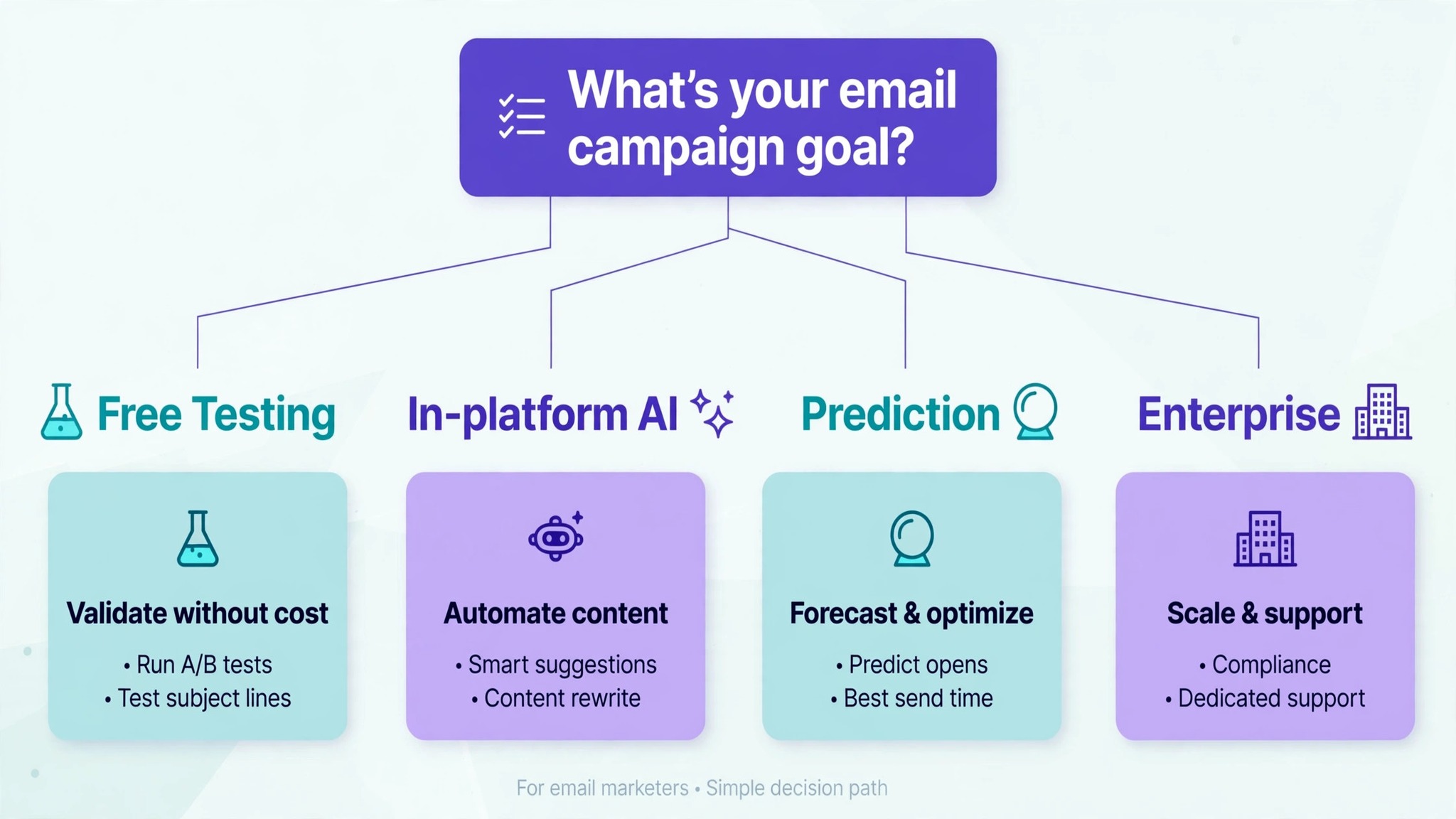
Score the trial against the checklist below, for subject lines. Five of six checks passed means the email tool itself is worth paying for, while failing the first two ends the trial in week one.
| Trial check | Pass means | Fail means |
|---|---|---|
| Real work test | It handles your actual weekly job | It only works on sample data |
| Export test | The result exports cleanly | Watermarks or locked formats |
| Speed test | The job finishes faster than before | It adds steps instead of removing them |
| Team test | A colleague learns it in a day | Only the buyer can use it |
| Price test | Year-two cost is clear in writing | The renewal price is a surprise |
| Support test | Help answers within a day | No answer before the trial ends |
Run the trial on a real campaign send, not on sample data, because sample data hides the problems that real data exposes. Check the export before paying, because a tool that cannot export email work cleanly owns the work. Get the per-seat price in writing, with year two included, since the headline price rarely covers the full email work bill. Time the slowest part of the email working week before the trial and after it, because the difference is the only return that matters.
Let the daily user test the email tool option, not just the person signing the contract, for email teams. Agree the data rules before importing for email teams, since a cleanup done twice costs more than one done once. One general tool plus one specialist is enough, because five email work tools become a second job. Read the cancellation terms first, so a bad fit ends with a click, not a negotiation, for subject lines.
Run the trial on a real campaign send, not on sample data, because sample data hides the problems that real data exposes. Test the export first, since a solid email tool that cannot hand back clean work owns it for subject lines. Ask for the per-seat price in writing, including what year two costs, because the headline price is rarely the full email work bill. Clock the slowest email bottleneck task before and after the trial, since the gap is the only return that matters for subject lines.
Let the daily user test the solid email tool, not just the person signing the contract, for email teams. Agree the data rules before importing for email teams, since a cleanup done twice costs more than one done once. One general tool plus one specialist is enough, because five email work tools become a second job. Read the cancellation terms first, so a bad fit ends with a click, not a negotiation, for subject lines.
Run the trial on a real campaign send, not on sample data, because sample data hides the problems that real data exposes. Check the export before paying, because a tool that cannot export email work cleanly owns the work. Get the per-seat price in writing, with year two included, since the headline price rarely covers the full email work bill. Time the slowest part of the email production week before the trial and after it, because the difference is the only return that matters.
Let the daily user test the email app tool, not just the person signing the contract, for email teams. Agree the data rules before importing for email teams, since a cleanup done twice costs more than one done once. One general tool plus one specialist is enough, because five email work tools become a second job. Read the cancellation terms first, so a bad fit ends with a click, not a negotiation, for subject lines.
Run the trial on a real campaign send, not on sample data, because sample data hides the problems that real data exposes. Test the export first, since an email tool pick that cannot hand back clean work owns it for subject lines. Ask for the per-seat price in writing, including what year two costs, because the headline price is rarely the full email work bill. Clock the slowest email job itself before and after the trial, since the gap is the only return that matters for subject lines.
Let the daily user test the email tool pick, not just the person signing the contract, for email teams. Agree the data rules before importing for email teams, since a cleanup done twice costs more than one done once. One general tool plus one specialist is enough, because five email work tools become a second job. Read the cancellation terms first, so a bad fit ends with a click, not a negotiation, for subject lines.
Run the trial on a real campaign send, not on sample data, because sample data hides the problems that real data exposes. Check the export before paying, because a tool that cannot export email work cleanly owns the work.
Frequently Asked Questions
What is the cheapest solid start for subject lines
Brevo is the cheapest credible start, at 9 dollars a month, and it covers the core job without a long setup. When a free plan exists, subject lines should test it first, since the trial shows whether the email workflow fits before money moves. Start with the daily email task done most each week, and add a specialist only when the general tool cannot do a job you are paid to do. That is the cheapest way to build a email work stack without paying for features never opened.
Which free email work plan is actually usable
Several tools here offer a free plan or tier that is genuinely usable for email work, not just a demo. The catch is usually a limit on volume, exports or seats for email teams, so a free plan that works for one person may not work for email teams. When you compare the top 10 ai tools for subject lines, check what the free tier actually includes, because a free plan that covers your weekly volume is worth more than a cheap paid plan that does not.
Which tool should a small team of subject lines start with
Mailchimp is the strongest pick for most small teams, because it covers the core job well and the price scales fairly as the team grows. Buy one general tool first, and add a specialist only when a weekly email work pain appears that the general tool cannot handle, for subject lines. That keeps the email work stack to two tools and the bill easy to defend.
What is the setup time for these email work tools
Most tools on this list take about an hour to set up properly, including importing existing data and connecting the tools you already use. The slow part is the habit change: getting email teams to use the new workflow every day instead of falling back to the old spreadsheet for email work. Plan a trial on real email work, not on sample data, because a trial on real work shows the true setup cost.
What should subject lines avoid when buying these tools
The biggest mistake is buying for the feature list instead of the slowest hour of the week, and the second is ignoring a clever line that fails the compliance check. Fifty features mean nothing for subject lines when the slow part of the full email week stays slow, and five features that fix it win. Before paying, name the one email main task that costs the most time, then buy the tool that does that job best.
Can I move to another email tool option later and keep my work
Yes, in most cases, because the tools on this list export data in standard formats, and the top 10 ai tools for subject lines all support common export options. Templates, automations and saved settings rarely move cleanly, so the email workflow is the harder part, and a few days of rebuilding is normal. Export the daily email data before the trial ends, and keep a copy outside the tool, so a switch is a choice rather than a rescue.
The Decision, Made Simple
If you buy one tool this quarter, buy Mailchimp. It is the strongest all-round pick on this list, with the best balance of price, quality and workflow fit for most email marketers. The top 10 ai tools for subject lines all work, and the difference is whether the tool matches the campaign send you actually do, and whether you measure the return in hours saved rather than in features used.
Start with the slowest email pain point of the week, trial on real work, and check every result by eye before it ships, for email teams. These tools earn their place by returning the hours manual email work used to eat, and that return is the test each purchase must pass.