A data analyst charges 50 to 150 dollars an hour, and a consultancy charges more again for a dashboard. An AI data analysis tool charges nothing to try and 20 dollars a month to answer questions, and that gap is the reason most small teams start with AI. The gap also hides the real question, which is not whether AI is cheaper, because it is, but what the subscription actually buys. That question is the heart of ai data analysis tool pricing, and it is the number this guide works out for every tool.
A tool that sells answers for 20 dollars a month and a tool that charges 75 dollars a month per user are not selling the same thing. The first sells a chat that reads a spreadsheet. The second sells a governed platform with dashboards, permissions and audit logs. A person who needs one answer a week pays less with the cheap plan, and a team that needs a dashboard every Monday pays less with the plan that counts users, not questions. The billing model decides the bill more than the headline price does.
The third thing to check is the question. Most AI analysts sell credits or messages, and one question costs one message or a handful of credits, while a BI platform sells seats that ask unlimited questions. A plan with 15 messages a month sounds generous until the second spreadsheet, when the messages run out and the tool asks for more money. Knowing ai data analysis tool pricing means knowing how many finished answers the monthly allowance actually covers, not just what the plan costs.
Prices in this guide are US list prices checked in November 2026, before tax. Monthly prices are per month, with the annual billing rate beside the monthly rate where the vendor publishes one. Where a vendor sells credits that vary by model and task, this guide uses the published plan price and says what the credits buy instead of guessing.
At a Glance. ai data analysis tool pricing in One Table
The table below is the short answer. Prices are in US dollars, before tax. Free means free to ask and preview, and the paid column is what it costs to get answers without limits.
| Tool | Free plan | Entry paid price | What you get | Per answer cost |
|---|---|---|---|---|
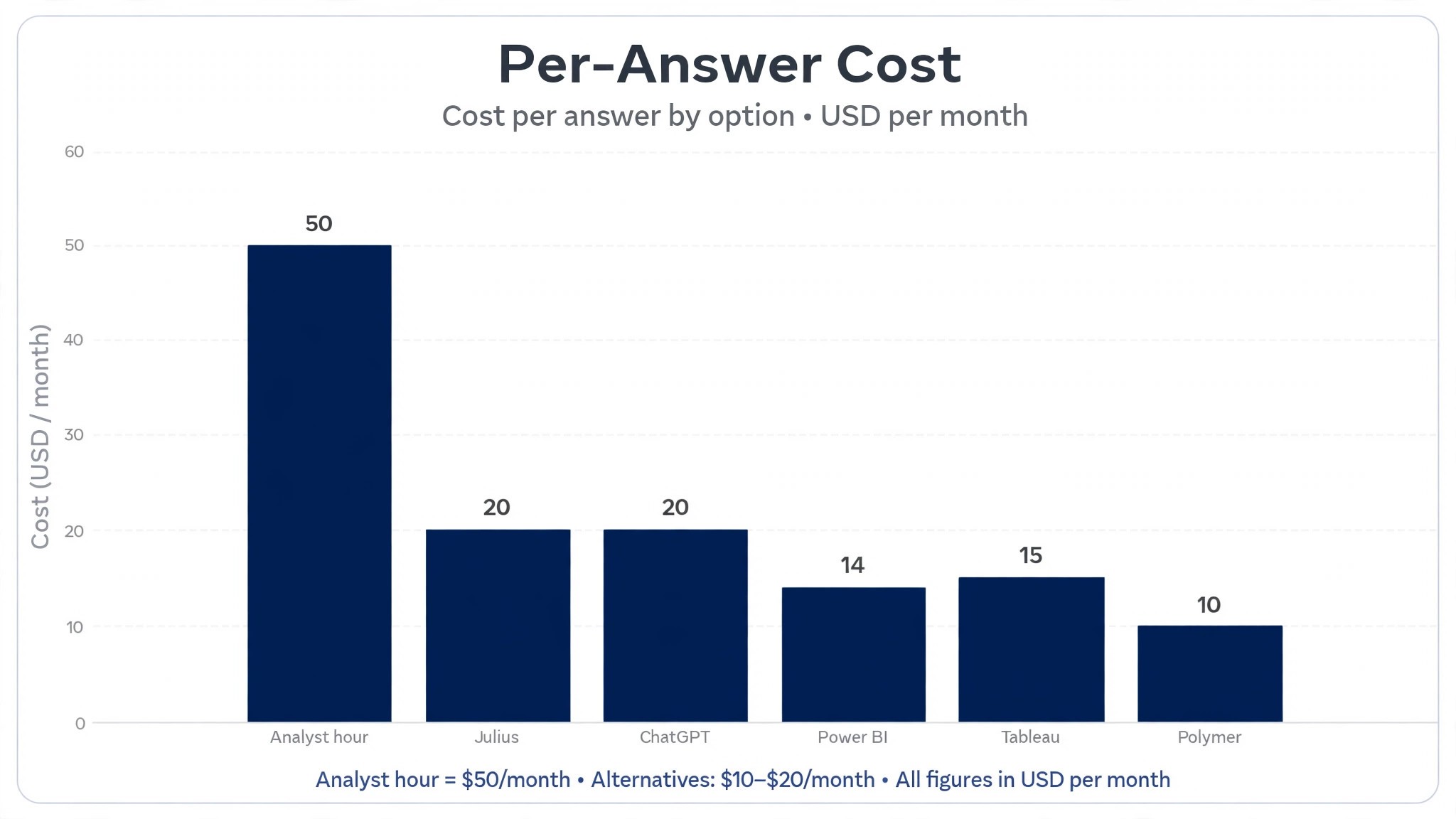
| Julius | Free, 15 messages a month | Plus 20 dollars a month, Pro 45 dollars a month | Chat analysis, charts, notebooks, connectors | About 1 dollar per answer on Plus |
| ChatGPT | Free, limited | Plus 20 dollars a month | Advanced data analysis, code execution, charts | About 20 dollars a month, unlimited questions |
| Power BI | Free, limited | Pro 14 dollars a month per user | Dashboards, Copilot with Fabric capacity | About 14 dollars a month per user |
| Tableau | Tableau Public free | Viewer 15 dollars a month per user, Creator 75 dollars a month per user | Dashboards, Pulse insights, governed data | About 15 dollars a month per viewer |
| Polymer | Free plan | Starter 10 dollars a month, Pro 25 dollars a month | No code dashboards, AI insights | About 10 dollars a month, flat |
| Akkio | Free trial | From 49 dollars a month | No code predictions, chat analysis, flows | About 49 dollars a month, flat |
| Rows | Free, limited tier | Pro 59 dollars a month per user | Spreadsheet AI, integrations, automations | About 59 dollars a month per user |
| Hex | Free plan | Professional 26 dollars a month per user | Notebooks, AI assistant, scheduled runs | About 26 dollars a month per user |
Read the per answer column first, because an analyst without messages is an analyst that stops working mid month. Julius Plus gives 2,000 credits a month, while the free plan gives 15 messages, so the paid plan covers about a hundred times the questions. That gap between the message allowance and the seat price is the oldest trick in ai data analysis tool pricing, and every tool in this table plays it in some form.
Read the billing column second, because a credit plan and a seat plan behave differently as the team grows. Julius Plus at 20 dollars a month covers one person, so a team of five pays 100 dollars a month for five Plus seats. Power BI Pro at 14 dollars a month per user covers one seat, so a team of five pays 70 dollars a month, but Copilot needs Fabric capacity on top. The billing model, not the headline price, decides what a team of five pays.
How the Billing Models Work
Data tools sell in three ways, and the model matters more than the price. Credit plans sell a fixed number of credits a month, so Julius Plus at 20 dollars a month buys 2,000 credits, which is the cheapest honest price in this guide for a person who asks questions about spreadsheets. Seat plans sell a fixed price per user a month, so Power BI Pro at 14 dollars a month per user buys dashboards for one person, which suits a Microsoft team that already lives in Excel.
Flat plans sell the whole tool for one price, so Polymer Starter at 10 dollars a month buys no code dashboards for a small team, which suits a business that wants answers without a per user bill.
The second thing to check is what counts as one question. Julius counts credits, and the credits vary by model and task complexity, so a hard question costs more than an easy one. ChatGPT Plus counts nothing per question, so a hundred questions cost the same as one, which suits a person who asks all day. A buyer who asks a few hard questions a week should check the credit cost before buying, because the difference decides whether the plan lasts the month.
The third thing to check is the data it reads. Julius reads CSVs, Excel sheets and Google Sheets, Power BI reads Power BI datasets, Tableau reads Tableau data sources, and Hex reads databases and notebooks. That data check is part of ai data analysis tool pricing, because a tool that cannot read the file the buyer actually has is not cheap at any price.

1. Julius
Julius is the individual analyst pick in this guide, and its pricing is a credit system with a free tier. The free plan gives 15 messages a month with no card, and Plus costs 20 dollars a month, or 16 dollars a month billed annually, with 2,000 credits. Pro costs 45 dollars a month, or 37 dollars billed annually, with 5,000 credits, and Max costs 200 dollars a month, with 25,000 credits. Business costs 450 dollars a month, with 60,000 credits and 3 editor seats.
Worked cost for 100 questions a month. Plus at 20 dollars a month covers 2,000 credits, so 100 questions cost 20 dollars in total, or about 20 cents per question at typical credit use. A person who asks questions about spreadsheets every day should pay Plus, because 20 dollars a month buys the shortest path from question to chart in this guide. A person who needs unlimited messages should pay Pro, because 45 dollars a month buys 5,000 credits and more memory.
Julius earns its price with the chat. A user uploads a file, asks a question in plain words, and gets a chart, a pivot table and a summary, with notebooks and database connectors for deeper work. A non technical user who wants a purpose built analyst should test Julius first, because 20 dollars a month buys the best spreadsheet analyst in this guide.
2. ChatGPT
ChatGPT is the all round pick in this guide, and its pricing is a subscription with a free tier. The free plan covers limited data analysis, and Plus costs 20 dollars a month, with Advanced Data Analysis, code execution, charts and file uploads included. The tool reads a spreadsheet, runs code on it, and returns a chart and a written answer, which suits a person who already uses ChatGPT every day.
Worked cost for 100 questions a month. Plus at 20 dollars a month covers unlimited questions, so 100 questions cost 20 dollars in total, or about 20 cents per question. A person who asks questions all day should pay Plus, because 20 dollars a month buys unlimited analysis for the price of one Julius Plus plan. A person who needs notebooks and database connectors should buy Julius instead, because ChatGPT is a chat, not a data platform.
ChatGPT earns its price with flexibility. A user can ask for a chart, then ask for the same data as a table, then ask for a written summary, and the back and forth is faster than any dedicated tool. A person who analyses data as one job among many should test ChatGPT first, because 20 dollars a month buys the best all round analyst in this guide.
3. Power BI
Power BI is the Microsoft pick in this guide, and its pricing is a seat system with a free tier. The free plan covers limited dashboards, and Pro costs 14 dollars a month per user, with dashboards, sharing and collaboration. Copilot needs Fabric capacity, F2 or higher, or Premium P1, on top of the Pro seat, so the AI assistant costs more than the seat alone. The tool reads Power BI datasets and Excel files, which suits a team that already lives in Microsoft tools.
Worked cost for a team of five. Pro at 14 dollars a month per user covers five seats for 70 dollars a month, so a team of five pays 70 dollars in total, or about 14 dollars per person. A Microsoft team that needs dashboards every Monday should pay Pro, because 14 dollars a month per user buys the cheapest governed BI in this guide. A team that needs Copilot should budget Fabric capacity on top, because the assistant does not run on a Pro seat alone.
Power BI earns its price with the fit. A team that already uses Excel and Teams gets dashboards without learning a new platform, and the sharing and permissions are built in, which suits a business that needs governed numbers. A Microsoft shop that needs AI insights should test Power BI first, because 14 dollars a month per user buys the best Microsoft BI in this guide. The weakness is the Copilot cost, because Fabric capacity is a separate bill that dwarfs the seat price.
4. Tableau
Tableau is the enterprise pick in this guide, and its pricing is a seat system with a free tier. Tableau Public is free for individual use, and Viewer costs 15 dollars a month per user, Explorer costs 42 dollars a month per user, and Creator costs 75 dollars a month per user. Tableau Pulse adds generative AI insights, and it comes with Tableau Cloud Standard, so even Viewers can follow metrics, while the Tableau Agent sits higher, in the Cloud+ edition.
Worked cost for a team of five. Viewer at 15 dollars a month per user covers five viewers for 75 dollars a month, so a team of five pays 75 dollars in total, or about 15 dollars per person. A business that needs governed dashboards should pay Tableau, because 15 dollars a month per viewer buys the most polished BI in this guide. A business that needs the AI agent should budget for Cloud+, because the agent is priced through sales and does not come with Viewer.
Tableau earns its price with the polish. The dashboards look better than any other tool on this list, the governance is the strongest, and Pulse turns metrics into plain language insights that a manager can read without opening a chart. A business that presents numbers to clients should test Tableau first, because 15 dollars a month per viewer buys the best looking BI in this guide. The weakness is the price, because Creator at 75 dollars a month per user is the most expensive seat on this list.
5. Polymer
Polymer is the budget dashboard pick in this guide, and its pricing is a flat subscription with a free tier. The free plan covers basic dashboards, and Starter costs 10 dollars a month, with no code dashboards and AI insights, while Pro costs 25 dollars a month, with more data, more users and more features. The tool turns a spreadsheet into a dashboard without code, which suits a small business that wants answers without hiring an analyst.
Worked cost for one team. Starter at 10 dollars a month covers the dashboards a small business needs, so one team pays 10 dollars in total, or about 10 dollars a month flat. A small business that wants a dashboard without a per user bill should pay Polymer, because 10 dollars a month buys the cheapest dashboard in this guide. A team that needs governed data should buy Power BI or Tableau instead, because Polymer is a dashboard tool, not a platform.
Polymer earns its price with simplicity. A user uploads a spreadsheet, asks a question, and gets a dashboard in minutes, without code and without a consultant, which is the fastest path from data to decision on this list. A small business that wants answers today should test Polymer first, because 10 dollars a month buys the best budget dashboard in this guide.
6. Akkio
Akkio is the prediction pick in this guide, and its pricing is a flat subscription with a free trial. The free trial covers no code predictions with limits, and paid plans start from 49 dollars a month, with chat analysis, flows and more data. The tool builds predictions from a spreadsheet, such as which customers will churn or which leads will close, which suits a business that wants a forecast, not just a chart.
Worked cost for one team. The entry plan at 49 dollars a month covers the predictions a small business needs, so one team pays 49 dollars in total, or about 49 dollars a month flat. A business that wants to predict churn or sales should pay Akkio, because 49 dollars a month buys the best no code predictions in this guide. A business that only needs charts should buy Polymer instead, because 10 dollars beats 49 dollars for the same dashboard.
Akkio earns its price with the predictions. A spreadsheet becomes a forecast in minutes, without code and without a data scientist, which is the difference between a business that reacts and a business that plans. A small business that wants to know what happens next should test Akkio first, because 49 dollars a month buys the best prediction tool in this guide. The weakness is the price, because 49 dollars a month is a lot for a business that only needs a chart.
7. Rows
Rows is the spreadsheet AI pick in this guide, and its pricing is a seat system with a free tier. The free plan covers limited AI features, and Pro costs 59 dollars a month per user, with spreadsheet AI, integrations, automations and more data. The tool turns a spreadsheet into a live document, with AI functions that pull data from the web, enrich a list and automate a report, which suits a team that lives in spreadsheets.
Worked cost for a team of five. Pro at 59 dollars a month per user covers five seats for 295 dollars a month, so a team of five pays 295 dollars in total, or about 59 dollars per person. A team that lives in spreadsheets should pay Rows, because 59 dollars a month per user buys the most powerful spreadsheet AI in this guide. A team that only needs charts should buy Polymer instead, because 10 dollars beats 59 dollars for the same dashboard.
Rows earns its price with the spreadsheet. The AI functions enrich a customer list, pull a price from the web and build a report that updates itself, which is the work a team used to do by hand every Monday. A team that runs its business in a spreadsheet should test Rows first, because 59 dollars a month per user buys the best spreadsheet AI in this guide. The weakness is the seat price, because 295 dollars a month for five people is the most expensive team bill on this list.
8. Hex
Hex is the notebook pick in this guide, and its pricing is a seat system with a free tier. The free plan covers basic notebooks, and Professional costs 26 dollars a month per user, with the AI assistant, scheduled runs and more data, while Team costs 47 dollars a month per user, with more seats and more governance. The tool combines notebooks, SQL and AI in one place, which suits a data team that writes code and wants an assistant beside it.
Worked cost for a team of five. Professional at 26 dollars a month per user covers five seats for 130 dollars a month, so a team of five pays 130 dollars in total, or about 26 dollars per person. A data team that writes notebooks should pay Hex, because 26 dollars a month per user buys the best notebook AI in this guide. A team that does not write code should buy Julius instead, because 20 dollars beats 26 dollars for a chat.
Hex earns its price with the notebook. A data scientist can write SQL, run Python and ask the AI assistant for help in the same file, then schedule the notebook to run every Monday, which is the workflow a data team actually uses. A data team that codes should test Hex first, because 26 dollars a month per user buys the best notebook in this guide. The weakness is the skill, because a non technical user gets little from a notebook, however good the AI is.
Free vs Paid
The free tier is the first thing to check, and the free plans in this guide are not equal. Julius free gives 15 messages a month, ChatGPT free gives limited analysis, Power BI free gives limited dashboards, Tableau Public is free for individual use, Polymer free gives basic dashboards, Akkio gives a free trial, Rows free gives a limited tier, and Hex free gives basic notebooks. That split between free questions and paid full platforms is the first thing ai data analysis tool pricing teaches a new team.
The paid tier is the second thing to check, and the cheapest honest price for an individual analyst is Julius Plus or ChatGPT Plus at 20 dollars a month, while the cheapest honest price for a dashboard is Polymer Starter at 10 dollars a month. A person who asks a few questions a week should pay 20 dollars and stop there, because a bigger allowance renews whether it is used or not. A team that needs dashboards every Monday should pay the seat price, because the per user bill is the real cost.
The rule is simple. Count the questions the team asks in a month, divide the price by that count, and that is the per answer cost. That per answer figure is the heart of ai data analysis tool pricing, and it is the number that decides the value.
Total Cost of Ownership
The sticker price is not the total cost, and a buyer that budgets on the sticker price will be surprised in month two. The total cost includes the subscription, the extra seats, the higher tier when the credits run out, and the cost of an answer that is wrong. A 20 dollar plan with 2,000 credits costs another 20 dollars when the credits run out mid month, so the real price of a heavy analysis month is 40 dollars, not 20. A 14 dollar seat costs 14 dollars forever, and that certainty is worth money to a team that asks on a schedule.
Add the hidden costs to every tool. An answer that is wrong costs a bad decision, which wipes out the saving from the cheapest tool, so every AI answer needs a human check against the source data. A dashboard that needs Fabric capacity costs far more than the seat, which is the most expensive outcome in this guide. A subscription that renews at a higher rate, such as Julius at 20 dollars monthly against 16 dollars on annual billing, costs 25 percent more, so commit annually or pay monthly on purpose, never by accident.
The seat count is the second hidden cost. A tool that charges per user costs five times more for a team of five than for one person, so a 59 dollar Rows seat becomes 295 dollars a month for a team, while a 10 dollar Polymer flat plan stays 10 dollars. A team that discovers the seat maths after signing must pay five times or switch tools.
The rule is simple. Take the published price, work out the cost per answer at the volume the team actually asks, add the seats and the capacity, and that is the real yearly cost. That per answer figure is the heart of ai data analysis tool pricing, and it is the number that decides the value.
Cheapest by Situation
| Situation | Best value | Why it wins |
|---|---|---|
| One person, spreadsheet questions | Julius Plus | 20 dollars a month, 2,000 credits |
| All round analysis, unlimited questions | ChatGPT Plus | 20 dollars a month, unlimited |
| Microsoft team dashboards | Power BI Pro | 14 dollars a month per user |
| Enterprise governed dashboards | Tableau Viewer | 15 dollars a month per user |
| Budget no code dashboards | Polymer Starter | 10 dollars a month, flat |
| No code predictions | Akkio | From 49 dollars a month |
| Spreadsheet AI for a team | Rows Pro | 59 dollars a month per user |
| Notebook AI for a data team | Hex Professional | 26 dollars a month per user |
Read the table by situation, not by price alone. The cheapest tool for one person is not the cheapest tool for a team of five, because the billing model flips the math. A buyer that chooses the cheapest tool and then discovers it cannot read the file the team actually has will pay twice, once for the cheap answers and once for the replacement. That situation test is the core of ai data analysis tool pricing. A buyer that buys the analysis tool it needs for the data it has, with the allowance that team requires, will not pay twice.
Frequently Asked Questions
Is there a truly free AI data analysis tool?
Yes, with limits. Julius free gives 15 messages a month, ChatGPT free gives limited analysis, Power BI free gives limited dashboards, Tableau Public is free for individual use, and Polymer free gives basic dashboards. Hex free gives basic notebooks, Rows free gives a limited tier, and Akkio gives a free trial. That split between free questions and paid full platforms is the first thing ai data analysis tool pricing teaches a new team.
How much does one AI analysed answer cost?
One answer costs about 20 cents on Julius Plus at 20 dollars a month for 2,000 credits, and about 20 cents on ChatGPT Plus at 20 dollars a month for unlimited questions at a hundred questions a month. A data analyst charges 50 to 150 dollars an hour, and a consultancy charges more again for a dashboard. Count the questions the team asks, divide by the allowance, and that is the per answer cost.
Do I own the analysis an AI tool makes?
Ownership depends on the tool and the tier. Julius, ChatGPT, Polymer and Hex give the buyer full rights to the charts and answers they make on paid plans, and the exports are standard CSV, PNG or PDF files. Power BI and Tableau keep the dashboards inside their platforms, so the data stays where it was built. Read the licence on the pricing page before paying, because a dashboard the buyer cannot share with a client is a dashboard that will need remaking.
How much does an AI data analysis tool cost in 2026?
An AI data analysis tool costs 10 to 75 dollars a month on a subscription, depending on the tool and the allowance included. A data analyst charges 50 to 150 dollars an hour, and a consultancy charges more again for a dashboard. The tool price buys answers and charts, and the analyst price buys judgment and work. A team that needs clean answers fast should pay the tool price. A team that needs a dashboard nobody else has should pay the analyst price.
Which AI data analysis tool is best for a small business?
It depends on the job. Julius Plus is best for spreadsheet questions at 20 dollars a month. ChatGPT Plus is best for all round analysis at 20 dollars a month. Power BI Pro is best for Microsoft team dashboards at 14 dollars a month per user. Polymer Starter is best for budget dashboards at 10 dollars a month. A small business that asks a few questions a week should choose Julius or ChatGPT. A small business that needs dashboards every Monday should choose Power BI or Polymer.
Verdict
For most small teams, the best value is Julius Plus at 20 dollars a month, with 2,000 credits and a chat that turns spreadsheets into charts, because it is the cheapest honest price in this guide for a purpose built analyst that a non technical person can use. A person who asks questions about spreadsheets every day should pay 20 dollars and stop there. For a person who asks all day, ChatGPT Plus at 20 dollars a month is the best pick, because the questions are unlimited for the same price.
For quality, Power BI Pro at 14 dollars a month per user is the best pick for Microsoft team dashboards, and Polymer Starter at 10 dollars a month is the best pick for a budget dashboard. For a zero budget, Julius free, ChatGPT free and Tableau Public all hand over usable answers with no payment. The right tool is the one that fits the question volume, the file type, and the budget at the tier the buyer will use in six months, not at the entry price, because the entry price buys credits that may not cover the team. That is the honest read on ai data analysis tool pricing in 2026.