

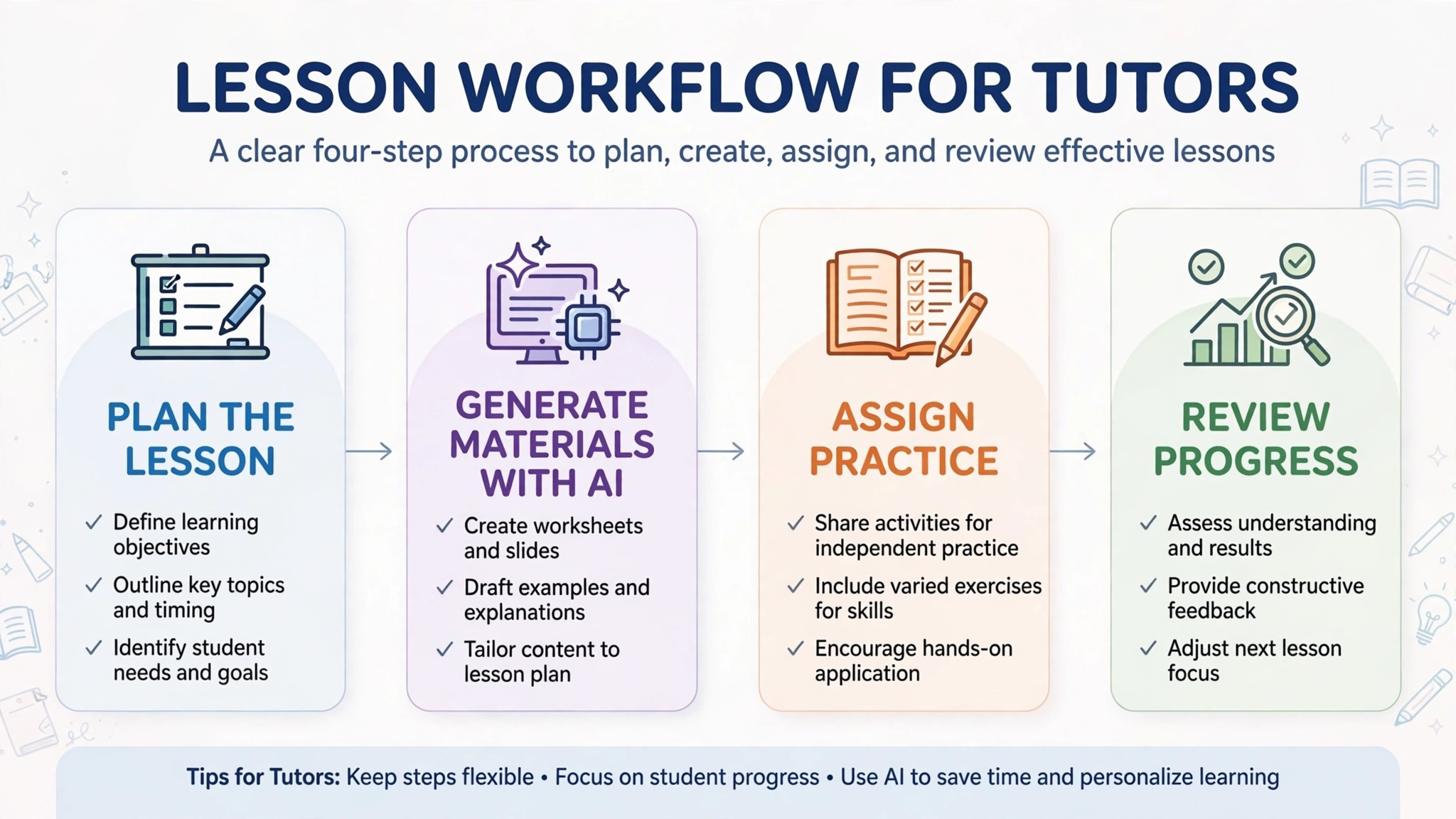
Forty minutes of planning for one hour of teaching is the maths most tutors live with, and it is why the planning eats the profit. A lesson plan, a practice set, marking, a progress report, and a message to a parent all sit between one paid hour and the next, and none of them appears on the invoice. The best ai tools for tutors cut that unpaid work down while leaving the teaching to the tutor, because the session is the part parents pay for and the part no tool can deliver. The twelve tools below are judged on how many of those forty minutes they hand back.
This guide compares twelve tools on published prices, the tutoring job each one does best and the catch that only shows up after the trial ends. Most lesson planning tools here were built for classroom teachers, and this guide says so where it matters, because a tutor works one to one and needs tools that fit that shape. Start with the shortlist, then read the reviews that match the students you actually teach.
The Quick Shortlist
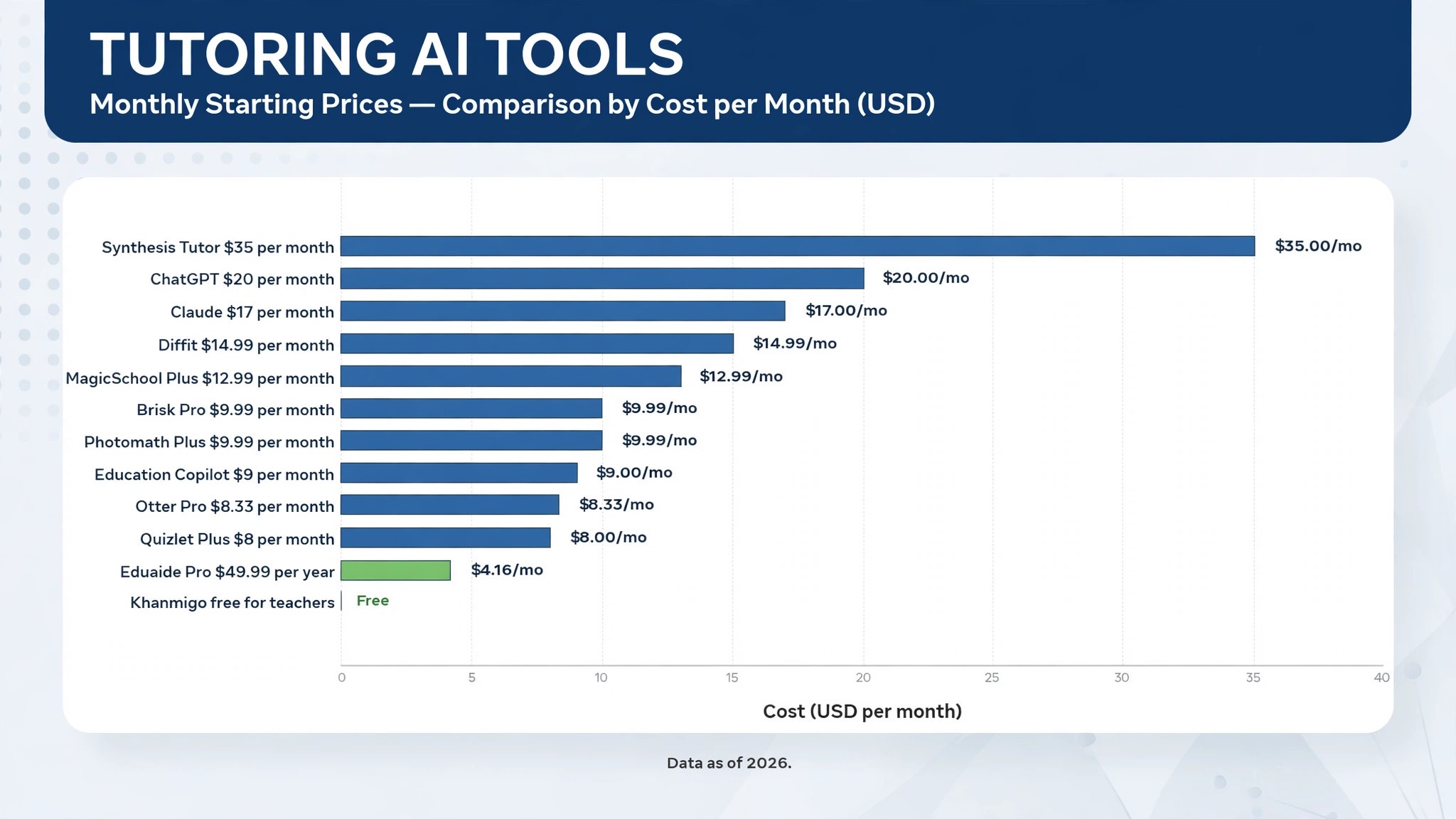
The table below matches each common tutoring job to the single tool that handles it best. Use it to narrow the best ai tools for tutors to two or three candidates before you read the full reviews. Prices are monthly list prices unless noted, and annual billing is usually cheaper than paying month to month.
| Job | Best tool | Why it wins |
|---|---|---|
| Lesson plans and quizzes fast | MagicSchool | 80 plus teacher tools, Plus at 12.99 dollars a month |
| Guided practice for the student | Khanmigo | Free for teachers, 4 dollars a month for learners |
| Lesson plans with pedagogy built in | Eduaide | Pro at 49.99 dollars a year |
| Readings at the right level | Diffit | 14.99 dollars a month, adapts any text |
| AI inside Google Docs | Brisk Teaching | Pro at 9.99 dollars a month |
| Full lesson plans in minutes | Education Copilot | From 9 dollars a month |
| All round drafting and ideas | ChatGPT | 20 dollars a month for Plus |
| Natural explanations and editing | Claude | 17 dollars a month billed annually |
| Flashcards and practice tests | Quizlet | From 8 dollars a month for Plus |
| Step by step math help | Photomath | Free, Plus from 9.99 dollars a month |
| Adaptive math practice, ages 5 to 11 | Synthesis Tutor | 35 dollars a month on promotion |
| Notes from every session | Otter.ai | Pro at 8.33 dollars a month billed annually |
How We Judged the Best AI Tools for Tutors
A tool earned a place here only if it does a real tutoring job in 2026, not if it added an AI label to an old worksheet. The best ai tools for tutors were judged on five things that decide whether a tutor keeps paying after the first year.
First, the tutoring job it does, from planning a lesson to giving a student practice to reporting progress to a parent, because a tool that does one job well beats a platform that does five jobs poorly. Second, whether it fits one to one work, because most education tools are built for classrooms of thirty, and a tutor needs tools that adapt to a single student rather than a whole class.
Third, output quality, because a worksheet with errors or a lesson plan that misses the student’s level costs more time in fixing than it saves in drafting. Fourth, whether the price is published and how it scales, including generation caps that change the real bill as the workload grows. Fifth, the catch, from student data rules that limit what a tutor can upload to free plans that run out mid term.
| Check before you buy | What to ask | Why it matters |
|---|---|---|
| One to one fit | Built for tutors or for classrooms | Classroom tools waste a tutor’s time |
| Student data | What you may upload, and where it goes | Student work needs careful handling |
| Generation caps | Monthly limit and what happens at the cap | A cap that runs out mid term stops the work |
| Subject range | Which subjects are genuinely covered | A listed subject can still be shallow |
| Parent reporting | Progress reports and messages included | Parents renew when they see progress |
| Contract terms | Monthly or annual, and what year two costs | Annual billing locks the price but not the need |
The 12 Tools, Reviewed One by One
1. MagicSchool
Starting price Free plan, then Plus at 12.99 dollars a month, or 8.33 dollars a month billed annually. Best for Lesson plans and quizzes fast. Watch out It is built for classroom teachers, so some tools assume a class of thirty.
MagicSchool is the most complete classroom AI toolkit available now, and it is the best starting point for a tutor who plans lessons every week. Instead of one chat box, it offers more than 80 purpose built tools, including lesson planners, rubric generators, quiz builders, report card comment writers and parent email composers, each asking for grade level, subject and standards up front so the output lands close on the first try. For a tutor who plans five different subjects in a week, that breadth is the whole value.
The strength is speed on the jobs tutors repeat. A lesson plan that took forty minutes can be drafted in four, a quiz can be built to match the lesson, and a parent email can be written in the tone the tutor wants. The free plan is generous, with the full tool set under usage limits, and Plus at 8.33 dollars a month billed annually adds unlimited generations and output history.
The catch is the classroom shape. For lesson planning at a low price, MagicSchool earns the top spot, and the free plan is enough to test whether the output fits your students before paying.
2. Khanmigo
Starting price Free for teachers, 4 dollars a month for learners and parents. Best for Guided practice for the student. Watch out Individual paid plans are limited to the United States.
Khanmigo is Khan Academy’s AI tutor and teacher assistant, and it is the tool to hand a struggling student before any other on this list. It guides students with questions instead of handing over answers, so a student learns the method rather than copying a solution, and it ties its help to Khan Academy content the tutor already trusts. For teachers it can generate standards aligned, differentiated lesson planning tied to the same content library.
The strength is the Socratic approach. A student who is stuck gets asked the next question rather than given the answer, which builds the understanding that lasts into the exam, and the tutor gets progress insight into where the student actually struggles. Teacher tools are free in the United States and eligible locations, and learners pay 4 dollars a month or 44 dollars a year.
The catch is availability and scope. For guided practice in maths, science and humanities, Khanmigo earns its place, and it is the best tool on this list to give a student between sessions.
3. Eduaide
Starting price Free plan, then Pro at 49.99 dollars a year. Best for Lesson plans with pedagogy built in. Watch out The free plan covers only 8 resources a month.
Eduaide is the lesson planning pick for tutors who want pedagogy rather than just text. It builds lesson plans, worksheets and assessments with teaching structure built in, so the output reads like a plan a good teacher would write rather than a summary a chatbot would produce. For a tutor who plans carefully and wants the reasoning behind each activity, that structure matters more than raw speed.
The strength is value. Pro costs 49.99 dollars a year, which is less than a month of most rivals, and it lifts the free plan’s limit of 8 resources a month to unlimited generation. A tutor who plans ten lessons a week will hit the free cap in the first week, so the Pro price is effectively the real price, and it is a low one.
The catch is the cap itself. For pedagogy led lesson planning at the lowest annual price on this list, Eduaide earns its place, and it pairs well with Khanmigo for the student facing practice.
4. Diffit
Starting price Free plan, then 14.99 dollars a month, or 149.99 dollars a year. Best for Readings at the right level. Watch out The price rose in 2026, so old reviews quote a lower figure.
Diffit is the differentiation pick, built for the tutor whose students read at different levels. It takes any text and rewrites it at the reading level a student can handle, then builds questions, summaries and vocabulary work around it, all in under a minute. For a tutor working with a student who struggles with reading, or with a multilingual learner, that levelling is the difference between a worksheet the student can use and one that sits untouched.
The strength is speed and precision. A tutor can take a real article, a textbook page or a news story and turn it into a reading at the right level with questions matched to it, instead of hunting for a pre levelled text that never quite fits the topic. Diffit also supports IEP work and multilingual learners, which matters for tutors who teach students with specific needs.
The catch is the price change. For differentiated readings, Diffit earns its place, and it is the best tool on this list for a tutor whose students need the same topic at different levels.
5. Brisk Teaching
Starting price Free plan, then Pro at 9.99 dollars a month, or 99.99 dollars a year. Best for AI inside Google Docs. Watch out It works best for tutors already living in Google Workspace.
Brisk Teaching is the pick for tutors who already live in Google Docs and Slides, because it puts AI inside the tools they already open every day. Instead of switching to a separate platform, the tutor gets help with lesson feedback, differentiated materials and grading inside the document itself, which saves the copy and paste step that eats time in every other tool on this list.
The strength is the fit. A tutor who marks in Google Docs can get feedback suggestions, adjust a reading level and draft a comment without leaving the page, and the free core tools cover the daily jobs well enough that many tutors never pay. Pro at 9.99 dollars a month adds the deeper features for tutors who use it every day.
The catch is the ecosystem. For Google based tutors, Brisk earns its place as the cheapest way to add AI to the marking workflow, and it is the easiest tool on this list to adopt because there is nothing new to learn.
6. Education Copilot
Starting price From 9 dollars a month. Best for Full lesson plans in minutes. Watch out Fewer tools than MagicSchool, so it is a planner rather than a platform.
Education Copilot is the focused lesson planner on this list, built to turn a topic into a full lesson plan in minutes. A tutor enters the subject, grade and topic, and gets a structured plan with objectives, activities and assessments, ready to adapt to a single student. For a tutor who plans many lessons and wants one tool that does that job well, that focus is a strength rather than a limit.
The strength is simplicity. There is no platform to learn and no long list of tools to ignore, just a planner that produces a usable lesson quickly, and the price from 9 dollars a month is low for the time it saves. A tutor who plans ten lessons a week will feel the saving in the first week.
The catch is breadth. For fast lesson planning at a low price, Education Copilot earns its place, and it is the best pick for a tutor who wants a planner and nothing else.
7. ChatGPT
Starting price Free plan, then 20 dollars a month for Plus. Best for All round drafting and ideas. Watch out Output quality depends heavily on the brief you give it.
ChatGPT is the best all round drafter per dollar on this list, and it is the tool most tutors already use every day. Plus at 20 dollars a month buys the stronger models, more capacity and file uploads, and the free plan is enough to test whether AI drafting fits a workflow. It handles lesson outlines, practice questions, explanations at different levels, parent emails and marking rubrics, and it does so in a plain chat box that any tutor can use without training.
The strength is flexibility. A tutor can ask for ten practice questions on fractions, then ask for the same questions rewritten for a student who struggles with reading, then ask for a parent summary of the session, all in one conversation. For a solo tutor who teaches many subjects, that flexibility is worth more than a specialist feature set.
The catch is that ChatGPT has no pedagogy built in, no student data handling designed for tutoring, and no progress tracking, so a tutor must supply the structure and check every fact. For all round drafting at 20 dollars a month, ChatGPT is the best value on this list, and it belongs in every tutor’s stack.
8. Claude
Starting price Free plan, then 17 dollars a month billed annually for Pro. Best for Natural explanations and editing. Watch out No lesson planning templates or student tracking built in.
Claude is the prose pick, and tutors who care about how explanations read tend to prefer it over every other generalist on this list. Its explanations are clearer, its edits are more careful, and it follows a style guide more closely than most rivals when given one. For a tutor who writes explanations a student must actually understand, that clarity is the reason to choose it.
The strength is editing and explanation. Claude is unusually good at taking a dense textbook paragraph and rewriting it at a student’s level without losing the meaning, and at tightening a tutor’s own feedback so a parent can understand it. A tutor can paste a rough explanation and get back a cleaner version in seconds, then adapt it to the student.
The catch is scope. For a tutor who values clear explanations above all, Claude earns its place, and it pairs well with MagicSchool when the lesson also needs a formal plan.
9. Quizlet
Starting price Free plan, then from 8 dollars a month for Plus. Best for Flashcards and practice tests. Watch out The free plan is useful, but the best study modes need Plus.
Quizlet is the practice pick, and it has been the flashcard standard for students long before AI arrived. Its AI features now generate flashcards from notes, build practice tests and adapt study sets to the student’s weak spots, so a tutor can turn a session’s notes into a practice set the student can use all week. For a tutor whose students need to memorise vocabulary, facts or formulas, that practice loop is the whole value.
The strength is the student habit. Most students already know Quizlet, so a tutor does not need to teach a new app before the learning starts, and the practice modes, including learn, test and match, keep revision from feeling like a chore. A tutor can track which cards a student struggles with and plan the next session around them.
The catch is that the best AI study modes sit behind Plus, so a tutor should expect to pay from 8 dollars a month for the full value. For flashcards and practice tests, Quizlet earns its place, and it is the best tool on this list to give a student for independent study between sessions.
10. Photomath
Starting price Free plan, then Plus from 9.99 dollars a month. Best for Step by step math help. Watch out It shows steps, so a tutor must teach the method, not just the answer.
Photomath is the maths pick, and it solves a problem every maths tutor knows well, which is that a student who is stuck needs to see the steps, not just the answer. A student scans a problem with a phone camera, and Photomath shows step by step solutions with explanations, covering school maths from arithmetic to calculus. For a tutor, that step view is a teaching aid, because it shows exactly where the student’s method went wrong.
The strength is the step breakdown. Instead of telling a student the answer is wrong, the tutor can walk through the steps together and find the exact line where the error happened, which turns a frustrating session into a useful one. The free plan covers step by step solutions, and Plus from 9.99 dollars a month adds animated steps and deeper explanations.
The catch is misuse. For maths tutoring, Photomath earns its place as the best step by step aid on this list, and it is the tool most likely to be already on a student’s phone.
11. Synthesis Tutor
Starting price 35 dollars a month on promotion, or 300 dollars a year for an individual plan. Best for Adaptive math practice, ages 5 to 11. Watch out It is built for elementary ages, so older students will outgrow it.
Synthesis Tutor is the specialist pick for tutors who teach elementary maths, built for children aged 5 to 11 who need engaging, adaptive practice. It adapts to the child’s level, explains concepts through games and stories, and keeps a young student practising longer than a worksheet ever would. For a tutor whose youngest students switch off during drill work, that engagement is the selling point.
The strength is adaptation. The tutor gets a picture of what the child can do and where they struggle, and the practice adjusts as the child improves, so the tutor can plan the next session around real evidence rather than a guess. That feedback loop is what separates Synthesis from a generic maths app.
The catch is age range and price. For elementary maths tutoring, Synthesis earns its place, and it is the best tool on this list for making practice feel like play.
12. Otter.ai
Starting price Free plan, then Pro at 8.33 dollars a month billed annually. Best for Notes from every session. Watch out Check local rules before recording a session with a child.
Otter.ai closes the list because a tutor’s memory of a session fades fast, and a good note is the difference between a planned next session and a repeated one. Otter transcribes sessions in real time, produces a summary and highlights the action points, so the tutor can send a parent a clear record of what was covered and what the student should practise. For a tutor with many students, that record keeping is worth the subscription on its own.
The strength is the summary. Instead of rewatching an hour of session or relying on scribbled notes, the tutor gets a searchable transcript and a summary that can be turned into a parent message in minutes. Pro at 8.33 dollars a month billed annually is a low price for a tool that saves an hour of admin every week.
The catch is recording rules. For session notes and parent reporting, Otter earns its place, and it pairs well with any planning tool on this list.
Side by Side Comparison
The table below puts the best ai tools for tutors side by side on price, best job and free plan, so you can compare the published prices against the free for teacher tools at a glance.
| Tool | Starting price | Best for | Free plan |
|---|---|---|---|
| MagicSchool | 12.99 dollars a month | Lesson plans and quizzes fast | Yes |
| Khanmigo | Free for teachers | Guided practice for the student | Yes |
| Eduaide | 49.99 dollars a year | Lesson plans with pedagogy built in | Yes, 8 a month |
| Diffit | 14.99 dollars a month | Readings at the right level | Yes |
| Brisk Teaching | 9.99 dollars a month | AI inside Google Docs | Yes |
| Education Copilot | 9 dollars a month | Full lesson plans in minutes | Trial only |
| ChatGPT | 20 dollars a month | All round drafting and ideas | Yes |
| Claude | 17 dollars a month | Natural explanations and editing | Yes |
| Quizlet | 8 dollars a month | Flashcards and practice tests | Yes |
| Photomath | 9.99 dollars a month | Step by step math help | Yes |
| Synthesis Tutor | 35 dollars a month | Adaptive math practice, ages 5 to 11 | Trial only |
| Otter.ai | 8.33 dollars a month | Notes from every session | Yes |
How to Pick the Right Tool for Your Students
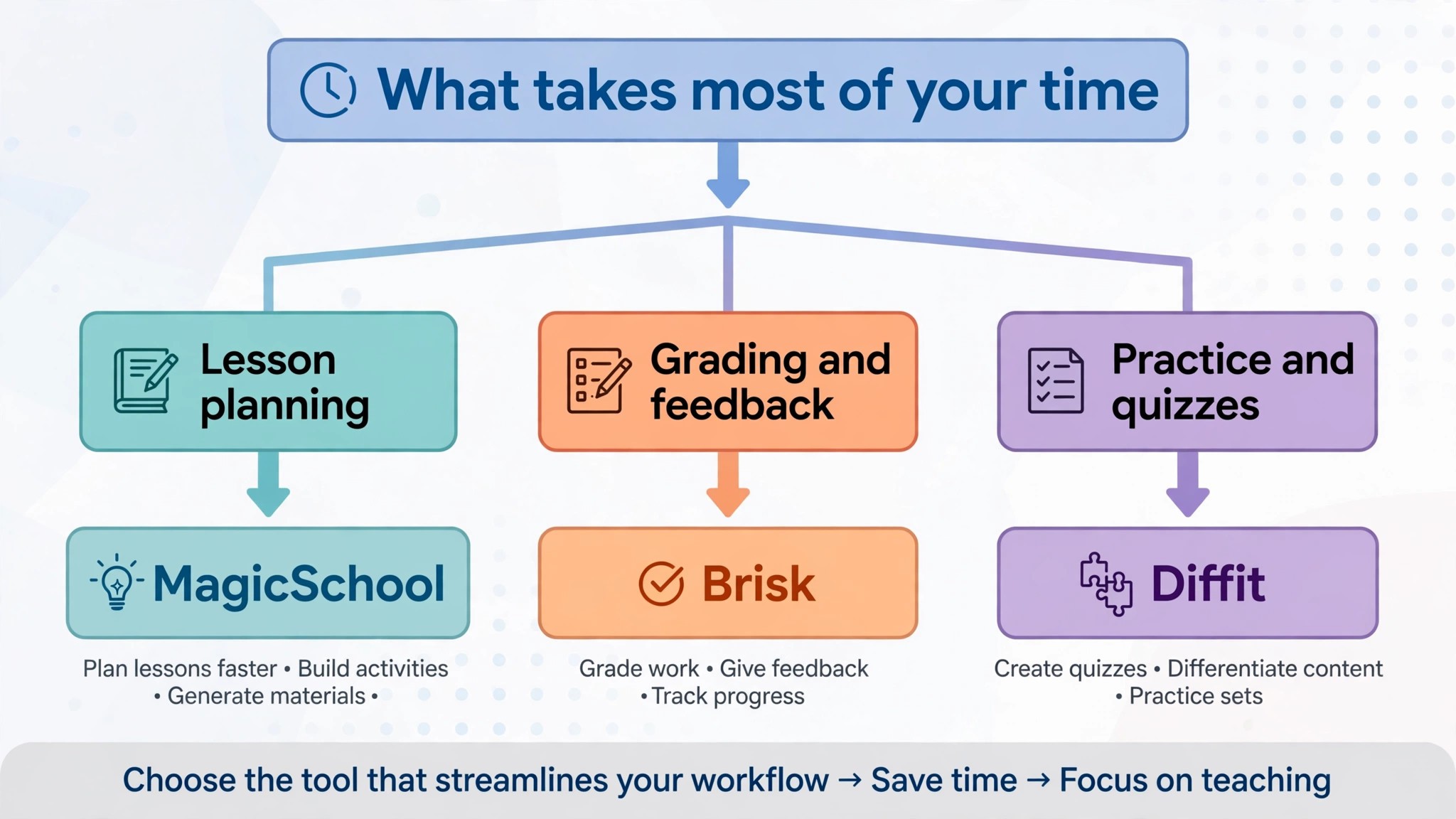
The best ai tools for tutors are not the ones with the longest feature list. They are the ones that fix the slowest part of your week. A tutor drowning in lesson planning should buy MagicSchool or Eduaide. A tutor whose students need practice between sessions should give them Khanmigo or Quizlet. A tutor whose students read at different levels should buy Diffit. A tutor losing hours to parent messages should buy Otter.ai. Start from the slow part, not from the vendor homepage.
Budget the full bill, not the headline price. The table below shows what a solo tutor actually pays in year one for the most common combinations, using published starting prices. Generation caps and annual billing are the lines that surprise buyers, so ask for them in writing before you sign, and remember that many tools here are free for teachers, which makes the real cost lower than the headline price suggests.
| Stack | Monthly cost | What it covers |
|---|---|---|
| Khanmigo plus MagicSchool free | 0 dollars | Guided practice plus lesson tools |
| MagicSchool Plus, annual | 8.33 dollars | Unlimited lesson and quiz tools |
| Eduaide Pro | About 4.17 dollars | Pedagogy led planning for a year |
| ChatGPT Plus plus Quizlet Plus | About 28 dollars | Drafting plus student practice |
| Claude Pro plus Diffit | About 32 dollars | Clear explanations plus levelled reading |
| Full stack, planning plus notes | About 40 dollars | Planning, practice and parent reporting |
Frequently Asked Questions
What is the cheapest good AI tool for tutors to start with
Khanmigo is the cheapest credible start, because teacher tools are free and learners pay 4 dollars a month. MagicSchool has a free plan with the full tool set under usage limits, and Eduaide Pro at 49.99 dollars a year is the cheapest paid plan on this list. Start with the tutoring job that costs you the most unpaid time each week, and add a paid tool only when the free plan cannot do a job you are paid to do. That is the cheapest way to build a stack from the best ai tools for tutors without paying for features you never open.
Will AI tools do the teaching for me
No, and any tool that implies otherwise should be treated with caution. The best ai tools for tutors plan lessons, draft practice and summarise sessions, but the teaching still needs a tutor who knows the student, the subject and the moment a concept clicks. A generated worksheet can contain errors, and a student who is stuck needs a human to notice the confusion and ask the next question. Use the AI to cut the surrounding work, and keep the teaching itself human, because that is what parents pay for.
Which tool is best for maths tutoring
Khanmigo is the strongest pick for guided maths practice, because it asks questions instead of giving answers and ties its help to content the tutor trusts. Photomath is the best aid for step by step solutions, and Synthesis Tutor is the best pick for elementary ages who need engaging adaptive practice. Price the combination, not one tool, and confirm the current plan limits before you sign, because several tools here changed prices in 2026.
How much should a solo tutor budget for AI tools
A realistic year one budget is 0 to 15 dollars a month, because Khanmigo is free for teachers and MagicSchool has a generous free plan, and 30 to 45 dollars a month once you add a general drafter such as ChatGPT Plus or Claude Pro plus a practice tool. A tutor who teaches many subjects will spend more on planning tools, while a tutor who teaches one subject can often work from free plans alone. Budget for the stack, not for one tool, and trial each one on real students before you commit to annual billing.
Our Verdict
If you buy one tool this quarter, buy MagicSchool Plus. At 8.33 dollars a month billed annually it is the best value on this list for a tutor who plans lessons every week, with more than 80 tools covering lessons, quizzes, rubrics and parent emails in one place. The best ai tools for tutors earn their keep by giving you back the unpaid hours that planning used to eat, and MagicSchool does that from the first week, whether the saving is a lesson plan drafted in four minutes or a parent email written before the session ends.
Whatever you pick, start with the slowest part of your week, trial with real students, and check every generated worksheet before it reaches a student. The tools on this list all work. The difference is whether the tool matches the students you actually teach, and whether you measure the return in hours saved and students kept rather than in features used.