
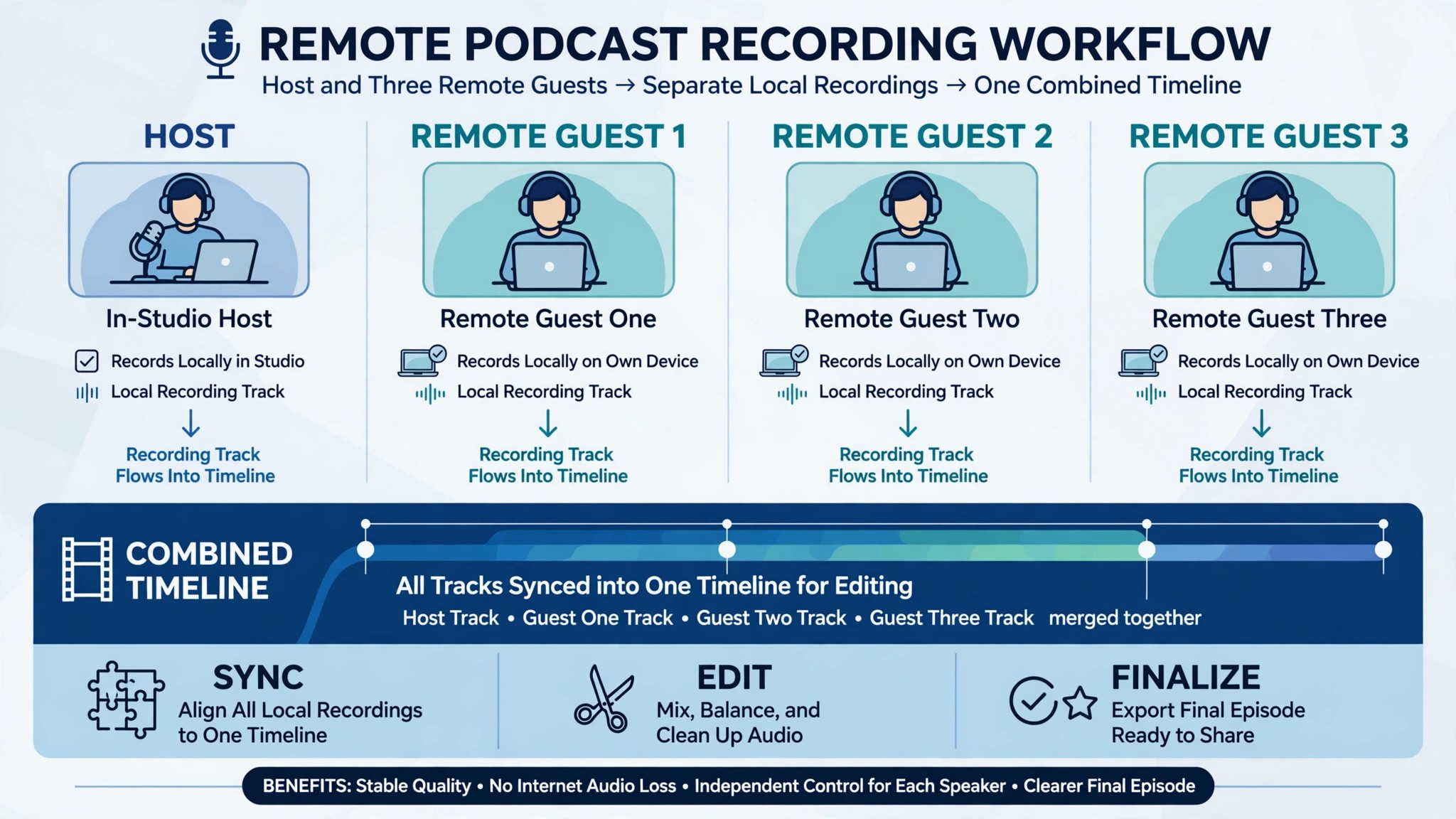
A video podcast lives or dies on the recording, and a bad recording cannot be fixed in the edit. A guest whose audio drops every ten seconds, a video track that freezes mid sentence, or a file that never uploads will cost you the episode, no matter how good the conversation was. The best video podcast tools for creators solve that problem first, by recording each guest locally on their own machine, then they make the edit and the clips easier after the recording is safe.
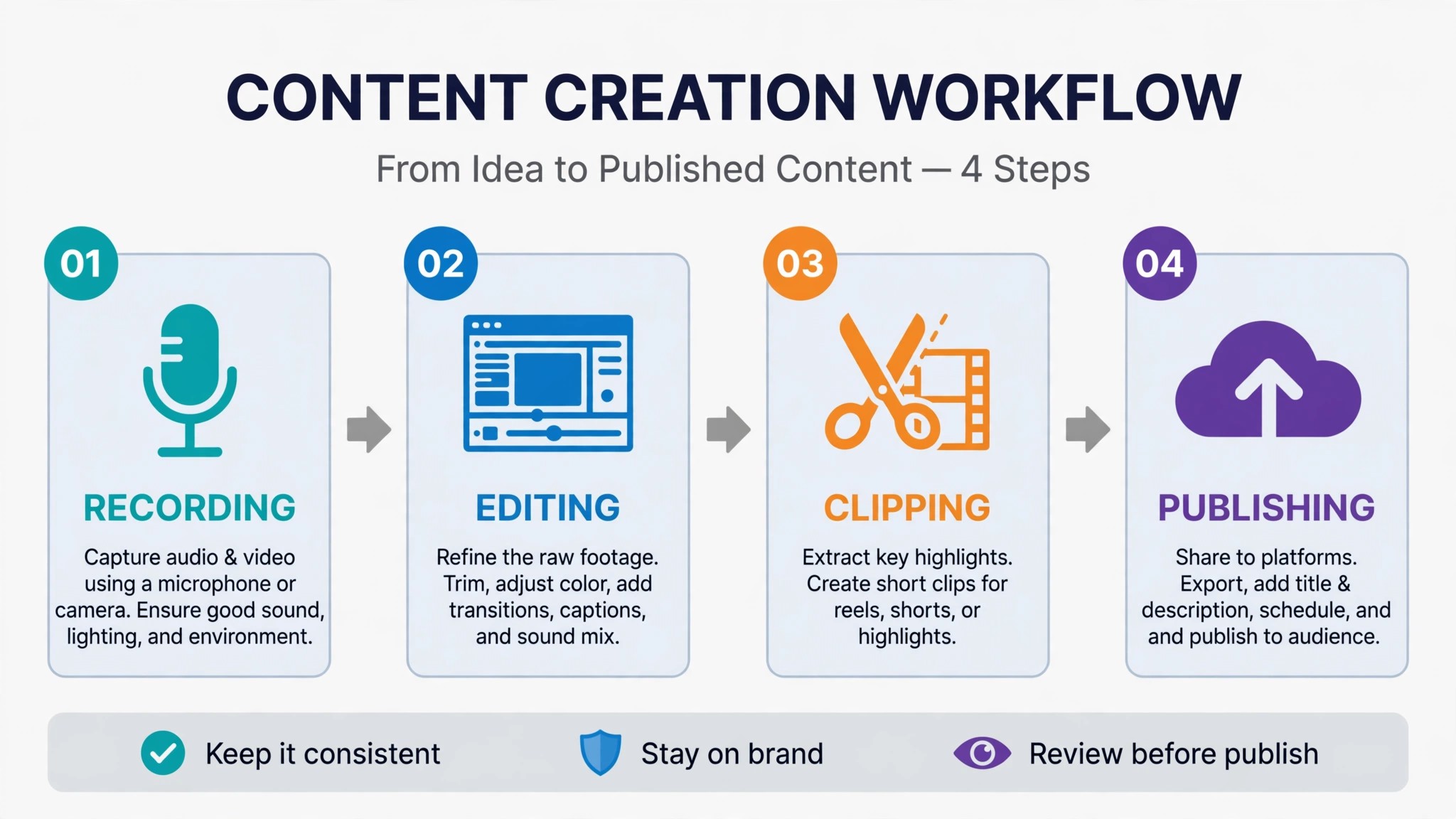
This guide compares twelve tools across the whole job, from recording remote guests to editing by transcript to cutting clips and publishing the finished show. Some are full studios that do everything in one window. Others do one job, like live streaming or audio cleanup, better than any studio can. The best video podcast tools for creators are the ones that match your show format, your guest setup and your budget, not the ones with the longest feature list. Prices below come from vendor pricing pages and roundups checked in November 2026. The reviews below follow the episode from recording to publishing, so the best video podcast tools for creators show up where they actually save time.
The Quick Shortlist
Use this table to match your show format to the right tool before you read the full reviews. A remote interview show needs a different tool from a live show, and a solo creator needs a different tool from a team with an editor. Every tool here has a free way to try it, so record a test episode before you pay for anything.
| Job | Best tool | Why it wins |
|---|---|---|
| Studio quality remote recording | Riverside | Local 4K tracks for every guest, Pro from 24 dollars a month |
| Editing video by editing text | Descript | Transcript editing with recording built in, from 16 dollars a month |
| Free studio quality recording | Zencastr | Unlimited 4K recording on the free plan |
| Recording while you stream live | StreamYard | Browser studio with multistreaming, Core from 35 dollars 99 a month |
| All in one recording and AI editing | Podcastle | Browser studio with AI voices, Essentials from 11 dollars 99 a month |
| Multistreaming a live show | Restream | Stream to many platforms at once, Standard from 19 dollars a month |
| Free AI audio cleanup | Adobe Podcast Studio | Studio quality sound from a phone recording, free to start |
| Broadcast grade remote audio | Cleanfeed | Live audio links for guests, free to start |
| Mac based live production | Ecamm Live | Live switching and guests on a Mac, Standard from 16 dollars a month |
| Free recording and streaming | OBS Studio | The free open source standard, free |
| Fast browser editing and clips | Kapwing | Edit and caption in the browser, Pro from 16 dollars a month |
| Turning episodes into clips | Vizard | AI clips from a full episode, Creator from 29 dollars a month |
How We Judged the Best Video Podcast Tools for Creators
A tool earned a place here only if it does a real video podcast job in 2026, not if it added a video button to an audio product. We judged each one on five things that decide whether a creator keeps paying after the first month. The best video podcast tools for creators share one trait that matters more than any feature list. They protect the recording, because a lost episode costs more than a month of any subscription on this list.
First, recording quality, from local capture on each guest machine to separate tracks for every speaker, because a bad internet connection should never ruin the final file. Second, the starting price a small show can actually afford, including whether a free plan exists and what the paid plan really unlocks. Third, the editing workflow, because a tool that edits by transcript can turn a two hour edit into twenty minutes. Fourth, publishing and clips, from hosting to short form video, because a show that never gets clipped grows slowly. Fifth, the catch, from recording hour caps to watermarks to features that only exist on a higher tier.
| Check before you buy | What to ask | Why it matters |
|---|---|---|
| Local recording | Does each guest record on their own machine | Stops bad Wi-Fi ruining the episode |
| Track limits | How many hours of multi track recording per month | A cap below your episode length blocks you |
| Video resolution | 720p, 1080p or 4K on your plan | Guests notice soft video before they notice soft audio |
| Free plan limits | Watermark, hours, export quality | A watermarked test is not a publishable episode |
| Guest friction | Does the guest need an account or an install | A guest who cannot join in one click may not join at all |
| Clip tools | AI clips included, or a separate purchase | Clips are where new listeners find your show |
The 12 Tools, Reviewed One by One
1. Riverside
Starting price 24 dollars a month billed annually for Pro. Best for Studio quality remote recording. Watch out The free plan allows only two hours of multi track recording in total, so it is a test, not a season.
Riverside is the remote recording studio most video podcasters name first, and it earns that position by recording each participant locally in up to 4K video with uncompressed audio. The files upload in the background while you record, so a guest whose connection drops mid episode still leaves a clean local file behind. The free plan covers two hours of multi track recording at 720p with a watermark, which is enough to test the workflow on a real episode. Pro at 24 dollars a month billed annually adds 15 hours of multi track recording a month, Magic Audio enhancement, AI transcriptions, Magic Clips for social video, and show notes.
The strength is that recording quality is the whole product. Separate tracks mean you can fix one guest without touching the others, and 4K video gives your editor room to crop and reframe without the picture falling apart. The text based editor and Magic Clips sit on top of the recording, so a small show can record, edit and cut clips without leaving Riverside. For a weekly interview show with remote guests, that combination is hard to beat.
2. Descript
Starting price 16 dollars a month billed annually for Hobbyist. Best for Editing video by editing text. Watch out Recording hours count toward media minutes, so long shows burn the allowance fast.
Descript changed podcast editing by letting you edit video the way you edit a document. Delete a sentence from the transcript and the video cuts itself. Remove filler words with one click, fix a misspoken word with an AI voice clone, and export the finished episode without opening a timeline. The recording engine inside Descript comes from SquadCast, which Descript acquired, so remote guests record locally in up to 4K with automatic backups. Hobbyist at 16 dollars a month billed annually includes 10 media hours, Creator at 24 dollars a month includes 30 hours and 4K export.
The strength is the edit. A creator who hates timelines will finish episodes in Descript that would sit unfinished in a traditional editor, and that is worth more than any single recording feature. The AI tools, from Studio Sound to filler word removal to automatic chaptering, are the best in this category, and the publishing workflow hands you a finished file ready for YouTube and your audio host.
3. Zencastr
Starting price Free on the Vibecastr plan, with Enterprise by quote. Best for Free studio quality recording. Watch out The free plan is the product now, and paid limits beyond Enterprise are unclear, so check the current plan before you rely on it.
Zencastr made the boldest move in this category. Its free Vibecastr plan records unlimited separate audio and video for up to six participants in 4K video and 48 kilohertz WAV audio, with unlimited transcription hours, unlimited track storage, and hosting for up to five shows. That is a full studio for zero dollars, and it is the reason Zencastr is the first tool a new show should try. Paid plans run from Standard at 20 dollars a month through Grow at 30 dollars and Scale at 50 dollars, adding ZenAI editing with filler word removal, social clips, dynamic ad insertion and team seats.
The strength is the free tier, and it is not close. A beginner can record a whole season without paying, and the separate tracks and cloud backup mean the recording is safe even when a guest has bad internet. The interface is simple enough that a non technical guest can join from a browser link and be recording in a minute, which matters more than most creators expect until their first guest cannot get into the studio.
4. StreamYard
Starting price 35 dollars 99 a month billed annually for Core. Best for Recording while you stream live. Watch out Prices roughly doubled after the 2024 acquisition, and 4K local recordings need the Advanced plan.
StreamYard is the browser studio for shows that record and go live at the same time. Invite up to ten guests with a link, add overlays and banners, and multistream to YouTube, LinkedIn, Facebook, Twitch and more while the recording runs. Core at 35 dollars 99 a month billed annually opens 1080p, unlimited local recording and streaming, three destinations and 50 hours of storage. Advanced at 68 dollars 99 a month adds 4K local recordings, eight destinations and webinars for 100 viewers. The free plan includes the StreamYard logo, two hours of local recording a month and two AI clips a month.
The strength is the live show workflow. A host can run a professional looking live broadcast with no desktop software, no guest installs and no editing skill, then publish the recording as the podcast episode. The AI clips turn live moments into short videos without a separate tool, which suits a show that treats the live audience as part of the content rather than an afterthought.
5. Podcastle
Starting price 11 dollars 99 a month billed annually for Essentials. Best for All in one recording and AI editing. Watch out Pricing and credit limits have shifted over time, so confirm current terms before you commit.
Podcastle, now rebranded as Async, is the all in one browser studio for creators who want recording, editing and publishing in one window. Remote recording covers up to ten guests on separate tracks, the multitrack editor handles the cut, Magic Dust cleans up the audio with one click, and AI voice cloning and text to speech cover intros, ads and corrections. Essentials at 11 dollars 99 a month billed annually records at 720p with two hours of remote recording a month. Pro at 23 dollars 99 a month billed annually adds 4K recording with 20 hours, more storage and the full AI feature set.
The strength is the price for the bundle. At the Essentials price, Podcastle undercuts every other studio here while covering recording, editing, audio enhancement and hosting. The thousand plus AI voices and the voice cloning are unmatched in this category, which makes it a strong pick for a show that records intros, ads or narration as well as interviews. A free plan exists for testing, with one hour of remote multitrack recording and 720p exports.
6. Restream
Starting price 19 dollars a month billed annually for Standard. Best for Multistreaming a live show. Watch out It is a streaming tool first, so its recording and editing are thinner than a dedicated studio.
Restream exists for one job, sending a live show to many platforms at once, and it does that job better than any tool on this list. A video podcast recorded live can go to YouTube, Twitch, Facebook, LinkedIn and more in a single broadcast, with chat from every platform merged into one window. Standard at 19 dollars a month billed annually covers the core multistreaming, and higher tiers add more destinations, custom branding and team seats.
The strength is reach. A show that only publishes to YouTube reaches YouTube viewers, while a show that streams to four platforms at once reaches four audiences for the same hour of work. The merged chat means the host can answer a Twitch question and a YouTube question without switching windows, which keeps a live show moving. Restream also records the stream, so the episode exists as a file after the broadcast ends.
7. Adobe Podcast Studio
Starting price Free to start. Best for Free AI audio cleanup. Watch out It is a studio for audio first, and video features are thinner than the dedicated video studios here.
Adobe Podcast Studio, formerly Adobe Podcast, takes a rough recording and makes it sound like it was recorded in a studio. Enhance Speech removes room echo and background noise with one click, and the results on a phone recording or a cheap microphone are genuinely startling. The studio handles recording, editing by transcript and publishing, and during its beta period the core tools were free to use. Paid access runs through Adobe Creative Cloud plans, so check the current Adobe page for the exact tier before you budget for it.
The strength is the audio cleanup, and it is the best free version of that job anywhere. A creator with a bad room or a noisy street outside can rescue an episode that would otherwise be unpublishable, and the transcript editor makes cutting filler words as easy as deleting text. For a show that records on the move, or with guests on laptop microphones, that rescue ability is worth more than 4K video.
The catch is the video side. Adobe Podcast Studio is built around audio, and a video podcast that needs multi camera switching, separate 4K tracks and live guests will find Riverside or StreamYard stronger. The pricing also sits inside the Adobe ecosystem, which is a poor fit for a creator who wants one small subscription rather than a Creative Cloud plan. Use Adobe Podcast Studio as the audio fixer in your stack, even if another tool does the recording.
8. Cleanfeed
Starting price Free, with Pro from 22 dollars a month. Best for Broadcast grade remote audio. Watch out It is audio only, so it covers the sound of your show, not the video.
Cleanfeed is the tool broadcasters use when the audio has to be right. A host sends a guest a browser link, the guest joins with no install, and Cleanfeed records studio quality audio with separate tracks for every speaker. The free plan covers the core recording, and Pro from 22 dollars a month adds multitrack recording, more guests and higher quality options. It is the simplest tool on this list to explain to a guest, and the one most likely to work on the first try.
The strength is reliability. Cleanfeed was built for live radio, so it handles bad connections, echo and latency better than tools that added audio as a second thought. The separate tracks mean an editor can fix one guest without touching the others, and the cloud backup means a dropped connection does not lose the episode. For an audio first show that adds video later, or a video show that records audio separately for quality, Cleanfeed is the safety net.
9. Ecamm Live
Starting price 16 dollars a month billed annually for Standard. Best for Mac based live production. Watch out It runs on Mac only, so a Windows or browser based team cannot use it.
Ecamm Live turns a Mac into a live production studio. It switches between cameras, brings in remote guests, adds overlays and lower thirds, and streams to YouTube, Facebook, Twitch and more, all from one app. Standard at 16 dollars a month billed annually covers the core live production, and Pro at 32 dollars a month adds 4K streaming, more guests and advanced features. The interface is built for a host who wants to run the show alone, with scenes and camera angles a click away.
The strength is the live production quality on a Mac. A solo host can switch cameras, show a guest full screen, cut to a slide and read chat without a second person running the desk, which is exactly what a small video podcast needs. The guest system is simple, the overlays look professional, and the recordings are clean enough to publish as the episode after the stream ends.
10. OBS Studio
Starting price Free. Best for Free recording and streaming. Watch out There is no support line, no cloud backup and no built in editor, so you build the workflow yourself.
OBS Studio is the free open source software that most of the streaming world runs on, and it is the most powerful free tool on this list. It records and streams in high quality, switches between scenes and cameras, mixes audio, adds overlays and sources, and runs on Windows, Mac and Linux. It costs nothing, it has no watermark, no hour cap and no subscription, and a huge community builds plugins for almost any job you can name.
The strength is control at zero cost. A creator who knows OBS can build a recording setup that rivals a paid studio, with separate audio tracks, custom scenes for each segment and a stream that goes to any platform. The plugin library adds remote guests, automatic scene switching, closed captions and more, and the skills transfer to every other tool in this category, because most of them are built on the same ideas.
11. Kapwing
Starting price 16 dollars a month billed annually for Pro. Best for Fast browser editing and clips. Watch out It is an editor, not a recorder, so you still need a tool to capture the episode.
Kapwing is the browser editor for creators who want the episode finished fast. Upload the recording, cut it on a timeline or by transcript, add captions, remove silences, and export clips sized for TikTok, Shorts and Reels without installing anything. Pro at 16 dollars a month billed annually removes the watermark, raises export limits and unlocks the AI tools, including automatic captions, background removal and smart cut. The free plan is enough to test the editor on a real episode.
The strength is speed. A creator can go from raw recording to a captioned episode and three clips in one browser tab, which is the whole post production job for a small show. The collaborative features let an editor and a host work on the same project without passing files around, and the templates keep the show looking consistent from episode to episode without a designer.
The catch is the missing recorder. Kapwing does not record remote guests, so it pairs with Riverside, Zencastr or OBS Studio rather than replacing them. The browser editor is also lighter than a desktop editor for long, complex episodes with many tracks. Buy Kapwing as the editing and clipping step after a dedicated recorder, and it will save more hours than any other tool in that role.
12. Vizard
Starting price 29 dollars a month for Creator. Best for Turning episodes into clips. Watch out The free plan watermarks exports and caps resolution, so it is a test, not a publishing plan.
Vizard takes a full video podcast episode and finds the moments worth clipping, then builds captioned vertical videos ready for TikTok, Shorts and Reels. It handles source videos up to ten hours on paid plans, which covers even the longest episodes, and the editor lets you adjust the clip boundaries, the captions and the framing before you export. The free plan gives 60 credits a month with 720p exports and short storage. Creator at 29 dollars a month, or 14 dollars 50 a month billed annually, removes the watermark, adds 4K export and post scheduling for six social accounts.
The strength is the clip quality from long content. A two hour episode becomes ten or more usable clips without a human watching the whole recording, and the AI scores each candidate so you start with the strongest moments. The scheduling tools mean the clips can go out across the week without daily manual posting, which is the difference between a show that clips and a show that means to clip.
Side by Side Comparison
| Tool | Starting price | Best for | Free plan |
|---|---|---|---|
| Riverside | 24 dollars a month, annual | Studio quality remote recording | Yes, 2 hours total |
| Descript | 16 dollars a month, annual | Editing video by editing text | Yes, 1 media hour a month |
| Zencastr | Free | Free studio quality recording | Yes, unlimited recording |
| StreamYard | 35 dollars 99 a month, annual | Recording while you stream live | Yes, 2 hours a month |
| Podcastle | 11 dollars 99 a month, annual | All in one recording and AI editing | Yes, 1 hour total |
| Restream | 19 dollars a month, annual | Multistreaming a live show | Yes |
| Adobe Podcast Studio | Free to start | Free AI audio cleanup | Yes |
| Cleanfeed | Free, Pro from 22 dollars a month | Broadcast grade remote audio | Yes |
| Ecamm Live | 16 dollars a month, annual | Mac based live production | Trial only |
| OBS Studio | Free | Free recording and streaming | Yes |
| Kapwing | 16 dollars a month, annual | Fast browser editing and clips | Yes |
| Vizard | 29 dollars a month | Turning episodes into clips | Yes, 60 credits a month |
How to Pick the Best Video Podcast Tools for Creators
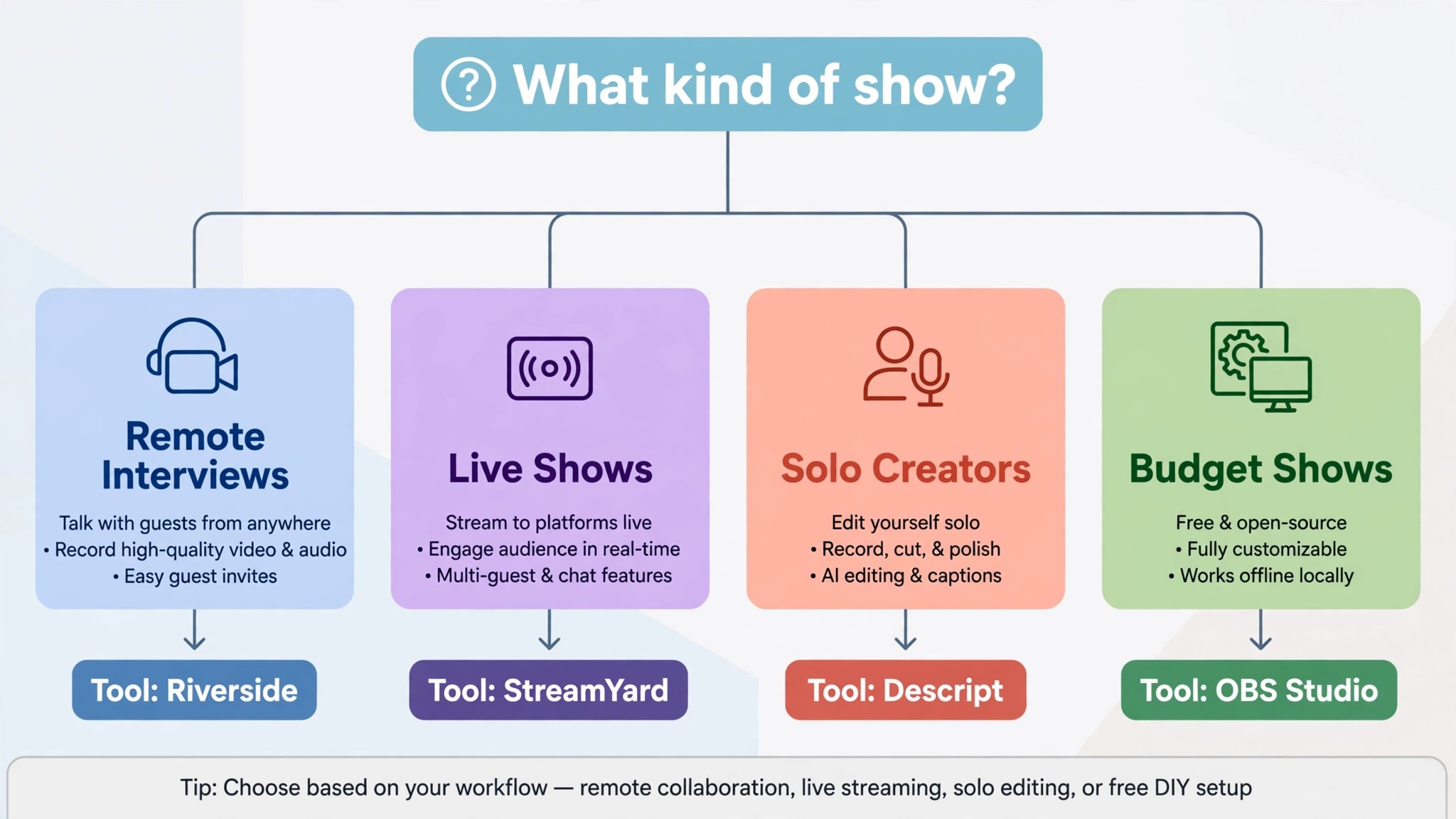
The right pick depends on your show format, not on which tool has the most features. A remote interview show should buy a recorder first, and Riverside is the safest choice. A solo creator who dreads editing should buy Descript, because the transcript editor is the difference between episodes that ship and episodes that sit unfinished. A live show should buy StreamYard or Restream, because the audience is part of the content. The best video podcast tools for creators are the ones that fit the show you actually record, not the show you imagine recording next year.
Budget the full stack, not the headline price of one tool. The table below shows what common show setups actually cost each month, using starting prices and annual billing where it is cheaper. Recording hour caps are the line that surprises buyers, so count your episode minutes before you pick a capped plan.
| Setup for a weekly show | Monthly cost, annual billing | What it covers |
|---|---|---|
| Zencastr free plus OBS Studio | 0 dollars | Recording, streaming, separate tracks |
| Riverside Pro | 24 dollars | 4K recording, 15 hours, Magic Clips |
| Descript Hobbyist | 16 dollars | Transcript editing, 10 media hours |
| Riverside Pro plus Descript Creator | 48 dollars | Best recording plus best editing |
| Podcastle Essentials | 11 dollars 99 | Recording, editing and AI voices in one |
| StreamYard Core | 35 dollars 99 | Live studio, multistreaming, AI clips |
| Riverside Pro plus Vizard Creator | 53 dollars | Recording plus clips for a full week |
Frequently Asked Questions
What is the cheapest good video podcast setup
Zencastr free plus OBS Studio free costs nothing and records a real show with separate tracks, so it is the cheapest working setup here. Add Descript Hobbyist at 16 dollars a month when editing becomes the bottleneck, because transcript editing saves more hours than any other single upgrade. The cheapest stack that actually publishes every week is usually a free recorder plus one paid editor, which costs less than 25 dollars a month for a small show.
Do I need 4K recording for a video podcast
No, not for most shows. Viewers watch video podcasts on phones and laptops, where 1080p looks clean and professional. 4K matters when you crop a wide shot into a close up, or when you publish to a large screen, and it costs more in storage and editing time. A new show should spend its first money on good audio and a reliable recorder, not on 4K.
Which tool is best for remote guests who are not technical
Zencastr and StreamYard are the easiest for guests, because both work from a browser link with no install and no account. Riverside is nearly as simple, and Cleanfeed is the simplest of all for audio only guests. Send the guest a test link the day before, ask them to use a quiet room and a wired connection if they can, and record a thirty second test before the real episode. The best video podcast tools for creators are the ones your least technical guest can join without help.
How much should a small show budget for video podcast tools
A realistic budget for a weekly show is zero to 25 dollars a month to start, and 25 to 55 dollars a month once you add a paid recorder and a clipping tool. The table above shows the common stacks, and the biggest cost is usually the recorder, not the editor. Credit based tools can push the bill higher in long episode months, so set a monthly cap and review usage in the first 90 days.
Our Verdict
If you buy one tool this quarter, buy Riverside Pro. It records every guest locally in up to 4K, it protects the episode when a connection drops, and it includes the editing and clipping tools a small show needs to publish without a second subscription. At 24 dollars a month billed annually, it is the best value for a weekly interview show that wants professional quality without a production team.
Whatever you pick, start with the recorder, test it with a real guest before you pay, and keep the editing simple enough that episodes actually ship. The best video podcast tools for creators on this list all work. Choose the recorder first, and the best video podcast tools for creators will sort themselves by the show you actually run. The difference is whether the tool matches your show format, your guests and your budget, and whether you measure the return in episodes published rather than in features used.