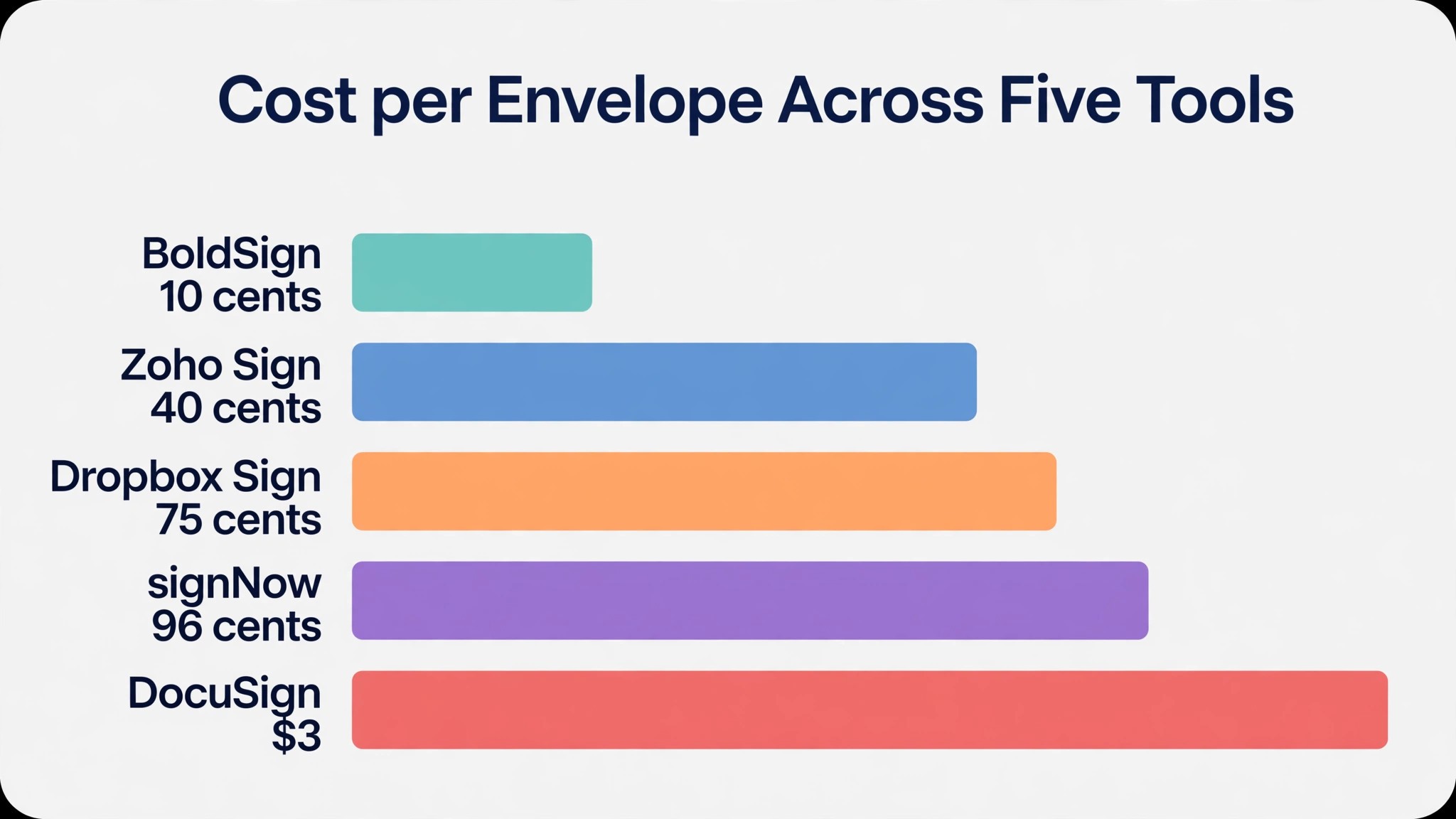
A contract that costs 30 cents to send on one tool costs 3 dollars to send on another, for the same signature. The difference is not the signature. It is the unit. One tool counts envelopes, one counts documents, one counts signature invites, and one charges a flat fee with no count at all. E-signature software pricing for small business is decided by that unit, and by the cap on the plan, more than by the monthly price.
Most owners compare the monthly price and stop there. A plan at 8 dollars per user looks cheap next to one at 30 dollars per user, until the cheap plan allows 100 signature invites a year and the dear plan allows unlimited sending, and the business that sends 20 documents a month runs out of invites in five months. A free plan that allows 5 envelopes a month looks generous until the business sends 6, and the sixth document waits until next month.
A free plan that allows 5 envelopes a month looks generous until the business sends 6, and the sixth document waits until next month. That cap is the first thing e-signature software pricing for small business asks you to check.
Prices in this guide are US list prices checked in November 2026, per user per month unless noted, on annual billing, before tax. The monthly billing rate is shown beside it where it is published. Where a vendor counts envelopes, the allowance is shown, because an envelope is counted once when it is sent, signed or not. Where a vendor counts documents or signature invites, that unit is shown instead, because the units are not the same and the count decides the real cost.
The nine tools in this guide are DocuSign, Dropbox Sign, Adobe Acrobat Sign, PandaDoc, signNow, Zoho Sign, SignWell, BoldSign and Xodo Sign. They cover the range from a free plan that sends 25 envelopes a month to a full proposal tool that happens to include signing, from a per user price with a cap to a flat fee with no cap. The table below gives the free plan, the entry paid price, what you get, and the per envelope cost, for each one.
E-Signature Software Pricing at a Glance
The table below is the short answer. Prices are in US dollars per month on annual billing, unless the tool charges a flat fee, before tax.
| Tool | Free plan | Entry paid price | What you get | Per envelope cost |
|---|---|---|---|---|
| DocuSign | No free plan, 3 sends a month on trial | Personal 11 dollars a month, Standard 30 dollars per user | 5 envelopes a month on Personal, 100 envelopes per user a year on Standard | About 3 dollars per envelope on Standard at 100 a year |
| Dropbox Sign | Free plan, 3 signature requests a month | Essentials 15 dollars a month, Standard 17.50 dollars per user | Unlimited signature requests on every plan | No per envelope cap, flat fee only |
| Adobe Acrobat Sign | No free plan | Acrobat Standard for teams 16.99 dollars per licence | Unlimited transactions on Acrobat plans, team plans cap at 150 per user a year | No per envelope cap on Acrobat plans |
| PandaDoc | Free, 5 documents a month | Starter 19 dollars per seat, 35 monthly | Unlimited documents and signatures on Starter | No per document cap on Starter |
| signNow | 7 day trial only | Business 8 dollars per user | 100 signature invites per user a year | About 96 cents per invite at 100 a year |
| Zoho Sign | Free, 5 envelopes a month | Standard 10 dollars per user | 25 envelopes per user a month | 40 cents per envelope at 25 a month |
| SignWell | Free, 3 documents a month | Light 10 dollars a month, 12 monthly | Unlimited documents on Light | No per document cap on Light |
| BoldSign | Free, 25 envelopes a month | Growth 5 dollars per user, 15 monthly | 50 envelopes per user a month on Growth | 10 cents per envelope at 50 a month |
| Xodo Sign | Free, 5 documents a month | Basic 10 dollars a month | Unlimited signing on Basic | No per document cap on Basic |
Read the allowance column before you read the price column. DocuSign Standard at 30 dollars per user allows 100 envelopes per user a year, which is about 8 a month, and a business that sends 20 documents a month runs out in five months. Dropbox Sign Essentials at 15 dollars a month allows unlimited signature requests, so the same business never runs out. The cap, not the price, decides whether the plan fits.
Read the free plan column second, because a free plan that covers your volume costs nothing and a paid plan that covers the same volume costs hundreds of dollars a year. BoldSign free allows 25 envelopes a month, which covers a real small business. SignWell free allows 3 documents a month, which is a test, not a plan.
DocuSign
DocuSign is the best known name in this guide, and its pricing is a per user price with an envelope cap. Personal costs 11 dollars a month on an annual plan, for 5 envelopes a month, with an AI assisted summary. Standard costs 30 dollars per user per month on an annual commitment paid monthly, for 100 envelopes per user per year. Business Pro costs 45 dollars per user per month, and adds bulk sending and payment collection. Prices rose in July 2026, from 10 dollars, 25 dollars and 40 dollars, so older guides show lower prices.
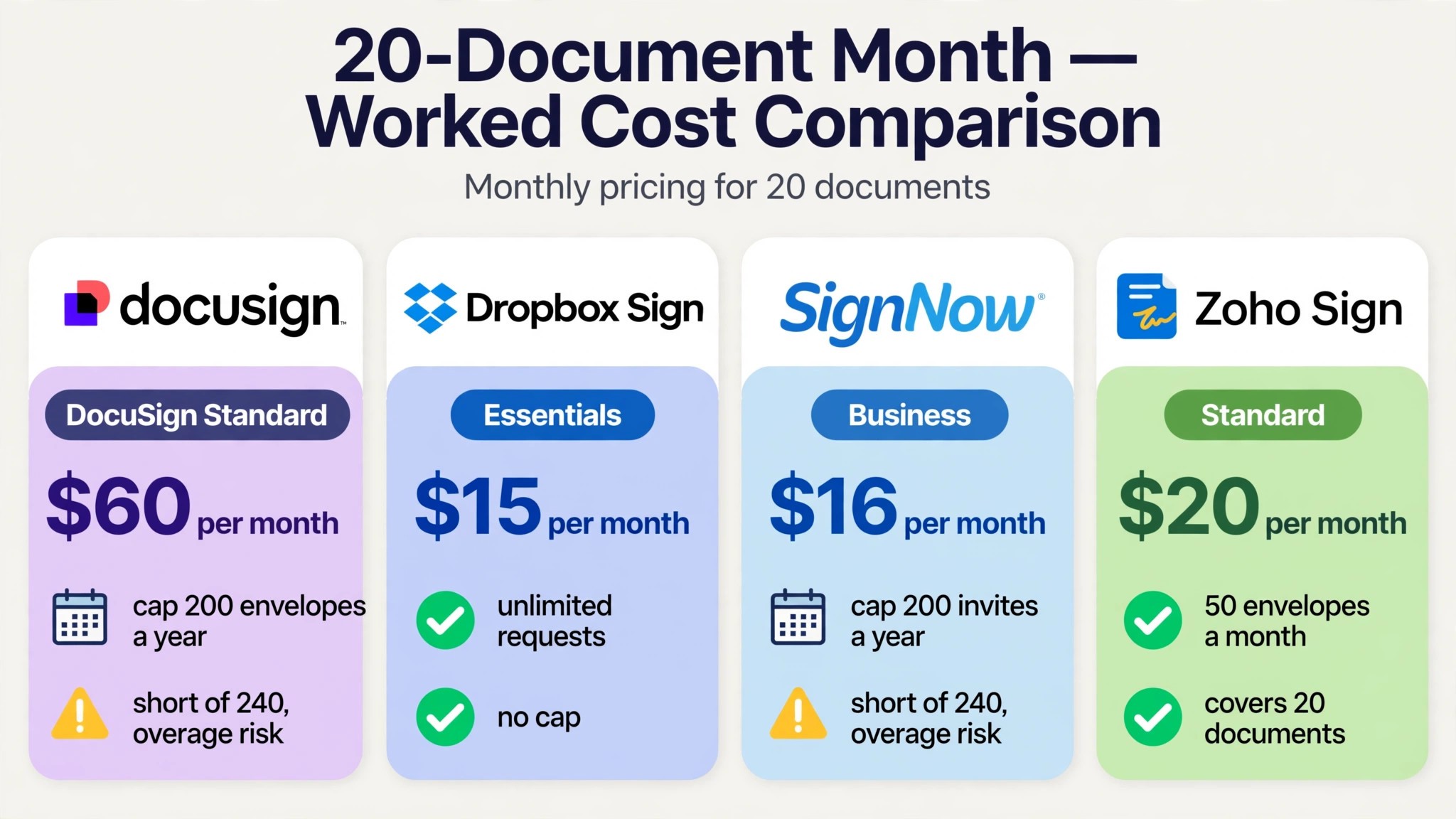
Worked cost for a business with 2 senders that sends 20 documents a month, which is 240 envelopes a year. Standard allows 100 envelopes per user a year, so 2 users get 200 envelopes a year, which is short of 240. The business needs a third seat or pays overage fees, and DocuSign does not publish the per envelope overage rate on its pricing page. At 30 dollars per user, 2 users cost 60 dollars a month, or 720 dollars a year, for 200 envelopes, which is 3.60 dollars per envelope. A business that sends 8 envelopes a month fits inside the allowance, and pays 3 dollars per envelope.
DocuSign fits a business that needs the name clients recognise, and that sends under 100 envelopes per user a year. It does not fit a business that sends more than that, because the cap forces extra seats and the overage rate is not published. A small business that sends a few contracts a month should test DocuSign Personal first, because 5 envelopes a month covers a light volume.
Dropbox Sign
Dropbox Sign is the pick for a team that wants unlimited sending at a fair price, and its pricing is a flat fee with no envelope math. The free plan allows 3 signature requests a month. Essentials costs 15 dollars a month billed annually, or 20 dollars billed monthly, for one user, with unlimited signature requests. Standard costs 17.50 dollars per user per month billed annually, or 25 dollars billed monthly, with a 2 user minimum, and unlimited signature requests. Premium is custom priced.
Worked cost for a business with 2 senders that sends 20 documents a month, which is 240 a year. Essentials at 15 dollars a month covers one user with unlimited requests, so the cost is 15 dollars a month, or 180 dollars a year, for 240 documents, which is 75 cents per document. Standard at 17.50 dollars per user covers 2 users for 35 dollars a month, or 420 dollars a year, for 240 documents, which is 1.75 dollars per document. The unlimited allowance means the cost per document falls as the volume rises, because the price does not move.
Dropbox Sign fits a team that sends a lot of documents and hates counting envelopes. It does not fit a business that wants proposal and quote features, because Dropbox Sign does one job, which is signing. A team that sends 20 documents a month should test Dropbox Sign first, because the unlimited sending removes the cap that catches DocuSign users.
Adobe Acrobat Sign
Adobe Acrobat Sign is the pick for a team that already works in Acrobat, and its pricing is bundled into Acrobat plans. Acrobat Standard for teams costs 16.99 dollars per licence per month on an annual commitment paid monthly. Acrobat Pro for teams costs 23.99 dollars per licence per month. Sign Solutions, the standalone signing product, is quote only, so a small business that wants a published price should buy the Acrobat bundle instead.
Worked cost for a business with 2 senders that sends 20 documents a month. Acrobat Standard for teams at 16.99 dollars per licence costs 33.98 dollars a month for 2 licences, or 407.76 dollars a year, for 240 documents, which is 1.70 dollars per document. Acrobat plans allow unlimited transactions, subject to technical and throttling limits, while team plans cap at 150 transactions per user a year, so check which plan you are buying before you compare. The Acrobat bundle also includes PDF editing, which is the reason to buy it.
Adobe fits a team that already edits PDFs in Acrobat and wants signing in the same product. It does not fit a business that wants a simple published signing price, because the pricing is split across product lines and the team cap is buried in the terms. A team that lives in Acrobat should test Acrobat Standard first, because the signing is already in the tool they use.
PandaDoc
PandaDoc is the pick for a sales team that sends proposals and quotes, and its pricing is a per seat price with unlimited documents. The free plan allows 5 documents a month. Launch costs 9 dollars a month, with 60 documents a year. Starter costs 19 dollars per seat per month billed annually, or 35 dollars billed monthly, with unlimited documents and signatures. Business costs 49 dollars per seat per month billed annually, or 65 dollars billed monthly, and adds advanced workflows.
Worked cost for a business with 2 senders that sends 20 documents a month, which is 240 a year. Starter at 19 dollars per seat costs 38 dollars a month for 2 seats, or 456 dollars a year, for 240 documents, which is 1.90 dollars per document. Launch at 9 dollars a month allows only 60 documents a year, so it does not cover 240 documents. The unlimited allowance on Starter means the cost per document falls as the volume rises, and the proposal features are the reason to pay more than Dropbox Sign.
PandaDoc fits a sales team that sends proposals, quotes and contracts in one document, and wants signing built into the proposal. It does not fit a business that only needs signing, because the proposal features are the reason for the higher price. A sales team that sends 20 proposals a month should test PandaDoc Starter first, because the document creation and signing sit in one place.
signNow
signNow is the value pick in this guide, and its pricing is a per user price with a signature invite cap. Business costs 8 dollars per user per month billed annually, and includes 100 signature invites per user a year. Business Premium costs 15 dollars per user per month billed annually. Enterprise costs 30 dollars per user per month billed annually. There is a 7 day free trial, and no free plan.
Worked cost for a business with 2 senders that sends 20 documents a month, which is 240 signature invites a year. Business allows 100 invites per user a year, so 2 users get 200 invites a year, which is short of 240. At 8 dollars per user, 2 users cost 16 dollars a month, or 192 dollars a year, for 200 invites, which is 96 cents per invite. A business that sends 16 invites a month fits inside the allowance, and pays 96 cents per invite. A business that sends more needs a third seat or pays overage fees.
signNow fits a budget conscious team that wants the cheapest per user price and sends under 100 invites per user a year. It does not fit a business that sends more than that, because the cap forces extra seats. A small team that wants integrations and an API at a low price should test signNow first, because the entry price is the lowest per user price in this guide.
Zoho Sign
Zoho Sign is the pick for a team already using Zoho apps, and its pricing is a per user price with a monthly envelope allowance. The free plan allows 5 envelopes a month for one user. Standard costs 10 dollars per user per month billed annually, or 12 dollars billed monthly, for 25 envelopes per user a month. Professional costs 16 dollars per user per month billed annually. Enterprise costs 22 dollars per user per month billed annually. Zoho Sign supports twelve interface languages, which is the widest in this guide.
Worked cost for a business with 2 senders that sends 20 documents a month, which is 240 envelopes a year. Standard allows 25 envelopes per user a month, so 2 users get 50 envelopes a month, which covers 20 documents with room to spare. At 10 dollars per user, 2 users cost 20 dollars a month, or 240 dollars a year, for 240 envelopes, which is 1 dollar per envelope. At the full allowance of 50 envelopes a month, the cost falls to 40 cents per envelope, which is the cheapest capped rate in this guide.
Zoho Sign fits a team that uses Zoho CRM or another Zoho app, and that sends under 25 envelopes per user a month. It does not fit a business that sends more than that, because the allowance is monthly and unused envelopes do not roll over. A Zoho team that sends a few contracts a month should test Zoho Sign first, because the free plan covers 5 envelopes a month and the paid plan is cheap.
SignWell
SignWell is the pick for a solo owner who wants unlimited documents at a low flat price, and its pricing is based on senders, not envelopes. The free plan allows 3 documents a month for one sender. Light costs 10 dollars a month billed annually, or 12 dollars billed monthly, for one sender, with unlimited documents. Business costs 30 dollars a month billed annually, or 36 dollars billed monthly, for 3 senders, with unlimited documents. Enterprise is custom priced.
Worked cost for a business with 1 sender that sends 20 documents a month, which is 240 a year. Light at 10 dollars a month covers one sender with unlimited documents, so the cost is 10 dollars a month, or 120 dollars a year, for 240 documents, which is 50 cents per document. A business with 3 senders pays 30 dollars a month on Business, or 360 dollars a year, for 240 documents, which is 1.50 dollars per document. The flat price means the cost per document falls as the volume rises, because the price does not move.
SignWell fits a solo owner or a small team that wants simple signing with an API, and that sends a lot of documents. It does not fit a business that wants proposal features, because SignWell does one job, which is signing. A solo owner who sends 20 documents a month should test SignWell Light first, because 10 dollars a month for unlimited documents is the cheapest flat price in this guide.
BoldSign
BoldSign is the pick for a budget team that wants a generous free plan and a low entry price, and its pricing is a per user price with a monthly envelope allowance. The free Essential plan allows 25 envelopes a month. Growth costs 5 dollars per user per month billed annually, or 15 dollars billed monthly, for 50 envelopes per user a month. Business costs 15 dollars per user per month billed annually, or 25 dollars billed monthly, for unlimited envelopes. Premium costs 99 dollars a month billed annually, for unlimited users and 250 envelopes a month.
Worked cost for a business with 2 senders that sends 20 documents a month, which is 240 envelopes a year. Free covers 25 envelopes a month, so the business fits on the free plan and pays nothing a month. Growth at 5 dollars per user costs 10 dollars a month for 2 users, or 120 dollars a year, for 50 envelopes per user a month, which is 10 cents per envelope at the full allowance. Business at 15 dollars per user costs 30 dollars a month for 2 users, for unlimited envelopes, which is 1.50 dollars per document at 20 a month.
BoldSign fits a developer team that wants an API first signing tool, and a budget team that wants the most generous free plan in this guide. It does not fit a business that wants proposal features, because BoldSign does one job, which is signing. A team that sends under 25 envelopes a month should start on the free plan, because it covers real work at no cost.
Xodo Sign
Xodo Sign is the pick for a team that wants low cost signing with a PDF editor, and its pricing is a flat monthly fee. The free plan allows 5 documents a month, paced at one every 7 days. Basic costs 10 dollars a month billed annually, with unlimited signing. Professional costs 16 dollars a month billed annually, and adds more features. Xodo Sign was formerly called Eversign, so older guides use the old name.
Worked cost for a business with 1 sender that sends 20 documents a month, which is 240 a year. Basic at 10 dollars a month covers one sender with unlimited signing, so the cost is 10 dollars a month, or 120 dollars a year, for 240 documents, which is 50 cents per document. Professional at 16 dollars a month costs 192 dollars a year, for the same 240 documents, which is 80 cents per document. The flat price means the cost per document falls as the volume rises, because the price does not move.
Xodo Sign fits a small team that wants signing and PDF editing in one product, at a low flat price. It does not fit a business that wants proposal features, because Xodo Sign does one job, which is signing and editing PDFs. A team that edits PDFs and signs them should test Xodo Sign first, because the editor and the signing sit in one place.
What the Monthly Fee Hides in E-Signature Software Pricing for Small Business
What the Monthly Fee Hides
The monthly fee is only the start of e-signature software pricing for small business, and the three costs below are the ones that move the total.
The monthly fee is the smallest part of the bill for a business that sends a lot of documents. Envelope caps, seat minimums and overage fees are where the money goes. DocuSign Standard allows 100 envelopes per user a year, and a business that sends 20 documents a month runs out in five months, then pays overage fees that DocuSign does not publish. signNow Business allows 100 signature invites per user a year, and the same business runs out in the same way. A cap that looks generous on the pricing page is tight at real volume.
Seat minimums are the second hidden cost. Dropbox Sign Standard has a 2 user minimum, so a solo owner pays for 2 users. BoldSign Premium is priced for unlimited users at 99 dollars a month. Count your senders before you choose, and pick the plan that covers your senders, not the plan with the lowest per user price.
Overage fees are the third hidden cost, and they are the hardest to budget, because most vendors do not publish them. DocuSign does not publish the per envelope overage rate. Adobe caps team plans at 150 transactions per user a year, with a per transaction charge beyond that. A business that sends more than the allowance should buy a plan with unlimited sending, because the overage bill is the one that surprises you.
Cheapest for Each Use Case
| Use case | Cheapest fit | Monthly cost for 2 senders sending 20 documents a month |
|---|---|---|
| Under 25 envelopes a month, free plan | BoldSign free | Nothing a month |
| Solo owner, unlimited documents | SignWell Light, or Xodo Sign Basic | 10 dollars a month |
| Team wanting unlimited sending | Dropbox Sign Essentials | 15 dollars a month for 1 user, 35 dollars for 2 users on Standard |
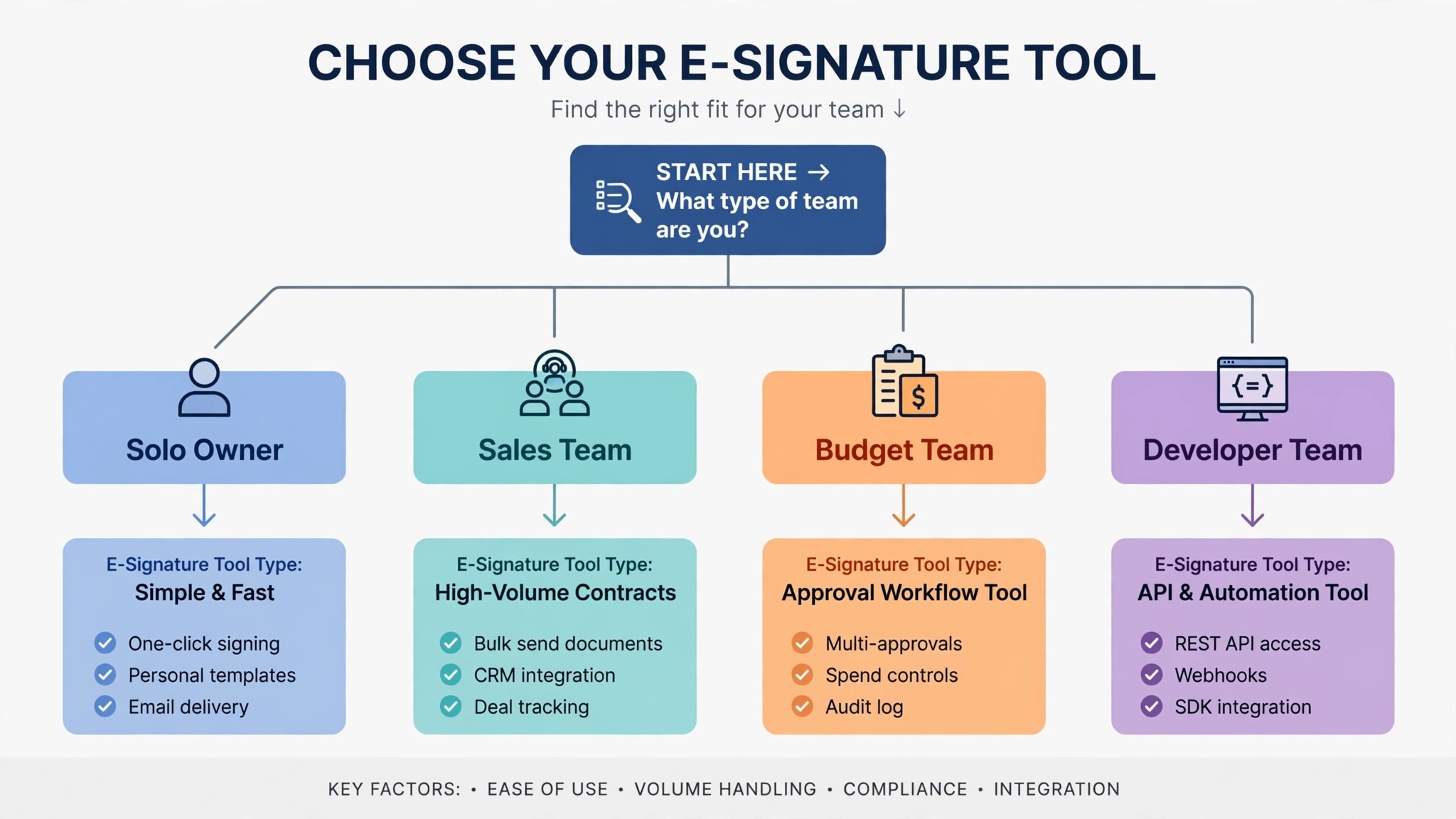
| Sales team sending proposals | PandaDoc Starter | 38 dollars a month |
| Budget team, cheapest per user | signNow Business | 16 dollars a month |
| Zoho team, under 25 envelopes a user a month | Zoho Sign Standard | 20 dollars a month |
| Team already in Acrobat | Adobe Acrobat Standard for teams | 33.98 dollars a month |
| Business needing the DocuSign name | DocuSign Standard | 60 dollars a month, plus overage risk |
| Developer team needing an API | BoldSign Growth | 10 dollars a month |
Use this table as the shortlist for e-signature software pricing for small business, then work out the cost per envelope at your own volume before you choose. Read the table by use case, not by price alone. The cheapest tool for a solo owner is not the cheapest tool for a sales team, because the sales team needs proposals that the solo tool does not provide.
Frequently Asked Questions
Is there a truly free e-signature tool?
Yes. BoldSign free allows 25 envelopes a month, which covers a real small business. Zoho Sign free allows 5 envelopes a month, PandaDoc free allows 5 documents a month, and Xodo Sign free allows 5 documents a month. Those free plans cover light work.
SignWell free allows 3 documents a month, and Dropbox Sign free allows 3 signature requests a month, so they are a test, not a plan.
How much does e-signature software cost per month?
A small business should expect to pay nothing a month on a free plan, 5 dollars to 19 dollars a month for a single sender on a paid plan, and 16 dollars to 60 dollars a month for 2 senders. Per envelope costs run from 10 cents on BoldSign Growth at the full allowance to about 3 dollars on DocuSign Standard at 100 envelopes a year. A business that sends 20 documents a month should budget about 10 dollars to 40 dollars a month, depending on the tool.
That range is the honest answer to e-signature software pricing for small business, because it includes the cap that decides whether the plan fits.
Which e-signature tool is cheapest per document?
It depends on the volume. BoldSign Growth at 5 dollars per user a month allows 50 envelopes per user a month, which is 10 cents per envelope at the full allowance. SignWell Light at 10 dollars a month allows unlimited documents, so the cost per document falls to 50 cents at 20 documents a month, and lower as the volume rises. DocuSign Standard at 30 dollars per user a month allows 100 envelopes a year, which is about 3 dollars per envelope, the dearest in this guide.
At that volume, e-signature software pricing for small business comes down to the allowance, not the monthly price.
Do unused envelopes roll over?
No, on most tools in this guide. DocuSign Standard allows 100 envelopes per user a year, and unused envelopes do not carry into the next year. Zoho Sign Standard allows 25 envelopes per user a month, and unused envelopes do not carry into the next month.
Which e-signature tool is best for a small business?
It depends on the job. BoldSign is best for a budget team that wants a generous free plan. SignWell is best for a solo owner that wants unlimited documents at a low flat price. Dropbox Sign is best for a team that wants unlimited sending. PandaDoc is best for a sales team that sends proposals. DocuSign is best for a business that needs the name clients recognise.
Verdict
For most small businesses, the best value is BoldSign free for up to 25 envelopes a month, because it covers real work at no monthly cost, and Growth at 5 dollars per user a month is the cheapest paid plan in this guide. A solo owner that sends more than 25 envelopes a month should look at SignWell Light at 10 dollars a month, because the unlimited documents remove the cap that catches every other tool.
For a team that sends a lot of documents, Dropbox Sign Essentials at 15 dollars a month is the best pick, and that is the simplest read on e-signature software pricing for small business for a busy team, because the unlimited signature requests remove the envelope math entirely. For a sales team, PandaDoc Starter at 19 dollars per seat a month is the best pick, because the proposals and quotes save more time than the plan costs.
The right tool is the one that fits the envelope count, the sender count and the features at the volume you will send in six months, not at the entry price, because the entry price buys an allowance that may not cover a real month of signing. Work out the cost per envelope at your volume, including overage risk, and the cheapest fit will be clear. Run that test before you sign, and the e-signature software pricing for small business at your volume will be obvious from the comparison table.
Work out the cost per envelope at your volume, including overage risk, and the cheapest fit will be clear. That volume test is the last step in e-signature software pricing for small business, and it is the one that saves the most money.