
A digital planner is a PDF you write on with a stylus, and it sells while you sleep. One good planner, designed once and listed on Etsy, can sell hundreds of copies without a single reprint, and the sellers who do well are not the ones with the fanciest art. They are the ones whose planners open cleanly in GoodNotes and whose tabs actually link where they promise. The best digital planner makers are the tools that get you from a blank page to a hyperlinked PDF a buyer can use, without a design degree and without a subscription you regret.
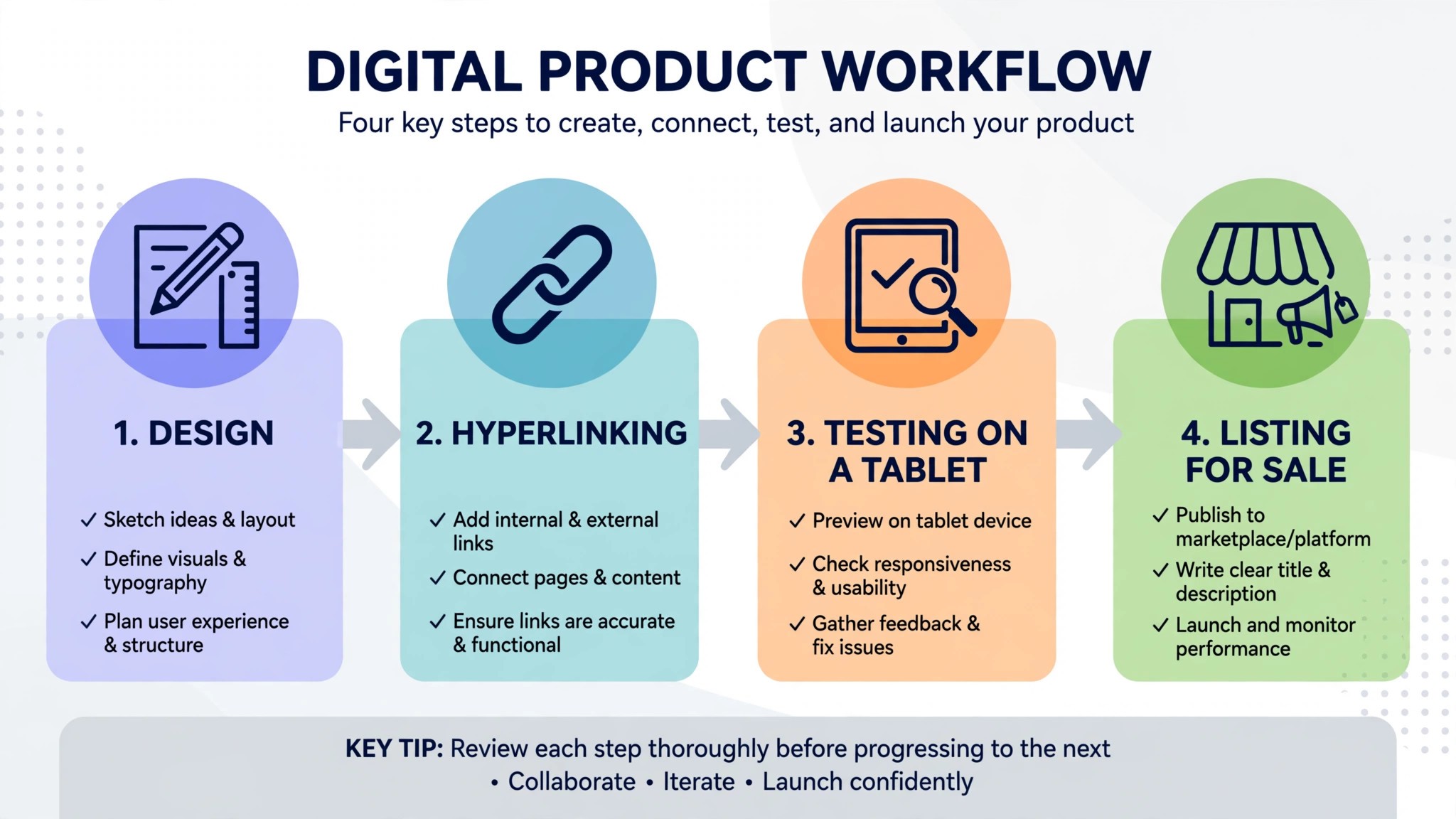
This guide compares fifteen tools across the whole job, from designing pages to adding hyperlinks to testing the finished PDF on a tablet. Some are design apps that build the pages. Others are the note taking apps where the planner actually gets used, and understanding both sides matters, because a planner designed in the wrong tool will not link properly when a buyer opens it.
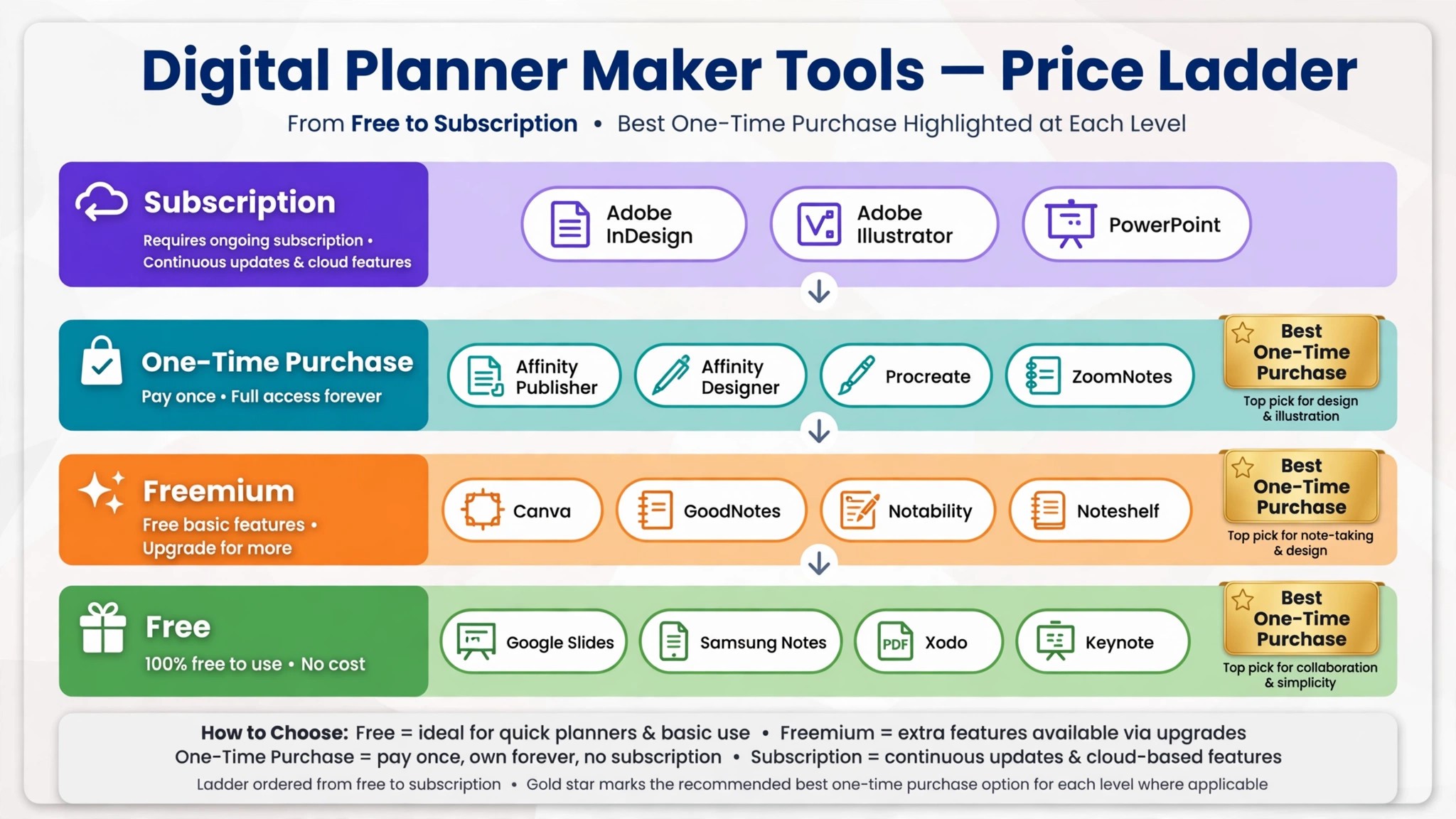
Prices below come from vendor pricing pages and roundups checked in November 2026, and typical Etsy planner prices of 5 to 35 dollars are noted wherever they set the context. The comparison below sorts the best digital planner makers by starting point, so a beginner, a seller and a professional each get a clear first pick.
The Quick Shortlist
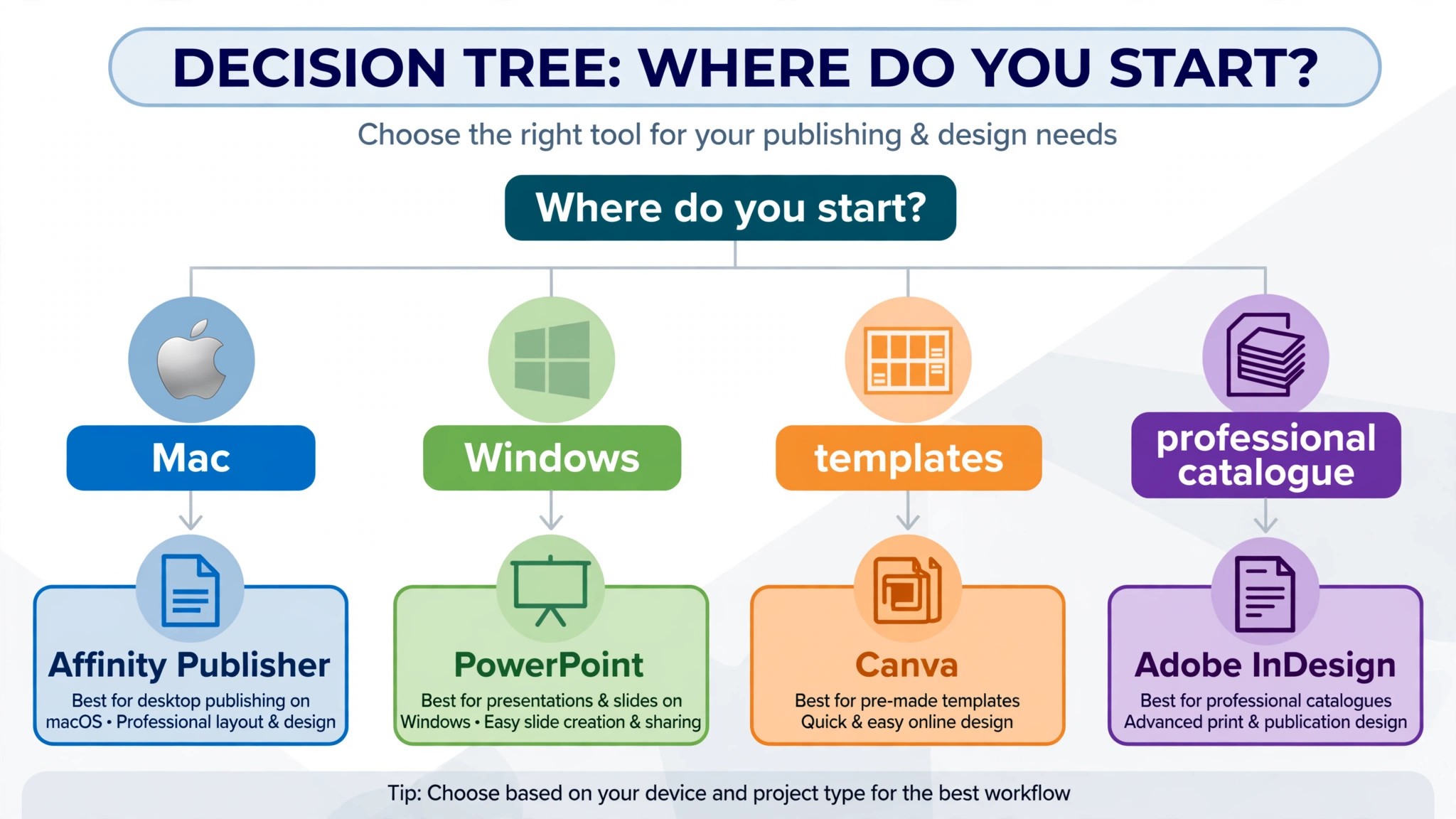
Use this table to match your starting point to the right tool before you read the full reviews. A beginner should start with Canva or Keynote. A serious seller should learn Affinity Publisher or InDesign. A buyer who wants to test planners should start with GoodNotes.
| Job | Best tool | Why it wins |
|---|---|---|
| Fastest planner for a beginner | Canva | Templates and drag and drop, Pro from 15 dollars a month |
| Professional print ready planners | Adobe InDesign | The publishing standard, from 22 dollars 99 a month |
| Best one time purchase for sellers | Affinity Publisher | Full hyperlinking without a subscription, 69 dollars 99 one time |
| Hand drawn pages and stickers | Procreate | iPad drawing at its best, 12 dollars 99 one time |
| Free hyperlinking for beginners | Keynote | Surprisingly capable, free on Mac |
| Hyperlinked PDFs on Windows | PowerPoint | The Windows route to linked pages, from around 7 dollars a month |
| Where buyers use the planner | GoodNotes | The gold standard for handwriting, Essential from 11 dollars 99 a year |
| Handwriting plus audio notes | Notability | Audio tied to every handwritten line, Plus from 7 dollars 99 a month |
| Budget handwriting and planning | Noteshelf | Clean handwriting app, around 10 dollars one time |
| Vector art and custom graphics | Adobe Illustrator | Precise vector control, from 22 dollars 99 a month |
| One time vector design | Affinity Designer | Illustrator power without the subscription, 69 dollars 99 one time |
| Free pages and collaboration | Google Slides | Free page design and PDF export, free |
| Handwriting with flexible notebooks | ZoomNotes | Deep handwriting features, around 8 dollars one time |
| PDF planning on any device | Xodo | Annotate and plan across platforms, free to start |
| Free planning on Samsung tablets | Samsung Notes | Solid and free on Galaxy tablets, free |
How We Judged the Best Digital Planner Makers
A tool earned a place here only if it does a real planner making job in 2026, not if it can export a PDF and call itself a planner maker. We judged each one on five things that decide whether a seller finishes a planner and whether a buyer enjoys using it. The best digital planner makers share one trait that matters more than any template library. They produce a hyperlinked PDF that works on the first try in the app the buyer actually uses.
| Check before you buy | What to ask | Why it matters |
|---|---|---|
| Hyperlinking | Can you link tabs across a hundred pages | A planner without links is not a planner |
| Export format | Clean hyperlinked PDF, or flat pages | Buyers open the PDF in GoodNotes or Notability |
| Cost model | Subscription, or one time purchase | A subscription eats the profit on a 15 dollar planner |
| Learning curve | Days, or weeks to a first listing | A tool you abandon helps nobody |
| Commercial use | Can you sell what you design | Some free assets cannot be resold |
| Tablet testing | Does it open cleanly on iPad and Android | Most buyers use a tablet, not a computer |
The 15 Tools, Reviewed One by One
1. Canva
Starting price Free, with Pro from 15 dollars a month. Best for Fastest planner for a beginner. Watch out Hyperlinking large planners is limited, so most sellers outgrow Canva for the linking step.
Canva is the best starting point for a seller who has never designed anything. It has thousands of templates, drag and drop elements, and a free tier that covers most of what a first planner needs. You can design a cover, build daily and weekly pages, and export a PDF in an afternoon, which is why most planner making guides recommend it first. Pro at 15 dollars a month unlocks more premium templates and design elements, though the free tier is enough to test whether you enjoy making planners at all.
The strength is speed. A beginner can go from an idea to a finished looking planner in a weekend, and the template library means the first pages do not have to be designed from scratch. Canva is also the easiest tool here to learn, with no manual to read and no settings to understand before the first page looks good.
2. Adobe InDesign
Starting price 22 dollars 99 a month. Best for Professional print ready planners. Watch out The subscription stings if you are not committed, and the learning curve is the steepest here.
InDesign is the gold standard for professional publishing, and it is the tool serious planner sellers graduate to. It handles long documents with master pages, styles and linked navigation better than any other tool here, which matters when a planner has a hundred dated pages that all need the same tabs. Plans start at 22 dollars 99 a month, and the hyperlinking is precise, fast and reliable across large files. A seller who plans to build a whole catalogue of planners will save hours on every product after the first.
The strength is control. Master pages mean a change to the tab layout updates every page at once, instead of a hundred manual edits. Paragraph and character styles keep the typography consistent across the whole planner, and the PDF export is the cleanest in this category. For a seller who treats planners as a business rather than a hobby, InDesign is the professional choice, and the output looks it.
3. Affinity Publisher
Starting price 69 dollars 99 one time for a single platform, or 164 dollars 99 for the Universal Licence. Best for Best one time purchase for sellers. Watch out The community is smaller than Adobe, so tutorials are fewer.
Affinity Publisher is the middle ground every serious planner seller should consider. It offers professional layout, master pages and hyperlinking close to InDesign, for a one time payment instead of a subscription. A single platform licence costs 69 dollars 99, and the Universal Licence covering all platforms costs 164 dollars 99. Once you pay, the tool is yours, which changes the maths completely for a seller whose planners sell for 15 dollars each.
The strength is the value. A seller who makes ten planners a year pays once and keeps the tool forever, while an InDesign subscriber pays 22 dollars 99 every month whether they publish or not. The hyperlinking handles large planners well, the master pages keep a dated planner consistent, and the output opens cleanly in GoodNotes and Notability. For a seller who wants professional output without a subscription, Affinity Publisher is the best buy on this list.
4. Procreate
Starting price 12 dollars 99 one time. Best for Hand drawn pages and stickers. Watch out It draws beautifully and links nothing, so it is a design tool, not a planner builder.
Procreate is the iPad drawing app that made digital art accessible, and it is the best tool on this list for the visual side of a planner. Hand drawn dividers, watercolour washes, custom stickers and illustrated covers all start here, and the brush engine is good enough that a seller with drawing skill can build a whole visual identity in Procreate. It costs 12 dollars 99 as a one time purchase, with no subscription and no hidden costs.
The strength is the art. A planner with hand drawn elements looks different from every template based planner on Etsy, and that difference is what makes a buyer stop scrolling. Procreate also makes the digital stickers that sellers bundle with planners, which are a product in their own right. For a seller whose strength is illustration, Procreate is the tool that turns that skill into a product.
5. Keynote
Starting price Free on Mac. Best for Free hyperlinking for beginners. Watch out It is Mac only, so Windows sellers need PowerPoint instead.
Keynote surprises most people, because a presentation app turns out to be one of the best free planner makers. It handles page layout well, it adds hyperlinks easily, and it exports a clean PDF that opens in GoodNotes with working tabs. It is free on every Mac, and the learning curve is gentle for anyone who has made a slideshow. Many planner sellers build their whole first catalogue in Keynote before they ever pay for a design tool.
The strength is the hyperlinking for zero cost. A seller can design pages, link the monthly and weekly tabs, test the PDF on an iPad, and list it on Etsy without spending a dollar on software. The slide size controls make it easy to set the exact page dimensions a tablet needs, and the export is reliable. For a Mac owner starting out, Keynote is the best free route to a working hyperlinked planner.
6. PowerPoint
Starting price Included with Microsoft 365, from around 7 dollars a month. Best for Hyperlinked PDFs on Windows. Watch out The subscription is the cost, and the design tools are weaker than Canva or Affinity.
PowerPoint is the Windows answer to Keynote, and it is how many Windows sellers build their first hyperlinked planner. It designs pages, adds hyperlinks between slides, and exports a PDF that opens in GoodNotes with working tabs. It comes with Microsoft 365, with plans from around 7 dollars a month, and most sellers already have it installed, which makes the starting cost effectively zero.
The strength is familiarity. Almost everyone has used PowerPoint, so the learning curve is the shortest of any tool here, and a seller can build a planner in a weekend without a tutorial. The hyperlinking is straightforward, the slide dimensions are easy to set, and the PDF export is reliable. For a Windows seller who wants a working planner fast, PowerPoint is the practical choice.
7. GoodNotes
Starting price Free for three notebooks, with Essential from 11 dollars 99 a year. Best for Where buyers use the planner. Watch out It is a notebook, not a design tool, so you test planners here rather than build them.
GoodNotes is the app your buyers will open, which makes it the most important tool on this list to understand even though you do not design in it. It turns an iPad into a paper planner you write on by hand, with Apple Pencil support, handwriting search, and PDF annotation that makes a hyperlinked planner feel like a real book. The free plan covers three notebooks, Essential costs 11 dollars 99 a year for unlimited notebooks, and Pro at 35 dollars 99 a year adds more features for heavy users.
The strength is the experience. A buyer who opens your planner in GoodNotes gets smooth handwriting, working tabs, and a search that finds any handwritten note by typing the word. Test every planner in GoodNotes before you list it, because a broken link that you miss is a refund request waiting to happen.
8. Notability
Starting price Free, with Plus from 7 dollars 99 a month. Best for Handwriting plus audio notes. Watch out The audio recording sits behind the paid tier, and templates are more limited than GoodNotes.
Notability is the handwriting app for people who take notes in lectures and back to back meetings, and it brings something GoodNotes does not. Audio recording tied to each handwritten line, so tapping a line replays what was said when it was written. That makes it a strong choice for students and professionals who plan around meetings, and a good app to test planners in for that audience. The free plan covers basic use, Plus costs 7 dollars 99 a month, and Pro at 19 dollars 99 a month adds more features.
The strength is the audio. A student who records a lecture while writing in a planner can replay the exact moment a note was made, which no paper planner can do. The handwriting is smooth, the interface is simple, and the app is popular enough that many buyers already have it. For a seller targeting students, Notability is the second app to test in after GoodNotes.
9. Noteshelf
Starting price Around 10 dollars one time. Best for Budget handwriting and planning. Watch out It is the dark horse here, with a smaller community and fewer planner templates.
Noteshelf is the handwriting app that many sellers overlook, and it deserves a place on this list because it does the core job well for a one time price of around 10 dollars. It offers smooth handwriting, PDF annotation and planner templates, and it runs on iPad, Android and Windows, which makes it one of the few apps here that covers all three. For a buyer who does not want a subscription, Noteshelf is the budget alternative to GoodNotes.
The strength is the value and the range. A one time purchase covers the app on every platform, and the handwriting quality is good enough that many users prefer it to the bigger names. Noteshelf also handles audio notes and handwriting search, so it is not a cut down app, just a quieter one. For a seller, supporting Noteshelf costs nothing extra, because a clean hyperlinked PDF works in it the same way it works in GoodNotes.
10. Adobe Illustrator
Starting price 22 dollars 99 a month. Best for Vector art and custom graphics. Watch out It is a drawing tool, not a planner builder, and the subscription is the same price as InDesign.
Illustrator is the professional vector tool, and it is where the custom graphics in a premium planner start. Logos, icons, dividers and decorative elements drawn in Illustrator stay crisp at any size, which matters when a buyer zooms into a page on a tablet. It costs 22 dollars 99 a month as a single app, and it is the tool professional designers use for vector work. A seller who draws their own planner art in Illustrator can build a visual identity no template can copy.
The strength is precision. Vector art scales without losing quality, the colour control is exact, and the output exports cleanly into InDesign or Affinity Publisher for the layout step. For a seller whose planners compete on looks, Illustrator is the tool that makes the difference visible. The learning curve is steep, but the results are professional.
11. Affinity Designer
Starting price 69 dollars 99 one time for a single platform. Best for One time vector design. Watch out The community is smaller than Adobe, so finding help takes longer.
Affinity Designer is the one time purchase alternative to Illustrator, and it is the smart buy for a seller who draws their own planner art. It offers professional vector control, crisp exports and a clean interface for 69 dollars 99 as a one time payment, with no subscription. The art it produces is indistinguishable from Illustrator for planner work, and it exports directly into Affinity Publisher, which makes the design to layout step simple for a seller using both.
The strength is the value. A seller pays once and owns the tool, which fits the economics of a planner business where products sell for 5 to 35 dollars. The vector tools handle icons, dividers, stickers and covers, and the raster tools cover textured art as well. For a seller who wants professional art without a monthly bill, Affinity Designer is the best buy in this category.
12. Google Slides
Starting price Free. Best for Free pages and collaboration. Watch out The design tools are basic, and offline use is limited.
Google Slides is the free tool that surprises sellers, because it designs pages, adds hyperlinks and exports a PDF without costing anything. It runs in a browser, so it works on any computer, and the collaboration features let two people work on the same planner at once. For a seller on a Chromebook or a shared computer, Google Slides is the only free tool here that needs no install and no payment.
The strength is the access. A seller can start a planner on a library computer, continue it on a phone, and export the PDF from anywhere, with no software to buy and no files to lose. The hyperlinking works, the page size is easy to set, and the export opens in GoodNotes. For a beginner testing the idea with zero budget, Google Slides is the best free starting point after Keynote and PowerPoint.
13. ZoomNotes
Starting price Around 8 dollars one time. Best for Handwriting with flexible notebooks. Watch out It is a niche app, and most buyers will not name it as their planner app.
ZoomNotes is the handwriting app for people who want deep control over their notebooks. It offers flexible page sizes, sub pages, bookmarks and handwriting features that go further than GoodNotes for power users, and it costs around 8 dollars as a one time purchase. It runs on iPad and Mac, and it is popular with students and professionals who build complex note systems rather than simple planners.
The strength is the flexibility. A buyer who wants a planner with nested sections, linked sub pages and custom page sizes will find ZoomNotes more capable than the bigger apps, and the one time price makes it a cheap experiment. For a seller, a clean hyperlinked PDF works in ZoomNotes the same way it works in GoodNotes, so supporting it costs nothing extra.
14. Xodo
Starting price Free to start, with Pro from 9 dollars 99 a month. Best for PDF planning on any device. Watch out It is a PDF tool first, so the handwriting feel is weaker than GoodNotes.
Xodo is the PDF app that works everywhere, and it is the best choice for a buyer who does not use an iPad. It runs on Android, Windows, Mac and the web, it annotates PDFs, and it handles hyperlinked planners on any device. The free plan covers the core annotation, and Pro from 9 dollars 99 a month adds more features for heavy users. For a seller, Xodo matters because it is where Android buyers open the planner.
The strength is the reach. A planner that works in Xodo works for buyers on Samsung tablets, Windows laptops and Chromebooks, which is a large audience that GoodNotes cannot reach. The annotation tools are solid, the sync works across devices, and the free plan is enough for most buyers. A seller who wants to serve Android buyers should test every planner in Xodo.
15. Samsung Notes
Starting price Free on Galaxy tablets. Best for Free planning on Samsung tablets. Watch out It only runs on Samsung devices, so it covers one brand rather than the whole Android market.
Samsung Notes is the free note app on Galaxy tablets, and it is better than most sellers expect. It offers handwriting with the S Pen, PDF annotation, templates and a clean interface, all for free on the device the buyer already owns. For a buyer with a Galaxy Tab, Samsung Notes is the GoodNotes equivalent, and it is the reason many Android buyers never need to pay for a planner app at all.
The strength is the price and the hardware. The S Pen is included with most Galaxy tablets, the handwriting is smooth, and the app handles PDF planners with working hyperlinks. A seller who tests in Samsung Notes will find that a clean PDF works well, and the buyer experience is good enough to earn positive reviews. For an Android focused seller, Samsung Notes is the first app to test in after Xodo.
Side by Side Comparison
| Tool | Starting price | Best for | Free plan |
|---|---|---|---|
| Canva | Free, Pro from 15 dollars a month | Fastest planner for a beginner | Yes |
| Adobe InDesign | 22 dollars 99 a month | Professional print ready planners | Trial only |
| Affinity Publisher | 69 dollars 99 one time | Best one time purchase for sellers | Trial only |
| Procreate | 12 dollars 99 one time | Hand drawn pages and stickers | No |
| Keynote | Free | Free hyperlinking for beginners | Yes |
| PowerPoint | From around 7 dollars a month | Hyperlinked PDFs on Windows | Trial only |
| GoodNotes | Free, Essential from 11 dollars 99 a year | Where buyers use the planner | Yes, 3 notebooks |
| Notability | Free, Plus from 7 dollars 99 a month | Handwriting plus audio notes | Yes |
| Noteshelf | Around 10 dollars one time | Budget handwriting and planning | Trial only |
| Adobe Illustrator | 22 dollars 99 a month | Vector art and custom graphics | Trial only |
| Affinity Designer | 69 dollars 99 one time | One time vector design | Trial only |
| Google Slides | Free | Free pages and collaboration | Yes |
| ZoomNotes | Around 8 dollars one time | Handwriting with flexible notebooks | Trial only |
| Xodo | Free, Pro from 9 dollars 99 a month | PDF planning on any device | Yes |
| Samsung Notes | Free | Free planning on Samsung tablets | Yes |
How to Pick the Best Digital Planner Makers
The right pick depends on your starting point, not on which tool has the most features. A beginner on a Mac should start with Keynote, because it is free and it links. A beginner on Windows should start with PowerPoint, for the same reason. A beginner who wants templates should start with Canva, because it is the fastest way to a planner that looks good. A seller who draws should add Procreate or Affinity Designer for the art, because the best digital planner makers for an illustrator are the ones that draw well and export cleanly.
Budget the full stack, not the headline price of one tool. The table below shows what common seller setups actually cost, using starting prices and one time purchases where they exist.
| Setup | Cost | What it covers |
|---|---|---|
| Keynote plus GoodNotes free | 0 dollars | Design, linking and testing on a Mac |
| Canva free plus GoodNotes Essential | 11 dollars 99 a year | Templates plus the buyer app |
| Affinity Publisher plus Affinity Designer | 139 dollars 98 one time | Professional layout plus vector art |
| Canva Pro plus GoodNotes Essential | 15 dollars a month plus 11 dollars 99 a year | Templates plus testing |
| Adobe InDesign plus Illustrator | 45 dollars 98 a month | The full professional Adobe stack |
| PowerPoint plus Xodo free | From around 7 dollars a month | Windows design plus cross platform testing |
| Procreate plus Keynote | 12 dollars 99 one time | Hand drawn art plus free linking |
Frequently Asked Questions
What is the cheapest good way to make a digital planner
Keynote on a Mac or PowerPoint on Windows, plus the free plan of GoodNotes for testing, costs nothing and produces a working hyperlinked planner. The cheapest stack that actually sells is usually a free design tool plus GoodNotes Essential at 11 dollars 99 a year, because testing in the app your buyers use is the step that prevents refunds.
Do I need GoodNotes to make a digital planner
No, but you need it to test one. GoodNotes is where most buyers will open your planner, so a planner that works anywhere else but breaks in GoodNotes will earn bad reviews. Then open the exported PDF in GoodNotes and tap every tab before you list it. The best digital planner makers are the design tools, but GoodNotes is the test that decides whether the product is ready.
Which tool is best for selling planners on Etsy
Affinity Publisher is the best pick for a serious Etsy seller, because the one time price of 69 dollars 99 beats a subscription within three months, and the hyperlinking handles large planners well. Canva is the best pick for a first listing, because it is the fastest way to a planner that looks good. Either way, the best digital planner makers for Etsy sellers are the ones that export a clean hyperlinked PDF the first time.
How much should a small shop budget for planner making tools
A realistic budget is zero to start, 12 dollars 99 for Procreate if you draw, 69 dollars 99 for Affinity Publisher when you are ready to build a catalogue, and 139 dollars 98 for Affinity Publisher plus Affinity Designer as a one time professional stack.
Our Verdict
If you buy one tool this quarter, buy Affinity Publisher at 69 dollars 99. It gives you professional layout, master pages and reliable hyperlinking for a single payment, and it pays for itself after five planner sales at 15 dollars each.
Whatever you pick, start with a ten page test planner, test every link in GoodNotes before you list it, and price your first planner low enough to earn reviews. The best digital planner makers reward the seller who tests, so test before you list. The best digital planner makers on this list all work, and the difference is whether the tool matches your skill level, your budget and the app your buyers use.