
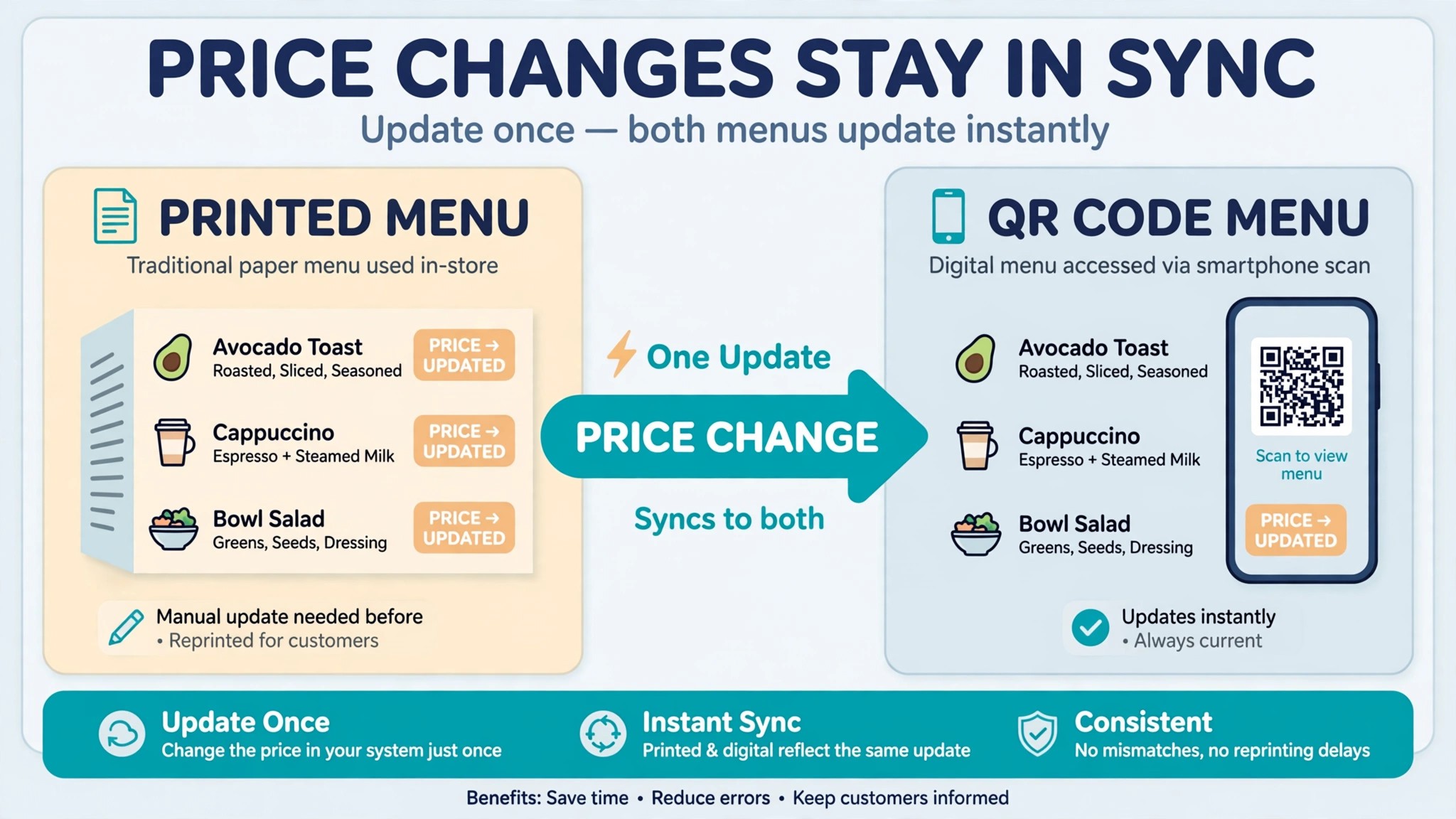
A menu is the hardest working page in a restaurant. It sells the dishes, sets the prices, carries the brand, and sits in front of every customer who walks in. A menu with a typo, a blurry photo or a price from last year costs real money, because customers order less when they cannot read what is on offer. The best menu makers for restaurants fix that problem without a graphic designer on staff, and they keep fixing it every time a price changes, because a good menu tool updates the print file, the website and the QR code from one edit.
This guide compares eight menu makers across the two kinds of tool in this category. Design tools like Canva and Adobe Express produce a file you print. Menu systems like MustHaveMenus, UpMenu and iMenuPro hold your menu as live data, so one price change updates everything at once. The best menu makers for restaurants are the ones that match your size, your budget and whether you need print, QR, or both. Prices below come from vendor pricing pages and roundups checked in November 2026. The reviews below test each tool on a real menu, so the best menu makers for restaurants that change prices weekly and the ones that print once a season are easy to tell apart.
The Quick Shortlist
Use this table to match your restaurant to the right tool before you read the full reviews. A cafe that prints a menu once a season needs a different tool from a restaurant that changes prices weekly. Every tool here has a free way to try it, so build your real menu in it before you pay for anything.
| Job | Best tool | Why it wins |
|---|---|---|
| Biggest restaurant template library | MustHaveMenus | 16,000 plus restaurant templates, Design from 24 dollars a month |
| Menu plus ordering and website | UpMenu | Live menu with online ordering, from 49 dollars a month |
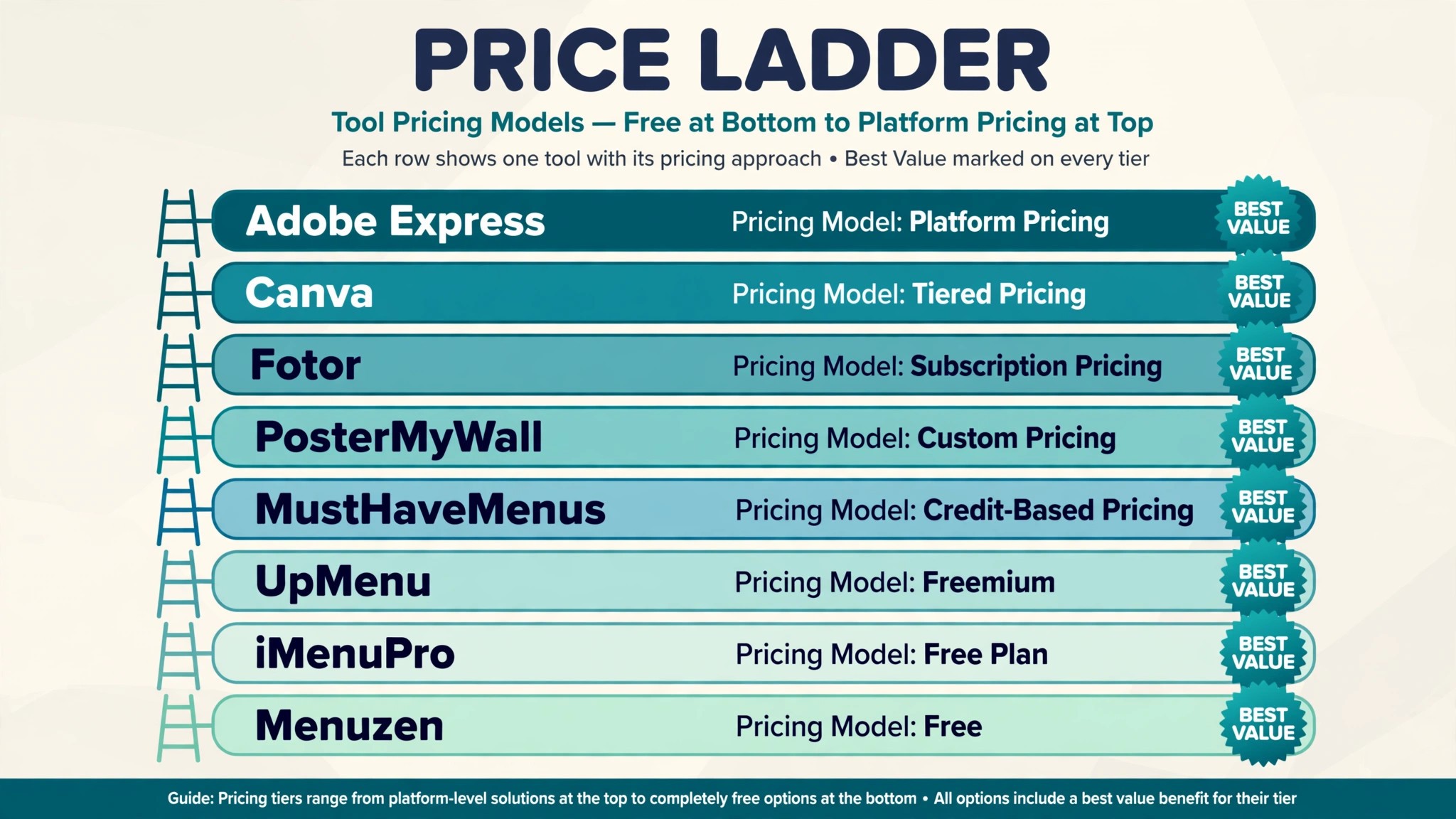
| Simple print and QR menus | iMenuPro | Tidy menus fast, 16 dollars a month or 11 dollars 25 on annual |
| Free design with huge templates | Canva | A usable free plan, Pro from 15 dollars a month |
| Quick menus with Adobe fonts | Adobe Express | Premium stock and fonts, Premium from 9 dollars 99 a month |
| Fast flyers and menus for promos | PosterMyWall | Cheap and quick, from 9 dollars 95 a month |
| Simple QR menus for small places | Menuzen | One clean price, 10 dollars a month |
| Cheapest design with photo tools | Fotor | Pro from 3 dollars 33 a month on annual billing |
How We Judged the Best Menu Makers for Restaurants
A tool earned a place here only if it does a real restaurant job in 2026, not if it can lay out a page and call itself a menu maker. We judged each one on five things that decide whether a restaurant keeps paying after the first month. The best menu makers for restaurants share one trait that matters more than any template count. They make a price change easy, because a menu that is hard to update goes stale, and a stale menu loses money.
First, the job it does, from designing a printed menu to hosting a QR menu to taking online orders, because a design tool and a menu system solve different problems. Second, the starting price a small restaurant can actually afford, including whether a free plan exists and whether the price is per location.
Third, the template quality, because restaurant specific templates with matching sets for dine in, takeout and table tents save hours over generic design templates. Fourth, the QR and digital side, from hosted QR menus to digital signage, because a printed QR code that shows an old menu is worse than no QR code at all. Fifth, the catch, from per location pricing to display features sold as add ons.
| Check before you buy | What to ask | Why it matters |
|---|---|---|
| QR hosting | Does the QR code show a live menu | A live menu updates when a price changes |
| Price per location | Per account, or per restaurant | Five sites at 49 dollars each is 245 dollars a month |
| Template range | Restaurant specific, or generic | Generic templates need more design work |
| Print quality | Print ready PDF, or screen only | A screen PDF prints badly |
| POS sync | Does it sync with Toast or Square | Sync stops double entry on every price change |
| Contract terms | Monthly billing, or annual only | Annual billing locks you in before you know the tool works |
The 8 Tools, Reviewed One by One
1. MustHaveMenus
Starting price Design from 24 dollars a month billed annually. Best for Biggest restaurant template library. Watch out The price is per location, and the digital signage Display feature is a paid add on.
MustHaveMenus is the purpose built menu platform with the biggest restaurant template library in this category, and it shows in the first ten minutes. More than 16,000 restaurant specific templates cover menus, table tents, social media posts and digital menu boards, with matching sets so the dine in menu, the takeout menu and the table tent all look like they came from the same restaurant. The free plan gives access to thousands of templates with 5 gigabytes of storage, and the Design plan starts at 24 dollars a month billed annually, with higher plans at 49 dollars a month for the full platform.
The strength is that everything is built for restaurants. The templates know what a menu needs, from allergen notes to price columns to sections for starters and mains, and the editor is simple enough that a manager can build a menu without a designer. MustHaveMenus also manages print, web, QR and digital signage from one place, with role permissions and brand kits for multi location groups, and it syncs with Toast and Square point of sale systems so a price change flows through.
The catch is the pricing structure. The price is per location, so five restaurants cost five times the headline price, and the Display feature for digital signage is a paid add on that many reviewers call the most common complaint. The 49 dollar monthly figure that appears in some roundups is the higher tier, while the Design plan at 24 dollars a month on annual billing is the entry point. MustHaveMenus is the best pick for a single restaurant that wants the biggest template library and a menu system that covers print and QR together.
2. UpMenu
Starting price From 49 dollars a month. Best for Menu plus ordering and website. Watch out It is a platform, not just a design tool, so the price and the setup are bigger than a simple menu maker.
UpMenu is the menu system for a restaurant that wants the menu, the website and the ordering in one place. It holds the menu as live data, publishes it to a QR code and a website, and takes online orders with its own ordering system, so a customer can scan, browse and order without a third party app. The price starts from 49 dollars a month, with higher plans depending on which modules are activated, and the highest plan reaches 169 dollars a month for a full setup.
The strength is the live menu. Change a price once and the print file, the website and the QR code all show the new price, because they all read from the same data. That is the difference between a menu system and a design tool, and it saves hours every time the menu changes. UpMenu also brings built in online ordering, which means the restaurant keeps the order and the customer data instead of paying a delivery app for both.
The catch is the scope and the price. UpMenu is a platform, and a small cafe that only needs a printed menu will find it more tool than it needs at a higher price than a design app. There is no free plan, so the only way to test it is a trial or a paid month. UpMenu is the best pick for a restaurant that wants ordering and a website alongside the menu, and the wrong pick for a cafe that prints a menu twice a year.
3. iMenuPro
Starting price 16 dollars a month, or 11 dollars 25 a month on annual billing. Best for Simple print and QR menus. Watch out There is no free plan, and it has no online ordering.
iMenuPro is the simple menu system for a small restaurant that wants a tidy print menu and a QR menu without a platform. It holds the menu as live data, so one edit updates the print file and the QR code at the same time, and it offers a clean set of restaurant templates that look professional without design skill. The price is 16 dollars a month, or 135 dollars a year, which works out to 11 dollars 25 a month, and that price covers all features with no tiers to climb.
The strength is the simplicity and the price. A small restaurant can build a menu in an evening, print it, put the QR code on the tables, and update a price in minutes whenever the supplier changes a cost. The hosted QR menu means the printed code never goes stale, which is the feature that matters most for a place that changes prices often. At 11 dollars 25 a month on annual billing, it is the cheapest true menu system on this list.
The catch is the narrow scope. There is no free plan, no online ordering and no design tool for flyers or social posts, so a restaurant that wants more than a menu will need a second tool. iMenuPro is the best pick for a small restaurant or cafe that wants a clean print and QR menu at a low fixed price, and the simplest menu system here to learn.
4. Canva
Starting price Free, with Pro from 15 dollars a month. Best for Free design with huge templates. Watch out Canva knows nothing about food, so there is no live menu, no QR hosting and no price sync.
Canva is the default design tool for a restaurant that wants a beautiful menu without hiring a designer, and its free plan is genuinely usable. You can create and download a complete menu without paying anything, using a huge template library, free photos and a drag and drop editor that anyone can learn in an afternoon. Pro at 15 dollars a month adds premium templates, brand kits and more storage, and the mobile editor means a manager can fix a typo from the dining room floor.
The strength is the range and the price. The template library is bigger than any restaurant specific tool, the free tier covers a full menu, and the same account designs the social posts, the flyers and the table tents to match. For a cafe or a food truck that prints a menu once a season, Canva is the fastest way to a menu that looks designed.
The catch is that Canva is a design tool, not a menu system. It has no concept of food cost, allergens or menu engineering, it does not host a QR menu, and a price change means editing the file, exporting a new PDF and reprinting, plus updating the QR code by hand. Canva is the best pick for a small place that prints menus rarely and wants them to look great, and the wrong pick for a restaurant that changes prices weekly.
5. Adobe Express
Starting price Free, with Premium from 9 dollars 99 a month. Best for Quick menus with Adobe fonts. Watch out Like Canva, it produces a file, not a live menu, so price changes mean a new export.
Adobe Express is the Adobe design tool for menus and social graphics, and it brings Adobe Stock photos and Adobe Fonts to a simple editor. The free plan includes more than 100,000 templates, standard photo editing, 4,000 plus Adobe Fonts and 5 gigabytes of storage, which is enough to design a full menu without paying. Premium at 9 dollars 99 a month billed monthly adds more templates, more fonts and the Firefly AI tools for generating images and text.
The strength is the design quality. Adobe Fonts give a menu a typographic polish that free tools struggle to match, and the Adobe Stock photos make a menu look professional even without a food photographer. The editor is quick to learn, the mobile app works well, and the same account covers the menu, the social posts and the flyers. For a restaurant that cares about typography, Adobe Express is the best cheap design tool here.
The catch is the same as Canva. Adobe Express produces a file, not a live menu, so there is no QR hosting, no price sync and no ordering. A price change means a new export and a reprint, and the premium templates sit behind the paid plan. Adobe Express is the best pick for a restaurant that wants beautiful menus with Adobe fonts at a low price, and a good second tool alongside a menu system like iMenuPro.
6. PosterMyWall
Starting price From 9 dollars 95 a month. Best for Fast flyers and menus for promos. Watch out It is a general design tool, so restaurant templates are fewer than MustHaveMenus.
PosterMyWall is the quick design tool for a restaurant that promotes as much as it serves. It designs menus, flyers, social posts and posters from a large template library, with a free plan to start and paid plans from 9 dollars 95 a month, rising to 29 dollars 95 a month for the full plan. The editor is simple, the mobile app is strong, and a promo flyer for the weekend can be designed, downloaded and posted in under an hour.
The strength is speed and price. A restaurant that runs weekly specials, happy hours and seasonal menus needs a tool that produces a new design fast, and PosterMyWall is built for exactly that. The templates are bright and promotional, which suits a cafe or a food truck more than a fine dining room, and the social media sizes are built in, so a menu post fits every platform without resizing.
The catch is the template range. PosterMyWall is a general design tool, so its restaurant templates are fewer and less specific than MustHaveMenus, and there is no live menu, no QR hosting and no ordering. It is the best pick for a restaurant that promotes heavily and needs fast flyers and menus at a low price, and a useful companion to a menu system rather than a replacement for one.
7. Menuzen
Starting price 10 dollars a month. Best for Simple QR menus for small places. Watch out It is a small specialist, so the template range is narrower than the big platforms.
Menuzen is the simple QR menu tool for a small restaurant, cafe or food truck that wants a clean digital menu without a platform. It builds a hosted QR menu that customers scan at the table, it updates from one edit, and it costs 10 dollars a month with a seven day trial after adding a card. The interface is minimal, the menus look tidy on a phone, and a small place can be live the same day it signs up.
The strength is the focus. Menuzen does one job, a QR menu, and it does it without the complexity of a full platform. A food truck that changes its menu daily, or a cafe with a small seasonal list, can update the menu from a phone and know the QR code on every table shows the new version. At 10 dollars a month it is the cheapest hosted QR menu here, and the simplest to explain to a team.
The catch is the narrow scope. Menuzen is not a design tool for print menus and not an ordering platform, so a restaurant that wants print, QR and ordering will need more than Menuzen alone. The template range is also narrower than MustHaveMenus or Canva. Menuzen is the best pick for a small place that mainly needs a QR menu at a low fixed price, and a good first step into digital menus.
8. Fotor
Starting price Pro from 3 dollars 33 a month billed annually. Best for Cheapest design with photo tools. Watch out It is a general design and photo tool, so restaurant features are thin.
Fotor is the cheapest design tool on this list, and it earns its place because of its photo tools. Pro costs 3 dollars 33 a month on annual billing, or 7 dollars 49 a month billed monthly, and it includes design templates, photo editing and AI tools in one account. A restaurant can fix a dish photo, drop it into a menu template, and export a print ready file without a second app, which is the workflow that matters for a menu with photos.
The strength is the price and the photo editing. Most menu tools expect you to bring finished photos, while Fotor lets you fix the photo and build the menu in the same place, which saves time for a small restaurant without a photographer. The free plan is usable for a first menu, and the Pro price is low enough that a cafe can pay for a year without thinking about it.
The catch is the restaurant depth. Fotor is a general design and photo tool, so it has no live menu, no QR hosting, no allergen features and no ordering, and its restaurant templates are fewer than Canva. It is the best pick for a small restaurant that wants cheap design with photo editing, and a useful tool for fixing dish photos before they go into a better menu maker.
Side by Side Comparison
The table below puts the eight tools next to each other on the facts that matter at decision time. The best menu makers for restaurants look very different once price, QR hosting and per location pricing sit in the same row, so use this table to check the two or three finalists you picked from the shortlist before you pay for any of them.
| Tool | Starting price | Best for | Free plan |
|---|---|---|---|
| MustHaveMenus | 24 dollars a month, annual | Biggest restaurant template library | Yes |
| UpMenu | 49 dollars a month | Menu plus ordering and website | No |
| iMenuPro | 16 dollars a month | Simple print and QR menus | No |
| Canva | Free, Pro from 15 dollars a month | Free design with huge templates | Yes |
| Adobe Express | Free, Premium from 9 dollars 99 a month | Quick menus with Adobe fonts | Yes |
| PosterMyWall | 9 dollars 95 a month | Fast flyers and menus for promos | Yes |
| Menuzen | 10 dollars a month | Simple QR menus for small places | Trial only |
| Fotor | 3 dollars 33 a month, annual | Cheapest design with photo tools | Yes |
How to Pick the Best Menu Makers for Restaurants
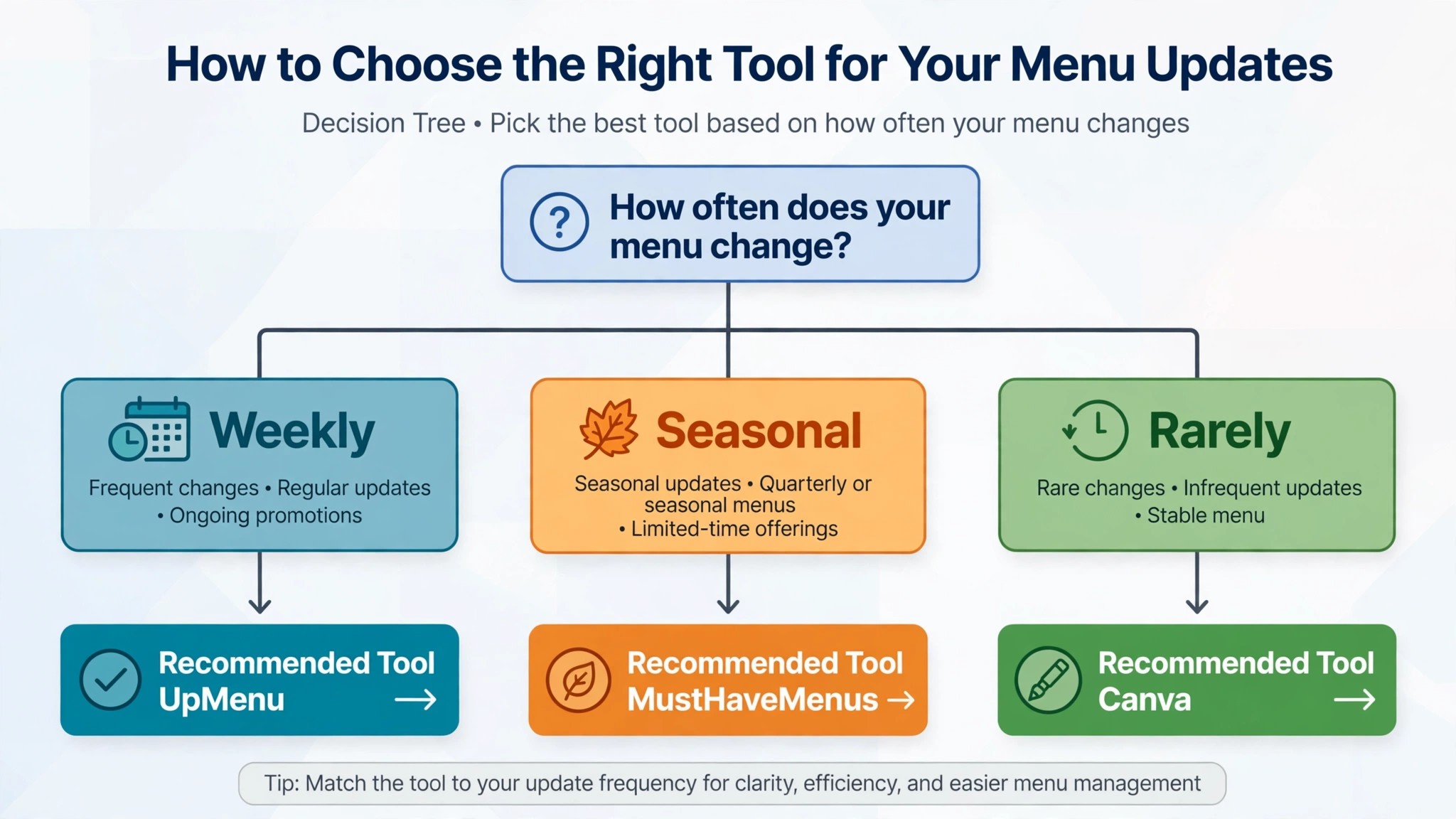
The right pick depends on how often your menu changes and whether you need print, QR, or both. A restaurant that changes prices weekly should buy a menu system, and iMenuPro at 11 dollars 25 a month on annual billing is the cheapest one that keeps the QR code live. A restaurant that wants the biggest template library should buy MustHaveMenus, because 16,000 restaurant templates beat a generic library for menu work. A restaurant that also wants online ordering should buy UpMenu, because ordering and the menu in one platform beats two separate tools. A cafe that prints a menu twice a year should use Canva free, because a free design tool is enough when the menu rarely changes.
Budget the full stack, not the headline price of one tool. The table below shows what common restaurant setups actually cost each month, using starting prices and annual billing where it is cheaper. Per location pricing is the line that surprises buyers, so count your sites before you pick a platform that charges per restaurant.
| Setup | Monthly cost | What it covers |
|---|---|---|
| Canva free | 0 dollars | Printed menus, flyers and social posts |
| iMenuPro, annual | 11 dollars 25 | Live print and QR menus, all features |
| MustHaveMenus Design, annual | 24 dollars | Templates, print, web and QR for one location |
| Canva Pro plus iMenuPro | 26 dollars 25 | Beautiful design plus a live QR menu |
| UpMenu, starting plan | 49 dollars | Live menu, website and online ordering |
| MustHaveMenus, five locations | 120 dollars | Design plan for five restaurants |
| Adobe Express Premium plus Menuzen | 19 dollars 99 | Adobe fonts plus a hosted QR menu |
Frequently Asked Questions
What is the cheapest good menu maker for a restaurant
Canva free is the cheapest way to design a printed menu, and it is genuinely usable without paying. For a live QR menu, iMenuPro at 11 dollars 25 a month on annual billing is the cheapest menu system, and Menuzen at 10 dollars a month is the cheapest hosted QR menu alone. The cheapest stack that actually works for a small restaurant is usually Canva free for design plus iMenuPro for the live menu, which costs 11 dollars 25 a month and covers print and QR together.
Do I need a QR menu, or is a printed menu enough
A printed menu is enough for a restaurant that changes its menu twice a year, but a QR menu earns its place the moment prices change more often. A QR code on the table that shows an old menu is worse than no QR code, because customers order from the wrong prices and the staff spend the meal correcting them. A hosted QR menu from iMenuPro, MustHaveMenus or Menuzen updates from one edit, so the printed code never goes stale. The best menu makers for restaurants are the ones that keep the QR code and the printed menu in agreement.
Which menu maker is best for a food truck
Canva free is the best pick for a food truck that prints a menu board rarely, because it is free and the templates are bright and promotional. Menuzen at 10 dollars a month is the best pick for a food truck that changes its menu daily, because the QR code updates from a phone. PosterMyWall is the best pick for a food truck that promotes heavily on social media, because it designs flyers and menus fast. A food truck that takes orders online should look at UpMenu, because ordering and the menu in one platform suits a mobile business.
How much should a small restaurant budget for menu tools
A realistic budget is zero for a cafe that prints menus rarely, 10 to 16 dollars a month for a small restaurant with a live QR menu, 24 dollars a month for MustHaveMenus Design on annual billing, and 49 dollars a month or more for a platform with ordering like UpMenu. The table above shows the common setups, and the biggest cost is usually per location pricing on a platform, not the design tool. A single location restaurant should budget 11 to 25 dollars a month for a good menu setup, and a multi location group should price every site before it commits.
Our Verdict
If you buy one tool this quarter, buy iMenuPro on annual billing at 11 dollars 25 a month. It holds your menu as live data, it updates the print file and the QR code from one edit, and it costs less than a single table of diners spends on dessert. Pair it with Canva free for the design, and you have beautiful menus and a live QR code for the price of one cheap subscription.
Whatever you pick, start with how often your menu changes, test the tool on your real menu before you pay, and check the QR code on a phone before you print it. The best menu makers for restaurants on this list all work. Choose by update frequency first, and the best menu makers for restaurants will narrow to one clear pick for your restaurant. The difference is whether the tool matches your restaurant size, your budget and your update frequency, and whether you measure the return in menus that stay correct rather than in templates on the shelf.