Canva gives you ten thousand templates and a free plan. Adobe Express gives you Firefly image generation and commercial safety for 9.99 dollars a month. A dedicated podcast art tool gives you neither, and still beats both for some shows. That contradiction is the whole story of cover art in 2026. The best podcast cover art makers are not ranked by how many templates they hold. They are ranked by how fast a listener can read your title at thumbnail size, remember your show, and tap it instead of the show next to it.
Cover art is the only marketing asset every listener sees before hearing a single second of audio. Apple Podcasts, Spotify, and every other app display it at a few hundred pixels wide, often smaller, and a design that looks great on a laptop can turn to mush on a phone. The title must be readable at 55 pixels. The image must work in a square. The style must match the show, not the template. Get those three things right and the art does real work for the show. Get them wrong and even a great podcast blends into the grid.
This guide compares eight tools that podcasters actually use to make cover art in 2026, with pricing checked against vendor pages and independent 2026 comparisons. The ranking weighs template quality, typography control, AI image generation, export size and quality, and price. Use the best pick table to shortlist, then test two tools with your real show title before committing to one.
Best Pick by Job
| Job | Best pick | Why it wins |
|---|---|---|
| Most podcasters | Canva | Largest template library, free plan, square cover presets |
| AI generated imagery | Adobe Express | Firefly images inside a template editor, 9.99 dollars a month |
| Fast social style art | Picsart | Quick AI photo tools, low price, usable free tier |
| Simple no fuss covers | Snappa | Clean templates, fast workflow, 15 dollars a month |
| Bold poster style type | Kittl | Typography led design built for posters and merch |
| Photo heavy covers | Fotor | Strong AI photo editing, 8.99 dollars a month |
| Brand consistent shows | VistaCreate | Good brand kits and templates at a modest price |
| Art from your episode | Podsqueeze | Square episode artwork made from the uploaded episode |
How the Best Podcast Cover Art Makers Were Compared
Every tool was judged on the same six tests. Templates had to include real podcast cover presets at 3000 by 3000 pixels, the size Apple Podcasts requires, not just generic square social posts. Typography had to allow a title that stays readable when the art shrinks to app size, with font choice, spacing, and contrast controls that actually work. AI image generation had to produce usable cover backgrounds rather than generic stock style images.
Export had to deliver high resolution files in the right format without watermarks on paid plans. Price was judged on the cheapest paid plan that removes the limits a podcaster actually hits. Finally, each tool was matched to a job, because a daily news show and a narrative fiction show need very different art.
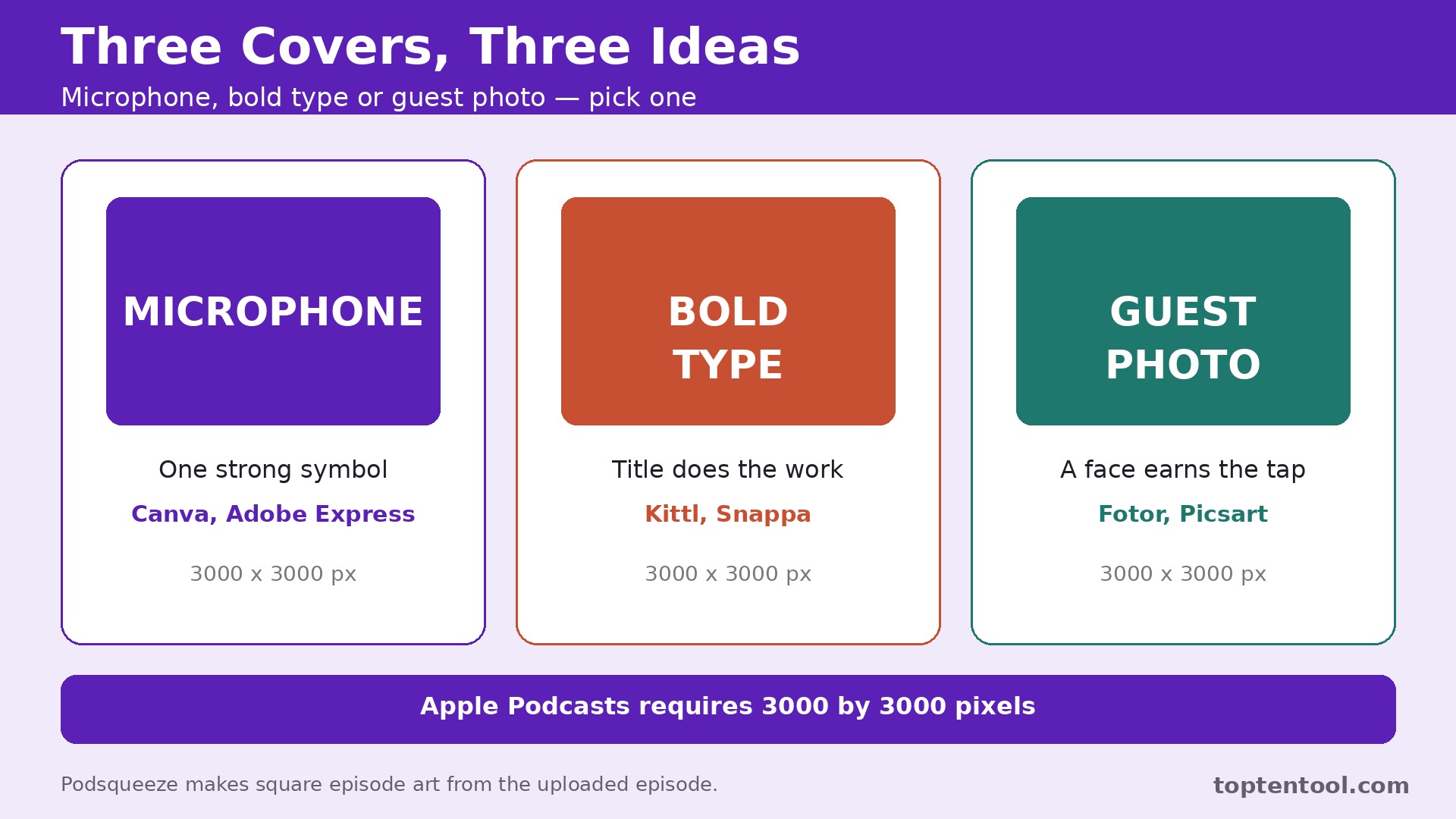
One technical point decides more than any feature list. Apple Podcasts requires cover art at 3000 by 3000 pixels, in JPG or PNG, and Spotify recommends the same square size. A tool that exports at 1400 pixels or adds a watermark on the free plan fails the basic test, whatever else it does well. Every one of the best podcast cover art makers in this guide can export a proper square cover, but the free plan limits differ, and the guide flags them clearly.
What Makes Cover Art Work in a Podcast App
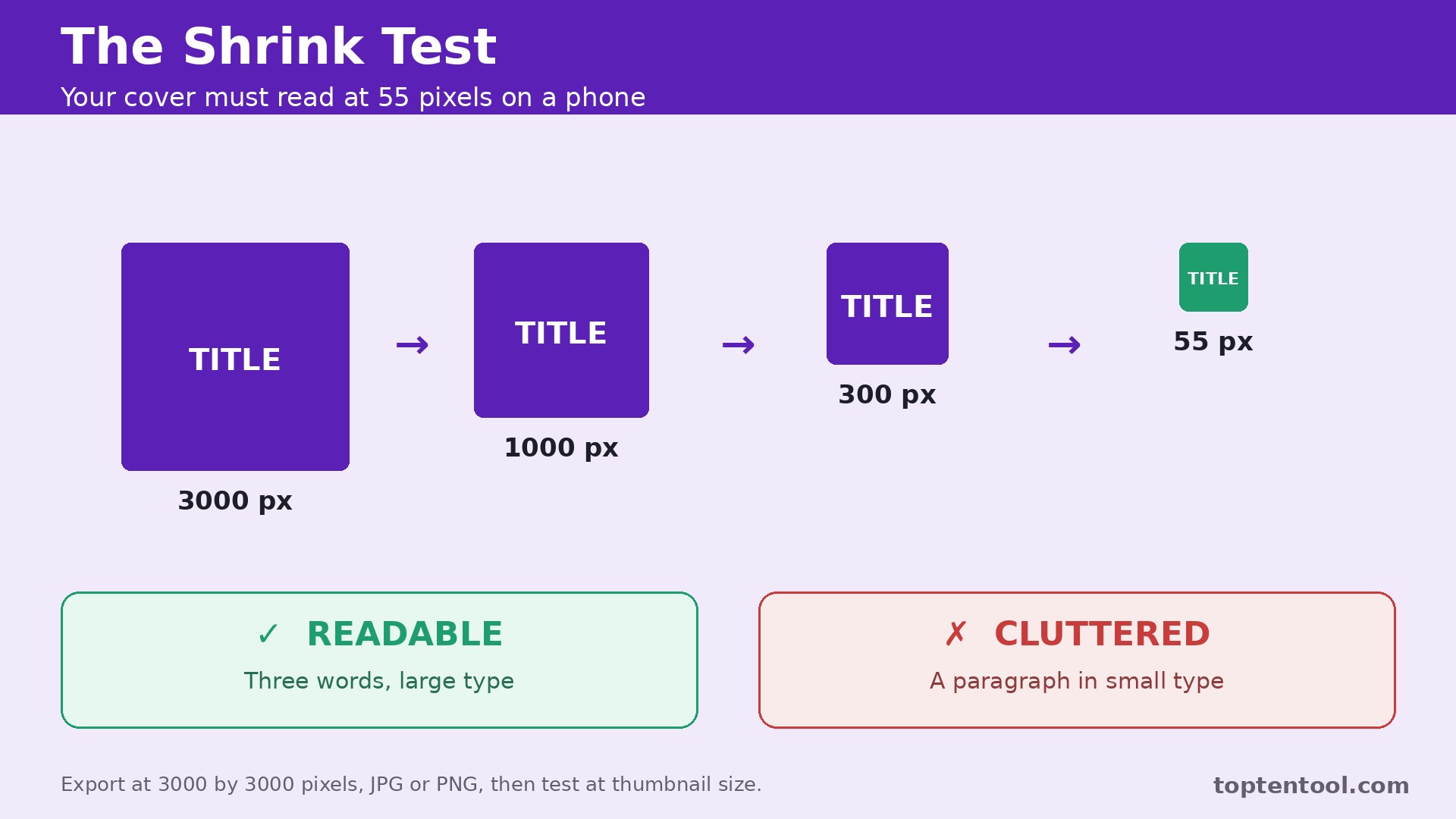
The first rule is that the title must survive shrinking. A listener scrolls a grid of covers that are barely larger than a thumbnail, and the show name has to be readable in under a second. That means short titles, large type, high contrast, and no more than three or four words if possible. A cover with a paragraph of text, a busy background, and a small logo fails every time, however beautiful it looks at full size. Test every design at 55 pixels before publishing, because that is the size your audience actually sees.
The second rule is that the image must say what the show is about in one glance. A true crime show needs mood and tension. A business show needs clarity and confidence. A comedy show needs energy and a face. The best covers use one strong visual idea rather than five competing ones, and they leave empty space around the title so the eye lands in the right place. A cover that tries to show everything about the show ends up showing nothing clearly.
The third rule is consistency across episodes. Listeners find a show by its cover, and a cover that changes style every week breaks that recognition. Pick a template, a color palette, and a font pairing, then use the same system for the main cover and for episode art. The best podcast cover art makers make that consistency easy with brand kits and saved templates, so the look survives a busy publishing week.
1. Canva
Canva is the default pick for podcast cover art, and the scale explains why. Its pricing page lists more than 1.6 million templates on the free plan and over 3.6 million templates plus 141 million stock photos, videos, and graphics on Pro, according to pricing trackers that checked the page in October 2026. Podcast cover templates come in the square shape the apps use, and the same editor covers YouTube thumbnails in 16 by 9, so one tool handles both pictures a podcaster needs.
The free plan is genuinely useful, with up to 20 standard or premium AI uses a month and one Brand Kit with three colors. Pro costs 144 dollars a year for one person, or about 15 to 18 dollars a month on monthly billing, and adds the background remover, Magic Resize, 100 gigabytes of storage, the full premium library, and five Brand Kits. Magic Studio bundles AI text to image generation, background removal, Magic Edit, and Magic Expand, which resizes an image to a new aspect ratio without starting over.
The drawback is sameness. Canva templates are so widely used that a cover built from a popular template can look like a dozen other shows. The AI image generation is also less consistent than Adobe Firefly for specific cover concepts. The fix is to treat Canva as a starting point, not a finished design. Change the fonts, shift the colors, and add your own photo or illustration, and the cover stops looking like a template. For most podcasters, Canva remains the best balance of price, templates, and ease.
2. Adobe Express
Adobe Express is the strongest choice when the cover needs an AI generated image rather than a template. Firefly image generation sits inside the template editor, so you can prompt an image, place it in a square cover, and add type in one workflow. The free plan covers the basics with limited generative credits, and Premium costs 9.99 dollars a month, with 250 generative credits, the full template library of more than 519,000 templates, and 200 million plus royalty free Adobe Stock assets.
Commercial safety is the quiet advantage. Firefly is trained on licensed content, which gives podcasters who monetize their show more confidence about using generated images in cover art and promotion. Premium is also included in most Adobe Creative Cloud plans, so a podcaster who already pays for Photoshop or Premiere likely has Express Premium sitting unused in their account. For standalone pricing, Adobe Express undercuts Canva Pro, at 9.99 dollars a month against about 12 dollars a month for Canva Pro on annual billing.
The drawback is the smaller template library. Canva lists 3.6 million templates against Premium’s 519,000, and the podcast specific template range is thinner. The editor is also less familiar to beginners than Canva. For a podcaster who wants AI imagery with commercial safety and already lives in Adobe tools, Express is the best pick. For a podcaster who wants the widest template choice, Canva still leads.
3. Picsart
Picsart is the fast option for podcasters who want AI photo editing and quick cover art without learning a full design editor. Its AI tools handle background removal, object removal, and photo effects in a few taps, and the template library covers square social and podcast formats. Pricing runs from about 6 to 13 dollars a month depending on the tier, which makes it one of the cheapest paid options in this guide, and the free tier is usable for basic work.
The strength is speed. A podcaster who records a photo of the host, removes the background, drops it on a bold color field, and adds a large title can have a finished cover in fifteen minutes. That speed matters for shows that publish episode art weekly, where a long design process would eat the production schedule. Picsart also works well on mobile, so a cover can be finished on a phone between recordings.
The drawback is design depth. Picsart is a photo editor first and a layout tool second, so typography control and brand kit features are lighter than Canva or Adobe Express. A cover that needs careful type hierarchy or a strict brand system will feel constrained. For a solo podcaster who wants fast, bold, photo led covers at a low price, Picsart is a strong choice.
4. Snappa
Snappa is the simplest tool in this guide, and that simplicity is the point. It offers clean templates, a fast editor, and square podcast cover presets without the feature overload of a full design suite. Pro costs 15 dollars a month, or 10 dollars a month on annual billing, and the free plan covers basic designs with limited downloads. For a podcaster who finds Canva overwhelming, Snappa is the calmer alternative.
The strength is the workflow. Pick a template, change the text, swap the image, export at full size, and the cover is done. There is no AI image generation to learn, no brand kit system to configure, and no marketplace to browse. That focus suits a podcaster who makes one cover and a few episode graphics, then gets back to recording. The templates are modern and clean, and the typography defaults are good, which means a beginner produces a decent cover on the first try.
The drawback is the ceiling. Snappa does not offer AI image generation, deep photo editing, or the template range of Canva, so a show that wants a distinctive illustrated cover will outgrow it. It also lacks the brand kit depth of the bigger tools. For a straightforward show that needs a clean, professional cover fast, Snappa is the best low friction choice in this guide.
5. Kittl
Kittl is the typography led choice, built for poster style design with strong type, vintage textures, and illustration tools. Pro costs 15 dollars a month, or 10 dollars a month on annual billing, and the platform is strongest when the cover leads with a big title and a bold graphic treatment rather than a photo. For a show with a short, punchy name, Kittl produces covers that look designed rather than templated.
The strength is the type engine. Font pairing, texture, and layout tools are deeper than Canva, and the vintage and poster styles suit narrative, comedy, and music shows that want a distinctive look. Kittl also covers merch design, so a show that sells shirts or posters can keep the same visual system across cover art and products. That consistency helps a brand grow beyond the podcast app.
The drawback is the learning curve and the narrower template range. Kittl is weaker on native social presets than Canva, and a podcaster who wants a quick square cover from a template will find the workflow slower. It is also less suited to photo heavy covers. For a show where the title is the brand and the type does the work, Kittl is the most distinctive tool in this guide.
6. Fotor
Fotor is the photo editing specialist in this guide, and the best pick when the cover starts with a photograph. Its AI photo tools handle background removal, retouching, enhancement, and effects, and the template library covers square podcast and social formats. Pro costs 8.99 dollars a month, which undercuts Canva Pro and Adobe Express Premium, and the free tier covers basic edits and designs.
The strength is the photo workflow. A host photo that needs better light, a cleaner background, or a stronger crop can be fixed inside Fotor without opening a separate editor, and the result drops straight into a cover template. That single tool flow saves time for shows that publish episode art with guest photos, where every episode needs a quick photo fix. The AI tools are genuinely useful rather than decorative, and the learning curve is short.
The drawback is layout depth. Fotor is a photo editor first, so typography control, brand kits, and template range are lighter than Canva. A cover that needs careful type hierarchy will feel constrained, and the template library is smaller than the leaders. For a photo led show that wants fast, affordable photo editing inside the cover workflow, Fotor is a strong value pick.
7. VistaCreate
VistaCreate is the brand consistency pick for podcasters who run a show as part of a wider content business. It offers templates, brand kits, and a clean editor at a modest monthly price, with paid plans starting in the low teens per month depending on billing. The exact figure varies by promotion, so confirm the current price on the pricing page before buying. The free tier covers basic designs.
The strength is the balance between templates and brand control. A podcaster who also makes YouTube thumbnails, social posts, and a website can keep one brand kit across all of them, and VistaCreate handles the square podcast cover alongside the other formats without a separate tool. The template quality is good, and the editor is friendly for beginners who find Canva crowded.
The drawback is that VistaCreate does not lead the category on any single feature. Canva has more templates, Adobe Express has stronger AI imagery, and Fotor has deeper photo editing. VistaCreate wins on being good enough across the board at a fair price, which is a real advantage for a small team but a weak pitch for a podcaster who needs one standout feature. For a show that values consistency across formats, it is a solid choice.
8. Podsqueeze
Podsqueeze is the only tool in this guide that makes art from the episode itself, and that difference earns it the final place. Upload an episode, and Podsqueeze generates square episode artwork at 1400 or 3000 pixels, alongside clips, show notes, and transcripts. Pricing starts at 5.99 dollars a month billed annually, with a free plan covering 30 minutes a month. For a podcaster who publishes episode art every week, that automation saves hours.
The strength is the workflow. The art matches the episode content because it is generated from the episode, not from a generic template, and the same upload produces the other assets a podcaster needs for promotion. That bundle suits a solo podcaster or a small team that wants one tool for episode publishing support rather than a separate design session for every episode.
The drawback is design control. Podsqueeze art is generated, not designed, so a show that wants a precise brand look will still need Canva or Adobe Express for the main cover. Treat Podsqueeze as the episode art engine and keep a designed main cover from another tool in this guide. For weekly episode art at a low price, it is the most practical option here.
Side by Side Comparison of the Best Podcast Cover Art Makers
| Tool | Starting paid price | Free plan | AI image generation | Best for |
|---|---|---|---|---|
| Canva | 144 dollars a year Pro | Yes, 20 AI uses a month | Yes, Magic Studio | Most podcasters |
| Adobe Express | 9.99 dollars a month | Yes, limited credits | Yes, Firefly | AI imagery |
| Picsart | About 6 to 13 dollars a month | Yes | Yes, photo AI | Fast social style art |
| Snappa | 15 dollars a month, 10 dollars annual | Yes, limited | No | Simple clean covers |
| Kittl | 15 dollars a month, 10 dollars annual | Yes | Yes | Bold poster type |
| Fotor | 8.99 dollars a month | Yes | Yes, photo AI | Photo heavy covers |
| VistaCreate | Low teens per month | Yes | Yes | Brand consistency |
| Podsqueeze | 5.99 dollars a month annual | Yes, 30 minutes a month | Yes, from episode | Episode artwork |
Prices change often. Confirm the current figure on each vendor pricing page before buying, since design tool pricing moves frequently.
Fee Breakdown Before You Choose
The cheapest tool is rarely the cheapest year. Canva Pro at 144 dollars a year looks dearer than Adobe Express Premium at 9.99 dollars a month, which totals 119.88 dollars over twelve months of monthly billing, about 24 dollars less than Canva Pro. Fotor Pro at 8.99 dollars a month totals about 108 dollars a year, and Podsqueeze at 5.99 dollars a month totals about 72 dollars a year. Those totals assume monthly billing with no discounts, and annual billing often lowers them further. Run the twelve month total, not the monthly headline, before comparing.
Also count the cost of the images themselves. A tool with a free plan that limits AI uses to 20 a month can force an upgrade the moment a show publishes weekly episode art. A tool with a cheap plan but a small stock library can push the podcaster toward paid stock photos. Check the AI use limit, the stock library size, and the brand kit count on the plan you buy, because those limits decide whether the cheap plan stays cheap. Canva Pro includes five Brand Kits against one on the free plan, and Adobe Express Premium includes the full template and asset libraries that the free plan limits.
How to Make a Cover That Gets Tapped
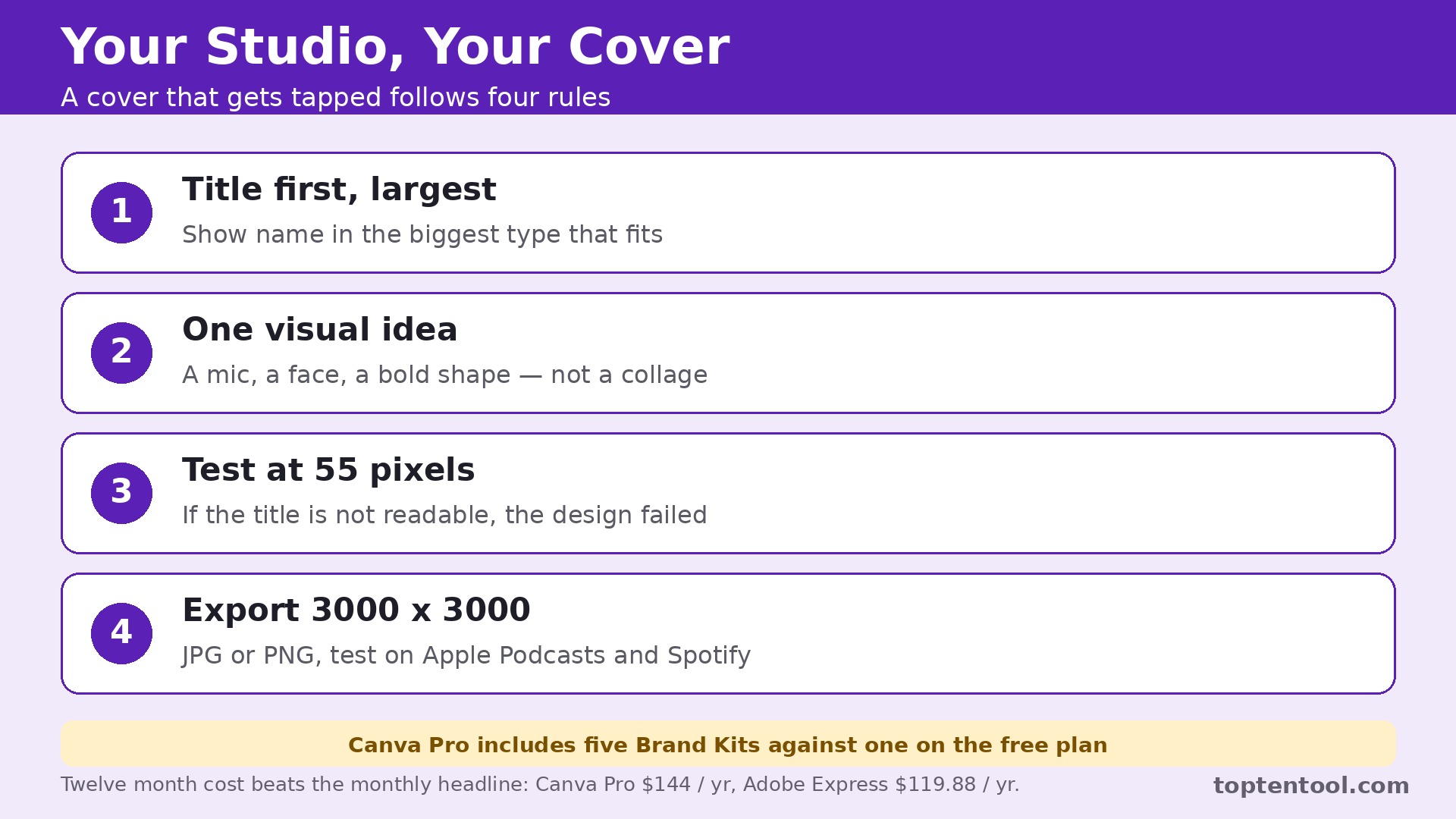
Start with the title, not the image. Write the show name in the largest type that fits, with one strong color behind it, and test it at 55 pixels on a phone. If the title is not readable at that size, the design has failed, whatever else it does well. That thumbnail test is the real measure of the best podcast cover art makers. Shorten the title if needed, drop the subtitle, and remove any text that is not the show name or a single hook word. A cover with three words in large type beats a cover with a paragraph in small type every time.
Next, pick one visual idea and commit to it. A single microphone, a single face, a single bold shape, or a single color field will read faster than a collage. Leave empty space around the title so the eye lands in the right place, and use contrast to separate the type from the background. A dark title on a light background or a light title on a dark background works. A mid tone title on a mid tone background disappears.
Finally, test the cover in context. Place it in a grid with ten other podcast covers and ask a friend to find it in three seconds. If they cannot, the cover needs more contrast, a larger title, or a simpler image. Then check the technical file. Export at 3000 by 3000 pixels, confirm the format is JPG or PNG, and upload a test to Apple Podcasts and Spotify before the launch date. A cover that fails the size check delays the launch, and a launch delay costs listeners.
How to Choose in One Afternoon
Start with the job, not the brand. A podcaster who needs one main cover and occasional episode art should trial Canva and Adobe Express side by side, making the same cover in both, and keep the one that felt faster. A podcaster who publishes episode art weekly should trial Podsqueeze alongside Canva, because the episode workflow matters more than the main cover. A photo led show should trial Fotor and Picsart with a real host photo.
Next, test the export. Make a cover in each trial tool, export it at 3000 by 3000 pixels, and open it on a phone at thumbnail size. The tool that produces the sharpest, most readable result wins, whatever the feature list says. Then check the brand kit. Save the colors and fonts, make a second cover for a different episode, and see whether the system keeps the look consistent without rework.
Finally, check the price for the year, not the month. Add the annual total, the AI use limit, and any stock or template limits, and compare the twelve month cost of the two finalists. The best podcast cover art makers stay inside their limits at your real publishing pace, so the cheap plan you buy in month one is still the cheap plan in month twelve. The tool that forces an upgrade in month two is not the bargain it appeared to be.
Frequently Asked Questions
What is the best podcast cover art maker for beginners?
For most beginners, Canva is the best podcast cover art maker to start with, because the free plan includes podcast cover templates at the right square size, the editor is friendly, and Pro at 144 dollars a year adds the full library and brand kits. Adobe Express is the closest alternative, with Firefly AI imagery at 9.99 dollars a month, and Snappa is the simplest option for a podcaster who finds Canva overwhelming.
What size should podcast cover art be?
Apple Podcasts requires cover art at 3000 by 3000 pixels, in JPG or PNG format, and Spotify recommends the same square size. Always export at 3000 by 3000, even if the tool offers a smaller default, and test the design at thumbnail size before publishing. A cover that looks good at full size but turns to mush at 55 pixels will not get tapped.
Can I use AI generated images for my podcast cover?
Yes, and most tools in this guide include AI image generation. Adobe Express with Firefly is the strongest choice for commercial safety, since Firefly is trained on licensed content. Canva Magic Studio and Picsart also generate cover backgrounds. Check the license terms on the plan you buy, and keep the title and branding as your own design rather than relying on generated text, which AI still spells inconsistently.
Do I need a paid plan to make good podcast cover art?
No, but the free plan limits matter. Canva free includes podcast templates and 20 AI uses a month, which covers a main cover and a few episode graphics. Adobe Express free covers basic designs with limited generative credits. A paid plan becomes worth it when the show publishes weekly episode art, needs brand kits, or wants the full template and stock libraries without watermarks.
How often should I change my podcast cover art?
Rarely. Listeners find a show by its cover, and changing it breaks recognition. Keep the main cover consistent for at least a year, and use episode art for variety instead. Refresh the main cover only when the show rebrands, changes format, or the art no longer matches the content. When you do refresh it, keep the same colors and fonts so existing listeners still recognize the show.
Verdict
The best podcast cover art makers depend on the job, and the honest answer changes with the show. For most podcasters, Canva is the best all round choice, because the template library, the free plan, and Pro at 144 dollars a year cover every cover a show needs. Adobe Express is the pick when AI generated imagery leads the design, at 9.99 dollars a month with Firefly and commercial safety. Podsqueeze is the smart add on for weekly episode art at 5.99 dollars a month, and Fotor is the value pick for photo led covers at 8.99 dollars a month.
Whichever tool you choose, judge the cover by the thumbnail test, not by the full size design. Make the title large, pick one visual idea, keep the style consistent across episodes, and export at 3000 by 3000 pixels. The cover is the first thing a listener sees and the last thing they remember when they choose between two shows. A cover that passes the small size test earns the tap, and the tap is where every listener starts.