

Editing is where most podcasts die. A one hour episode can take three hours to cut, clean and publish, and that math kills weekly shows faster than any lack of ideas. The best AI tools for podcasters attack that exact problem. They remove filler words, clean bad audio, write show notes and cut clips while you do the work only a human can do.
Recording quality comes first, editing second, and promotion third. A tool that records each guest locally will save more episodes than any editor, because a ruined recording cannot be fixed. After that, the tool that edits by transcript saves the most hours, and the tool that turns one episode into ten clips brings the most new listeners.
This guide compares eight tools with prices checked in November 2026. Each review states the real starting price, what the tool meters, and where it falls short. Hours and credits matter more than sticker prices in this category, so read the limits before you pay.
How we judged each tool
We judged tools by the hour. How many finished minutes does a dollar buy, and how many hours of editing does it save. A tool that charges by media hour is cheap for a monthly show and expensive for a daily one. A tool that charges by credit needs the same check, since credits buy different things in different tools.
We also checked the failure modes. AI cleanup can make voices sound thin. Transcript editing can delete a word you wanted to keep. Clip tools can pick the dullest minute of a great episode. The best AI tools for podcasters are the ones whose mistakes are easy to spot and undo, not the ones that promise perfection.
Finally, we favored tools that fit a real workflow. Recording, editing, cleanup, show notes, clips and hosting each get one owner. A tool that tries to do all six usually does two well and four badly, so this list keeps each pick in its lane.
The best AI tools for podcasters at a glance
Use the table to match the tool to your bottleneck, then read the full review. Pay attention to the meter column. Hours, credits and minutes decide the real cost.
| Tool | Starting price | Best for | Watch out |
|---|---|---|---|
| Descript | Free, Hobbyist $16/mo | Editing by transcript | Media hours and AI credits are metered |
| Riverside | Free, Standard $19/mo | Remote recording quality | Recording hours are capped per month |
| Adobe Podcast | Free, Premium $9.99/mo | Rescuing bad audio cheaply | Enhance can sound processed on some voices |
| Auphonic | Free, from $11/mo | Automatic loudness and cleanup | No editing, cleanup only |
| Podcastle | Free, Essential $11.99/mo | Beginners who want one simple app | Less depth than Descript for heavy editing |
| Opus Clip | Free, Starter $15/mo | Turning episodes into Shorts | Virality score is unreliable |
| ElevenLabs | Free, Starter $5/mo | AI voiceover, intros and dubbing | Free tier is non commercial |
| Buzzsprout | Free, from $12/mo | Simple podcast hosting and stats | Monthly upload hours are capped |
1. Descript
Starting price. Free plan with 1 media hour a month. Hobbyist costs 16 dollars a month billed annually, or 24 dollars billed monthly. Creator costs 24 dollars a month billed annually.
Descript turns your recording into a transcript, and editing the text edits the audio and video. Delete a word in the transcript and it disappears from the episode. That single idea makes cutting ums, repeats and tangents far faster than scrubbing a waveform, and it is why Descript remains the most complete AI editor for podcasters.
Hobbyist at 16 dollars a month billed annually gives 10 media hours and 400 AI credits a month, with 1080p exports. Creator at 24 dollars a month billed annually raises that to 30 hours and 800 credits with 4K exports. Studio Sound cleans up echo and room noise, filler word removal works in one click, and Overdub clones your voice to fix a flubbed line without another recording session.
The catch is metering. Media minutes and AI credits are counted separately, so a busy show can hit a ceiling before the month ends even when features remain. The free plan gives only 1 media hour a month with watermarked 720p exports, which is enough to test and not enough to publish weekly.
Descript is also a full workspace, which is both its strength and its weight. Recording, editing, publishing and repurposing live in one app, so you stop juggling files. But a podcaster who only needs cleanup will find it heavier and pricier than a specialist, and the learning curve is real for the first few episodes.
Pick it when you spend most of your time cutting content and want to edit by reading, not by scrubbing audio.
Skip it when you record rarely and only need cleanup, since a specialist costs less.
2. Riverside
Starting price. Free plan with 2 hours of multitrack recording. Standard costs 19 dollars a month, or 15 dollars a month billed annually. Pro costs 29 dollars a month, or 24 dollars billed annually.
Riverside records each guest locally on their own device, in separate tracks, at up to 4K video. A shaky internet connection cannot ruin the file, because the local recording is what you keep. For interview shows with remote guests, that is the single most important feature in this whole list.
Standard at 19 dollars a month, or 15 dollars on annual billing, gives 5 hours of multitrack recording a month with no watermark. Pro at 29 dollars a month, or 24 dollars annually, raises that to 15 hours and adds AI transcription, show notes and Magic Audio cleanup. The free plan gives a one off 2 hours of multitrack recording at 720p with a watermark, which is enough to test the quality properly.
Riverside also edits by text now, and Magic Clips turns long episodes into short clips. The editing is good, but it is not as deep as Descript. Think of Riverside as a recording studio with editing attached, not as an editor with recording attached.
Watch the hour meter. A show that records two hours a week will outgrow Standard fast, and the jump to Pro is the real monthly cost. If you record in person with one microphone, Riverside solves a problem you do not have, and Descript alone may be enough.
Pick it when your show has remote guests and a bad connection must never ruin an episode.
Skip it when you record solo in person and only need editing, not remote capture.
3. Adobe Podcast
Starting price. Free Enhance Speech with limits. Premium costs 9.99 dollars a month.
Adobe Podcast Enhance Speech is the cheapest rescue tool in podcasting. Upload a recording made in a noisy room on a cheap microphone, and it returns audio that sounds close to studio quality. For new podcasters recording at home, it is the fastest upgrade money cannot buy, because the free tier already does the main job.
Premium at 9.99 dollars a month raises the limits and adds more tools, including a web based editor and transcription features. It sits inside Adobe Express workflows too, which helps if you already use Adobe tools for cover art or social posts.
The limit is taste. Enhance Speech can make some voices sound thin or processed, especially when the original recording is very noisy. It also cannot fix clipping, where the audio was recorded too loud and the peaks are destroyed. Record at a sensible level first, then let Enhance do the polish.
Use it as a safety net, not as a recording plan. A 10 dollar microphone in a quiet room beats a 200 dollar microphone in a noisy room, and no AI can fully replace good recording habits. But when a guest records on a laptop in a kitchen, Adobe Podcast saves the episode.
Pick it when your audio is noisy or echoey and you need it fixed for almost no money.
Skip it when you already record in a treated room with a good microphone.
4. Auphonic
Starting price. Free plan with 2 hours a month. Paid plans from 11 dollars a month.
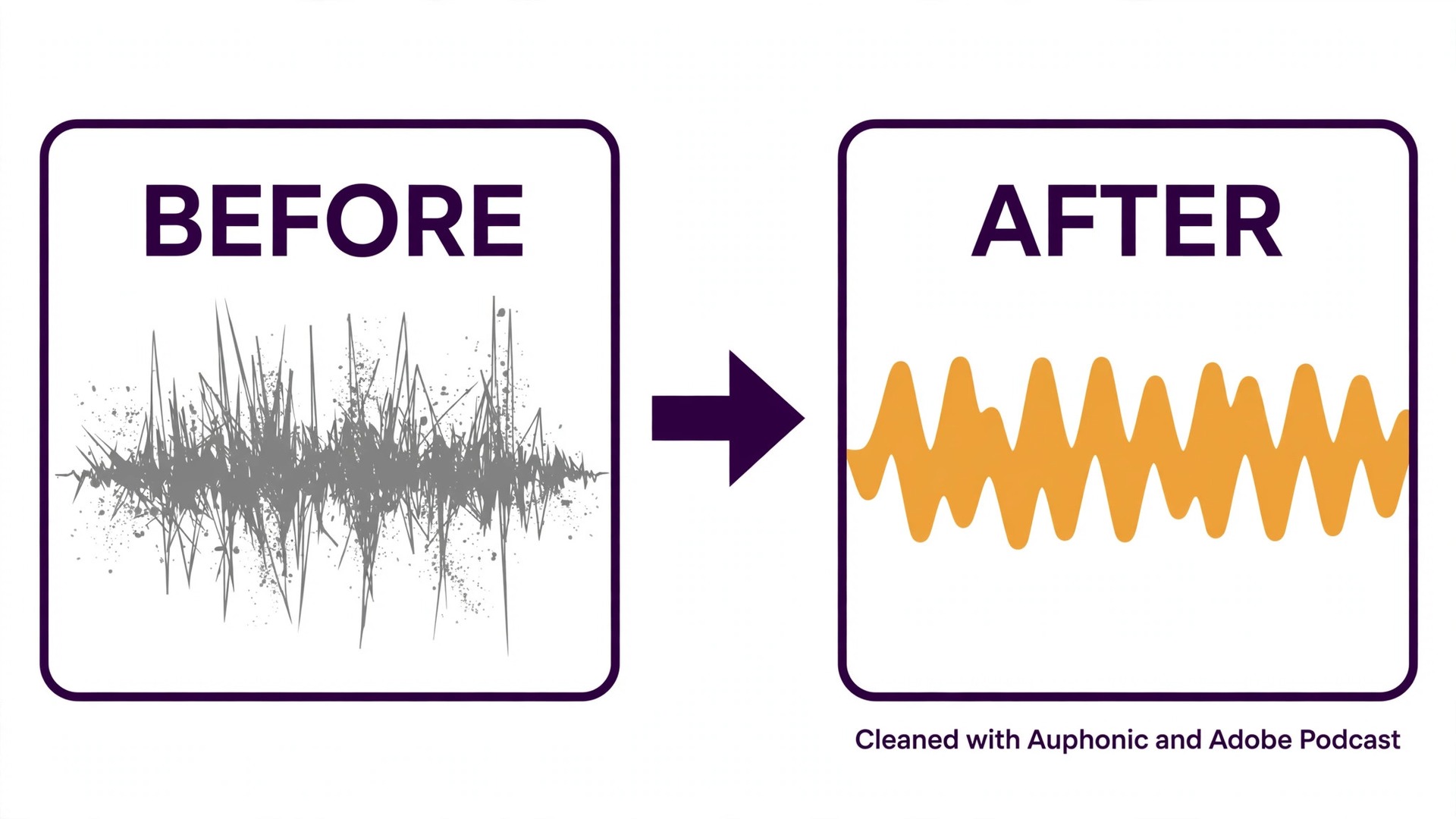
Auphonic is a post production service that levels loudness, removes noise and hum, and balances multiple speakers automatically. You upload the finished edit, it returns a polished file that meets loudness standards for podcast platforms. For shows that publish to Apple Podcasts and Spotify, that consistency matters.
The free plan gives 2 hours a month, which covers a monthly show. Paid plans from 11 dollars a month raise the allowance and add features such as multitrack processing and chapter marks. The price per hour is low compared with hiring an engineer or spending an hour per episode on manual leveling.
Auphonic does not edit. It cannot cut ums, remove a tangent or write show notes. It is the last step in the chain, not the first. Pair it with Descript or Riverside for editing, and use Auphonic to make the finished file sound consistent every week.
It also rewards good input. A recording with heavy background noise will improve, but it will not become studio clean. Auphonic is best for shows that already record decently and want the final 10 percent of polish without thinking about it.
Pick it when you want every episode at the same loudness with noise removed, automatically.
Skip it when you need editing or show notes, since Auphonic only polishes finished audio.
5. Podcastle
Starting price. Free plan. Essential costs 11.99 dollars a month.
Podcastle, now also called Async in some places, is the simplest all in one setup for a new podcaster. Record, edit, clean up audio and publish from one browser based app, with AI tools for noise removal, leveling and text based editing. There is almost nothing to install and little to learn.
Essential at 11.99 dollars a month is the cheapest paid all in one plan on this list. For a beginner publishing weekly, that price covers the whole workflow without buying three separate tools. The free plan lets you test the recording and editing before paying.
The trade off is depth. Podcastle will not match Descript for long transcript edits, Riverside for remote recording quality, or Auphonic for loudness precision. It is a good first home, not a forever home for a show that grows into daily publishing or complex production.
Pick it when you are starting and want to publish this week, not after a month of learning software. Move on when a specific job, such as remote recording or deep editing, starts to hurt. That is the natural upgrade path.
Pick it when you are starting your first show and want one simple app for everything.
Skip it when you already edit heavily or record remote guests weekly.
6. Opus Clip
Starting price. Free plan with 60 credits a month and a watermark. Starter costs 15 dollars a month, Pro costs 29 dollars a month.
Opus Clip turns a long episode into short vertical clips automatically. It finds highlight moments, adds captions, reframes for vertical video and scores each clip for viral potential. For a podcaster trying to grow on TikTok, Reels and Shorts, it is the fastest way to turn one recording into a week of posts.
Starter at 15 dollars a month is the entry point, with Pro at 29 dollars for more minutes. The free plan gives 60 credits a month with a watermark, which is enough to test whether clips actually bring listeners. Metering is by source video minutes, not by clips produced, so a two hour episode costs more than a thirty minute one.
The virality score deserves skepticism. It flags moments that look clip worthy to an algorithm, not moments your audience will love. Review every clip before posting, and trust your own judgment about which story or joke deserves to travel.
Opus Clip works best when the episode already has strong moments. A flat conversation will not become viral because an AI cut it into pieces. Record with clips in mind, with clear stories and quotable lines, and the tool will do the rest.
Pick it when you publish long episodes and need short clips for social every week.
Skip it when you only publish audio and have no video to clip.
7. ElevenLabs
Starting price. Free tier with a monthly character allowance. Starter costs 5 dollars a month.
ElevenLabs makes the most human sounding AI voices on this list. Podcasters use it for intros, ad reads, corrections and dubbing into other languages, with voice cloning that keeps a consistent sound across episodes. For a show that needs a correction without re recording, it is a quiet superpower.
Starter at 5 dollars a month is the cheapest paid plan in this guide, and the free tier lets you test voices before paying. Higher tiers at 22 and 99 dollars add more characters and features, but most podcasters will never need them.
The limits matter. The free tier is for non commercial use, so a monetized show needs a paid plan. Cloned voices also raise honest questions with listeners, so tell your audience when a segment is AI voiced. Transparency keeps trust, and trust is the whole business for a podcast.
Use ElevenLabs for small jobs, not for whole episodes. An AI voiced episode will sound fine for a minute and tiring for an hour. Intros, ads, corrections and translated versions are the right scale.
Pick it when you need intros, ad reads or quick corrections in a consistent voice.
Skip it when you want whole episodes voiced by AI, since listeners will notice.
8. Buzzsprout
Starting price. Free plan for testing. Paid plans from 12 dollars a month.
Buzzsprout is podcast hosting, not an editor, and it earns its place here because publishing is where many shows stall. It distributes your show to Apple Podcasts, Spotify and the rest, gives clear listener stats, and adds features such as transcription and Magic Mastering for audio polish.
Paid plans from 12 dollars a month are priced by monthly upload hours. That keeps costs predictable for a weekly show, and the free plan lets you test the dashboard before you commit. The interface is the simplest among major hosts, which matters when you publish tired after a long edit.
Upload hours are the meter to watch. A show that publishes long episodes or bonus content can hit the cap, and older episodes count against nothing once published. Plan your episode length against the plan you buy, and check the stats to see which episodes actually earn listeners.
Buzzsprout pairs well with Descript or Riverside. Edit in one of those, host in Buzzsprout, and let Auphonic or Adobe Podcast handle polish. That three tool chain covers recording to publishing for about 30 to 40 dollars a month.
Pick it when you want hosting that just works, with clear stats and easy distribution.
Skip it when you already host elsewhere and are happy with it, since switching hosts is work.
Which One Suits Your Setup
Match the tool to the stage where you lose the most time. These are our first picks for each job in a podcast workflow, and the best AI tools for podcasters are the ones that own one stage each.
| Job to be done | Best pick | Why it wins |
|---|---|---|
| Editing an episode fast | Descript | Edit by transcript from 16 dollars a month annual |
| Recording remote guests | Riverside | Local tracks protect every interview |
| Fixing bad audio free | Adobe Podcast | Enhance Speech rescues noisy rooms |
| Final polish and loudness | Auphonic | Automatic leveling from 11 dollars a month |
| Starting your first show | Podcastle | All in one simplicity for 11.99 dollars |
| Clips for social | Opus Clip | Long to short from 15 dollars a month |
| Intros and voice fixes | ElevenLabs | Human sounding voices from 5 dollars |
| Hosting and stats | Buzzsprout | Simple distribution from 12 dollars a month |
A lean stack that costs about 43 dollars a month
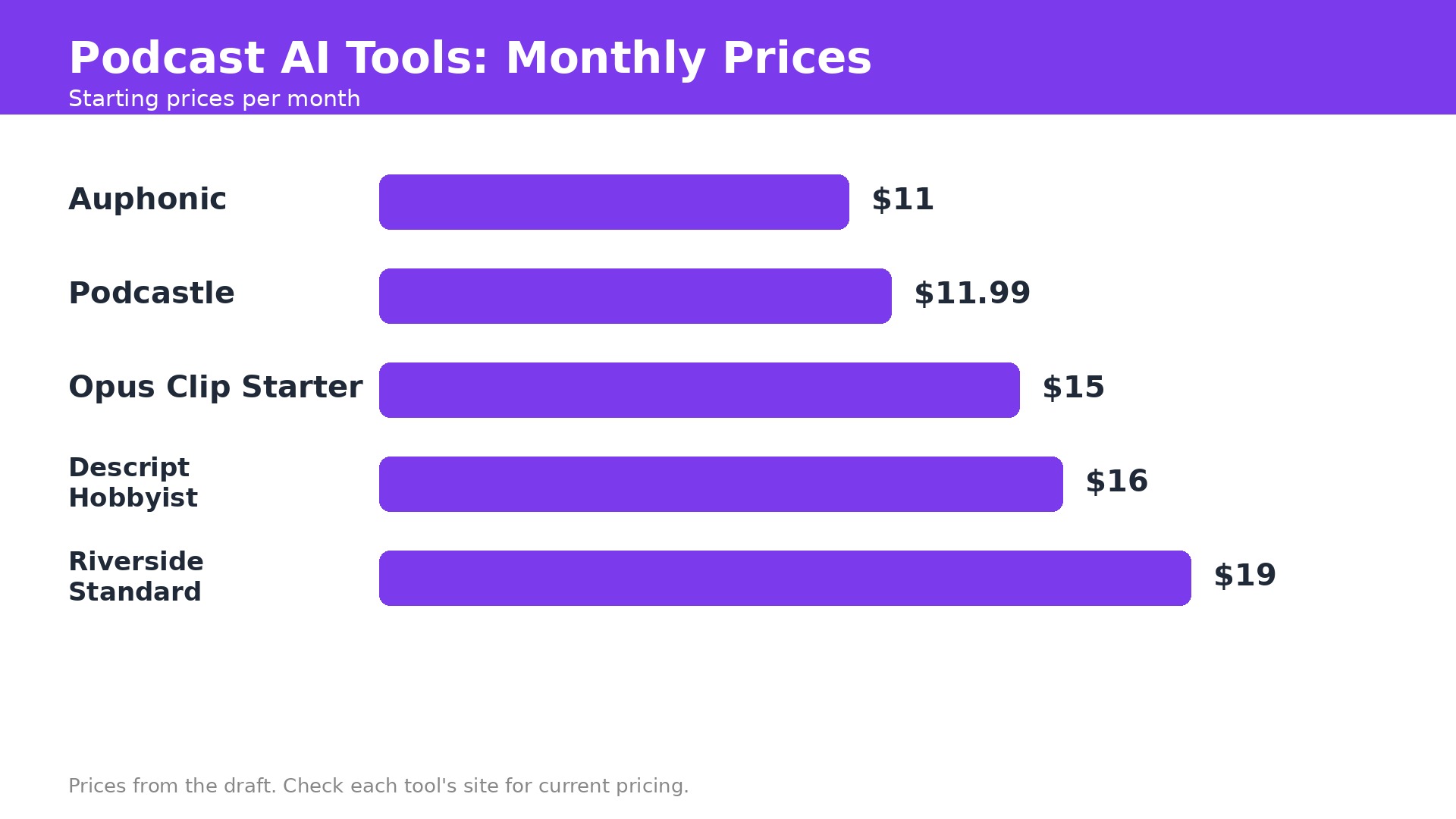
One strong combination is Riverside Standard at 19 dollars a month for recording, Descript Hobbyist at 16 dollars for editing, and Adobe Podcast free for cleanup. That totals about 35 dollars a month plus a free cleanup tool, and it covers recording, editing and rescue for a weekly interview show.
Add Opus Clip Starter at 15 dollars when clips become a growth job, and the total reaches about 50 dollars a month. Add Buzzsprout at 12 dollars for hosting, and a full chain from recording to publishing costs about 60 dollars. That is still less than one hour of freelance editing per episode in most markets.
Watch the meters before you add anything. Descript counts media hours and AI credits separately, Riverside counts recording hours, and Opus Clip counts source minutes. A plan that looks cheap can double in price if you publish more often. Check usage after the first month, then upgrade only the tool that actually hit its cap.
Mistakes that waste money on podcast tools
The first mistake is buying an editor before fixing recording. A tool cannot rescue an interview recorded over a bad connection with one combined track. Record locally with Riverside first, then worry about editing. The second mistake is paying for two all in one tools. Descript and Podcastle overlap heavily, so pick one and learn it.
The third mistake is trusting AI clips without watching them. Opus Clip can cut a joke in half or pick the dullest minute of a great episode. Review every clip before it goes out under your name. The fourth mistake is ignoring loudness. An episode that is too quiet or too loud loses listeners faster than a weak intro, and Auphonic fixes it for 11 dollars a month.
How to plan a week of episodes with AI
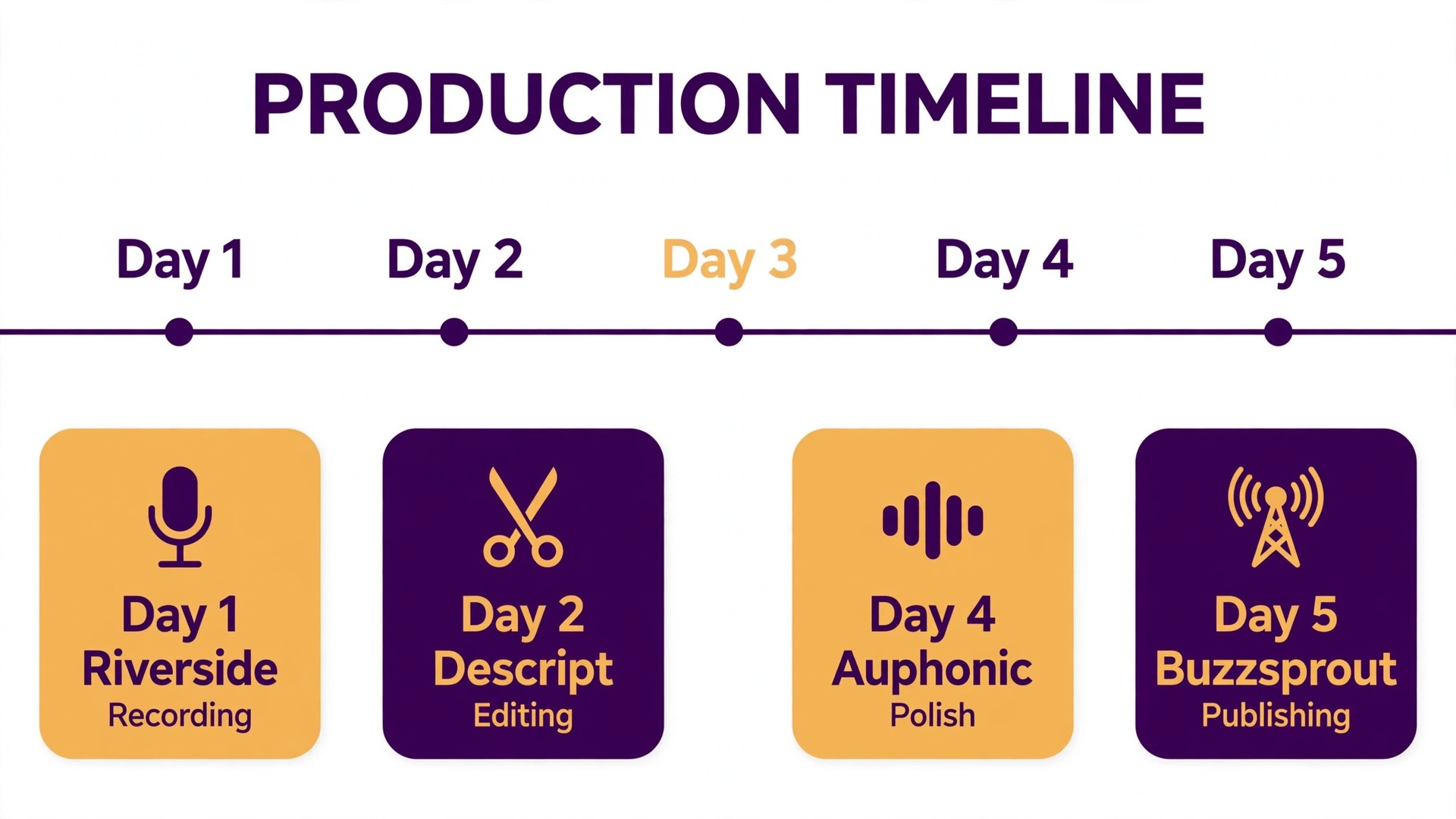
Record on Monday and let Riverside capture each guest locally. Upload the files to Descript on Tuesday and cut by transcript, removing filler words and tangents in one pass. Send the finished edit to Auphonic for loudness and cleanup on Wednesday, and let Adobe Podcast rescue any noisy guest audio the same day.
Write show notes on Thursday with the Descript transcript and a short prompt to your writing assistant. Turn the notes into a blog post, a newsletter and three social posts from the same source, so one episode feeds every channel without rewriting the same ideas four times.
Cut clips on Friday with Opus Clip and schedule them across the weekend. Post two clips a day, watch which ones earn clicks back to the full episode, and use that data to choose next week topic. A weekly rhythm like this keeps a show alive, because the work is spread across days instead of crushed into one long night.
When to hire a human instead
AI handles the mechanical work, but some jobs still need a person. A launch episode, a sponsor read and a sensitive interview all deserve a human editor who hears tone, not just words. Budget for a human on the episodes that matter most, and let AI handle the regular weekly shows.
A human editor also catches what AI misses. A joke that lands badly, a claim that needs checking, a guest who sounds uncomfortable. Those judgments decide whether listeners trust the show, and no tool can make them for you. Listen to the full episode once before it publishes, even when AI did the edit.
The same rule applies to cover art and branding. AI can draft a thumbnail or a social image, but the visual identity of a show deserves a designer who understands the audience. Spend the money where listeners notice, and save it where they do not.
How to plan a week of episodes with AI
Record on Monday and let Riverside capture each guest locally. Upload the files to Descript on Tuesday and cut by transcript, removing filler words and tangents in one pass. Send the finished edit to Auphonic for loudness and cleanup on Wednesday, and let Adobe Podcast rescue any noisy guest audio the same day.
Write show notes on Thursday with the Descript transcript and a short prompt to your writing assistant. Turn the notes into a blog post, a newsletter and three social posts from the same source, so one episode feeds every channel without rewriting the same ideas four times.
Cut clips on Friday with Opus Clip and schedule them across the weekend. Post two clips a day, watch which ones earn clicks back to the full episode, and use that data to choose next week topic. A weekly rhythm like this keeps a show alive, because the work is spread across days instead of crushed into one long night.
When to hire a human instead
AI handles the mechanical work, but some jobs still need a person. A launch episode, a sponsor read and a sensitive interview all deserve a human editor who hears tone, not just words. Budget for a human on the episodes that matter most, and let AI handle the regular weekly shows.
A human editor also catches what AI misses. A joke that lands badly, a claim that needs checking, a guest who sounds uncomfortable. Those judgments decide whether listeners trust the show, and no tool can make them for you. Listen to the full episode once before it publishes, even when AI did the edit.
The same rule applies to cover art and branding. AI can draft a thumbnail or a social image, but the visual identity of a show deserves a designer who understands the audience. Spend the money where listeners notice, and save it where they do not.
What the full stack costs in real life
A beginner can start for about 12 dollars a month with Podcastle Essential or Buzzsprout plus free cleanup from Adobe Podcast. That covers recording, editing, hosting and rescue well enough to publish weekly and learn what your audience wants.
A serious weekly show should budget 40 to 60 dollars a month. Riverside Standard at 19 dollars, Descript Hobbyist at 16 dollars and Auphonic at 11 dollars total 46 dollars, with Adobe Podcast free as a backup. Add Opus Clip at 15 dollars when social growth becomes a goal, and the stack stays under 65 dollars a month. The best AI tools for podcasters earn that money by returning hours, and any tool that does not save at least an hour a week should be cancelled.
What to Do Next
Start with Riverside for recording, Descript for editing and Adobe Podcast free for cleanup. That trio is the short version of the best AI tools for podcasters, and it fixes the three failure points that kill shows, ruined recordings, slow editing and bad audio. Add Opus Clip when you are ready to grow, and Buzzsprout when you want hosting that stays out of your way.
No tool here replaces a good conversation. AI removes the boring work so you can spend your time on guests, stories and questions worth hearing. That is the whole point of the stack.
Frequently Asked Questions
What is the best AI tool for podcast editing?
Descript is the best all in one editor among the best AI tools for podcasters because it lets you edit audio and video by editing a transcript. Hobbyist costs 16 dollars a month billed annually. Riverside is better if remote recording quality matters more than editing depth, and Podcastle is simpler for beginners.
Can AI edit my podcast automatically?
AI can remove filler words, clean noise, level loudness and draft show notes, but it cannot judge which stories to keep. Use Descript or Auphonic for the mechanical work, then listen to the full episode once before publishing. The final listen catches mistakes no tool will flag.
How much do AI podcast tools cost?
A beginner stack built from the best AI tools for podcasters costs about 12 dollars a month. A serious weekly show should budget 40 to 60 dollars a month for recording, editing and cleanup. Watch the meters, since media hours, recording hours and credits all cap monthly use and decide the real price.
Is Descript or Riverside better for podcasters?
Descript is better for editing, because transcript editing is faster and deeper. Riverside is better for recording remote guests, because local tracks protect the audio from bad connections. Many shows use both, Riverside to record and Descript to edit.
Can AI fix bad podcast audio?
Partly. Adobe Podcast Enhance Speech can rescue noisy or echoey recordings for free, and Auphonic levels and cleans finished audio from 11 dollars a month. Neither can fix clipping from recording too loud, or a guest recorded over a bad connection on one combined track.
Do I need video for my podcast?
No, but video helps growth. Riverside records video alongside audio, and Opus Clip turns long video episodes into Shorts for TikTok and Reels. If you only publish audio, skip the clip tools and spend the money on better recording and editing instead.