
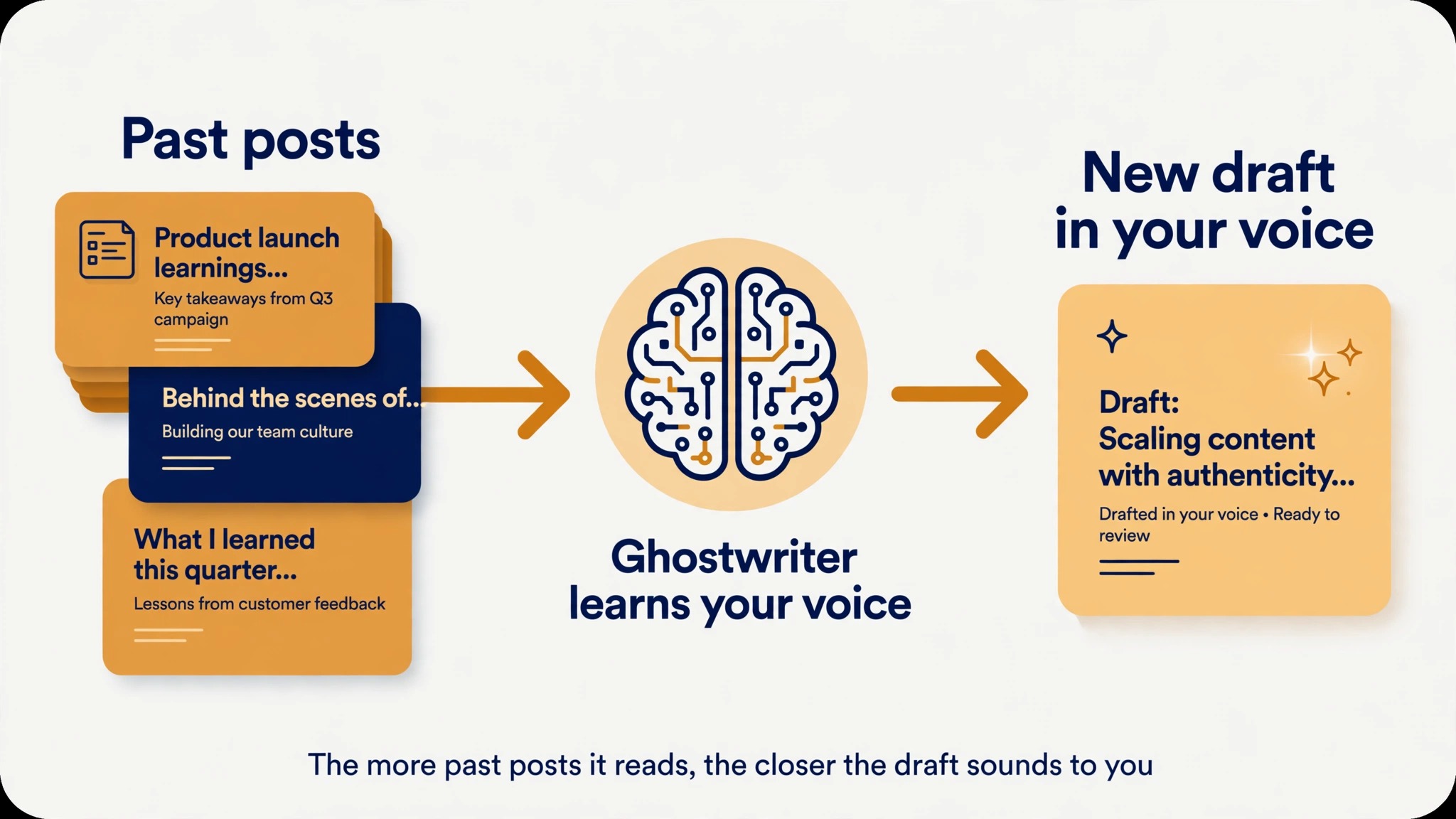
Among the best LinkedIn post makers for most people in 2026, ContentIn leads, because it pairs an AI ghostwriter that learns your voice with scheduling and analytics for 39 dollars a month, which undercuts Taplio AI writing by 30 dollars a month while covering the same daily workflow. That verdict holds for solo creators and founders who write their own posts and want help drafting them faster.
It does not hold for everyone, because a sales team that needs outreach and a lead database should still look at Taplio, and a writer who only wants a better editor should look at AuthoredUp instead. The right tool depends on the bottleneck in your posting habit, and this guide ranks ten tools by that test rather than by brand size.
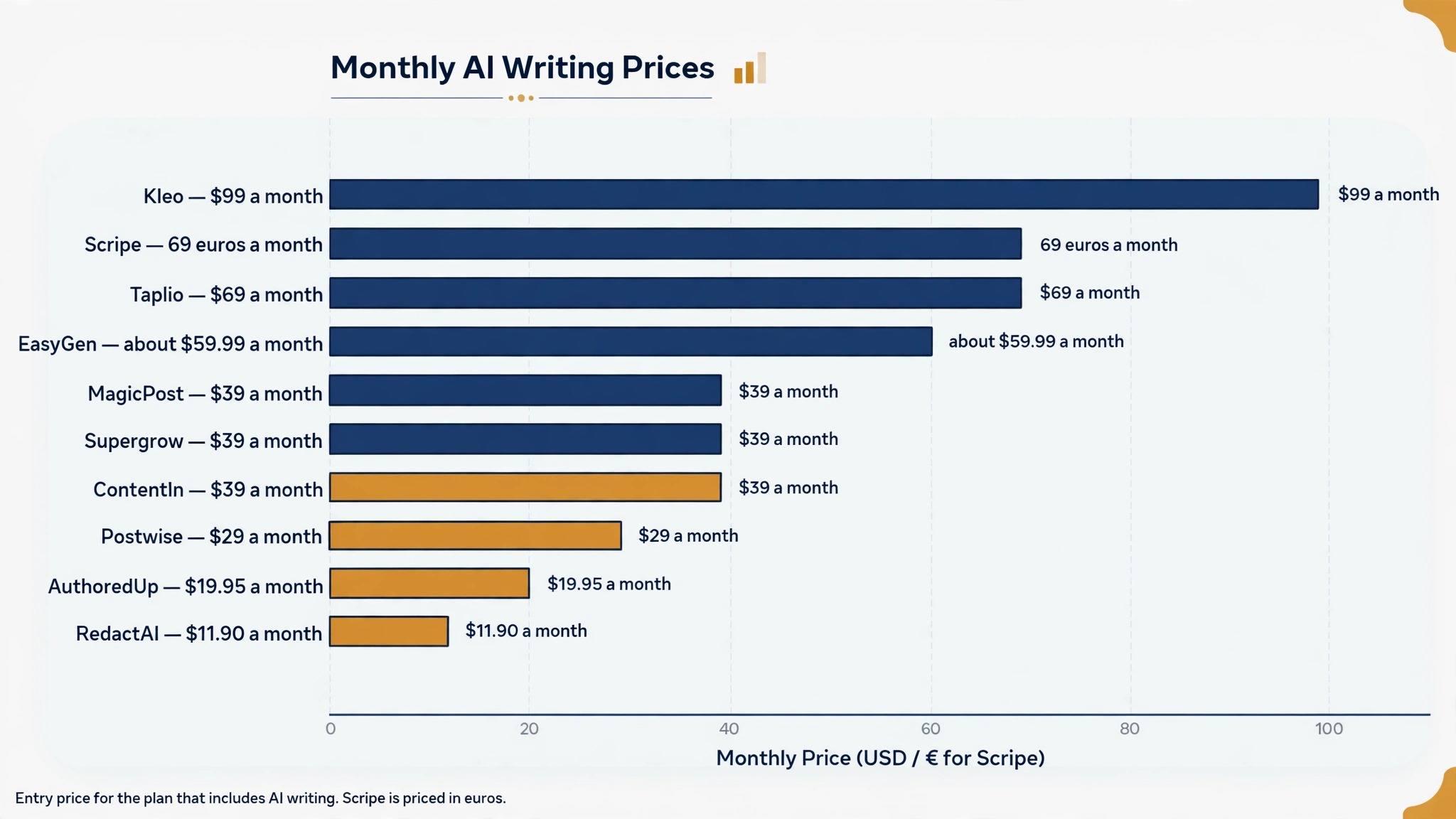
LinkedIn rewards a different kind of post than it did two years ago. Short hooks matter more than long essays, carousels earn saves, and the first hour of engagement decides how far a post travels. The tools below all promise to help with that, but they do it in different ways, and the price gap between the cheapest and the most expensive is nearly tenfold. Prices in this guide were checked against vendor pages and independent pricing checks from August to October 2026, and this category reprices often, so confirm the current figure on the vendor page before you pay.
The Best LinkedIn Post Makers at a Glance
| Tool | Best for | AI writing from | Free option |
|---|---|---|---|
| Taplio | All in one growth plus outreach | 69 dollars a month | 7 day trial |
| Supergrow | Voice first drafting, carousels | 39 dollars a month | 7 day trial |
| AuthoredUp | Editing and formatting posts | 19.95 dollars a month | Free trial |
| Postwise | Voice learning ghostwriter | 29 dollars a month | 400 free credits |
| ContentIn | Budget ghostwriter plus calendar | 39 dollars a month | Free scheduler plan |
| MagicPost | Safe AI writing via official API | 39 dollars a month billed yearly | Free trial |
| Kleo | Voice drafts plus coaching | 99 dollars a month | None |
| EasyGen | Data driven drafts and trends | About 59.99 dollars a month | 3 free posts |
| Scripe | Teams with approvals | 69 euros a month | 7 day trial |
| RedactAI | Cheapest voice matched drafts | 11.90 dollars a month billed yearly | Free start |
Best Pick by Job
| Job | Best pick | Why it wins |
|---|---|---|
| Most people, best value | ContentIn | Ghostwriter, scheduling and analytics for 39 dollars |
| Growth plus lead generation | Taplio | Post library, lead database, outreach in one plan |
| Polishing your own writing | AuthoredUp | Best editor, preview and formatting on LinkedIn |
| Tightest budget | RedactAI | Voice matched drafts from 11.90 dollars a month |
| Safest account setup | MagicPost | Official API posting, documented on its site |
| Teams with approvals | Scripe | Knowledge base, approvals, deep analytics |
The 10 Best LinkedIn Post Makers in Detail
Taplio
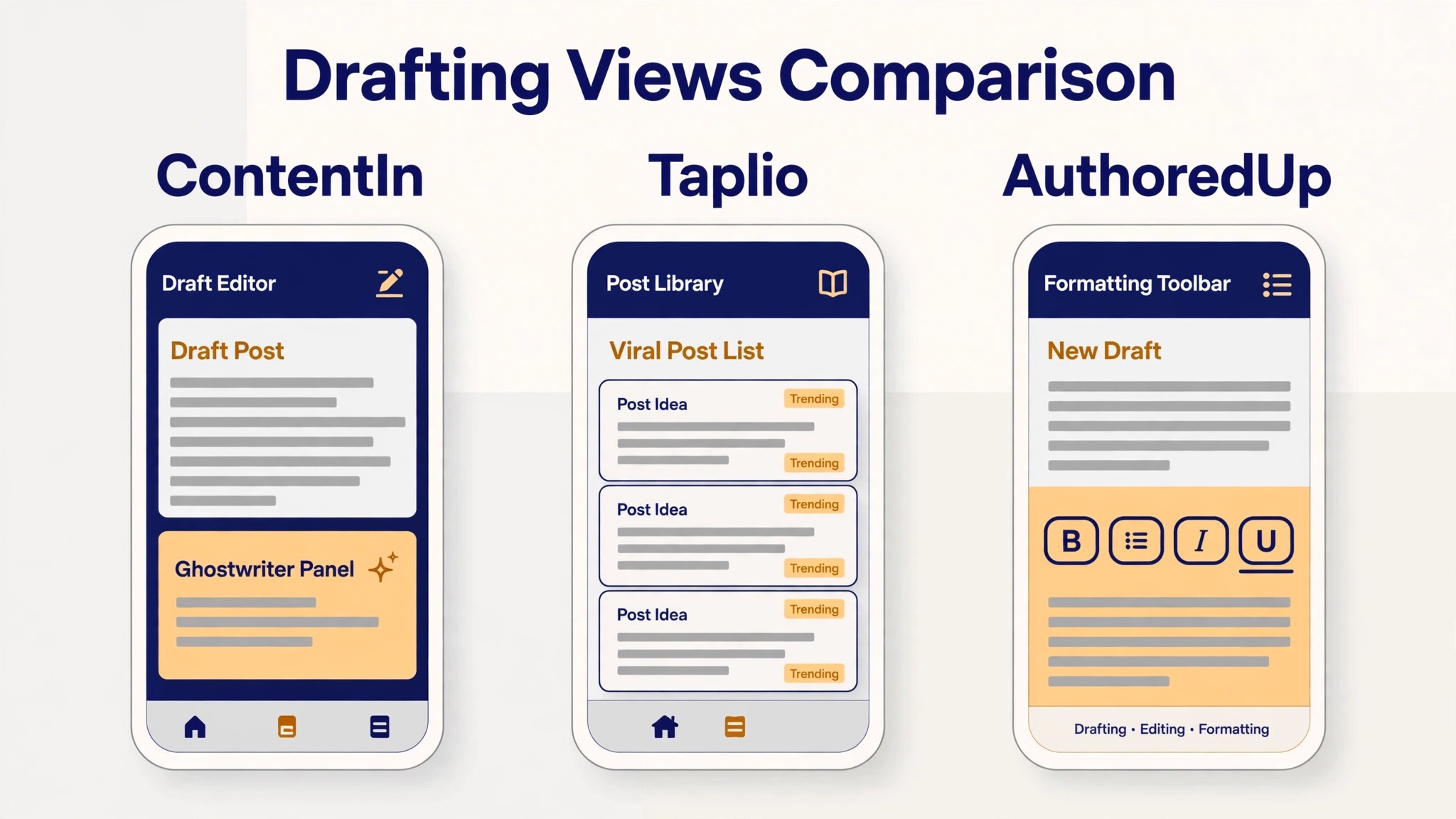
Taplio is the biggest name in this category and the most complete platform, combining AI post generation with scheduling, analytics, a library of more than five million viral posts, and lead generation tools in one workspace. Its AI generates ideas from a URL, a topic or your past content, identifies your best performing formats, and suggests publishing times based on when your audience is active. The lead tools include a database for finding prospects and bulk outreach on the top plan, which is why sales teams pick Taplio over narrower writing tools.
The price is the catch, and it is higher than most lists admit. Starter costs 39 dollars a month but includes no AI writing at all, so the real entry price for an AI post maker is Growth at 69 dollars a month, and Pro costs 199 dollars a month. That makes Taplio the most expensive tool here for what most people want, which is help writing posts.
LinkedIn also blocked Taplio temporarily in April 2025, as reported by independent reviewers, because parts of the tool run through a browser extension rather than the official API. If you need outreach and content in one subscription and you can afford the Growth plan, Taplio is strong. If you only need writing help, a cheaper tool does the job.
Supergrow
Supergrow built its name on hook quality, which is the first line of a LinkedIn post and the line that decides whether a reader expands the post or scrolls past it. Its AI studies thousands of high performing posts and reverse engineers the structures that drive comments, saves and shares, then applies those patterns to your drafts. The tool also turns voice notes into posts through a feature called PostCast, which interviews you by voice and drafts from your answers, and it turns long articles into brand consistent carousels in seconds.
Supergrow repriced in autumn 2026, and the old 19 dollar plan is gone, with plans now starting at 39 dollars a month and a Teams plan at 199 dollars for five accounts. A Post Score feature added in August 2026 rates each draft for performance and authenticity and suggests rewrites, which is a useful check against the generic tone that AI drafts often carry. Supergrow suits daily creators who talk more easily than they type and who want carousels without opening a design tool. It is less suited to a team that needs approvals or to a buyer who wants the cheapest AI writer, because both of those jobs are cheaper elsewhere.
AuthoredUp
AuthoredUp is a writing first tool rather than a growth platform, and it is the best choice for people who write their own posts and want help making them better. It works as a Chrome extension that sits inside LinkedIn itself, so the AI assistance, formatting tools and preview appear exactly where you write, with no copy and paste between apps. The editor handles bold and italic text, bullet spacing, hooks and calls to action, and it shows an exact preview of how the post will look in the feed before you publish.
AuthoredUp costs 19.95 dollars a month, or 16.63 dollars a month billed yearly, and a Business plan costs 14.95 dollars per profile a month with a three profile minimum. A Coauthor AI feature is in beta on the paid plan, so the AI writing is newer and less central here than in Taplio or ContentIn. The strength is the drafting experience itself, which independent testers rate as the best LinkedIn editor available, with deep analytics on which of your posts performed and why. Pick AuthoredUp if your bottleneck is formatting and polish. Pick a ghostwriter tool if your bottleneck is coming up with the post in the first place.
Postwise
Postwise is built around a ghostwriter that learns your voice from examples you provide, and it is the best tool here for people whose main complaint is that AI drafts do not sound like them. You paste your LinkedIn URL or a set of your past posts, the tool studies your vocabulary, your sentence rhythm and your angles, and then drafts new posts that follow the same patterns. It also suggests hooks designed to stop the scroll, and it covers LinkedIn, Twitter and Threads from one account, which matters if you post on more than one platform.
Postwise costs 29 dollars a month, with a free trial that includes 400 AI credits, which is enough to test the voice learning properly before paying. The trade off is depth, because Postwise is a writing and scheduling tool rather than a full growth platform, with no lead database, no CRM and no team approval workflow. For a solo creator who posts daily and wants a ghostwriter that sounds like them, that trade is worth it, and the price undercuts Taplio AI writing by 40 dollars a month. For a sales team or an agency, the missing features will push you toward Taplio or Scripe instead.
ContentIn
ContentIn is the value pick in this roundup, and it is the tool most people should try first. Its AI ghostwriter reads your past LinkedIn posts and drafts new ones in your voice, with unlimited drafts on the Growth plan at 39 dollars a month or 31 dollars a month billed yearly. The same plan adds a content calendar, scheduling, first comment scheduling, analytics and a post optimizer, so the whole daily workflow lives in one app. A cheaper plan starts from about 15 dollars a month for the scheduler and basic features, which is the lowest entry price of any full workflow tool here.
ContentIn posts through the official LinkedIn API, which matters for account safety, because tools that run on stored browser sessions carry more risk than tools that use the approved route. The ghostwriter covers several formats, including text posts, carousels and polls, and the planner is built around posting mix and timing rather than raw volume. The weakness is brand size, because ContentIn is smaller than Taplio and has a smaller template library and community, so you will find fewer tutorials and fewer public reviews. On price and features per dollar, though, nothing else here matches it.
MagicPost
MagicPost is the safety first pick, and it is the only tool on this list whose vendor documents official API posting as its core method. That matters because LinkedIn has tightened its rules on automation, and tools that post through the approved API are far less likely to trigger a restriction than tools that drive the site through a browser session. MagicPost keeps its feature set deliberately narrow, with a post generator, an idea generator, an inspiration library, scheduling with comment scheduling included, and solid LinkedIn metrics, without trying to be a full growth platform.
The pricing has two tiers and the cheaper one has no AI, which confuses buyers who compare headline prices. The Analytics plan costs about 21 dollars a month billed yearly or 35 dollars month to month, and covers metrics, manual writing and scheduling. The Creator plan costs about 39 dollars a month billed yearly or 69 dollars month to month, and adds the AI post and idea generators, the inspiration library and engagement metrics for any creator you want to study. A free trial needs no card. Pick MagicPost if account safety is a hard requirement. Pick ContentIn if you want more features for the same money and accept the standard API setup.
Kleo
Kleo is the premium option in this roundup, and it sells writing help plus coaching and community rather than software alone. The tool drafts posts in your voice, generates graphics and carousels, keeps a swipe file of proven formats, and schedules your posts, while the subscription adds live coaching sessions and a community of creators who review each other work. That combination suits a founder or a consultant who wants a system for growing on LinkedIn, not just a place to type drafts.
Kleo costs 99 dollars a month or 999 dollars a year, with no free trial and a 30 day guarantee on the annual plan. That price is hard to justify on features alone, because ContentIn covers the same drafting and scheduling for 39 dollars a month, so the extra 60 dollars buys the coaching and the community rather than the tool. If you will actually attend the coaching and use the community, Kleo can be worth it, because feedback from experienced creators improves posts faster than any AI feature. If you will not attend, the subscription is an expensive way to buy a post generator, and a cheaper tool plus a writing course will serve you better.
EasyGen
EasyGen is a single purpose AI writer for LinkedIn, and it does one thing fast, which is turning an idea or a trend into a draft. Its generator is data driven, studying trending posts and top creators in your niche, and it includes a content calendar and creator research tools so you can see what is working for others before you write. The Chrome extension and web app keep the workflow close to LinkedIn, and the drafts are tuned for the hook first style that performs best in the feed.
EasyGen costs about 59.99 dollars a month or about 49.99 dollars a month billed yearly, according to third party reviews, because EasyGen does not publish pricing before signup. There is no scheduling, no analytics and no team workflow, so you are paying more than ContentIn for a tool that does less, and the only reason to pick it is the quality of its trend research and its creator data. Three free posts let you test the drafts before paying. For most buyers the math does not work, and ContentIn or Postwise gives you more for less money, but a creator who lives on trend driven content may find the research features worth the premium.
Scripe
Scripe is the team tool in this roundup, built for European B2B companies that run LinkedIn as a programme rather than a personal habit. It combines a knowledge base, where the team stores facts, stories and product details, with an AI writer that drafts from that base, plus approvals, scheduling and deep analytics across every account. That structure solves the real problem for teams, which is keeping ten people posting in one consistent voice without a manager rewriting every draft by hand.
Scripe costs 69 euros a month plus VAT for the Solo plan, or 55 euros a month billed yearly, with Advanced at 99 euros and Business at 149 euros. The higher plans add auto engagement across accounts and agency features such as client workspaces. The price is in euros and the product is B2B only, with strict refund terms, so a solo creator outside Europe should look elsewhere. For a B2B team that needs approvals and a shared knowledge base, Scripe is the most complete option here, and the per account cost falls sharply once several colleagues share one plan.
RedactAI
RedactAI is the budget specialist in this roundup, and it is the cheapest way to get voice matched LinkedIn drafts. The tool learns your writing style and generates posts that follow it, with a free start and paid plans from 11.90 dollars a month billed yearly for fifteen posts, or 24 dollars a month billed yearly for the Creator plan with unlimited posts. That undercuts every other ghostwriter here by a wide margin, and it makes RedactAI the natural pick for a creator who posts a few times a week and wants AI help without a 30 dollar subscription.
The trade off is scope, because RedactAI is a drafting tool rather than a workflow platform, with basic scheduling and no analytics, CRM or team features. The drafts are good for the price, and the voice matching is the feature that matters, but you will need a separate scheduler or LinkedIn native scheduling to publish consistently. For a beginner testing AI assisted posting, RedactAI is the lowest risk entry point in this guide, and the free start means you can judge the voice matching before spending anything. For a daily poster who wants scheduling and analytics included, ContentIn is the better value.
What a Good LinkedIn Post Looks Like in 2026
A good LinkedIn post in 2026 opens with a hook that makes a clear promise in the first two lines, because the feed shows only those lines before the reader has to tap to expand. The hook should state a result, a mistake or a surprising fact, and it should do so in plain words rather than clever ones, because a reader scrolling fast has no patience for wordplay.
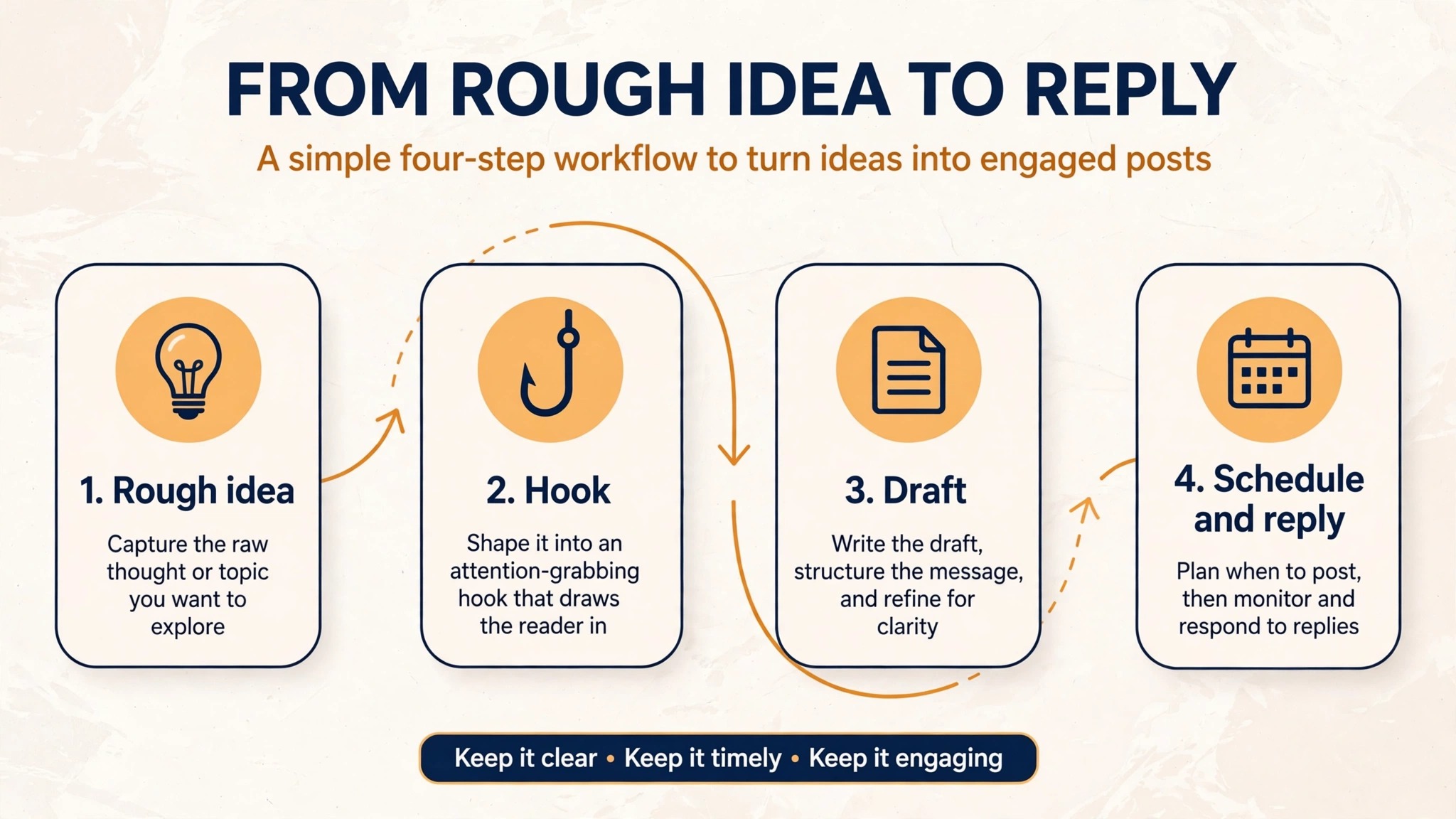
The best LinkedIn post makers help with this specific job, and the hook generators in Supergrow and Postwise exist because the first line matters more than the rest of the post combined. Write the hook last if you struggle with it, after you know what the post actually says, and test two versions on different days to see which one earns more expands.
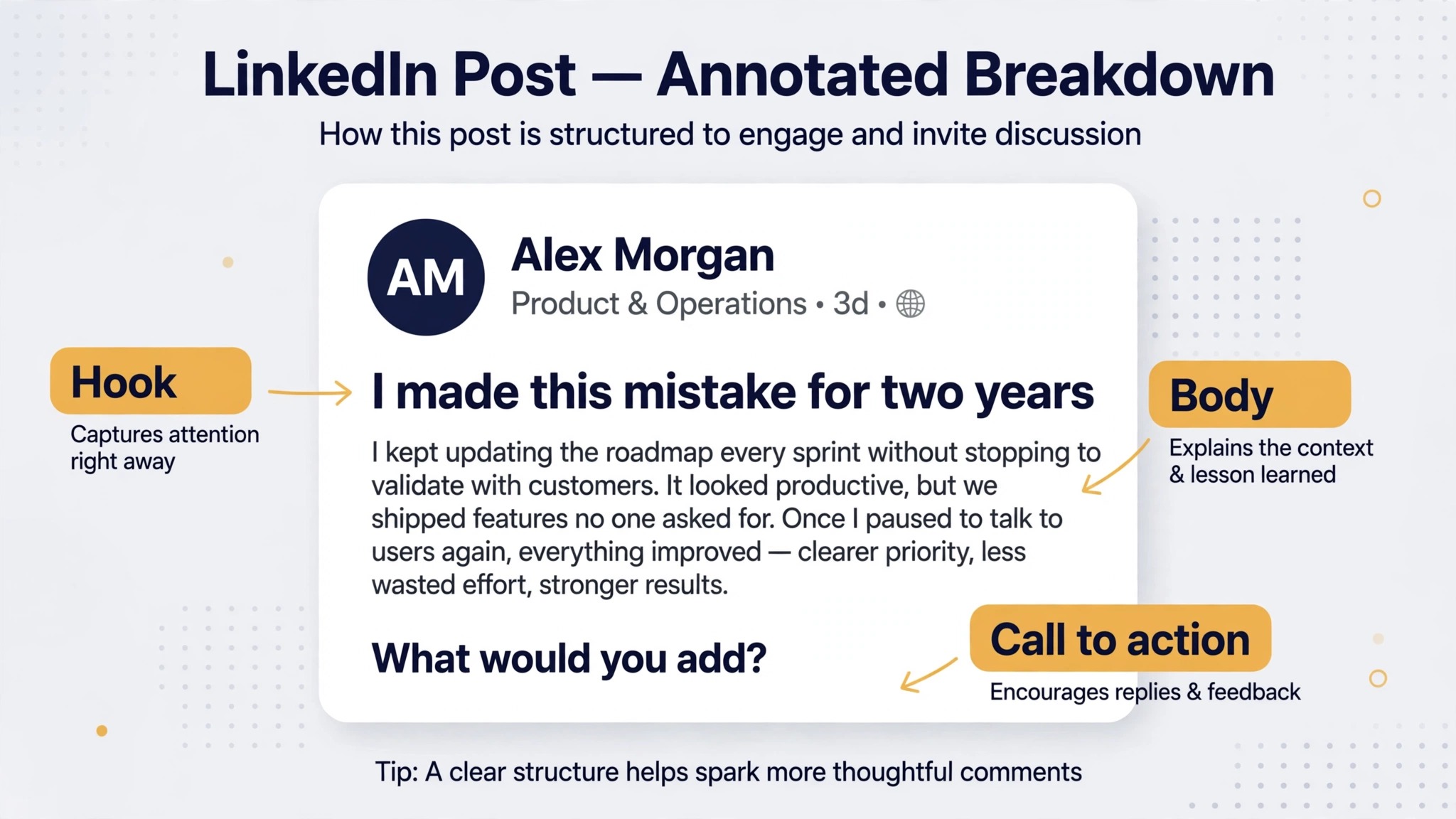
The body of the post should be short, specific and easy to scan, with one idea per line and white space between thoughts. A post that runs to forty lines will be skipped no matter how good the idea is, while a post of ten to fifteen lines with a clear structure will be read to the end. Use a personal example, a real number or a concrete step rather than a general claim, because specifics are what make a post feel written by a person rather than generated by a tool. A carousel can carry a longer argument, but the same rule applies, one idea per slide and a clear headline on each.
The close of the post should ask for one response, not five. A question that invites a story works better than a question that invites a yes or no answer, and a call to save the post works better than a call to follow you, because saves are a strong signal to the algorithm and they bring the reader back. The first hour after publishing matters most, so reply to early comments quickly and ask a follow up question that keeps the conversation going. A tool can draft the post, but it cannot hold the conversation, and the conversation is where the reach comes from.
How to Choose the Right LinkedIn Post Maker
Start from your bottleneck, because the ten tools here solve different problems and the wrong pick wastes money. If you struggle to come up with ideas, pick a ghostwriter with a strong idea generator, such as ContentIn or MagicPost. If you have ideas but your drafts sound flat, pick a voice learning tool such as Postwise or RedactAI. If you write well but your formatting is messy, pick AuthoredUp. If you need leads as well as content, pick Taplio. If you run a team, pick Scripe. A tool that solves the wrong bottleneck will feel useless within a month, while a tool that solves the right one will feel essential within a week.
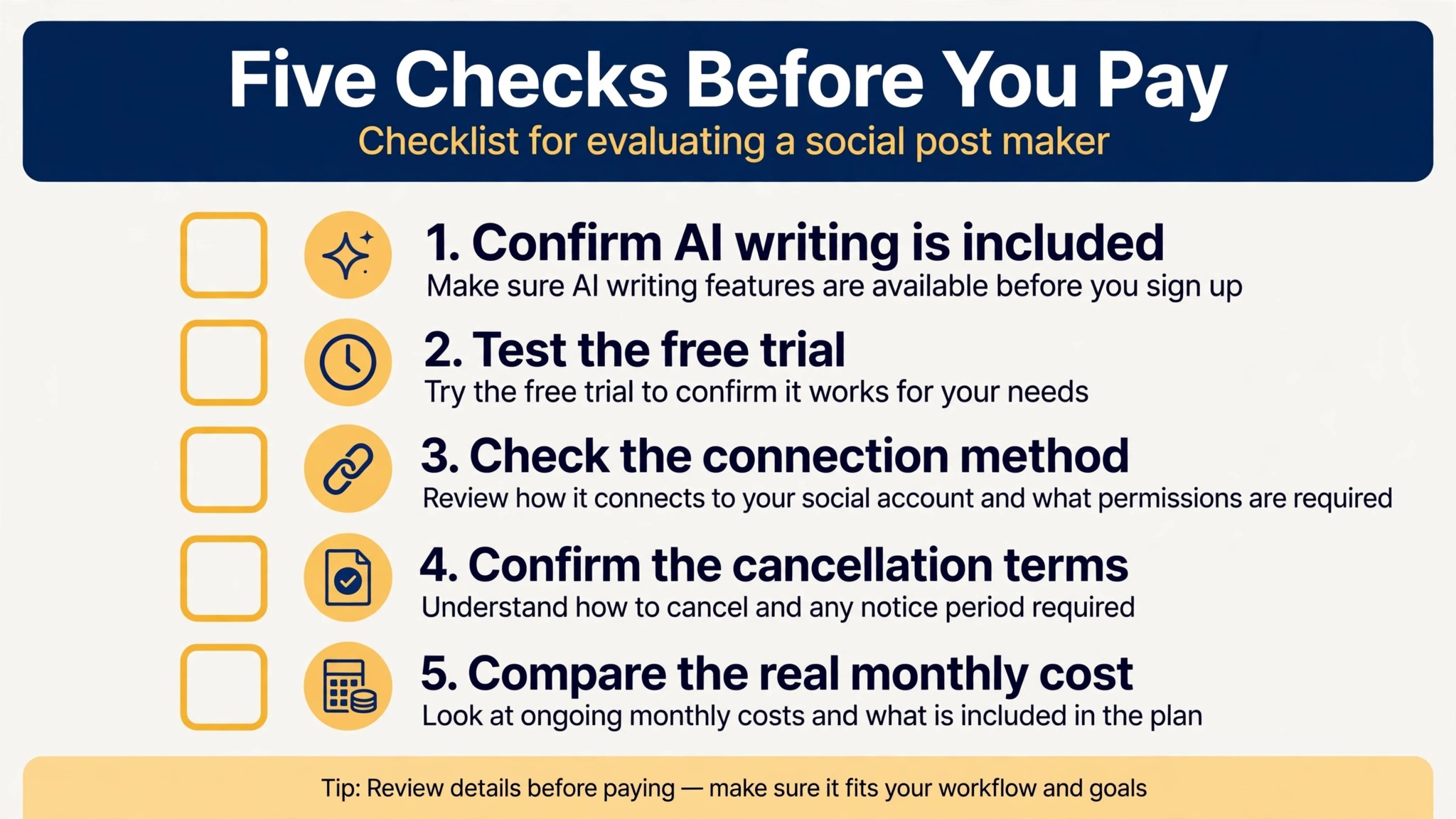
Check the real price of AI writing before you compare plans, because several tools hide the AI features on a higher tier. Taplio Starter at 39 dollars a month has no AI writing, and the real price is 69 dollars. MagicPost Analytics at about 21 dollars a month billed yearly has no AI writing, and the real price is about 39 dollars. ContentIn Growth at 39 dollars a month includes unlimited AI drafts, and Postwise at 29 dollars includes the ghostwriter from the start. The headline price on a pricing page is not always the price of the feature you want, so read the plan comparison table line by line and confirm that AI writing is included before you pay.
Test the voice matching before you commit, because it is the feature that decides whether you keep using the tool. Use the free trial or the free credits to generate five posts on topics you know well, then read them aloud and ask whether they sound like you. If the drafts need heavy editing, the tool is not learning your voice and you will spend as much time fixing posts as you would have spent writing them. The best LinkedIn post makers earn their keep by cutting your drafting time in half, not by giving you a new editing job, so the trial is the real test and the feature list is only a promise.
Account Safety and the Official API
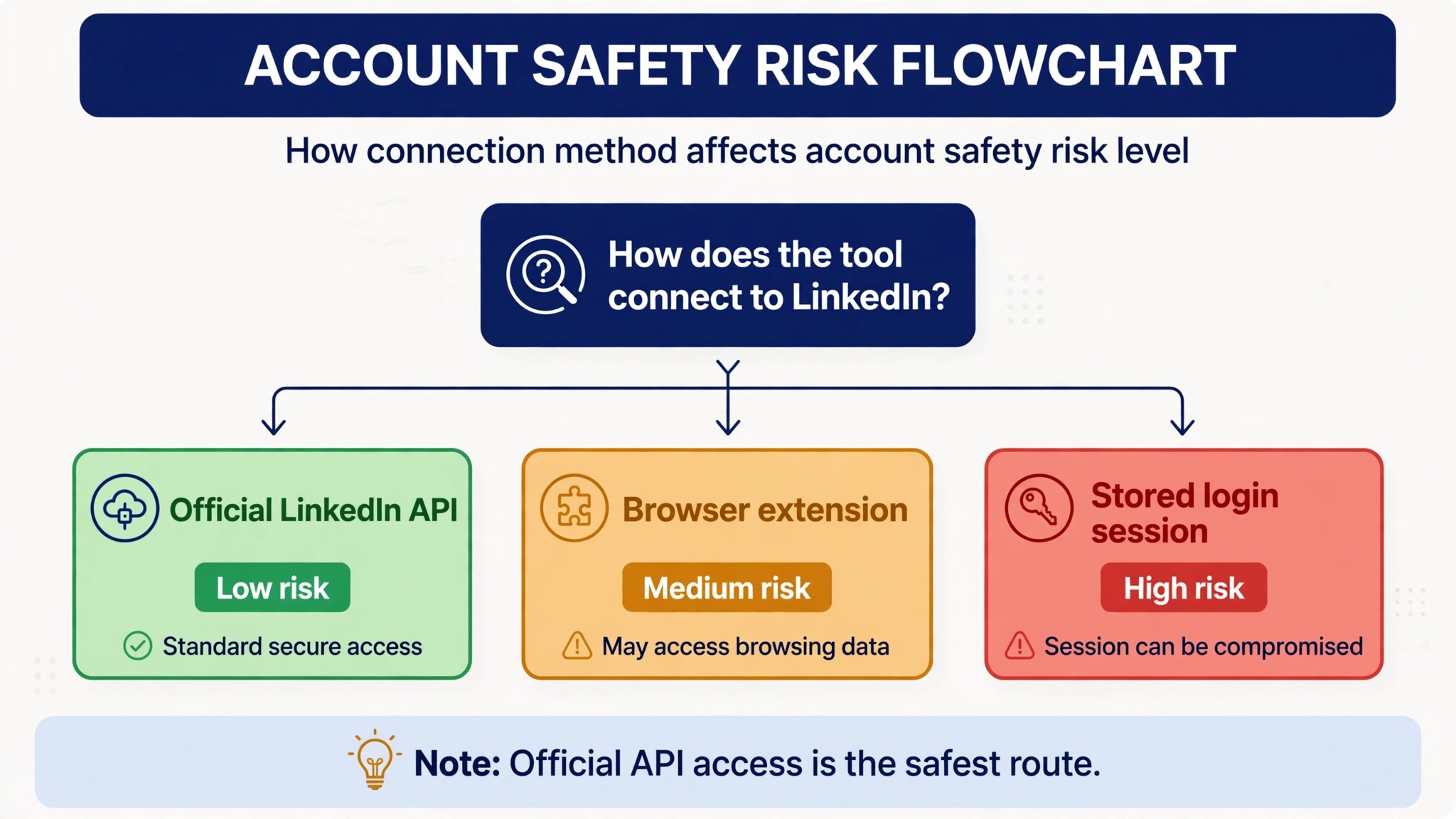
LinkedIn has tightened its rules on automation, and the way a tool connects to LinkedIn now matters as much as what it writes. Tools that post through the official LinkedIn API use an approved route, and they are far less likely to trigger a restriction than tools that drive the site through a browser extension or a stored session. MagicPost documents official API posting, ContentIn posts through the official API, and Taplio has acknowledged that parts of its tool run as automation against LinkedIn terms. LinkedIn blocked Taplio temporarily in April 2025, as reported by independent reviewers, and the analytics tool Shield wound down in May 2026 after LinkedIn made clear it could not keep operating as built.
The practical rule is to prefer an official API tool when you have the choice, and to be cautious with any tool that asks for your LinkedIn password or installs a browser extension that acts on your behalf. Never give a tool your password directly, never run two automation tools at once, and keep your posting volume human, because a sudden jump from two posts a week to five posts a day looks automated no matter which tool you use.
If a tool promises auto connecting, auto commenting or bulk direct messages, treat that as a risk rather than a feature, because those are the behaviours LinkedIn restricts first. Your account is worth more than any growth hack, and a restriction can cost you the audience you spent years building.
Mistakes That Waste Money on Post Makers
Paying for the top plan before testing the trial is the most common mistake, and it is also the easiest to avoid. Every paid tool here except Kleo offers a free trial or free credits, and a week of testing tells you more than any review. The buyers who waste money are the ones who sign up for Taplio Pro at 199 dollars a month because a tutorial recommended it, then discover they only needed the writing help that ContentIn covers for 39 dollars. Start on the cheapest plan that includes AI writing, use it for a month, and upgrade only when a specific feature is missing from your daily work.
Publishing AI drafts without editing them is the mistake that costs reach rather than money. Readers can recognise a generic AI post within two lines, and LinkedIn own data shows that posts with a personal voice earn more engagement than posts that read like a template. Edit every draft, add one specific detail from your own experience, cut any sentence you would not say out loud, and read the post once before scheduling it. The tool should cut your drafting time in half, not remove you from the process, because the personal detail is the part that makes a post perform.
Posting more often without a plan is the third mistake, and it shows up when a new tool makes drafting easy. Five rushed posts a week will perform worse than two thoughtful ones, because the algorithm rewards engagement per post rather than volume, and your audience will tune out if every post feels the same. Set a sustainable rhythm, such as three posts a week, and use the time the tool saves you to reply to comments and to read what others in your niche are posting. The best LinkedIn post makers make consistency possible, but consistency without quality is just noise, and noise is what the algorithm is designed to suppress.
Frequently Asked Questions
What is the best LinkedIn post maker for beginners?
ContentIn is the best starting point for most beginners, because it combines an AI ghostwriter, scheduling and analytics for 39 dollars a month, with a free scheduler plan to try first. RedactAI is the cheapest entry point, from 11.90 dollars a month billed yearly, if you only want help drafting. AuthoredUp is the best pick if you already write well and only need formatting and preview help. Among the best LinkedIn post makers, the right beginner tool is the one that matches your bottleneck, so test the free trial of two tools for a week and keep the one whose drafts need the least editing.
How much do the best LinkedIn post makers cost?
Prices run from free to 199 dollars a month, and the useful range for most people is 12 to 69 dollars a month. RedactAI starts at 11.90 dollars a month billed yearly, AuthoredUp at 19.95 dollars a month, Postwise at 29 dollars a month, ContentIn at 39 dollars a month, and Taplio AI writing at 69 dollars a month, with Pro at 199 dollars. The best LinkedIn post makers hide AI writing on higher tiers more often than buyers expect, so check that the plan you pick actually includes AI drafting, because Taplio Starter at 39 dollars a month and MagicPost Analytics at about 21 dollars a month billed yearly both exclude it.
Do LinkedIn post makers violate LinkedIn rules?
It depends on how the tool connects to LinkedIn. Tools that post through the official LinkedIn API, such as MagicPost and ContentIn, use an approved route and carry the lowest risk. Tools that drive the site through a browser extension or a stored session carry more risk, and LinkedIn blocked Taplio temporarily in April 2025. The best LinkedIn post makers for safety are the ones that document official API posting, and you should avoid any tool that asks for your LinkedIn password, promises auto connecting or bulk direct messages, or runs two automation tools at once on the same account.
Can AI write LinkedIn posts that sound like me?
Yes, if the tool learns your voice from your past posts, and no, if it only uses generic prompts. Postwise, ContentIn and RedactAI all train on examples of your writing, and the quality of the output depends on the quality of the examples you give them. Feed the tool your ten best performing posts rather than a random sample, edit every draft to add one specific detail from your experience, and read each post aloud before publishing. A draft that needs no editing is rare, and a draft that sounds like you after a minute of editing is the realistic goal.
Is Taplio worth 69 dollars a month?
Taplio is worth 69 dollars a month if you use the lead generation and outreach features alongside the AI writing, because no cheaper tool combines a viral post library, a lead database and bulk outreach in one plan. It is not worth 69 dollars a month if you only need help writing posts, because ContentIn covers ghostwriting, scheduling and analytics for 39 dollars a month and Postwise covers voice learning ghostwriting for 29 dollars a month. The honest test is to list the Taplio features you would use every week, and if the list is only the AI writer, a cheaper tool is the better buy.
Which LinkedIn post maker has the best free plan?
Postwise has the most useful free trial, with 400 AI credits to test the ghostwriter properly. ContentIn offers a free scheduler plan, though AI writing needs the paid Growth plan. MagicPost offers a free trial with no card required, and EasyGen gives three free posts. Kleo has no free trial at all. The best LinkedIn post makers for testing are the ones that let you generate enough posts to judge the voice matching, so favour a trial with real credits over a trial that ends after a single draft, and test on topics you know well.