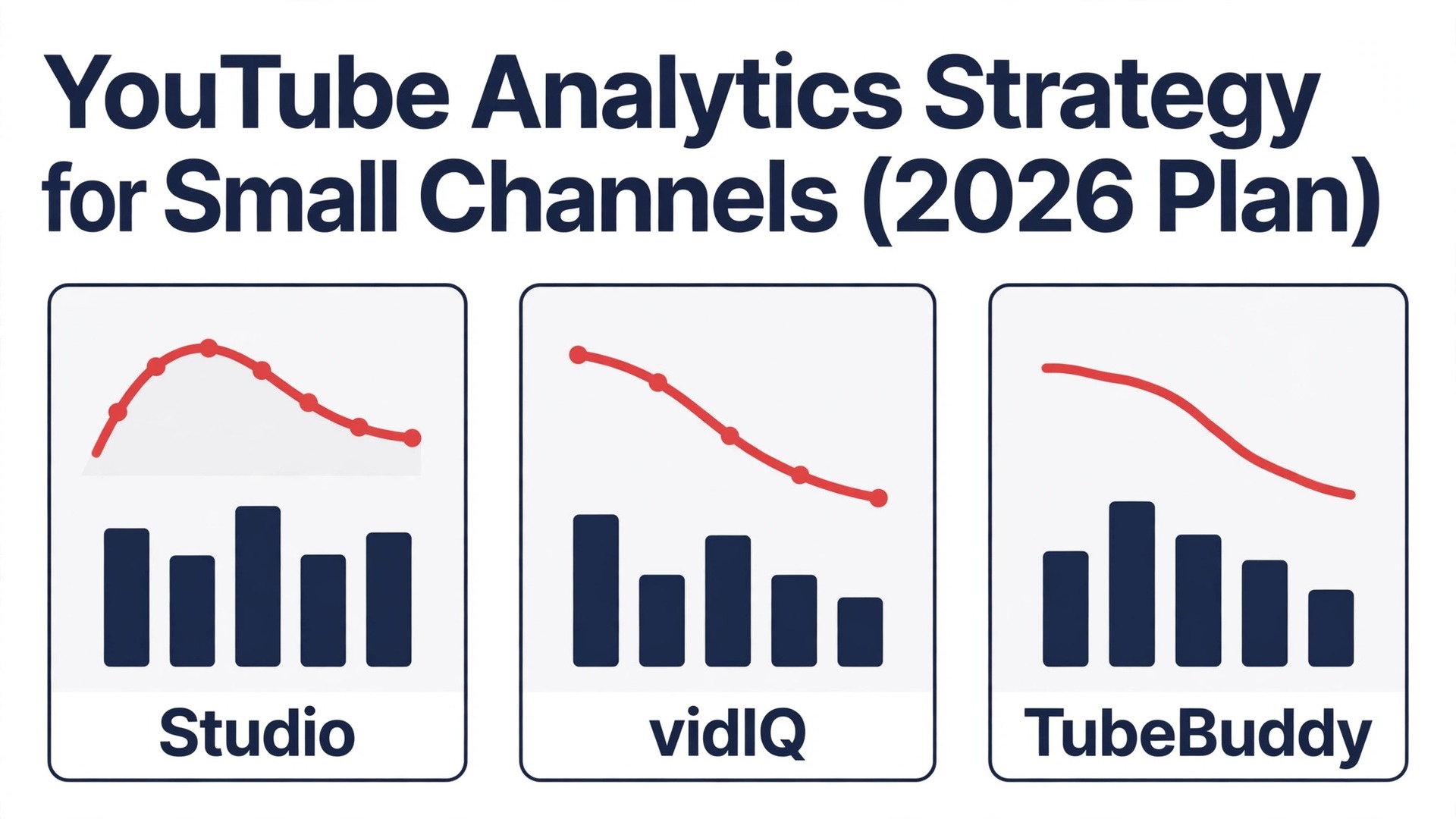
You upload every week, the views stay flat, and you have no idea why. One video gets 800 views and the next gets 90, and the only difference you can see is the topic. That is the problem a youtube analytics strategy for small channels solves. It replaces guessing with a weekly routine that reads the right numbers, finds the one thing to fix next, and turns each upload into a test with a clear answer. This guide builds that routine from the ground up, using YouTube Studio as the source of truth and adding vidIQ, TubeBuddy and a handful of free tools only where they answer a question Studio cannot.
You will learn which metrics matter at under 1,000 subscribers, which ones mislead you, and how to use the numbers to pick your next topic, fix your packaging and grow without burning out.
Small channels fail on analytics in two opposite ways. Some creators never open Studio at all, so they repeat the same mistakes for a year. Others check the numbers every hour, panic at every dip, and change their whole channel based on a single bad video. Both approaches waste the data. The right approach is slower and calmer. You check the numbers once a week, you look at patterns across ten videos rather than one, and you change one thing at a time so you know what worked.
The other trap is vanity. Subscriber count feels like progress, and total views feel like success, but neither tells you what to do next. A channel can gain subscribers from a single viral video and then lose them just as fast, because the new audience never watches again. A channel can get 10,000 views from a misleading thumbnail and earn nothing from it, because nobody stays to watch. The metrics that matter for a small channel are the ones that predict the next video, not the ones that flatter the last one.
The 5 Metrics That Actually Matter Under 1,000 Subscribers
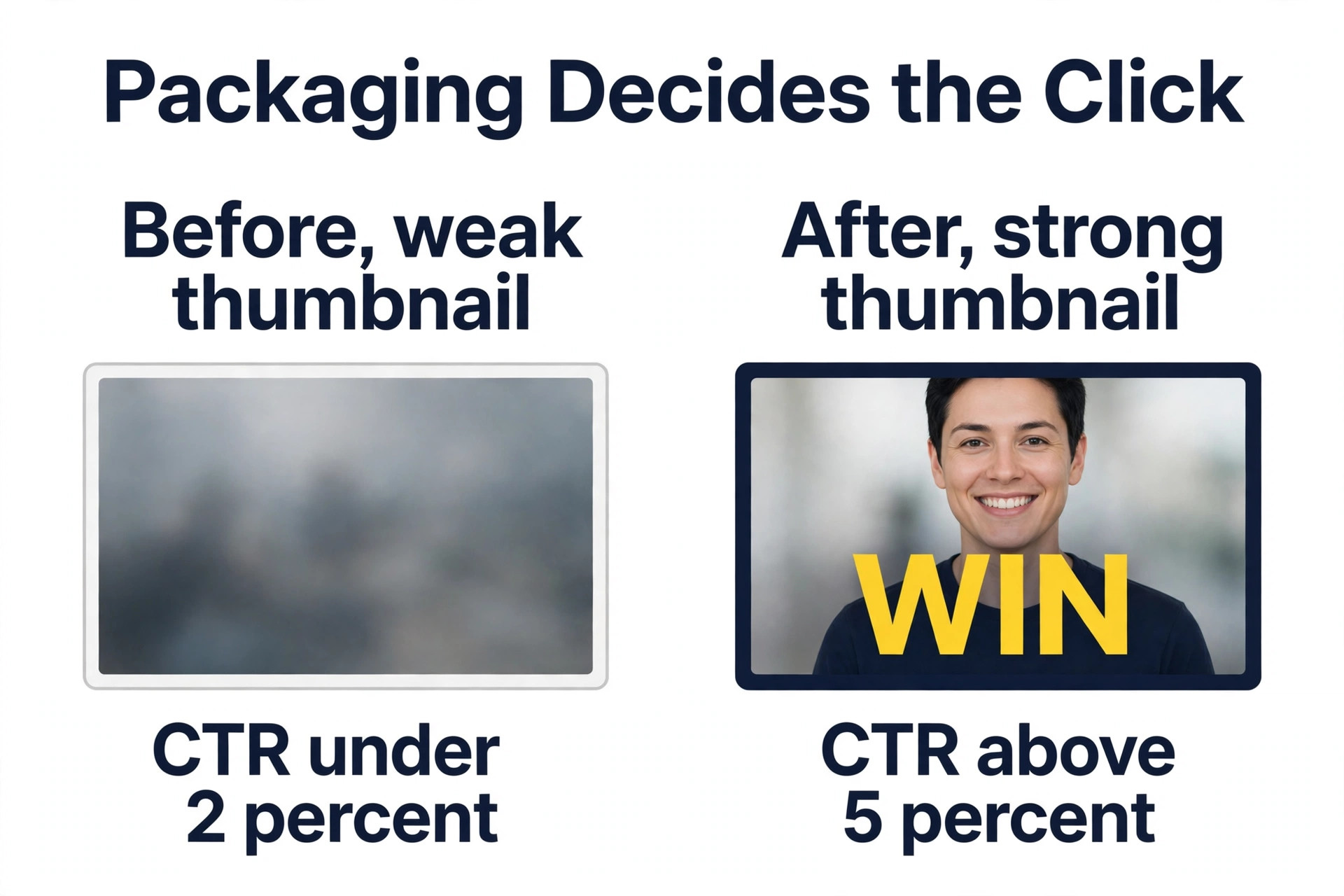
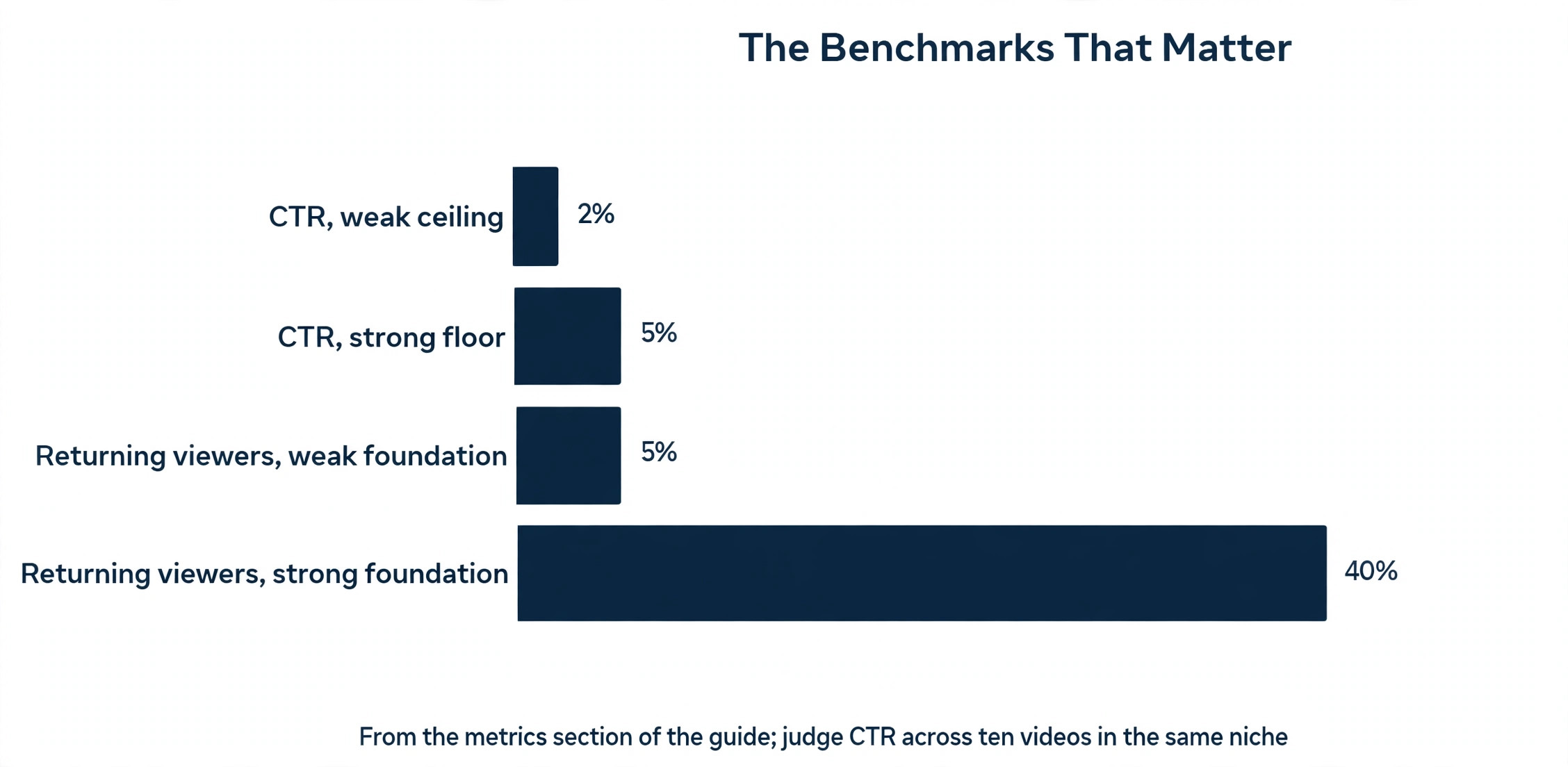
Impressions click through rate, known as CTR, is the first metric to learn. It tells you what share of people who saw your thumbnail and title clicked on it. A CTR under 2 percent means the packaging failed, whatever the topic was. A CTR above 5 percent on a small channel means the packaging worked, and the topic is worth repeating. CTR is noisy on very small numbers, so judge it across ten videos, not one, and compare videos in the same niche rather than across different topics.
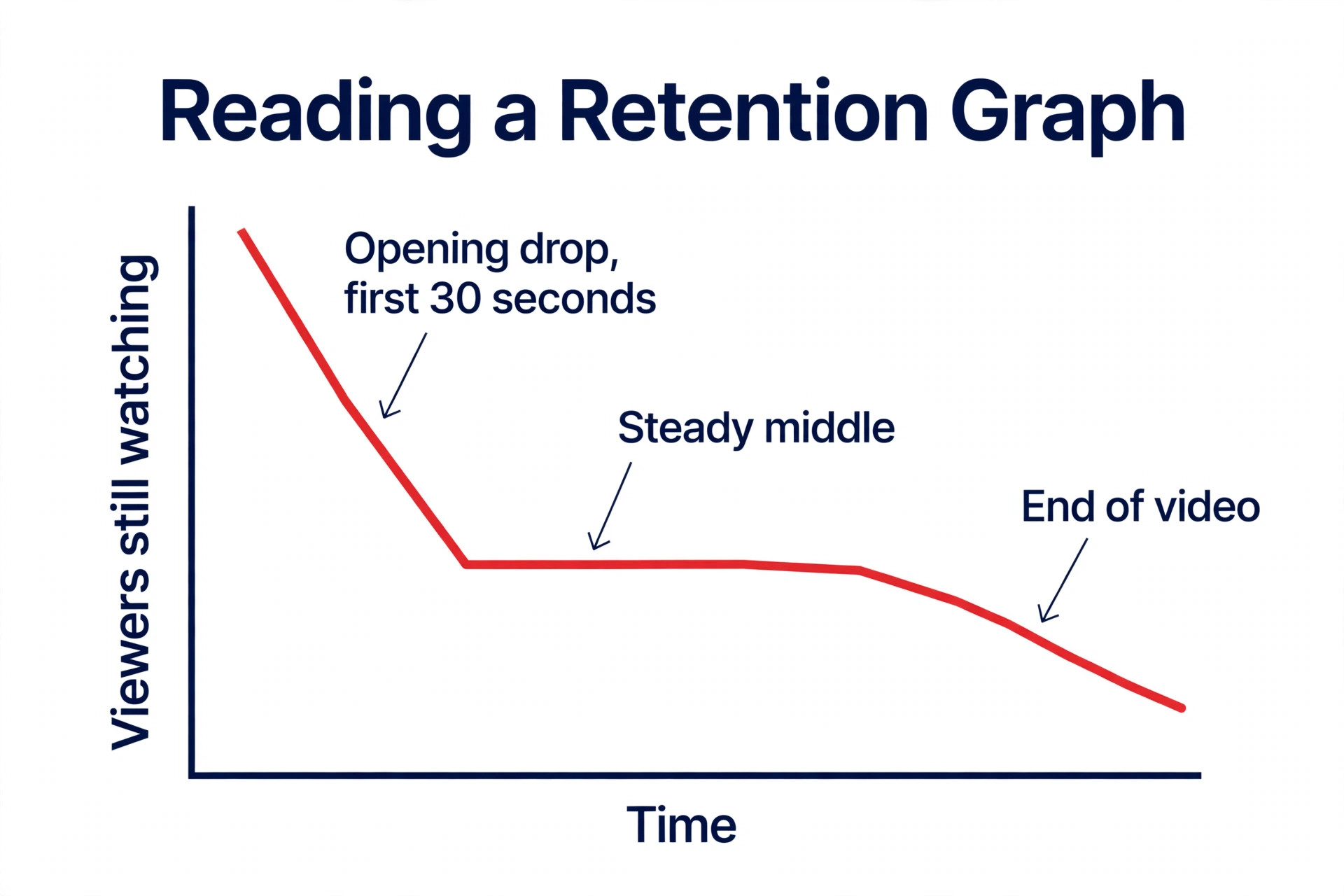
Average view duration and audience retention are the second metric, and they matter more than views. Retention shows you the exact moment people leave, and that moment is a diagnosis. If half your viewers leave in the first 30 seconds, your opening is the problem. If they leave at the same point in every video, that segment is the problem. If retention holds steady to the end, the video worked, even if the view count is low. Watch time is the number YouTube uses to decide whether to recommend your video, so retention is the closest thing to a growth lever you own.
Returning viewers is the third metric, and it is the one most small channels ignore. It tells you how many of your viewers have watched you before, and it is the best early sign of a real audience. A channel with 500 subscribers and 40 percent returning viewers has a stronger foundation than a channel with 2,000 subscribers and 5 percent returning viewers, because the first channel has people who come back on purpose. Check this number every month, not every day, because it moves slowly and it is the honest measure of whether your channel is building loyalty.
Traffic sources are the fourth metric, and they tell you where viewers actually find you. A small channel usually gets most views from browse features, search, or suggested videos, and each source needs a different fix. Low search traffic means your titles and descriptions do not match what people search for. Low suggested traffic means your videos do not keep viewers watching the next one. Low browse traffic means your packaging does not stand out on the home page. Read the traffic source report before you blame the algorithm, because the answer is usually in that breakdown.
Watch time from subscribers versus non subscribers is the fifth metric, and it tells you whether you are growing an audience or renting one. If almost all your watch time comes from non subscribers, your videos reach new people but do not convert them. If almost all of it comes from subscribers, your videos please the people you have but do not reach anyone new. A healthy small channel needs both, with new viewers discovering the channel and a growing share returning for the next video.
How This Strategy Works in One Week
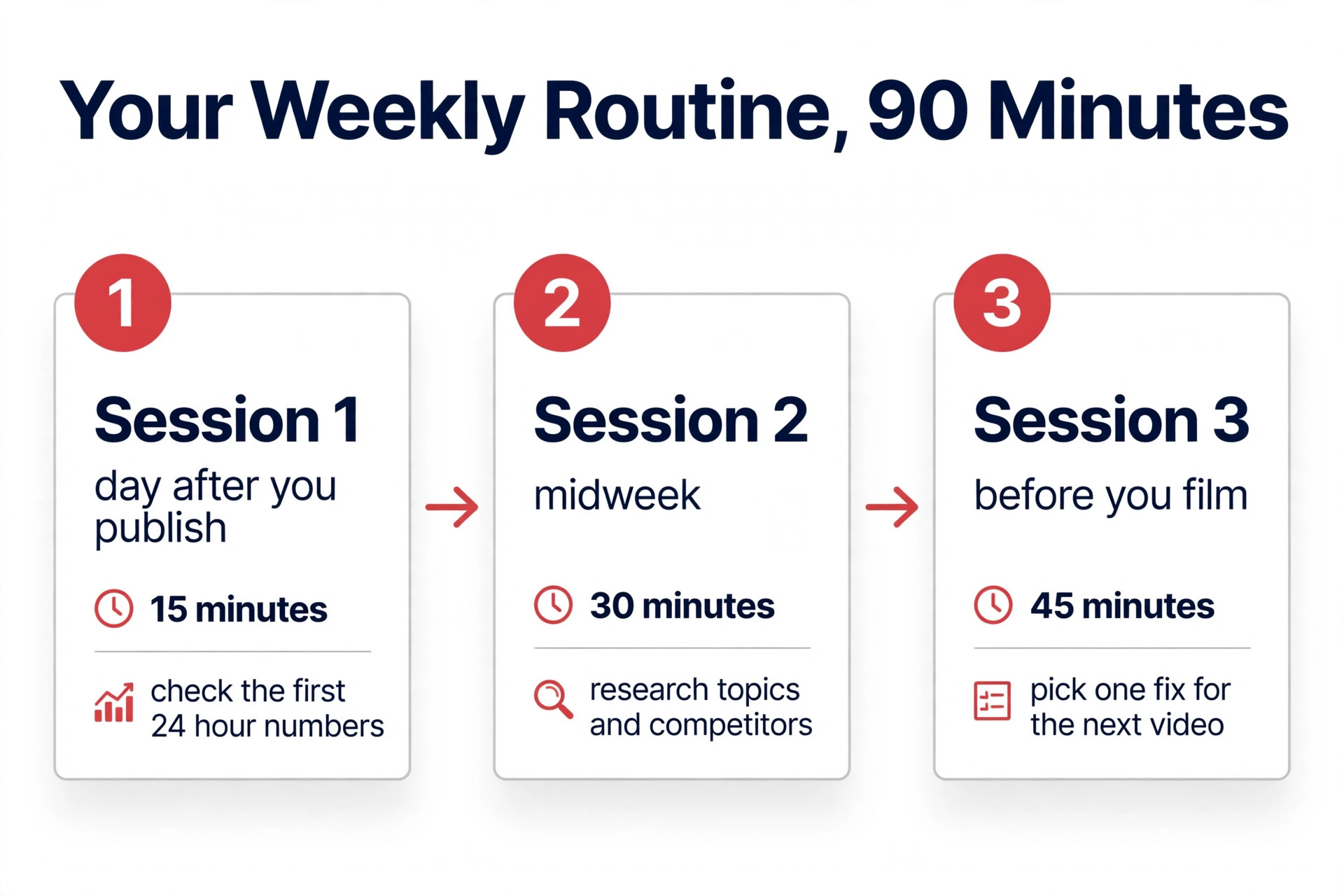
The youtube analytics strategy for small channels in this guide takes about 90 minutes a week, split across three short sessions. The first session happens the day after you publish, and it takes 15 minutes. You check the first 24 hour numbers, you note the CTR and the early retention curve, and you write down one observation about what worked and one about what did not. You do not change anything yet, because 24 hour data is too noisy to act on.
The second session happens midweek, and it takes 30 minutes. You open the Research tab in Studio, you check what your audience searched for, and you look at three competitor videos in your niche to see which topics are getting views right now. You add the best topic to a list of future video ideas, with a note about why the data supports it. This is the session where vidIQ earns its place, because its keyword scores and Daily Ideas turn a vague sense of what is popular into a ranked list.
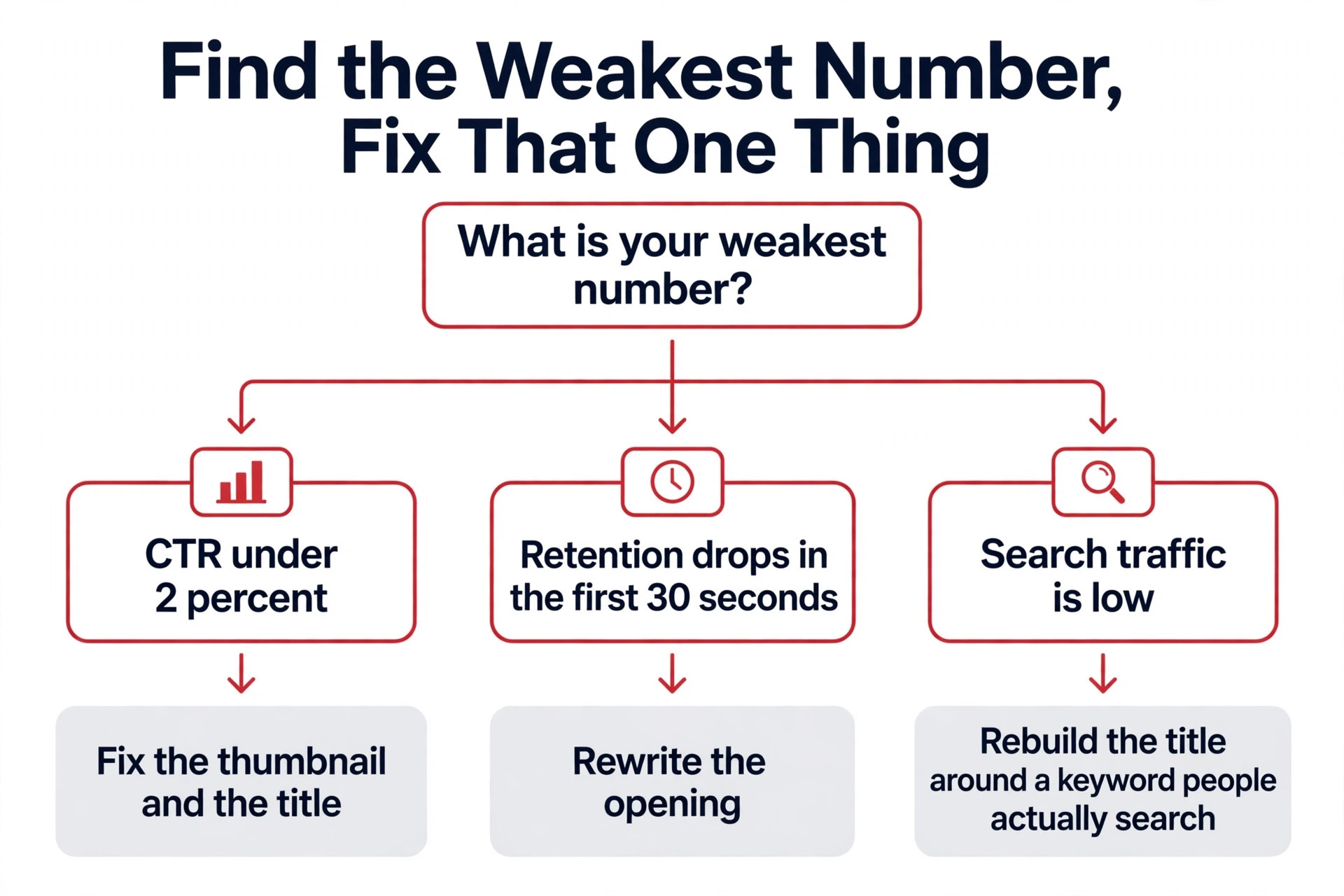
The third session happens before you film the next video, and it takes 45 minutes. You review the last ten videos as a group, you pick the one fix that matters most, and you build the next video around that fix. If CTR is the weakness, you spend the time on the thumbnail and the title. If retention is the weakness, you rewrite the opening. If search traffic is the weakness, you rebuild the title around a keyword people actually type. One fix per video, every week, is how a small channel improves without burning out.
The Tools, Ranked by the Question They Answer
No single tool answers every analytics question, and the mistake is buying a paid tool before you know which question you need answered. YouTube Studio is free and it holds the only data that matters for your own channel, which is your real retention, your real CTR and your real revenue. Every other tool estimates, compares or researches. Start with Studio, add one specialist tool when a specific gap appears, and stop there until the next gap shows up.
1. YouTube Studio Analytics
YouTube Studio is the starting point, and it is the only tool with your real numbers. Its reports cover impressions, click through rate, watch time, audience retention, traffic sources, returning viewers and eligible revenue, and every figure is first party data rather than an estimate. The Research tab shows what your audience searched for on YouTube, which is the most useful free research tool a small channel owns, and it is the place to start every topic decision.
The limitation is scope. Studio shows you your own channel in detail, but it will not show you a competitor retention curve, a keyword opportunity score, or a public channel growth trend. It also will not tell you which of your older videos deserve a new thumbnail, or which topic to make next. That is why the tools below exist, and each one fills a specific gap rather than replacing Studio.
Studio is free with every YouTube account, and a new Studio experience has been rolling out gradually since July 2026, so the tabs may look different from older screenshots. Learn the Reach, Engagement and Audience tabs first, because those three hold every metric in this guide. The Revenue tab matters only after monetisation, and the Subscribers report matters less than the returning viewers number.
2. vidIQ
vidIQ is the research tool, and it answers the question Studio cannot, which is what to make next. Its keyword engine turns search demand and competition into one opportunity score, so choosing between five possible topics takes seconds instead of a spreadsheet. Daily Ideas generates video topics tuned to your channel niche and history, which is genuinely useful when the blank page is what slows you down, and its competitor tracking shows how fast rival channels are growing.
The free plan is generous enough to prove the value before you pay. It includes niche trends, content ideas, AI Coach tips and 150 AI credits a month, and it tracks up to 3 competitors with outlier detection. Boost costs 19 dollars a month, or about 16 dollars and 58 cents a month billed annually, and adds 2,000 AI credits a month with deeper research. Max costs 49 dollars a month and adds 6,000 credits. The trade off is focus. vidIQ has no dedicated thumbnail A and B testing tool, and it is limited on bulk edits, so it will not help you fix a back catalogue.
Choose vidIQ when topic selection is your bottleneck. If you know what to film but your videos do not get clicked, vidIQ is the wrong tool, and TubeBuddy is the better spend. If you stare at a blank page every week, vidIQ is the tool that pays for itself first.
3. TubeBuddy
TubeBuddy is the optimisation tool, and it answers the question vidIQ cannot, which is how to make the videos you already publish perform better. It lives inside YouTube Studio as a browser extension, and its tools attach to the workflow you already have. SEO Studio checks your title, tags and description at upload time, bulk editors let you update cards, end screens and descriptions across dozens of older videos at once, and the Legend tier offers live thumbnail and title A and B testing on real viewers.
Pricing starts with a limited free plan, then Pro at 12 dollars a month billed annually, which covers basic title and tag optimisation and basic video and thumbnail tools. Legend costs about 26 dollars a month billed annually, or about 33 dollars month to month, and adds the A and B testing and the full content strategy tools. The trade off is the licence. TubeBuddy creator licences are for individuals only, and its terms reserve the right to move you to custom enterprise pricing if you pass 50,000 subscribers, run multiple channels, or have three or more channel managers.
Choose TubeBuddy when your bottleneck is optimisation rather than ideas. If your CTR is under 2 percent, if your back catalogue has weak titles, or if you want to test two thumbnails on a live video, TubeBuddy is the only major tool that does all three. YouTube Studio now tests three titles and thumbnails for free, which covers the simplest A and B test, so check that free option before you pay for Legend.
4. Social Blade
Social Blade is the quickest free way to check any public channel stats, and it answers a simple question, which is whether a competitor is growing faster than you. It tracks publicly visible subscriber and view trends for any channel, charts them over time, and estimates earnings as a modelled range rather than a real figure. The earnings number applies a broad worldwide revenue window to daily views and assumes those views were monetised, so treat it as a rough guide, never as a fact.
The free tier shows a channel last 14 days of data, and a free account extends the table to 30 days and adds favourites. Paid plans start at 3 dollars and 99 cents a month, with Bronze at 59 dollars and 99 cents a year, and they unlock deeper history and the Similar Channels feature. The trade off is depth. Social Blade counts daily, it cannot show you a competitor retention curve, and it cannot tell you why a channel is growing, only that it is.
Use Social Blade for a five minute check, not a strategy session. Look up three channels in your niche once a month, note which one is growing fastest, and then watch their last five videos to see what changed. The insight comes from watching the videos, not from reading the chart.
5. ViewStats
ViewStats is the outlier tool, and it answers the question that Social Blade cannot, which is which specific videos are breaking out in your niche right now. It is the YouTube analytics site from the MrBeast team, and its free account lets you browse channel and video pages, install a Chrome extension, and see views over time, title and thumbnail changes, and a ranking of each video against the creator previous nine uploads. That last feature is the useful one, because it shows you when a creator video performs far above their own baseline, which is the signal that a topic or a format is working.
Pro costs 49 dollars and 99 cents a month billed monthly, or 479 dollars and 88 cents a year, equivalent to 39 dollars and 99 cents a month, and adds outlier video discovery, thumbnail search, competitor tracking and alerts. Business starts at 249 dollars a month, which is far beyond a small channel budget. The free tier is real work, and most small channels should use it for months before paying.
Choose ViewStats when you plan content from data rather than from instinct. Open it once a week, filter your niche for outlier videos from the last 30 days, and ask what those videos have in common. The answer is usually a topic, a format or a packaging idea you can adapt, not copy.
6. Morningfame
Morningfame is the coaching tool, and it answers the question a dashboard cannot, which is what to do next when you are new and everything looks confusing. It gives you a lightweight weekly channel report, keyword grades for your video ideas, and a guided workflow that walks you through research, optimisation and review in a fixed order. The interface is beginner friendly, and the guidance is the product, not the charts.
Pricing is 4 dollars and 90 cents a month for Basic, with limited access to the Keyword Research Tool and Niche Spy, and 12 dollars and 90 cents a month for Plus. There is no permanent free plan, but new members get the first month free, and membership is invite only, which keeps the community small. The trade off is breadth. Morningfame trades the deep research of vidIQ and the bulk tools of TubeBuddy for a simpler guided path, so an experienced creator will outgrow it quickly.
Choose Morningfame when you are under 1,000 subscribers, you want someone to tell you what to check each week, and you would rather follow a clear routine than build your own. It is the cheapest paid tool on this list, and for a brand new channel that guidance is worth more than a bigger dashboard.
7. NoxInfluencer
NoxInfluencer is the free comparison tool, and it answers the question of how your channel stacks up against another channel in public. It keeps a free toolkit with a YouTuber calculator, a channel comparison, live subscriber counts and video analytics, plus ranked lists for YouTube, TikTok, Instagram and Twitch. The YouTube money calculator lets you enter daily views and a revenue rate yourself, which is more honest than a tool that guesses your revenue for you.
Paid plans start at 239 dollars a month, which puts the full product far beyond a small channel budget, and the free use is limited by view quotas. The main product is influencer marketing software for brands, not analytics for small creators, so the free tools are a side offering rather than the core business. The trade off is clear. Use the free comparison and calculator tools, and do not pay for the full platform until your channel is large enough to attract brand deals.
Choose NoxInfluencer when you want a quick side by side comparison of two channels, or a rough earnings estimate with your own numbers plugged in. It is a five minute tool, not a weekly routine, and it sits alongside Social Blade rather than replacing it.
8. Google Trends
Google Trends is the free demand check, and it answers the question no YouTube tool can answer well, which is whether people are searching for your topic outside YouTube at all. A topic that is rising on Google Trends and rising on YouTube is a stronger bet than a topic that is only rising in one place. A topic that is falling on Google Trends is a warning, even if a few YouTube videos about it are doing well right now.
The tool is free, it needs no account, and it takes two minutes to check a topic. Type the topic, compare it with two related topics, set the region to your audience country, and look at the 12 month trend. A flat line means steady demand, a rising line means growing interest, and a sharp spike means a news event that will fade. The trade off is that Google Trends measures web search, not YouTube search, so a topic can be strong on YouTube and weak on Google, especially for entertainment and gaming niches.
Use Google Trends as the final check before you commit to a video. If vidIQ says the keyword opportunity is high, ViewStats says outlier videos exist, and Google Trends says demand is rising, you have three independent signals pointing the same way. That is the strongest topic decision a small channel can make.
The Weekly Checklist for Your Youtube Analytics Strategy for Small Channels
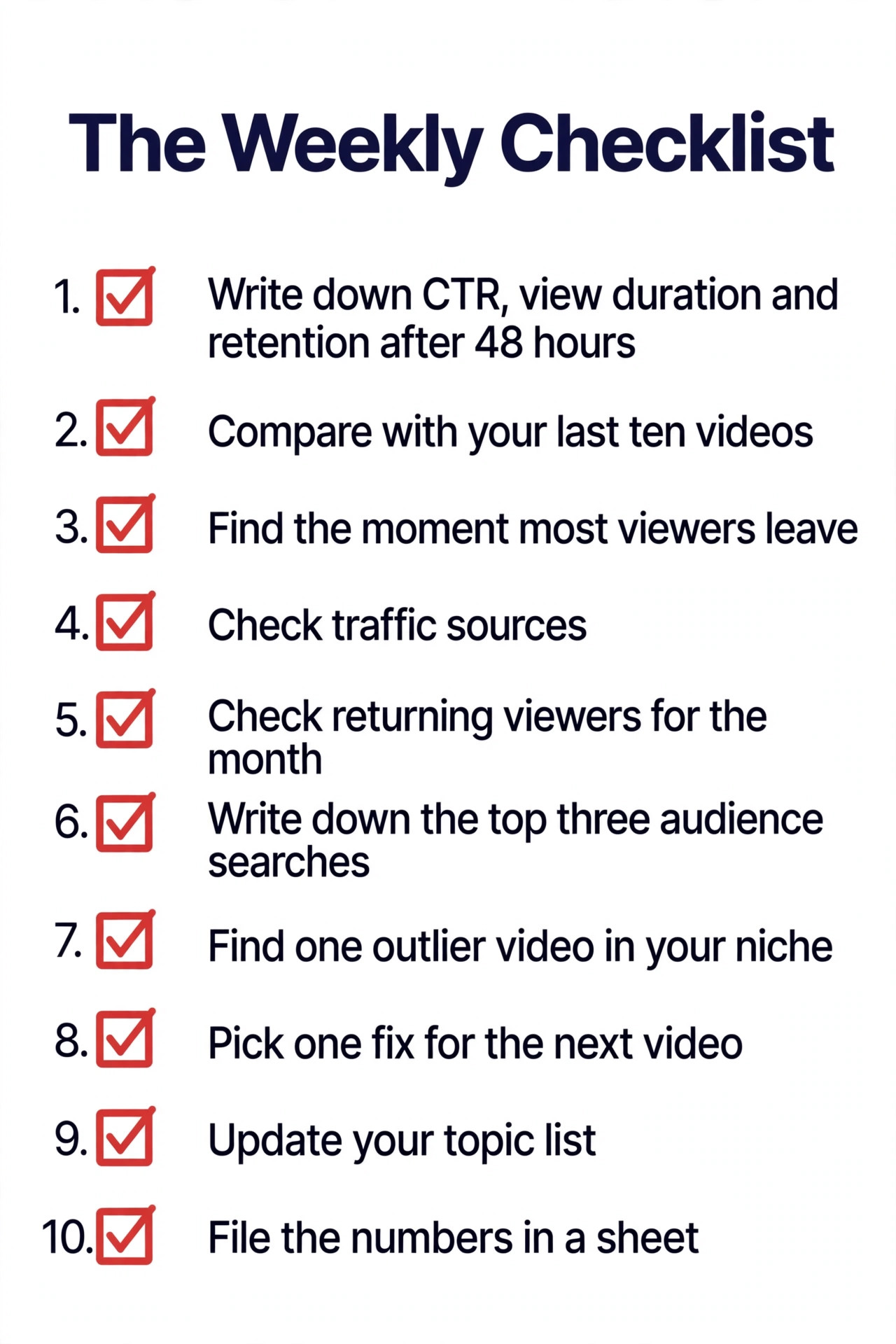
Use this youtube analytics strategy for small channels checklist every week, in order, and do not skip steps. Each item takes a few minutes, and together they turn raw numbers into a decision about your next video.
- Open Studio and write down the CTR, average view duration and retention for your latest video after 48 hours.
- Compare those three numbers with your last ten videos, and mark whether the new video is above or below your own average.
- Find the exact moment most viewers leave, and write one sentence about what happens on screen at that moment.
- Check traffic sources and note whether search, browse or suggested videos drove the most views.
- Check returning viewers for the month, and note whether the share is rising or falling.
- Open the Research tab and write down the three searches your audience used most this week.
- Check vidIQ or ViewStats for one outlier video in your niche, and note the topic and the packaging.
- Pick one fix for the next video, based on the weakest number, and write it at the top of your filming notes.
- Update your topic list with one new idea from the research, and drop the weakest idea on the list.
- File the numbers in a simple sheet, so next month you can see the trend instead of relying on memory.
Which Tool for Which Job
| Job | Pick | Why it wins |
|---|---|---|
| Your own real numbers | YouTube Studio | Free, first party, and the ground truth |
| What to make next | vidIQ | Keyword scores plus Daily Ideas |
| Fix what you already published | TubeBuddy | Bulk edits plus live A and B testing |
| Quick competitor growth check | Social Blade | Free public stats in five minutes |
| Find breakout videos in your niche | ViewStats | Outlier detection against a creator baseline |
| Guided weekly routine for beginners | Morningfame | Coaching plus keyword grades at 4 dollars and 90 cents |
| Side by side channel comparison | NoxInfluencer | Free comparison plus a calculator you control |
| Check demand outside YouTube | Google Trends | Free, fast, and independent of YouTube |
Use this table when you feel tempted to buy a second paid tool. Most small channels need Studio plus one paid tool, not three. If your bottleneck is ideas, that tool is vidIQ. If your bottleneck is packaging and optimisation, that tool is TubeBuddy. If your bottleneck is neither, spend the money on a better microphone instead, because audio quality affects retention more than any analytics tool.
Mistakes That Waste a Small Channel Analytics
The most common mistake is judging a video after 24 hours. Early data is noisy, because your subscribers watch first and the wider audience arrives later. A video that looks dead on day one can grow for weeks through search and suggested videos, and a video that spikes on day one can fade just as fast. Wait 48 hours before you judge CTR and retention, and wait 28 days before you judge a video total performance.
The second mistake is changing three things at once. A creator changes the thumbnail, the title and the opening in the same video, the video performs better, and nobody knows which change caused it. Change one thing per video, write down what you changed, and compare the result with the previous ten videos. Slow, controlled change is how a small channel learns, and fast, random change is how it stays confused.
The third mistake is copying a big channel numbers as a target. A channel with a million subscribers can get a 10 percent CTR on a weak thumbnail, because the audience already trusts the creator. A small channel needs stronger packaging to earn the same click, because nobody knows the name yet. Compare your numbers with your own past videos, and with channels of a similar size, not with the biggest channel in your niche.
The fourth mistake is ignoring the retention curve. Creators spend hours on thumbnails and minutes on openings, then wonder why viewers leave in the first 30 seconds. Open every video with the promise of the video in the first 15 seconds, cut the long introduction, and check the retention graph after every upload. The opening is the cheapest fix in this whole guide, and it is the one most small channels skip.
Our Verdict
A youtube analytics strategy for small channels works when it is small, weekly and focused on one fix at a time. YouTube Studio is the foundation, because it holds your real retention, your real CTR and your real traffic sources for free. vidIQ is the add on when topic selection is the bottleneck, at 19 dollars a month or about 16 dollars and 58 cents billed annually. TubeBuddy is the add on when packaging and optimisation are the bottleneck, at 12 dollars a month billed annually for Pro. Morningfame is the add on when you want guidance more than data, at 4 dollars and 90 cents a month.
Start with Studio alone for a month, and run the weekly checklist in this youtube analytics strategy for small channels. Add vidIQ when you stare at a blank page, add TubeBuddy when your CTR sits under 2 percent, and add ViewStats free tier when you want to find breakout topics in your niche. Check Social Blade and NoxInfluencer once a month for a competitor snapshot, and check Google Trends before you commit to any topic. One fix per video, every week, is the whole strategy, and it is enough to grow a small channel without burning out.
Frequently Asked Questions
What is the best youtube analytics strategy for small channels?
The best youtube analytics strategy for small channels is a weekly routine built on YouTube Studio, with one fix per video. Check CTR, retention and traffic sources after 48 hours, compare them with your last ten videos, find the weakest number, and fix only that thing in the next video. Add vidIQ for topic research when ideas run dry, and TubeBuddy for packaging and bulk optimisation when CTR is the weakness. The strategy works because it is small and repeatable, not because it uses many tools.
How often should a small channel check analytics?
Once a week is enough, with a 15 minute check the day after publishing and a 30 minute research session midweek. Checking every hour creates panic and leads to changes based on noisy early data. Waiting a month means you repeat the same mistake for four videos before you notice. A weekly rhythm gives you enough data to see patterns and enough time to act on them before the next upload.
What is a good CTR for a small YouTube channel?
A CTR above 5 percent is strong for a small channel, a CTR between 2 and 5 percent is normal, and a CTR under 2 percent means the thumbnail and title need work. Judge CTR across ten videos in the same niche, not on a single video, because small view counts make single video CTR noisy. Compare your CTR with your own past videos first, and with similar sized channels second, never with a channel ten times your size.
Is vidIQ or TubeBuddy better for a small channel?
It depends on your bottleneck. vidIQ is better when you do not know what to make next, because its keyword scores, Daily Ideas and competitor tracking turn topic choice into a ranked decision. TubeBuddy is better when you know what to make but your videos do not get clicked, because its bulk editors and live A and B testing fix packaging and older videos. Many creators use both, but a small channel should buy only one, and Studio alone is fine until one of those bottlenecks actually appears.
Can I grow a small channel using only free analytics tools?
Yes. YouTube Studio, Social Blade, ViewStats free tier, NoxInfluencer free tools and Google Trends together cover every metric in this guide without a subscription. Paid tools save time and add research depth, but they do not replace the weekly habit of reading retention, CTR and traffic sources and changing one thing per video. A creator who checks Studio weekly will outgrow a creator who buys three paid tools and never opens them.
Why do my views drop even when my content improves?
Views drop for reasons that have nothing to do with quality. Search demand for a topic can fall, a competitor can publish a stronger video on the same topic, or YouTube can test your video with a new audience that does not click. Check the traffic sources report before you blame the content. If search traffic fell, the topic demand changed. If CTR fell, the packaging failed. If retention fell, the opening failed. The numbers tell you which one, and the fix is different in each case.