A five person sales team pays 70 dollars a month for one CRM and 500 dollars a month for another, and both tools claim to do the same job. The gap is not a rounding error. It is the difference between a tool that charges by the seat and a tool that charges a flat platform fee, between a free plan that covers real work and a free plan that covers a demo, and between a price that stays flat as the team grows and a price that jumps when the team crosses a user cap. That is why CRM software pricing for small business starts with the billing model, not with the sticker price.
That gap is why CRM software pricing for small business deserves a full comparison before a team signs a contract, because the cheapest sticker price is rarely the cheapest year.
Prices in this guide are US list prices checked in September and October 2026, per user per month on annual billing unless noted. Annual billing usually saves 15 to 25 percent against monthly billing, so the monthly figures in the tables are the annual rate, and the monthly billing rate is higher. A CRM that looks cheap on a monthly page can cost 20 percent more when the team pays month to month, and a CRM that looks expensive on an annual page can be the cheapest option when the team commits for a year. Read the billing term before you compare any two numbers.
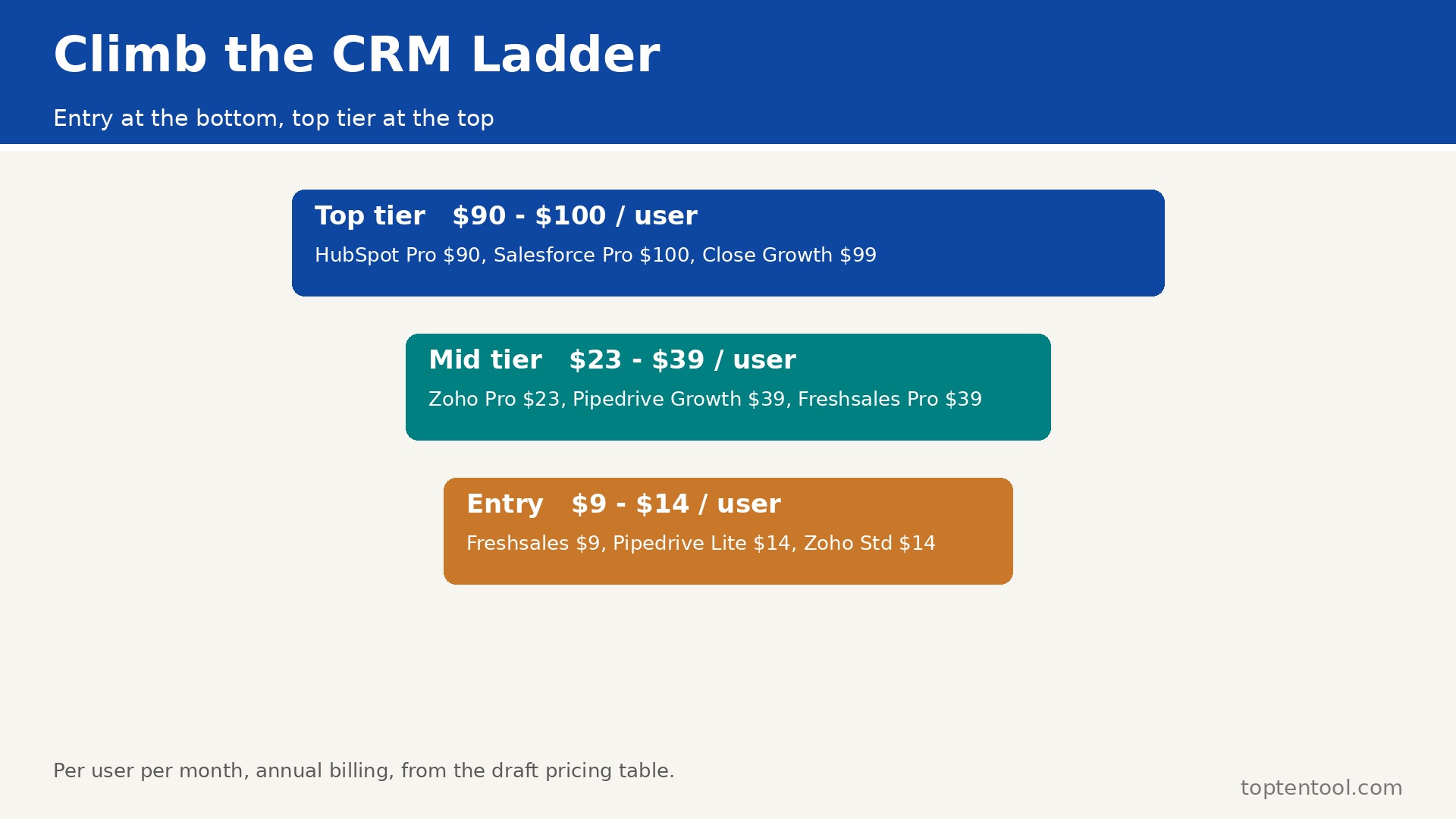
The CRM software pricing for small business in this guide covers HubSpot, Salesforce, Pipedrive, Zoho CRM, Freshsales, Close, Monday CRM, and Capsule. They cover the range from free to enterprise, from a visual pipeline to a full sales and marketing suite, and from a tool a solo founder can run to a tool a 25 person team can grow into. The fee table below gives the free plan, the entry paid plan, the mid tier, and the limits for each one, so a team can see the full ladder before it steps onto the first rung.
CRM Software Pricing for Small Business at a Glance
The table below is the short answer. It shows the free plan, the entry paid price, the mid tier price, and the limit that forces the next tier, for each tool. Prices are per user per month on annual billing, in US dollars, before tax and before add ons.
| Tool | Free plan | Entry paid | Mid tier | Key limit |
|---|---|---|---|---|
| HubSpot | Yes, up to 2 users, 1,000 contacts | Starter 20 dollars per seat | Professional 90 dollars per seat | Pro needs 1,500 dollar onboarding fee |
| Salesforce | No, trial only | Starter Suite 25 dollars per user | Pro Suite 100 dollars per user | Starter lacks API and workflow automation |
| Pipedrive | No, 14 day trial | Lite 14 dollars per seat | Growth 39 dollars per seat | Lite limits automations and reporting |
| Zoho CRM | Yes, up to 3 users | Standard 14 dollars per user | Professional 23 dollars per user | Free plan caps at 3 users |
| Freshsales | Free trial, 21 days | Growth 9 dollars per user | Pro 39 dollars per user | Growth limits custom modules |
| Close | No, 14 day trial | Essentials 35 dollars per user | Growth 99 dollars per user | Growth unlocks the power dialer |
| Monday CRM | Yes, limited | Basic from 12 dollars per seat | Standard from 17 dollars per seat | Prices vary by sales CRM plan |
| Capsule | Yes, up to 2 users | Professional 18 dollars per user | Teams 36 dollars per user | Free plan caps at 2 users and 250 contacts |
Read the free plan column first, because a free plan that covers real work saves a team months of paid bills while it tests the tool. HubSpot Free covers contacts, deals, tasks, and email tracking for up to two users, with no time limit. Zoho Free covers three users with leads, contacts, and deals. Capsule Free covers two users and 250 contacts. Salesforce, Pipedrive, and Close have no free plan, only a trial of 14 days, so a team that needs a free start should not shortlist those three.
Read the mid tier column second, because the entry price is not the price a team will pay in six months. HubSpot Starter at 20 dollars is a useful first step, but the first tier that covers sequences, forecasting, and real reporting is Professional at 90 dollars per seat, plus a 1,500 dollar one time onboarding fee. Salesforce Starter at 25 dollars is a contact database, not a full CRM, because it lacks API access and workflow automation. The first tier that covers real automation is Pro Suite at 100 dollars per user. A team that budgets on the entry price and then discovers the mid tier price in month three has made the most common CRM buying mistake.
HubSpot
HubSpot is the default free start for a small business, and its pricing is the most complex in this guide. The free CRM covers contacts, deals, tasks, live chat, and email tracking for up to two users, with 1,000 contacts, and no credit card is needed. That free plan is genuinely usable, and a team of two can run a real sales process on it for months.
Starter costs 20 dollars per seat per month billed annually, and it adds basic automation, email scheduling, and pipeline management, with HubSpot branding removed. Professional costs 90 dollars per seat per month billed annually, or 100 dollars billed monthly, and it adds sequences, advanced automation, forecasting, call recording, and playbooks. Professional also needs a one time onboarding fee of 1,500 dollars, and Enterprise needs 3,500 dollars.
Worked cost for a five person team. Free is 0 dollars. Starter is 5 times 20 dollars, which is 100 dollars a month, or 1,200 dollars a year. Professional is 5 times 90 dollars, which is 450 dollars a month, or 5,400 dollars a year, plus 1,500 dollars onboarding in year one, which is 6,900 dollars in year one. A team that plans to use sequences and forecasting should budget on Professional, not on Starter, because Starter will feel thin within a month.
The hidden cost is the contact tier. HubSpot charges for contacts in Marketing Hub, and the sales price above does not include marketing contacts. A team that adds Marketing Hub should budget separately, and should check the contact count before it signs, because a list that grows past a tier boundary raises the bill without a warning.
Salesforce
Salesforce is the enterprise default, and its small business entry is Starter Suite at 25 dollars per user per month billed annually. Starter Suite covers contacts, accounts, leads, and basic reporting, for up to ten users, but it lacks API access, workflow automation, and forecasting. That limit makes it a contact database with a sales view, not a full CRM, and a team that needs automation will outgrow it fast.
Pro Suite costs 100 dollars per user per month billed annually, and it adds custom objects, automations, and deeper reporting. Enterprise costs 165 dollars per user per month billed annually in most current listings, with some sources listing 175 dollars, and it adds advanced customization, workflow, and support. The price gap between Starter and Pro is 75 dollars per user per month, which is the largest jump in this guide.
Worked cost for a five person team. Starter is 5 times 25 dollars, which is 125 dollars a month, or 1,500 dollars a year. Pro is 5 times 100 dollars, which is 500 dollars a month, or 6,000 dollars a year. Enterprise is 5 times 165 dollars, which is 825 dollars a month, or 9,900 dollars a year. A small team should start on Starter only if it plans to stay small and simple. A team that plans to automate should budget on Pro from the start, because the move from Starter to Pro is a price jump, not a step.
Pipedrive
Pipedrive is the clearest visual pipeline in this guide, and its pricing is the simplest to read. Lite costs 14 dollars per seat per month billed annually, Growth costs 39 dollars, Premium costs 49 dollars, and Ultimate costs 79 dollars. Lite covers pipeline management, contacts, activities, and a deal timeline, with limited automations. Growth adds full automations, email sync, and deeper reporting. Premium adds AI features, revenue forecasting, and team goals.
Worked cost for a five person team. Lite is 5 times 14 dollars, which is 70 dollars a month, or 840 dollars a year. Growth is 5 times 39 dollars, which is 195 dollars a month, or 2,340 dollars a year. Premium is 5 times 49 dollars, which is 245 dollars a month, or 2,940 dollars a year. A sales led team that lives in the pipeline should budget on Growth, because Lite limits automations to three active workflows, and a team that automates follow ups will hit that limit in the first week.
Pipedrive has no free plan, only a 14 day trial, so a team should use the trial to test the pipeline with real deals, not with sample data. A trial with sample data tells you nothing about whether the pipeline fits your sales process.
Zoho CRM
Zoho CRM is the value pick in this guide, and its pricing is the most forgiving for a small team. The free edition covers three users with leads, contacts, and deals, forever. Standard costs 14 dollars per user per month billed annually, Professional costs 23 dollars, Enterprise costs 40 dollars, and Ultimate costs 52 dollars. Standard covers core CRM, workflows, and email insights. Professional adds inventory, sales forecasting, and deeper automation. Enterprise adds custom functions and advanced analytics.
Worked cost for a five person team. Free covers three users, so a five person team pays for five seats on Standard, which is 5 times 14 dollars, or 70 dollars a month, or 840 dollars a year. Professional is 5 times 23 dollars, which is 115 dollars a month, or 1,380 dollars a year. Enterprise is 5 times 40 dollars, which is 200 dollars a month, or 2,400 dollars a year. Zoho is the cheapest full CRM in this guide at the mid tier, and the free plan for three users makes it the best test option for a micro business.
The hidden cost is the ecosystem. Zoho works best when the team also uses Zoho Books, Zoho Campaigns, or Zoho Desk, and those tools have their own prices. A team that uses only Zoho CRM will not face that cost, but a team that adopts the full Zoho suite should budget for the suite, not for the CRM alone.
Freshsales
Freshsales is the cheapest paid seat in this guide, and its pricing is built for a team that wants calling and email inside the CRM. Growth costs 9 dollars per user per month billed annually, Pro costs 39 dollars, and Enterprise costs 59 dollars. Growth covers contacts, deals, email, and basic automation, and it is genuinely functional at that price. Pro adds custom modules, AI insights, and deeper reporting. Enterprise adds advanced audit and custom roles.
Worked cost for a five person team. Growth is 5 times 9 dollars, which is 45 dollars a month, or 540 dollars a year. Pro is 5 times 39 dollars, which is 195 dollars a month, or 2,340 dollars a year. Enterprise is 5 times 59 dollars, which is 295 dollars a month, or 3,540 dollars a year. A team that wants built in calling should test Growth first, because the 9 dollar price is the lowest entry in this guide, and the jump to Pro is large, at 30 dollars per user per month.
Freshsales has no permanent free plan, only a 21 day trial, so a team should use the trial to test calling and email with real contacts. A trial that tests only the pipeline will miss the calling features that make Freshsales different.
Close
Close is built for a sales team that lives on the phone, and its pricing reflects that focus. Essentials costs 35 dollars per user per month billed annually, Growth costs 99 dollars, and Scale costs 139 dollars. Essentials covers the pipeline, email, and basic calling. Growth unlocks the power dialer, predictive dialing, and advanced reporting. Scale adds custom roles, advanced permissions, and priority support.
Worked cost for a five person team. Essentials is 5 times 35 dollars, which is 175 dollars a month, or 2,100 dollars a year. Growth is 5 times 99 dollars, which is 495 dollars a month, or 5,940 dollars a year. The jump from Essentials to Growth is 64 dollars per user per month, which is the second largest jump in this guide, and it is the price of the dialer. A team that does not call all day should stay on Essentials. A team that calls all day should budget on Growth, because Essentials without the dialer is a CRM without its main tool.
Close has no free plan, only a 14 day trial, so the trial should test the dialer with real calls, not with a demo list. A dialer that sounds good in a demo and lags on a real call will cost the team more than the plan saving.
Monday CRM
Monday CRM is the visual pick, and its pricing sits in the middle of this guide. The sales CRM plans start at about 12 dollars per seat per month billed annually on Basic, with Standard and Pro above it, and the exact price depends on the sales CRM plan rather than the work management plan. That distinction matters, because Monday.com work management and Monday Sales CRM are priced separately, and a team that buys the wrong one will pay for the wrong features.
Worked cost for a five person team, using the Basic figure as a guide. Basic is about 5 times 12 dollars, which is 60 dollars a month, or 720 dollars a year. Standard is higher, and Pro is higher again, with automations and AI features that a sales team will want. A team that chooses Monday CRM should get a written quote for the sales CRM plan at its real seat count, because the published price can vary by plan and by region, and a quote is the only number that counts at checkout.
Monday CRM has a free plan with limited boards, so a team can test the visual boards before it pays. The free plan is useful for a test, but it is not a long term home for a team that needs automations, because those sit on the paid plans.
Capsule
Capsule is the simplest CRM in this guide, and its pricing is built for a small team that wants contacts and deals without a learning curve. The free plan covers two users and 250 contacts. Professional costs 18 dollars per user per month billed annually, and Teams costs 36 dollars per user per month. Professional covers contacts, deals, tasks, and email integration. Teams adds advanced permissions, reporting, and more storage.
Worked cost for a five person team. Professional is 5 times 18 dollars, which is 90 dollars a month, or 1,080 dollars a year. Teams is 5 times 36 dollars, which is 180 dollars a month, or 2,160 dollars a year. Capsule is the right choice for a team that wants a simple CRM and will not use the advanced features of HubSpot or Salesforce. A team that needs forecasting, sequences, or a dialer should not choose Capsule, because those features do not exist at any price.
Total Cost of Ownership
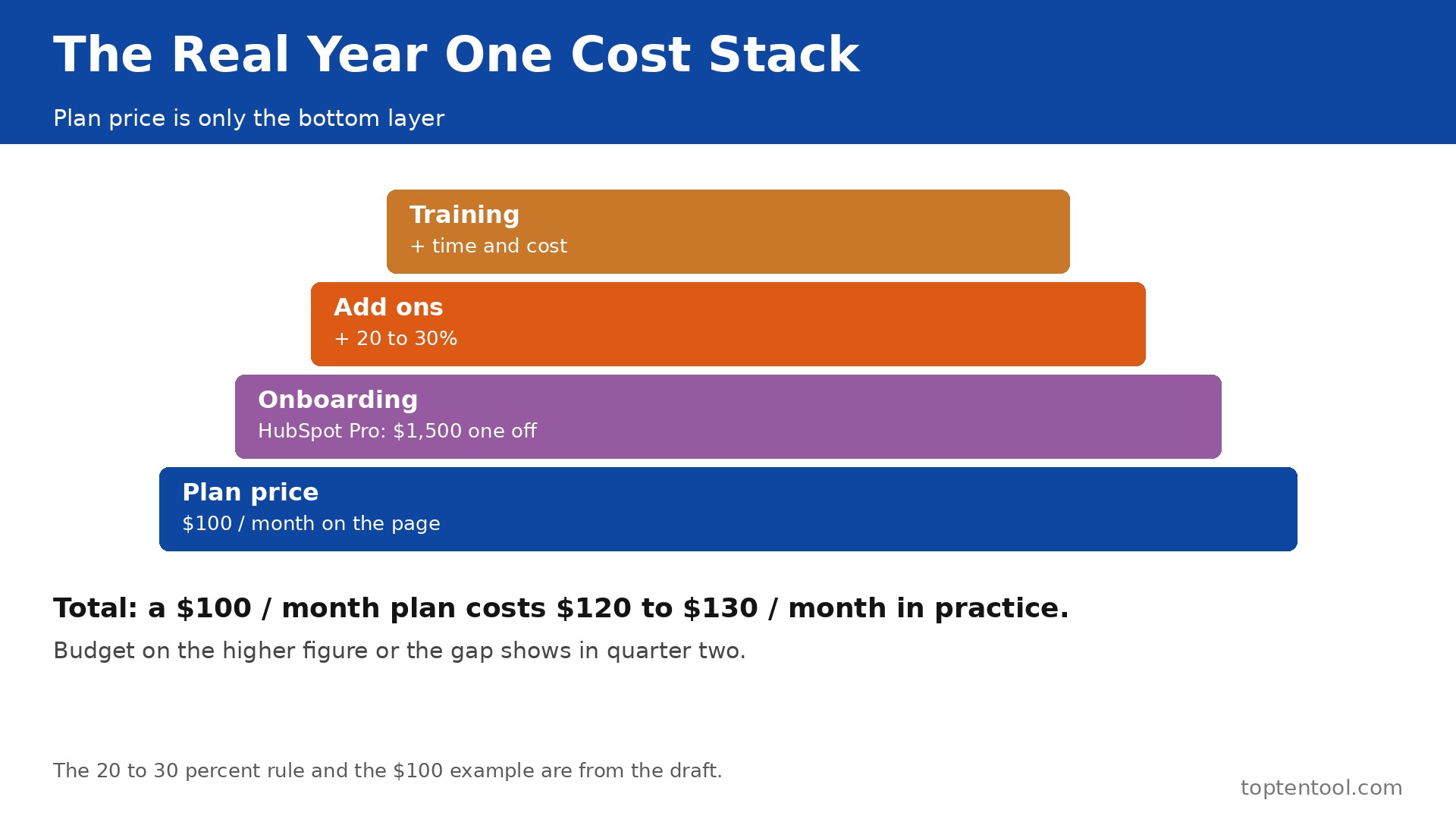
The sticker price is not the total cost, and a team that budgets on the sticker price will be surprised in month three. The total cost includes the plan, the onboarding fee, the add ons, the integrations, and the time spent setting up and training the team.
HubSpot Professional for five users costs 5,400 dollars a year, plus 1,500 dollars onboarding in year one, which is 6,900 dollars in year one and 5,400 dollars in year two. Add Marketing Hub contacts, and the total rises again. Salesforce Pro for five users costs 6,000 dollars a year, with no onboarding fee listed, but with implementation time that a small team should budget as a week of work.
Pipedrive Growth for five users costs 2,340 dollars a year, with no onboarding fee, and the setup is a day. Zoho Professional for five users costs 1,380 dollars a year, with no onboarding fee, and the setup is a day. Freshsales Growth for five users costs 540 dollars a year, the cheapest in this guide, with a setup of a day.
Add the hidden costs to every tool. A CRM that needs a paid integration for email, for accounting, or for calling adds 20 to 50 dollars a month per integration. A CRM that needs training adds a day of the team time, which is worth more than the plan price for a small team. A CRM that needs data cleaning adds a week of work before the import, because a dirty list costs money on every plan that charges by contact. Budget 500 dollars for the switch itself, for the hours spent cleaning the list, rebuilding the pipeline, and training the team, because that time is real even when no invoice covers it.
The rule is simple. Take the published price, add 20 to 30 percent for add ons, onboarding, and integrations, and that is the real year one cost. A tool that costs 100 dollars a month on the pricing page will cost 120 to 130 dollars a month in practice, and a team that budgets on the lower figure will feel the gap in the second quarter.
A five person team should also price the year two jump. CRM software pricing for small business changes when the free plan ends, when the contact count crosses a tier, and when the team adds a seat. HubSpot Free ends at two users, Zoho Free ends at three, and Capsule Free ends at 250 contacts. A team that starts free and grows to five users in six months will pay the full mid tier price in year one, not the free price it budgeted in January.
The cheapest way to test is to run two tools side by side for a month. CRM software pricing for small business is only real when the team uses its own contacts, its own pipeline, and its own follow up routine. A trial with sample data proves nothing. Import 200 real contacts, run the real pipeline for two weeks, and count the hours the team spends on admin. The tool with the lower admin hours is usually the cheaper tool, even when its monthly price is higher.
Cheapest by Situation
| Situation | Best value | Why it wins |
|---|---|---|
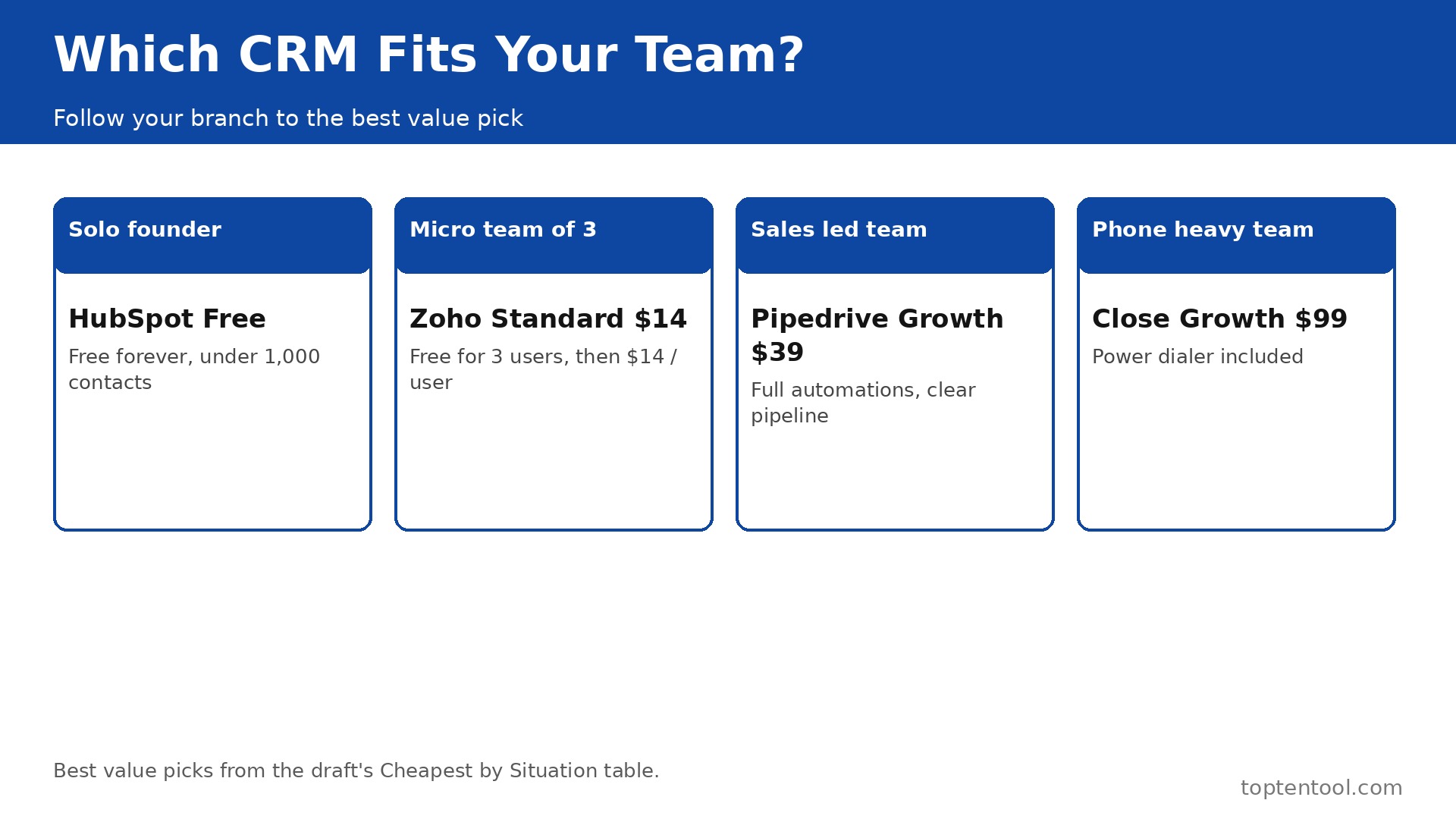
| Solo founder, under 1,000 contacts | HubSpot Free | Free forever, real pipeline, no card needed |
| Micro team of 3, tight budget | Zoho CRM Free or Standard | Free for 3 users, Standard 14 dollars per user |
| Sales led team, visual pipeline | Pipedrive Growth | 39 dollars per seat, full automations, clear pipeline |
| Lowest paid seat, calling included | Freshsales Growth | 9 dollars per user, built in calling and email |
| Marketing led growth, inbound team | HubSpot Starter or Professional | Free start, scales to marketing, but Pro is 90 dollars |
| Enterprise scale, deep customization | Salesforce Pro Suite | 100 dollars per user, unmatched ecosystem, but costly |
| Phone heavy sales team | Close Growth | 99 dollars per user, power dialer included |
| Simple contacts and deals, no learning curve | Capsule Professional | 18 dollars per user, simple, fast to set up |
| Visual boards, non technical team | Monday CRM Basic | About 12 dollars per seat, visual, easy to adopt |
| Team of 5, best mid tier value | Zoho Professional | 23 dollars per user, 115 dollars a month for 5 users |
Read the table by situation, not by price alone. The cheapest tool for a solo founder is not the cheapest tool for a phone heavy team, because the phone heavy team needs a dialer that the solo founder will never use. That situation test is the core of CRM software pricing for small business. A team that buys the cheapest tool and then discovers it lacks the one feature the team needs will pay twice, once for the cheap tool and once for the replacement.
Frequently Asked Questions
Is there a truly free CRM for a small business?
Yes. HubSpot Free covers up to two users and 1,000 contacts, with contacts, deals, tasks, and email tracking, and no time limit. Zoho Free covers three users with leads, contacts, and deals. Capsule Free covers two users and 250 contacts. Those three are the only free plans in this guide that cover real work. Salesforce, Pipedrive, and Close have trials only, so a team that needs a free start should test HubSpot or Zoho first.
Why does HubSpot Professional cost so much more than Starter?
Professional adds sequences, advanced automation, forecasting, call recording, and playbooks, and it needs a 1,500 dollar one time onboarding fee. Starter at 20 dollars per seat is a useful first step, but the first tier that covers real sales automation is Professional at 90 dollars per seat. A team that budgets on Starter and then needs forecasting will face a jump of 70 dollars per seat per month, plus the onboarding fee.
What is the cheapest CRM per user in 2026?
Freshsales Growth at 9 dollars per user per month billed annually is the cheapest paid seat in this guide. Zoho Standard and Pipedrive Lite are next, at 14 dollars per user. The cheapest paid seat is not always the cheapest total, because a team that needs the mid tier features will pay more on the tool with the cheapest entry price than on the tool with a higher entry price and a lower mid tier jump.
Do CRM prices include onboarding and training?
No, not always. HubSpot Professional needs a 1,500 dollar onboarding fee, and Enterprise needs 3,500 dollars. Salesforce, Pipedrive, Zoho, and Freshsales do not list a mandatory onboarding fee, but the team time for setup and training is still a cost. Budget a day for setup on a simple tool, and a week for setup on HubSpot or Salesforce, because the setup time is the hidden cost that most teams forget.
How much does a CRM cost for a 5 person team in a year?
It depends on the tier. Freshsales Growth costs 540 dollars a year. Zoho Standard costs 840 dollars a year. Pipedrive Lite costs 840 dollars a year. HubSpot Starter costs 1,200 dollars a year. Zoho Professional costs 1,380 dollars a year. Pipedrive Growth costs 2,340 dollars a year. HubSpot Professional costs 5,400 dollars a year plus 1,500 dollars onboarding in year one. Salesforce Pro costs 6,000 dollars a year. The range is 540 dollars to 6,900 dollars in year one, and that range is why the tier matters more than the brand.
Verdict
For most small businesses, the best value is Zoho CRM. Standard at 14 dollars per user is the cheapest full CRM, Professional at 23 dollars is the cheapest mid tier, and the free plan for three users lets a micro team start without paying. A five person team on Professional pays 115 dollars a month, or 1,380 dollars a year, with no onboarding fee, and that price covers the features a small team actually uses.
For a sales led team that lives in the pipeline, Pipedrive Growth at 39 dollars per seat is the best pick, because the pipeline is clearer than any other tool in this guide, and the automations are full at that tier. For a solo founder, HubSpot Free is the best start, because it costs nothing and it scales to paid plans when the team grows. For a phone heavy team, Close Growth at 99 dollars per user is the only pick that includes the dialer the team needs.
Avoid Salesforce Starter Suite unless the team plans to stay small and simple, because the lack of API and automation will force a jump to Pro at 100 dollars per user. Avoid HubSpot Professional unless the team will use sequences and forecasting every week, because the 90 dollar price plus the 1,500 dollar onboarding fee is the most expensive mid tier in this guide. The right CRM is the one that fits the team size, the sales process, and the budget at the mid tier, not at the entry price, because the mid tier is where the team will live in six months. That is the honest read on CRM software pricing for small business in 2026.