
A freelance designer in 2026 does not lose clients to a better portfolio. She loses them to a faster one. The client who needs a logo, a social set and a landing page mockup by Friday will hire the designer who shows a first draft on Wednesday, and AI is what makes that speed possible without cutting corners. The best ai tools for freelance designers turn a brief into options in minutes, handle the revisions that used to eat an evening, and leave the designer free for the judgment calls a client actually pays for.
This guide compares the best ai tools for freelance designers on real prices, the job each one does best and what to watch out for. Prices come from vendor pricing pages and independent roundups checked in November 2026, and where a vendor sells by quote only, this guide says so instead of guessing.
The Quick Shortlist
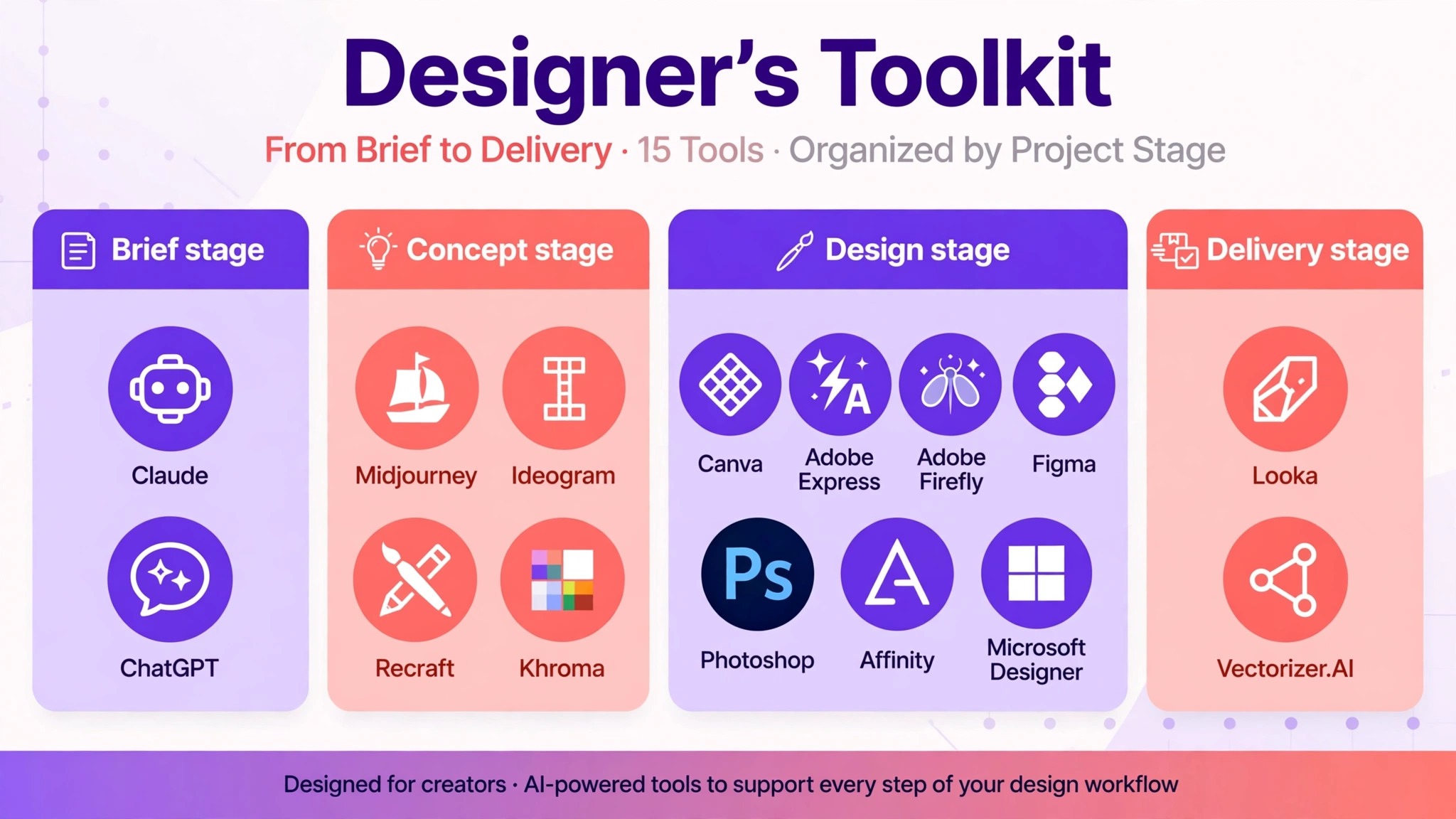
The table below matches each common design job to the single tool that handles it best. Use it to narrow the best ai tools for freelance designers to two or three candidates before you read the full reviews.
| Job | Best tool | Why it wins |
|---|---|---|
| All round design in a browser | Canva | Templates plus AI editing by conversation, Pro from 12 dollars a month billed annually |
| Quick social posts and flyers | Adobe Express | Commercially safe AI on a small budget, Premium 9.99 dollars a month |
| Commercially safe image generation | Adobe Firefly | Licensed training data, from 9.99 dollars a month |
| Artistic concept images | Midjourney | The ceiling for aesthetic quality, Basic 10 dollars a month |
| UI and product design | Figma | AI inside the tool developers already use, Professional from 16 dollars a seat a month |
| Readable text in generated images | Ideogram | Typography that actually spells correctly, Plus 20 dollars a month |
| True vector logos and icons | Recraft | Editable SVG output, Basic from 10 dollars a month billed annually |
| Fast logo concepts for a client | Looka | A full logo in minutes, 49 to 299 dollars per design |
| Color palettes that work | Khroma | AI palettes trained on thousands of combinations, free to 99 dollars a month |
| Precise AI photo editing | Photoshop | Generative Fill inside layered files, 22.99 dollars a month |
| Briefs, proposals and client writing | Claude | Long form drafting that sounds human, Pro from 17 dollars a month billed annually |
| Brainstorming and research | ChatGPT | The general assistant for every thinking job, Plus 20 dollars a month |
| Raster to vector conversion | Vectorizer.AI | Clean SVG from any image, from 10 dollars a month |
| Professional illustration and layout | Affinity | A full design suite with AI features, free |
| Quick social graphics from a prompt | Microsoft Designer | Invites, stickers and posts from a description, free |
How We Tested the Best AI Tools for Freelance Designers
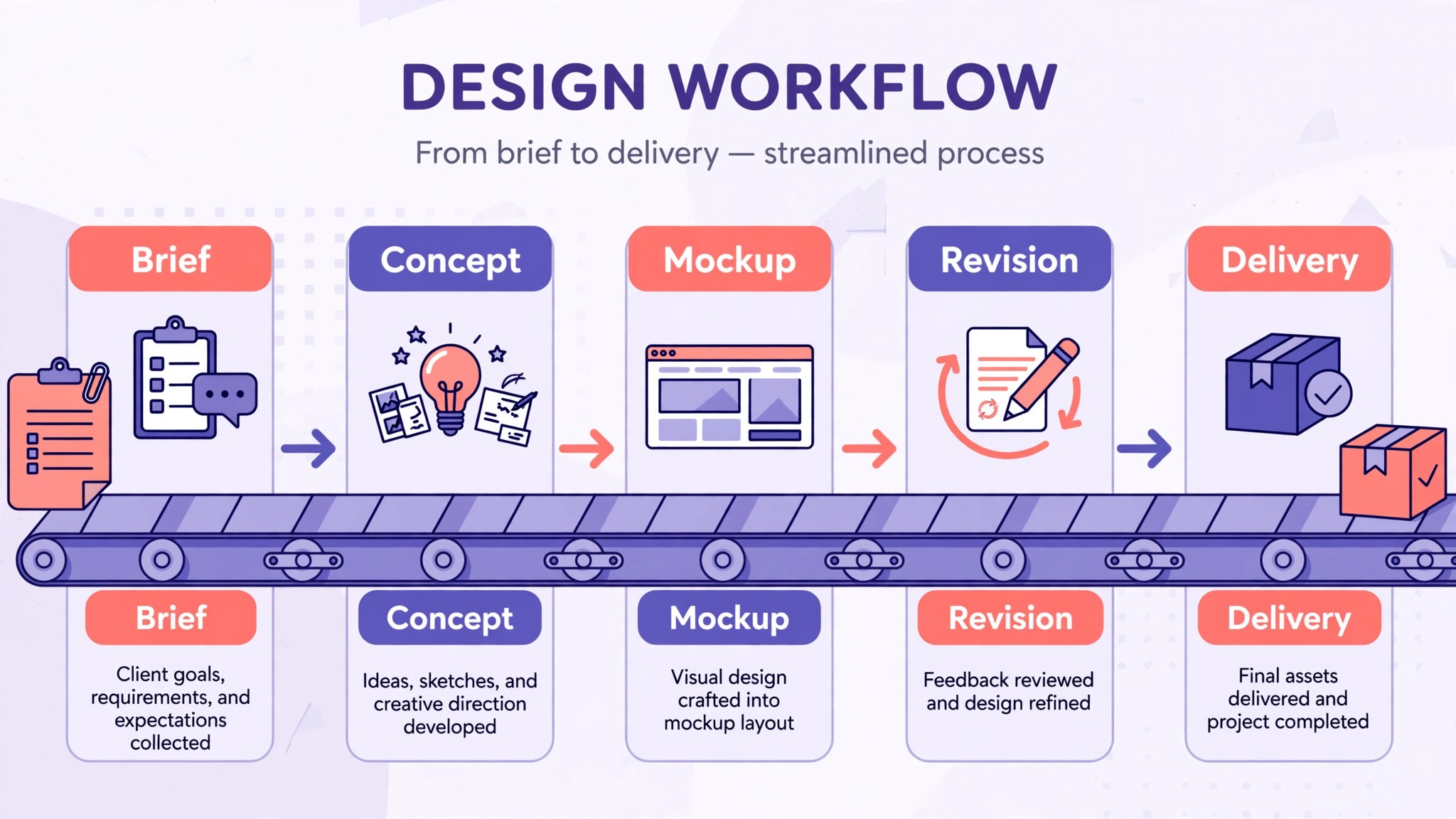
A tool earned a place here only if it does a real freelance design job in 2026, not if it added an AI button to an old product. The best ai tools for freelance designers prove their value on a real client project, not in a demo. We judged each one on five things that decide whether a freelancer keeps paying after the trial.
First, the job it does, from generating a concept to editing a photo to converting a raster to a vector, because a tool that does one job well beats a platform that does five jobs poorly. Second, the starting price a solo freelancer can actually buy, including whether a free plan exists and what the paid plan really includes.
Third, the file it hands you, because a layered PSD or a true SVG keeps working after the AI step, while a flat PNG does not. Fourth, the quality of its AI output, from type that spells correctly to images a client will actually approve. Fifth, the catch, from credit limits that quietly double the bill to free plans that strip commercial rights.
| Check before you buy | What to ask | Why it matters |
|---|---|---|
| Commercial rights | Does the free plan allow client work | Free images you cannot sell are a demo, not a tool |
| Output format | Layered file, true vector, or flat PNG | A flat file cannot be revised or resized |
| Credit model | What burns credits, and do they expire | Stops a 10 dollar plan becoming a 40 dollar plan |
| Training data and licensing | Is the output safe to sell to a client | Licensed training protects you and your client |
| Free plan limits | How many generations, exports or seats before you pay | Tells you if the trial is a real test |
| Export quality | Resolution, formats and color control | A low resolution export cannot go to print |
The 15 Tools, Reviewed One by One
1. Canva
Starting price Pro 18 dollars a month, or 12 dollars a month billed annually. Free plan with up to 20 AI uses a month. Best for All round design in a browser. Watch out Canva changed its Pro price several times in 2026, so confirm the price at checkout.
Canva is still the closest thing to a graphic designer in a browser tab, and for a freelancer it covers the widest range of paid work. It handles social posts, flyers, presentations, video, print and brand kits, with a template for almost everything a small business makes. Canva AI now edits by conversation, so a freelancer can ask for a layout change in plain language instead of dragging layers around for twenty minutes.
The strength is the combination of speed and editability. A client asks for a social set in the morning, and the freelancer delivers editable designs by lunch, with the brand kit keeping every piece consistent. The free plan gives up to 20 AI uses a month, which is enough to judge the quality, and Pro at 12 dollars a month on annual billing is the best value on this list for the range it covers.
2. Adobe Express
Starting price Premium 9.99 dollars a month. Free plan with daily free generations and 5GB of storage. Best for Quick social posts and flyers. Watch out It starts from templates, so a client who wants something truly original will notice the pattern.
Adobe Express is Adobe’s quick design app for social posts, flyers, short videos and simple brand assets, and it suits a freelancer who needs to turn work around fast. The free plan needs no payment card, lists more than 100,000 static and video templates and 5GB of storage, and gives free daily generations for image generation and object removal. Premium at 9.99 dollars a month adds 250 generative credits per user each month and starts with a 30 day free trial.
The strength is the Adobe backing. The AI assistant and Firefly models sit inside a low cost plan, and the output is commercially safe, which matters when a freelancer sells the work to a client. A freelancer who already uses Adobe tools will find the workflow familiar, and the templates mean a first draft exists in minutes.
3. Adobe Firefly
Starting price From 9.99 dollars a month. Free plan with daily free generations. Best for Commercially safe image generation. Watch out The most capable image model sits on the higher tiers, so check which model your plan includes.
Adobe Firefly is the choice when rights matter more than flair, and for a freelancer selling work to clients, rights matter a lot. Its Image Model 5 generates at native 4MP without upscaling, and it is trained on licensed content, so the output carries none of the legal uncertainty that hangs over models trained on scraped images. Prompt to Edit lets a freelancer describe a change in plain language instead of masking it by hand.
The strength is the commercial safety. A freelancer can hand a Firefly image to a corporate client and answer the licensing question with confidence, which is something no other generator on this list can match at this price. The integration with Adobe Express and Photoshop also means the generated image flows straight into the editing workflow.
4. Midjourney
Starting price Basic 10 dollars a month for 3.3 fast GPU hours. No free tier. Best for Artistic concept images. Watch out Generations are public unless you pay for Stealth Mode on Pro and above, so client work can be seen by others.
Midjourney still sets the ceiling for aesthetic quality, and version 8.2, which became the default model in July 2026, renders several times faster than the previous generation, generates at native 2K and finally handles text without embarrassing itself. For a freelancer selling concept art, editorial illustration or mood imagery, nothing else on this list produces work that looks this good this consistently.
The strength is the output. A client who sees a Midjourney concept understands the direction instantly, and that shortens the approval cycle from days to hours. The community and the style controls also mean a freelancer can develop a recognizable look across a client’s whole campaign, which is the kind of consistency that wins repeat work.
5. Figma
Starting price Professional full seat 16 dollars a month on annual billing, including 3,000 AI credits. Best for UI and product design. Watch out Paid seats are needed for teams, so the bill grows with every collaborator.
Figma is the tool for UI and product work, and its AI now sits inside the workflow developers already use. Figma Make turns a prompt into a working prototype or web app, and the AI features help with naming, organizing and iterating on frames. A freelancer designing app screens can go from a brief to a clickable prototype in a day, and the developer handoff stays clean because the file is the deliverable.
The strength is the file. Unlike a generated image, a Figma file is editable frames and code, so the client’s developer can build from it directly. That is the difference between a design that looks good in a presentation and one that ships. The Starter plan gives 150 AI credits a day, which is enough to test the workflow before paying.
6. Ideogram
Starting price Plus 20 dollars a month, or 15 dollars a month billed annually. Free tier available. Best for Readable text in generated images. Watch out The old Basic plan at 8 dollars a month is now legacy and closed to new buyers, so new subscribers start at Plus.
Ideogram is the image generator for designers who need text in the picture, and that is a bigger job than it sounds. Posters, book covers, signage and social graphics all need words that spell correctly, and most generators still garble them. Ideogram 4.0, released in June 2026, renders text cleanly and adds bounding box layout control, so a freelancer can place a headline exactly where the design needs it.
The strength is the typography. A freelancer who has ever regenerated a poster five times because the headline said the wrong word will understand the value immediately. Plus at 20 dollars a month, or 15 on annual billing, gives 1,000 priority credits and private generation, which keeps client work out of the public gallery.
7. Recraft
Starting price Basic 12 dollars a month, or 10 dollars a month billed annually, for 1,000 credits. Pro from 20 dollars a month, or 16 billed annually. Best for True vector logos and icons. Watch out Images made on the free plan are public, Recraft owns them, and they come with no commercial rights.
Recraft is the vector tool for freelancers who sell logos, icons and illustrations, because it hands you a true SVG instead of a flat image. A logo that needs to go on a van, a business card and a website has to scale without losing quality, and only a vector file does that properly. Recraft generates and edits vector art directly, so the freelancer can refine the shapes instead of tracing a raster after the fact.
The strength is the file. A client who receives a real SVG can use it everywhere, and the freelancer does not have to rebuild the logo in Illustrator afterwards. The Basic plan at 12 dollars a month, or 10 on annual billing, is a fair price for a tool that replaces a genuinely tedious job.
8. Looka
Starting price 49 to 299 dollars per design, one time. Best for Fast logo concepts for a client. Watch out It is a per design purchase, not a subscription, so the cost adds up across many clients.
Looka automates logo design, and for a freelancer it is the fastest way to show a client options. Feed it the business name and a few preferences, and it returns a set of logo concepts with matching brand assets in minutes. A freelancer who needs to present three directions in a first meeting can do it without spending a day in Illustrator.
The strength is the speed. A logo project that used to take a week of back and forth can start with real options on day one, and the client can react to something concrete instead of a mood board. The one time price, from 49 to 299 dollars per design depending on the package, is easy to pass through to the client as a project cost.
9. Khroma
Starting price Free to 99 dollars a month. Best for Color palettes that work. Watch out It is a single purpose tool, so it only pays off if color is a real part of your work.
Khroma generates color and pattern combinations with AI, trained on thousands of palettes, and it suits a freelancer who spends too long choosing colors. Feed it a color you like and it returns combinations that work, with the contrast and accessibility checked. A freelancer building a brand palette can test dozens of options in an afternoon instead of guessing.
The strength is the focus. Color is one of those jobs that looks simple and eats hours, and Khroma removes the guesswork. The free tier is genuinely useful, and the paid tiers up to 99 dollars a month add the features a busy freelancer needs. It is also one of the few tools here that a client can play with, which makes palette approval faster.
10. Photoshop
Starting price 22.99 dollars a month. Best for Precise AI photo editing. Watch out It is the most expensive single tool here, so it only pays off if photo editing is core to your work.
Photoshop 2026 is still the standard for precise AI editing, and its Generative Fill remains the best way to change a photo without leaving the file. A freelancer retouching product shots, extending a background or removing an unwanted object can do it in layers, with the AI step sitting alongside the manual work. The result is a layered PSD that the client can revise, not a flat image that has to be redone.
The strength is the control. Where a generator gives you a finished image, Photoshop gives you a file you can keep working on, and that matters when a client asks for the third revision. The multi model support also means the freelancer can pick the best engine for each job instead of being locked to one.
11. Claude
Starting price Pro 20 dollars a month, or 17 dollars a month billed annually. Free plan available. Best for Briefs, proposals and client writing. Watch out Pro usage limits apply on heavy days, so check the plan before a big writing project.
Claude is the tool freelancers reach for when a draft has to read like a person wrote it, and that covers most of the writing a designer does. It turns a rough client brief into a clear project scope, drafts proposals that sound professional, and rewrites revision notes so the client understands what changed and why. A freelancer who writes ten client emails a day can cut that time in half.
The strength is the tone. Claude follows detailed style instructions well, which matters when a freelancer wants every client message to sound like them, not like a chatbot. It also handles long documents, from a brand guidelines draft to a full proposal, with a steadier hand than its rivals. Pro at 20 dollars a month, or 17 on annual billing, is the plan most freelancers buy.
12. ChatGPT
Starting price Plus 20 dollars a month. Free tier available. Best for Brainstorming and research. Watch out It will invent client details if you let it, so never send its output without checking the facts.
ChatGPT is the general assistant for the thinking jobs, from brainstorming campaign directions to researching a client’s industry before the first meeting. A freelancer can ask it to summarize a competitor’s visual style, draft a mood board brief, or turn a client call transcript into a structured list of requirements. For a solo freelancer, it is the closest thing to a creative director to bounce ideas off.
The strength is flexibility. No specialist tool can match a general model for the odd jobs, from naming a brand to writing the copy that goes on a poster. The paid Plus plan at 20 dollars a month brings the better model and longer context, which matters when you are pasting in a long brief.
13. Vectorizer.AI
Starting price From 10 dollars a month. Best for Raster to vector conversion. Watch out Complex images with gradients convert less cleanly than simple logos, so check the output before you bill for it.
Vectorizer.AI converts raster images to vector, and for a freelancer it fixes one of the most common client problems. A client sends a logo as a low resolution JPG, and the freelancer needs a clean SVG for print. Vectorizer.AI does that conversion in seconds, with a quality that used to take an hour of manual tracing. A freelancer who takes on rebrands and refreshes will use it weekly.
The strength is the time saved. Manual tracing is tedious, skilled work that clients do not want to pay for, and a clean automatic conversion turns it into a five minute job. At 10 dollars a month, it pays for itself the first time it saves an hour of tracing.
14. Affinity
Starting price Free. Best for Professional illustration and layout. Watch out AI features require a Canva premium plan, so the free app on its own has limited AI.
Affinity is the professional design suite that is now free, and for a freelancer it is the closest thing to a full Adobe replacement without the subscription. It handles illustration, photo editing and page layout in three apps, with the precision a professional needs. The AI features, which require a Canva premium plan, add generation and assistance inside that professional workflow.
The strength is the value. A full professional suite for free is hard to argue with, and a freelancer starting out can do real client work in Affinity from day one. The files are professional grade, so a client who needs print ready output gets it without the freelancer paying a monthly subscription.
15. Microsoft Designer
Starting price Free with a Microsoft account. Best for Quick social graphics from a prompt. Watch out Frequent use may call for a subscription, so heavy users should check the terms.
Microsoft Designer makes invitations, greeting cards, stickers and social posts from a description, and it needs only a free Microsoft account to start. A freelancer who needs a quick social graphic for a client can describe it, get options in seconds, and export the result. It is the lightest tool on this list, and sometimes light is exactly what the job needs.
The strength is the price. Free is hard to beat, and for a freelancer who only occasionally needs a quick graphic, Microsoft Designer covers the job without another subscription. It is also genuinely fast, which matters when a client asks for a social post by the end of the day.
Side by Side Comparison
| Tool | Starting price | Best for | Free plan |
|---|---|---|---|
| Canva | Pro 12 dollars a month, annual | All round design in a browser | Yes |
| Adobe Express | Premium 9.99 dollars a month | Quick social posts and flyers | Yes |
| Adobe Firefly | From 9.99 dollars a month | Commercially safe image generation | Yes |
| Midjourney | Basic 10 dollars a month | Artistic concept images | No |
| Figma | Professional 16 dollars a seat a month | UI and product design | Yes |
| Ideogram | Plus 20 dollars a month | Readable text in generated images | Yes |
| Recraft | Basic 10 dollars a month, annual | True vector logos and icons | Yes |
| Looka | 49 to 299 dollars per design | Fast logo concepts for a client | No |
| Khroma | Free to 99 dollars a month | Color palettes that work | Yes |
| Photoshop | 22.99 dollars a month | Precise AI photo editing | No |
| Claude | Pro 17 dollars a month, annual | Briefs, proposals and client writing | Yes |
| ChatGPT | Plus 20 dollars a month | Brainstorming and research | Yes |
| Vectorizer.AI | From 10 dollars a month | Raster to vector conversion | No |
| Affinity | Free | Professional illustration and layout | Yes |
| Microsoft Designer | Free | Quick social graphics from a prompt | Yes |
How to Pick the Right Stack for Your Work
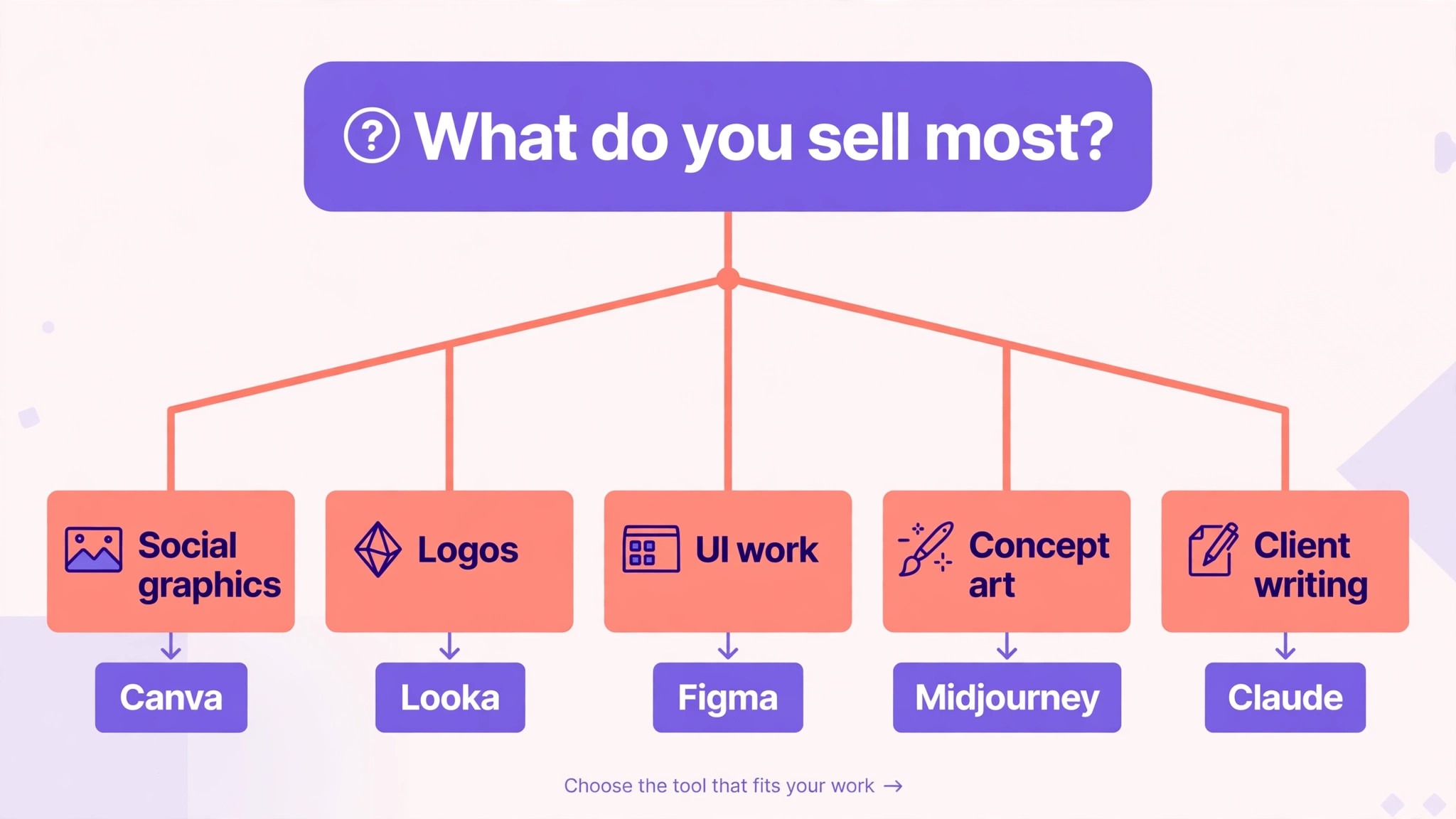
The best ai tools for freelance designers are not the ones with the longest feature list. They are the ones that fix the bottleneck your work feels every week. A designer who loses hours to social graphics should buy Canva. A designer who sells logos should buy Recraft and Vectorizer.AI. A designer who sells UI work should buy Figma. A designer who sells concept art should buy Midjourney. A designer who drowns in client writing should buy Claude. Start from the work you actually sell, not from the vendor homepage. The best ai tools for freelance designers are the ones your clients never notice, because the work simply arrives on time.
Budget the full stack, not the headline price. The table below shows what a solo freelancer actually pays in year one for the most common combinations, using starting annual prices. Credit limits and seat costs are the lines that surprise buyers, so ask for them in writing before you sign.
| Stack for a solo freelancer | Monthly cost, annual billing | What it covers |
|---|---|---|
| Canva Pro plus Claude Pro | 29 dollars | Everyday design plus all the writing |
| Canva Pro plus Midjourney Basic | 22 dollars | Design plus artistic concepts |
| Adobe Express plus Firefly | 20 dollars | Fast design plus safe generation |
| Figma Professional plus Ideogram Plus | 31 dollars | UI work plus text heavy images |
| Recraft Basic plus Vectorizer.AI | 20 dollars | Vector logos plus raster conversion |
| Canva Pro plus Photoshop | 35 dollars | Everyday design plus precise editing |
Frequently Asked Questions
What is the cheapest good AI design tool for a freelancer
Affinity is free and covers professional illustration and layout, and Canva Pro at 12 dollars a month billed annually is the cheapest paid all rounder with a real free tier behind it. Midjourney Basic at 10 dollars a month is the cheapest way into high quality concept art.
Will AI tools replace freelance designers
No, and the designers who treat them as replacements get the worst results. AI replaces the drafting, resizing, tracing and first pass work that sits around designing, which is roughly a third of a freelancer’s week. The taste, the client judgment and the final call still belong to a person.
Which tool is best for logo design
Recraft is the best single tool for most logo work, because it hands you a true SVG that scales to any size. Looka is better when you need fast concepts to show a client in a first meeting. Ideogram is better when the logo needs readable text inside a generated image.
How much should a solo freelancer budget for AI design tools
A realistic year one budget for the best ai tools for freelance designers is 30 to 60 dollars a month for a solo freelancer using self serve tools, and 100 dollars a month or more once you add Photoshop and Figma together. Credit based tools can push the bill higher in heavy months, so set a monthly cap and review usage in the first 90 days.
Can I sell AI generated images to clients
It depends on the tool and the license. Adobe Firefly and Ideogram grant full commercial rights on every tier, free included. Recraft’s free plan gives no commercial rights at all, and Midjourney generations are public unless you pay for Stealth Mode. Always check the license on the plan you actually pay for, and tell the client how the image was made when they ask.
Our Pick
If you buy one tool this quarter, buy Canva Pro. It covers the most of the freelance design job at a price a solo designer can afford, and it is the fastest way to find out whether AI design work fits your practice. The best ai tools for freelance designers earn their keep by giving you your evenings back, and Canva does that from the first week, without an enterprise contract or a migration project.
Whatever you pick, start with the work you sell most, trial with a real client project, and keep a human in the loop on anything a client will see for the first month. The best ai tools for freelance designers on this list all work. The difference is whether the tool matches the job you actually do, and whether you measure the return in projects delivered and clients kept rather than in features used.