
An influencer does not run out of ideas, they run out of hours. The video takes an evening to edit, the captions take another hour, the brand email sits unanswered for a week, and the post that should have gone live on Tuesday goes live on Friday, when the trend has already moved on. The best ai tools for influencers exist because the work around the content now takes longer than the content itself. Hooks, captions, edits, clips, scheduling and brand deals have all moved into software that does the repetitive half while the creator keeps the half that needs a face and a voice.
This guide compares fifteen tools on published prices, the influencer job each one does best and the catch that only shows up after the trial ends. Prices in this category move often, so every figure below is the published starting price as of late 2026, with annual billing noted where it changes the number. Start with the shortlist, then read the reviews that match the content you make most.
The pattern across all fifteen is simple. The tools that win are the ones that remove a specific bottleneck, whether that bottleneck is the edit, the caption, the clip or the brand deal. Everything else is a bonus, and a creator who buys the bonus first usually keeps the leak.
The Quick Shortlist
The table below matches each common influencer job to the single tool that handles it best. Use it to narrow the best ai tools for influencers to two or three candidates before you read the full reviews. Prices are monthly list prices unless noted, and annual billing is usually cheaper than paying month to month.
| Job | Best tool | Why it wins |
|---|---|---|
| Long video into short clips | OpusClip | AI clipping with a virality score |
| Talking head captions from a phone | Captions | AI editing and captions, from 9.99 dollars |
| Short form editing and captions | CapCut | Full editor free, Pro from 19.99 dollars |
| Editing video by transcript | Descript | Cut the text and the video follows |
| Hooks, captions and brand replies | ChatGPT | Fastest all round drafting and ideas |
| Natural long form captions and scripts | Claude | Cleanest long form drafts, follows a style guide |
| Thumbnails, covers and media kits | Canva | Templates plus AI design, 10 dollars a month |
| Scheduling posts across platforms | Later | Visual planner from 25 dollars a month |
| Scheduling on a small budget | Buffer | From 6 dollars a month per channel |
| One link for every platform | Linktree | Pro from 9 dollars a month |
| Caption led short videos | Submagic | From 12 dollars a month billed annually |
| Recording interviews and podcasts | Riverside | Studio quality recording from 15 dollars |
| Brand voice across a team | Jasper | Stored brand voices, 59 dollars a seat |
| Grammar and tone checks | Grammarly | Catches what a first pass edit misses |
| Managing several brand accounts | Hootsuite | Professional plan from 99 dollars a month |
How We Judged the best ai tools for influencers
A tool earned a place here only if it does a real influencer job in 2026, not if it added an AI label to an old scheduler. The best ai tools for influencers were judged on five things that decide whether a creator keeps paying after the first month.
First, the influencer job it does, from a hook to a clip to a brand deal, because a tool that writes one format well beats a platform that writes five formats poorly. Second, whether the price is published and how it scales, including per channel and per seat charges that change the real bill as the audience grows. Third, output quality, because a caption that needs a full rewrite costs more time than writing from scratch.
Fourth, the publishing workflow, because a creator who cannot move from edit to published post without five manual steps will skip the steps that matter. Fifth, the catch, from credit caps that run out mid month to free plans that watermark every export.
| Check before you buy | What to ask | Why it matters |
|---|---|---|
| Credit or clip caps | Monthly limit and what happens at the cap | A cap that runs out mid week stops the posting |
| Export quality | Watermark, resolution and format on the free plan | A watermarked export cannot be published |
| Platform coverage | Which networks it posts to directly | A scheduler that skips your main platform is useless |
| Brand deal tools | Media kit, rate card, or outreach help | Deals are the revenue, not the content |
| Per channel pricing | Cost per channel and per seat | Per channel bills multiply across platforms |
| Trial on real content | Can you test it on real posts before you pay | A trial on demo data proves nothing |
The 15 Tools, Reviewed One by One
Read the reviews that match the content you make most, then check the price at your real posting volume before you trial anything. Each review names the starting price, the job the tool does best and the catch to ask about.
1. OpusClip
Starting price Free plan, then 15 dollars a month for Starter. Best for Long video into short clips. Watch out The free plan watermarks exports and clips expire after 3 days.
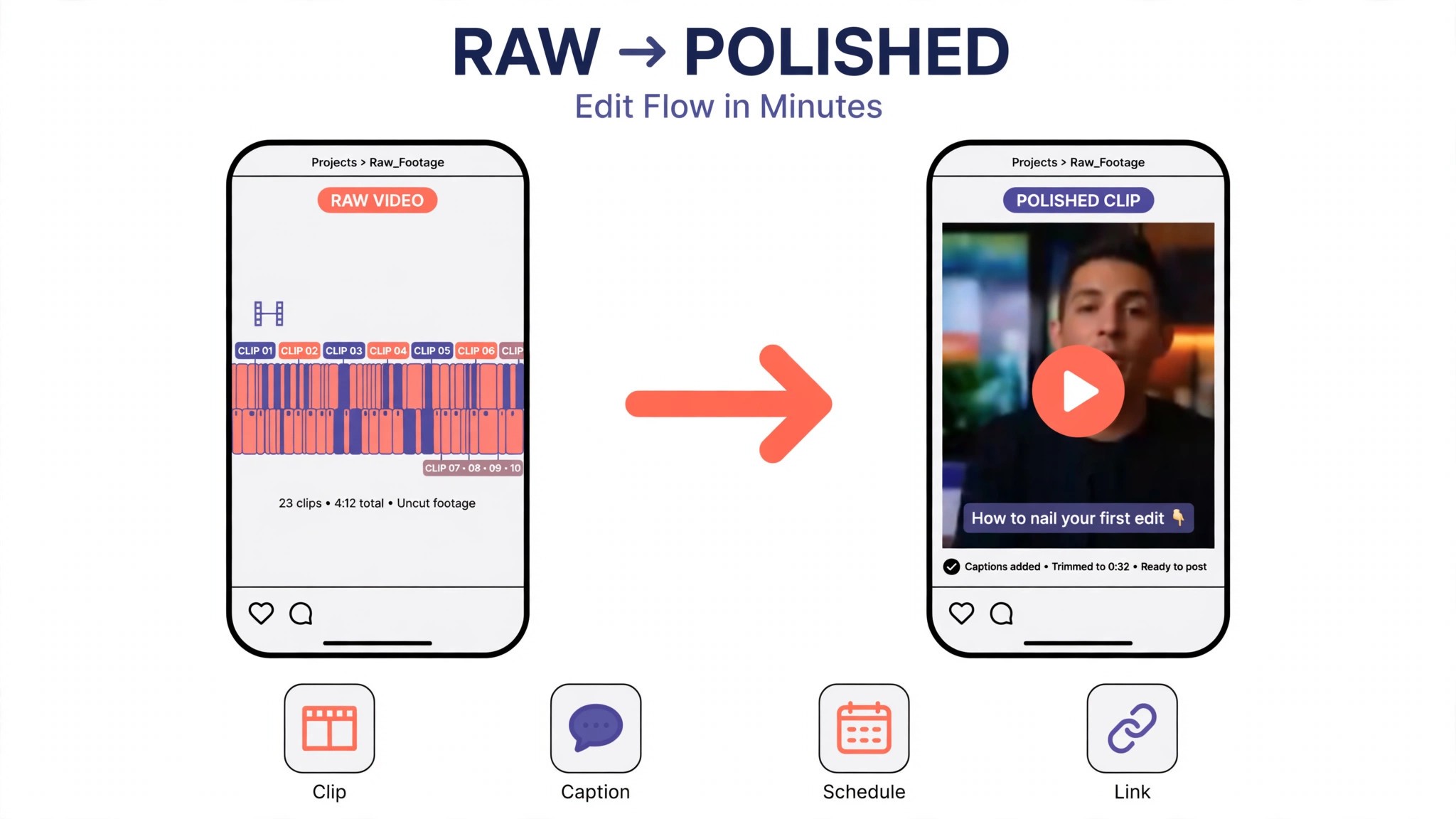
OpusClip is the repurposing pick for influencers with long videos. It takes a podcast, a stream or a vlog, finds the strongest moments, cuts them into short clips, adds animated captions and scores each clip with a virality score, then posts them to Shorts, TikTok and Reels. For a creator with a back catalogue of long videos, that is a month of short form content from work already done.
The strength is the ranking. The virality score tells the creator which clips to publish first instead of guessing, and the auto posting saves the manual upload step on three platforms. Starter at 15 dollars a month buys 150 credits, with one credit per minute of source video, which covers a weekly long video comfortably.
The catch is the free plan. It gives 60 credits a month with a watermark and no editing, and clips stop being exportable after 3 days, so the free tier is a demo rather than a workflow. For turning long video into shorts, OpusClip earns the top spot.
2. Captions
Starting price From 9.99 dollars a month for Basic. Best for Talking head captions from a phone. Watch out Prices are iOS prices, and the best features sit on Max at 24.99 dollars.
Captions is the phone pick for influencers who film talking head video on an iPhone. It adds accurate captions in more than 100 languages, fixes eye contact, removes filler words and edits the video from a chat, all from the phone, so a creator can go from recording to posting without touching a desktop.
The strength is the phone workflow. A creator can record, caption, edit and post from one app, and the caption styles look native to the platforms rather than pasted on. Max at 24.99 dollars a month adds AI Edit and Clips with 500 credits a month, which is the tier most serious creators need.
3. CapCut
Starting price Free plan, then Pro from 19.99 dollars a month. Best for Short form editing and captions. Watch out Premium templates and assets need Pro at export.
CapCut is the free pick for short form video, and it is the tool most influencers already have on their phone. The free editor covers cutting, auto captions, effects and templates, and the mobile app is fast enough to edit a reel on the train. For a creator starting out, CapCut does the job for nothing, which no other video tool on this list can say.
The strength is the breadth at zero cost. Auto captions, background removal, noise removal and a huge template library are all available without paying, and the desktop app matches the mobile app for most jobs. A creator can go from raw clip to captioned reel in one app, on one phone, in minutes.
The catch is the Pro wall. Premium templates, premium effects and some AI features need Pro at 19.99 dollars a month, and a project that uses them will ask for payment at export. For free short form editing, CapCut earns its place.
4. Descript
Starting price Free plan, then 16 dollars a month billed annually for Hobbyist. Best for Editing video by transcript. Watch out Hobbyist caps media hours at 10 a month.
Descript is the editing pick, and it changes how an influencer cuts video. You edit the transcript like a document, delete a sentence, and the video follows. Filler words disappear with one click, and the overdub feature can fix a misspoken word without re-recording. For a creator who makes talk heavy video or podcasts, that transcript editing is the single biggest time saving on this list.
The strength is the workflow. A creator can record, transcribe, cut, caption and publish from one app, and the learning curve is shorter than a traditional editor. The free plan covers 60 media minutes a month, which is enough to test the workflow on a real video before paying.
The catch is the caps. Hobbyist at 16 dollars a month billed annually gives 10 media hours and 400 AI credits a month, so a creator publishing several long videos a week will need the Creator plan at 24 dollars a month billed annually. For editing by transcript, Descript earns its place.
5. ChatGPT
Starting price Free plan, then 20 dollars a month for Plus. Best for Hooks, captions and brand replies. Watch out Output quality depends heavily on the brief you give it.
ChatGPT is the best all round drafting tool an influencer can buy for 20 dollars a month, and it is the tool most creators already use every day. Plus buys the stronger models and more capacity, and the free plan is enough to test the workflow. It writes hooks, captions, scripts, brand reply drafts and content calendars in a plain chat box.
The strength is flexibility. A creator can ask for ten hook angles, five caption options and a reply to a brand email in one session, and the back and forth is faster than any template based tool. For a solo creator who makes many formats, that flexibility is worth more than a specialist feature set.
The catch is that ChatGPT has no video editing, no scheduling and no brand voice memory comparable to Jasper, so a creator must supply the structure and the standards on every job. For hooks, captions and brand replies at 20 dollars a month, ChatGPT is the best value on this list.
6. Claude
Starting price Free plan, then 17 dollars a month billed annually for Pro. Best for Natural long form captions and scripts. Watch out No video tools or scheduling built in.
Claude is the prose pick, and influencers who care about how captions read tend to prefer it over every other generalist on this list. Its long form drafts sound more natural, its edits are more careful, and it follows a style guide more closely than most rivals when given one. For scripts, newsletters and long captions where tone matters as much as information, that natural voice is the reason to choose it.
The strength is editing. Claude is unusually good at tightening a draft, cutting filler, and rewriting a paragraph in a specified tone without changing its meaning, which is the work a creator does most after the first draft exists. A creator can paste a rough script and get back a cleaner version in seconds.
7. Canva
Starting price Free plan, then 10 dollars a month billed annually for Pro. Best for Thumbnails, covers and media kits. Watch out The best AI features sit behind Pro.
Canva is the graphics pick for influencers, and it is the fastest way to make a thumbnail, a cover, a media kit or a story template that looks professional. The template library covers every platform, the AI tools generate images and rewrite text, and the brand kit keeps colours and fonts consistent across every post.
The strength is the template plus the brand kit. A creator can build a visual style once, then produce a new thumbnail for every video in minutes, with the same fonts, colours and layout. The free plan is genuinely useful, and Pro at 10 dollars a month billed annually adds the AI features and the full asset library.
The catch is that Canva is a graphics tool, not a video or scheduling tool, so it solves one job and leaves the rest to the other tools on this list. For thumbnails, covers and media kits, Canva earns its place.
8. Later
Starting price Starter from 25 dollars a month billed annually. Best for Scheduling posts across platforms. Watch out The visual planner is the strength, so a creator who posts by hand will use less of it.
Later is the scheduling pick for influencers who plan content visually. It provides a drag and drop calendar, a media library, auto publishing and analytics across the major platforms, so a creator can plan a week of posts in one sitting and let the tool publish them.
The strength is the planner. A creator can see the whole week as a grid, move posts by dragging them, and check that the feed looks balanced before anything goes live. The analytics show which posts actually performed, which is the feedback a creator needs to improve.
9. Buffer
Starting price From 6 dollars a month per channel. Best for Scheduling on a small budget. Watch out Per channel pricing adds up across five platforms.
Buffer is the budget scheduling pick for influencers who want simple, reliable posting without a big bill. From 6 dollars a month per channel, it covers scheduling, a queue, basic analytics and engagement tools, with a clean interface that takes minutes to learn.
The strength is the price and the simplicity. A creator with two channels pays about 12 dollars a month, and the tool does the job without a learning curve or a sales call. The queue system also keeps a steady posting rhythm, which is the habit that grows an audience.
The catch is the per channel math. A creator on five platforms pays about 30 dollars a month, which is more than Later Starter, so the budget advantage fades as the channel count grows. For scheduling on a small budget, Buffer earns its place.
10. Linktree
Starting price Free plan, then Pro from 9 dollars a month. Best for One link for every platform. Watch out It is a link page, not a content tool, so it solves one job only.
Linktree is the link pick for influencers who need one bio link that goes everywhere. Pro from 9 dollars a month buys customisation, analytics, email capture and commerce links, so the bio link becomes a small storefront rather than a list of links.
The strength is the simplicity. Every platform gets the same link, the creator updates it once, and the analytics show which link actually gets clicked. For a creator with an audience spread across five platforms, that single link is the difference between a follower who finds the product and one who gives up.
The catch is the scope. Linktree is a link page, not a content, editing or scheduling tool, so it solves one job and leaves the rest to the other tools on this list. For one link for every platform, Linktree earns its place as the cheapest tool here.
11. Submagic
Starting price From 12 dollars a month billed annually. Best for Caption led short videos. Watch out There is no free plan listed, so the trial is the only way to test it.
Submagic is the caption pick for influencers who make short videos with bold, animated captions. It adds word by word captions, auto sound effects, b roll suggestions and hooks to a video in minutes, and the caption styles are the ones that perform best on short form platforms.
The strength is the caption style. The animated captions, with keywords highlighted and sound effects on key words, are the look that stops a scroll, and Submagic produces them faster than any manual editor. The tool also handles the hook, suggesting the opening line that keeps a viewer watching.
12. Riverside
Starting price Standard from 15 dollars a month billed annually. Best for Recording interviews and podcasts. Watch out It records, it does not edit deeply, so a creator still needs Descript for the cut.
Riverside is the recording pick for influencers who interview guests or record podcasts on video. It records each person locally in studio quality, so a guest with a bad connection still sounds clear, and the platform handles the scheduling, the waiting room and the recording in one place.
The strength is the quality. Local recording means the audio and video are captured on each person’s device rather than streamed, so the final file is clean even when the call was not. For a creator whose interviews are the content, that quality is the value.
13. Jasper
Starting price 59 dollars a month per seat for Pro, billed annually. Best for Brand voice across a team. Watch out Per seat pricing adds up fast for a team of five.
Jasper is the team pick for influencers who run a team or manage several brand accounts. Its Pro plan buys the writing suite with brand voices that learn how each brand sounds, so a post, an email and an ad all read as if one writer produced them, even when three people wrote them.
The strength is control. Templates cover ads, emails and long form, and team governance keeps every writer inside the brand rules instead of inventing a new voice per post. For a creator managing several brands, that consistency is the whole value.
The catch is the bill. At 59 dollars per seat a month on annual billing, a five person team pays close to 3,500 dollars a year, which is far more than a solo creator needs. For a team or a multi brand creator, Jasper earns its place.
14. Grammarly
Starting price Free plan, then 12 dollars a month billed annually for Premium. Best for Grammar and tone checks. Watch out It edits, it does not draft or research.
Grammarly is the editing layer that catches what a first pass edit misses. It checks grammar, spelling, tone and clarity across every app a creator writes in, from the browser to the document to the email client. For an influencer who publishes fast, that safety net is worth more than it looks, because one public typo costs more credibility than the subscription.
The strength is the coverage. Grammarly works everywhere the creator writes, not just inside one app, so the same check applies to a caption, a brand email and a script. The tone suggestions are practical, and the free plan covers the basic checks well enough for many creators.
The catch is scope. Grammarly does not draft, it does not research, and it does not write a script from a brief. For grammar and tone, Grammarly earns its place as the cheapest editing specialist on this list.
15. Hootsuite
Starting price Professional from 99 dollars a month. Best for Managing several brand accounts. Watch out It is the most expensive scheduler here, so a solo creator will pay for features they never use.
Hootsuite is the management pick for influencers and agencies that run several brand accounts at once. Professional from 99 dollars a month covers scheduling, monitoring, analytics and team workflows across the major platforms, with the depth a solo scheduler cannot match.
The strength is the scale. A creator managing five brand accounts gets one dashboard for all of them, with approval workflows, team roles and reporting that a client can read. The monitoring also catches brand mentions and comments that a solo creator would miss.
The catch is the price. At 99 dollars a month, Hootsuite costs four times as much as Later Starter, and a solo creator with one account will not use the team features that justify it. For managing several brand accounts, Hootsuite earns its place.
Side by Side Comparison
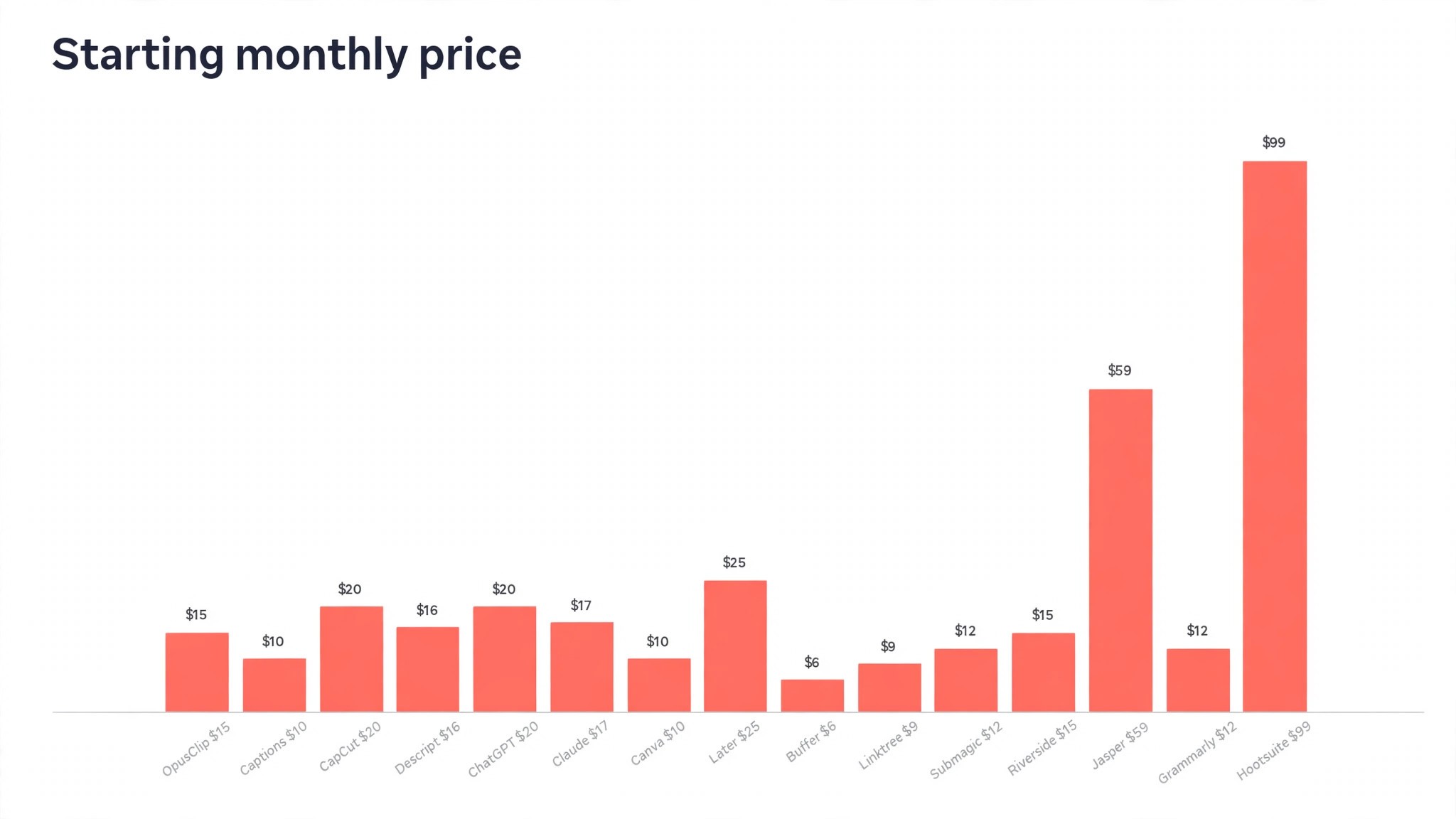
The table below puts the best ai tools for influencers side by side on price, best job and free plan, so you can compare the published prices against the per channel tools at a glance.
| Tool | Starting price | Best for | Free plan |
|---|---|---|---|
| OpusClip | 15 dollars a month | Long video into short clips | Yes |
| Captions | 9.99 dollars a month | Talking head captions from a phone | Limited |
| CapCut | 19.99 dollars a month | Short form editing and captions | Yes |
| Descript | 16 dollars a month | Editing video by transcript | Yes |
| ChatGPT | 20 dollars a month | Hooks, captions and brand replies | Yes |
| Claude | 17 dollars a month | Natural long form captions | Yes |
| Canva | 10 dollars a month | Thumbnails, covers and media kits | Yes |
| Later | 25 dollars a month | Scheduling across platforms | Trial only |
| Buffer | 6 dollars a month | Scheduling on a small budget | Yes |
| Linktree | 9 dollars a month | One link for every platform | Yes |
| Submagic | 12 dollars a month | Caption led short videos | No |
| Riverside | 15 dollars a month | Recording interviews and podcasts | Yes |
| Jasper | 59 dollars per seat a month | Brand voice across a team | Trial only |
| Grammarly | 12 dollars a month | Grammar and tone checks | Yes |
| Hootsuite | 99 dollars a month | Managing several brand accounts | Trial only |
How to Pick the Right Tool for Your Content
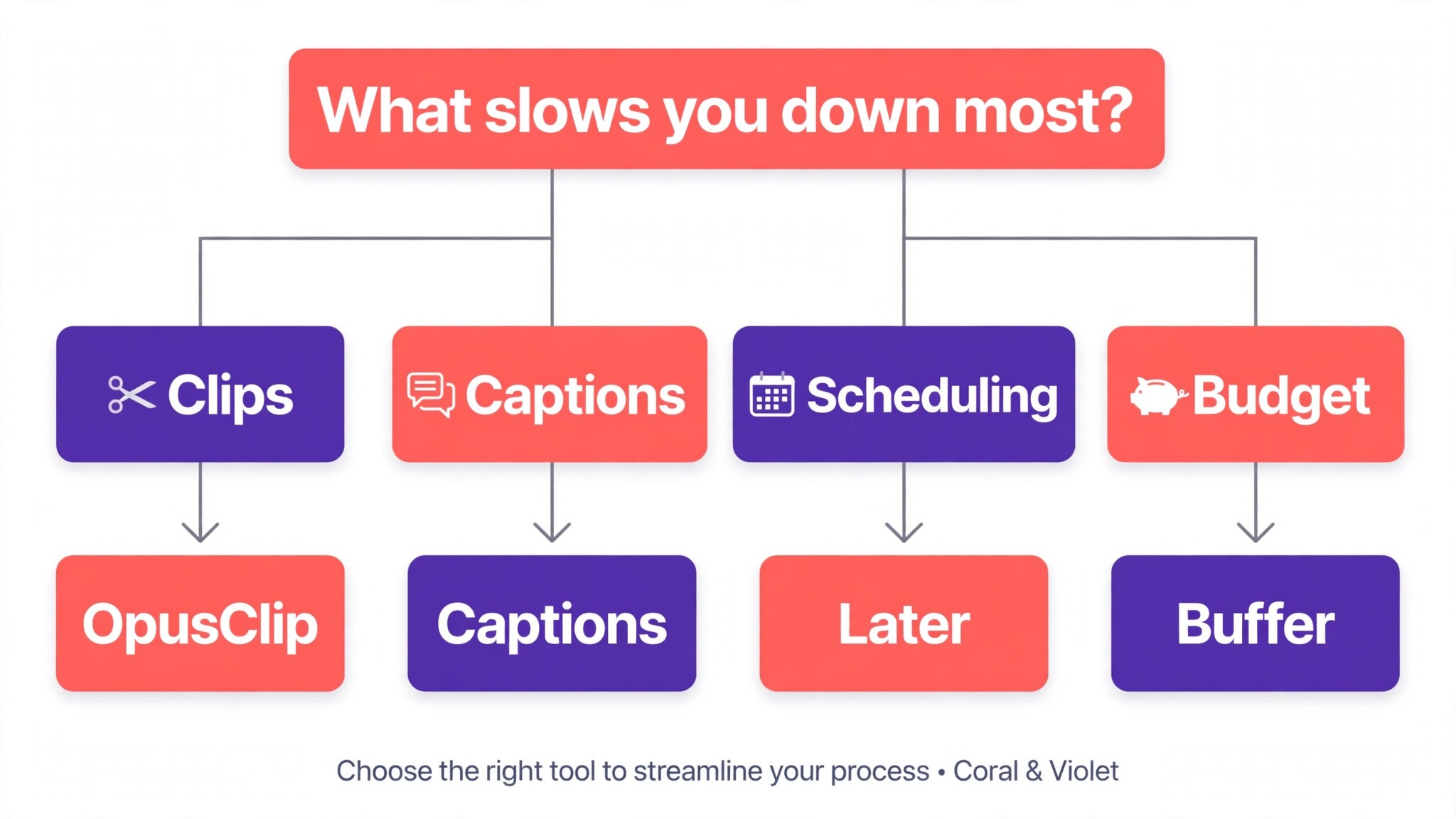
The best ai tools for influencers are not the ones with the longest feature list. They are the ones that fix the slowest part of your week. A creator drowning in edits should buy Descript or CapCut. A creator sitting on hours of long video should buy OpusClip. A creator who cannot write captions fast enough should buy Captions or Submagic. A creator who misses posting days should buy Later or Buffer. A creator chasing brand deals should buy ChatGPT and Canva for the pitch. Start from the slow part, not from the vendor homepage.
Budget the full bill, not the headline price. The table below shows what a solo creator and a small team actually pay in year one for the most common combinations, using published starting prices. Per channel and per seat charges are the lines that surprise buyers, so ask for them in writing before you sign, and remember that annual billing usually saves about twenty percent against monthly billing.
| Stack for one creator | Monthly cost | What it covers |
|---|---|---|
| ChatGPT Plus plus CapCut free | About 20 dollars | Hooks plus short form editing |
| OpusClip Starter plus Canva Pro | About 25 dollars | Long to short clips plus thumbnails |
| Descript Hobbyist plus Later Starter | About 41 dollars | Transcript editing plus scheduling |
| Captions Max plus Buffer, 2 channels | About 37 dollars | Phone captions plus scheduling |
| Jasper Pro, one seat | 59 dollars | Brand voice and team drafting |
| Jasper Pro, five seats | 295 dollars | Brand voice for a team of five |
Frequently Asked Questions
What is the cheapest good AI tool for influencers to start with
CapCut is the cheapest credible start for video, with a full free editor, and ChatGPT has a free plan with Plus at 20 dollars a month. Buffer from 6 dollars a month per channel is the cheapest scheduler here, and Linktree Pro at 9 dollars a month covers the bio link. Start with the content you make most each week, and add a specialist only when the general tool cannot do a job you are paid to do. That is the cheapest way to build a stack from the best ai tools for influencers without paying for features you never open.
Will AI captions and clips really grow my audience
They will if they remove the bottleneck that stops you posting. An influencer who posts three times a week grows faster than one who posts once a week, and the tools on this list remove the edit, the caption and the clip work that eats the week. The content still has to be good, and the audience still has to care, but a creator who publishes consistently with decent captions will outgrow a creator who publishes rarely with perfect ones. Use the AI to post more often, then measure which posts actually perform.
Which tool is best for turning long videos into short clips
OpusClip is the strongest choice for long to short video, because it finds the best moments, cuts them, captions them and scores each clip before posting to three platforms. Descript is the best pick when the video also needs a careful transcript edit, and CapCut is the best free pick for manual short form edits. Price the combination, not one tool, and confirm the current plan limits before you buy, because both OpusClip and Descript have changed tiers in the past year.
How much should a solo influencer budget for AI tools
A realistic year one budget is 20 to 40 dollars a month for one general drafter such as ChatGPT Plus plus a free editor such as CapCut, and 60 to 90 dollars a month once you add a clipping or scheduling tool such as OpusClip or Later. A team of five on Jasper Pro pays close to 3,500 dollars a year, while the same team on Buffer pays about 30 dollars a month for five channels.
Our Verdict
If you buy one tool this quarter, buy OpusClip if you record long video and ChatGPT if you write every day. OpusClip is the best repurposing tool on this list at 15 dollars a month for Starter, turning a weekly long video into a week of short clips with a virality score on each one. ChatGPT is the best value drafter at 20 dollars a month, with hooks, captions and brand replies that need the least fixing. The best ai tools for influencers earn their keep by giving you back the hours that editing, captioning and scheduling used to eat, and both of these do that from the first week.
Whatever you pick, start with the slowest part of your week and keep a human edit step on every AI caption for the first month. The tools on this list all work. The difference is whether the tool matches the content you actually make, and whether you measure the return in hours saved and posts published rather than in features used.