
A meme made in 60 seconds can earn more shares than a polished ad made in a week, and a meme with a watermark can cost a small business more credibility than the post ever earns. That is the whole trade in this category. Speed matters, because a joke that lands a day late is not a joke. Branding matters, because a post that carries another site watermark is not your post. The best meme makers for small business balance both, with templates that are fast, text tools that are clean and exports that a brand can actually publish.
The category splits in a useful way. Classic makers like Imgflip are fastest for a caption on a known template. Design tools like Canva and Adobe Express are best when a logo, a brand kit and a campaign have to sign off. Video makers like Kapwing are best when the meme moves. This guide compares fifteen tools on published prices where they exist, the job each one does best and the catch that only shows up after you export. Start with the shortlist, then read the reviews that match the way your business actually posts.
The Quick Shortlist
The table below matches each common meme job to the single tool that handles it best. Use it to narrow the best meme makers for small business to two or three candidates before you read the full reviews. Prices are monthly list prices unless noted.
| Job | Best tool | Why it wins |
|---|---|---|
| Fastest classic caption meme | Imgflip | Template library, under a minute |
| Branded memes in a campaign | Canva | Brand kit, fonts and every size |
| Free with no watermark | Adobe Express | No watermark, no cost |
| Video and GIF memes | Kapwing | Crop, caption and resize in one click |
| AI memes in many languages | Supermeme.AI | Solo 9.99 dollars a month, 110 plus languages |
| Mobile memes on the go | Mematic | Over 10 million downloads, collage maker |
| Casual memes and community | Memedroid | Large community and template feed |
| Casual photo memes | piZap | Photo tools beside the meme maker |
| GIF reactions and search | Tenor | GIF search your keyboard already uses |
| Memes inside a design suite | Simplified | Pro 15 dollars a month, 5 AI outputs at once |
| AI memes from a photo | YouCam AI Pro | Free 5 images a day |
| No frills photo to meme | AI Meme | Free, machine learning captions |
| GIFs and stickers for social | GIPHY | Free library, easy sharing |
| Video memes on Windows | Clipchamp | Free, Microsoft video editor with text |
| Video memes with subtitles | VEED | Browser video editor with captions |
How We Judged the Shortlist
A tool earned a place here only if it does a real small business job in 2026, not if it added a meme button to a photo app. The best meme makers for small business were judged on five things that decide whether a business keeps using it after the first month.
First, speed, from template search to export, because a meme that takes twenty minutes is a design project, not a meme. Second, whether the export carries a watermark, because a watermark on a business post is a credibility problem. Third, branding, from logos and fonts to brand colours, because a meme that looks like everyone else earns no followers.
Fourth, sharing, from one tap posting to the right size for every platform, because a meme made for one feed and posted to another looks wrong. Fifth, the catch, from free GIFs capped at 500 by 500 pixels to a design suite that takes longer to open than the joke takes to write.
| Check before you buy | What to ask | Why it matters |
|---|---|---|
| Watermark | Does the free export carry one | A watermark kills a business post |
| Template library | Known formats, or only generic ones | Known formats get shared faster |
| Brand kit | Logo, fonts and colours in one place | Branded memes build recognition |
| Export size | Right size for TikTok, Reels and X | Wrong size looks unprofessional |
| Video and GIF | Still images only, or moving memes too | Video memes earn more shares |
| Cost | Free, or paid to remove the watermark | The real price is the paid plan |
The 15 Tools, Reviewed One by One
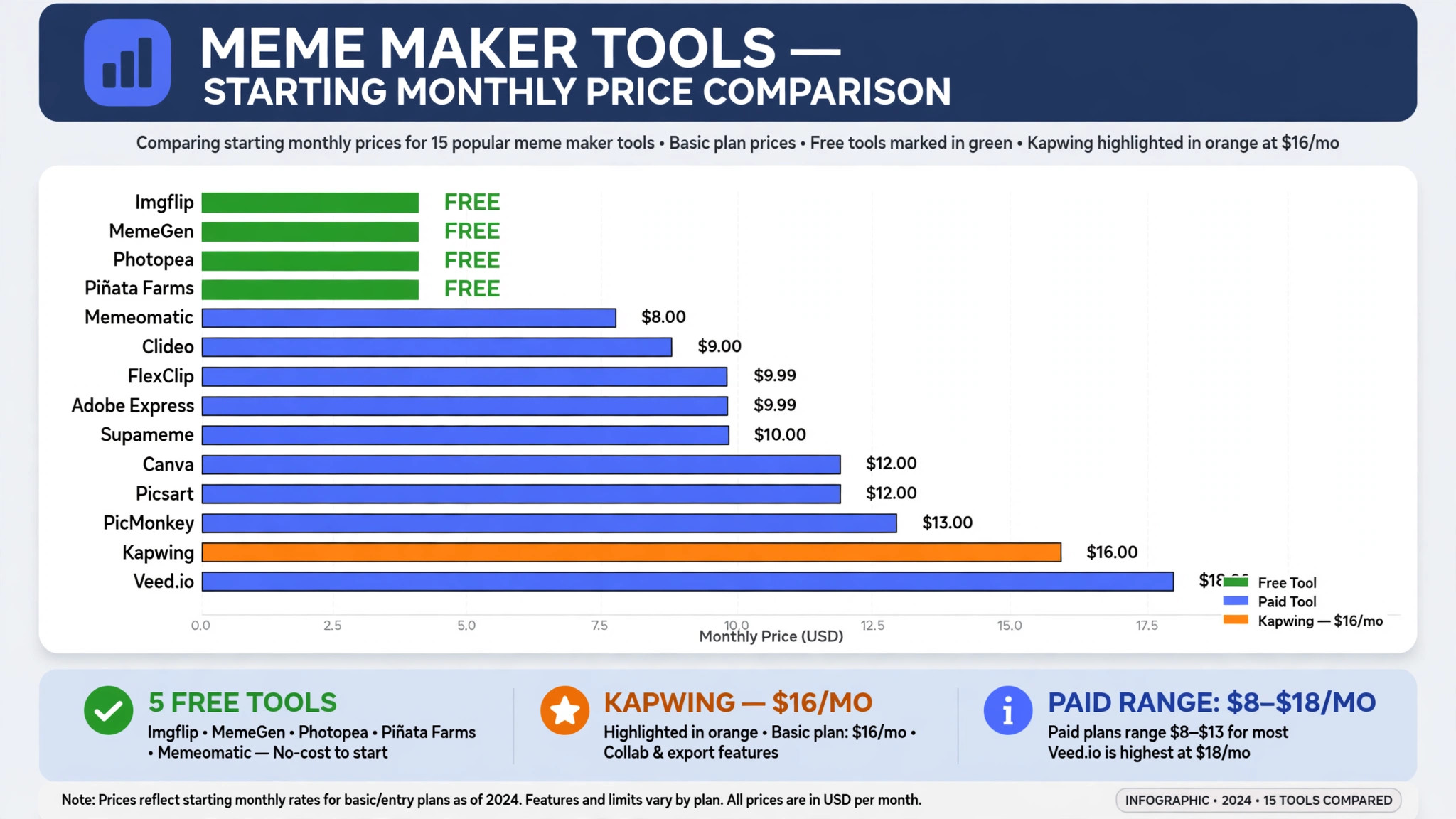
The reviews below follow the same shape for every tool, starting price first, then the job it does best and the catch to check before you publish. The best meme makers for small business in this list range from free to 16 dollars a month, so read the price line as carefully as the feature list.
1. Imgflip
Starting price Free, Pro 11.95 dollars a month billed yearly. Best for Fastest classic caption meme. Watch out Free exports carry a watermark and free GIFs are capped at 500 by 500 pixels.
Imgflip is the tool most people actually mean when they say meme generator. Pick a template, type two lines, download. Under a minute, every time. The library holds more than a million user uploaded templates, with a community database that knows every format name, so a business can find the format its audience already recognises without designing anything.
The strength is speed and familiarity. No account, no onboarding, no design decisions. The meme generator output is the size and shape other platforms expect, and the Pro plan at 11.95 dollars a month billed yearly, or 14.95 dollars monthly, removes the watermark and lifts the GIF size cap. AI background removal, custom fonts and stickers sit on top for a business that wants a cleaner look.
The catch is the free tier. Free exports carry the site watermark, free GIFs are capped, and there are ads. For anything a brand will publish, that settles it on its own. Pay for Pro, or use a watermark free tool like Adobe Express for the posts that carry the logo.
2. Canva
Starting price Free, Pro 15 dollars a month. Best for Branded memes in a campaign. Watch out Pro pricing varies by region, so check the current figure on the pricing page.
Canva is not the fastest meme tool and it never will be. It is the one to use when the meme carries a logo, sits in a campaign, or gets posted by a company rather than a person. Thousands of meme templates, a drag and drop editor, a brand kit and fonts on paid plans, and every output size for every platform in the same project make it the design pick in this list.
The strength is the brand control. Free exports carry no watermark, which already puts it ahead of Imgflip for professional use. The AI Meme Generator lets a team type a prompt and generate a shareable meme as an image, GIF or short video, then keep editing and resizing it in the same tool. Magic Resize per platform means one meme can become a feed post, a story and a reel cover without rebuilding it three times.
The catch is time. Template hunting inside a vast library takes longer than Imgflip purpose built search, and some of the best elements are marked premium before you build on them. For a social media manager making the meme where the rest of the content calendar lives, that friction is worth it. For a quick joke, it is not.
3. Adobe Express
Starting price Free, Premium 9.99 dollars a month. Best for Free with no watermark. Watch out Fewer book and meme specific templates than Canva, and the library is thinner outside Adobe.
Adobe Express, formerly Adobe Spark, is the best free option in this list for one simple reason. No watermark, no cost. The meme generator is a dedicated tool inside it rather than a side feature, and a small business posting the occasional meme will find that combination hard to argue with.
The strength is the clean output. The free plan includes more than 100,000 templates, more than a million Adobe Stock assets, 5 GB of storage and no watermarks on exports. Premium at 9.99 dollars a month adds more templates, brand kits and generative credits, but the free tier is generous enough for a cover, a lead magnet or the social graphics that promote the business.
The catch is the template depth. The meme specific library is thinner than Canva, and outside the Adobe ecosystem it has no real advantage. For a business already inside Adobe, it is the obvious pick. For a business that wants the widest template choice, Canva wins.
4. Kapwing
Starting price Free, Pro 16 dollars a month billed yearly. Best for Video and GIF memes. Watch out Free exports carry limits that change with plan revisions, so check the current terms.
Kapwing is a browser video editor with a meme maker at its heart. Crop a clip into the classic black bar caption format, add styled text, auto generate subtitles, resize for TikTok, Reels and X in one click, and export. That video focus is the reason it sits in this list, because a moving meme earns more shares than a still one.
The strength is the video workflow. A business can take a clip, add captions that are readable on mute, and export it in the right size for every platform without opening a separate editor. The subtitle tool matters, because most social video is watched without sound, and a meme without captions loses half its audience.
The catch is the free tier. Free exports historically carry limits that change with plan revisions, so a business should check the current terms before building a workflow on them. For a business that posts video memes weekly, Pro at 16 dollars a month is fair. For a still image meme, Imgflip is faster.
5. Supermeme.AI
Starting price Solo 9.99 dollars a month. Best for AI memes in many languages. Watch out The strength is language support, so a business posting in one language may not need it.
Supermeme.AI is the AI meme pick for a business that posts in more than one language. The Solo plan costs 9.99 dollars a month, supports more than 110 languages for input and output prompts, gives 8 or more outputs at once and lets the user edit meme text directly. That language depth is rare in this category.
The strength is the output volume. A team can type one prompt and get eight meme options, then edit the text on the one that works. For a business that runs social accounts in two or three languages, that saves the translation step that usually slows a meme down.
The catch is fit. A business posting only in English will find the language support wasted, and a classic template tool will be faster for a known format. For a multilingual business, Supermeme.AI is the pick. For a single language business, Imgflip or Canva will do.
6. Mematic
Starting price Free, paid removes ads and watermark. Best for Mobile memes on the go. Watch out The free version includes ads and a small watermark.
Mematic is the mobile pick, with over 10 million downloads and a collage maker beside the meme maker. Thousands of templates, one tap sharing to social platforms and a simple editor make it the go to tool for a business owner who makes memes on a phone between jobs.
The strength is the mobile flow. A photo taken at the shop, a caption typed in seconds and a share to Instagram or Facebook without opening a laptop is the workflow that a small business actually uses. The collage maker adds a second format for a business that posts more than one image at a time.
The catch is the free tier. The free version includes ads and a small watermark, and the paid version removes both and adds extra features. For a business post, pay for the removal or use a watermark free tool. For a personal meme, the free version is fine.
7. Memedroid
Starting price Free. Best for Casual memes and community. Watch out The community feed is the point, so a business post can get lost in the noise.
Memedroid is a casual maker with a large community and template feed, built for people who make memes for fun and share them with a community that votes on them. A small business can use it to find formats that are already popular, then adapt them for its own audience.
The catch is the context. A business post made in a community app can feel casual in the wrong way, and the tool is not built for brand kits, logos or campaign work. Use it to spot formats, then make the business version in Canva or Adobe Express.
8. piZap
Starting price Free. Best for Casual photo memes. Watch out The meme maker sits beside photo tools, so it is not the fastest route to a classic meme.
piZap is a casual meme maker with photo tools beside it, built for a business that wants to edit a photo and add a caption in the same place. The free plan covers the basics, with templates, text and photo editing in one browser tool.
The catch is speed. The meme maker is not as fast as Imgflip for a classic template, and a business that only wants a caption on a known format should go straight to Imgflip. For a photo based meme, piZap is the simpler route.
9. Tenor
Starting price Free. Best for GIF reactions and search. Watch out Tenor is a GIF library first, so it is not a full meme maker.
Tenor owns the GIF search that most keyboards use, and that library is the reason it sits in this list. A business can search for a reaction GIF, share it in a comment or a message, and join a conversation without making anything at all.
The catch is the scope. Tenor does not make a branded meme with a logo and a caption, and a business that wants to publish its own meme should use a maker tool instead. Use Tenor for reactions, and a maker for posts.
10. Simplified
Starting price Pro 15 dollars a month. Best for Memes inside a design suite. Watch out The meme tool is one part of a larger suite, so the price covers more than memes.
Simplified is a design suite with an AI meme generator inside it, at 15 dollars a month for Pro. It gives 5 AI meme outputs at a time, generates matching meme visuals and text from a prompt, and offers various editing tools beside the meme maker.
The strength is the suite. A business that already works in Simplified for social posts, ads and graphics can make memes in the same place, with stock images and editing tools beside the meme generator. That saves the friction of opening a separate tool for one post.
The catch is the price. A business that only wants memes will find 15 dollars a month steep for a tool it opens once a week. For a business already paying for the suite, the meme tool is a bonus. For a meme only buyer, Imgflip or Adobe Express is cheaper.
11. YouCam AI Pro
Starting price Free 5 images a day. Best for AI memes from a photo. Watch out The free allowance is 5 images a day, so a busy poster will hit the limit.
YouCam AI Pro is the fast AI pick, with a free allowance of 5 images a day and AI generated meme images in 5 to 10 seconds. A user can type a prompt or upload a photo, and the tool generates a meme image that is ready to share.
The strength is speed. A business that wants an AI generated image rather than a template can get one in seconds, without searching a library or designing a layout. The user friendly interface makes it easy for a non designer to get a usable result.
The catch is the daily limit. Five free images a day is generous for a small business, but a team that posts many memes will need a paid plan. Check the paid price before building a daily workflow on the free allowance.
12. AI Meme
Starting price Free. Best for No frills photo to meme. Watch out The tool is simple, so a business that wants brand control should look elsewhere.
AI Meme is a dedicated, no frills AI meme tool that creates memes from an uploaded image using machine learning, with very creative meme text. It is free, simple and built for one job, which is turning a photo into a meme without a design step.
The strength is the simplicity. Upload a photo, get a meme, share it. A business that wants a quick joke from a real photo will find the flow faster than any design suite, and the machine learning captions are often funnier than a human would write in the same time.
The catch is control. A business cannot add a logo, a brand colour or a campaign message easily, and the tool is not built for branded work. Use it for a quick, funny post, and use Canva for the posts that carry the brand.
13. GIPHY
Starting price Free. Best for GIFs and stickers for social. Watch out GIPHY is a library, not a maker, so it does not build a branded meme.
GIPHY is the free GIF and sticker library that most social platforms use, with a huge collection of GIFs, stickers and short clips that a business can share in a post, a comment or a message. The library is the point, and the sharing is built in.
The catch is the scope. GIPHY does not make a meme with a caption and a logo, and a business that wants to publish its own branded meme should use a maker tool. Use GIPHY for GIFs and stickers, and a maker for original memes.
14. Clipchamp
Starting price Free. Best for Video memes on Windows. Watch out The free plan covers the basics, so check what the paid plan adds for a busy poster.
Clipchamp is Microsoft video editor, free to use, with text, captions and export tools that suit a video meme. A business on Windows can open it, add a clip, add bold caption text and export a video meme without installing a separate app.
The catch is the depth. Clipchamp is a video editor, not a meme maker, so a business that wants templates and a community feed should use Imgflip or Kapwing instead. For a video meme from a real clip, Clipchamp is the simplest route on Windows.
15. VEED
Starting price Free, paid plans available. Best for Video memes with subtitles. Watch out The free plan has limits, so check the export terms before building a workflow on it.
VEED is a browser video editor with captions, subtitles and text tools that suit a video meme. A business can upload a clip, add styled captions, resize for TikTok, Reels and X, and export without installing anything.
The strength is the subtitle workflow. A video meme watched on mute needs captions to land, and VEED auto generates them cleanly. The browser access means a team can edit from any computer, which suits a small business without a dedicated editing machine.
The catch is the free tier. Free exports carry limits, and a business that posts video memes weekly should check the paid price and the export terms before committing. For an occasional video meme, the free plan is enough. For a weekly video workflow, Kapwing or VEED paid is the fair comparison.
Side by Side Comparison
The table below puts the shortlist side by side on price, best job and free plan, so you can compare the published prices against each other at a glance.
| Tool | Starting price | Best for | Free plan |
|---|---|---|---|
| Imgflip | Free, Pro 11.95 dollars a month annual | Fastest classic meme | Yes |
| Canva | Free, Pro 15 dollars a month | Branded memes | Yes |
| Adobe Express | Free, Premium 9.99 dollars a month | Free with no watermark | Yes |
| Kapwing | Free, Pro 16 dollars a month annual | Video and GIF memes | Yes |
| Supermeme.AI | Solo 9.99 dollars a month | AI memes in many languages | No |
| Mematic | Free, paid removes watermark | Mobile memes | Yes |
| Memedroid | Free | Casual memes and community | Yes |
| piZap | Free | Casual photo memes | Yes |
| Tenor | Free | GIF reactions | Yes |
| Simplified | Pro 15 dollars a month | Memes in a design suite | Yes |
| YouCam AI Pro | Free 5 images a day | AI memes from a photo | Yes |
| AI Meme | Free | No frills photo to meme | Yes |
| GIPHY | Free | GIFs and stickers | Yes |
| Clipchamp | Free | Video memes on Windows | Yes |
| VEED | Free, paid plans available | Video memes with subtitles | Yes |
How to Pick the Right Tool from the Best Meme Makers for Small Business
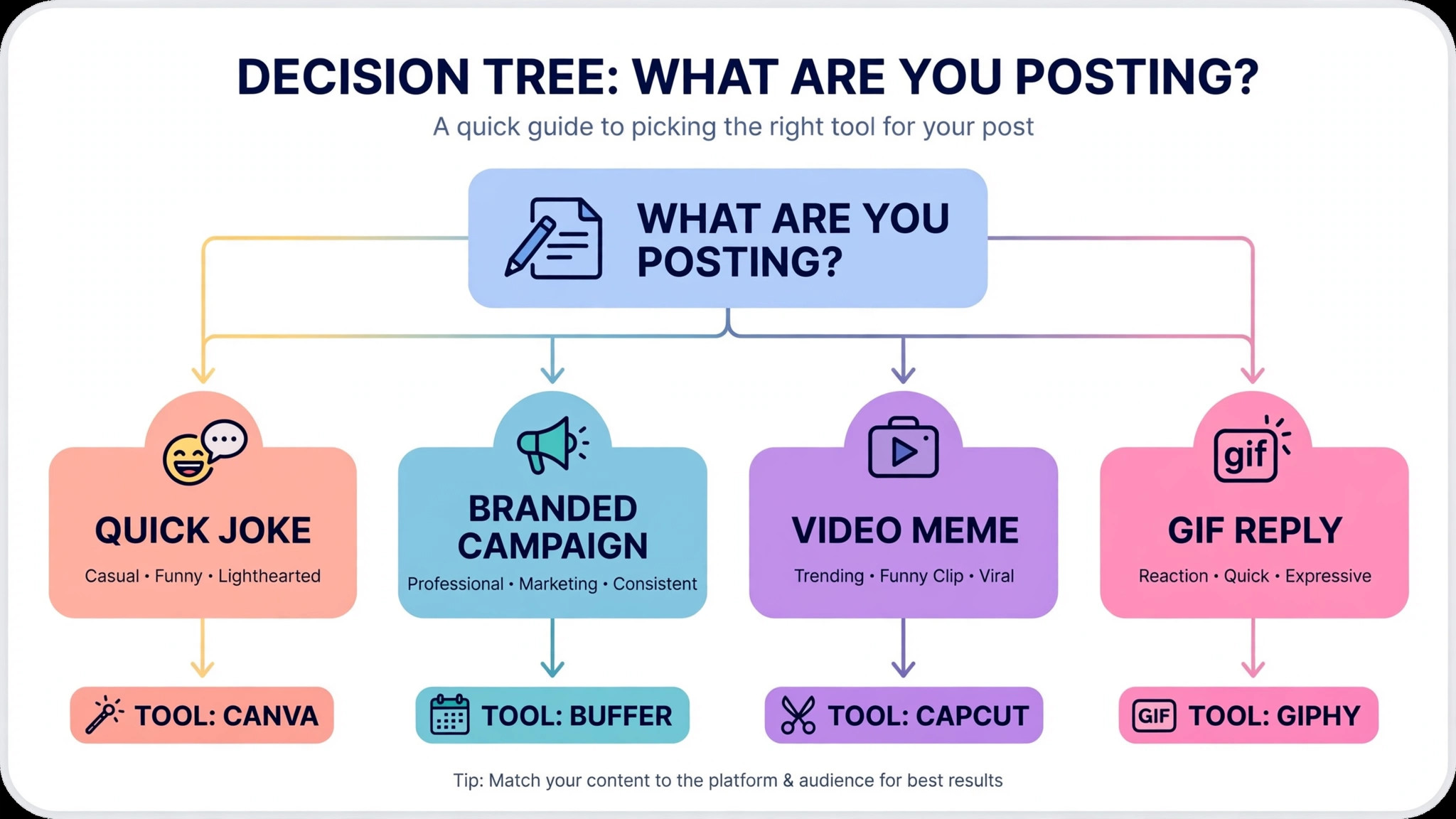
The right pick starts from the post, not from the tool. A business that posts a quick joke on a known template should buy Imgflip Pro, because speed and familiarity decide whether the joke lands on time. A business that posts branded memes in a campaign should buy Canva, because the brand kit and the sizes decide whether the post looks professional. A business that posts the occasional meme and hates watermarks should use Adobe Express free, because no watermark and no cost is hard to argue with.
Budget the full bill, not the headline price. The table below shows what a small business actually pays in year one for the most common combinations, using published starting prices. Watermark removal is the line that surprises buyers, so check whether the free export carries one before you build a workflow on it.
| Stack for one business | Monthly cost | What it covers |
|---|---|---|
| Imgflip Pro, annual | 11.95 dollars | Classic memes, no watermark |
| Canva Pro | 15 dollars | Branded memes and full design suite |
| Adobe Express Premium | 9.99 dollars | No watermark memes and Adobe assets |
| Kapwing Pro, annual | 16 dollars | Video memes with subtitles |
| Supermeme.AI Solo | 9.99 dollars | AI memes in 110 plus languages |
Frequently Asked Questions
What is the cheapest good meme maker for a small business
Adobe Express free is the cheapest good entry with real meme tools behind it, because it costs nothing and exports with no watermark. Imgflip free is the fastest way to a classic meme, but the free export carries a watermark, so Pro at 11.95 dollars a month billed yearly is the real price for a business post. For a branded workflow, Canva Pro at 15 dollars a month is the cheapest published design suite price on this list. Start with the post that earns the most shares, not with the cheapest tool overall.
Why does a watermark matter on a business meme
A watermark matters because it tells the audience the post was made in someone else tool, not in the business brand. A meme with an Imgflip watermark looks like a personal joke, while the same meme made in Canva or Adobe Express looks like a business post. The best meme makers for small business in this guide list the watermark beside the price, so you can see which free plans are safe to publish and which ones need a paid plan.
Which meme maker is best for video memes
Kapwing suits a business that posts video memes weekly, with crop, caption, subtitles and resize in one click at 16 dollars a month billed yearly. VEED suits a business that wants subtitles and browser editing without installing anything. Clipchamp suits a Windows business that wants a free video editor it already has. Trial the subtitle flow with a real clip before you sign, because a video meme watched on mute needs captions to land.
How much should a small business budget for meme tools in year one
A realistic year one budget is 0 to 10 dollars a month for a free or low cost meme tool, and 12 to 16 dollars a month once you pay to remove the watermark or to add video. Most small businesses will spend less on meme tools than on any other software in this guide, because the tools are cheap and the free tiers are generous. The best meme makers for small business are not the cheapest ones on the list. They are the ones that make a meme fast, export it clean and share it in the right size for every feed.
Our Verdict
If you buy one tool this quarter, buy Imgflip Pro. At 11.95 dollars a month billed yearly, it is the fastest route to a classic meme that the audience already recognises, with no watermark and no GIF cap, and it will earn more shares in a month than a design suite that takes twenty minutes to open. The best meme makers for small business earn their keep by making a joke fast and publishing it clean, and Imgflip does both from the first week, whether the win is a template that lands on time or a post that gets shared without a watermark in the corner.
Whatever you pick, start with the post, make the meme fast, and check the export for a watermark before you publish. The best meme makers for small business on this list all work. The difference is whether the tool matches the post your business actually needs to make, and whether you measure the return in shares and followers rather than in features used.