The bill climbs with every thousand subscribers, the newsletter is now the product itself rather than a funnel for a course, and the growth tools on the other side look built for exactly that job. That is the moment most creators start asking how to switch from ConvertKit to Beehiiv, and it is a fair question.
ConvertKit, now called Kit, is an automation platform built for creators who sell products and courses through email. Beehiiv is a newsletter platform built for creators whose newsletter is the business, with referral programs, an ad network and a Boosts marketplace built in rather than bolted on. A creator with 10,000 subscribers pays about 119 dollars a month on Kit Creator against about 96 dollars a month on Beehiiv Scale, and the Beehiiv plan includes the growth tools Kit never had.
The switch is not about which tool is better in general. It is about which platform matches the way the creator actually earns. Kit wins for a creator who sells courses and digital products through branching visual automations. Beehiiv wins for a creator who grows a newsletter, sells subscriptions and sponsorships, and wants the platform to bring new readers. For a newsletter first creator, the gap is real. For a creator whose income runs through Kit automations and digital product sales, Beehiiv can feel like a step sideways, and this guide says so plainly.
This guide walks through how to switch from ConvertKit to Beehiiv in seven steps, with a checklist, a cost comparison, and a clear account of what transfers, what does not, and what to test before cancelling Kit. Follow the steps in order, run both platforms side by side for two weeks, and the move will be boring in the best way. Skip the steps, cancel early, and paid subscribers, sequences and sign up dates can vanish without a trace.
Why Newsletter Creators Look Across the Fence
Cost is the reason most creators switch, and the numbers explain why. Kit ships three tiers. The free plan covers up to 10,000 subscribers with unlimited emails, but no automations and limited features. Creator starts from about 15 dollars a month for 300 subscribers, and costs about 29 dollars a month for 1,000 subscribers, about 49 dollars for 3,000, about 79 dollars for 5,000, and about 119 dollars for 10,000. Creator Pro sits roughly double the Creator price at each tier and adds advanced reporting, subscriber scoring and a referral system. Kit also takes a small revenue cut on its payments tool, on top of Stripe fees.
Beehiiv ships a free Launch plan that covers up to 2,500 subscribers with unlimited sends. Scale costs 49 dollars a month for 1,000 subscribers and opens paid subscriptions, the referral program and the ad network. Max costs 99 dollars a month and adds priority support and advanced analytics. Beehiiv takes no share of subscription revenue, which is the single biggest financial difference at scale, because Kit and Substack style revenue cuts grow with every paying reader while a flat Beehiiv fee does not.
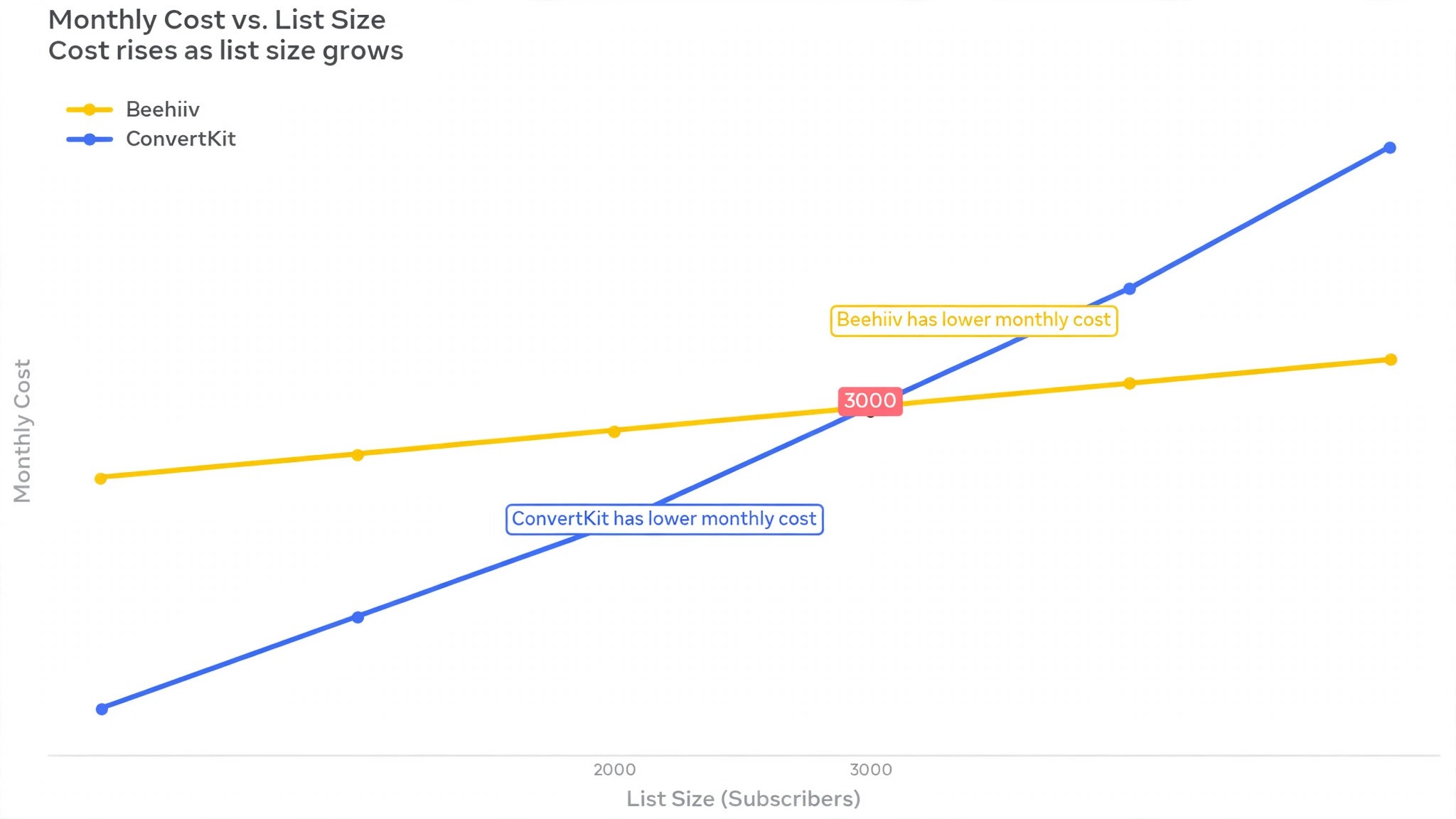
At 1,000 subscribers, Kit Creator at about 29 dollars a month is cheaper than Beehiiv Scale at 49 dollars a month, so a small list should not switch for price alone. At 5,000 subscribers, Kit runs about 89 dollars a month against about 78 dollars for Beehiiv, so Beehiiv starts to win. At 10,000 subscribers, Kit runs about 119 to 139 dollars a month against about 96 dollars for Beehiiv, a saving of roughly 23 to 43 dollars a month, and the Beehiiv plan includes the referral program and ad network that Kit charges extra for or does not offer.
The saving grows with the list, and it grows fastest for a creator who monetizes through subscriptions rather than courses.
The growth tools tell the same story. Beehiiv includes recommendations, a referral program, Boosts and an ad network on paid plans, so other newsletters pay to recommend yours and sponsors can buy space without a separate deal. Kit includes a Creator Network with paid recommendations, but its strength is automation depth, not discovery. A creator whose bottleneck is growth will feel the difference in the first month. A creator whose bottleneck is selling a course will not.
ConvertKit vs Beehiiv at a Glance
| Feature | ConvertKit, now Kit | Beehiiv |
|---|---|---|
| Pricing model | Per subscriber tier | Per subscriber tier, flat by plan |
| Free plan | Up to 10,000 subscribers, no automations | Up to 2,500 subscribers, no ads or paid subs |
| Entry paid plan | Creator about 29 dollars a month for 1,000 subs | Scale 49 dollars a month for 1,000 subs |
| Top plan | Creator Pro, roughly double Creator | Max 99 dollars a month |
| Revenue share | Small cut on payments tool plus Stripe | None on subscriptions |
| Automations | Visual builder, unlimited on Creator | Linear automations, 10 live on lower paid plans |
| Growth tools | Creator Network recommendations | Referral program, Boosts, ad network |
| Digital products | Built in commerce and delivery | Not built in, use a separate store |
| Landing pages | Unlimited on free plan | Included on paid plans |
| Analytics | Advanced reporting on Creator Pro | Advanced analytics on Max |
Beehiiv wins on growth and monetization, and that is the point of the switch. Referrals, Boosts and ads all live in the same dashboard, so a creator stops stitching together sponsors and referral tools by hand. Kit wins on automation depth, with a visual builder, branching logic and purchase events that Beehiiv does not match. Check which side of that trade your newsletter sits on before you move.
The Trade-Offs Nobody Mentions First
A switch guide that only lists the savings is not honest, so this section states the trade plainly. Kit is an automation platform with a newsletter attached. Beehiiv is a newsletter platform with automation attached, and the difference shows in the daily work. A creator who runs a welcome sequence, a course launch sequence, a purchase follow up and a re-engagement flow will find Beehiiv simpler and shallower, with linear automations instead of branching visual workflows. The first month in Beehiiv feels slower for that creator, even when the bill is lower, and a creator who lives in automations will feel that friction daily.
A creator whose newsletter is the product will not miss the depth, because Beehiiv replaces the growth work Kit never did. Recommendations bring new readers, the referral program turns readers into promoters, and the ad network fills sponsorship slots without a sales call. The question is not which tool is better. The question is whether the creator sells courses through email or sells a newsletter itself, and learning how to switch from ConvertKit to Beehiiv starts with answering that question honestly.
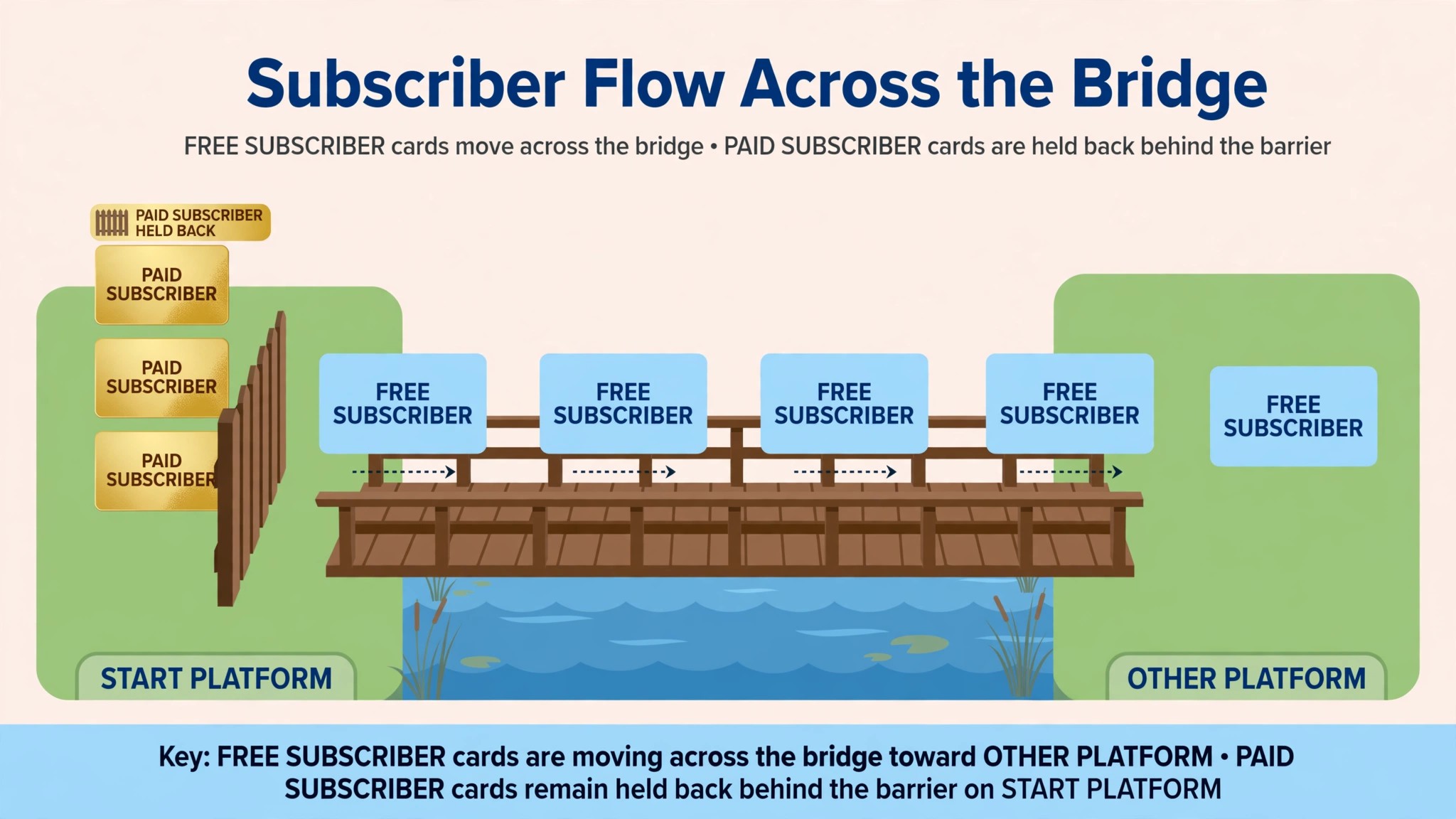
The paid subscriber problem deserves a second look, because it decides the switch for anyone with paying readers. Beehiiv’s own migration guide is blunt. If paid subscriptions are managed through Kit and Stripe Express, there is not a way to migrate those paid subscriptions to Beehiiv. Those readers must resubscribe, and some will not. That is the single most important fact in this comparison, and a creator with hundreds of paying readers should read it twice before moving.
The automation cap also changes the plan choice. Kit sequences must be rebuilt as Beehiiv automations, and Beehiiv caps live automations at ten on its lower paid plans. A creator with twenty sequences needs a higher Beehiiv plan or a hard cut to the ten that matter. Count the sequences before choosing a plan, and the math will make the choice.
How to Switch from ConvertKit to Beehiiv in 7 Steps
Step 1. Audit the Kit account before touching anything
Open Kit and list every subscriber count, every tag, every segment, every sequence, every visual automation, every form, every landing page, every broadcast and every digital product. Export the full subscriber list as a CSV, including email addresses, tags, custom fields, statuses and sign up dates. Note the renewal date and the billing cycle, because cancelling mid cycle can carry a fee. Pay special attention to paid subscribers, because they cannot migrate, and to sequences, because they must be rebuilt. This audit takes an afternoon and prevents the most common switch failure, which is discovering a paying reader only after the subscription was lost.
Step 2. Set up Beehiiv and choose the right plan
Create the Beehiiv account, choose the plan that matches the subscriber count and the automation count, and set up the publication, the domain and the sending settings. Scale at 49 dollars a month for 1,000 subscribers suits most creators, but a creator with more than ten live automations needs a higher plan. Connect the custom domain early, because DNS changes take time to propagate, and confirm the sender address and authentication records before importing anyone. Do not cancel Kit yet. The two platforms will run side by side for the next two weeks.
Step 3. Clean the list and export it properly
Before importing, prune the Kit list. Remove subscribers who have not opened an email in the last 90 days, because importing a cold list into a fresh sending domain damages deliverability and invites spam complaints. Export the cleaned list as a CSV with email, first name, tags, custom fields and the created at date, because Beehiiv gives every imported subscriber the import date as their subscription date unless the original sign up date is mapped to a date custom field. A clean list of engaged readers outperforms a big list of cold ones on every metric that matters.
Step 4. Import the subscribers and map the tags
Import the CSV into Beehiiv and map each column carefully. Tags and custom fields need mapping, because Kit tags become Beehiiv segments and attributes, and a careless mapping loses the segmentation the creator spent years building. Check the import report for held or failed rows, because the whole list must fit the plan tier, and over limit imports are held. Confirm the subscriber count, the tags and a sample of sign up dates before moving on. A pilot import of a small segment first catches mapping errors before they touch the whole list.
Step 5. Rebuild the sequences as Beehiiv automations
Rebuild the Kit sequences as Beehiiv automations, starting with the welcome sequence, because that is the one new subscribers meet first. Kit visual automations do not translate one to one, so branches and conditions must be simplified into Beehiiv’s linear automation flow. Keep the count under ten live automations on the lower paid plans, and cut or merge the sequences that earn the least. Test each automation with a test subscriber before it goes live, because a broken welcome email is the first thing a new reader sees.
Step 6. Run both platforms side by side for two weeks
Send from Beehiiv for two weeks while Kit stays open and the old sequences finish. Watch open rates, click rates, bounce rates and spam complaints daily, and compare them with the Kit history from step 1 to spot any deliverability gap. Send the first Beehiiv broadcast to the most engaged segment only, then widen the send as the domain warms up. Fix the problems while Kit is still available as a fallback, not after it is cancelled. Two quiet weeks of parallel running cost nothing and catch every problem early.
Step 7. Handle paid subscribers, then cancel Kit
Paid subscribers need a separate decision, because they cannot migrate from Kit and Stripe Express. Give them a clear path, either a free complimentary period on Beehiiv while they resubscribe, or a direct email explaining the move with a new subscribe link. Expect some loss, and plan the message carefully, because a paying reader who feels pushed will churn. Once the free list is clean, the automations are live and the paid readers have a path, export the final Kit data and cancel the subscription before the renewal date. Keep the Kit export files for six months, because open and click history does not transfer and the old exports are the only record of it.
What Transfers and What Does Not
Free subscribers transfer well. A CSV export from Kit, imported into Beehiiv with tags, custom fields and locations mapped, moves the audience cleanly, and Beehiiv offers migration assistance for larger lists. Tags become segments, custom fields carry over when mapped, and the original sign up date survives when the created at field is mapped to a date custom field. The whole move takes about 15 minutes for a normal list once the export is ready, which is the easy part of the switch.
What does not transfer is specific, and the creator should name it before starting. Paid subscriptions managed through Kit and Stripe Express cannot migrate, because Kit does not give you the customer and payment data a transfer needs. Those readers must resubscribe on Beehiiv, and some will not.
Kit sequences and visual automations do not transfer, so every sequence must be rebuilt as a Beehiiv automation, capped at ten live on the lower paid plans. Kit landing pages, forms and broadcasts have no export, so the best ones must be rebuilt by hand. Digital products and commerce flows do not transfer, because Beehiiv has no built in store, so a creator who sells products through Kit needs a separate store or a hybrid stack.
Open and click history does not transfer with full fidelity, so export the analytics before cancelling and keep the files. Referral data, Boosts history and ad revenue history stay behind. The only things lost are the Kit specific records, which are the paid subscriptions, the sequences, the broadcasts and the history. Export them all before cancelling, and the switch loses nothing that matters, except the paid readers who choose not to resubscribe.
That is the full picture of how to switch from ConvertKit to Beehiiv without losing the work that matters.
The Go-Live Checklist
Use this checklist before starting step 1, and do not skip a line.
- List every Kit subscriber count, tag, segment, sequence and automation. – Export the full subscriber CSV with tags, custom fields and sign up dates. – Prune subscribers who have not opened in the last 90 days. – Note the Kit renewal date and billing cycle. – Flag paid subscribers, because they cannot migrate and must resubscribe. – Choose the Beehiiv plan by subscriber count and live automation count.
- Confirm the custom domain, sender address and authentication records. – List the Kit sequences the newsletter actually uses, and cut the rest. – Plan a replacement for any Kit feature Beehiiv lacks, including digital products. – Set a switch date in a quiet week, not during a launch. – Tell the readers the switch date and the new subscribe path before step 1.
What the Switch Costs in Real Money
The saving depends on list size, because both tools charge by subscriber tier. At 1,000 subscribers, Kit Creator runs about 29 dollars a month against Beehiiv Scale at 49 dollars a month, so Kit is about 20 dollars a month cheaper here, and a small list should not switch for price alone. At 3,000 subscribers, Kit runs about 49 dollars a month against about 61 dollars for Beehiiv, close to even. At 5,000 subscribers, Kit runs about 89 dollars a month against about 78 dollars for Beehiiv, so Beehiiv saves about 11 dollars a month.
At 10,000 subscribers, Kit runs about 119 to 139 dollars a month against about 96 dollars for Beehiiv, a saving of roughly 23 to 43 dollars a month, or about 276 to 516 dollars a year. At 25,000 subscribers, Kit Creator runs about 199 dollars a month, and the Beehiiv saving grows further. Those figures use published monthly rates, and annual billing lowers both sides. The saving also grows for a creator who monetizes through subscriptions, because Beehiiv takes no revenue share while Kit takes a cut on its payments tool.
The saving shrinks when the creator adds products or needs deep automation. A creator who sells digital products through Kit must pay for a separate store on Beehiiv, and a creator with more than ten live automations needs a higher Beehiiv plan. Count the products and the sequences, run the two totals, and the answer will be clear. For most newsletter first creators with a growing list, Beehiiv saves money every month after the first few thousand subscribers.
Run the same math for your own list before you commit to how to switch from ConvertKit to Beehiiv, because the totals decide the plan.
Your First Two Weeks on Beehiiv
The parallel run only helps if the creator tests the right things, so set the tests before the first Beehiiv send goes out. Send the first broadcast to the most engaged segment only, including one welcome email, one regular issue and one post with a referral link, and confirm each one arrives with the right formatting and the right links. Then compare the Beehiiv open and click rates against the Kit history from step 1, checking deliverability on the same audience. That test plan is the part of how to switch from ConvertKit to Beehiiv that most creators skip, and it is the part that catches the problems while Kit is still available as a fallback.
Test the automations and the growth tools next, because those are the workflows that break quietly. Subscribe with a test email and confirm the welcome automation fires, check that the referral link tracks a new signup, and confirm the Boosts and recommendations appear where the creator expects them. Also test a paid subscription checkout, since that flow differs between the two platforms and trips up creators who rely on it. A test that covers sending, automations, referrals and payments in the first week leaves the second week for fixing what failed, which is exactly how a quiet switch is supposed to work.
Five Mistakes That Stall the Move
The first mistake is importing a cold list. A creator who imports every subscriber, including readers who have not opened in a year, damages the new sending domain and invites spam complaints that follow the newsletter for months. Prune first, import the engaged readers, and leave the cold ones behind. The second mistake is forgetting the paid subscribers. A creator who cancels Kit before telling paying readers to resubscribe loses revenue in one move, and the recovery takes weeks of emails.
The third mistake is skipping the sign up date mapping. Beehiiv gives every imported subscriber the import date as their subscription date unless the created at field is mapped to a date custom field, so a creator who skips that step loses the history that powers segmentation and anniversary emails. Map the dates. The fourth mistake is skipping the two week parallel run. A creator who switches overnight discovers the automation gaps during a live launch, when fixing them costs the most. Two quiet weeks of parallel running cost nothing and catch every problem early.
The fifth mistake is underestimating the rebuild. Sequences, landing pages and broadcasts do not transfer, and a creator who budgets an hour for the rebuild will run out of time. Budget an afternoon, rebuild the welcome sequence first, and leave the long tail of old broadcasts behind. The switch is a good time to clean the list and the automations, not a reason to move every old email into the new tool.
Life After the Switch
The first month after the move is when the new growth tools start paying. Turn on the referral program in week one, because a new reader who joins through a referral is worth more than a reader who joins through a form, and Beehiiv tracks the source for you.
Apply to the ad network once the list is warm, and price the first sponsorship slot low, because one paying sponsor teaches you more about your rate card than a month of guessing. The work of how to switch from ConvertKit to Beehiiv does not end on cancel day. It ends when the first Beehiiv automation earns its keep and the first referral brings a reader you never touched, and that usually takes a full month.
Revisit the plan choice after 90 days. A creator who started on Scale may find ten live automations are enough, or may find the list grew past the tier and needs the next plan up. Count the sequences again too, because every live automation should earn its place. The switch saves money once. The growth tools save it every month after.
Frequently Asked Questions
How long does it take to switch from ConvertKit to Beehiiv?
Most creators finish the switch in one to two weeks. The setup takes an afternoon, the list cleaning and import take a few hours, the sequence rebuild takes another afternoon, and the two week parallel run catches the problems while Kit is still available. A creator with a large list or many sequences should budget three weeks. Do not promise a one day switch, because the manual rebuild and the parallel run are what make the move safe.
Will I lose my subscribers when I switch from ConvertKit to Beehiiv?
Free subscribers transfer cleanly through a CSV export and import, with tags and custom fields mapped. Paid subscribers managed through Kit and Stripe Express cannot migrate, and those readers must resubscribe on Beehiiv, so expect some loss and plan the message carefully. Prune cold subscribers before importing, map the sign up dates, and keep Kit running until the Beehiiv list is checked, and no free subscriber will be lost.
Is Beehiiv really cheaper than ConvertKit?
At small lists, no. At 1,000 subscribers Kit Creator at about 29 dollars a month is cheaper than Beehiiv Scale at 49 dollars. At 5,000 subscribers Beehiiv starts to win, and at 10,000 subscribers Beehiiv saves roughly 23 to 43 dollars a month. The saving grows with the list, and it grows fastest for a creator who monetizes through subscriptions, because Beehiiv takes no revenue share. Count the subscribers and the products before deciding.
Do my automations transfer to Beehiiv?
No, Kit sequences and visual automations do not transfer. They must be rebuilt as Beehiiv automations, which are simpler and linear, and capped at ten live on the lower paid plans. A creator with more than ten sequences needs a higher plan or a hard cut to the ten that matter. Rebuild the welcome sequence first, test it with a test subscriber, and leave the low value sequences behind.
Can I keep my Kit landing pages when I switch?
No, Kit landing pages and forms have no export, so the best ones must be rebuilt in Beehiiv by hand. Copy the top converting pages first, because those cover most signups, and leave the long tail behind. The custom domain must also be moved, with DNS changes that take time to propagate, so start the domain move early and confirm the sender authentication before the first send.
The Call
Switch to Beehiiv if the newsletter is the product, the list is growing past a few thousand subscribers, and the bottleneck is growth rather than automation. A creator with 5,000 to 10,000 subscribers will save money every month, get a referral program, Boosts and an ad network that Kit never had, and lose nothing it actually uses, as long as the paid subscribers get a clear resubscribe path first. For those creators, learning how to switch from ConvertKit to Beehiiv is worth an afternoon, and the growth tools pay for the move.
Stay on Kit if the income runs through visual automations and digital product sales, if paid subscribers are a large share of the list and cannot be asked to resubscribe, or if the newsletter is a funnel for a course rather than the product itself. A creator who lives in branching automations will find Beehiiv shallow, and a creator with hundreds of paying readers can lose more in churn than the switch saves. Stay also if a launch is close and the list is mid campaign. A switch during a launch costs more in chaos than it saves in subscription fees.
The decision rule is simple. Count the subscribers, count the paid readers, list the sequences the newsletter actually uses, and run the two totals. If Beehiiv covers the weekly workflow and costs less, switch in a quiet week and follow the seven steps. If Kit covers a weekly workflow that Beehiiv cannot, stay and renegotiate the Kit plan instead. The right tool is the one that matches the work, not the one with the lower headline price.