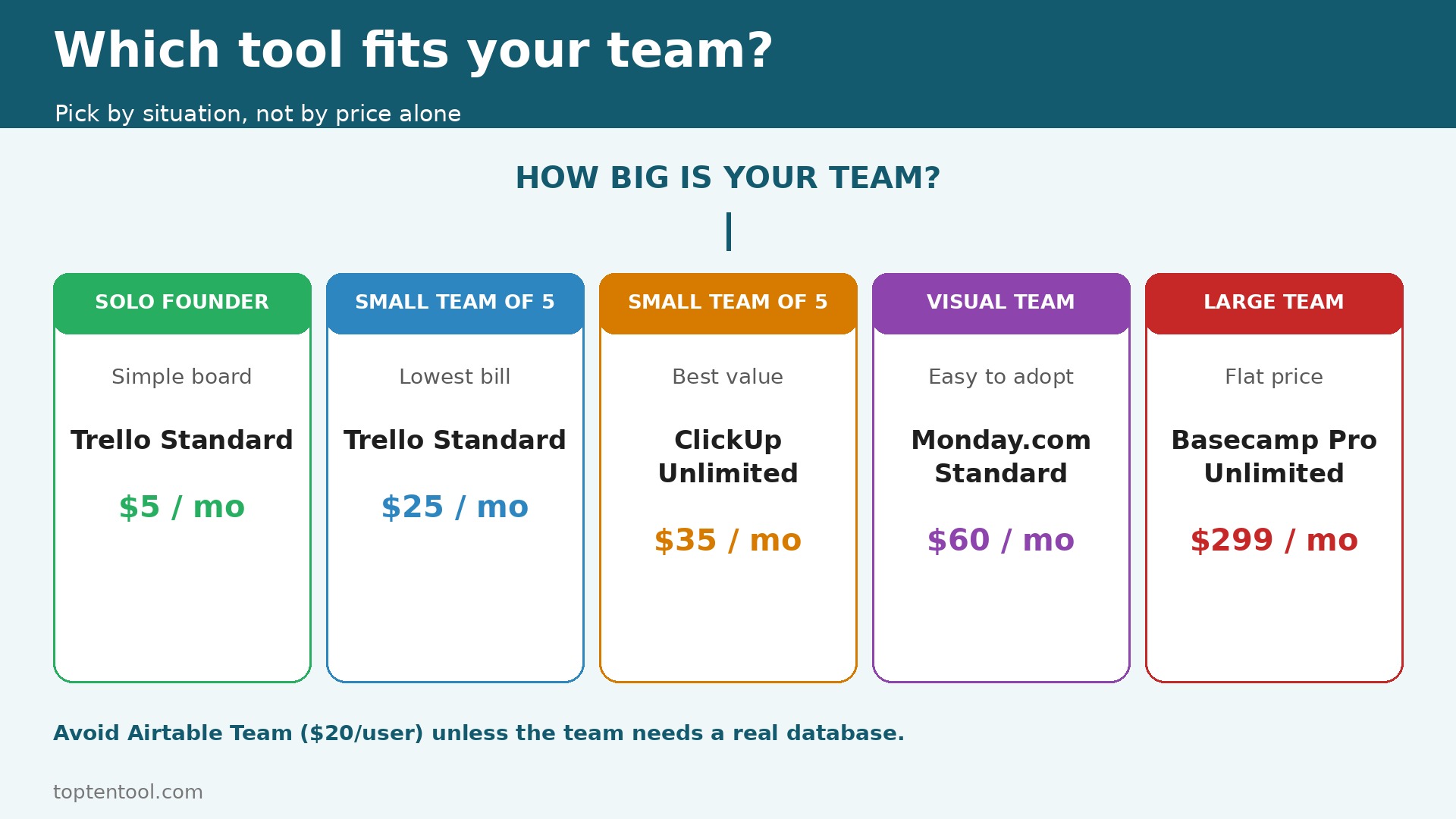
The verdict first. For most small teams, Trello Standard at 5 dollars per user per month is the cheapest real team tool, ClickUp Unlimited at 7 dollars is the best value, and Asana Starter at 10.99 dollars is the easiest to adopt. Those three sentences cover most teams, and the rest of this guide proves them with the traps that make a cheap tool expensive, which is the heart of project management software pricing for small teams. A team that buys on the sticker price alone will miss the seat minimum, the free plan cap, and the storage limit, and those three traps decide the real bill more than the price per user does.
Prices in this guide are US list prices checked in October 2026, per user per month on annual billing unless noted. Monthly billing is higher, usually by 20 percent, so a tool that costs 5 dollars on annual billing costs 6 dollars on monthly billing, and a tool that costs 10.99 dollars on annual billing costs 13.49 dollars on monthly billing. A team that pays month to month because it does not want a commitment will pay that premium every month, and the premium adds up to a full extra month per year.
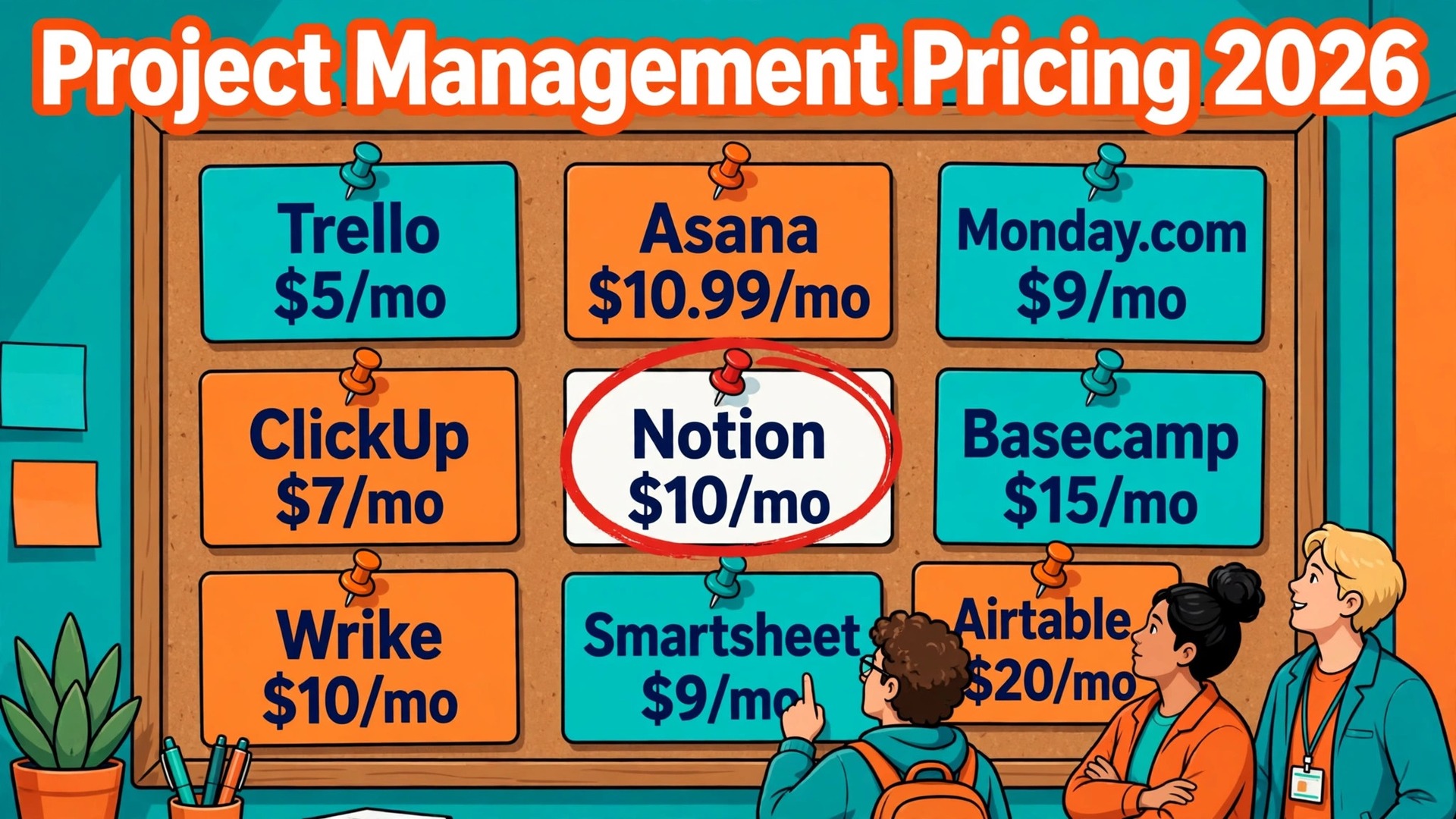
The project management software pricing for small teams in this guide covers Trello, Asana, Monday.com, ClickUp, Notion, Basecamp, Wrike, Smartsheet, and Airtable. They cover the range from a simple Kanban board to a full work management suite, from a free plan that covers a team of ten to a free plan that covers only two people, and from a flat monthly price to a per user price that rises with every hire. The fee table below gives the free plan, the entry paid plan, the mid tier, and the limit that forces the next tier, for each one.
Project Management Software Pricing for Small Teams at a Glance
The table below is the short answer. Prices are per user per month on annual billing, in US dollars, before tax and before add ons, unless the tool charges a flat price.
| Tool | Free plan | Entry paid | Mid tier | Key limit |
|---|---|---|---|---|
| Trello | Up to 10 collaborators, 10 boards | Standard 5 dollars | Premium 10 dollars | Free caps at 10 boards per workspace |
| Asana | Personal, up to 2 users | Starter 10.99 dollars | Advanced 24.99 dollars | Paid plans need a 2 seat minimum |
| Monday.com | Up to 2 seats, 3 boards | Basic 9 dollars per seat | Standard 12 dollars per seat | Paid plans need a 3 seat minimum |
| ClickUp | Free Forever, unlimited members, 60 MB storage | Unlimited 7 dollars | Business 12 dollars | Free storage caps at 60 MB |
| Notion | Free, limited blocks for 2 plus members | Plus 10 dollars per member | Business 20 dollars per member | Free block limit bites with 2 plus members |
| Basecamp | No free plan, 30 day trial | 15 dollars per user | Pro Unlimited 299 dollars flat a month | Per user price rises with every hire |
| Wrike | Free, limited | Team 10 dollars per user | Business 25 dollars per user | Free plan limits tasks and storage |
| Smartsheet | No free plan, 30 day trial | Pro 9 dollars per user | Business 19 dollars per user | Pro limits automations and reporting |
| Airtable | Free, limited records | Team 20 dollars per user | Business 45 dollars per user | Free caps records per base |
Read the free plan column first, because a free plan that covers a real team saves a team months of paid bills while it tests the tool. ClickUp Free Forever covers unlimited members with unlimited tasks, and only the storage is capped at 60 MB. Trello Free covers up to 10 collaborators per workspace, with 10 boards, and files up to 10 MB each. Asana Personal and Monday.com Free both cap at two users, so they are personal tools, not team tools, and a team of three has no free option on either one.
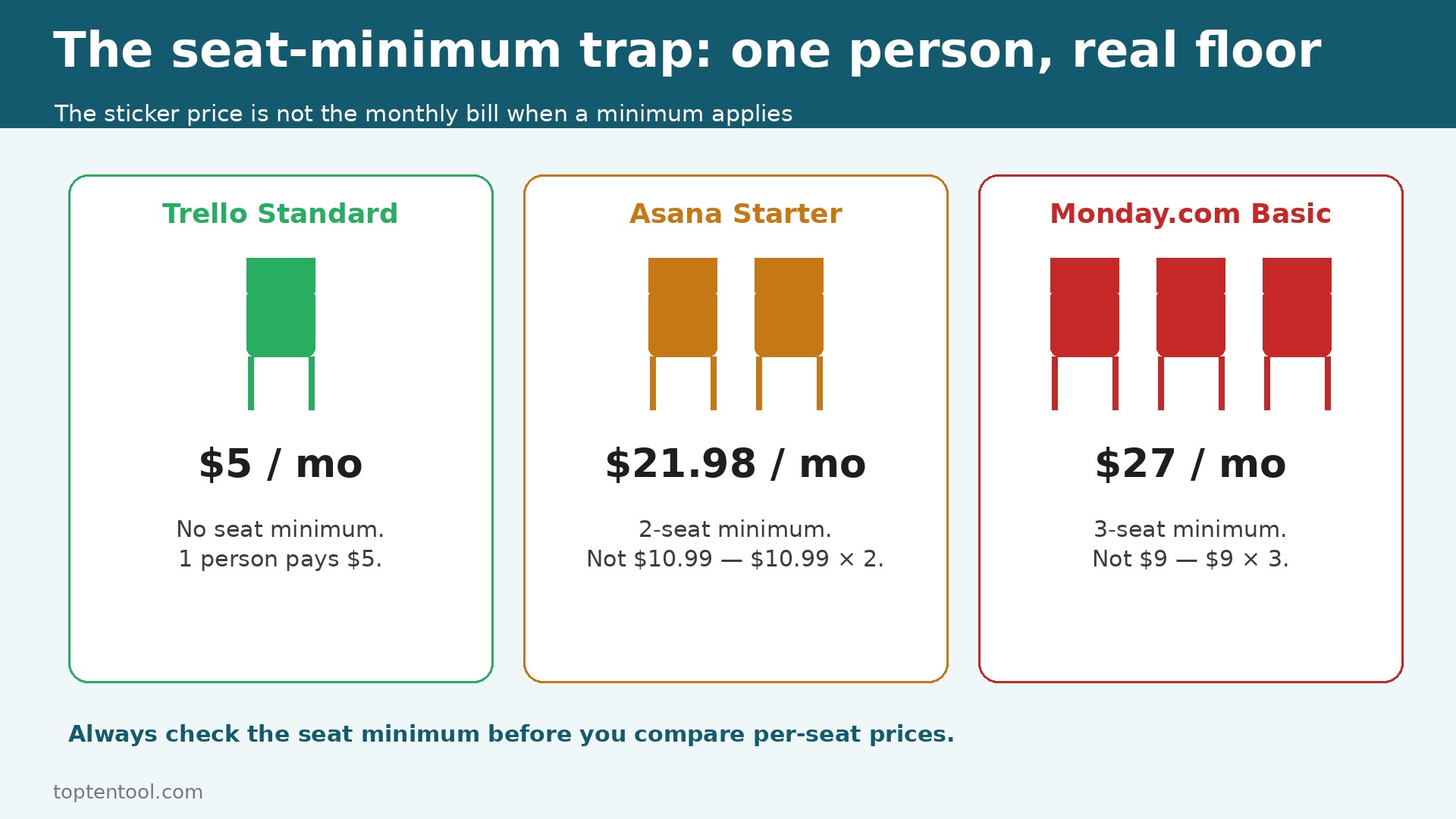
Read the seat minimum column second, because the sticker price is not the monthly bill when a minimum applies. Asana sells paid seats with a two seat minimum, so a one person paid account costs 21.98 dollars a month, not 10.99 dollars. Monday.com paid plans start at three seats, so the real floor for one person is 27 dollars a month on Basic, not 9 dollars. A solo founder who budgets on the per seat price will be surprised at checkout, and the surprise is the minimum, not the price.
Trello
Trello is the cheapest real team tool in this guide, and its pricing is the simplest to read. Free covers up to 10 collaborators per workspace, up to 10 boards, and files up to 10 MB each. Standard costs 5 dollars per user per month billed annually, or 6 dollars billed monthly, and it removes the board limit and adds advanced checklists and custom fields. Premium costs 10 dollars per user per month billed annually, or 12.50 dollars monthly, and it adds Calendar, Timeline, Table, Dashboard, and Map views plus AI features. Enterprise costs 17.50 dollars per user per month billed annually.
Worked cost for a five person team. Free is 0 dollars, if the team fits in 10 boards. Standard is 5 times 5 dollars, which is 25 dollars a month, or 300 dollars a year. Premium is 5 times 10 dollars, which is 50 dollars a month, or 600 dollars a year. A team that needs only Kanban boards should stay on Standard, because Premium adds views the team may never use. A team that needs Timeline and Dashboard views should budget on Premium from the start.
Trello has no seat minimum, so a one person paid account costs 5 dollars a month on Standard. That makes Trello the best pick for a solo founder who needs a real board, and for a small team that wants the lowest bill without a free plan cap.
Asana
Asana is the easiest tool to adopt in this guide, and its pricing is the most likely to surprise a small team. Personal is free for up to two users, with list, board, and calendar views. Starter costs 10.99 dollars per user per month billed annually, or 13.49 dollars monthly, and it adds Timeline and Gantt views, dashboards, unlimited automations, and forms. Advanced costs 24.99 dollars per user per month billed annually, or 30.49 dollars monthly, and it adds portfolio management, workload, and advanced reporting.
Worked cost for a five person team. Starter is 5 times 10.99 dollars, which is 54.95 dollars a month, or 659.40 dollars a year. Advanced is 5 times 24.99 dollars, which is 124.95 dollars a month, or 1,499.40 dollars a year. The jump from Starter to Advanced is 14 dollars per user per month, which is the largest jump in this guide for a mid tier move, and a team that needs portfolio views will face it sooner than expected.
Asana sells paid seats with a two seat minimum, so a one person paid account costs 21.98 dollars a month, not 10.99 dollars. A team of three has no free option, because Personal caps at two users, so the first paid seat is the first cost. Budget on the five person total, not on the per seat price, because the per seat price hides the minimum.
Monday.com
Monday.com is the most visual tool in this guide, and its pricing is built around seats and boards. Free covers up to two seats and three boards. Basic costs 9 dollars per seat per month billed annually, Standard costs 12 dollars, and Pro costs 19 dollars. Basic covers unlimited boards, docs, and basic automations. Standard adds Timeline, Gantt, Calendar, and more automations. Pro adds time tracking, formula columns, and advanced automations.
Worked cost for a five person team. Basic is 5 times 9 dollars, which is 45 dollars a month, or 540 dollars a year. Standard is 5 times 12 dollars, which is 60 dollars a month, or 720 dollars a year. Pro is 5 times 19 dollars, which is 95 dollars a month, or 1,140 dollars a year. The prices look low, but the seat minimum changes the math for a solo user. Paid plans start at three seats, so a one person paid account costs 27 dollars a month on Basic, not 9 dollars.
Monday.com is the best pick for a non technical team that adopts quickly, because the boards are colour coded and the automations are easy to build. A team that needs a visual workflow and will use it daily should test the free plan with two people first, then move to Standard when the team grows past two seats.
ClickUp
ClickUp is the best value in this guide, and its pricing is the most generous at the free tier. Free Forever covers unlimited members with unlimited tasks, and only the storage is capped at 60 MB. Unlimited costs 7 dollars per user per month billed annually, or 10 dollars monthly, and it adds unlimited storage, Gantt charts, custom fields, native time tracking, and 1,000 automation runs a month. Business costs 12 dollars per user per month billed annually, or 19 dollars monthly, and it adds advanced automations, AI, and more storage.
Worked cost for a five person team. Free is 0 dollars, if the team fits in 60 MB of storage. Unlimited is 5 times 7 dollars, which is 35 dollars a month, or 420 dollars a year. Business is 5 times 12 dollars, which is 60 dollars a month, or 720 dollars a year. ClickUp Unlimited at 7 dollars undercuts nearly every rival while including features others reserve for top tiers, and that is why it wins on value.
Note that ClickUp has also listed a newer lineup with Core at 9 dollars per user per month billed annually, Business at 17 dollars, and Max at 100 dollars, with pooled AI credits. The Unlimited plan at 7 dollars is the figure most current comparisons still list, and a team should confirm which lineup is live at checkout, because the price and the AI credits differ between the two.
Notion
Notion is the best pick when docs and tasks must live together, and its pricing is per member. Free costs 0 dollars, with a limited block allowance once two or more members share a workspace. Plus costs 10 dollars per member per month billed annually, or 12 dollars monthly, and it adds unlimited blocks, file uploads, and 30 day version history. Business costs 20 dollars per member per month billed annually, and it adds full AI, SSO, and advanced permissions.
Worked cost for a five person team. Plus is 5 times 10 dollars, which is 50 dollars a month, or 600 dollars a year. Business is 5 times 20 dollars, which is 100 dollars a month, or 1,200 dollars a year. Notion is not a pure project tool, so a team that needs Gantt charts, time tracking, or advanced automations will find it thin. A team that needs a wiki, docs, and light task tracking in one place will find it perfect, and the 10 dollar Plus price is fair for that job.
Notion has no seat minimum, so a one person paid account costs 10 dollars a month on Plus. That makes Notion a good pick for a solo founder who writes docs and tracks tasks in the same workspace.
Basecamp
Basecamp skips per user pricing in its flat plan, which makes it the value pick for a large team. The per user plan costs 15 dollars per user per month billed annually. Pro Unlimited costs 299 dollars a month flat, billed annually, for unlimited users. That flat price is the key to the comparison, because a team of 20 people pays 300 dollars a month on the per user plan and 299 dollars on the flat plan, and a team of 30 people pays 450 dollars on the per user plan and still 299 dollars on the flat plan.
Worked cost for a five person team. Per user is 5 times 15 dollars, which is 75 dollars a month, or 900 dollars a year. Pro Unlimited is 299 dollars a month, or 3,588 dollars a year, which is far more than the per user price for five people. A five person team should not buy Pro Unlimited. A 25 person team should, because 25 times 15 dollars is 375 dollars a month, and the flat price saves 76 dollars a month, or 912 dollars a year.
Basecamp has no free plan, only a 30 day trial, so a team should use the trial to test the message boards, the to dos, and the file sharing with real work. A trial with sample data tells you nothing about whether the team will actually use the message board instead of email.
Wrike
Wrike is built for a team that needs structured work with approvals and reporting, and its pricing sits in the middle of this guide. Free covers limited tasks and storage. Team costs 10 dollars per user per month billed annually, and Business costs 25 dollars per user per month. Team covers Gantt charts, shared dashboards, and basic automations. Business adds advanced reporting, custom workflows, and AI features.
Worked cost for a five person team. Team is 5 times 10 dollars, which is 50 dollars a month, or 600 dollars a year. Business is 5 times 25 dollars, which is 125 dollars a month, or 1,500 dollars a year. The jump from Team to Business is 15 dollars per user per month, which is large, and a team that needs advanced reporting should budget on Business from the start. Wrike is the right pick for a team that needs approvals and client work, and the wrong pick for a team that just needs a simple board.
Smartsheet
Smartsheet is built for a team that thinks in spreadsheets, and its pricing is per user with a minimum. Pro costs 9 dollars per user per month billed annually, and Business costs 19 dollars per user per month. Pro covers unlimited sheets, Gantt charts, and basic automations. Business adds advanced reporting, proofing, and more automations. Smartsheet has no free plan, only a 30 day trial, so a team should test it with a real sheet, not with a demo.
Worked cost for a five person team. Pro is 5 times 9 dollars, which is 45 dollars a month, or 540 dollars a year. Business is 5 times 19 dollars, which is 95 dollars a month, or 1,140 dollars a year. Smartsheet is the best pick for a team that already manages work in spreadsheets and wants that sheet to become a project tool without changing how the team thinks.
Airtable
Airtable is built for a team that needs a database as much as a project tool, and its pricing is the highest in this guide. Free covers limited records per base. Team costs 20 dollars per user per month billed annually, and Business costs 45 dollars per user per month. Team covers unlimited bases, advanced calendar, and more records. Business adds advanced permissions, AI, and more automations.
Worked cost for a five person team. Team is 5 times 20 dollars, which is 100 dollars a month, or 1,200 dollars a year. Business is 5 times 45 dollars, which is 225 dollars a month, or 2,700 dollars a year. Airtable is the most expensive tool in this guide at the mid tier, and it is worth that price only when the team needs a real database, with linked records, views, and interfaces, rather than just a task list. A team that needs only tasks should not pay Airtable prices.
Total Cost of Ownership
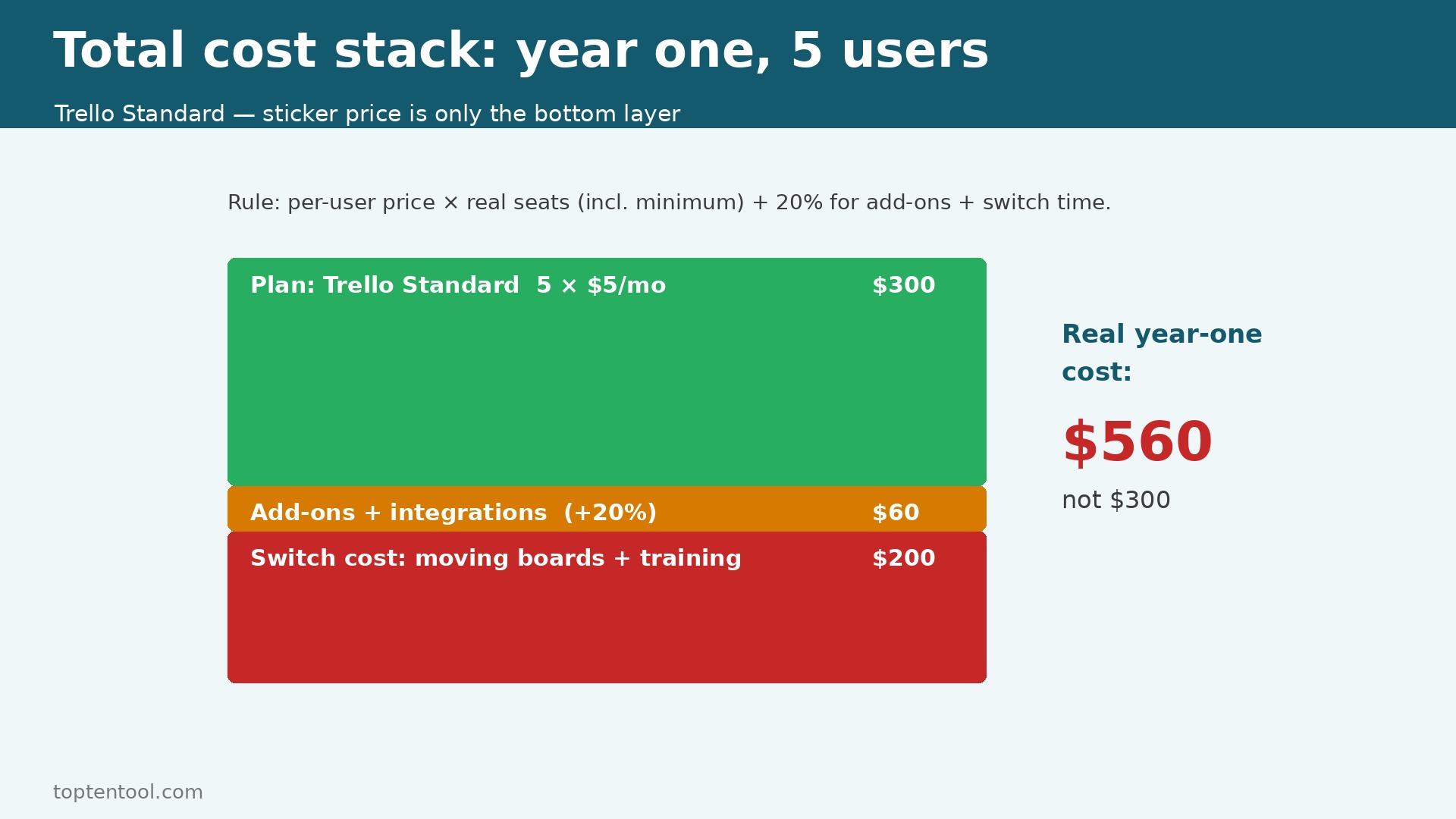
The sticker price is not the total cost, and a team that budgets on the sticker price will be surprised in month three. The total cost includes the plan, the seat minimum, the storage limit, the add ons, and the time spent setting up and training the team.
Trello Standard for five users costs 300 dollars a year, with no seat minimum and no onboarding fee. ClickUp Unlimited for five users costs 420 dollars a year, with no seat minimum. Monday.com Basic for five users costs 540 dollars a year, but a one person account costs 27 dollars a month because of the three seat minimum.
Asana Starter for five users costs 659.40 dollars a year, but a one person account costs 21.98 dollars a month because of the two seat minimum. Notion Plus for five users costs 600 dollars a year. Basecamp per user for five users costs 900 dollars a year. Airtable Team for five users costs 1,200 dollars a year, the highest in this guide for a five person team at the entry tier.
Add the hidden costs to every tool. A tool that needs a paid integration for time tracking, for reporting, or for file storage adds 10 to 30 dollars a month per integration. A tool that needs training adds a day of the team time, which is worth more than the plan price for a small team. A tool that caps storage on the free plan will force a paid plan sooner than expected, and the forcing point is the storage, not the feature list. Budget 200 dollars for the switch itself, for the hours spent moving boards, rebuilding templates, and training the team, because that time is real even when no invoice covers it.
The rule is simple. Take the published per user price, multiply by the real seat count including the minimum, add 20 percent for add ons and integrations, and that is the real year one cost. A tool that costs 5 dollars a user on the pricing page will cost 6 dollars a user in practice when the team pays monthly, and a tool that costs 9 dollars a user with a three seat minimum will cost 27 dollars a month for a solo user, not 9 dollars.
A team should also price the year two jump. Project management software pricing for small teams changes when the free plan ends, when the board count crosses a cap, and when the team adds a seat. Trello Free ends at ten boards, Asana Personal ends at two users, and ClickUp Free ends at 60 MB of storage. A team that starts free and grows to five users in six months will pay the full entry price in year one, not the free price it budgeted in January.
The cheapest way to test is to run two tools side by side for a month. Project management software pricing for small teams is only real when the team uses its own projects, its own deadlines, and its own reporting routine. A trial with sample tasks proves nothing. Move one real project across, run it for two weeks, and count the hours the team spends on admin. The tool with the lower admin hours is usually the cheaper tool, even when its monthly price is higher.
Cheapest by Situation
| Situation | Best value | Why it wins |
|---|---|---|
| Solo founder, simple board | Trello Standard | 5 dollars a month, no seat minimum |
| Solo founder, docs plus tasks | Notion Plus | 10 dollars a month, no seat minimum |
| Small team of 5, lowest bill | Trello Standard | 25 dollars a month for 5 users |
| Small team of 5, best value | ClickUp Unlimited | 35 dollars a month, most features per dollar |
| Non technical team, visual boards | Monday.com Standard | 60 dollars a month for 5 users, easy to adopt |
| Structured projects, timelines | Asana Starter | 54.95 dollars a month for 5 users, Gantt included |
| Docs, wikis, light tasks | Notion Plus | 50 dollars a month for 5 users, docs and tasks together |
| Large team, client work | Basecamp Pro Unlimited | 299 dollars flat a month, unlimited users |
| Spreadsheet team, Gantt needed | Smartsheet Pro | 45 dollars a month for 5 users |
| Database plus project work | Airtable Team | 100 dollars a month for 5 users, linked records |
Read the table by situation, not by price alone. The cheapest tool for a solo founder is not the cheapest tool for a large team, because the large team needs a flat price that the solo founder will never use. That situation test is the core of project management software pricing for small teams. A team that buys the cheapest tool and then discovers it lacks the one view the team needs will pay twice, once for the cheap tool and once for the replacement.
Frequently Asked Questions
Is there a truly free project tool for a small team?
Yes. ClickUp Free Forever covers unlimited members with unlimited tasks, and only the storage is capped at 60 MB. Trello Free covers up to 10 collaborators per workspace, with 10 boards. Those two are the only free plans in this guide that cover a real team. Asana and Monday.com free plans cap at two users, so they are personal tools, not team tools.
Why does Monday.com cost more for one person than the price says?
Monday.com paid plans start at three seats, so a one person paid account costs 27 dollars a month on Basic, not 9 dollars. Asana has a similar trap, with a two seat minimum, so a one person paid account costs 21.98 dollars a month on Starter, not 10.99 dollars. Always check the seat minimum before you compare per seat prices, because the minimum is the real floor.
What is the cheapest project tool per user in 2026?
Trello Standard at 5 dollars per user per month billed annually is the cheapest paid seat in this guide. ClickUp Unlimited at 7 dollars is next, and Monday.com Basic at 9 dollars is next. The cheapest paid seat is not always the cheapest total, because a team that needs Timeline views will pay 10 dollars on Trello Premium, while a team on ClickUp Unlimited gets Gantt charts for 7 dollars.
Do project tools charge for guests or viewers?
It depends on the tool. Asana allows unlimited free guests who can see projects without a paid seat, which lowers the real cost for a team that works with clients. Trello and ClickUp have guest and viewer rules that vary by plan, so check the guest policy before you count seats, because a team with five members and ten clients will pay far less if the clients are guests rather than paid seats.
How much does a project tool cost for a 5 person team in a year?
Trello Standard costs 300 dollars a year. ClickUp Unlimited costs 420 dollars a year. Monday.com Basic costs 540 dollars a year. Smartsheet Pro costs 540 dollars a year. Asana Starter costs 659.40 dollars a year. Notion Plus costs 600 dollars a year. Basecamp per user costs 900 dollars a year. Airtable Team costs 1,200 dollars a year. The range is 300 dollars to 1,200 dollars at the entry tier, and the mid tier range is higher, so the tier matters more than the brand.
Verdict
For most small teams, the best value in project management software pricing for small teams is ClickUp Unlimited at 7 dollars per user per month. A five person team pays 35 dollars a month, or 420 dollars a year, and that price includes Gantt charts, time tracking, custom fields, and unlimited storage, which other tools reserve for higher tiers. The free plan is the most generous in this guide, so a team can test with real work before it pays.
For the lowest bill, Trello Standard at 5 dollars per user is the pick. A five person team pays 25 dollars a month, or 300 dollars a year, and the board is the simplest in this guide. For the easiest adoption, Asana Starter at 10.99 dollars per user is the pick, because the Timeline and Gantt views are clear, and the team will adopt it without training. For a large team, Basecamp Pro Unlimited at 299 dollars flat a month is the pick, because the price stops rising with headcount.
Avoid Airtable Team unless the team needs a real database, because 20 dollars per user is the highest entry price in this guide, and a task list does not need a database. Avoid Monday.com Basic for a solo user, because the three seat minimum makes the real floor 27 dollars a month, not 9 dollars. In project management software pricing for small teams, the right tool is the one that fits the team size, the work style, and the budget at the tier the team will use in six months, not at the entry price, because the entry price is where the team starts, not where it lives.