For teams asking how to switch from Salesforce to HubSpot, the deciding question is size, not features.
HubSpot is the better pick for most small and midsize sales teams that want sales, marketing, and service on one record without hiring a dedicated admin. Salesforce is the better pick for large or complex sales organizations that need territories, approvals, custom objects, and deep reporting, and can fund an admin or a partner to run them. That verdict, drawn from 2026 comparisons of both platforms, is the starting point for this guide, not the conclusion. The switch from Salesforce to HubSpot is the most common CRM migration direction in 2026, and it succeeds when the team moves for the right reasons and plans for the parts that do not transfer cleanly.
The switch is usually triggered by cost or admin overhead. Salesforce reset its editions in September 2026, bundling Slack, Flex Credits, and some Agentforce features into new Core, Advanced, and Max tiers, with Core at 195 dollars per user per month, Advanced at 395 dollars, and Max at 550 dollars. HubSpot Sales Hub Professional costs 90 dollars a seat per month on annual billing, plus a required 1,500 dollar onboarding fee, and Enterprise costs 150 dollars a seat plus 3,500 dollars onboarding. For a ten person team, that gap is about a thousand dollars a month before any admin cost is counted, and the admin cost is often the larger line.
This guide walks through how to switch from Salesforce to HubSpot in seven steps, with a checklist, a cost comparison, and a clear account of what transfers, what does not, and what to test before cancelling Salesforce. Follow the steps in order, run both systems side by side for four to ten weeks, and the move will be boring in the best way. Skip the steps, cancel early, and contacts, deals, and reporting history can break without warning.
Why Teams Switch from Salesforce to HubSpot
Cost is the reason most teams switch, and the gap is wide at the mid tier. Salesforce Starter Suite costs 25 dollars per user per month, Pro Suite costs 100 dollars, Core costs 195 dollars, Advanced costs 395 dollars, and Max costs 550 dollars, all on annual contracts. HubSpot Sales Hub Free covers up to 2 users, Starter starts from 7 dollars a seat, Professional costs 90 dollars a seat per month on annual billing, and Enterprise costs 150 dollars.
A team on Salesforce Core at 195 dollars per user that moves to HubSpot Professional at 90 dollars saves 105 dollars per seat per month, or more than 12,000 dollars a year for a ten person team, before any admin saving.
Admin overhead is the second reason, and it is often larger than the license gap. Salesforce needs a dedicated admin or a partner to manage custom objects, Flows, permissions, and reporting, and most organizations that run it well pay for that expertise. HubSpot is built to be run by the sales team itself, with a simpler data model, visual workflows, and reporting that a sales manager can build without code. A small team that cannot fund a Salesforce admin will get more value from HubSpot, because the system actually gets used rather than slowly decaying.
Speed to value is the third reason. HubSpot puts sales, marketing, and service on one record, so a lead that downloads a guide, opens an email, and books a meeting shows the full story in one timeline. Salesforce can do the same, but it usually needs Marketing Cloud, which starts at 1,250 dollars a month as a separate product, plus integration work. A team that wants the full journey in one place without a second purchase will find HubSpot faster to set up and easier to keep clean. That speed matters most for a team that needs results this quarter, not next year.
The fourth reason is the free tier. HubSpot offers a genuinely free CRM for up to 2 users, with 1,000 contacts and one pipeline, so a small team can start with no spend and upgrade only when the team grows. Salesforce Free Suite is also free, but the paid tiers rise fast, and the real cost appears in the admin and the add ons. A team that is still proving its sales process can run on HubSpot Free, learn what it needs, and pay only when the process is proven.
Salesforce vs HubSpot Side by Side
| Feature | Salesforce | HubSpot |
|---|---|---|
| Free plan | Free Suite, limited | Free CRM, up to 2 users, 1,000 contacts |
| Entry paid plan | Starter Suite 25 dollars a month | Starter from 7 dollars a seat a month |
| Mid paid plan | Pro Suite 100 dollars, Core 195 dollars | Professional 90 dollars a seat a month annual |
| Advanced plan | Advanced 395 dollars, Max 550 dollars | Enterprise 150 dollars a seat a month annual |
| Onboarding fee | None published | 1,500 dollars Professional, 3,500 dollars Enterprise |
| Marketing tools | Marketing Cloud separate, from 1,250 dollars a month | Marketing Hub included in the platform |
| Custom objects | Deep, with Apex and Flow | Custom objects on Enterprise |
| Admin need | Dedicated admin or partner usually needed | Sales team can run it |
| AI pricing | Flex Credits, 500 dollars per 100,000 credits | HubSpot Credits, from 9 dollars per 1,000 |
| App marketplace | AgentExchange, more than 10,000 apps | Wide, including native integrations |
HubSpot charges a mandatory one time onboarding fee on its paid tiers, which is 1,500 dollars on Professional and 3,500 dollars on Enterprise, and that fee is not in the per seat figure. Salesforce charges no published onboarding fee, but the implementation and admin costs usually exceed it. Compare the total year one cost, not the headline seat price, because the onboarding, the admin, and the marketing add ons decide the real bill.
Before You Switch. The Honest Comparison
A switch guide that only lists the savings is not honest, so this section states the trade plainly. Salesforce is an enterprise ecosystem, HubSpot is an all in one platform for smaller teams, and the difference shows in the daily work. A large organization that relies on territories, approvals, custom objects, and Apex logic will feel the loss of those tools on HubSpot from the first week.
A small sales team that wants one record for sales, marketing, and service, with workflows it can build itself, will not miss Salesforce at all. The question is not which CRM is better. The question is how complex the business really is, and learning how to switch from Salesforce to HubSpot starts with answering that question honestly.
The admin cost is the number that decides the switch more than the license price. Salesforce needs a dedicated admin or a partner to manage custom objects, Flows, permissions, and reporting, and that expertise costs thousands a month even part time. HubSpot is built to be run by the sales team itself, with a simpler data model and visual workflows. A team that cannot fund a Salesforce admin will get more value from HubSpot, because the system actually gets used rather than slowly decaying. A team that already funds an admin well may get more value from staying, because the depth is already paid for and already working.
The data model is the second honest check. Salesforce custom objects with no clean equivalent are the hardest part of the migration, and Apex logic has to be re-expressed declaratively or dropped. A team with many custom objects should map each one in step 2 before any data moves, and be honest about how many can be flattened or dropped without harming the business. Run the free HubSpot CRM for two weeks with a real pipeline, and the team will know whether the simpler model fits before any money moves. That test is the cheapest way to learn how to switch from Salesforce to HubSpot without committing to the move.
What You Lose and What You Gain
The switch trades depth for simplicity, and the team should name that trade before starting. What you gain is a lower license bill, a system the sales team can run without a dedicated admin, sales, marketing, and service on one record, a free CRM to start with, and faster time to value. The interface is calmer, the workflows are visual, and the reporting covers the metrics a small sales team actually reads without a consultant.
What you lose is real, and it matters for complex organizations. Salesforce offers deep customization with custom objects, Apex logic, Flow automation, territories, approvals, and field level permissions that HubSpot does not replicate fully. Custom objects with no clean equivalent are the hardest part of the migration, and Apex logic has to be re-expressed declaratively or dropped. Record level permission models that Salesforce handles natively do not exist in the same form in HubSpot. A large or complex sales organization that relies on those tools will miss them daily on HubSpot, and the switch can hurt more than it saves.
Reporting also changes. Salesforce reporting is deeper and more flexible for complex organizations, with custom report types and cross object reporting that HubSpot matches only partially. HubSpot reporting is easier to build and easier to read, but it is less powerful for a team that needs deeply custom analysis. AI pricing differs too. Salesforce sells Flex Credits at 500 dollars per 100,000 credits, with a standard action costing 20 credits, while HubSpot charges HubSpot Credits from 9 dollars per 1,000 beyond the tier allowance. Both now meter AI as consumption, so budget for it separately on either platform. Name the loss before the move, and the team can plan around it instead of discovering it in week two.
A pilot pipeline also settles the question honestly. Run one real pipeline on HubSpot for a month while Salesforce still runs the rest, and the team will see whether the simpler model helps or hinders the daily work. That pilot is the fairest test of how to switch from Salesforce to HubSpot, because it measures the new system against real deals rather than a demo.
How to Switch from Salesforce to HubSpot in 7 Steps
Step 1. Audit the Salesforce account before touching anything
Open Salesforce and list every object, every custom field, every workflow, every Flow, every Apex trigger, every report, every dashboard, and every integration. Export the contact, account, opportunity, and activity lists, and note the renewal date and the contract terms. This audit takes a full day for a real Salesforce org, and it prevents the most common switch failure, which is discovering a critical custom object or automation only after it was deleted. Pay special attention to custom objects, record level permissions, and Apex logic, because those are the parts that do not transfer cleanly.
Step 2. Map the Salesforce data model onto HubSpot
Map Salesforce objects onto HubSpot objects before moving any data. Accounts and contacts map to companies and contacts, opportunities map to deals, and activities map to engagements. Custom objects need a decision for each one, because HubSpot custom objects exist only on Enterprise, and some Salesforce custom objects have no clean equivalent. Decide for each custom object whether to rebuild it in HubSpot, flatten it into properties, or drop it. That decision is the hardest part of the migration, and it should be made with the sales team in the room, not by IT alone.
Step 3. Set up HubSpot and configure the pipeline
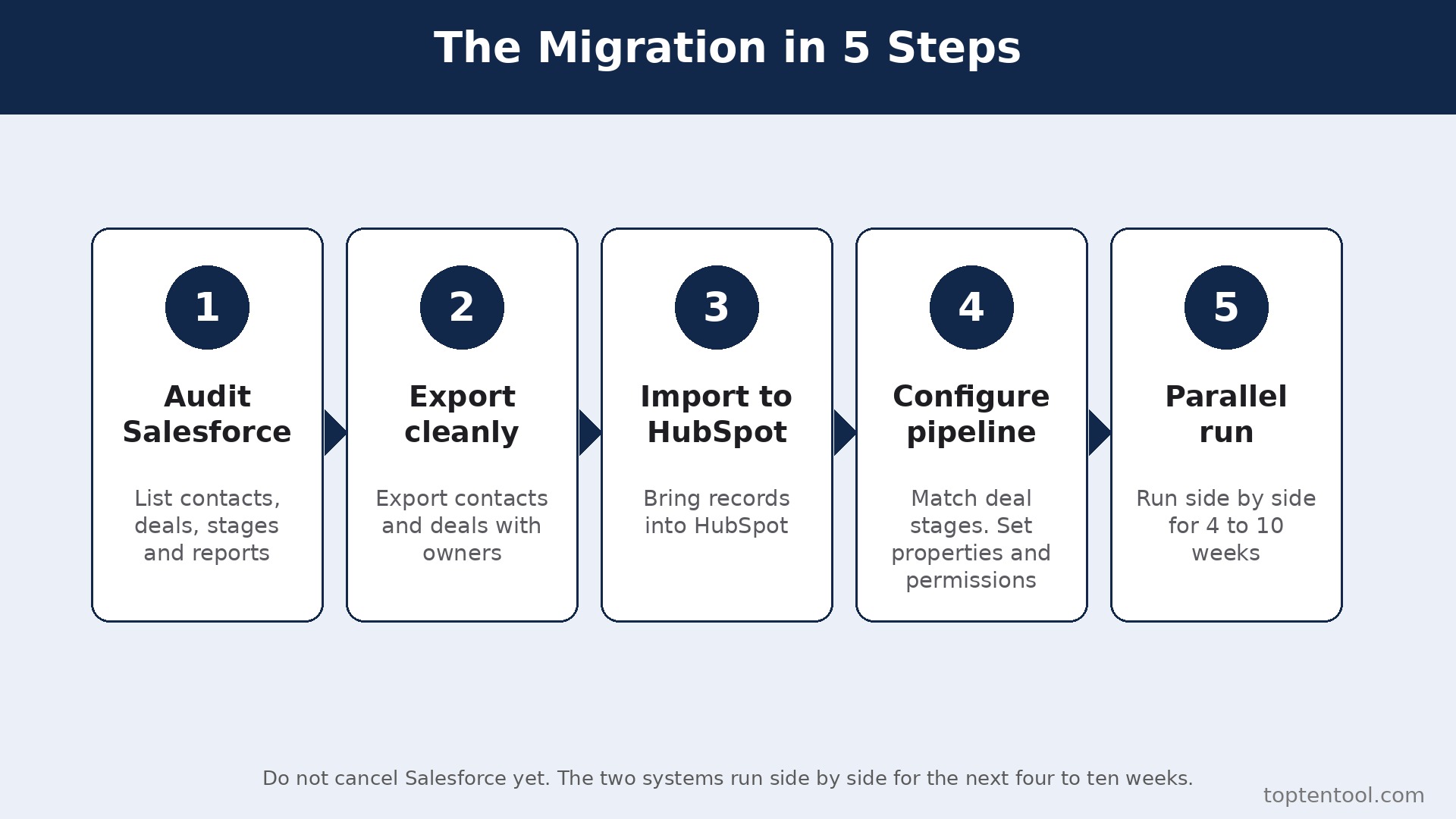
Create the HubSpot account, choose the plan that matches the team size, and configure the deal pipeline to match the Salesforce stages. Sales Hub Professional costs 90 dollars a seat per month on annual billing, plus a required 1,500 dollar onboarding fee, and Enterprise costs 150 dollars plus 3,500 dollars onboarding. Set up the properties, the deal stages, and the user permissions, and connect the email and calendar integrations. Do not cancel Salesforce yet. The two systems will run side by side for the next four to ten weeks.
Step 4. Migrate the data with the HubSpot importer
Use the HubSpot migration tools or the Salesforce import to bring contacts, companies, deals, and activities across. HubSpot offers its own migration services, and most migrations finish in four to ten weeks with a certified partner, according to 2026 comparison research. Migrate a small sample first, check it line by line against Salesforce, and only then migrate the full data set. Historical data, reporting continuity, and integrations take longer than the CRM configuration itself, so budget time for them. Check duplicates carefully, because a dirty import will haunt the team for months.
Step 5. Rebuild the workflows and the reports
Recreate the Salesforce workflows as HubSpot workflows, starting with the ones the team actually uses every week. Apex logic has to be re-expressed declaratively or dropped, and Flows become HubSpot workflows with different triggers and actions. Rebuild the reports and dashboards, and confirm each one shows the right data. Test each workflow with a real record before relying on it, because a workflow that fires wrong is worse than no workflow. This step takes longer than the data migration, and it is where most switches run late.
Step 6. Run both systems side by side for four to ten weeks
Use HubSpot for all new leads and deals for four to ten weeks while Salesforce stays available for reference and for any deal that has not migrated yet. Watch for problems daily, including missing contacts, broken workflows, and reports that show the wrong numbers. Compare the HubSpot pipeline with the Salesforce export from step 1 to spot any gap. Fix the problems while Salesforce is still available as a fallback, not after it is cancelled. A CRM migration that runs parallel for a month costs little and catches every problem early.
Step 7. Cancel Salesforce and confirm the data is safe
Once four to ten weeks of HubSpot work look clean, export any final Salesforce data, including the records that were not migrated, the reports the team relies on, and the activity history that matters. Then cancel the Salesforce subscription before the renewal date. Confirm the cancellation email arrives, and check that no auto renewal is set. Keep the Salesforce export files for at least a year, because historical data does not transfer fully and the old exports are the only record of past deals. The switch is done when HubSpot has run cleanly for a month and Salesforce is cancelled without a surprise charge.
Pre Switch Checklist
Use this checklist before starting step 1, and do not skip a line.
– List every Salesforce object, custom field, Flow, Apex trigger, report, and integration. – Decide the fate of each custom object, rebuild, flatten, or drop. – Note the Salesforce renewal date and any contract term. – Choose the HubSpot plan and budget the onboarding fee. – Map the Salesforce deal stages onto the HubSpot pipeline. – Confirm the team has no dedicated Salesforce admin to lose. – List the Salesforce features the team actually uses, including territories and approvals. – Plan a replacement for any Salesforce feature HubSpot lacks. – Set a switch date in a quiet quarter, not during a launch. – Tell the team the switch date and the new workflow before step 1.
Data Migration. What Transfers and What Does Not
Contacts, companies, deals, and activities transfer through the HubSpot migration tools, and a careful import will move the core data cleanly. That covers the records the sales team uses every day, and a sample import checked line by line will catch most errors before the full migration. What does not transfer cleanly is the structure around the records. Custom objects with no clean equivalent need a rebuild or a flattening decision, record level permission models do not replicate in HubSpot, and Apex logic has to be re-expressed declaratively or dropped. Those three gaps are the hard parts of the migration, and they decide whether the switch succeeds or stalls.
Workflows and reports also need rebuilding rather than importing. Salesforce Flows become HubSpot workflows with different triggers, and Salesforce reports become HubSpot reports with different fields and filters. Historical data transfers as records, but reporting continuity breaks, because the old reports do not move and the new reports start from the migration date. Integrations need reconnecting one by one, and each one should be tested with a real record before the team relies on it. Almost every B2B tool has a HubSpot connector, but the field mapping still needs checking.
What does transfer fully is the customer relationship itself. The contacts, the companies, and the deals are the core, and they arrive intact when the import is checked carefully. The team also keeps its files, because attachments can be downloaded and reattached, and its email history, because HubSpot connects to the same mailboxes. The only things lost are the Salesforce specific structures, which are the custom objects, the Apex logic, and the permission models. Export them all before cancelling, and document the decisions made for each one, so the team knows what was rebuilt, what was flattened, and what was dropped.
Cost Comparison. What the Switch Actually Saves
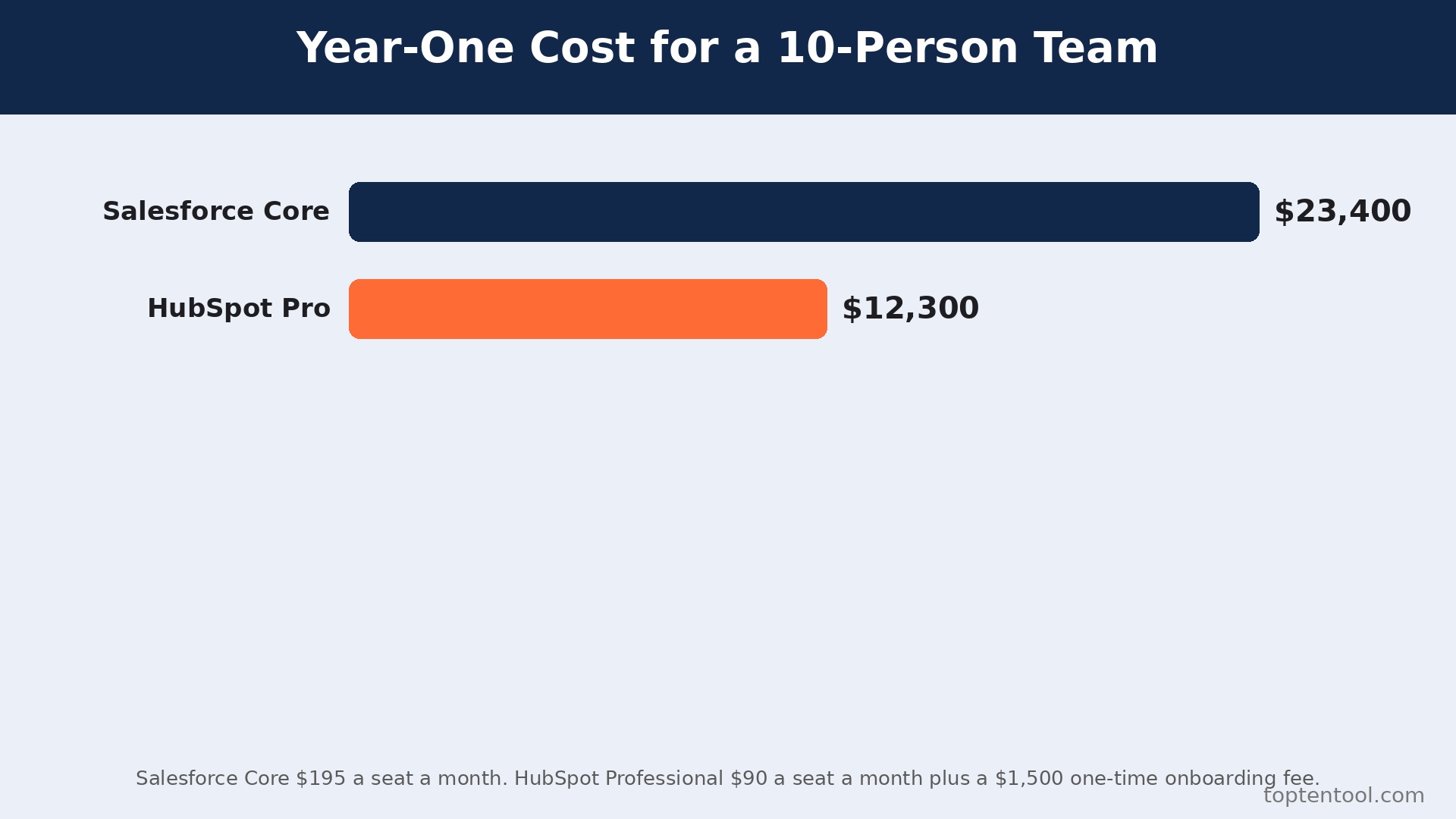
The saving depends on the tier and the team size, and the year one total matters more than the monthly seat price. A ten person team on Salesforce Core at 195 dollars per user per month pays 1,950 dollars a month, or 23,400 dollars a year. The same team on HubSpot Professional at 90 dollars a seat pays 900 dollars a month, or 10,800 dollars a year, plus a 1,500 dollar onboarding fee, for a year one total of 12,300 dollars. That is a saving of about 11,100 dollars in year one, and about 12,600 dollars a year after that, before any admin saving is counted.
A five person team on Salesforce Pro Suite at 100 dollars per user pays 500 dollars a month, against 450 dollars on HubSpot Professional plus the 1,500 dollar onboarding fee, so the year one saving is small and the real saving appears in year two. A team on Salesforce Starter Suite at 25 dollars per user pays less than HubSpot Professional, so the switch does not save money at the entry tier, and a team that moves for price alone at that tier will be disappointed. The switch saves the most money for teams on Core, Advanced, or Max, where the per seat gap is widest.
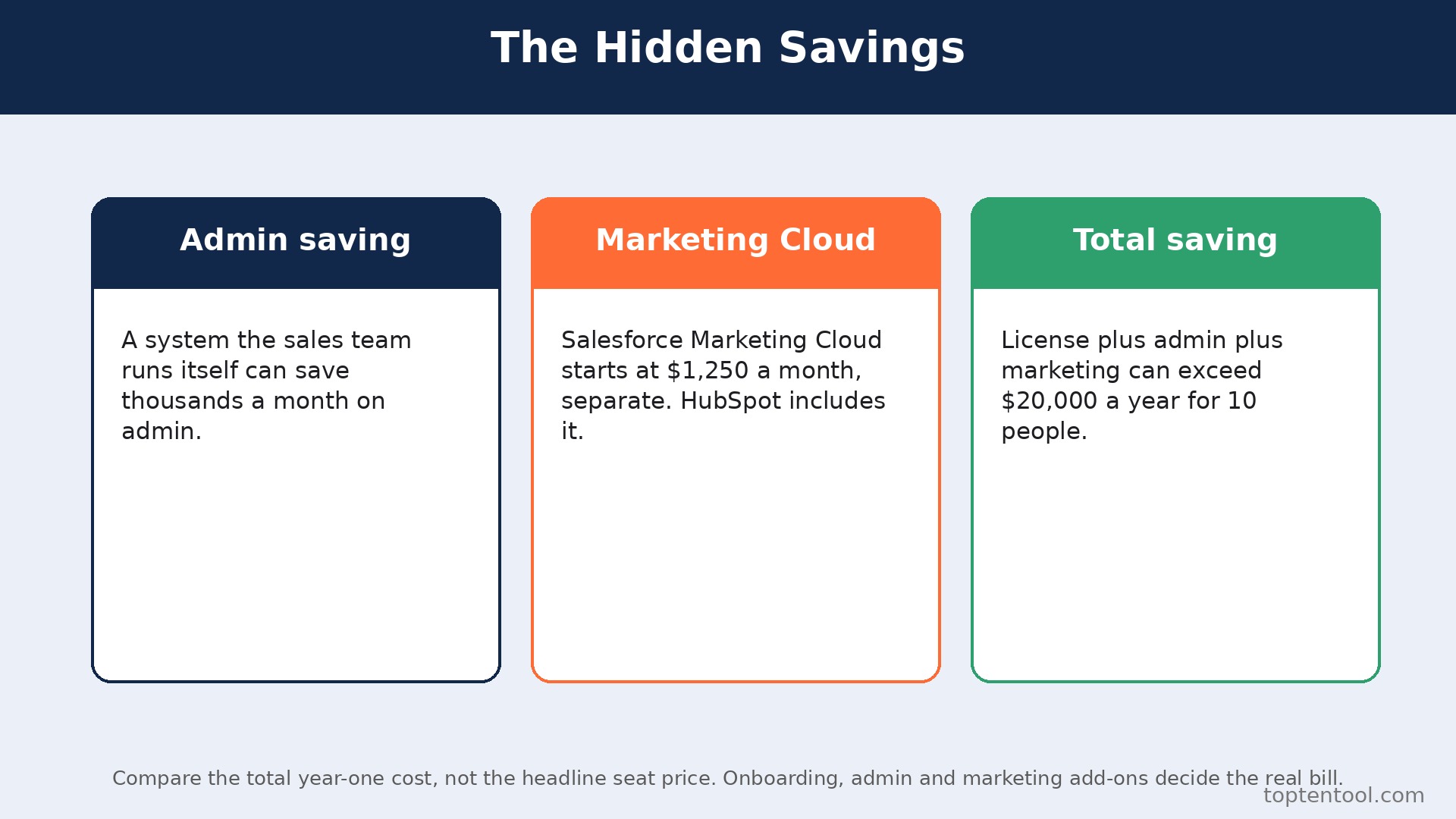
The admin saving is often larger than the license saving. A team that pays for a Salesforce admin or a partner, even part time, can save thousands a month by moving to a system the sales team runs itself. Marketing Cloud is the other hidden cost, because Salesforce Marketing Cloud starts at 1,250 dollars a month as a separate product, while HubSpot includes marketing tools in the platform.
A team that buys Marketing Cloud and moves to HubSpot saves that whole line as well. Add the license, the admin, and the marketing lines together, and the total saving for a ten person team can exceed 20,000 dollars a year. Run the full total before deciding, because the seat price alone understates the case.
Common Switch Mistakes and How to Avoid Them
The first mistake is underestimating the custom object work. A team that assumes every Salesforce custom object has a HubSpot equivalent will discover the gap mid migration, when the data has nowhere to go. Decide the fate of each custom object in step 2, before any data moves, and document the decision. The second mistake is skipping the sample import. A team that migrates the full data set without testing a sample will find duplicates, wrong field mappings, and missing activities only after the whole database is polluted. Migrate a sample, check it line by line, fix the mapping, and only then migrate the rest.
The third mistake is cancelling Salesforce before the parallel run ends. A team that cancels on day one loses the fallback, the history, and the reports in one move, and the rebuild takes weeks instead of days. Keep Salesforce until step 7, and run both systems for four to ten weeks. The fourth mistake is forgetting the onboarding fee. HubSpot Professional carries a mandatory 1,500 dollar onboarding fee, and Enterprise carries 3,500 dollars, and a team that budgets only the seat price will be surprised by the first invoice. Budget the fee in year one, and the saving still holds for most teams.
The fifth mistake is training too late. A team that gets HubSpot access on the day Salesforce is cancelled will fall back to spreadsheets and chat, because nobody knows the new workflow. Train the team on one pipeline before the migration, and let them practice with real deals. The switch is a good time to clean the database, not a reason to move every old record into the new tool. Delete the dead leads, merge the duplicates, and move only the records the team actually works.
The sixth mistake is forgetting the integrations. Salesforce connects to tools the team may rely on, including billing, support, and data tools, and those connections do not follow the team to HubSpot automatically. List every Salesforce integration before the switch, and confirm the same tool has a HubSpot connector, or plan a replacement. A team that treats how to switch from Salesforce to HubSpot as a CRM only job will discover the missing integration during a live deal, and that is the worst moment to find it.
Frequently Asked Questions
How long does it take to switch from Salesforce to HubSpot?
Most migrations take four to ten weeks with a certified partner, according to 2026 comparison research. The audit takes a day, the data model mapping takes a week, the data migration takes a few days, and the workflow rebuild takes the longest. The parallel run of four to ten weeks catches the problems while Salesforce is still available. Do not promise a two week switch, because the custom object work and the workflow rebuild are what make the migration safe.
Will I lose my contacts and deals when I switch from Salesforce to HubSpot?
Contacts, companies, deals, and activities transfer through the HubSpot migration tools, and a careful import will move them cleanly. Custom objects, Apex logic, and record level permissions do not transfer cleanly, and need a rebuild or a flattening decision for each one. Migrate a sample first, check it line by line against Salesforce, and only then migrate the full data set. Keep Salesforce until the migration is verified, and no core record will be lost.
Is HubSpot really cheaper than Salesforce?
For most small and midsize teams, yes, by a wide margin at the mid tier. A ten person team on Salesforce Core at 195 dollars per user pays 23,400 dollars a year, against 12,300 dollars in year one on HubSpot Professional including the 1,500 dollar onboarding fee. The saving is smaller at the entry tier, where Salesforce Starter at 25 dollars is cheaper than HubSpot Professional, and the admin and Marketing Cloud savings often exceed the license saving. Run the full year one total before deciding.
Does HubSpot have the same customization as Salesforce?
No, and the difference matters for complex organizations. Salesforce offers deep customization with custom objects, Apex, Flow, territories, and approvals that HubSpot does not replicate fully. HubSpot custom objects exist only on Enterprise, and Apex logic has to be re-expressed or dropped. A small or midsize team with standard processes will not miss the depth. A large or complex organization that relies on it should stay on Salesforce.
Can I keep my Salesforce reports after switching to HubSpot?
Reports do not transfer. Salesforce reports and dashboards must be rebuilt in HubSpot, and reporting continuity breaks at the migration date. Export the reports the team relies on before cancelling, and keep them for at least a year. That export is the only record of past performance after the switch, so do not cancel Salesforce until the export is saved and checked.
Verdict. Who Should Switch and Who Should Stay
Switch to HubSpot if the team is small or midsize, the processes are relatively standard, and the goal is speed to value without a dedicated admin. A team of up to fifty people that wants sales, marketing, and service on one record, with a lower license bill and a system the sales team can run itself, will find HubSpot the better fit. The year one saving for a ten person team on Core exceeds 11,000 dollars, and the admin saving can double it. For those teams, learning how to switch from Salesforce to HubSpot is worth a few weeks, and the new system pays back every month.
Stay on Salesforce if the organization is large or complex, relies on custom objects, Apex logic, territories, or approvals, and can fund an admin or a partner to run them. Salesforce remains the dominant CRM with deep customization, a marketplace of more than 10,000 apps, and reporting that HubSpot cannot match for complex needs. A team that needs those tools will miss them daily on HubSpot, and the switch can hurt more than it saves. Stay also if the team is mid quarter with a full pipeline. A switch during a busy sales period costs more in lost deals than it saves in subscription fees.
The decision rule is simple. List the custom objects, the Apex logic, and the permission models the team actually uses, count the admin cost, and run the full year one total at the right tier. If HubSpot covers the weekly workflow and costs less, switch in a quiet quarter and follow the seven steps. If Salesforce covers a weekly workflow that HubSpot cannot, stay and use HubSpot for the marketing side instead. The right CRM is the one that matches the complexity of the business, not the one with the lower headline price.