Your invoicing used to take ten minutes. Now it takes an afternoon. You open QuickBooks to send one invoice, you click through three screens, you hunt for a client, you re-enter a rate you already entered last month, and by the time the invoice goes out you have lost the thread of the work that actually pays you. That slow grind is the reason so many freelancers and small service firms start asking how to switch from QuickBooks to FreshBooks, and it is a fair question to ask before the next renewal lands.
QuickBooks Online is a full accounting system. It was built for a business with a bookkeeper, a chart of accounts, inventory, payroll, and a monthly close. FreshBooks was built for a business that lives on client work. It puts invoicing, time tracking, expenses, and payments in one place, and it charges by how many clients you bill rather than by how many seats you occupy. Neither tool is wrong. They are built for different days. A solo consultant with 20 clients does not need the same machine as a 25 person firm with stock on shelves.
This guide walks through how to switch from QuickBooks to FreshBooks in full. You will see why teams switch, what each tool does better, what the real monthly cost looks like at three common sizes, what transfers cleanly and what does not, and a seven step workflow you can run over a weekend without closing your books mid month. Prices below are US list prices checked in October and November 2026.
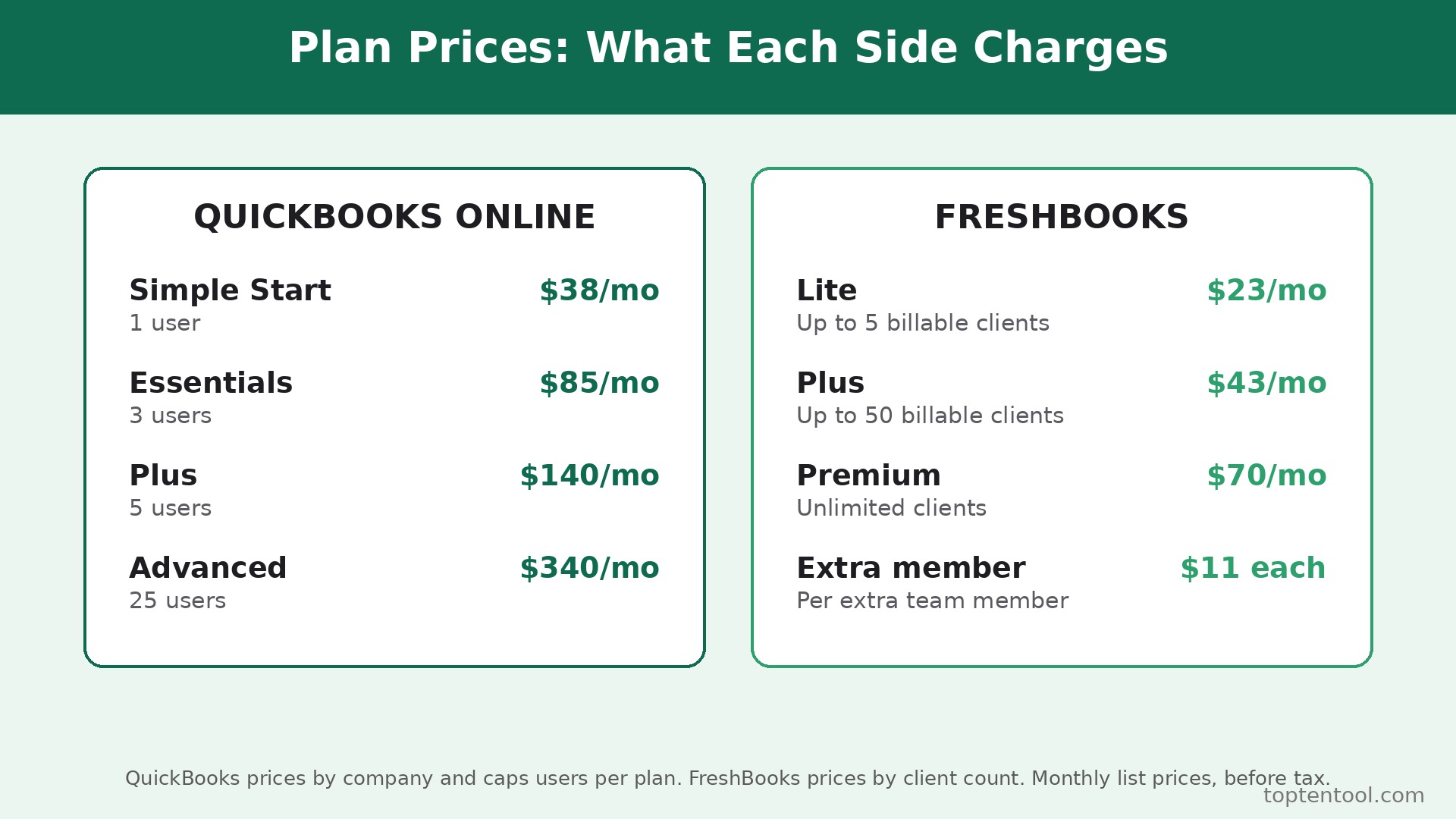
QuickBooks Online lists Simple Start at 38 dollars a month, Essentials at 85 dollars, Plus at 140 dollars, and Advanced at 340 dollars. FreshBooks lists Lite at 23 dollars a month for up to five billable clients, Plus at 43 dollars for up to 50, and Premium at 70 dollars for unlimited clients, with extra team members at 11 dollars each.
Before you move anything, run one honest test. Open your last three months in QuickBooks and count how many features you actually used. If the list is invoices, expenses, time, and a profit and loss report, FreshBooks covers your week. If the list includes inventory, class tracking, and a formal month end close, stay where you are. The switch saves money and time for the first group and costs the second group more than it saves. That honest count is the first step in how to switch from QuickBooks to FreshBooks without paying for features you never open.
How to Switch from QuickBooks to FreshBooks Starts With Why Teams Move
Most switches start with a bill, not a feature. A freelancer on QuickBooks Simple Start pays 38 dollars a month for one user. Add a second person who needs to post and the plan forces a move to Essentials at 85 dollars. A five person team needs Plus at 140 dollars. FreshBooks Plus at 43 dollars covers up to 50 billable clients with one user included, and each extra team member adds 11 dollars.
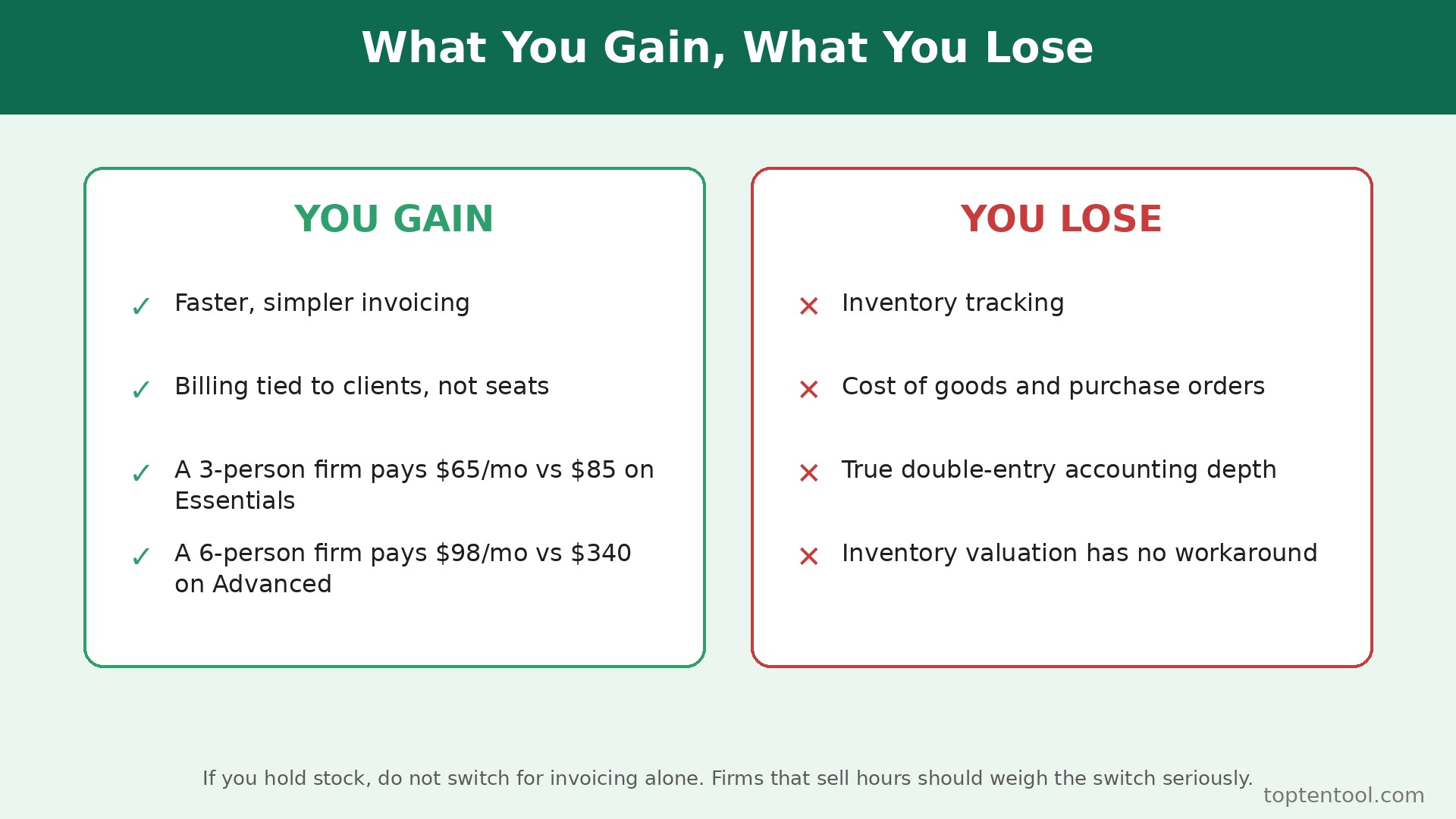
A three person service firm therefore pays 65 dollars a month on FreshBooks Plus, against 85 dollars on QuickBooks Essentials, and the FreshBooks bill stays tied to clients rather than to seats. The gap widens as the team grows, and it narrows again only when the firm needs true double entry accounting depth.
The second reason is speed. FreshBooks was designed around a single flow. You track time, you turn that time into an invoice, you send it, the client pays online, and the payment reconciles. QuickBooks can do the same work, but the path is longer. In a week with 30 billable hours, that gap is the difference between invoicing on Friday and invoicing on Monday, and Monday invoicing is how cash flow slips by a week.
The third reason is the client limit. FreshBooks Lite caps billable clients at five. That cap pushes a growing freelancer to Plus sooner than expected, and it is the most common surprise in the move. Count your active clients before you pick a plan. A consultant with 12 active clients needs Plus at 43 dollars, not Lite at 23 dollars. A firm with 60 active clients needs Premium at 70 dollars. Write the number down now, because every cost comparison in this guide depends on it.
The fourth reason is support for how service work actually runs. FreshBooks Plus adds proposals, retainers, and double entry reports. Premium adds project profitability and accounts payable. QuickBooks Plus adds inventory and project profitability too, but at 140 dollars a month. If your work is projects with hours and expenses attached, compare the project report in both tools during a trial before you commit.
There are also good reasons to stay. QuickBooks handles inventory, multi user permissions, class and location tracking, and a full general ledger with an audit trail that accountants trust. FreshBooks offers double entry reports on Plus and Premium, but it is not a replacement for a full ledger when a business carries stock, runs payroll for a large team, or needs consolidated reporting across entities. An accountant who closes your books each month will have a view here. Ask them before you move, and ask specifically whether they can work from FreshBooks reports or whether they will charge extra to rebuild the close.
QuickBooks and FreshBooks Side by Side
The table below compares the two tools on the points that decide a switch. Prices are monthly list prices in US dollars, before tax and before introductory discounts. Both vendors run first month promotions, so price the decision on the list rate you will pay after the promotion ends.
| Area | QuickBooks Online | FreshBooks |
|---|---|---|
| Monthly plans | Simple Start 38, Essentials 85, Plus 140, Advanced 340 | Lite 23, Plus 43, Premium 70, Select custom |
| Users included | 1 on Simple Start, 3 on Essentials, 5 on Plus, 25 on Advanced | 1 on every plan, extra members 11 each |
| Billable clients | No client cap, priced by users | Lite 5, Plus 50, Premium unlimited |
| Invoicing | Full invoicing with recurring templates | Unlimited invoices on every plan |
| Time tracking | Essentials and above | Every plan |
| Expenses | Every plan, bank import included | Every plan |
| Inventory | Plus and Advanced | No inventory management |
| Project profit | Plus and Advanced | Premium, with profitability reports |
| Payroll | Paid add on, per employee fees | Paid add on through a partner |
| Accountant access | 2 to 3 accountants by plan | Accountant access on Plus and Premium |
| Free trial | 30 day trial or 50 percent off 3 months | 30 day free trial, no card required |
| Card processing | About 2.9 percent plus 30 cents | About 2.9 percent plus 30 cents |
Read the user row twice. QuickBooks prices by company and caps users per plan. FreshBooks prices by client count and charges 11 dollars per extra team member. A solo operator with 40 clients pays 43 dollars on FreshBooks Plus and 38 dollars on QuickBooks Simple Start, so QuickBooks is cheaper for that one person.
A three person firm with 40 clients pays 65 dollars on FreshBooks Plus and 85 dollars on QuickBooks Essentials, so FreshBooks wins. A six person firm with 40 clients pays 98 dollars on FreshBooks Plus and 340 dollars on QuickBooks Advanced, because Plus caps at five users. The winner flips with headcount, and that is why a flat claim that one tool is cheaper is never true for every firm.
Inventory is the hard line. If you hold stock, track cost of goods, or need purchase orders, FreshBooks does not do the job. No workaround in FreshBooks replaces inventory valuation. Firms that sell products should not switch for invoicing alone. Firms that sell hours should weigh the switch seriously, because inventory is the one feature they will never miss.
The Seven Step Switch Workflow
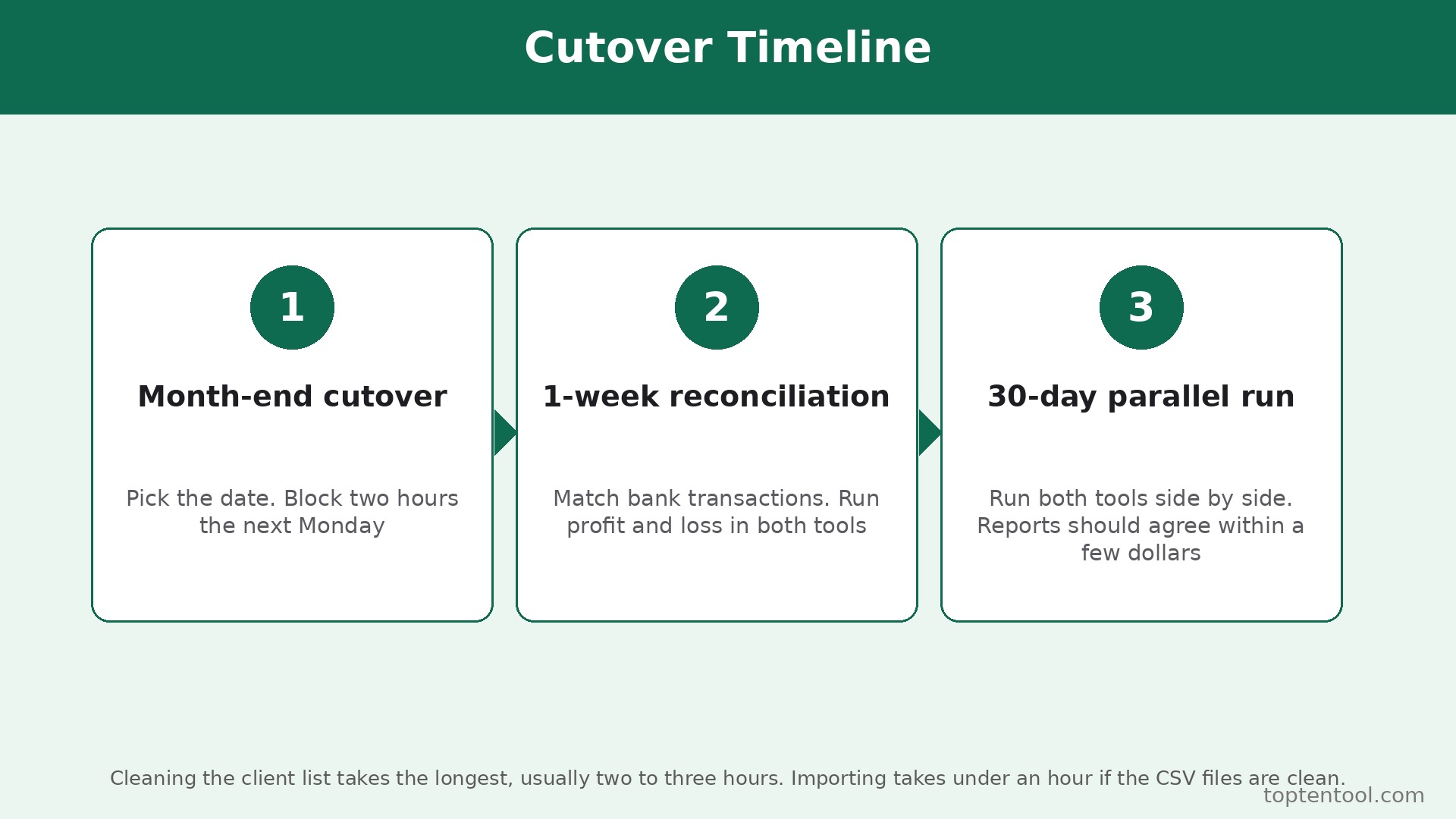
This workflow assumes you run the move over a weekend at month end, with the old system kept live for 30 days after the cutover. Do not cancel QuickBooks on day one. Keep it as a read only archive until the first full month in FreshBooks has been reconciled.
Step 1. Freeze the books and pick a cutover date
Choose the last day of a month. Stop entering new transactions in QuickBooks after that date, except for payments that arrive against old invoices. Record the closing balances for bank, receivables, payables, and any open invoices. Export a trial balance and a profit and loss report for the year to date and save both as PDFs. The cutover date becomes the line between old history and new history, and every later step refers back to it.
Step 2. Clean the client list before you export it
Open the customer list in QuickBooks and delete duplicates, merge two records for the same client, and fix email addresses. A dirty client list is the most common cause of a messy import, because FreshBooks bills by client count and every duplicate counts toward the cap. Export the cleaned list to a spreadsheet. Add a column for the FreshBooks plan limit and flag any client with no activity in 12 months. Archive the inactive ones instead of importing them, and keep the archive file with your month end records.
Step 3. Export invoices, expenses, and time the right way
Export open invoices, paid invoices for the current year, expenses, and unbilled time. QuickBooks exports to CSV in most plans, and the export includes client name, invoice number, date, amount, and status. Check the file in a spreadsheet before you import anything. Look for blank client names, negative amounts, and invoices dated before the cutover. Fix those rows in the spreadsheet, not in FreshBooks after import, because a fix after import creates a second version of the same invoice.
Step 4. Set up FreshBooks and import in small batches
Create the FreshBooks account on the plan that matches your client count, not the cheapest plan. Set the currency, tax settings, invoice numbering, payment terms, and late fee rules to match the old system. Import clients first, in a batch of 20, and check the count against the spreadsheet. Then import open invoices, then expenses, then time entries. Small batches make errors easy to find. A single import of 500 rows hides a bad row until a client complains.
Step 5. Rebuild recurring invoices and payment links
Recurring invoices do not transfer as live schedules. List every recurring invoice in QuickBooks, with client, amount, frequency, and next due date. Recreate each one in FreshBooks and set the next send date to the day after cutover. Test one recurring invoice with your own email first. Check the payment link, the invoice number sequence, and the tax line. Then send a short note to clients who pay by card, telling them the invoice will look different but the payment link and the amount stay the same.
Step 6. Connect the bank and reconcile the first week
Connect the same bank accounts in FreshBooks and let the feed pull the last 30 days. Match each bank transaction to an invoice, an expense, or a transfer. Do not auto accept matches in the first week. Review each one, because the feed will match on amount alone and amount alone is not enough when two clients pay the same figure. At the end of the first week, run a profit and loss report in FreshBooks and compare it with the same week in QuickBooks. The two reports should agree within a few dollars. If they do not, stop and find the gap before you enter more data.
Step 7. Run both systems for 30 days, then close the old one
Keep QuickBooks live for one full month. Send all new invoices from FreshBooks. Record all new expenses in FreshBooks. Use QuickBooks only to check an old invoice or to answer a client question about a payment made before cutover. At the end of the 30 days, run the month end reports in both systems, confirm the receivables balance matches, export a final backup from QuickBooks, and only then cancel the subscription. Cancelling early saves one month of fees and risks a lost record you cannot recover.
Pre Switch Checklist
Work through this list before you create the FreshBooks account. Every item you skip here becomes a support ticket later.
Before You Start
– Count active billable clients and pick the FreshBooks plan that fits that number, not the number you hope to reach next year. – List every open invoice with client, number, date, amount, and due date, and confirm the total matches the receivables balance in QuickBooks. – List every recurring invoice, retainer, and subscription, with the next billing date for each one. – Export a full client list, a full invoice list, and a year to date profit and loss report, and store the files outside both tools. – Confirm your accountant can work from FreshBooks reports, or agree on what extra work the close will need.
Right Before the Move
– Check that your payment processor, card reader, and any connected app has a FreshBooks integration, or a manual export you can live with. – Note every custom invoice template, late fee rule, and tax setting in QuickBooks, so you can rebuild them exactly. – Tell clients who pay by direct debit or standing order that the invoice format will change, and confirm the payment details stay the same. – Pick a cutover date at month end and block two hours on the following Monday to reconcile the first week. – Keep the QuickBooks login active for at least 30 days after cutover, and set a calendar reminder for the cancellation date.
If three or more items on this list are blank, you are not ready to switch. A switch with an unknown receivables total is a switch that will produce a client dispute in the first month, and a dispute in the first month erases the goodwill the new system was meant to build.
What You Lose and What You Gain
A switch is a trade, and an honest guide names both sides. The gains are real, and so are the losses, and the right answer depends on which side matters more to your week.
What you gain is speed in the daily loop. Invoicing takes fewer clicks. Time turns into an invoice without retyping hours. Expenses attach to a project from a phone photo. Clients pay from the invoice itself, and the payment lands against the right invoice without manual matching. For a service firm, those four steps are the working day, and a tool that shortens them pays for itself in recovered hours. A firm that sends 40 invoices a month and saves five minutes per invoice recovers more than three hours a month, which is worth far more than the price gap between the plans.
What you gain next is a bill that follows clients, not seats. A small team can add a part time bookkeeper for 11 dollars a month instead of jumping a whole plan tier. That pricing shape fits firms that grow by adding clients before they add staff, which is how most service firms grow. It also makes the cost predictable. You know the bill will rise when the client count crosses 50, and you can plan for that crossing instead of discovering it on a renewal invoice.
What you lose is accounting depth. QuickBooks gives you a general ledger, class tracking, location tracking, inventory valuation, purchase orders, and budgeting inside one file. FreshBooks gives you double entry reports on Plus and Premium, but it does not give you the same ledger control, and it does not manage stock. If your accountant relies on class tracking to split revenue by service line, ask how they will get that split from FreshBooks. If the answer is a manual spreadsheet, add that hour to the monthly cost of the switch.
What you lose next is history in one place. Past invoices, past payments, and past tax reports stay in QuickBooks unless you import them, and most firms import only open items and the current year. That is a sensible choice, but it means a question about an invoice from two years ago still needs a QuickBooks login. Keep the export files and keep the login for at least a year, even after you cancel the paid plan, because the free archive access rules change and a cancelled account can lock you out of old records.
What you lose last is some integration breadth. QuickBooks connects to a larger set of payroll, inventory, and industry tools. FreshBooks covers the main payment and banking tools, but a niche app that only integrates with QuickBooks will need a manual export. When you plan how to switch from QuickBooks to FreshBooks, list your connected apps first and test the top three in a trial.
Data Migration in Detail
Migration is where switches succeed or fail, and the detail matters more than the marketing claim that migration is one click. It is not one click. It is a series of small, careful transfers, each with its own limits.
Clients transfer cleanly. Name, email, address, phone, and payment terms move in a CSV import, and FreshBooks matches on email to avoid duplicates. What does not transfer is the full contact history, notes attached to a client in QuickBooks, and any custom fields you added. Copy the notes that matter into the spreadsheet before import, or keep them in a separate file. A note that says a client pays late every December is worth keeping, and it will not survive an automated import.
Open invoices transfer well. Invoice number, date, client, line items, amount, tax, and due date all map to FreshBooks fields. Paid invoices transfer as history, but the payment record may import as a single lump rather than as individual card payments with fees. That matters at tax time if you reconcile card fees separately. Import paid invoices for the current year only, and keep the QuickBooks export as the source of truth for fee detail.
Expenses transfer with limits. Vendor, date, amount, and category move, but receipt images attached in QuickBooks do not always carry over. Download the receipt images that support a tax deduction before you cancel QuickBooks. Time entries transfer as hours with a client and a project, but the timer history and the approval trail do not. If you bill by the hour, export the unbilled time report on cutover day and reconcile it line by line in FreshBooks before you send the first invoice.
What does not transfer at all is the chart of accounts, the general ledger history, budgets, payroll records, inventory quantities, and bank reconciliation history. None of that belongs in FreshBooks, and trying to force it in creates a mess. Instead, take a closing trial balance on cutover day, save it as a PDF, and treat it as the opening position. Your accountant starts from that document, not from a failed import.
Export steps in QuickBooks are straightforward. Go to the customer list and export to CSV. Go to sales and export open invoices. Go to expenses and export the current year. Go to time and export unbilled entries. Open each CSV in a spreadsheet, check for blank client names and duplicate invoice numbers, and save a cleaned copy. Import into FreshBooks in the order clients, invoices, expenses, time, and check the counts after each batch. If a batch fails, fix the CSV and reimport only that batch. Never reimport a batch that partly succeeded, because the second import will duplicate the rows that already landed.
The Real Cost Comparison
Price the switch at three sizes, on list prices, for a full year, before promotions and before card fees. Card processing is about 2.9 percent plus 30 cents on both tools, so it cancels out of the comparison unless your volume changes with faster invoicing.
A solo freelancer with 12 active clients pays 38 dollars a month on QuickBooks Simple Start, which is 456 dollars a year. The same freelancer pays 43 dollars a month on FreshBooks Plus, which is 516 dollars a year, because Lite caps at five clients. QuickBooks is 60 dollars a year cheaper here, and how to switch from QuickBooks to FreshBooks only makes sense if the time saved is worth more than 60 dollars. For most freelancers it is, but the price alone does not justify the move.
A three person firm with 40 active clients pays 85 dollars a month on QuickBooks Essentials, which is 1,020 dollars a year. The same firm pays 43 dollars for FreshBooks Plus plus 22 dollars for two extra team members, which is 65 dollars a month and 780 dollars a year. FreshBooks saves 240 dollars a year, and the saving grows if the firm adds a fourth person, because the next QuickBooks step is Plus at 140 dollars while FreshBooks adds only 11 dollars for the extra member.
A six person firm with 60 active clients pays 340 dollars a month on QuickBooks Advanced, which is 4,080 dollars a year, because Plus caps at five users. The same firm pays 70 dollars for FreshBooks Premium plus 55 dollars for five extra members, which is 125 dollars a month and 1,500 dollars a year. The saving is large on paper, but this is the size where accounting depth starts to matter. A firm with six people and 60 clients that also carries inventory or runs payroll should not switch on price alone. Run the trial, ask the accountant, and weigh the 2,580 dollar saving against the cost of rebuilding the close.
Add the hidden costs to every size. FreshBooks charges 11 dollars per extra team member, and QuickBooks charges for payroll as an add on, with per employee fees. Budget 100 dollars of your own time for how to switch from QuickBooks to FreshBooks, for the hours spent cleaning the client list and rebuilding recurring invoices.
Frequently Asked Questions
Will I lose my old invoices when I switch?
No, if you export before you cancel. Open invoices move to FreshBooks in a CSV import, and paid invoices for the current year move as history. Older history stays in QuickBooks, so export a full invoice list and a year to date profit and loss report as PDFs before you cancel, and keep the QuickBooks login active for 30 days after cutover.
How long does the switch take?
A clean switch for a firm with under 50 clients takes one weekend plus one week of parallel running. Cleaning the client list takes the longest, usually two to three hours. Importing takes under an hour if the CSV files are clean. Rebuilding recurring invoices takes another hour. The 30 day parallel run is not extra work, it is the safety net that catches a missed invoice before a client notices.
Does FreshBooks handle tax the same way as QuickBooks?
FreshBooks handles sales tax on invoices and produces tax summary reports, but it does not replace a full ledger for a business with complex tax needs. If you file in multiple states, collect tax on products as well as services, or need class level tax reporting, check the tax reports in a FreshBooks trial against your last filing before you commit.
Can I switch back if FreshBooks does not fit?
Yes, and the return path is the same work in reverse. Export clients, open invoices, expenses, and time from FreshBooks, and import them into QuickBooks. The risk is not the export, it is the month of data entered only in FreshBooks. Keep the QuickBooks export from cutover day, so a return starts from a known position rather than from a rebuild.
Is FreshBooks cheaper than QuickBooks for a solo freelancer?
Not always. A solo freelancer with more than five clients pays 43 dollars on FreshBooks Plus against 38 dollars on QuickBooks Simple Start, so QuickBooks is cheaper by 5 dollars a month. The switch pays off in time saved, not in plan price, for a solo operator. For a team of three or more, FreshBooks is usually cheaper, because QuickBooks jumps a whole tier when the user cap is crossed.
Verdict
Switch if you sell hours, not stock, and if your week is invoices, time, and expenses. A service firm with three to five people and 20 to 50 clients will save money and save hours, and the seven step workflow above keeps the move safe. The trial is the deciding test. Run FreshBooks for 14 days with real clients and real invoices, and count the minutes per invoice against QuickBooks. If the count falls by a third, switch.
Stay if you carry inventory, run a formal month end close with class tracking, or rely on an integration that only exists for QuickBooks. The price saving at six users is tempting, but it disappears the first time the close takes an extra day because the ledger depth is gone. Stay also if your accountant charges extra to work from FreshBooks reports, because that extra fee can erase the plan saving in a single month.
For the solo freelancer, the honest answer is to try before you buy. The 5 dollar monthly gap is small, and the time saving is real, but only a trial with your own clients proves whether the simpler flow fits your work. Start the trial at month end, follow the checklist, keep QuickBooks live for 30 days, and let the first reconciled month decide. That is how to switch from QuickBooks to FreshBooks without losing invoices, without losing clients, and without discovering the cost of the move after the old system is already gone.