

A small channel does not lose to big channels on quality. It loses on discovery, because the right viewers never find the video in the first place. The best YouTube SEO tools for small channels fix that gap by showing which topics people actually search for, which titles earn clicks, and which videos are already ranking for the keywords you want. Our research compared vendor pricing pages in November 2026, and the good news is that the best tools for a small channel cost less than $20 a month.
YouTube Studio already gives you the essentials for free, and many small channels should start there. The paid tools earn their fee when they save you from making videos nobody searches for, or when they fix a back catalogue of titles and thumbnails in bulk. A tool that stops you making three wrong videos has paid for a year of itself.
This guide compares eight tools on real prices, keyword research, thumbnail testing and bulk editing, and it ends with a pick for each common situation. Start with the comparison table, then read the reviews that match your channel size.
The Overview
The table below shows the starting price of each tool, who it suits best, and the one thing to watch. Prices are monthly list prices on annual billing unless noted. Free tools cover the essentials, paid tools add research depth. Use the table to shortlist the best YouTube SEO tools for small channels options that fit your budget before reading the full reviews.
| Tool | Starting price | Best for | Watch out |
|---|---|---|---|
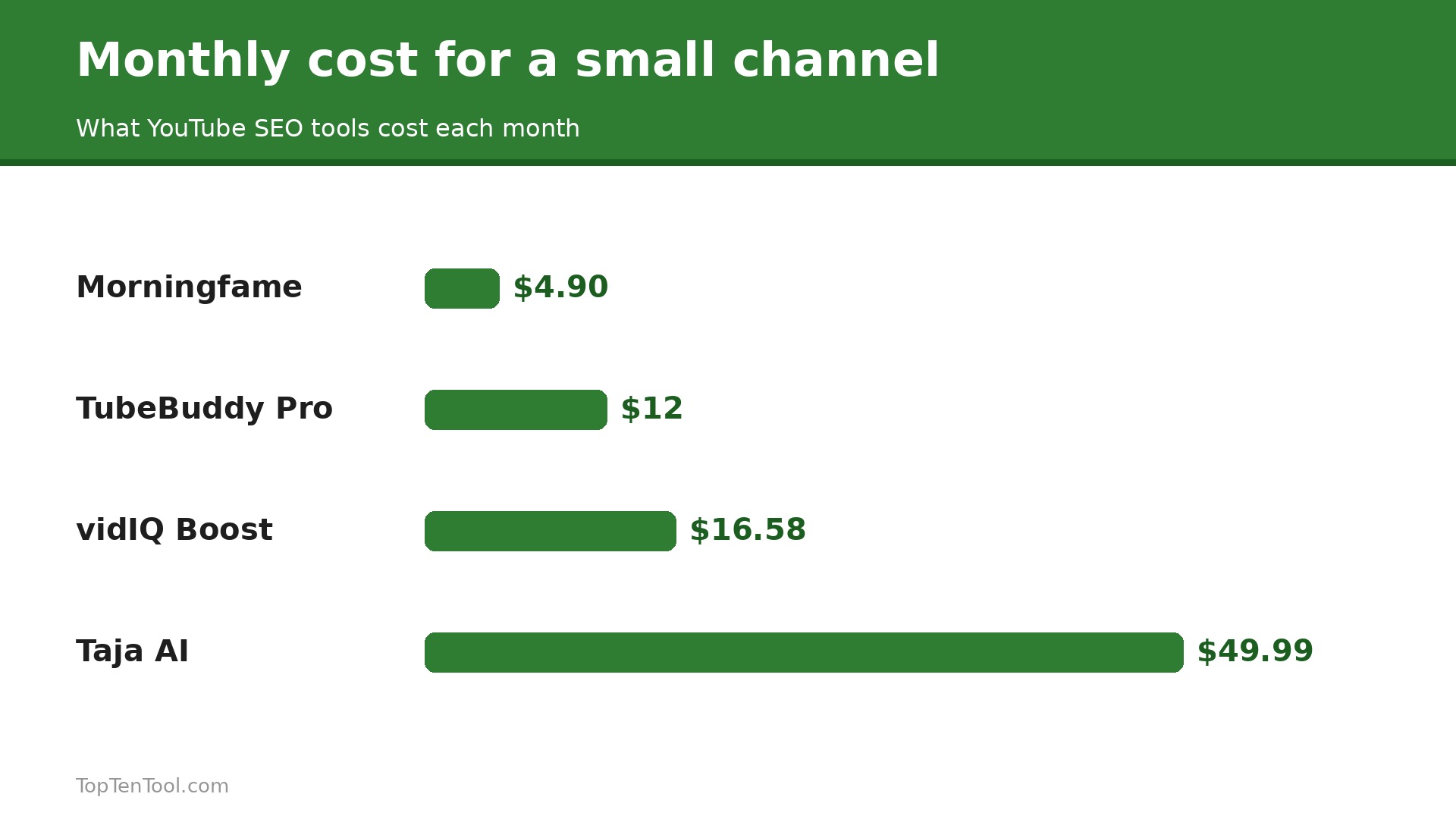
| vidIQ | $16.58 a month for Boost on annual billing | Keyword research and topic ideas | No thumbnail A B testing built in |
| TubeBuddy | $12 a month for Pro on annual billing | Optimising videos you already published | Keyword research is weaker than vidIQ |
| YouTube Studio | Free | Every small channel, starting out | No keyword opportunity scoring or bulk SEO help |
| Morningfame | $4.90 a month | Small creators who want growth guidance | Smaller feature set than vidIQ or TubeBuddy |
| Social Blade | $3.99 a month | Channel benchmarking and tracking | Not a keyword research tool |
| Ahrefs | $129 a month for Lite | Creators who already use Ahrefs for web SEO | Far too expensive as a YouTube only tool |
| Taja AI | $49.99 a month | AI metadata automation | Expensive for a small channel that is not earning |
| Rapidtags | Free, paid from $3.99 a month | Free tag suggestions | Tags matter less than titles and thumbnails now |
How We Compared These YouTube Tools
We judged each tool on five things that decide whether a small channel grows faster with it. First, keyword research quality, including search volume, competition and opportunity scoring, because picking the right topic matters more than any other feature. Second, optimisation help at upload time, such as title, tag and description suggestions. Third, thumbnail and title testing, since the click is the moment a search becomes a view. Fourth, bulk editing, because a channel with 50 videos cannot fix metadata one video at a time. Fifth, price for a channel that is not earning yet, which rules out enterprise tools. We also checked which tools work inside YouTube Studio and which need a separate dashboard.
The best YouTube SEO tools for small channels are the ones that help you pick better topics and fix old videos fast.
The 8 Best YouTube SEO Tools Reviewed
1. vidIQ
Starting price $16.58 a month for Boost on annual billing. Best for Keyword research and topic ideas. Watch out No thumbnail A B testing built in.
vidIQ has the strongest keyword research engine in this category. It shows search volume, competition and an overall opportunity score for each query, and its Daily Ideas and AI Coach suggest topics based on your channel data. The free plan is generous, with niche trends, content ideas and 150 AI credits a month. Boost costs $16.58 a month on annual billing, about $19 monthly, and adds 2,000 AI credits, thumbnail generation and unlimited trends. Max at $39 a month adds stronger AI and short clipping from long videos.
vidIQ does not offer thumbnail A B testing, so you will need YouTube native testing or TubeBuddy for that job. The free plan shows upsell prompts often, and the interface can feel busy with many panels. It is still the best first paid tool for a channel whose main problem is deciding what to make next.
In practice, vidIQ earns its place when keyword research and topic ideas. The main risk is no thumbnail A B testing built in, so test that specific limit during your trial before you commit.
Pick it when deciding what to make is your bottleneck. Skip it when thumbnail testing is your main need.
2. TubeBuddy
Starting price $12 a month for Pro on annual billing. Best for Optimising videos you already published. Watch out Keyword research is weaker than vidIQ.
TubeBuddy is an optimisation tool first, and it installs as a browser extension that works directly inside YouTube Studio. Its strengths are practical, with SEO Studio and tag tools at upload time, Best Time to Publish, a retention analyser and competitor scorecards. Pro costs $12 a month on annual billing, and Legend at about $26 a month on annual billing adds live thumbnail A B testing, full SEO access and bulk processing across your whole library.
TubeBuddy keyword research is weaker than vidIQ, and its free plan is limited, listed on a separate free page rather than the main pricing grid. The Legend tier is where the best features live, so the real cost is higher than the Pro headline. It is still the best tool for fixing a back catalogue and testing thumbnails.
In practice, TubeBuddy earns its place when optimising videos you already published. The main risk is keyword research is weaker than vidIQ, so test that specific limit during your trial before you commit.
Pick it when you have many published videos to optimise and test. Skip it when topic research is your main bottleneck.
3. YouTube Studio
Starting price Free. Best for Every small channel, starting out. Watch out No keyword opportunity scoring or bulk SEO help.
YouTube Studio is free and it covers the essentials, which is why every small channel should master it before paying for anything. It shows search terms that brought viewers, click through rate by video, audience retention and the native thumbnail test that YouTube launched in late 2023. The research tab shows what your audience searches for, and the analytics show exactly where viewers drop off.
Studio has no keyword opportunity scoring, no competitor tag view and no bulk metadata editing, so a channel with 50 videos cannot fix titles quickly. It is also silent on which topics you should make next. Use Studio as your base, and add vidIQ or TubeBuddy only when you can name the gap they would fill.
In practice, YouTube Studio earns its place when every small channel, starting out. The main risk is no keyword opportunity scoring or bulk SEO help, so test that specific limit during your trial before you commit.
Pick it when you are under 1,000 subscribers and not earning yet. Skip it when you need keyword scores or bulk editing.
4. Morningfame
Starting price $4.90 a month. Best for Small creators who want growth guidance. Watch out Smaller feature set than vidIQ or TubeBuddy.
Morningfame is the focused growth tool for small creators, with a clean dashboard that explains what to do next rather than drowning you in data. It covers keyword research, ranking tracking and growth guidance at $4.90 a month, which is the cheapest paid tool on this list. The tone is friendly and the advice is practical, which suits a solo creator who finds the bigger tools overwhelming.
Morningfame has a smaller feature set than vidIQ or TubeBuddy, with no bulk editing and no thumbnail testing. It is a guidance tool, not a full optimisation suite. It earns its place for a small channel that wants one clear next step each week at a tiny price.
In practice, Morningfame earns its place when small creators who want growth guidance. The main risk is smaller feature set than vidIQ or TubeBuddy, so test that specific limit during your trial before you commit.
Pick it when you want simple growth guidance at the lowest price. Skip it when you need bulk editing or thumbnail testing.
5. Social Blade
Starting price $3.99 a month. Best for Channel benchmarking and tracking. Watch out Not a keyword research tool.
Social Blade tracks more than 160 million channels, which makes it the best benchmarking tool on this list. You can watch a rival channel grow day by day, compare subscriber counts, and spot which of their videos are taking off. Plans start at $3.99 a month, and the free tier covers basic lookups. It is a research tool for understanding the competition, not for optimising your own metadata.
Social Blade does not do keyword research, title suggestions or thumbnail testing, so it cannot replace vidIQ or TubeBuddy. Its estimates are directional rather than exact. Use it alongside a research tool, not instead of one.
In practice, Social Blade earns its place when channel benchmarking and tracking. The main risk is not a keyword research tool, so test that specific limit during your trial before you commit.
Pick it when you want to track rivals and benchmark growth. Skip it when you need keyword research or optimisation help.
6. Ahrefs
Starting price $129 a month for Lite. Best for Creators who already use Ahrefs for web SEO. Watch out Far too expensive as a YouTube only tool.
Ahrefs is a web SEO giant that also covers YouTube keyword data, with search volume, keyword difficulty and ranking data inside the same workflow. Lite starts at $129 a month, which is expensive for a small channel, but fair for a creator or business already paying for Ahrefs to rank a website. The YouTube data is solid and the interface is polished.
As a YouTube only purchase, Ahrefs makes no sense for a small channel. It has no thumbnail testing, no bulk YouTube editing and no channel specific coaching. Buy it only if you already use it for web SEO and want YouTube data in the same place.
In practice, Ahrefs earns its place when creators who already use Ahrefs for web SEO. The main risk is far too expensive as a YouTube only tool, so test that specific limit during your trial before you commit.
Pick it when you already pay for Ahrefs for web SEO. Skip it when YouTube is your only SEO job.
7. Taja AI
Starting price $49.99 a month. Best for AI metadata automation. Watch out Expensive for a small channel that is not earning.
Taja AI automates metadata, generating titles, tags, descriptions and chapters from your video, which saves time for creators who publish often. It costs $49.99 a month, which is steep for a small channel, but the time saved is real when you publish several videos a week. The output is a starting draft that still needs a human edit, and the tool suits creators who publish at volume.
The price is the honest catch. A channel publishing twice a month will not save enough time to justify $50 a month, and the AI output can be generic without careful editing. It fits a busy creator who publishes weekly and hates writing metadata.
In practice, Taja AI earns its place when aI metadata automation. The main risk is expensive for a small channel that is not earning, so test that specific limit during your trial before you commit.
Pick it when you publish several videos a week and hate writing metadata. Skip it when you publish twice a month and are not earning yet.
8. Rapidtags
Starting price Free, paid from $3.99 a month. Best for Free tag suggestions. Watch out Tags matter less than titles and thumbnails now.
Rapidtags generates tag suggestions from any keyword in seconds, and the free tier covers the basics. The paid plan from $3.99 a month adds more features, but the free version is enough for most small channels. It is a simple, fast tool that does one job well, and it pairs nicely with YouTube Studio for a zero cost workflow.
Tags matter far less than they used to, and no tag tool can fix a weak title, a poor thumbnail or a topic nobody searches for. Rapidtags is a helper, not a growth strategy. Use it for quick tag ideas, and spend your real effort on titles and thumbnails.
In practice, Rapidtags earns its place when free tag suggestions. The main risk is tags matter less than titles and thumbnails now, so test that specific limit during your trial before you commit.
Pick it when you want quick free tag ideas. Skip it when you expect tags alone to grow the channel.
A Shortlist by Job
The right pick depends on your bottleneck, whether that is picking topics, fixing old videos, or testing thumbnails. Use this table as a shortcut, then read the full review of the tool it points to. Every pick below was judged against the best YouTube SEO tools for small channels criteria set out in this guide.
| Job to be done | Best pick | Why it wins |
|---|---|---|
| Picking what to make next | vidIQ | Best keyword scores and Daily Ideas |
| Fixing published videos | TubeBuddy | Bulk editing plus thumbnail testing |
| Starting out, zero budget | YouTube Studio | Free and covers the essentials |
| Simplest growth guidance | Morningfame | $4.90 a month, one clear next step |
| Tracking rivals | Social Blade | 160 million channels tracked |
| Quick free tag ideas | Rapidtags | Free tier covers the basics |
| Already using Ahrefs for web | Ahrefs | YouTube data in the same workflow |
How to Choose the Best YouTube SEO Tools for Small Channels
Start with your bottleneck, because the two leading tools solve different problems. If you struggle to decide what to make, vidIQ is the answer, with keyword opportunity scoring, Daily Ideas and competitor velocity tracking. If you already have videos and need to optimise them, TubeBuddy is the answer, with live thumbnail A B testing and bulk editing. Many creators end up using both, but start with the one that matches your bottleneck and add the second only when the first is paying off. The best YouTube SEO tools for small channels are the ones that fix your actual bottleneck, not the ones with the longest feature list.
Next, use the free plans properly before you pay. vidIQ free gives you trends, ideas and AI credits, and YouTube Studio free gives you search terms and retention data. Spend a month with the free tools, make five videos from real keyword research, and only upgrade when you can name the paid feature you need.
Then check the price against your earnings. A channel that earns nothing should not pay $50 a month for Taja AI or $129 for Ahrefs. A channel earning a few hundred a month can justify vidIQ Boost at $16.58 or TubeBuddy Pro at $12. Finally, remember that no tool fixes a weak hook, slow pacing or a topic nobody searches for. The tool finds the opportunity, but the video still has to earn the click and the watch. Keep this checklist beside you while you compare best YouTube SEO tools for small channels options, and the right choice will be obvious by the end.
A Simple Weekly Workflow for a Small Channel
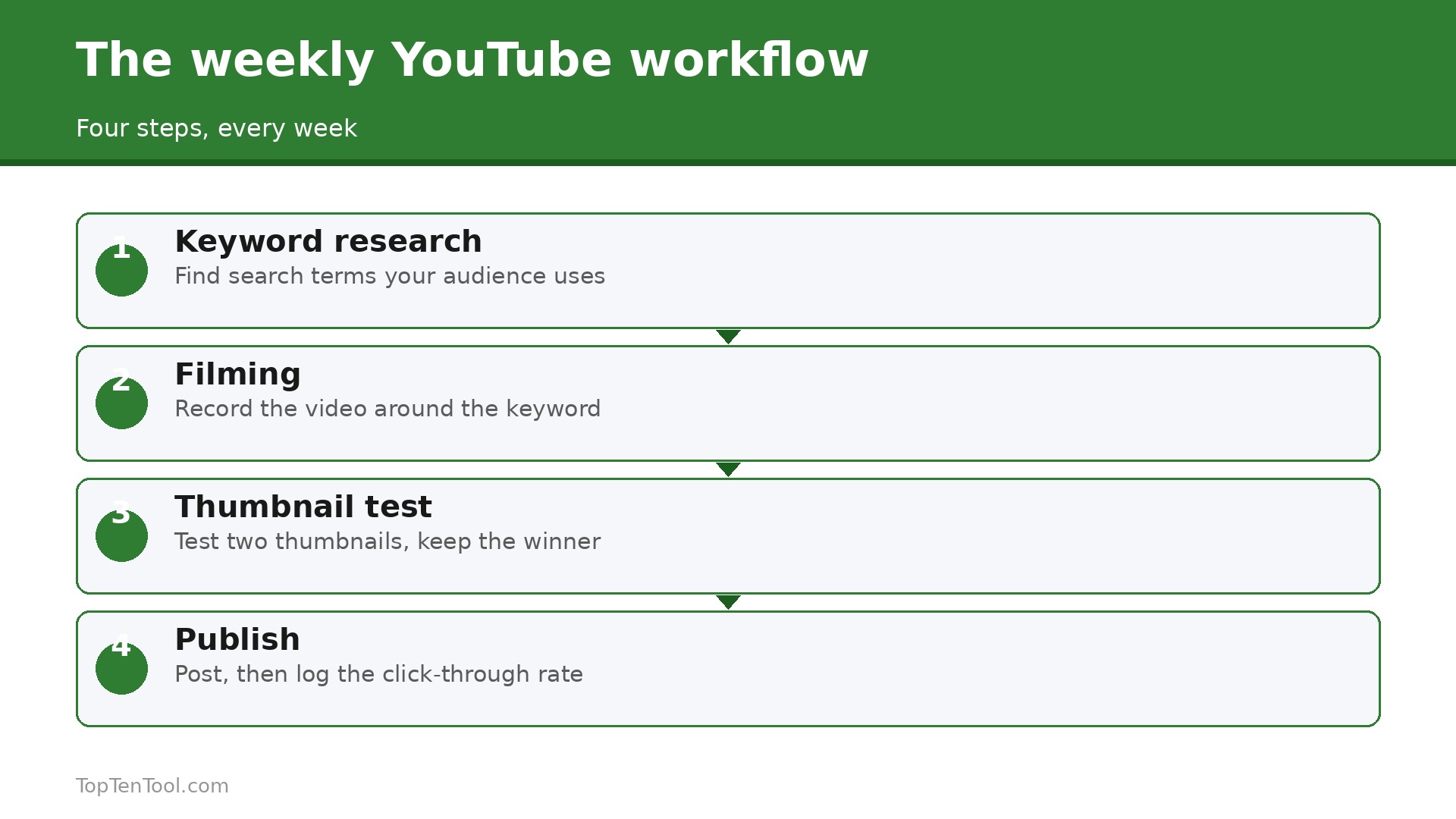
A small channel does not need a complex system, it needs a repeatable week. On Monday, spend 30 minutes in vidIQ or YouTube Studio finding one keyword with real search demand and low competition, and write the title before you film anything. On Tuesday, film the video with the keyword in the first 30 seconds. On Wednesday, use TubeBuddy or Rapidtags to check tags and write a description that answers the search. On Thursday, design two thumbnails and test them, using TubeBuddy Legend or the native YouTube test. On Friday, publish at your best time and reply to every comment in the first hour.
On Sunday, check retention in Studio and note where viewers dropped off, then fix that moment in the next video. Repeat for eight weeks and the data will show what your audience actually wants.
Five Mistakes That Stall Small Channels
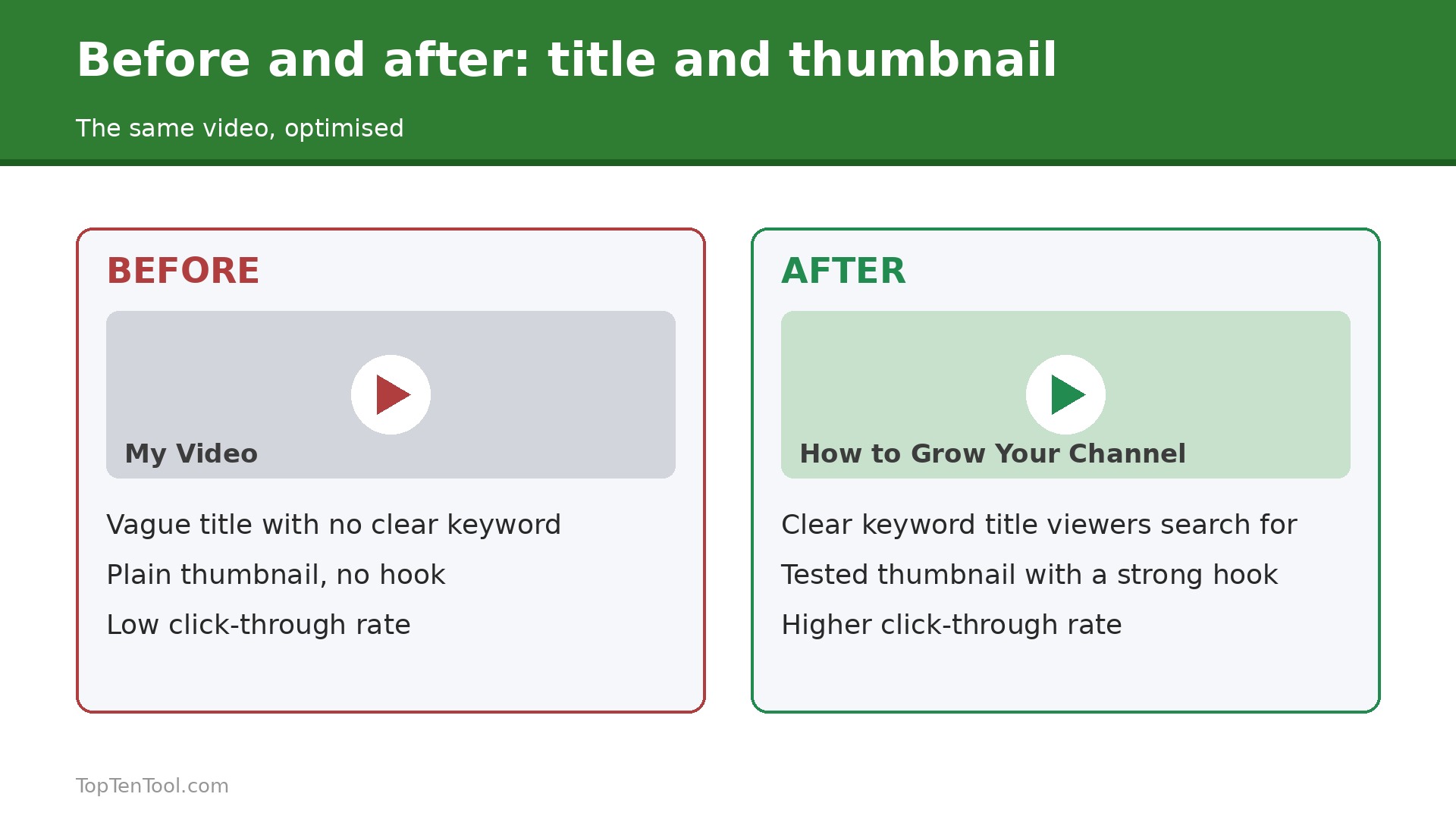
The most common mistake is making videos nobody searches for, because a great video on a dead topic still gets no views. Check search demand before you film. The second is a vague title, which tells neither YouTube nor the viewer what the video delivers. Put the keyword and the benefit in the title. The third is a thumbnail that repeats the title, which wastes the space that should sell the click. The fourth is ignoring retention, because a video that loses half its viewers in 30 seconds will not rank no matter how good the tags are. The fifth is publishing inconsistently, which makes it hard for YouTube to learn who your audience is.
Fix these five and a cheap tool will do more for you than an expensive one.
How to Use Free Tools Before You Pay
The smartest way to buy a YouTube tool is to spend a month proving you need it with free tools first. Start with YouTube Studio, which is free and already shows your real search terms, click through rate by video, audience retention and the native thumbnail test. Open the research tab and write down ten search terms your audience actually used to find you, then check which of those terms have videos ranking that you could beat. That list is your content plan, and it cost nothing.
Next, add vidIQ free, which gives you niche trends, content ideas, AI Coach tips and 150 AI credits a month. Use it to score your ten search terms and pick the three with the best mix of volume and low competition. Film those three videos before you spend a dollar, and watch what happens to views and watch time. If the research led videos outperform your old videos, the tool is working and the paid upgrade is justified. If they do not, the problem is the video itself, not the tool, and paying would not fix it.
Then use Rapidtags free for tag ideas and Social Blade free to watch two rival channels for a month, noting which of their videos take off and why. By the end of the month you will know whether your bottleneck is topic research, which points to vidIQ Boost, or optimisation and testing, which points to TubeBuddy. That is the moment to pay, with a clear job for the tool and a month of baseline data to measure it against.
What to Fix First on an Existing Channel
A channel with 50 videos has a back catalogue problem, not a new video problem, and the fix order matters. Start with the ten videos that already get the most search traffic, because a small improvement there pays more than a big improvement on a video nobody watches. For each one, rewrite the title so the keyword and the benefit are clear in the first 60 characters, rewrite the first two lines of the description to answer the search, and replace the thumbnail with one that sells a single clear idea. TubeBuddy bulk tools make this fast, but you can do it by hand in an afternoon.
Next, fix the videos with high impressions and low click through rate, because YouTube is already showing them and viewers are already passing them by. Those videos need a new thumbnail first, not a new title, since the thumbnail decides the click. Test two thumbnails with the native YouTube test or TubeBuddy Legend and keep the winner.
Then look at retention. A video that loses half its viewers in the first 30 seconds needs a faster hook, not better tags. Re edit the opening or add a pattern interrupt in the first ten seconds. Finally, delete or unlist the videos that get no traffic and hurt the channel average, because a clean catalogue helps YouTube understand what your channel is about. Fix the top ten first, then the click through rate losers, then retention, and only then worry about making new videos.
How to Track Whether the Tool Is Working
A YouTube tool earns its fee only if the channel improves, so track three numbers before and after you start paying. First, the click through rate on new videos, which shows whether your titles and thumbnails got better. A lift of even one point is meaningful, because it compounds across every impression YouTube gives you. Second, the search traffic share, which shows whether your keyword research is working. If more viewers arrive from search after a month of using the tool, the research is paying off. Third, the average view duration on new videos, which shows whether you picked topics your audience actually wants to watch.
Check these three numbers weekly for the first month, and compare them with the month before you started. If all three move up, keep paying. If only one moves, the tool is helping in one area and you should use it for that job only. If none move, cancel, because the bottleneck is the video itself, not the research.
Keep a simple log, with one line per video, the keyword you targeted, the click through rate after seven days, and the view duration. After eight videos you will see a pattern, and that pattern tells you more than any tool dashboard. The log is free, it takes five minutes a week, and it is the only honest way to know whether a $16 a month subscription is earning its keep.
Our Take
For most small channels, the smart start is YouTube Studio free plus vidIQ free, then vidIQ Boost at $16.58 a month when topic research becomes the bottleneck. Add TubeBuddy Pro at $12 when you have a back catalogue to fix, and Legend at about $26 when thumbnail testing matters. Morningfame at $4.90 is the pick for creators who want simple guidance, and Social Blade at $3.99 covers rival tracking. The best YouTube SEO tools for small channels are the ones that help you pick better topics and fix old videos fast, so start free, prove the workflow, and pay only for the feature you can name.
That is the best YouTube SEO tools for small channels shortlist we would hand to a friend starting today.
Frequently Asked Questions
Do small YouTube channels need a paid SEO tool?
Not at first. YouTube Studio free covers search terms, retention and native thumbnail testing, and vidIQ free adds keyword ideas and trends. A paid tool earns its fee when you publish regularly and need deeper keyword scores or bulk editing. Start free, make five videos from real research, and upgrade only when you can name the paid feature you need.
Is vidIQ or TubeBuddy better for a small channel?
It depends on your bottleneck. vidIQ wins on keyword research and topic ideas, so choose it if deciding what to make is your problem. TubeBuddy wins on optimising published videos, with bulk editing and live thumbnail A B testing, so choose it if fixing old videos is your problem. Many creators use both.
How much does YouTube SEO software cost?
The useful range for a small channel is $0 to $26 a month. YouTube Studio is free, Morningfame is $4.90, Social Blade is $3.99, TubeBuddy Pro is $12, and vidIQ Boost is $16.58 on annual billing. Taja AI at $49.99 and Ahrefs at $129 suit larger creators and businesses, not a channel that is not earning yet.
Can YouTube SEO tools guarantee more views?
No tool can guarantee views. A tool can show you which topics people search for, which titles earn clicks, and where viewers drop off, but the video still has to earn the click and the watch. A weak hook or a dead topic will not rank no matter how good the tags are.
What is the best free YouTube SEO tool?
YouTube Studio is the best free tool, because it shows your real search terms, click through rate and retention. vidIQ free is the best free add on, with trends, ideas and AI credits. Together they cover the essentials for a channel under 1,000 subscribers.
Should I pay for thumbnail A B testing?
Yes, once you publish regularly and your titles are already solid. The thumbnail decides the click, and a test that lifts click through rate by even one point can double views over time. TubeBuddy Legend at about $26 a month is the cheapest way to test, and YouTube native testing is free if you are patient.