
Email marketing tools now charge by contact, by email sent, or by active profile, and that single choice decides whether a growing list costs 9 dollars or 150 dollars a month. A tool that bills by emails sent can be cheap for a large list that emails rarely, while a tool that bills by contacts can be cheap for a small list that emails often. Email marketing pricing for small business is the subject of this guide, with real prices, real limits, and real worked examples for a small business.
This guide compares seven leading email tools with the real prices checked in August to November 2026, at 500, 1000, 5000, and 10000 contacts, including free tiers, per contact costs, and the automation limits that push many small businesses to a higher tier. Use the size table to see your real price before you sign up.
Prices change often, so treat every figure here as a snapshot from late 2026 and confirm the current price on the vendor site before you buy. The comparisons in this guide stay useful even when a price moves, because the billing model, the caps, and the hidden fees change far more slowly than the headline number.
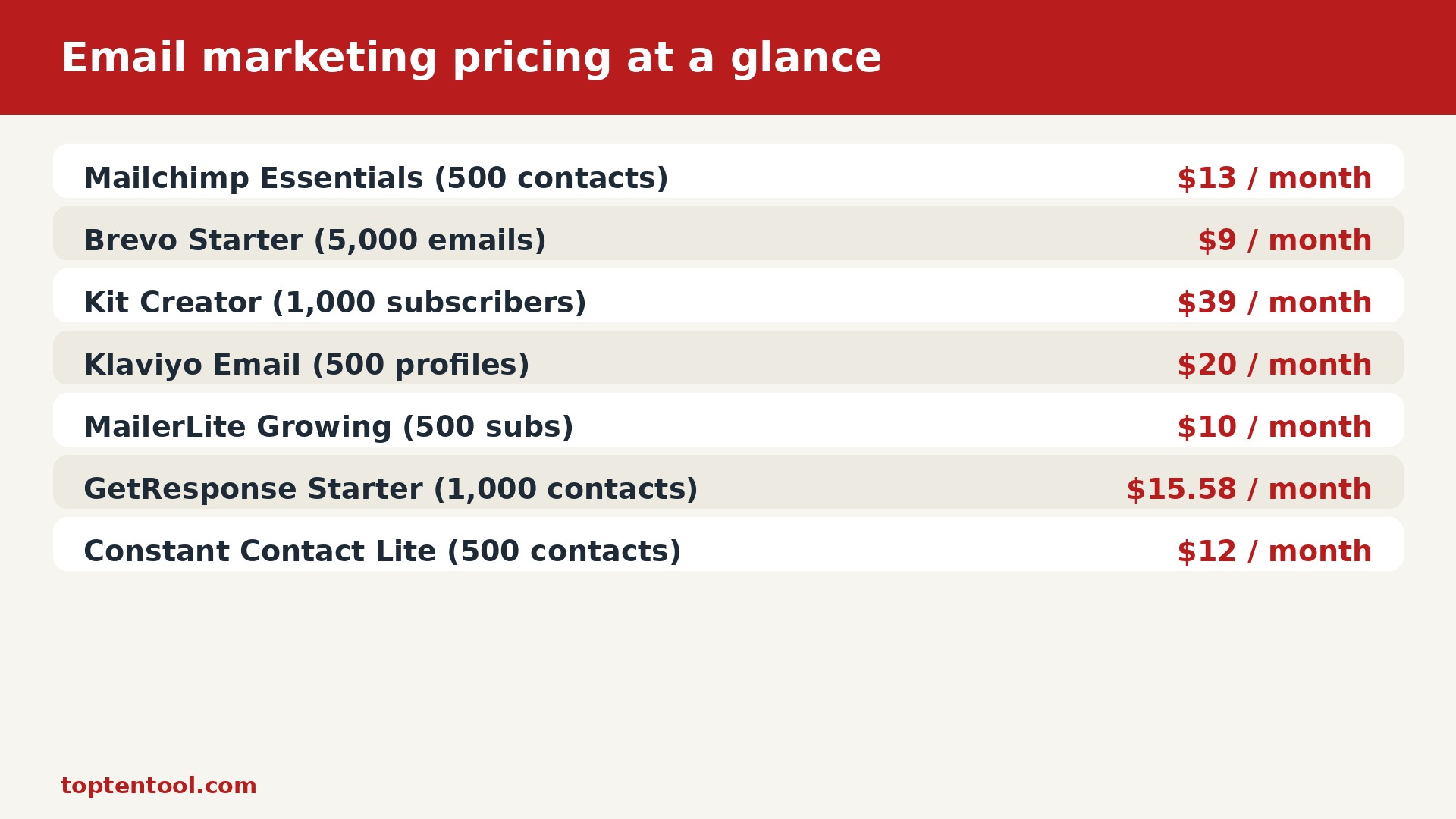
email marketing pricing for small business at a glance
| Tool | Free tier | Starting paid price | What the price covers | Hidden fees and watch out |
|---|---|---|---|---|
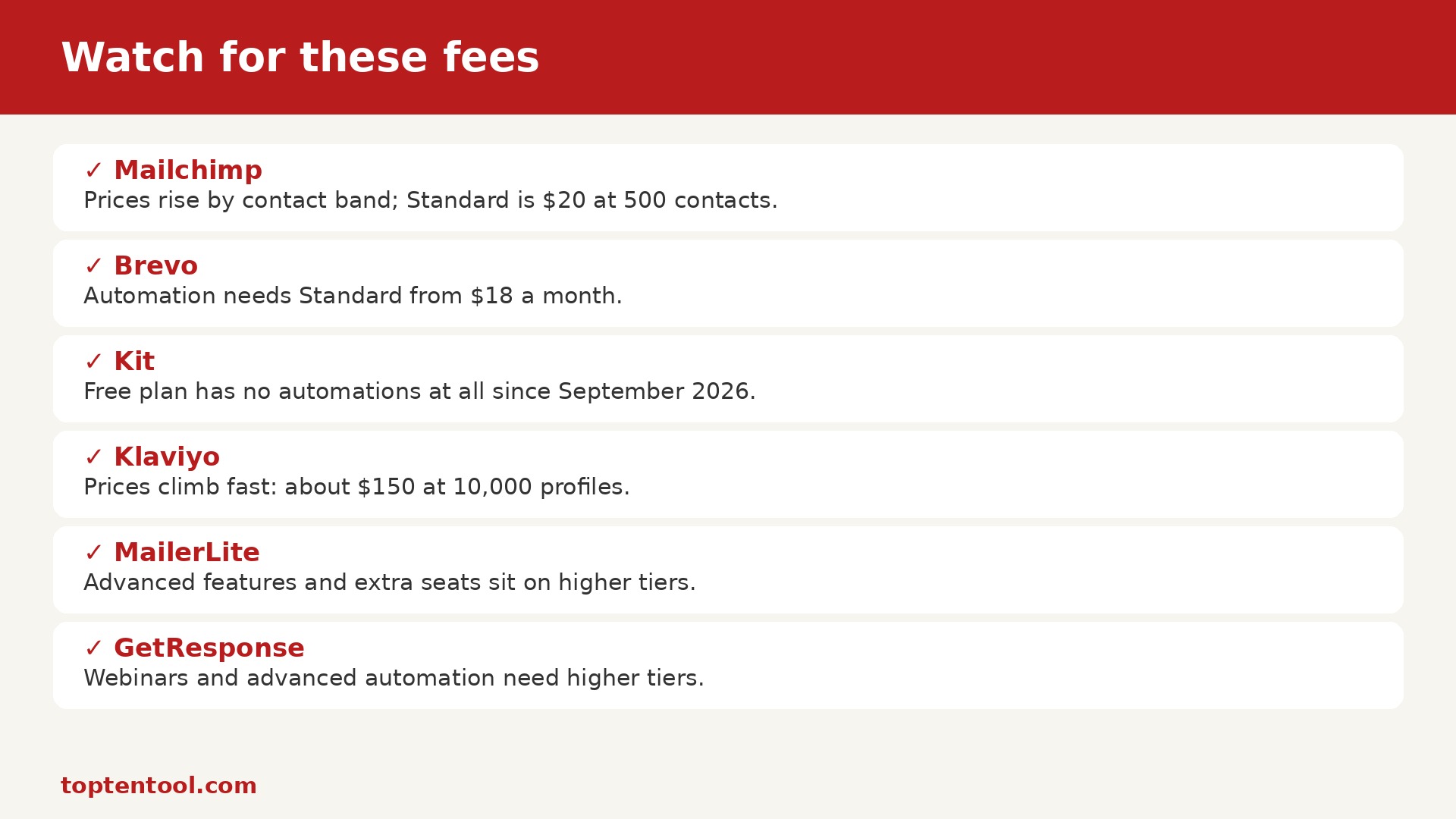
| Mailchimp | Free plan for up to 250 contacts and 500 sends a month | 13 dollars a month for Essentials at 500 contacts, about 20 dollars at 1000 contacts | Essentials with A and B testing, branded templates, and 5000 sends | Prices rise by contact band, Standard is 20 dollars at 500 contacts |
| Brevo | Free plan with 300 emails a day and unlimited contacts | 9 dollars a month for Starter with 5000 emails | Starter billed by emails sent, not by contacts stored | Automation needs Standard from 18 dollars a month |
| Kit | Free plan for up to 10000 subscribers | 39 dollars a month for Creator at 1000 subscribers, 33 dollars on annual billing | Creator with visual automations, sequences, and paid newsletters | Free plan has no automations at all since September 2026 |
| Klaviyo | Free plan for up to 250 active profiles and 500 sends | 20 dollars a month for Email at 500 profiles, about 30 dollars at 1000 profiles | Email with Shopify data, flows, and revenue attribution | Prices climb fast with active profiles, about 150 dollars at 10000 |
| MailerLite | Free plan for up to 500 subscribers | 10 dollars a month for Growing Business at 500 subscribers | Growing Business with automation, landing pages, and A and B testing | Advanced features and extra seats sit on higher tiers |
| GetResponse | Free plan for up to 500 contacts | 15.58 dollars a month for Starter at 1000 contacts on annual billing | Starter with email marketing, autoresponders, and landing pages | Webinars and advanced automation need higher tiers |
| Constant Contact | No free plan, free trial only | 12 dollars a month for Lite at 500 contacts | Lite with email templates, basic automation, and reporting | Prices rise steeply with contacts and SMS costs extra |
Read the table across, not down, because the cheapest starting price is not always the cheapest total. A tool with a free tier and a low starting price can cost more at scale if it bills per seat or per resolution, while a tool with a higher starting price can cost less if it bills per workspace or per month with no per seat charge.
When you compare email marketing pricing for small business, start with your real volume from last month, not with the volume you hope to reach next year. The right plan is the one that fits today and still leaves room to grow without a sudden jump in price.
How email marketing pricing actually works
Most tools in this category use one of three billing models, which are per seat, per volume, or flat per month. Per seat pricing multiplies with every new team member, per volume pricing multiplies with every new customer or message, and flat pricing stays steady until you hit a cap. The model matters more than the number, because a 20 dollar flat plan can beat a 10 dollar per seat plan once the team reaches three people.
Free tiers are real, but they are limited in ways that matter. A free plan may allow only 50 conversations, 250 contacts, 100 prompts, or 25 credits a month, and it may block the feature you need most, such as automation, private generations, or paid subscriptions. Use the free tier to test the tool with real work, and check the upgrade price on the first day, not the day you hit the limit.
Annual billing saves 15 to 25 percent on most tools, but it locks you in for a year. Monthly billing costs more, yet it lets you leave after one month if the tool does not fit. For a new tool, pay monthly for the first month, then switch to annual only when you are sure the tool will still fit in six months.
The headline price in email marketing pricing for small business rarely tells the whole story, because seats, volume, and AI use are billed in different ways. Add those three lines together before you compare any two tools side by side.
Mailchimp
Mailchimp starts at 13 dollars a month for Essentials at 500 contacts, about 20 dollars at 1000 contacts. The free tier is free plan for up to 250 contacts and 500 sends a month, and the paid plan covers essentials with a and b testing, branded templates, and 5000 sends. That combination suits small businesses that want a familiar all round platform, and it is worth testing with a real week of work before you commit to a yearly deal.
The watch out with Mailchimp is prices rise by contact band, standard is 20 dollars at 500 contacts. Check that line against your real volume from last month, because a cap or an extra charge that looks small on the pricing page can add 50 dollars or more to a busy month. Ask the vendor for a written total at your exact volume, including seats, volume, and add ons, before you sign up.
Brevo
Brevo starts at 9 dollars a month for Starter with 5000 emails. The free tier is free plan with 300 emails a day and unlimited contacts, and the paid plan covers starter billed by emails sent, not by contacts stored. That combination suits businesses with a large list that email less often, and it is worth testing with a real week of work before you commit to a yearly deal.
The watch out with Brevo is automation needs standard from 18 dollars a month. Check that line against your real volume from last month, because a cap or an extra charge that looks small on the pricing page can add 50 dollars or more to a busy month. Ask the vendor for a written total at your exact volume, including seats, volume, and add ons, before you sign up.
Kit
Kit starts at 39 dollars a month for Creator at 1000 subscribers, 33 dollars on annual billing. The free tier is free plan for up to 10000 subscribers, and the paid plan covers creator with visual automations, sequences, and paid newsletters. That combination suits creators and newsletter writers who sell products, and it is worth testing with a real week of work before you commit to a yearly deal.
The watch out with Kit is free plan has no automations at all since september 2026. Check that line against your real volume from last month, because a cap or an extra charge that looks small on the pricing page can add 50 dollars or more to a busy month. Ask the vendor for a written total at your exact volume, including seats, volume, and add ons, before you sign up.
Klaviyo
Klaviyo starts at 20 dollars a month for Email at 500 profiles, about 30 dollars at 1000 profiles. The free tier is free plan for up to 250 active profiles and 500 sends, and the paid plan covers email with shopify data, flows, and revenue attribution. That combination suits ecommerce brands on shopify that want data driven flows, and it is worth testing with a real week of work before you commit to a yearly deal.
The watch out with Klaviyo is prices climb fast with active profiles, about 150 dollars at 10000. Check that line against your real volume from last month, because a cap or an extra charge that looks small on the pricing page can add 50 dollars or more to a busy month. Ask the vendor for a written total at your exact volume, including seats, volume, and add ons, before you sign up.
MailerLite
MailerLite starts at 10 dollars a month for Growing Business at 500 subscribers. The free tier is free plan for up to 500 subscribers, and the paid plan covers growing business with automation, landing pages, and a and b testing. That combination suits budget conscious teams that want a clean editor, and it is worth testing with a real week of work before you commit to a yearly deal.
The watch out with MailerLite is advanced features and extra seats sit on higher tiers. Check that line against your real volume from last month, because a cap or an extra charge that looks small on the pricing page can add 50 dollars or more to a busy month. Ask the vendor for a written total at your exact volume, including seats, volume, and add ons, before you sign up.
GetResponse
GetResponse starts at 15.58 dollars a month for Starter at 1000 contacts on annual billing. The free tier is free plan for up to 500 contacts, and the paid plan covers starter with email marketing, autoresponders, and landing pages. That combination suits solopreneurs who want automation without a high price, and it is worth testing with a real week of work before you commit to a yearly deal.
The watch out with GetResponse is webinars and advanced automation need higher tiers. Check that line against your real volume from last month, because a cap or an extra charge that looks small on the pricing page can add 50 dollars or more to a busy month. Ask the vendor for a written total at your exact volume, including seats, volume, and add ons, before you sign up.
Constant Contact
Constant Contact starts at 12 dollars a month for Lite at 500 contacts. The free tier is no free plan, free trial only, and the paid plan covers lite with email templates, basic automation, and reporting. That combination suits local businesses that want simple campaigns and support, and it is worth testing with a real week of work before you commit to a yearly deal.
The watch out with Constant Contact is prices rise steeply with contacts and sms costs extra. Check that line against your real volume from last month, because a cap or an extra charge that looks small on the pricing page can add 50 dollars or more to a busy month. Ask the vendor for a written total at your exact volume, including seats, volume, and add ons, before you sign up.
What Costs Least for Your Use
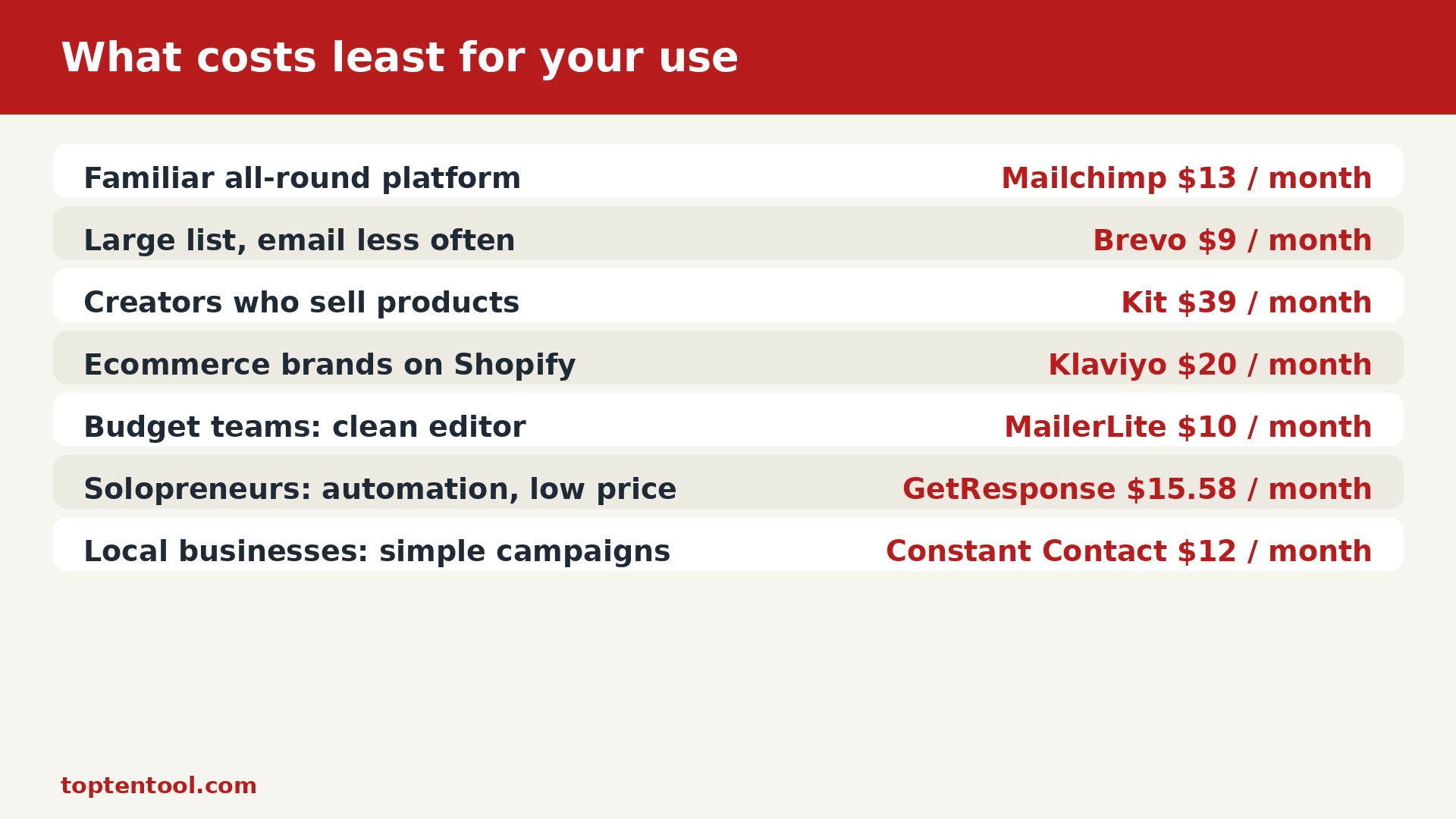
| Use case | Cheapest pick | Price |
|---|---|---|
| Small businesses that want a familiar all round platform | Mailchimp | 13 dollars a month for Essentials at 500 contacts, about 20 dollars at 1000 contacts |
| Businesses with a large list that email less often | Brevo | 9 dollars a month for Starter with 5000 emails |
| Creators and newsletter writers who sell products | Kit | 39 dollars a month for Creator at 1000 subscribers, 33 dollars on annual billing |
| Ecommerce brands on Shopify that want data driven flows | Klaviyo | 20 dollars a month for Email at 500 profiles, about 30 dollars at 1000 profiles |
| Budget conscious teams that want a clean editor | MailerLite | 10 dollars a month for Growing Business at 500 subscribers |
| Solopreneurs who want automation without a high price | GetResponse | 15.58 dollars a month for Starter at 1000 contacts on annual billing |
| Local businesses that want simple campaigns and support | Constant Contact | 12 dollars a month for Lite at 500 contacts |
The table above picks by job, not by price alone, because the cheapest tool for a solo writer is rarely the cheapest tool for a five person team. Match the use case to your own work first, then read the price, and you will avoid the most common mistake in this category, which is buying a team plan for solo work or a solo plan for team work.
A free tier can be the smartest way to test email marketing pricing for small business for a small team, as long as you know what happens when you hit the limit. Check the upgrade price on day one, so the free start does not turn into a surprise bill.
What a Thousand Units Costs
Work out the cost at 1000 units, whether that means 1000 conversations, 1000 contacts, 1000 images, or 1000 words of output, because that is the volume where free tiers end and real bills begin. Add the base plan, the per unit charge, and the add ons you will actually use, and write the total down. A tool that costs 20 dollars at 100 units and 200 dollars at 1000 units is not a bad tool, but it is a tool you should choose with open eyes.
Test the worked example with your own numbers. Take last month volume, multiply it by the per unit price, add the base plan, and compare the total across three tools. The result often surprises buyers, because the tool with the highest starting price can be the cheapest at high volume, and the tool with the lowest starting price can be the most expensive once seats and AI charges are added.
Many buyers overpay on email marketing pricing for small business by choosing a plan for features they will not use for six months. Pick the plan that covers the next 90 days, and upgrade when the work actually needs the next tier.
Watch for These Fees
Per seat charges are the most common hidden cost. A plan that costs 19 dollars per agent a month costs 95 dollars a month for five agents, and 190 dollars for ten. A plan that costs 45 dollars per workspace a month costs the same for two seats or four seats, which makes it far cheaper for a small team that grows.
Per resolution and per credit charges are the second hidden cost. An AI agent that costs 0.99 dollars per resolution adds 99 dollars for 100 resolved conversations, and a premium image model that burns credits twice as fast doubles the real cost per image. Check the cap on your plan and the price of extra units before you launch.
Annual versus monthly billing is the third hidden cost. A plan listed at 12 dollars a month on annual billing can cost 30 dollars a month on monthly billing, which is a 150 percent jump. The annual price is the one vendors advertise, and the monthly price is the one you pay if you want flexibility.
Add ons for WhatsApp, SMS, advanced automation, and premium features are the fourth hidden cost. A chat tool may charge extra for WhatsApp, an email tool may charge extra for SMS, and an image tool may charge extra for premium models. List the add ons you need before you compare prices, or the comparison will miss the real bill.
If you are shortlisting tools by email marketing pricing for small business, ask each vendor for the total monthly cost at your exact volume, including seats, AI use, and add ons. A written total beats a pricing page every time.
A One-Afternoon Decision
Spend the morning listing your real volume, your team size, and the one feature you cannot work without. Spend the afternoon testing two tools with real work, not with a demo, and time how long each task takes. By evening you will know which tool fits, which plan fits, and what the real monthly total will be at your volume.
Ask three questions before you pay. First, what is the total monthly cost at my exact volume, including seats and AI use. Second, what happens when I hit the cap, and how much do extra units cost. Third, how do I export my data if I leave. A vendor that answers all three clearly is a vendor you can trust with your work.
The best value in email marketing pricing for small business is not always the lowest price, because a tool that saves two hours a week is worth more than a tool that saves ten dollars a month. Measure time saved as carefully as money spent.
Our Take for Small Business
For most small businesses, the best value is a tool with a genuine free tier, a flat or workspace price, and a clear upgrade path, because that combination keeps the first year cheap and the second year predictable. Avoid quote only tools unless you have enterprise volume, and avoid per resolution pricing unless you have measured your resolution volume first.
Before you sign a yearly deal based on email marketing pricing for small business, try the monthly price for one month with real work. Annual billing saves money only when you are sure the tool will still fit in six months.
The final test is simple. Run the tool for 30 days with real work, compare the time saved and the money spent with the month before, and keep the tool only if both numbers improved. A good tool pays for itself in hours saved, not just in dollars saved, and that is the number that matters most for a small business.
Support quality matters more than feature count when something breaks at 9 pm. Test support before you need it by asking one real question during the trial and timing the reply. A clear answer in an hour beats a long feature list with no one to call. Check the help centre too, because good docs save more time than good chat support over a year.
Make one person the owner of the move. That person keeps the checklist, answers questions, and decides when a step is done. Without an owner, tasks drift, two people fix the same problem, and nobody fixes the real one. The owner does not need to do every step, but they need to know the status of every step at any moment.
Plan the announcement as carefully as the technical move. Customers, readers, and supporters need to know what changed, what stayed the same, and what they need to do, if anything. A short message sent twice beats a long message sent once. Tell people before the change, not after, and give them a place to ask questions.
Measure the result 30 days after the move. Compare the same numbers you measured before, such as time per task, cost per month, open rate, or sales per week. If the numbers improved, keep going. If they did not, find the one step that failed and fix it before you blame the tool. A move is only a success when the numbers say so.
Keep the old account readable for at least a month after the move. Old comments, old invoices, old posts, and old messages are hard to recreate once the account is closed. Set a calendar reminder for the closing date, check that nothing important is left behind, and only then cancel. A quiet month of overlap costs little and prevents a painful loss.
Start with a small test before you commit the whole team or the whole budget. A one week trial with real work, real customers, and real deadlines tells you more than any demo video. Write down what felt fast, what felt slow, and what needed a workaround. If the test saves time on the second day, the tool is probably a fit. If the test creates new work, the tool is probably not ready for your team yet.
Budget for the second year, not just the first month. Introductory discounts, free trials, and first year deals all end, and the regular price is the price you will live with. Add the cost of extra seats, extra volume, and the add ons you will actually use. A tool that looks cheap at 20 dollars a month can cost 80 dollars a month once the team grows and the limits bite.
Check who owns the data before you sign up. Export a sample file on day one, open it, and confirm that names, dates, amounts, and notes are all there. If export is hard, slow, or missing fields, treat that as a warning. The best tools make it easy to leave, because they know good work keeps customers, not locked doors.
Talk to the people who will use the tool every day, not just the person who pays the bill. A finance lead cares about reports, a support lead cares about speed, and a creator cares about how the page looks to fans. Ask each group for one must have feature and one deal breaker. When those lists agree, the choice is easy. When they conflict, pick the tool that serves the daily user first.
Keep a simple log during the first month. Note the date, the task, the time it took, and any error or surprise. After 30 days the log shows the real cost in hours, not the promised cost in marketing copy. Share the log with the team and ask what to keep, what to change, and what to drop. Small fixes in week two prevent big frustration in month three.
Do not move everything at once if you can move in stages. Pick the smallest group, the quietest week, or the least risky project and move that first. Learn from the first move, fix the template, and then move the next group with a better plan. Staged moves feel slower on paper, but they protect revenue, reputation, and sleep.
Read the plan limits as carefully as the headline price. Word caps, contact caps, credit caps, and seat caps are where most bills surprise people. A plan that allows 5000 emails a month is not the same as a plan that allows 5000 contacts, and a plan with 100 AI prompts is not the same as unlimited use. Match the limit to your real volume from last month, not to your hopes for next year.
Support quality matters more than feature count when something breaks at 9 pm. Test support before you need it by asking one real question during the trial and timing the reply. A clear answer in an hour beats a long feature list with no one to call. Check the help centre too, because good docs save more time than good chat support over a year.
Make one person the owner of the move. That person keeps the checklist, answers questions, and decides when a step is done. Without an owner, tasks drift, two people fix the same problem, and nobody fixes the real one. The owner does not need to do every step, but they need to know the status of every step at any moment.
Frequently Asked Questions
What is the cheapest way to start?
Start on a genuine free tier with real work for two weeks, then move to the lowest paid plan that covers your volume. Pay monthly for the first month, and switch to annual billing only when you are sure the tool fits. That path keeps the first month near zero and avoids a yearly lock in.
Why do two tools with the same price cost different amounts?
Because they bill different things. One tool may bill per seat, another per conversation, and a third per month with no per seat charge. Add seats, volume, and AI charges together at your real volume, and the true total becomes clear.
Are free tiers really free?
Yes, for the limits they state, which are usually 50 conversations, 250 contacts, 100 prompts, or a small number of credits a month. Free tiers block some features, such as automation or private output, so check the limit and the upgrade price before you build your work around a free plan.
Should I pay annually or monthly?
Pay monthly for the first month to test the tool, then pay annually if you are sure it fits and the saving is at least 15 percent. Annual billing saves money only when you stay for the full year, and a tool that does not fit is expensive at any price.
What hidden fees should I check first?
Check per seat charges, per resolution or per credit charges, the monthly billing penalty, and add ons for WhatsApp, SMS, or premium features. Ask the vendor for a written total at your exact volume before you sign up.
How often do prices change?
Prices in this category change often, sometimes twice a year, and vendors rarely warn existing customers in advance. Check the vendor pricing page before you buy, and budget for a 10 to 20 percent rise in the second year.