

Posting every day without knowing what works is guesswork, and guesswork is expensive when every hour counts. The best social media analytics tools for small business turn likes and follows into answers, showing which posts bring visitors, which formats earn saves, and which channel deserves more of your time. Our research compared vendor pricing pages in November 2026, and the price gap is wide, from free tools that cover the basics to platforms that cost $199 a seat a month.
Small businesses need a different kind of analytics from big brands. You do not need a 40 page board report. You need to know what to post next week, which post to boost, and whether Instagram or LinkedIn is actually bringing enquiries. The tool that answers those three questions in five minutes beats the one that takes an hour to build a dashboard.
This guide compares ten tools on real prices, reporting depth and scheduling, and it ends with a pick for each common situation. Start with the comparison table, then read the reviews that match your channels and your budget.
The Snapshot
The table below shows the starting price of each tool, who it suits best, and the one thing to watch. Prices are monthly list prices on annual billing unless noted. Per seat tools cost far more than per channel tools once a team grows. Use the table to shortlist the best social media analytics tools for small business options that fit your budget before reading the full reviews.
| Tool | Starting price | Best for | Watch out |
|---|---|---|---|
| Buffer | $5 per channel a month | Creators and small teams on a budget | Deeper competitor tracking needs another tool |
| Sprout Social | $79 per seat a month | Brands that present reports to clients | Standard at $199 is the plan most teams actually need |
| Hootsuite | $99 per user a month | Teams managing many accounts | Per user pricing gets expensive fast |
| Metricool | $18 a month | Analytics on a budget with ads included | Interface is less polished than Buffer |
| SocialPilot | $25.50 a month | Flat rate scheduling plus analytics | Analytics are thinner than Sprout or Hootsuite |
| Later | $25 a month | Visual planning for Instagram and TikTok | Analytics depth is lighter than Metricool |
| Agorapulse | $79 per user a month | Engagement and social inbox | Per user pricing limits small teams |
| Sendible | $89 a month | Agencies managing client brands | Overkill for a single business |
| Zoho Social | $15 a month | Businesses already in the Zoho ecosystem | Analytics are basic outside Zoho |
| Rival IQ | $239 a month | Competitive analysis for agencies | Far too expensive for a small business starting out |
How We Compared These Analytics Tools
We judged each tool on five things that decide whether a small business keeps using it. First, the real monthly cost for one person running three to five channels, because per seat pricing can turn a $79 headline into a $400 bill. Second, reporting depth, from simple best time to post through to cross channel comparisons and competitor tracking. Third, scheduling, since most small businesses want analytics and publishing in one place. Fourth, ease of use, because a report you never open is worthless. Fifth, the free plan, which lets a new business test properly before paying. We gave extra credit to tools that publish prices openly.
The best social media analytics tools for small business are the ones that answer what to post next, not the ones that produce the prettiest charts.
The 10 Best Social Media Analytics Tools Reviewed
1. Buffer
Starting price $5 per channel a month. Best for Creators and small teams on a budget. Watch out Deeper competitor tracking needs another tool.
Buffer is the friendliest starting point on this list. The free plan covers 3 channels with 10 queued posts each, and the AI Assistant helps draft captions on every plan, including free. Essentials costs $5 per channel a month on annual billing and unlocks unlimited posts, full analytics history and a hashtag manager. Team at $10 per channel adds unlimited teammates and branded reports. Pricing is per channel, not per seat, so adding a teammate costs nothing extra.
Buffer analytics are clean and honest but not deep. Competitor tracking, social listening and advanced sentiment analysis are absent, and teams that need to prove ROI to a client will want more reporting. For a small business that wants simple numbers and easy scheduling, Buffer is the best value on this list.
In practice, Buffer earns its place when creators and small teams on a budget. The main risk is deeper competitor tracking needs another tool, so test that specific limit during your trial before you commit.
Pick it when you run a few channels and want simple analytics at a low price. Skip it when you need deep competitor analysis or social listening.
2. Sprout Social
Starting price $79 per seat a month. Best for Brands that present reports to clients. Watch out Standard at $199 is the plan most teams actually need.
Sprout Social is the tool clients trust because its reports look expensive in a good way. Everything is presentation ready, the cross channel views are elegant, and the Smart Inbox ties customer care to analytics. Essentials starts at $79 per seat a month for 5 profiles, with optimal send times and profile reporting. Standard at $199 a seat unlocks unlimited profiles and the full inbox, while Professional at $299 adds competitive reports and sentiment analysis.
The price is the honest catch. A two person team on Standard pays about $398 a month, which is more than most small businesses spend on all their software combined. Essentials is limited, so growing teams get pushed up fast. Sprout fits brands where social is a real revenue channel and reporting proves it.
In practice, Sprout Social earns its place when brands that present reports to clients. The main risk is standard at $199 is the plan most teams actually need, so test that specific limit during your trial before you commit.
Pick it when social is a revenue channel and you present reports to clients or a boss. Skip it when you are a solo owner watching every dollar.
3. Hootsuite
Starting price $99 per user a month. Best for Teams managing many accounts. Watch out Per user pricing gets expensive fast.
Hootsuite is the veteran of social management, with scheduling, analytics, listening and team workflows in one dashboard. Standard starts at $99 per user a month on annual billing for 10 social accounts, unlimited scheduled posts, and AI post and image generation. The analytics cover the major channels well, and approval workflows suit teams where more than one person touches a post.
Per user pricing means every teammate adds $99 a month, and the best listening features sit on higher tiers. The interface carries years of additions and can feel heavy for a small team. Hootsuite fits a team that manages many accounts and needs approvals, not a solo owner with three channels.
In practice, Hootsuite earns its place when teams managing many accounts. The main risk is per user pricing gets expensive fast, so test that specific limit during your trial before you commit.
Pick it when you manage many accounts with a team and need approval workflows. Skip it when you are solo and want the cheapest good option.
4. Metricool
Starting price $18 a month. Best for Analytics on a budget with ads included. Watch out Interface is less polished than Buffer.
Metricool is the budget analytics pick that surprises people. Plans start at about $18 a month, and the free plan is genuinely useful. It covers analytics, scheduling, ads and even website analytics in one place, so a small business can see social and web traffic together. The reporting is strong for the price, with best time to post, competitor tracking and hashtag analysis included.
The interface is less polished than Buffer or Sprout, and the learning curve is steeper for a first time user. Some integrations are thinner, and customer support is slower than the bigger platforms. For a business that wants deep analytics without a deep bill, Metricool is the best value after Buffer.
In practice, Metricool earns its place when analytics on a budget with ads included. The main risk is interface is less polished than Buffer, so test that specific limit during your trial before you commit.
Pick it when you want analytics, ads and web stats in one cheap tool. Skip it when you want the most polished interface and fastest support.
5. SocialPilot
Starting price $25.50 a month. Best for Flat rate scheduling plus analytics. Watch out Analytics are thinner than Sprout or Hootsuite.
SocialPilot is the flat rate budget option, with Essentials from $25.50 a month on annual billing for 7 accounts and no per user add on at the entry tier. It covers scheduling, analytics, a social inbox and client management, which makes it popular with freelancers and small agencies. The price stays predictable as the team grows, because the entry tier does not charge per seat.
Analytics are thinner than Sprout or Hootsuite, with less depth on competitors and listening. The interface is functional rather than beautiful, and some users report occasional scheduling quirks. It suits a small team that wants a predictable bill and solid basics.
In practice, SocialPilot earns its place when flat rate scheduling plus analytics. The main risk is analytics are thinner than Sprout or Hootsuite, so test that specific limit during your trial before you commit.
Pick it when you want a flat monthly price that does not rise per teammate. Skip it when you need deep competitive or listening reports.
6. Later
Starting price $25 a month. Best for Visual planning for Instagram and TikTok. Watch out Analytics depth is lighter than Metricool.
Later is built for visual planning, and it shows in the calendar, media library and Instagram first workflow. Starter costs $25 a month for one set of 8 profiles and one user, with 30 posts per profile monthly, while Growth at $50 adds more profiles and users. Analytics cover the visual channels well, with best time to post, hashtag suggestions and link in bio tracking.
Later is weaker outside Instagram and TikTok, and the analytics are lighter than Metricool or Sprout. LinkedIn and X reporting feel like an afterthought, and the price rises with profiles. It fits creators and shops whose audience lives on visual platforms.
In practice, Later earns its place when visual planning for Instagram and TikTok. The main risk is analytics depth is lighter than Metricool, so test that specific limit during your trial before you commit.
Pick it when Instagram or TikTok is your main channel. Skip it when LinkedIn or X is where your audience lives.
7. Agorapulse
Starting price $79 per user a month. Best for Engagement and social inbox. Watch out Per user pricing limits small teams.
Agorapulse is the engagement pick, with a unified inbox that pulls comments, messages and mentions into one queue, plus scheduling and reporting. Plans start from $79 per user a month, with a free plan for basic use. The inbox is genuinely good, with labels, assignments and saved replies, and the reports are clear enough to share with a client.
Per user pricing makes it expensive for a team, and the analytics, while clear, are less deep than Sprout. Small businesses that only need scheduling will find cheaper options. Agorapulse fits teams where replying to comments and messages is the main job.
In practice, Agorapulse earns its place when engagement and social inbox. The main risk is per user pricing limits small teams, so test that specific limit during your trial before you commit.
Pick it when replying to comments and messages is your main social job. Skip it when you only need scheduling and basic reporting.
8. Sendible
Starting price $89 a month. Best for Agencies managing client brands. Watch out Overkill for a single business.
Sendible is built for agencies, with client dashboards, approval workflows and reporting that a client can read without training. The Traction plan from $89 a month covers 4 users and 24 profiles, which is good value per seat compared with Sprout or Hootsuite. Scheduling, listening and analytics are all included, and the white label reports look professional.
Sendible is overkill for a single business with three channels, and the interface assumes you manage clients. Solo owners will pay for features they never use. It earns its place for freelancers and small agencies that manage several brands at once.
In practice, Sendible earns its place when agencies managing client brands. The main risk is overkill for a single business, so test that specific limit during your trial before you commit.
Pick it when you manage social for several clients and need client dashboards. Skip it when you run one business with a few channels.
9. Zoho Social
Starting price $15 a month. Best for Businesses already in the Zoho ecosystem. Watch out Analytics are basic outside Zoho.
Zoho Social is the sensible pick for businesses already using Zoho CRM or Zoho Books, because social data connects to customer records and the price is low. Plans start at about $15 a month, and the tool covers scheduling, monitoring and basic analytics across the main channels. The value is in the connection, not the depth of any single feature.
Outside the Zoho ecosystem, Zoho Social is unremarkable, with basic analytics and fewer integrations than Buffer or Metricool. It suits a Zoho shop first and a general buyer second.
In practice, Zoho Social earns its place when businesses already in the Zoho ecosystem. The main risk is analytics are basic outside Zoho, so test that specific limit during your trial before you commit.
Pick it when you already use Zoho CRM and want social tied to customers. Skip it when you want the deepest standalone analytics.
10. Rival IQ
Starting price $239 a month. Best for Competitive analysis for agencies. Watch out Far too expensive for a small business starting out.
Rival IQ is the competitive analysis specialist, with head to head reports that show exactly how your social performance compares with named competitors. It tracks engagement, posting frequency, hashtags and boosted posts across channels, and the reports are built for agencies that present to clients. Plans start at $239 a month, with a trial available.
The price puts it out of reach for most small businesses, and it is an analytics only tool, so you still need a scheduler. It fits agencies and competitive analysts, not a solo owner. Include it only when beating a named rival is the whole job.
In practice, Rival IQ earns its place when competitive analysis for agencies. The main risk is far too expensive for a small business starting out, so test that specific limit during your trial before you commit.
Pick it when competitive benchmarking is your main job and a client pays for it. Skip it when you need scheduling plus analytics at a small business price.
Which Tool Earns the Spot
The right pick depends on your channels, your team size and whether you present reports to anyone else. Use this table as a shortcut, then read the full review of the tool it points to. Every pick below was judged against the best social media analytics tools for small business criteria set out in this guide.
| Job to be done | Best pick | Why it wins |
|---|---|---|
| Cheapest good start | Buffer | Free for 3 channels, $5 per channel paid |
| Analytics on a budget | Metricool | Deep reports from about $18 a month |
| Flat price, no per seat bill | SocialPilot | $25.50 a month for 7 accounts |
| Visual channels first | Later | Best Instagram and TikTok planning |
| Replying is the main job | Agorapulse | Best unified inbox, from $79 |
| Reports for clients | Sprout Social | Presentation ready, from $79 a seat |
| Managing several client brands | Sendible | 4 users and 24 profiles for $89 |
| Already on Zoho | Zoho Social | Social tied to CRM from $15 |
How to Choose the Best Social Media Analytics Tools for Small Business
Start with the pricing model, because it decides the real bill. Per channel tools such as Buffer charge $5 per channel, so five channels cost $25 a month no matter how many teammates you add. Per seat tools such as Sprout and Hootsuite charge $79 to $199 per person, so a three person team can cost $600 a month before you post anything. Count your channels and your teammates, then price both models before you commit. The best social media analytics tools for small business are the ones whose pricing model matches your team shape.
Next, decide what decision the analytics must support. If the question is what to post next week, you need best time to post, top posts and format comparisons, which Buffer and Metricool answer well. If the question is whether social brings sales, you need link tracking and web analytics, which Metricool covers by including website stats. If the question is how you compare with a rival, you need Rival IQ or Sprout competitive reports.
Then test the free plan for a month and check whether you actually open the reports. A tool that emails you a weekly summary you read beats a dashboard you never visit. Finally, check which channels are covered well, because some tools treat Instagram as first class and LinkedIn as an afterthought, and that gap only shows after you pay. Keep this checklist beside you while you compare best social media analytics tools for small business options, and the right choice will be obvious by the end.
The Real Monthly Cost for One Person With Five Channels
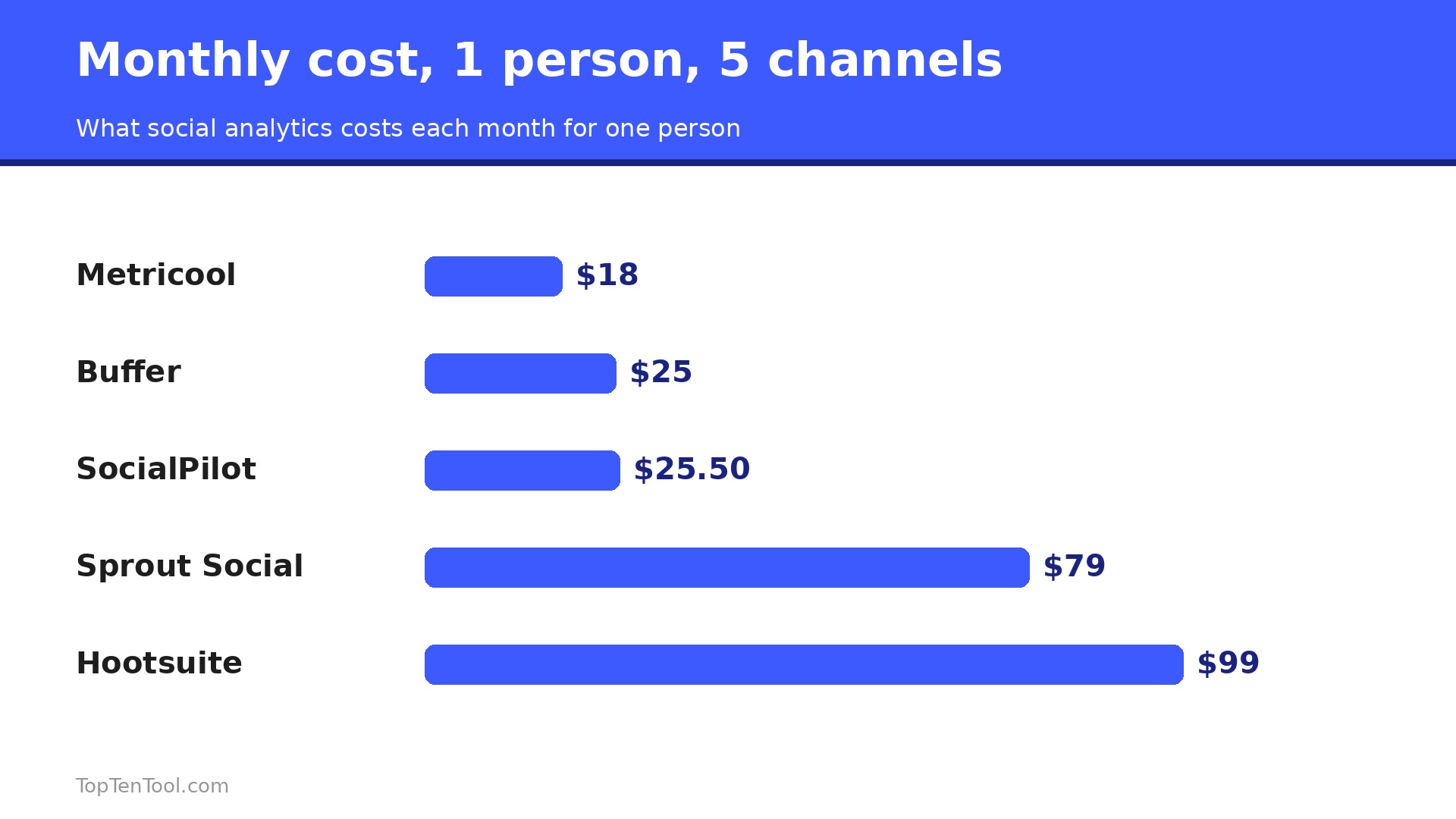
The headline price hides the model, so run the numbers for your setup. One person with five channels pays $25 a month on Buffer Essentials, about $18 on Metricool, $25.50 on SocialPilot, and $79 on Sprout Essentials or Agorapulse. The same person on Hootsuite Standard pays $99. Add a second teammate and Buffer stays at $25, while Sprout rises to $158 and Hootsuite to $198. Add a third and the gap becomes hundreds of dollars a month. Price the team you will have in six months, not the team you have today, and remember that per seat tools also push their best reporting to higher tiers.
Five Mistakes That Waste Your Analytics Budget
The most common mistake is buying a $199 a seat tool and using ten percent of it, when a $18 tool would have answered every question you actually ask. The second is tracking vanity numbers, such as follower count, while ignoring saves, shares and link clicks, which predict sales far better. The third is checking analytics daily, which creates noise, when a weekly review shows real trends. The fourth is comparing channels on the same metric, because a LinkedIn click and a TikTok view are different things. The fifth is never acting on the data, which turns a paid tool into an expensive decoration. Fix these five and a cheap tool will outperform an expensive one.
What Good Reporting Looks Like Week by Week
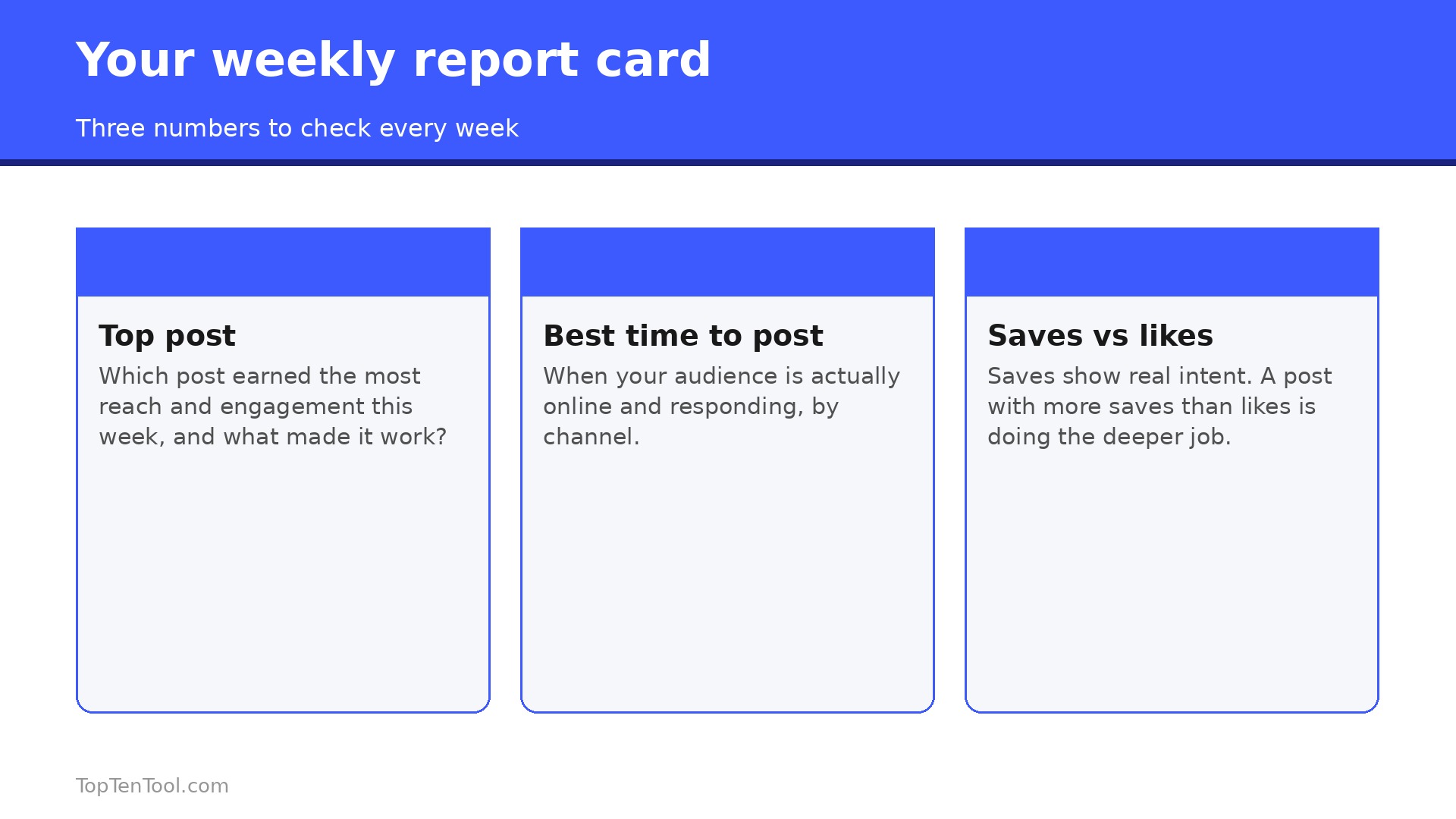
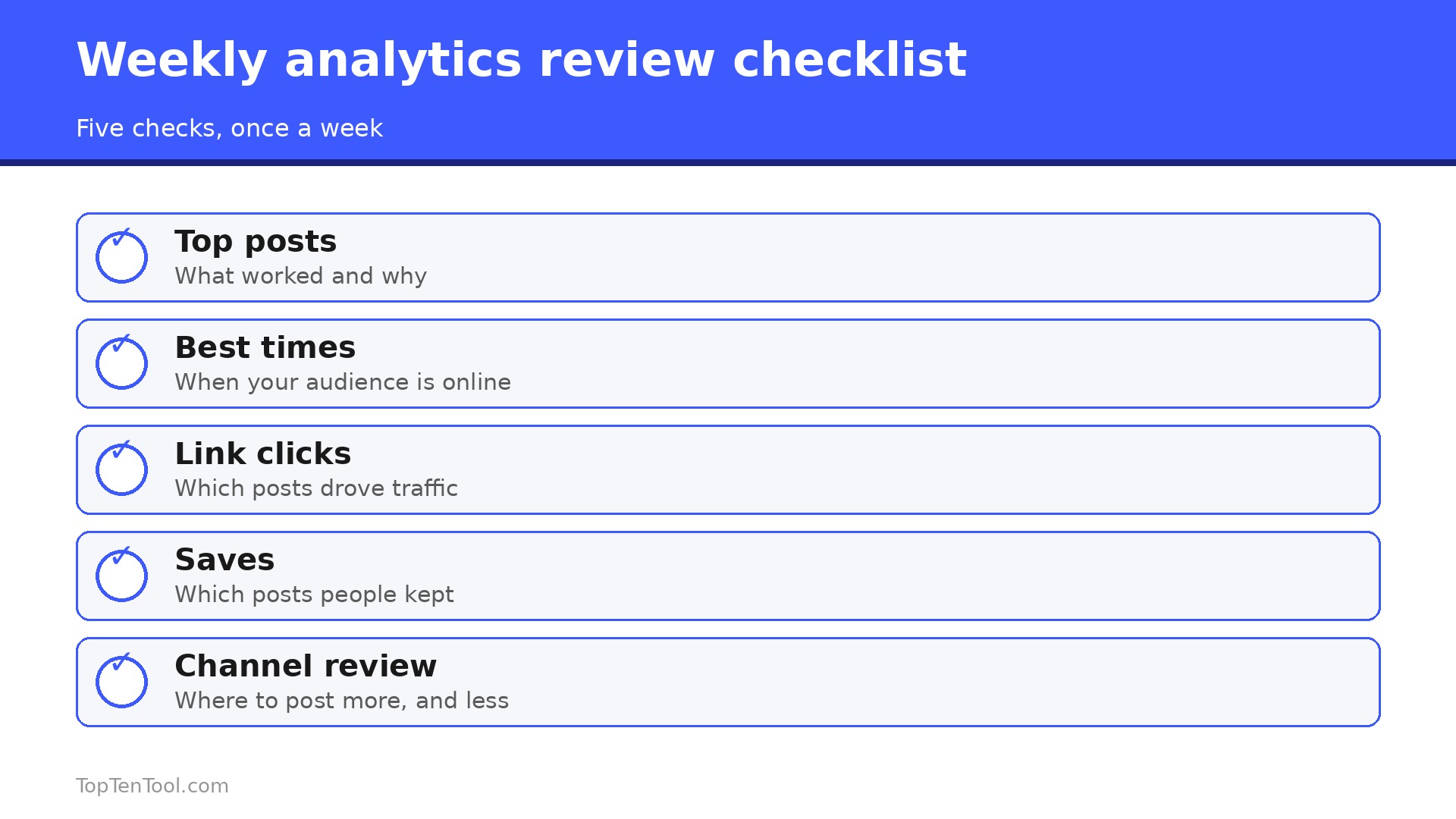
A good weekly report fits on one page and answers three questions. What worked, what flopped, and what do we post next. Start with your top three posts by saves and shares, not by likes, because saves predict future reach far better than a like that costs nothing. Write one sentence next to each top post saying why it worked, whether it was the topic, the format, the hook or the timing. Then list your bottom three posts and do the same, because the flops teach more than the wins. A post that flopped on Tuesday at noon and won on Thursday at 7pm is telling you about timing, not quality.
Next, compare channels on the metric that matches each one. On Instagram, watch saves and shares. On LinkedIn, watch comments and profile visits. On TikTok, watch watch time and shares. On X, watch reposts and link clicks. Comparing a TikTok view with a LinkedIn click is like comparing two different games, so keep each channel on its own scale and judge it against its own past, not against a different platform.
Then check the posting rhythm. A channel that posts three times a week and grows slowly is usually a content problem, while a channel that posts once a month and grows slowly is usually a consistency problem. The report should tell you which one you have. End the weekly review by writing next week plan in three lines, with the format, the topic and the time for each post, based on what the data just showed. That single habit, a one page weekly review and a three line plan, turns analytics from a dashboard you ignore into a routine that compounds.
A small business that does this for eight weeks will know its audience better than a competitor with a far bigger budget and no review habit.
How to Compare Two Tools in a One Week Test
The fastest way to choose between two analytics tools is a one week test with real data, not a feature checklist. Pick the two finalists, connect the same three channels to both, and schedule the same posts through each one for seven days. At the end of the week, open both reports and ask which one told you what to post next without a second look. The tool that answers that question in five minutes wins, even if the other tool has more charts.
During the test, watch three things. First, whether the data matches what you see on the platforms themselves, because a tool that reports numbers you cannot verify is a tool you will stop trusting. Second, whether the weekly email summary is useful, since most small businesses read the email and never open the dashboard. Third, whether the scheduling works without errors, because a missed post costs more than a missing chart.
Then check the price for the team you will have in six months, not today, and cancel the loser before the trial ends. A one week test with real posts beats a month of reading reviews, because the right tool is the one your team actually opens, not the one with the longest feature list. Keep the winner for a full month, run the weekly review habit from this guide, and only then decide whether the paid plan is worth it.
The Bottom Line
For most small businesses, the smart start is Buffer free or Metricool, because both answer the real questions at a price a small business can sustain. Buffer wins on ease and per channel pricing, Metricool wins on depth and value. SocialPilot is the pick for a flat predictable bill, Later for visual channels, and Sprout only when social is a revenue channel and reports must impress a client. The best social media analytics tools for small business are the ones you open every week and act on, so choose the tool whose reports you will actually read, not the one with the longest feature list.
That is the best social media analytics tools for small business shortlist we would hand to a friend starting today.
Frequently Asked Questions
What is the best free social media analytics tool for a small business?
Buffer free is the best starting point, with 3 channels, 10 queued posts each and the AI Assistant included. Metricool free is a strong second, with deeper analytics and website stats. Both let a small business test properly before paying, and both upgrade sensibly when the time comes.
How much should a small business pay for social media analytics?
Most small businesses are well served in the $0 to $50 a month range. Buffer costs $5 per channel, Metricool about $18, and SocialPilot $25.50. Tools at $79 to $199 a seat, such as Sprout and Hootsuite, suit larger teams where social is a revenue channel, not a solo owner.
Is Sprout Social worth the price for a small business?
Only when social is a real revenue channel and you present reports to clients or a boss. Sprout reports are the best on this list, but Essentials at $79 a seat is limited, and most teams need Standard at $199. For most small businesses, Buffer or Metricool answers the same questions for a tenth of the price.
Which tool is best for Instagram analytics?
Later is the best pick when Instagram is the main channel, because it is built for visual planning and link in bio tracking. Buffer and Metricool also cover Instagram well, with best time to post and top post analysis. Choose Later for planning, Metricool for depth, and Buffer for simplicity.
Do I need a separate analytics tool, or is scheduling enough?
Scheduling alone tells you what you posted, not what worked. Analytics tells you which posts earned saves, shares and clicks, which is the information that improves next week. Most tools on this list combine both, so you do not need two subscriptions. Start with one tool that does both.
How often should I check social media analytics?
Once a week is enough for most small businesses. A weekly review shows real trends without the noise of daily swings. Check monthly for bigger decisions, such as dropping a channel or doubling down on a format. Daily checks waste time and lead to overreacting to single posts.