
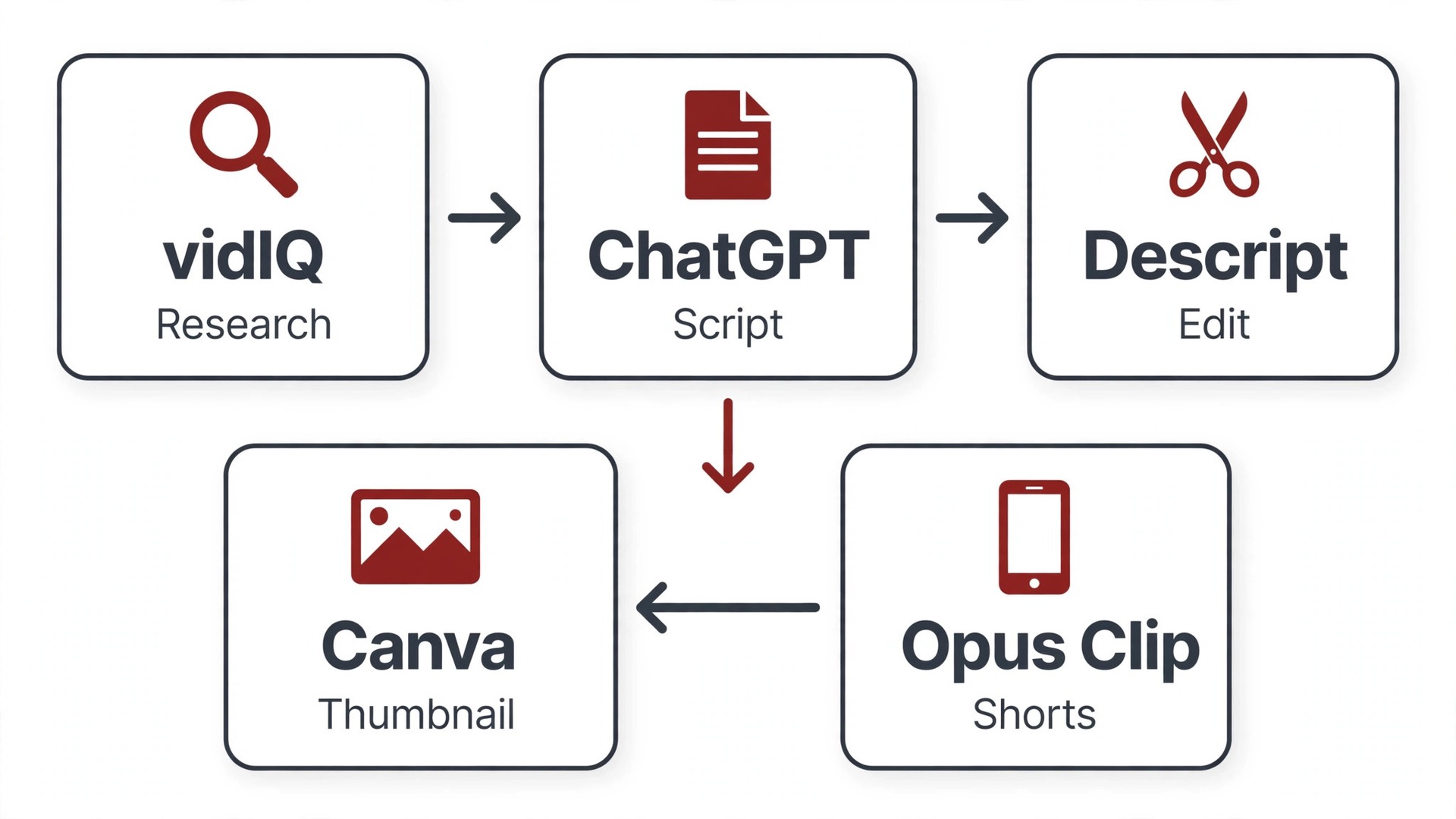
vidIQ will tell you what to make, but it will not edit it. Descript will edit it, but it has no idea what your audience searches for. Opus Clip will turn the finished video into Shorts, but it cannot save a boring video. That is the honest truth about the best AI tools for YouTubers in 2026. No single tool covers a whole channel, so the winners build one tool per stage and stop buying duplicates.
A YouTube workflow splits into six stages. Research and ideas, scripting, voice, editing, thumbnails and repurposing into Shorts. One tool per stage beats a crowded stack, because each tool is judged on one job and one meter. Credits, minutes and hours matter more than sticker prices here, so read the limits before you pay.
This guide compares 12 tools with prices checked in November 2026. Each review states the real starting price, what the tool meters, and when to pick it or skip it. Use the comparison table to build your stack by stage, then read the reviews for the stages where you lose the most time.
How we sorted the tools
We sorted every tool by the stage it serves, not by a single leaderboard. A research tool is judged on keyword data and idea quality. An editor is judged on speed and export quality. A clip tool is judged on whether its clips actually bring viewers back to the long video. A tool that is excellent at one stage and useless at the others still earns its place.
We also checked the meters. vidIQ counts AI credits, Descript counts media hours, Opus Clip counts source minutes, Runway counts generation credits. A tool that looks cheap can get expensive when you run every AI feature on every video. The best AI tools for YouTubers are the ones whose meter matches how you actually publish.
Finally, we checked the YouTube rules that matter. YouTube requires disclosure for realistic synthetic or altered content, and repetitive mass produced videos risk demonetization. AI is a production helper, not a channel strategy. A tool that encourages faceless volume without a human idea behind it will hurt a channel faster than it helps.
The best AI tools for YouTubers at a glance
Find your bottleneck stage in the table, then read that review in full. Prices are starting prices checked in November 2026.
| Tool | Starting price | Best for | Watch out |
|---|---|---|---|
| vidIQ | Free, Boost $16.58/mo | Ideas, keywords and channel research | Real AI depth sits behind Max |
| TubeBuddy | Free, Pro from $3.60/mo | SEO inside YouTube Studio and A/B tests | Advanced tools need Legend |
| Descript | Free, Hobbyist $16/mo | Talking head and interview editing | Media hours and AI credits are metered |
| Opus Clip | Free, Starter $15/mo | Long video to Shorts | Virality score is unreliable |
| CapCut | Free, Pro $9.99/mo | Free editing and AI effects | Pro features lock some exports |
| Pictory | From $25/mo | Script and blog to video | Stock matching sometimes misses |
| InVideo | Free, Starter $20/mo | Prompt to video drafts | Credit model changed in 2026 |
| ElevenLabs | Free, Starter $5/mo | AI voiceover and dubbing | Free tier is non commercial |
| ChatGPT | Free, Plus $20/mo | Scripts, titles and research | Ideas can be generic without good prompts |
| Runway | Free, Standard $15/mo | Generative B-roll and hero shots | Credits burn fast per second |
| Canva | Free, Pro $12.99/mo | Thumbnails and channel art | Templates can look familiar |
| Fliki | Free, Standard $28/mo | Faceless explainers from text | Pricier than Pictory for the same job |
1. vidIQ
Starting price. Free plan with 150 AI credits a month. Boost costs 16.58 dollars a month billed annually, or 19 dollars billed monthly. Max costs 39 dollars a month billed annually.
vidIQ is the research pick for YouTube growth. It shows keyword search volume and competition before you film, gives daily video ideas tailored to your channel, and audits your channel to flag weak titles and descriptions. Its AI Coach reads your channel data and suggests what to make next, which is the feature that separates it from a generic keyword tool.
Boost at 16.58 dollars a month billed annually gives 2,000 AI credits, while Max at 39 dollars a month billed annually gives 6,000 credits plus deeper Coach conversations and short clip generation. The free plan includes 150 credits a month, which is enough to test the ideas and keyword tools on a small channel.
The limit is depth. The strongest AI features sit behind Max, and the free and Boost ideas can feel generic if your niche is unusual. vidIQ also cannot edit or produce anything. Pair it with an editor and a clip tool, and treat it as the brain of the stack rather than the hands.
Pick it when you need to know what to make next and how to package it for search.
Skip it when you already have a full content calendar and only need editing help.
2. TubeBuddy
Starting price. Free plan. Pro costs from 3.60 dollars a month billed annually. Legend costs 26.39 dollars a month billed annually and adds A/B testing.
TubeBuddy lives inside YouTube Studio as a browser extension, and it is the optimization layer creators actually use daily. Tag suggestions, best time to publish data, bulk editing for up to 1,500 videos and thumbnail and title A/B testing that picks a winner automatically are its core strengths.
Pro from 3.60 dollars a month billed annually is the cheapest paid entry on this list, while Legend at 26.39 dollars a month billed annually is the cheapest plan here with native A/B testing. For a channel with dozens of videos already published, bulk tools and A/B tests earn their price fast, since small gains across a catalog add up.
The weakness is that advanced tools need Legend, and the free plan is very limited. TubeBuddy also overlaps with vidIQ on keyword research, so running both paid plans wastes money. Pick one research tool, and let TubeBuddy own optimization and testing if your catalog is large.
Pick it when your channel already has dozens of videos and you want to optimize the catalog.
Skip it when you are starting from zero and need ideas more than bulk tools.
3. Descript
Starting price. Free plan with 1 media hour a month. Hobbyist costs 16 dollars a month billed annually, or 24 dollars billed monthly.
Descript edits video by editing its transcript. Delete a sentence in the text and it disappears from the video. For talking head, interview and podcast style channels, that is faster than any timeline editor, and it is why Descript is the editing pick for most YouTubers who talk to camera.
Hobbyist at 16 dollars a month billed annually gives 10 media hours and 400 AI credits a month with 1080p exports. Creator at 24 dollars a month billed annually raises that to 30 hours with 4K. Studio Sound cleans up room noise, filler removal works in one click, and Overdub clones your voice to fix a line without re recording.
The meter is the catch. Media hours and AI credits are counted separately, so a channel publishing long videos weekly can hit a ceiling. Descript is also weaker for cinematic edits with heavy effects. Use it for content where the words carry the video, and keep a traditional editor for visual heavy work.
Pick it when you film talking head or interview videos and cutting words is most of your edit.
Skip it when you make cinematic or effects heavy videos where a timeline editor matters more.
4. Opus Clip
Starting price. Free plan with 60 credits a month and a watermark. Starter costs 15 dollars a month, Pro costs 29 dollars a month.
Opus Clip turns one long video into a batch of Shorts automatically. It finds highlight moments, adds captions, reframes for vertical video and scores clips for viral potential. For channels that already publish long form video, it is the fastest way to feed Shorts, TikTok and Reels from the same recording.
Starter at 15 dollars a month is the entry point, with Pro at 29 dollars for more minutes. Metering is by source video minutes, not by clips, so a two hour video costs more than a twenty minute one. The free plan gives 60 credits a month with a watermark, which is enough to test whether clips bring viewers back.
The virality score deserves skepticism. It flags moments that look clip worthy to an algorithm, not moments your audience will love. Review every clip before posting, and record with clips in mind, with clear stories and quotable lines, so the tool has strong moments to find.
Pick it when you already publish long videos and need a weekly Shorts batch from them.
Skip it when you only publish Shorts and have no long video to clip.
5. CapCut
Starting price. Free plan with generous features. Pro costs 9.99 dollars a month, though pricing varies by region.
CapCut is the free editing pick for YouTube creators. Auto captions in dozens of languages, background removal, AI effects, templates and vertical reframing all work on mobile and desktop, and the free tier covers many creators fully. It is the best free AI video tool in practice, because you do the editing and it removes the friction.
Pro at 9.99 dollars a month unlocks more effects and removes limits, though pricing varies by region so check your local price. The direct publish workflow and generous export options make it the fastest path from raw clip to posted video for short form creators.
The limits are licensing and control. Read the current terms for paid client work, and note that some Pro badged features lock export if you use them on the free plan. CapCut is also weaker for long form precision editing than Descript or a traditional editor. Use it for Shorts and quick edits, not for a forty minute documentary.
Pick it when you edit Shorts and quick videos and want strong AI tools for free.
Skip it when you need precise long form editing or full control over licensing.
6. Pictory
Starting price. Starter costs 25 dollars a month billed annually, or 29 dollars billed monthly. Professional costs more. A 14 day free trial is available, with no permanent free plan.
Pictory turns scripts and blog posts into finished videos with AI voiceover and matched stock footage. Paste the script, pick a voice, and a first draft appears in minutes. For faceless channels, explainers and creators repurposing written content, that workflow is hard to beat.
Starter at 25 dollars a month billed annually gives 200 video minutes, while Professional at 35 dollars on annual billing gives 600 minutes and more brand kits. Brand kits save each client or channel colors, fonts and logo, so every new project starts on brand instead of from scratch.
The weak point is matching. Pictory sometimes pairs a shot that misses the line it illustrates, and a creator has to replace it by hand. Budget time for a review pass on every video, and keep your own stock library for shots that must be exact. It is a first draft machine, not a finished video machine.
Pick it when you have scripts or blog posts and want them as videos without filming.
Skip it when you film yourself and need a real editor, not a script to video tool.
7. InVideo
Starting price. Starter costs 20 dollars a month. A free plan with a watermark is available.
InVideo takes a prompt or a rough script and assembles a full video with scenes, voiceover, music and subtitles. Creators use it as a first draft machine. Show a moving storyboard in an hour instead of storyboarding for a day, then lock the direction before investing real edit hours.
Starter at 20 dollars a month gives 400 credits, with Plus at 60 dollars for 2,000 credits. The free tier exports with a watermark and is for non commercial use. Note that InVideo rebuilt its plans around credits in 2026, so check the current allowances before you cost it into a channel budget.
The output needs refinement. AI assembled scenes can feel generic, and voices can sound flat on longer videos. Treat InVideo as the draft stage, then refine in CapCut or Descript. A channel that publishes InVideo output untouched will look like every other channel doing the same.
Pick it when you need fast video drafts from a prompt to test ideas quickly.
Skip it when you want finished videos without a refinement pass.
8. ElevenLabs
Starting price. Free tier with a monthly character allowance for non commercial use. Starter costs 5 dollars a month.
ElevenLabs offers the most human sounding AI voiceover on this list, with voice cloning, narration and dubbing across many languages. Faceless channels use it for narration, global creators use it for dubbing, and educators use it for a consistent voice across lessons.
Starter at 5 dollars a month is the cheapest paid entry for voice work, with higher tiers at 22 and 99 dollars for more characters. The free tier gives a monthly character allowance for testing, but a monetized channel needs a paid plan for commercial use.
The risk is overuse. An AI voice sounds fine for a few minutes and tiring for a full video, and listeners can tell. Use it for narration where a human voice is impractical, for dubbing, and for corrections. Tell your audience when a segment is AI voiced, since trust is the asset a channel cannot rebuild quickly.
Pick it when you run a faceless channel or need dubbing in other languages.
Skip it when you film yourself and your own voice is part of the channel.
9. ChatGPT
Starting price. Free plan. Plus costs 20 dollars a month.
ChatGPT is the scripting and research assistant for most YouTube channels. It drafts scripts, titles, descriptions, hooks and community posts, and it helps outline a video before filming. Give it your vidIQ keyword data and a few details about your angle, and the first draft appears in seconds.
Plus at 20 dollars a month removes free plan limits and gives steadier access. For a channel publishing weekly, that covers scripting, titles and descriptions for the whole month at a low price. It also drafts variations, so you can test three hooks instead of one.
The ideas can be generic. Unedited ChatGPT scripts have a recognizable rhythm, and viewers notice when every video sounds the same. Always rewrite the hook in your own words, check every fact, and bring a real opinion to the video. AI writes the draft. You supply the point of view.
Pick it when you write scripts, titles and descriptions every week.
Skip it when you only need a few videos a month, since the free plan covers that.
10. Runway
Starting price. Free tier with 125 one time credits. Standard costs 15 dollars a month, or 12 dollars a month billed annually, with 625 credits.
Runway generates video clips from text and image prompts, and it is the pick for B-roll that does not exist in any stock library. A five or ten second hero shot, a product reveal, or an impossible location can be generated instead of filmed, which suits channels that need unique visuals.
Standard at 15 dollars a month, or 12 dollars on annual billing, gives 625 credits. Generation models burn about 12 credits per second, so that buys roughly 52 seconds of footage. The free tier gives 125 one time credits, about ten seconds, which is enough to learn the tool and not enough to produce with.
The cost per usable second is the real price. Re rolls are normal, so budget three to five times the credits for footage you actually keep. Use Runway for a few hero seconds per video, not for whole videos, and keep stock footage for everything ordinary.
Pick it when you need unique B-roll or hero shots that stock cannot supply.
Skip it when your videos are talking head or screen recordings that need no generated footage.
11. Canva
Starting price. Free plan. Pro costs 12.99 dollars a month billed monthly, or less on annual billing.
Canva is the thumbnail tool most YouTubers actually use. Its templates, background remover, Magic Write for titles and brand kit keep thumbnails consistent across a channel. A strong thumbnail decides the click, and Canva makes it fast to test variations without opening a full photo editor.
Pro at 12.99 dollars a month unlocks the background remover and the full template library. For a channel publishing weekly, that is cheap for the job thumbnails do. The free plan covers basic thumbnails well enough to start.
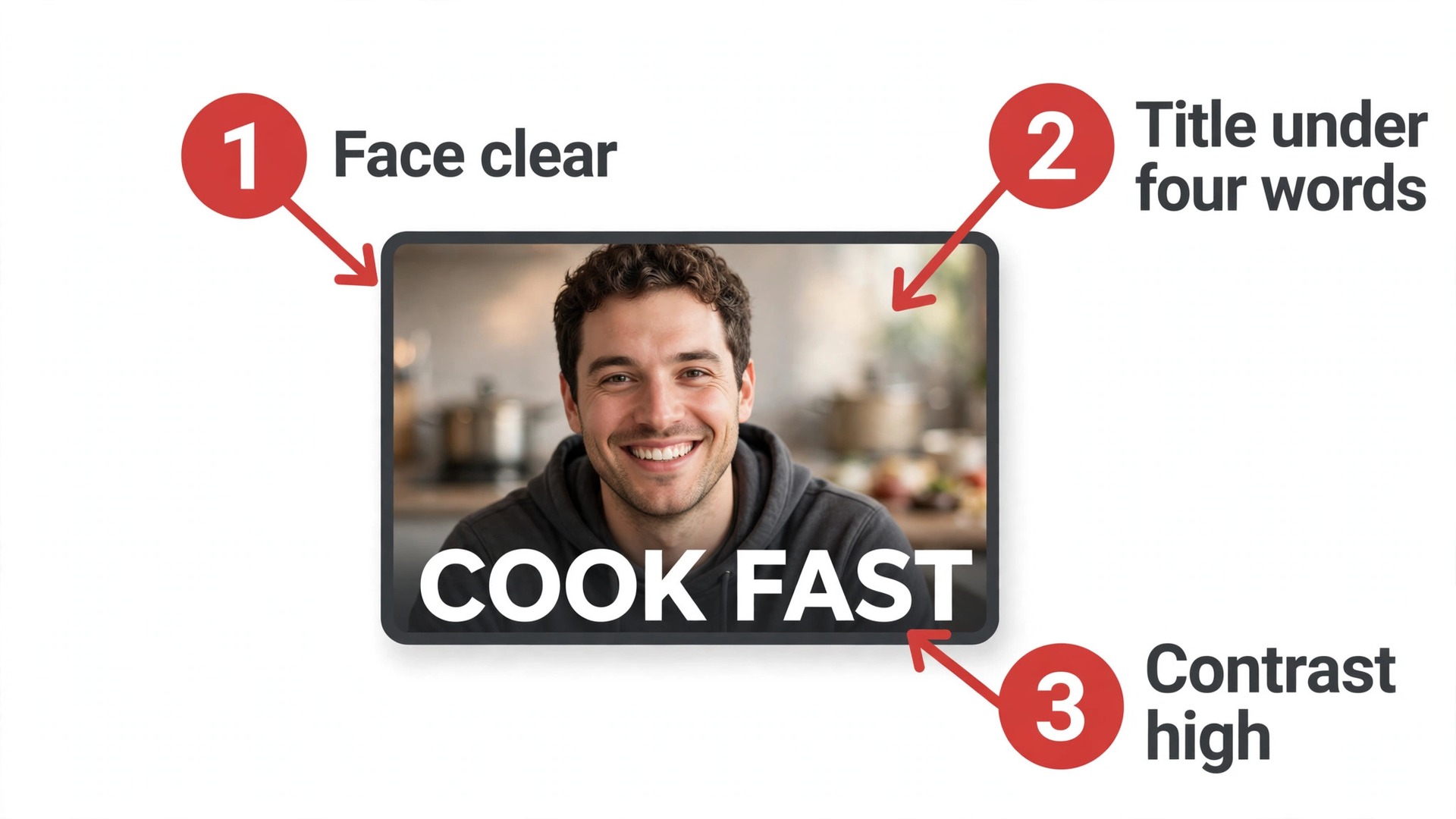
Templates are also the weakness. A thumbnail made straight from a popular template looks like a hundred other channels. Change the fonts, colors and layout to match your channel, keep the title to three or four words, and test two versions when a video matters. The tool makes the thumbnail. You make the click.
Pick it when you need fast consistent thumbnails every week without a designer.
Skip it when you already use Photoshop or a designer for thumbnails.
12. Fliki
Starting price. Standard costs 28 dollars a month, or 21 dollars a month billed annually. A free plan with 720p watermarked exports is available.
Fliki turns written content into videos with AI voices in more than 75 languages, stock visuals and subtitles. Faceless channels, explainers and creators repurposing blog posts use it to publish without filming. Standard at 28 dollars a month, or 21 dollars on annual billing, gives 180 minutes of credits a month.
The voice quality is the reason to pick Fliki over cheaper script to video tools. Its text to speech library is large and natural enough for explainer narration, and the multi language support suits channels with an international audience.
The price is the question. At 28 dollars a month it costs more than Pictory Starter and InVideo Starter for a similar job. It earns its place only when voice quality and language range matter to your channel. Otherwise, the cheaper tools do the same work.
Pick it when you run a faceless explainer channel and voice quality matters.
Skip it when you film yourself or you need the cheapest script to video tool.
The Best Fit for Your Needs
Build the stack by stage, one tool each. These are our first picks for the six stages of a YouTube workflow, and the best AI tools for YouTubers are the ones that own exactly one stage.
| Job to be done | Best pick | Why it wins |
|---|---|---|
| Deciding what to make | vidIQ | Keyword data plus AI Coach from 16.58 dollars a month |
| Optimizing the catalog | TubeBuddy | A/B tests on Legend, bulk tools from 3.60 dollars |
| Editing talking head video | Descript | Edit by transcript from 16 dollars a month |
| Turning long video into Shorts | Opus Clip | Automatic clips from 15 dollars a month |
| Free editing and effects | CapCut | Strong free tier, Pro 9.99 dollars |
| Script to video | Pictory | First drafts from 25 dollars a month annual |
| AI voiceover | ElevenLabs | Human sounding voices from 5 dollars |
| Generative B-roll | Runway | Unique shots from 15 dollars a month |
| Thumbnails | Canva Pro | Fast consistent thumbnails for 12.99 dollars |
| Scripting and titles | ChatGPT Plus | Drafts for every video for 20 dollars |
What a working stack costs
A beginner can start at zero with vidIQ free, TubeBuddy free, CapCut free and ChatGPT free. That covers research, optimization, editing, thumbnails and scripting well enough to publish weekly and learn what your audience wants. Add Canva Pro at 12.99 dollars when thumbnails become a weekly job.
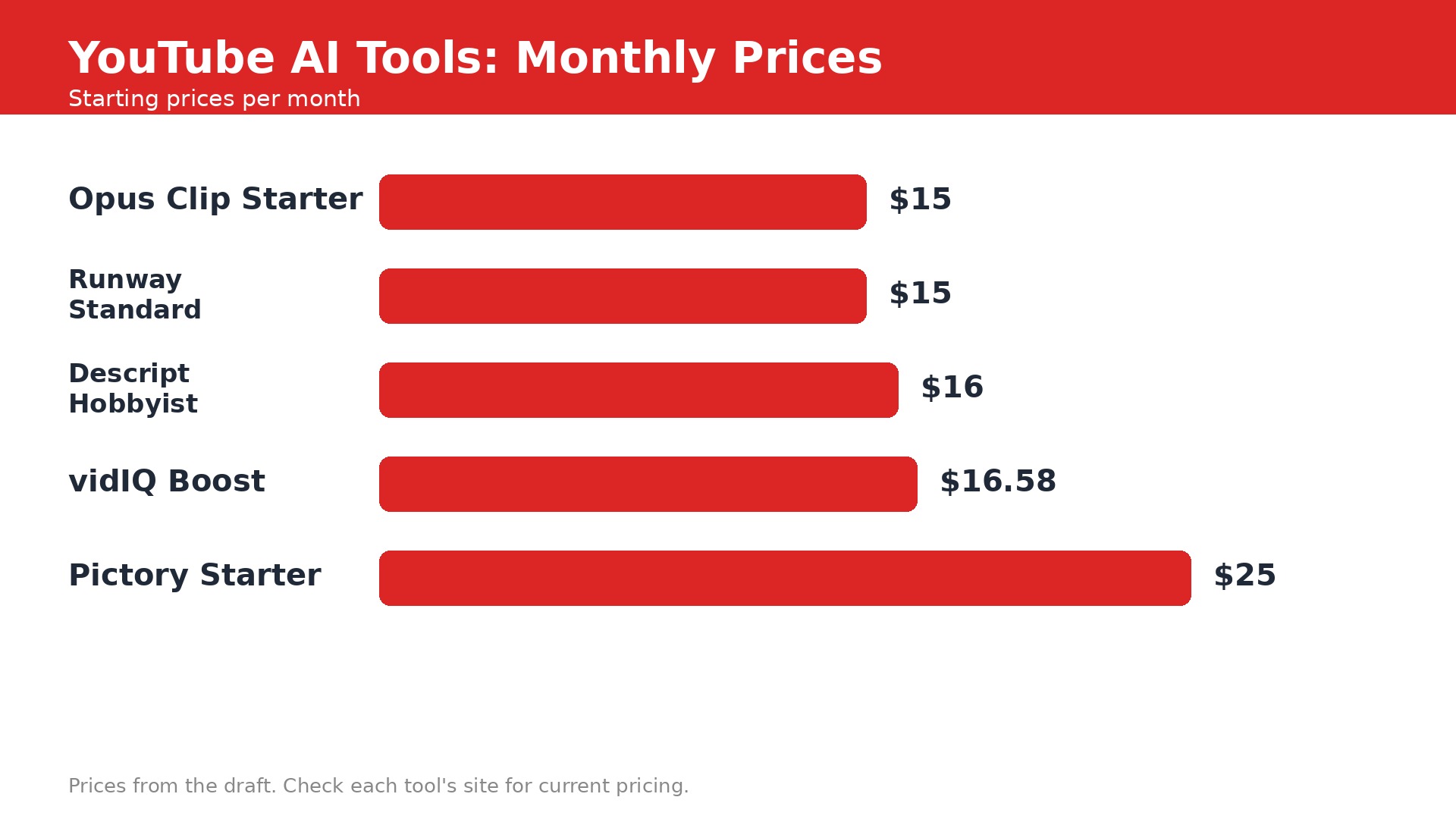
A growing channel should budget about 50 to 70 dollars a month. That is vidIQ Boost at 16.58 dollars, Descript Hobbyist at 16 dollars and Opus Clip Starter at 15 dollars, which totals about 48 dollars. Add ElevenLabs Starter at 5 dollars for voice work, and the stack stays under 55 dollars a month. Runway joins only when a video needs generated shots, since its credits burn fast.
Watch the meters every month. vidIQ counts credits, Descript counts media hours, Opus Clip counts source minutes and Runway counts generation credits. A plan that looks cheap can double when you publish more often. Upgrade only the tool that actually hit its cap.
Mistakes that hurt a channel
The first mistake is buying two research tools. vidIQ and TubeBuddy overlap on keywords, so pick one and spend the other subscription on editing or clips. The second mistake is publishing AI output untouched. Generic scripts, flat AI voices and template thumbnails all signal a channel with no point of view, and viewers leave.
The third mistake is ignoring disclosure. YouTube requires disclosure for realistic synthetic or altered content, and repetitive mass produced videos risk demonetization. Tell viewers when a segment is AI generated. The fourth mistake is trusting the virality score. Opus Clip can pick the dullest minute of a great video, so watch every clip before it goes out under your name.
Real-Life Stack Costs
A new channel can run on free tiers for zero dollars a month and publish weekly. That is vidIQ free, TubeBuddy free, CapCut free, ChatGPT free and Canva free. The only cost is time, and the tools remove enough friction to make weekly publishing realistic for one person.
A channel publishing weekly with real growth should budget 50 to 70 dollars a month for research, editing and clips. Add 15 to 30 dollars more when voice work or generated B-roll joins the workflow. The best AI tools for YouTubers earn that money by returning hours and by bringing viewers back, and any tool that does neither should be cancelled.
The Honest Answer
Start with vidIQ for ideas, CapCut for editing and Canva for thumbnails, all free. Add Descript when editing becomes the bottleneck, Opus Clip when Shorts become a growth job, and ElevenLabs when voice work matters. That stack is the full version of the best AI tools for YouTubers, and it covers every stage without a wasted dollar.
No tool here makes a video worth watching. Research tells you what to make, editing makes it watchable, and clips bring new viewers. The idea, the opinion and the delivery are still yours. Keep them human, and the tools will do the rest.
Frequently Asked Questions
What is the best AI tool for YouTubers?
There is no single best tool among the best AI tools for YouTubers, because each stage needs a different one. vidIQ leads research, Descript leads editing, Opus Clip leads Shorts and Canva leads thumbnails. Start with the stage where you lose the most time, and add one tool at a time.
Can AI make YouTube videos for me?
AI can draft scripts, generate voiceover, assemble stock footage and cut clips, but it cannot supply the idea or the point of view. Channels that publish AI output untouched risk demonetization, since YouTube penalizes repetitive mass produced videos. Use AI for drafts and production, then add your own judgment.
How much do AI tools for YouTube cost?
A beginner can start free with vidIQ, TubeBuddy, CapCut, ChatGPT and Canva, which are the free tier of the best AI tools for YouTubers. A growing channel should budget 50 to 70 dollars a month for vidIQ Boost, Descript Hobbyist and Opus Clip Starter. Watch the meters, since credits, media hours and source minutes all cap monthly use.
Is vidIQ or TubeBuddy better?
vidIQ is better for deciding what to make, with keyword research and an AI Coach that reads your channel. TubeBuddy is better for optimizing a catalog you already have, with bulk editing and thumbnail A/B testing on Legend. Running both paid plans wastes money, so pick the one that matches your stage.
Do I need to disclose AI content on YouTube?
Yes, YouTube requires disclosure for realistic synthetic or altered content. Tell viewers when a segment is AI generated or AI voiced. Disclosure keeps trust, and trust is what turns a viewer into a subscriber.
Can AI help my videos get more views?
AI helps with packaging and distribution, not with quality. vidIQ improves titles and ideas, Canva improves thumbnails, and Opus Clip brings Shorts viewers back to long videos. None of them can save a video with no clear idea. Fix the video first, then let the tools amplify it.