
If you run a Shopify store, start with the AI already inside your admin. Shopify Sidekick comes with every plan, writes product descriptions, edits images, builds reports and runs automations, and it costs nothing extra. That single fact shapes this whole list. The best AI tools for Shopify store owners are the ones that earn their place after Sidekick, not the ones that duplicate it.
Most stores already pay for five or six apps and cannot say which ones earn their keep. The fix is to judge every tool by one job. Support tickets, email revenue, reviews, average order value, ad creative, inventory and profit each get one owner. A tool that does a job nobody on your team does today, and costs less than the margin it adds, stays. Everything else goes.
This guide compares 10 tools with prices checked in November 2026. Each review states the real starting price, what the tool does well, where it falls short, and when to pick it or skip it. Use the comparison table to shortlist, then read the two or three reviews that match your biggest bottleneck.
How we picked this list
We picked tools that plug into Shopify properly, not tools that happen to mention ecommerce. That means a Shopify App Store listing or a native integration, real merchant reviews, and pricing you can find on the vendor page. We also favored tools that charge in a way a small store can predict. Flat fees and per resolution pricing beat open ended usage bills that spike in a busy month.
We also checked what each tool cannot see. A support agent that cannot edit an order is a chatbot, not a helper. An attribution tool that only reads ad platform data will flatter your ads. A review app that charges by order count gets expensive exactly when you succeed. Those limits matter more than the feature list, so they appear in every review below.
The best AI tools for Shopify store owners share one trait. They replace a repeating task with a result you can measure in dollars, hours or tickets closed. If a tool only produces reports you never act on, it is not on this list.
The best AI tools for Shopify store owners at a glance
Scan the table for your job, then read the full review before you install anything. Prices are starting prices from vendor pages checked in November 2026.
| Tool | Starting price | Best for | Watch out |
|---|---|---|---|
| Shopify Sidekick | Included with Shopify | Store management inside the admin | Weakest at analysis, check its numbers |
| Klaviyo | Free, Email from $20/mo | Email and SMS that earns revenue | Price rises with your list size |
| Gorgias | From $10/mo + $0.90/resolution | AI customer support that edits orders | Per resolution costs add up fast |
| Judge.me | Free, Awesome $15/mo | Reviews at a flat predictable price | No SMS or loyalty built in |
| Rebuy | From $25/mo | Raising average order value | Needs traffic to pay for itself |
| Tidio | Free, Starter $24.17/mo | Cheap AI chat on a small store | Billable conversation limits |
| Triple Whale | Free, Foundation from $219/mo | Attribution and profit clarity | Paid plans are expensive for small stores |
| Prediko | From $49/mo | AI inventory forecasting | Needs clean sales history to work |
| Creatify | Free, Standard $15/mo | AI video ads and UGC style creative | Creative still needs human review |
| Photoroom | Free, Pro $12.99/mo | Product photos without a studio | Cannot fix bad lighting or blur |
1. Shopify Sidekick
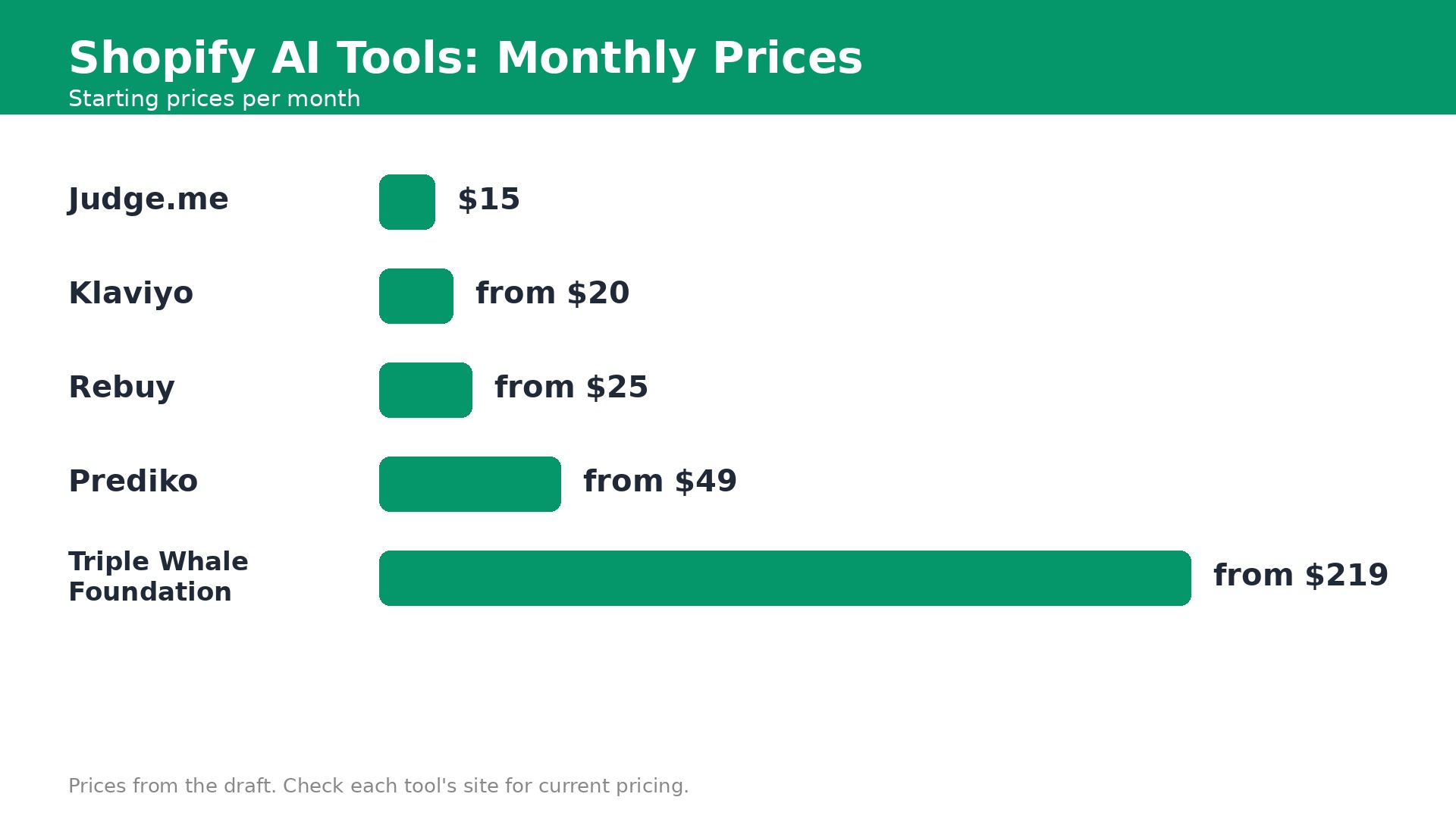
Starting price. Included with every Shopify plan. Basic costs 29 dollars a month billed annually, or 39 dollars billed monthly.
Sidekick is Shopify own AI assistant, built into the admin and included with every plan. It writes product descriptions, edits theme text, builds Flow automations, pulls reports and, since the Spring 2026 edition, takes actions inside partner apps such as Klaviyo and Loop. For a solo owner, it is the closest thing to a free employee.
It is strongest at doing tasks and weakest at analysis. Sidekick can draft and act quickly, but its summaries of performance deserve a second look against your real numbers before you change budgets or prices. Treat it as a fast pair of hands, not as a strategist.
Because it costs nothing extra, the right move is to use it first for every new job. Only add a paid tool when Sidekick clearly cannot do the task, such as answering customers or forecasting stock. Most stores should exhaust Sidekick before they buy anything else on this list.
Pick it when you want one AI that already knows your products, orders and theme and costs nothing extra.
Skip it when you need deep analysis or customer facing chat, which are not its strengths.
2. Klaviyo
Starting price. Free plan up to 250 active profiles and 500 email sends a month. Email plan from 20 dollars a month for 251 to 500 profiles.
Klaviyo is the email and SMS platform most Shopify stores grow into. Its AI composer drafts campaigns, its Customer Agent answers common questions, and its predicted lifetime value scores tell you which customers deserve your attention. The Shopify integration is deep, so purchase history, browsing and order data feed every send.
The free plan covers up to 250 profiles, which is enough to prove the channel works. Paid pricing scales with active profiles, so a growing list costs more each month, but email usually pays for itself many times over when flows are set up well. Abandoned cart, welcome and post purchase flows do most of the work.
The risk is paying for a large list that never gets cleaned. Inactive profiles cost money every month while adding nothing to revenue. Suppress unengaged subscribers regularly, and keep SMS for your best customers only, since SMS costs far more per message than email.
Pick it when email drives a real share of your revenue and you want flows that run themselves.
Skip it when your list is tiny and you send one newsletter a month, since the free plan or Sidekick covers that.
3. Gorgias
Starting price. Helpdesk from 10 dollars a month for the Starter plan with 50 tickets. The AI Agent costs 90 cents per resolution on annual contracts.
Gorgias is the support desk built for Shopify, and its AI Agent answers tickets and edits orders directly. Where is my order, refund requests and address changes are the bulk of most store inboxes, and Gorgias resolves many of them without a human touching the ticket. It rates 4.6 out of 5 from 582 G2 reviews.
The pricing model is honest. You pay a small helpdesk fee from 10 dollars a month, then 90 cents per AI resolution on annual contracts. That means you pay when the AI actually solves something, not for every message it reads. For a store drowning in where is my order tickets, the payback is quick.
Watch the resolution count in a busy month. A sale or a shipping delay can triple ticket volume overnight, and the AI bill follows. Set clear rules for when the agent escalates to a human, and review a sample of resolved tickets weekly to catch wrong answers early.
Pick it when support tickets eat hours every day and most are about orders, shipping or returns.
Skip it when you get fewer than twenty tickets a week, since a person can handle those faster.
4. Judge.me
Starting price. Free plan with unlimited reviews. Awesome plan costs a flat 15 dollars a month.
Judge.me is the value leader in Shopify reviews. The free plan includes unlimited reviews with photo and video support, and the Awesome plan costs a flat 15 dollars a month no matter how many orders you take. That flat price is rare. Rivals charge by order count, so their bill rises exactly when your store succeeds.
It collects reviews automatically, shows stars on product pages and in Google results, and includes AI features on the paid plan. With a 5.0 rating from nearly 48,000 App Store reviews, it is also the most trusted review app on the platform by merchant count.
The limit is scope. Judge.me does reviews and little else, so loyalty and SMS need separate tools. That is fine for most stores. A tool that does one job at a flat price beats a suite that charges by volume for features you never open.
Pick it when you want credible reviews without a bill that grows with every order.
Skip it when you want reviews, loyalty and SMS in one account, since Judge.me stays focused on reviews.
5. Rebuy
Starting price. From 25 dollars a month for one package, priced by monthly Shopify orders. A 14 day free trial is available.
Rebuy uses AI to show the right add on, bundle or post purchase offer at the right moment. Smart cart recommendations, checkout upsells and post purchase offers all learn from what your customers actually buy together. For a store with steady traffic, lifting average order value by a few dollars is often cheaper than buying more traffic.
Pricing starts from 25 dollars a month for one package and scales with monthly orders. That keeps it affordable for small stores while letting larger stores pay for the volume they handle. The 14 day trial is long enough to test one offer properly if you have real traffic.
The catch is traffic. A store with fifty visitors a day will not learn fast enough for the AI to help, and the monthly fee will outrun the extra revenue. Fix traffic first, then add Rebuy when you have enough orders to measure a lift in a week or two.
Pick it when you have steady traffic and want more revenue from each order you already get.
Skip it when your store is new and traffic is thin, since there is too little data to optimize.
6. Tidio
Starting price. Free plan with 50 billable conversations. Starter costs 24.17 dollars a month for 100 billable conversations.
Tidio gives small stores an AI chat agent called Lyro at a low price. It answers common questions, recommends products and hands over to a human when it cannot help. The free plan includes 50 billable conversations, which is enough for a quiet store to test whether chat actually brings sales.
At 24.17 dollars a month, Starter is one of the cheapest ways to put AI on your storefront. It suits stores where shoppers ask the same five questions before buying, such as sizing, shipping times and returns. Answering those instantly can be the difference between a sale and a closed tab.
Count your conversations before you commit. Billable conversation limits are the meter that matters, and a busy week can push you into a higher tier. Also keep the handover to humans obvious. A shopper who cannot reach a person quickly will leave, no matter how clever the bot sounds.
Pick it when you want affordable AI chat and your shoppers ask the same questions repeatedly.
Skip it when you already use Gorgias for support and want one inbox, not two chat tools.
7. Triple Whale
Starting price. Free plan. Foundation from 219 dollars a month and Automate from 749 dollars a month, priced by annual GMV. Enterprise is quoted by sales.
Triple Whale answers the question every ad spending store asks. Which ads actually make money. Its attribution pixel, dashboards and Moby AI analyst track orders across channels and show contribution margin, not just revenue. The free plan covers first and last click attribution with twelve months of data.
Foundation from 219 dollars a month adds multi touch attribution, the business intelligence suite and daily Moby AI. Automate from 749 dollars adds automations and ad actions. Those prices are entry points based on your annual GMV, so larger stores pay more.
This is a tool for stores spending real money on ads. A store spending under a thousand dollars a month on ads will learn little that Shopify reports do not already show. Start with the free plan, and only pay when ad spend is large enough that a wrong decision costs more than the subscription.
Pick it when you spend serious money on ads and need to know which ones earn profit.
Skip it when your ad spend is small or mostly organic, since the free plan covers the basics.
8. Prediko
Starting price. From 49 dollars a month for stores under 100,000 dollars in GMV.
Prediko forecasts demand and builds purchase orders so you stop guessing stock levels. It reads your sales history, seasonality and lead times, then tells you what to order and when. For stores that stock out of bestsellers or sit on slow stock, that is money saved twice.
At 49 dollars a month for smaller stores, it is cheap compared with one stockout of a popular product or one pile of dead inventory. It rates 4.9 from 264 App Store reviews, which is unusually high for a forecasting tool.
The forecast is only as good as your history. A new store with three months of sales, or a store with messy variant data, will get weak forecasts. Clean up SKUs and variants first, give it at least six months of history, and treat the first forecasts as guidance rather than orders.
Pick it when you hold inventory and stockouts or overstock cost you real money.
Skip it when you sell print on demand or digital products with no inventory to manage.
9. Creatify
Starting price. Free plan. Standard costs 15 dollars a month, or 10 dollars a month billed annually.
Creatify turns product links into video ads with AI avatars, voices and UGC style scripts. Paste a product URL and it generates ad variations you can test on Meta and TikTok. It rates 4.8 from 1,773 G2 reviews, which is strong for a creative tool.
The Standard plan at 15 dollars a month, or 10 dollars on annual billing, is cheap for the volume it produces. A store testing ten ad angles a week would spend far more on a freelancer or an agency for the same output. The free plan lets you test the quality before paying.
AI ads still need a human eye. Avatars can look stiff, claims can drift from what your product actually does, and ad platforms reject creative that overpromises. Review every video before it runs, and keep your best performing human made ads as the benchmark.
Pick it when you run paid social and need fresh ad creative every week without an agency.
Skip it when you do not run paid ads, since creative tools earn nothing without a testing budget.
10. Photoroom
Starting price. Pro costs 12.99 dollars a month billed monthly. A free plan with a watermark is available.
Photoroom removes backgrounds, stages products in AI scenes and batch edits photos. For a Shopify store photographing products at home, it turns uneven tabletop shots into clean, consistent listing images. It also resizes for your store, social and ads from the same file.
The batch tools are the reason to pay 12.99 dollars a month. Editing one photo is free almost everywhere. Editing two hundred photos with the same background and size is where the time saving lives. Consistent photos also lift conversion, since shoppers trust a store that looks professional.
It cannot rescue a bad photo. Blur, harsh shadows and wrong colors stay wrong after a background swap. Spend the saved time on better lighting and a plain background, and use Photoroom for cleanup rather than rescue work.
Pick it when you photograph products yourself and need clean consistent images at volume.
Skip it when you already use a photographer or shoot on clean studio backgrounds.
A Pick for Each Situation
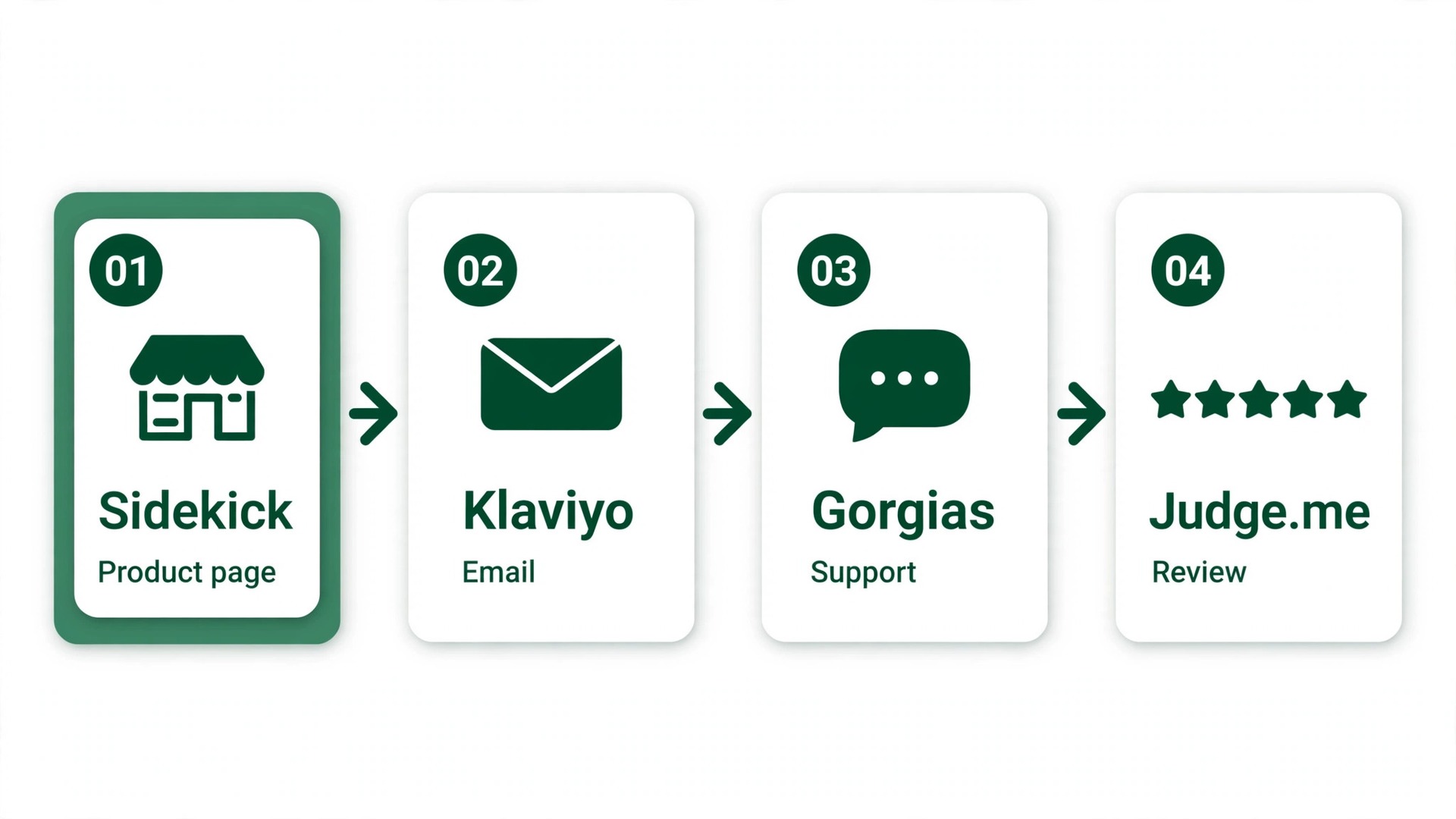
One tool per job keeps the stack cheap and the results measurable. These are our first picks for each job a Shopify store hands to AI, and the best AI tools for Shopify store owners are the ones that own exactly one job each.
| Job to be done | Best pick | Why it wins |
|---|---|---|
| Running the store day to day | Shopify Sidekick | Included, knows your products and orders already |
| Email and SMS revenue | Klaviyo | Flows and predicted value drive repeat sales |
| Customer support | Gorgias | AI agent resolves tickets and edits orders |
| Product reviews | Judge.me | Flat 15 dollars, unlimited reviews |
| Higher order value | Rebuy | AI offers lift each order from 25 dollars a month |
| Cheap storefront chat | Tidio | AI agent from 24.17 dollars a month |
| Ad attribution | Triple Whale | Free plan, paid when ad spend justifies it |
| Inventory forecasting | Prediko | Forecasts and purchase orders from 49 dollars |
| Video ad creative | Creatify | UGC style ads from 10 dollars a month annual |
| Product photos | Photoroom | Batch backgrounds for 12.99 dollars a month |
How to build the stack without overspending
Start with Sidekick and the free tiers. Klaviyo free to 250 profiles, Gorgias trial, Judge.me free and Creatify free cover email, support, reviews and creative without a dollar spent. Add the first paid tool only when a job takes more than three hours a week or clearly loses sales.
A realistic small store stack costs about 60 to 90 dollars a month. That is Klaviyo at 20 dollars, Judge.me Awesome at 15 dollars, Rebuy at 25 dollars and Photoroom at 12.99 dollars. Add Gorgias resolutions as ticket volume grows, and keep Triple Whale free until ad spend passes a thousand dollars a month.
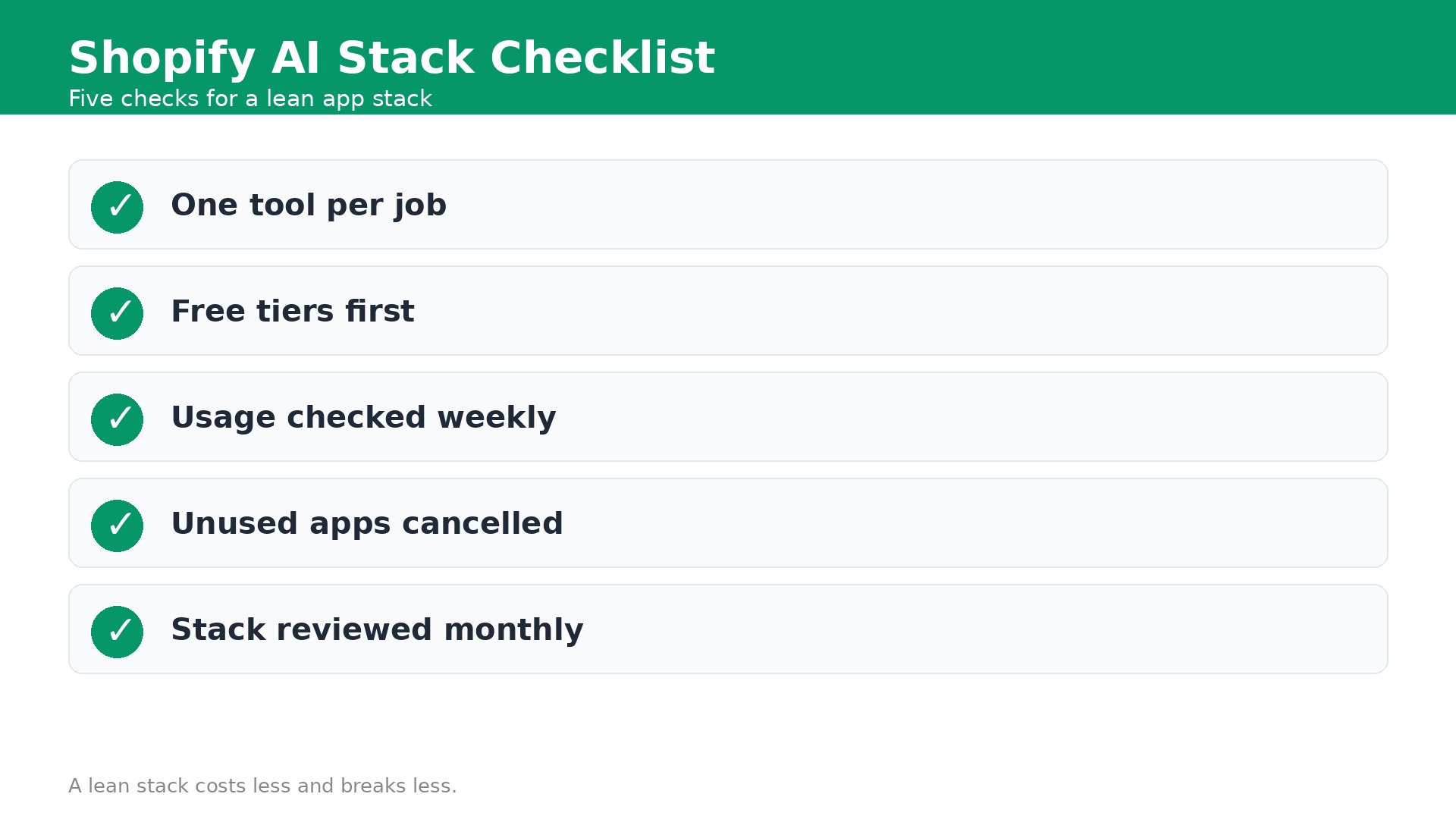
Audit the stack every quarter. Open each app and check the last time it changed a result. An app that has not produced a sale, a review or a resolved ticket in a month is a cost, not a tool. Cancel it and spend the money on the tool that is working hardest.
Common mistakes store owners make with AI apps
The first mistake is installing five apps that do the same job. Two chat tools, two review apps and three description writers will fight each other and confuse shoppers. Pick one per job and uninstall the rest. The second mistake is trusting AI copy without reading it. Wrong materials, wrong sizes and invented guarantees lead to refunds that cost more than the time saved.
The third mistake is buying attribution before spending enough on ads to need it. A 219 dollar Triple Whale plan cannot help a store spending 300 dollars a month on ads. The fourth mistake is ignoring the meters. Per resolution, per conversation and per order pricing all spike in a busy month, so check usage weekly during sales and holidays.
How to test an app before you pay for it
Install one app at a time and give it a single job with a number attached. A review app must produce five new reviews in two weeks. A support agent must resolve twenty tickets without a human. An upsell app must lift average order value by three dollars. Write the number down before you install, and judge the app against it after two weeks.
Use the free trial like a test, not like a tour. Connect real products, real customers and real orders, then run the app on live traffic for a full week including a weekend. A trial on demo data tells you nothing about how the app behaves when a customer asks a hard question at midnight on a Saturday.
Watch the bill during the trial, not after it. Per resolution, per conversation and per order pricing all spike when traffic spikes, so check usage on day three and day seven. If the trial projects a monthly cost above your target, cancel before the trial ends rather than hoping the next month will be quieter.
Ask support one hard question before you pay. A slow or unhelpful answer during a trial predicts the support you will get when checkout breaks on a sale day. The best apps answer fast, in plain language, with a link to the help article that solves the problem. An app with great features and poor support will cost more than its subscription.
How to test an app before you pay for it
Install one app at a time and give it a single job with a number attached. A review app must produce five new reviews in two weeks. A support agent must resolve twenty tickets without a human. An upsell app must lift average order value by three dollars. Write the number down before you install, and judge the app against it after two weeks.
Use the free trial like a test, not like a tour. Connect real products, real customers and real orders, then run the app on live traffic for a full week including a weekend. A trial on demo data tells you nothing about how the app behaves when a customer asks a hard question at midnight on a Saturday.
Watch the bill during the trial, not after it. Per resolution, per conversation and per order pricing all spike when traffic spikes, so check usage on day three and day seven. If the trial projects a monthly cost above your target, cancel before the trial ends rather than hoping the next month will be quieter.
Ask support one hard question before you pay. A slow or unhelpful answer during a trial predicts the support you will get when checkout breaks on a sale day. The best apps answer fast, in plain language, with a link to the help article that solves the problem. An app with great features and poor support will cost more than its subscription.
What the Full Stack Costs
A new store can run on Sidekick plus free tiers for zero dollars a month in app costs beyond the Shopify plan itself. That covers descriptions, basic email, reviews and creative well enough to make the first sales. The moment email or support becomes a daily job, budget 60 to 90 dollars a month for Klaviyo, Judge.me, Rebuy and Photoroom together.
A growing store spending on ads should budget 150 to 300 dollars a month, adding Gorgias resolutions and Prediko at 49 dollars. Triple Whale Foundation at 219 dollars only joins when monthly ad spend is large enough that one wrong budget decision costs more than the plan. The best AI tools for Shopify store owners pay for themselves in hours saved or margin protected, and any tool that does neither should be cancelled.
The Last Word
Use Sidekick for everything it can do, then add Klaviyo for email, Judge.me for reviews and Gorgias when tickets pile up. That is the short version of the best AI tools for Shopify store owners, and it works because each tool owns one job. That is the short version of the best AI tools for Shopify store owners, and it works because each tool owns one job. That core covers the jobs that decide whether a store grows. Add Rebuy, Prediko and Creatify only when traffic, inventory or ad creative becomes the bottleneck.
Keep the stack small and measured. One tool per job, one metric per tool, and a quarterly audit to cancel what stopped earning. A Shopify store does not need ten AI apps. It needs three or four that work every day.
Frequently Asked Questions
What is the best AI tool for Shopify?
Shopify Sidekick is the best starting point among the best AI tools for Shopify store owners because it is included with every plan and already knows your products, orders and theme. After that, the best tool depends on the job. Klaviyo for email, Gorgias for support and Judge.me for reviews are the strongest picks in their lanes.
Does Shopify have built in AI?
Yes. Shopify Magic writes product descriptions and edits content, while Sidekick acts as an AI assistant inside the admin. Both are included with Shopify plans, so there is no extra cost. They cover descriptions, reports, automations and image edits for most small stores.
How much do AI tools for Shopify cost?
A new store can start at zero beyond the Shopify plan by using Sidekick and free tiers, which is why the best AI tools for Shopify store owners include so many free options. A realistic small store stack costs 60 to 90 dollars a month. Larger stores spending on ads should budget 150 to 300 dollars a month, with attribution tools joining only when ad spend justifies them.
Can AI answer my Shopify customer support tickets?
Yes. Gorgias AI Agent resolves order, shipping and return questions and edits orders directly, charging 90 cents per resolution on annual contracts. Tidio offers a cheaper chat agent from 24.17 dollars a month. Review resolved tickets weekly to catch wrong answers early.
Which AI tool increases Shopify sales most?
It depends on your bottleneck. Klaviyo usually adds the most revenue through email flows, Rebuy lifts average order value, and Creatify supplies fresh ad creative. If traffic is the problem, none of them help until more shoppers arrive. Fix the bottleneck first, then pick the tool.
Do I need a separate AI tool for product descriptions?
No, not at first. Shopify Magic and Sidekick write solid descriptions for free inside your admin. Add Jasper or Copy.ai only when you produce descriptions in high volume and need brand voice controls that Shopify does not offer.