More than half of all social traffic now arrives on a phone, and most social platforms still allow only one link in a profile. That single link has to do the work of a whole website, sending followers to a shop, a newsletter, a video, and a booking page at the same time. The page behind that link decides how many of those followers actually arrive, and the difference between a good page and a bad one is measured in lost sales. The best link in bio tools turn one link into a small storefront that loads fast, reads clearly on a phone, and takes a fair cut of what you sell.
The choice is harder than it looks, because the tools price around selling rather than around linking. Two tools can charge the same monthly fee and take very different cuts of your sales, and the fee is often the bigger cost. This guide compares nine tools on the questions that decide the real price, including the monthly fee, the cut on sales, the free plan limits, and whether the page still belongs to an independent company or to a rival that bought it.
How We Picked the Best Link in Bio Tools
We judged every tool on five things that matter to a creator with an audience to serve. First, the free plan, and whether free means a usable page or a demo with the useful features locked away. Second, the monthly price and what it unlocks, including custom domains, analytics, and scheduling. Third, the fee on sales, because a 9 percent cut on every order dwarfs a monthly subscription within weeks for anyone who sells. Fourth, the selling tools themselves, such as a store, a booking flow, an email capture form, and a media kit. Fifth, independence and stability, because a tool that shuts down takes your page with it.
Prices in this guide come from vendor pricing pages and 2026 comparisons that rechecked those pages in September and October 2026. Prices change often, and Linktree raised its prices again in October 2026, so confirm the current figures on the vendor page before you pay. Where two comparisons disagreed on a price, this guide says so and names the range instead of picking one number.
The Best Link in Bio Tools at a Glance
The first table covers the five tools most creators consider first. The fee on sales is the column to read carefully, because it is the cost that grows with your income.
| Tool | Best for | Free plan | Paid from |
|---|---|---|---|
| Linktree | The standard link list | Yes | 8 dollars a month |
| Beacons | All in one creator suite | Yes | 10 dollars a month |
| Stan Store | Selling digital products | 14 day trial only | 29 dollars a month |
| Carrd | One page bio websites | Yes | 9 dollars a year |
| Campsite.bio | Clean fast link pages | Yes | 7 dollars a month |
The second table covers four more tools that win on price, on mobile design, or on scheduling, depending on what the page needs to do.
| Tool | Best for | Free plan | Paid from |
|---|---|---|---|
| Lnk.Bio | Paying once, not monthly | Yes | 0.99 dollars a month |
| Taplink | Forms and payments on a budget | Yes | 4 dollars a month |
| Milkshake | Mobile first mini websites | Yes | 2.99 dollars a month |
| Later | Scheduling plus a bio page | Yes, limited | 18.75 dollars a month |
Best Pick by Job
The right tool depends on what the page must do, so the table below matches the pick to the job instead of naming one winner for every creator.
| Your situation | Best pick | Why it fits |
|---|---|---|
| You want the recognised default | Linktree | Audiences already know it and trust it |
| You sell courses and digital products | Stan Store | Checkout lives on the page with no platform fee |
| You want email, store, and media kit together | Beacons | The most tools in one account |
| You want design control at the lowest price | Carrd | A one page site for 9 dollars a year |
| You want the cheapest paid plan | Lnk.Bio | Paid from 0.99 dollars a month |
| You build everything on your phone | Milkshake | Designed for mobile first from the start |
The 9 Best Link in Bio Tools in Detail
1. Linktree
Linktree is the default link in bio tool, and the default matters, because audiences recognise it instantly and trust the page before they read it. It offers the widest integration library in this guide, the most themes, and the most predictable experience for a visitor who has opened a hundred Linktree pages before yours. For a simple list of links, the free plan is fine, and the page takes minutes to publish.
Paid tiers are Starter at 8 dollars a month, or 6 dollars a month billed annually, Pro at 15 dollars a month, or 12 dollars billed annually, and Premium at 35 dollars a month, or 30 dollars billed annually. Paid selling moved to Pro in October 2026, and the seller fee is 9 percent on Starter and Pro, dropping to 0 percent only on Premium. That fee is the real cost for anyone who sells, and it is the reason to compare Linktree against Stan Store before committing.
Linktree is also the company that acquired Koji and Bento, and Bento shut down on February 13, 2026, after the acquisition. That history is a reminder to keep your links backed up somewhere you control, because a page that lives only inside one company can disappear with a business decision. Pick Linktree when recognition and integrations matter most, and when the page is mainly a list of links rather than a store.
2. Beacons
Beacons packs email, a store, and media kits into one creator suite, and it is the most complete all in one option in this guide. The free plan is generous, with a link page, email capture, and basic selling included, and the paid tiers add more of everything rather than unlocking a single missing feature. Creator costs 10 dollars a month, Creator Plus costs 30 dollars a month, and Creator Max costs 100 dollars a month.
The fee on sales is 9 percent on the free plan and on Creator, dropping to 0 percent from Creator Plus upward. That structure means a seller doing real volume should budget for the 30 dollar tier, not the 10 dollar one, because the fee saving pays for the upgrade quickly. Annual billing brings the middle tiers to about 8.33 and 25 dollars a month, which softens the jump.
Beacons suits creators who want one account for the whole business, from the link page to the email list to the store. It is less focused than Linktree for a simple list and less checkout led than Stan Store for pure selling, but it covers more ground than either one on its own.
3. Stan Store
Stan Store is built to sell digital products, and it shows in every decision the tool makes. The page is a checkout first, with courses, downloads, and bookings sold directly from the bio link, and the platform takes no fee on sales at all. Creator costs 29 dollars a month, or 300 dollars a year, and Creator Pro costs 99 dollars a month, or 948 dollars a year, adding funnels, affiliates, and custom domains.
There is no free plan, only a 14 day trial, so Stan Store is a commitment rather than a test. That is honest pricing for the audience it serves, because a seller doing real volume saves more on the zero fee than the subscription costs. Stripe processing of roughly 2.9 percent plus 30 cents per transaction still applies on top, as it does on every platform in this guide.
Choose Stan Store when you already sell courses or digital products and you want a checkout link rather than a page. For a simple list of links with no selling, it is too much tool at too high a price.
4. Carrd
Carrd is the cheapest route to a designed one page site, and it is the best value in this guide by a wide margin. Pro Lite costs 9 dollars a year, and Pro Standard costs 19 dollars a year, adding a custom domain and forms. The free plan covers a basic page, and the paid tiers cost less per year than most rivals charge per month.
Carrd is a one page website builder rather than a link list, so you arrange the layout yourself instead of filling in a list of links. That freedom is the appeal and the work, because a good Carrd page takes more thought than a Linktree list, and a bad one looks emptier than a simple list would. Selling runs through third party embeds rather than a built in store, and Carrd takes no cut of sales itself.
Pick Carrd when you want design control at the lowest price, and when the page should feel like a small website rather than a list. It suits writers, designers, and founders who already know what the page should say.
5. Campsite.bio
Campsite.bio makes clean fast link pages, and it does that one job with unusual focus. The page loads quickly, reads clearly on a phone, and stays out of the way of the links themselves. The free plan covers the basics, and Pro costs 7 dollars a month, with a 0 percent fee on sales, which is rare at this price.
The tool is smaller and quieter than Linktree or Beacons, and that is both its charm and its limit. It does not offer the integration library of Linktree or the creator suite of Beacons, and it will not suit a seller who needs email, funnels, and a media kit in one account. For a fast page that simply sends visitors to the right place, it is one of the best options here.
Choose Campsite.bio when speed and simplicity matter more than features, and when the page is a signpost rather than a store. The 7 dollar price and the zero fee make it easy to justify even for a small audience.
6. Lnk.Bio
Lnk.Bio does Linktree’s job for less, and its pricing is the most unusual in this guide. Paid plans start at about 0.99 dollars a month, or 9.99 dollars as a one time payment, which means you can pay once instead of monthly and never see another bill. The free plan covers a usable page, and the paid tier adds templates and extra features.
The shop takes a 5 percent fee, which sits between the free options and the zero fee tiers elsewhere. Analytics are basic, and the tool does not offer the selling depth of Beacons or Stan Store, so it suits a creator who wants a cheap reliable page rather than a business platform.
Pick Lnk.Bio when the monthly subscription is the problem. A one time payment of under 10 dollars for a permanent page is the cheapest paid option in this guide, and the page itself is clean, fast, and easy to maintain.
7. Taplink
Taplink is built for small businesses that need forms and payments on a budget. The free plan covers a page with links, and paid plans start at 4 dollars a month billed yearly, adding forms, payments, and bookings. The fee on sales is 0 percent, which makes the low subscription genuinely cheap for a seller.
The tool is stronger on business features than on creator features, so it suits a shop, a service, or a local business more than an influencer with a media kit. It does not offer the scheduling of Later or the store depth of Stan Store, but it covers the practical middle ground of taking a booking or a payment from a bio link without a monthly bill that hurts.
Choose Taplink when the page must take a form submission or a payment, and when the budget is tight. It is the most practical tool in this guide for a small business that lives on social traffic.
8. Milkshake
Milkshake builds mobile first mini websites entirely on your phone, and it is the only tool in this guide designed that way from the start. You build the page in the app, preview it as your visitors will see it, and publish without touching a desktop. The free plan covers a usable page, and paid plans start at 2.99 dollars a month.
The fee on sales is 12 percent on the free plan and on Lite, 9 percent on Pro, and 7 percent on Pro Plus, which is the highest fee structure in this guide. That matters for sellers, and it is the reason Milkshake suits creators who mainly link rather than sell. The mobile building experience is genuinely good, and the pages look like they were designed for a phone, because they were.
Pick Milkshake when you build everything on your phone and the page is mostly links, photos, and a short story. For serious selling, a lower fee tool will pay for itself quickly.
9. Later
Later is a social scheduling platform with a bio page attached, and that combination is the reason to choose it. Linkin.bio connects the scheduled posts to the bio page, so a follower who taps a post lands on the matching link without extra steps. Starter costs 18.75 dollars a month billed annually, or 25 dollars month to month, Growth costs 37.50 dollars, and Scale costs 82.50 dollars.
The free plan is limited and carries a Later banner, and the bio page itself is simpler than a dedicated tool, with no built in store and no fee on sales because it routes visitors to your own store instead. The price is high for a bio page alone, and it only makes sense when the scheduling is already part of your workflow.
Choose Later when your team already schedules in Later and the bio page is an extension of that workflow. As a standalone bio tool, it is too expensive for what the page alone does.
The Fee on Sales Is the Real Price
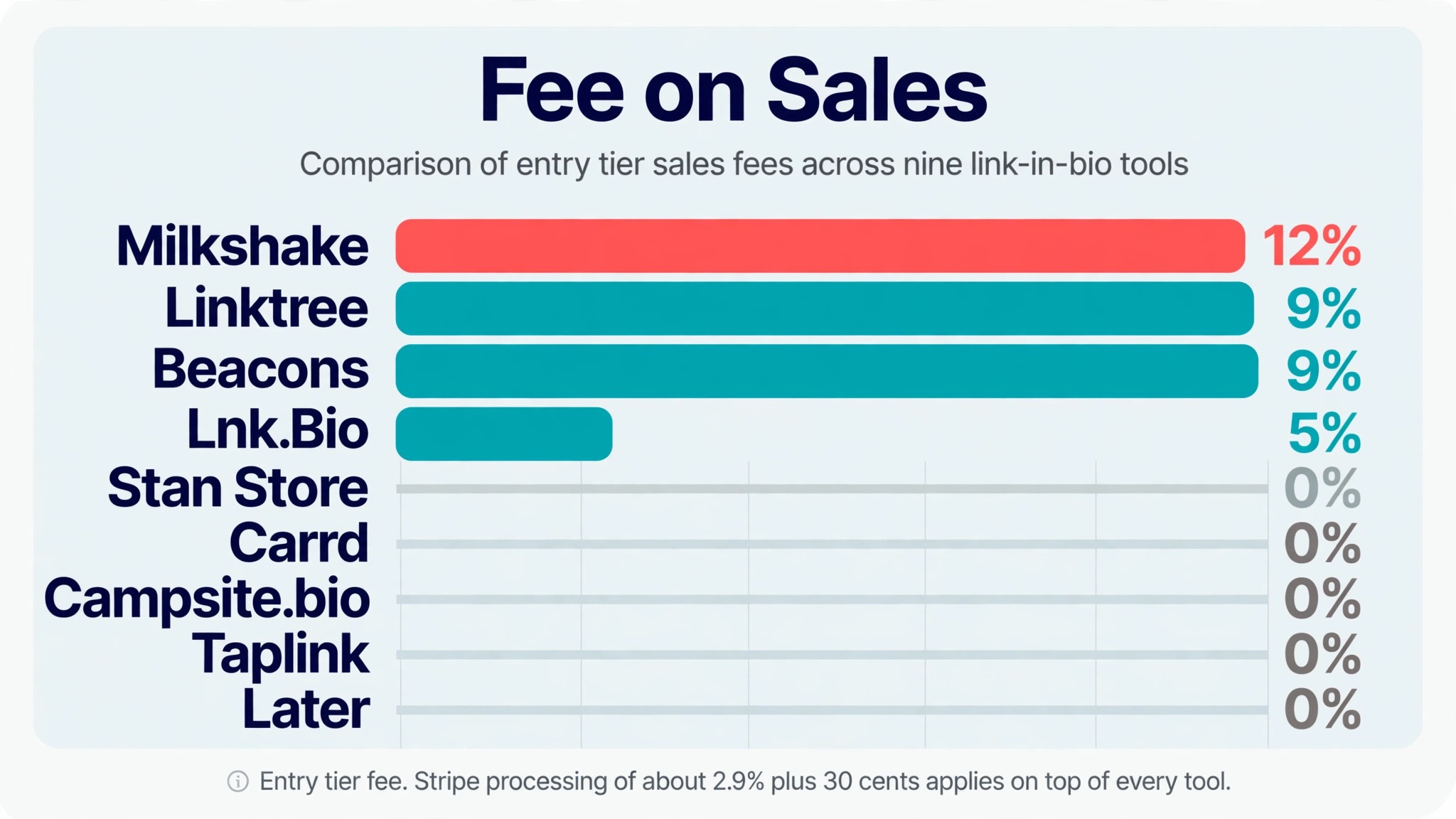
The monthly subscription is the price you see, and the fee on sales is the price you pay. A 9 percent fee on 1,000 dollars of monthly sales costs 90 dollars, which is three times the cost of a 29 dollar subscription, and it grows with every sale while the subscription stays flat. Any comparison that lists only the monthly fee is hiding the bigger number.
The table below puts the fee beside the subscription, so the real cost is visible in one place. Stripe processing of roughly 2.9 percent plus 30 cents per transaction applies on top of every platform fee listed here, on every tool in this guide, so it is not included in the comparison.
| Tool | Paid from | Fee on sales |
|---|---|---|
| Linktree | 8 dollars a month | 9 percent, 0 percent on Premium |
| Beacons | 10 dollars a month | 9 percent, 0 percent from Creator Plus |
| Stan Store | 29 dollars a month | 0 percent |
| Carrd | 9 dollars a year | None from Carrd |
| Campsite.bio | 7 dollars a month | 0 percent |
| Lnk.Bio | 0.99 dollars a month | 5 percent on the shop |
| Taplink | 4 dollars a month | 0 percent |
| Milkshake | 2.99 dollars a month | 12 percent free, 9 percent Pro, 7 percent Pro Plus |
| Later | 18.75 dollars a month | None, routes to your store |
The rule that follows from this table is simple. If you do not sell, pick the cheapest page that looks good. If you sell a little, pick a low fee tool such as Campsite.bio or Taplink. If you sell a lot, pick a zero fee tool such as Stan Store, or pay for the tier that removes the fee, because the fee saving will exceed the subscription within the first month.
That fee table is also the reason the rankings in this guide differ from most other lists of the best link in bio tools. A list that ranks by features alone will crown the tool with the most features, and a list that ranks by monthly price alone will crown the cheapest subscription. Neither list answers the question that decides the real cost, which is how much of each sale the tool keeps. Judge the tools by the total cost at your own sales volume, and the winner for a seller will often be different from the winner for a creator who only links.
How to Choose a Link in Bio Tool Without Overpaying
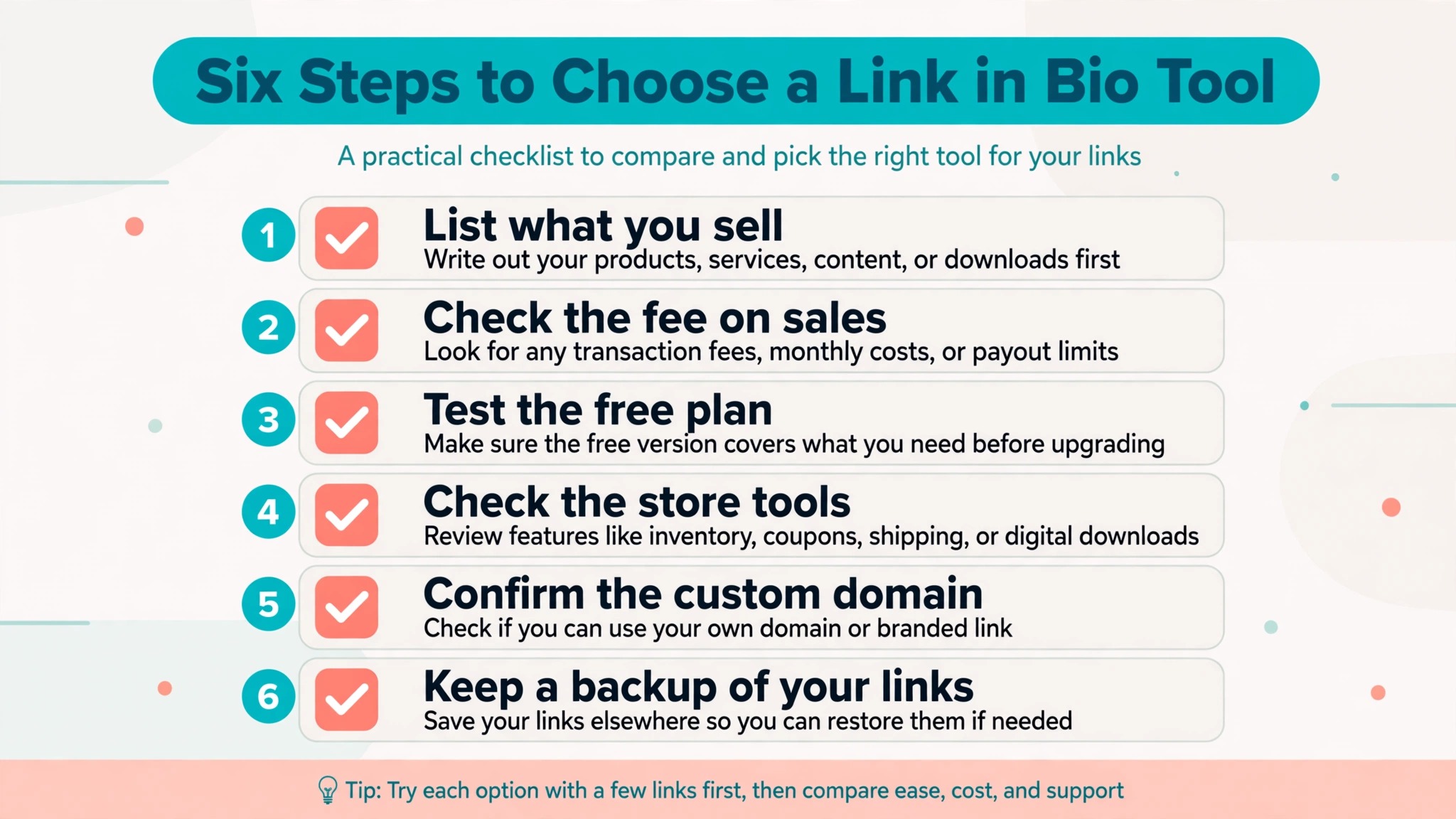
Choosing well takes twenty minutes and saves money every month after. Work through the steps below in order, and do not pay until the free tier has shown you a page you would send to your own audience.
- List what the page must do, in order. Links only, email capture, selling, bookings, or all four, because the list eliminates most tools before you open any of them.
- Build the page on the free plan first. If the free tier will not let you publish a usable page without branding that embarrasses you, that is your answer, and the paid tier is the real price.
- Add up the real monthly cost, including the fee on your expected sales. A 10 dollar subscription with a 9 percent fee costs more than a 29 dollar subscription with no fee once monthly sales pass about 210 dollars, so do the arithmetic for your own numbers.
- Test the page on a phone, on a slow connection, and from a follower account. A page that loads slowly or looks broken on a phone loses the visitors it was built to serve, whatever the feature list says.
- Check what happens if the tool shuts down. Keep a copy of your links, your email list, and your product pages somewhere you control, because Bento shut down in February 2026 after an acquisition, and its users lost their pages with it.
- Pick the tool that fits the next year, not only the next week. A page that works for a hundred followers and breaks at ten thousand costs more to rebuild than the right tool would have cost from the start.
Mistakes That Cost Creators Money
The most expensive mistake is choosing by monthly price and ignoring the fee on sales. A free plan with a 12 percent fee costs more than a 29 dollar plan with no fee for any creator who sells more than a few hundred dollars a month, and the fee is deducted silently on every order, so it is easy to miss until the monthly total arrives.
The second mistake is building the whole business inside one tool. A link page, an email list, and a store that all live in one account are convenient until that account changes its prices, removes a feature, or shuts down. Keep the email list exportable, keep the product files backed up, and keep a copy of the link list, so a platform change is an inconvenience rather than a disaster.
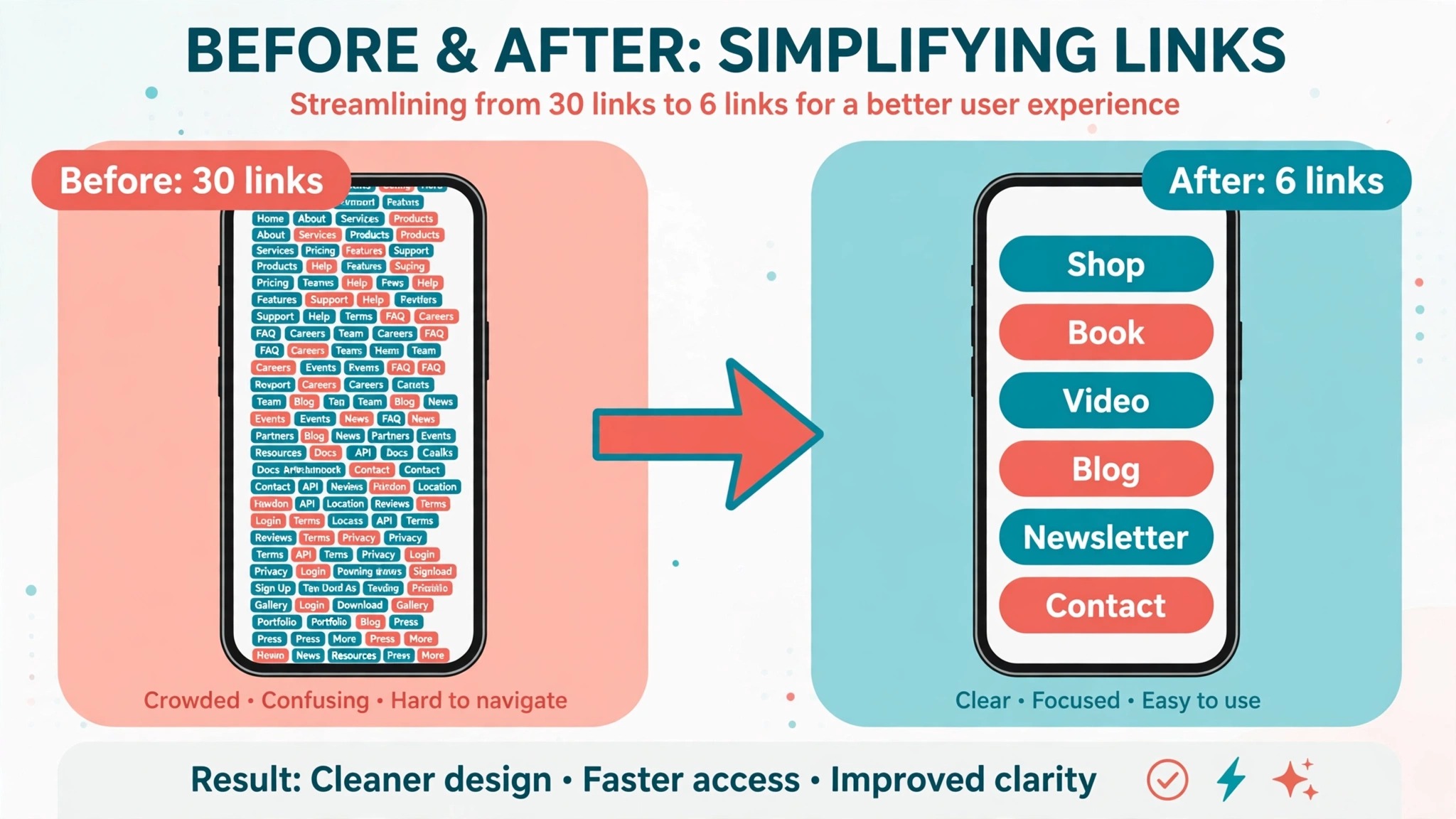
The third mistake is adding too many links. A page with thirty links is a directory, not a guide, and visitors faced with thirty choices pick none of them. Five to eight links, ordered by what the audience wants most, will send more traffic than a complete archive, because a short list is a decision and a long list is a chore.
The fourth mistake is never checking the analytics. Every tool in this guide reports clicks per link, and the data shows which links earn their place and which ones are ignored. Remove the ignored links, move the popular ones to the top, and update the page monthly, because a page that never changes slowly stops matching what the audience wants.
The fifth mistake is forgetting the custom domain. A page on a free subdomain works, and a page on your own domain looks professional, survives a platform change, and keeps the traffic if you ever switch tools. The domain costs a few dollars a year, and the paid tier that unlocks it is usually the cheapest upgrade in the tool.
The sixth mistake is treating the bio page as finished. A page that still links to a product you no longer sell, a video from two years ago, or a booking form for a closed service is worse than no page at all, because it sends visitors to dead ends. Review the page monthly, remove what is stale, and add what is new, and the page will keep earning its place in your profile.
Frequently Asked Questions
Which of the best link in bio tools is free?
Linktree, Beacons, Carrd, Campsite.bio, Lnk.Bio, Taplink, Milkshake, and Later all offer free plans, and Stan Store offers only a 14 day trial. The free tiers differ in branding, analytics, and selling features, so test the free plan on a real page before you pay. Carrd gives the strongest free experience for a designed page, while Linktree gives the most recognised free page.
What is the cheapest link in bio tool?
Lnk.Bio is the cheapest paid option, from 0.99 dollars a month or 9.99 dollars as a one time payment, and Carrd costs 9 dollars a year for Pro Lite. Both are cheaper per year than a single month of most rivals. The cheapest tool overall depends on whether you sell, because a low subscription with a high fee on sales can cost more than a higher subscription with no fee.
Does Linktree take a cut of my sales?
Yes, Linktree charges a 9 percent seller fee on Starter and Pro, and 0 percent only on Premium at 35 dollars a month. The free plan cannot sell at all, and paid selling moved to Pro in October 2026. If you sell more than a few hundred dollars a month, compare the fee against Stan Store at 29 dollars a month with no platform fee, because the saving can exceed the subscription quickly.
Is Bento still available?
No, Bento shut down on February 13, 2026, after Linktree acquired it. Anyone still linking to a Bento page should replace it with a page on a tool in this guide, and keep a backup of the links, because a page that lives only inside one company can disappear with a business decision. The same caution applies to any tool in this guide, so export your data regularly.
Should I use a custom domain for my bio page?
Yes, when the page matters to your income. A custom domain looks professional, survives a switch between tools, and keeps your traffic if a platform changes its rules. Most tools in this guide unlock custom domains on a paid tier, with Carrd offering it from 19 dollars a year on Pro Standard, and Linktree offering it from Pro. The domain itself costs a few dollars a year from a registrar.
How many links should a bio page have?
Five to eight links is the range that works best, ordered by what your audience wants most. A page with thirty links overwhelms visitors, and a page with one link wastes the space. Put the newest offer or the most popular destination at the top, remove links that get no clicks, and review the analytics monthly to keep the page matched to what followers actually open.
The Bottom Line
The best link in bio tools are the ones that charge fairly for what you actually do. Linktree wins for recognition and integrations, Stan Store wins for sellers who want no platform fee, Beacons wins for creators who want everything in one account, and Carrd wins for design control at the lowest price.
Add up the subscription and the fee on your own sales before you choose, keep a backup of your links and your email list, and review the page monthly. One link has to do the work of a whole website, and the tool that makes that work cheap and reliable is the right one for you. Build it once, check it monthly, and let the page earn its place in your profile.