
A client arrives for a 2 pm colour appointment and finds another client already sitting in your chair. The stylist apologises, the waiting client leaves a one star review, and the salon loses two bookings instead of one. That scene is the reason owners search for how to fix double bookings in salon booking software, and it is almost never caused by one careless mistake. It is caused by a booking setup where two channels can claim the same slot, the same chair or the same stylist at the same time, and nobody notices until the client walks in.
Double bookings cost more than the lost service. A salon that double books once a week loses the revenue from the turned away client, the tip, the retail sale and the rebooking that would have followed. The damage spreads further when the client tells friends or posts about the wait, because a salon sells trust as much as it sells hair. The good news is that every common cause has a concrete fix, and most fixes take less than an hour to set up once you know where to look.
This guide works through the seven causes we see most often in small salons, from unsynced booking channels to wrong service durations. Each cause comes with a fix you can apply today, a short diagnosis checklist to find your own weak spot, and a comparison of the salon software that prevents the problem by design. Prices were checked against vendor pricing pages and current 2026 roundups in November 2026, so confirm the price on the checkout page before you pay.
How to Fix Double Bookings in Salon Booking Software for Good
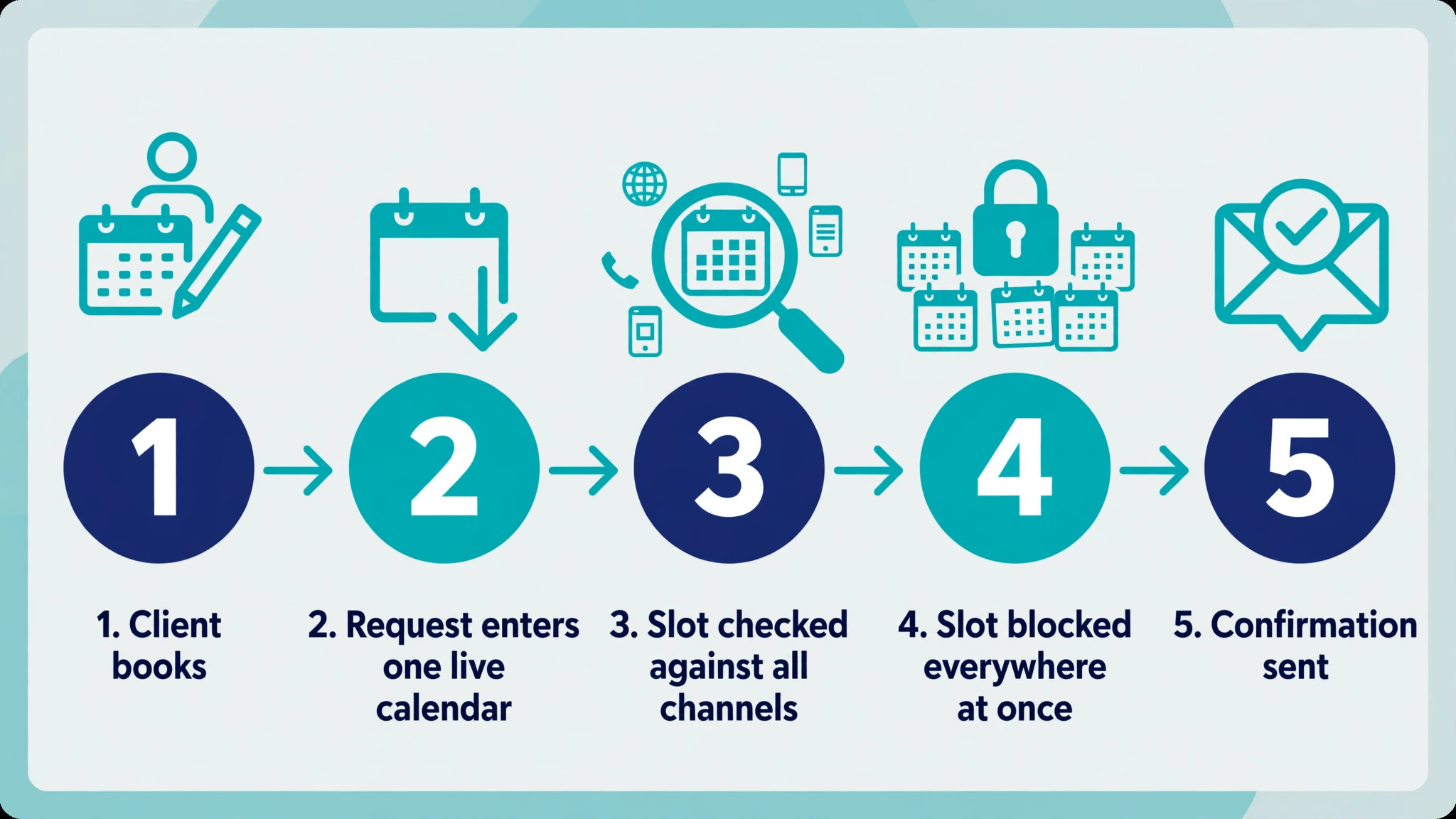
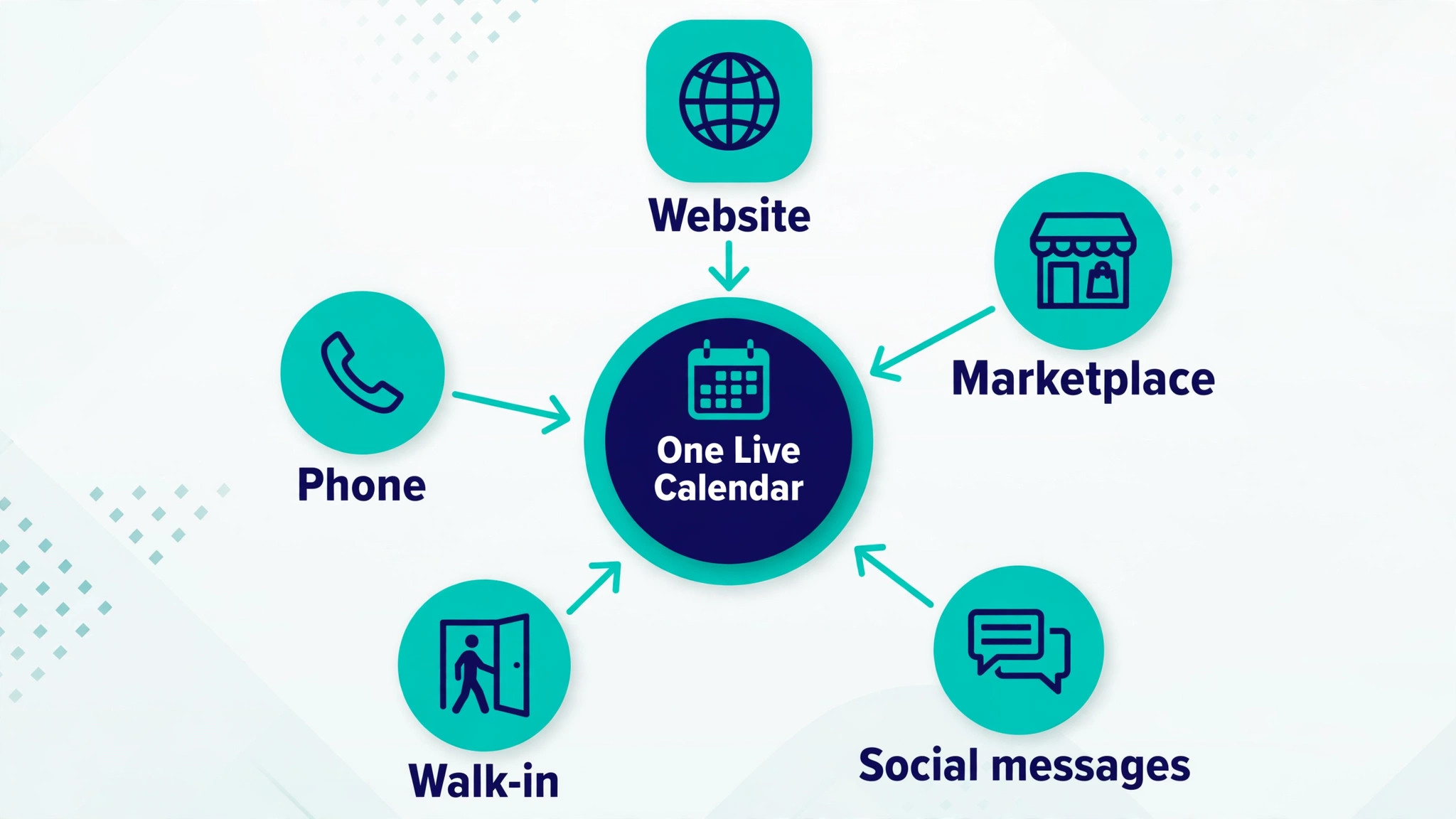
The fix starts with one rule. One calendar must own every slot. When the phone, the website, the marketplace listing, the walk in book and the social media direct message all write to the same live calendar, a slot that is taken disappears everywhere at once. When any channel writes to a separate list, a paper diary or a stylist memory, two bookings can land on the same slot before anyone compares the lists.
That rule sounds simple, and it is the one most salons break. A salon often adds online booking on top of a phone book, then adds a marketplace profile, then lets stylists take bookings in their own direct messages. Each channel works on its own. None of them knows what the others sold. The rest of this guide shows how to close each gap, in the order that stops the most damage first.
Before you change any setting, run the diagnosis checklist in the later section. It takes ten minutes and tells you which of the seven causes is yours. Fixing the wrong cause wastes a week and leaves the real gap open, so diagnose first and then work through the matching fix below.
The 7 Causes and the 7 Fixes
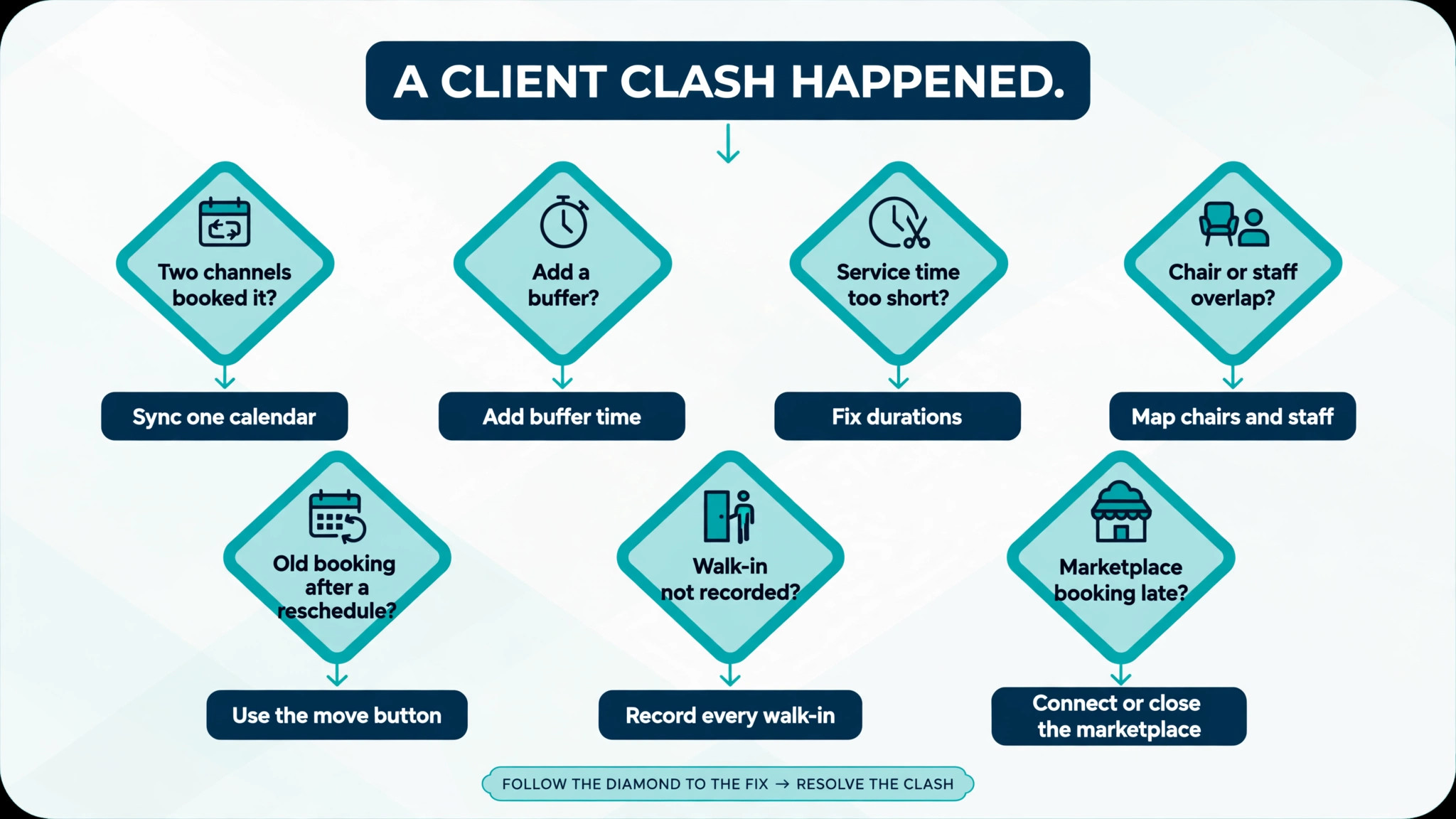
The seven causes below cover almost every double booking a small salon will meet. Read the headings and pick the ones that match your salon. Most salons have two or three at once, which is why the problem feels random. It is not random. It follows the gaps in your setup, and it repeats until each gap is closed. Work through the list in order if you want to fix double bookings in salon booking software in one focused week.
1. Two Booking Channels That Never Sync
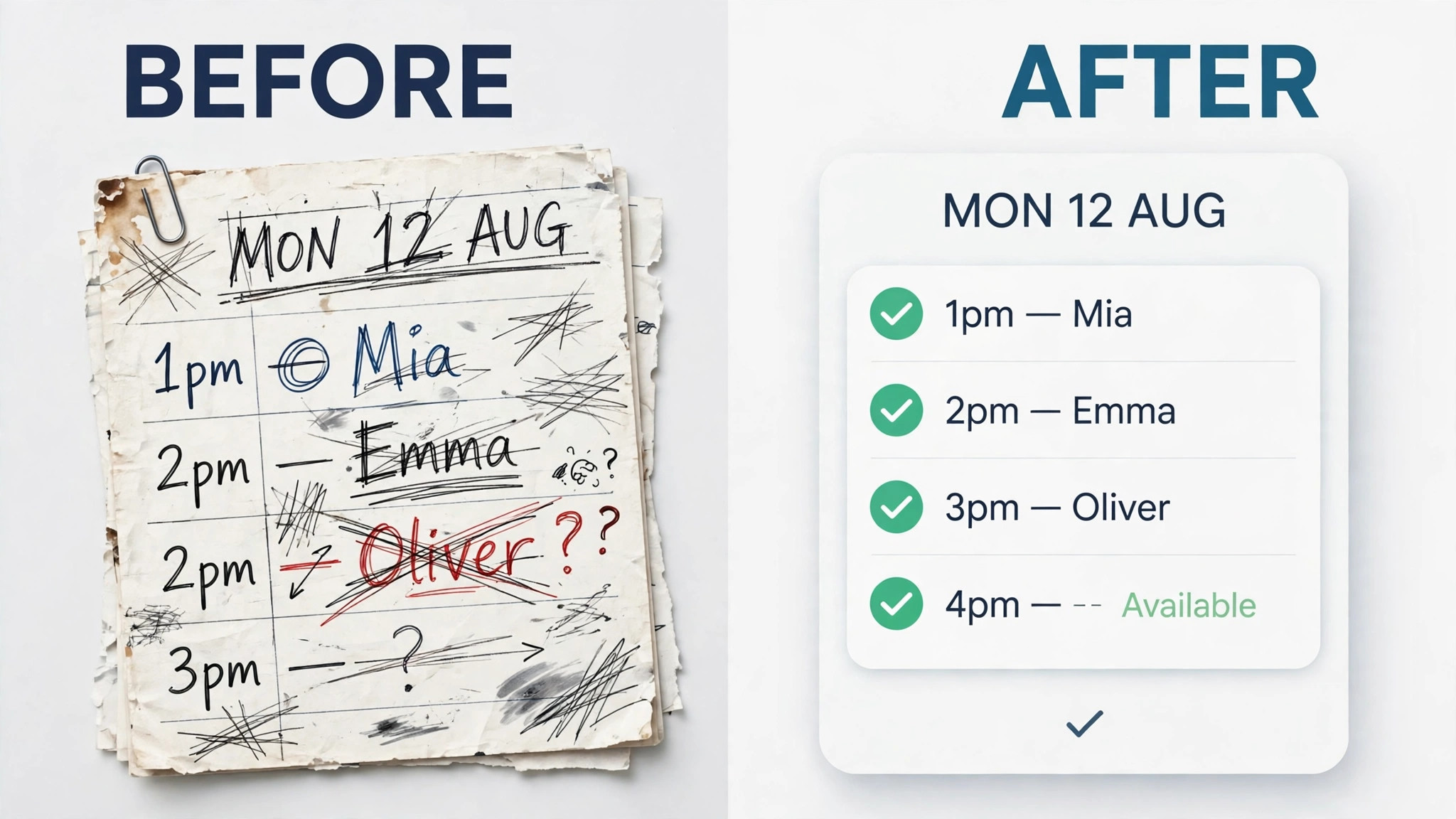
This is the most common cause by a wide margin. A client books online at 11 am while the receptionist takes a phone booking for the same stylist at the same time. The online system never saw the phone booking, and the receptionist never saw the online booking. Both clients get a confirmation, and the clash only surfaces when they arrive.
The cause is not the staff. It is the setup. A salon that runs online booking as a separate system from the front desk book has two sources of truth, and two sources of truth always disagree eventually. The same gap opens when a marketplace profile takes bookings that never reach the salon calendar, or when a stylist books a client in a personal message and forgets to add it to the book.
The fix is to make the salon software the only calendar. Turn off any booking form, link or marketplace listing that does not write straight into it. Give every stylist one shared calendar view and remove the paper diary from the front desk, because a paper diary is a second source of truth by another name. Then test the setup. Book a test slot online and check that it vanishes from the phone booking screen within seconds. If it does not vanish, the channels are still separate and the fix is not finished.
- List every place a client can book, including phone, website, marketplace, social messages and walk ins.
- Turn off or connect every channel that does not write into the same live calendar.
- Give all staff one shared calendar view and remove the paper diary from the desk.
- Book a test slot online and confirm it disappears from every other booking screen at once.
- Repeat the test for a marketplace booking and for a phone booking entered by the receptionist.
2. No Buffer Time Between Services
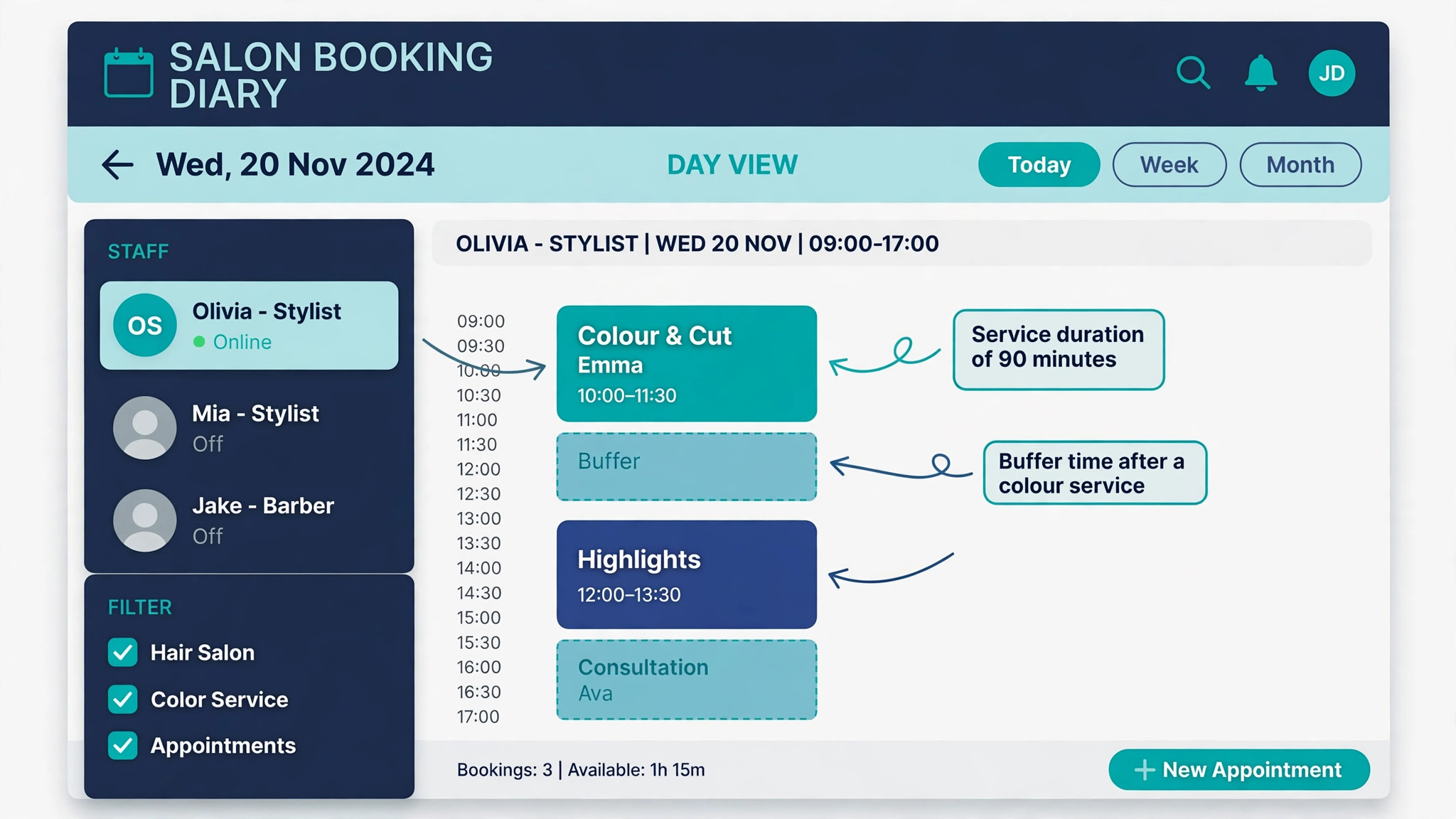
A colour service that needs 90 minutes is booked back to back with a cut at 90 minutes, with no time to rinse, clean the chair, mix the next colour or deal with a client who arrives five minutes late. The second client waits, the stylist rushes, and the schedule slips so far that the next booking overlaps the one after it. The diary looks clean, but the real day is already double booked by the time the third client arrives.
Buffer time is the gap that absorbs real life. Without it, a small delay becomes a clash, because the diary assumes every service ends exactly on time. Salons that skip buffers usually do it to fit more bookings into the day, and the maths looks good on paper. In practice the extra booking is the one that gets turned away, so the salon earns less, not more.
The fix is to add a buffer to every service that needs one. Colour, foils, keratin and bridal work need 10 to 15 minutes after the service. Cuts need 5 minutes for cleanup and consultation. Set the buffer inside the booking software so it blocks the slot automatically, rather than relying on staff to remember it. Then check the day view. If two services touch with no gap, the buffer is not applied.
- Open the service list and write the real end to end time for each service, including cleanup.
- Add a 10 to 15 minute buffer after colour, foils, keratin and bridal services.
- Add a 5 minute buffer after cuts and blow dries.
- Set buffers in the software so they block the slot automatically.
- Check the next full day in the diary and confirm no two services touch without a gap.
3. Service Durations Set Too Short
A balayage that takes three hours is listed as a two hour service. A bridal trial that takes 90 minutes is listed as 60. The diary then offers a free slot in the middle of a service that is still running, and a new client books it. The stylist is trapped between two clients, and one of them waits an hour or leaves.
Wrong durations usually come from the setup day. The owner guesses the times, or copies them from a previous system, and nobody corrects them when the real times turn out longer. The error compounds because the diary keeps offering the phantom slot every week, so the same clash repeats with different clients.
The fix is to time the real services. Ask each stylist to note the start and finish of their five most booked services for one week. Then update the durations in the software to match the real times, including consultation and cleanup. Round up to the nearest 15 minutes rather than down, because a diary that ends five minutes early is better than one that ends an hour late. Tell the team the new times before they go live, so nobody is surprised when the diary looks fuller.
- Ask each stylist to time their five most booked services for one week.
- Add consultation and cleanup time to each real duration.
- Update every service duration in the software to the real time, rounded up to 15 minutes.
- Check that no service can now be booked inside another service.
- Tell the team the new durations before they go live.
4. Staff Calendars That Overlap
A salon with four stylists and three chairs books four clients at 10 am because the software counts staff, not chairs. A stylist who works at two locations is booked at both on the same morning. A part time stylist who only works Tuesdays and Thursdays is offered on a Monday because the rota was never entered. Each of these is a calendar overlap, and each one looks like a double booking to the client who loses the chair.
The cause is a resource the software does not know about. Booking software blocks a stylist who is busy, but it cannot block a chair, a basin or a room unless you tell it that the resource exists and that it is limited. The same applies to a stylist working across locations. The software sees two free calendars, because it does not know they belong to one person.
The fix is to map the real limits. Enter every stylist working pattern, including days off, lunch breaks and location, and set the number of bookable chairs, basins and rooms as resources the software must respect. If the software cannot limit by chair or room, use the paid plan that adds resource booking, or cap the number of simultaneous bookings by hand until you switch. Then test with a busy Saturday. If the diary offers more bookings than you have chairs, the limit is not set.
- Enter every stylist working pattern, including days off, breaks and location.
- Set chairs, basins and rooms as limited resources in the software.
- Link a stylist who works at two locations to one shared calendar, not two.
- Cap simultaneous bookings at the number of chairs when the software cannot do it for you.
- Test a busy Saturday in the diary and count bookings against chairs.
5. Reschedules That Create a Second Booking
A client moves a Friday appointment to Saturday. The receptionist books the Saturday slot and forgets to cancel the Friday one. The Friday slot stays in the diary, another client books it, and the stylist now has two clients on Friday and a gap on Saturday that nobody fills. The same error happens when a client reschedules online and the old booking survives because the software was set to keep it as a backup.
Reschedules are risky because they involve two actions, and the second action is easy to skip when the phone rings or the next client arrives. The diary looks right at the moment of the change, because the new booking is there. The old booking only becomes a problem days later, when a new client takes it and the stylist discovers the clash.
The fix is to make rescheduling a single action. Use the move or reschedule button in the software, which cancels the old slot and creates the new one in the same step, instead of creating a new booking and cancelling the old one by hand. Turn off any setting that keeps the original booking after a move. Then add a daily check. Each morning, the front desk scans the day for any client with two bookings and any slot with two names, and fixes both before the doors open.
- Always use the move or reschedule button, never a new booking plus a manual cancel.
- Turn off any setting that keeps the original booking after a move.
- Check the day each morning for any client with two bookings.
- Check the same day for any slot with two names on it.
- Confirm the change with the client by text, so a wrong move is caught the same day.
6. Walk Ins Booked on Memory Instead of the Diary
A walk in client asks for a cut, the stylist says yes from memory, and nobody writes it down. An hour later an online booking arrives for the same stylist at the same time, because the diary still shows the slot as free. The walk in client is already in the chair, the booked client is at the door, and the salon has to choose who waits.
Walk ins cause double bookings because they bypass the system entirely. The diary cannot block a slot it does not know is taken, and memory is the weakest booking system a salon can run. The problem grows on busy days, when the front desk is rushed and the walk in feels too small to record properly. Those small unrecorded bookings are the ones that clash.
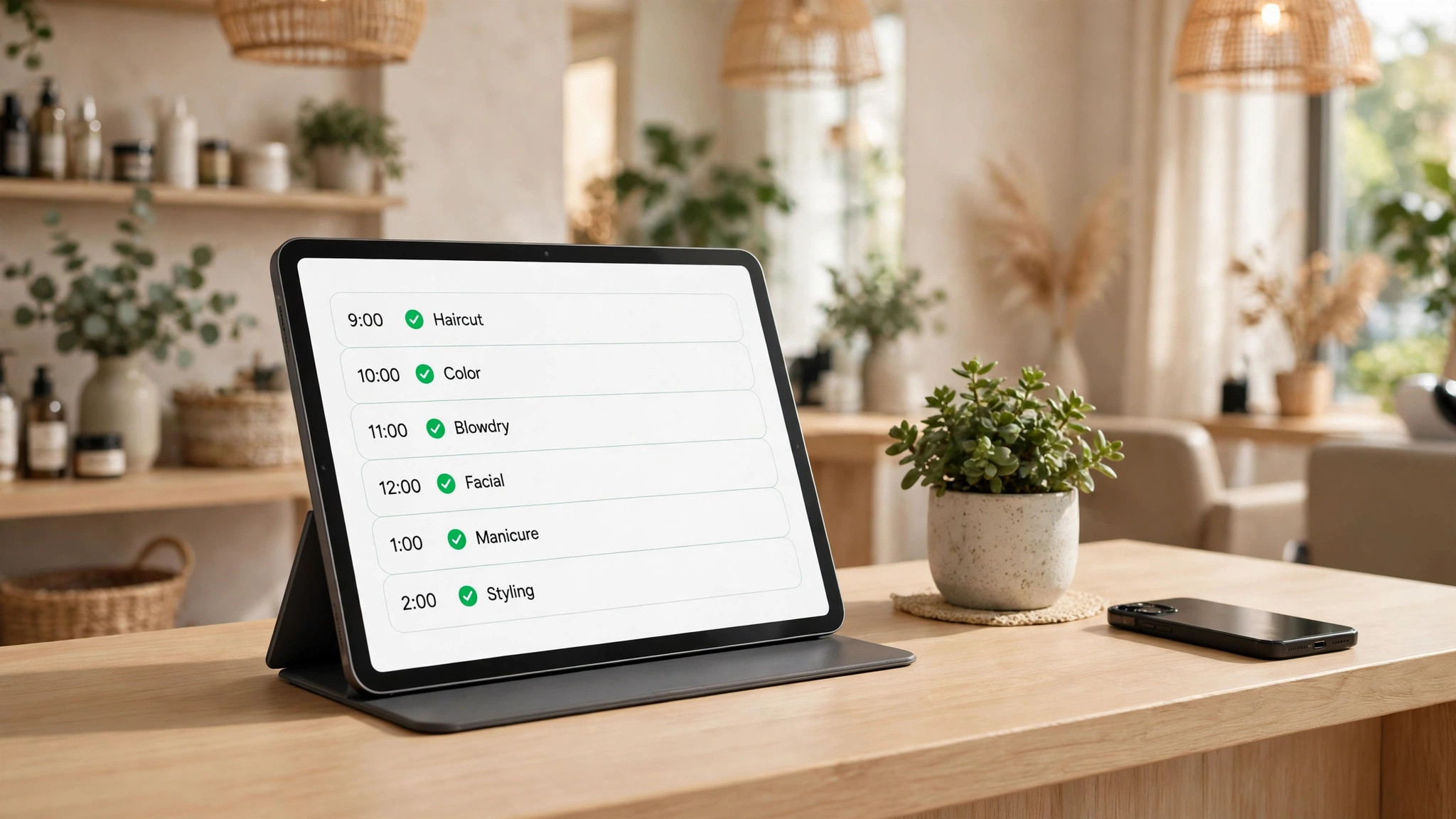
The fix is a rule with no exceptions. Every walk in goes into the diary before the service starts, even a 15 minute fringe trim. Put a tablet at the front desk with the diary open, so the booking takes seconds and nobody has to walk to a back office computer. If the diary shows no free slot, offer the client the next free time or the waitlist, and record the waitlist entry too. A walk in who waits 20 minutes for a real slot is a happy client. A walk in who takes a booked client slot is a lost client.
- Record every walk in in the diary before the service starts, with no exceptions.
- Keep a tablet at the front desk with the diary open all day.
- Offer the next free slot or the waitlist when the diary shows no space.
- Record waitlist entries in the software, not on paper.
- Check the diary at the end of each day for services with no booking attached.
7. Marketplace Bookings That Bypass Your Calendar
A client finds the salon on a marketplace, books through the marketplace, and the booking never reaches the salon calendar. Or it reaches the calendar hours later, after the salon has already sold the same slot to a phone client. Marketplace bookings are useful for new clients, but they are the least reliable channel when the sync is slow or the marketplace keeps its own diary.
The cause is usually a marketplace fee model that rewards the marketplace for keeping the booking on its own platform. The salon sees the booking only when the marketplace sends it, and a delay of even 30 minutes is enough for a clash on a busy Saturday. Some salons also run a marketplace profile they forgot about, so bookings arrive from a listing nobody checks.
The fix starts with an audit. Search for the salon name on the main marketplaces and list every live profile. Either connect each live profile to the salon calendar with a live sync, or close the profile and redirect clients to the salon booking page. Then set the marketplace to block slots the moment they are taken, and check the sync daily for the first two weeks. If bookings still arrive late, move new client discovery to a channel you control, and keep the marketplace only if the sync proves reliable.
- Search the main marketplaces for the salon name and list every live profile.
- Connect each live profile to the salon calendar with live sync, or close it.
- Set the marketplace to block a slot the moment it is taken.
- Check the sync daily for two weeks and log any booking that arrives late.
- Keep a marketplace only when its sync proves reliable over that test period.
The 10 Minute Diagnosis Checklist
Use this checklist before you change any setting. It tells you which cause is yours, so you fix the real gap first. Work through it with the diary open and a recent double booking in mind.
- Pick your last double booking and write down how each client booked, phone, online, marketplace, walk in or message.
- Check whether both bookings were in the same calendar at the time they were made.
- Check whether the service durations in the diary match the real times your stylists take.
- Check whether a buffer exists after the service that clashed.
- Check whether the stylist was booked at two locations or against a chair that was already taken.
- Check whether the clash involved a reschedule where the old booking was never cancelled.
- Check whether a walk in or a marketplace booking was involved.
- Count how many of the seven causes match your answers, and fix the matching ones in order.
Most salons find two or three matches. That is normal, and it explains why the problem felt random. Fix the matching causes one at a time, test each fix with a real booking, and move to the next. A salon that fixes three causes in one week usually sees the problem disappear, because the remaining causes have nothing left to feed on.
Salon Software That Prevents Double Bookings
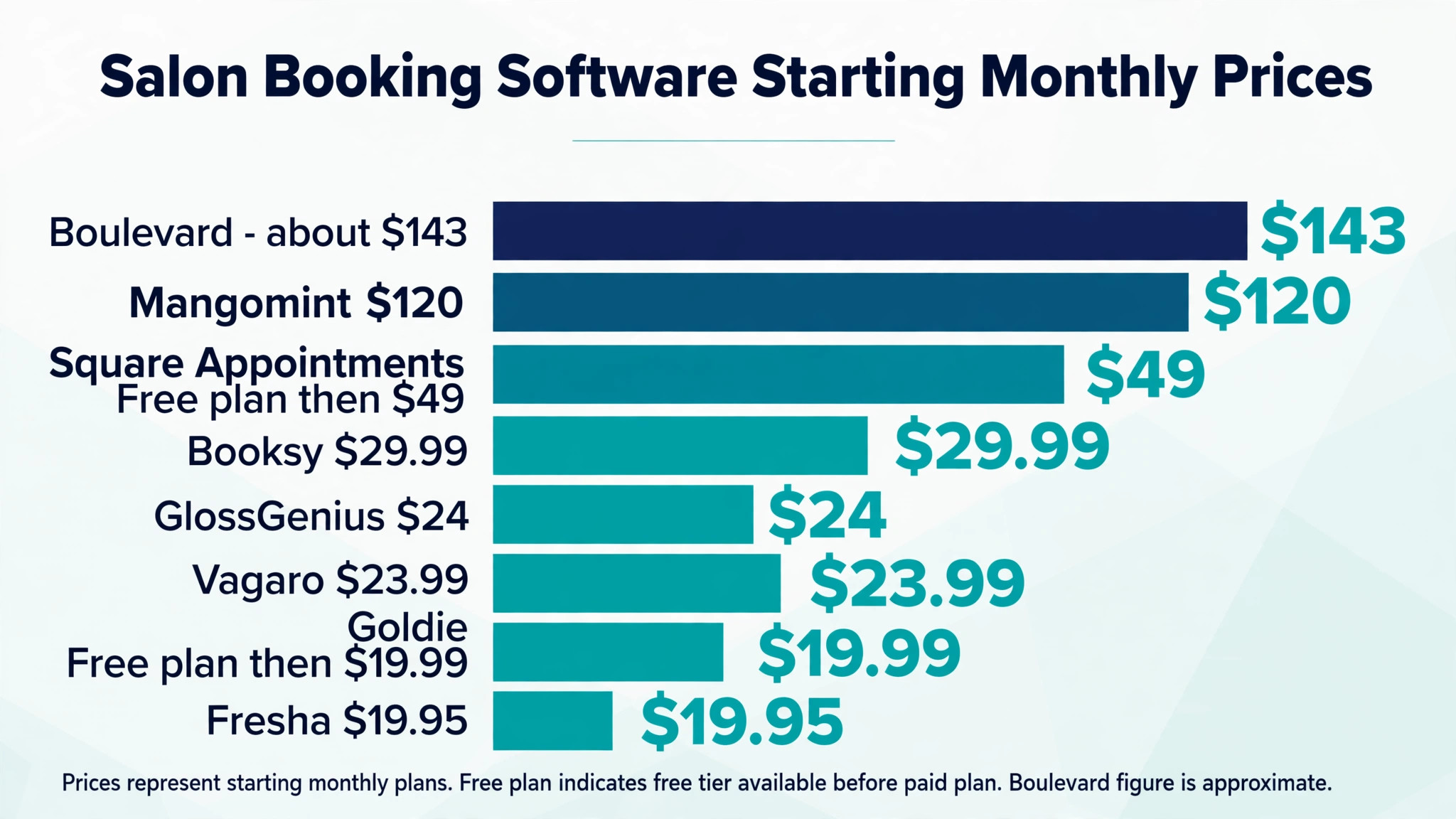
The right software makes the fixes above automatic. It blocks a taken slot everywhere at once, adds buffers without staff input, and keeps one calendar for every channel. The table below compares the tools salons shortlist most often, with prices checked in November 2026. Confirm the price on the vendor page before you pay, because marketplace fees and per staff charges change the real monthly cost. Any tool on this list can help you fix double bookings in salon booking software, so judge them on whether your team will keep the calendar up to date.
| Software | Starting price | Double booking protection | Best for |
|---|---|---|---|
| Fresha | 19.95 dollars a month per location | Live calendar, deposits, marketplace sync | Small teams that want marketplace discovery |
| Vagaro | 23.99 dollars a month for six months, then 30 dollars | Shared calendars, deposits, reminders | Small to mid salons that need multi staff tools |
| GlossGenius | 24 dollars a month | Single branded booking page, deposits | Independent stylists who want a polished book |
| Booksy | 29.99 dollars a month plus 20 dollars per extra user | Live calendar, deposits, Boost marketplace | Salons that want a large marketplace audience |
| Square Appointments | Free plan, then 49 dollars a month | Free booking site, reminders, payments | Salons already taking payments through Square |
| Goldie | Free for 20 appointments a month, Pro 19.99 dollars | Simple shared calendar, reminders | Solo stylists who want a low cost start |
| Mangomint | 120 dollars a month per location plus 10 dollars per user | Resource booking, memberships, front desk tools | Growing salons with a front desk team |
| Boulevard | About 143 dollars a month for up to 5 calendars | Premium client experience, deposits, memberships | High volume salons and spas |
Fresha is the cheapest route to a synced calendar with marketplace reach, but the 20 percent one time commission on a new marketplace client adds up, so read the marketplace terms before you rely on it. Vagaro gives the most complete multi staff setup at the lowest entry price, and the 30 day trial needs a card on file. GlossGenius wins on the booking experience, because clients can book in under 30 seconds without an account, and the Gold plan at 48 dollars a month covers teams up to nine staff.
Square Appointments is the best free starting point, because the free plan includes unlimited staff calendars and a booking website, and you pay only card processing until you need the paid no show protection. Goldie suits a solo stylist who wants a simple shared calendar without a marketplace fee. Mangomint and Boulevard suit larger salons, and both charge enough that a small salon should trial them carefully before committing.
A Weekly Routine That Keeps the Diary Clean
Software fixes the structure, but a short weekly routine keeps it clean. Spend 20 minutes every Monday on the diary, and most double bookings never get the chance to form. This routine is the maintenance step that keeps your work to fix double bookings in salon booking software from slipping back after the first good week.
- Open next week in the diary and scan each day for two names on one slot.
- Check that every stylist working pattern matches the rota for that week.
- Check that every service duration still matches the real time, and fix any that drifted.
- Check that buffers are still applied after colour and bridal services.
- Check that every marketplace profile is still synced, and close any profile you no longer use.
- Check the waitlist and fill gaps with waiting clients before the week starts.
- Send reminders for every booking in the next 48 hours, so a client who cannot come cancels in time for the slot to be resold.
Reminders deserve a special note. A client who forgets an appointment creates a gap, and a gap tempts the front desk to squeeze in a walk in without recording it. Automated reminders cut no shows, and a cancelled slot that is released early is a slot the diary can sell cleanly. Set reminders for 48 hours and again for 2 hours before the appointment, and let clients cancel or move the booking from the reminder itself.
Mistakes That Bring Double Bookings Back
The most common mistake is fixing the software and keeping the old habits. A salon installs a live calendar, then keeps the paper diary as a backup, and the two books disagree within a week. A backup that can be booked from is not a backup. It is a second source of truth, and it will cause the exact problem the software was bought to fix.
The second mistake is letting stylists take bookings in direct messages and add them to the diary later. Later never comes on a busy day, and the diary stays wrong until the client arrives. The rule must be simple. A booking is not a booking until it is in the diary, and a stylist who takes a booking in a message adds it before replying to the next message.
The third mistake is setting service durations once and never checking them again. Stylists get faster at some services and slower at others, new services are added with guessed times, and the diary drifts out of date. A quarterly duration check takes an hour and prevents a whole season of clashes. Put it on the calendar the same way you would put a client booking, because it protects every booking that follows, and it is one of the cheapest ways to fix double bookings in salon booking software for the long term.
Our Verdict
The way to fix double bookings in salon booking software is to give one live calendar ownership of every slot, add buffers and real durations to every service, and record every walk in and reschedule in the same system. That combination closes the seven causes in this guide, and it works on the cheapest free plan as well as on the premium tools, because the principle matters more than the price.
Start with the diagnosis checklist, fix the causes that match, and test each fix with a real booking before you move on. A salon that does that work in one focused week will stop losing clients at the door, and the diary will start to feel calm again. The clients notice the difference too, because a salon that never double books is a salon they can trust with their time.
Frequently Asked Questions
Why does my salon keep double booking the same Saturday slot?
The same slot clashes every Saturday because the cause repeats every Saturday. Check whether that slot is offered by two channels at once, whether the service before it has no buffer, or whether a marketplace booking arrives late for that time. Fix the channel, the buffer or the sync for that slot, and the repeat clash stops. A clash that repeats on a schedule is a setup error, not bad luck.
Can booking software stop double bookings on its own?
Booking software stops double bookings when every channel writes into its live calendar. It cannot stop a clash when a booking is taken on paper, in a message or on a marketplace that is not synced, because the software never sees that booking. The software is the tool, and the rule that every booking goes into it is what makes the tool work.
Should I take deposits to prevent double bookings?
Deposits reduce no shows and late cancellations, and they make clients take the booking seriously, but they do not prevent a double booking on their own. A deposit on two bookings for the same slot still leaves two clients and one chair. Use deposits alongside a single live calendar, not instead of it, and set the deposit policy clearly at booking so clients understand the terms.
What is the best salon software to fix double bookings in salon booking software?
The best choice depends on the size of the salon. Square Appointments is the best free starting point, Vagaro is the best value for a small team, and GlossGenius is the best for a solo stylist who wants a polished booking page. Mangomint and Boulevard suit larger salons with a front desk. Pick the tool whose calendar every member of staff will actually use, because the best software is the one the team keeps up to date.
How do I handle two clients who arrive for the same slot?
Apologise to both, offer the waiting client the next free slot or a priority rebooking with a discount on the service, and never blame the other client or a member of staff in front of them. Fix the diary before the next client arrives, so the same clash does not repeat that day. Then log how the clash happened, so the cause can be fixed that week instead of being forgotten.
How often should I check service durations and buffers?
Check durations every quarter and buffers every month, and check both whenever you add a new service or a new stylist joins. A new service with a guessed duration is the most common way a clean diary starts to clash again, so time the new service in its first week and update the diary to match the real time.