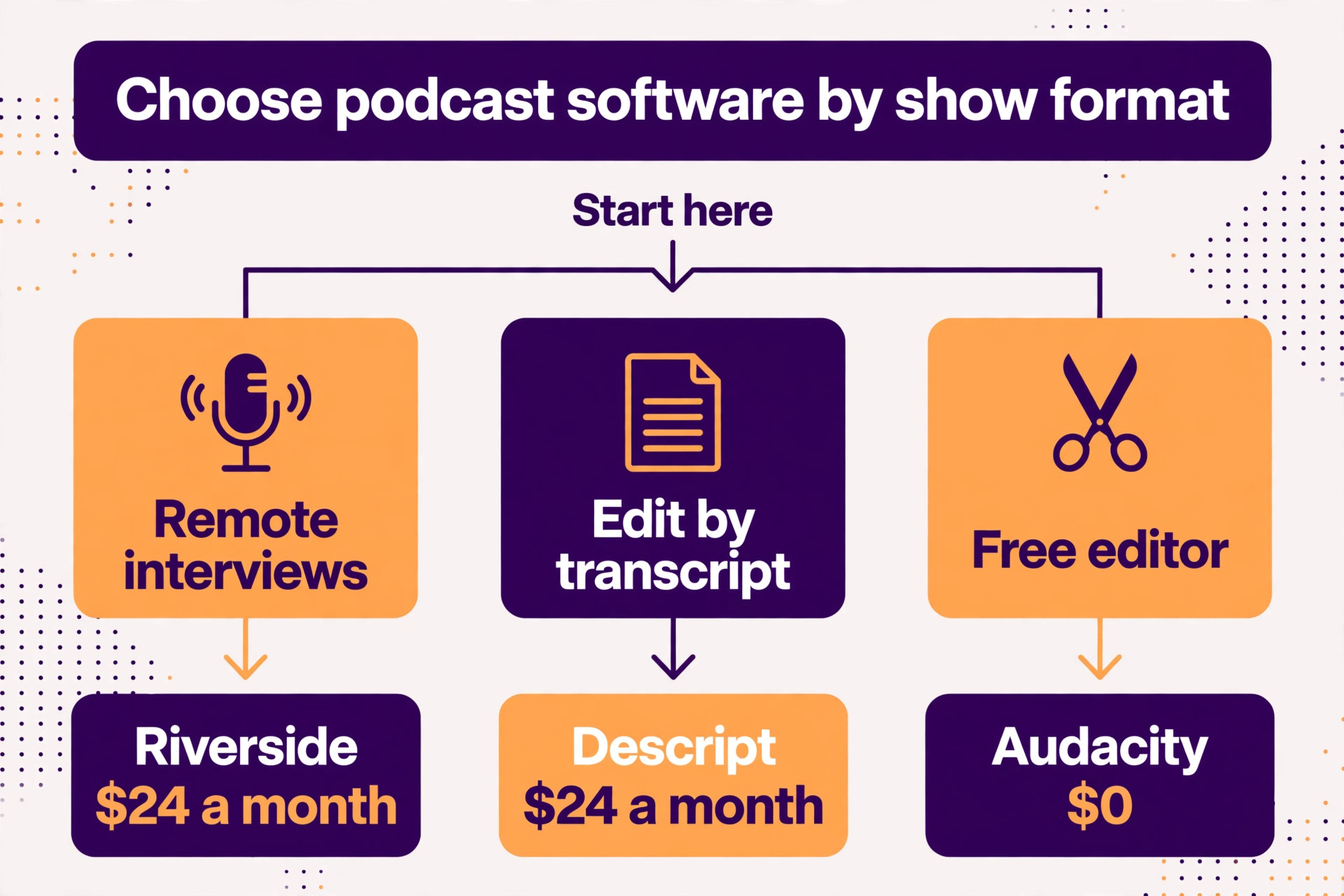
Descript is the best overall pick among the best podcast recording and editing tools we compared, because editing by transcript turns a two hour edit into a 30 minute one. Riverside is the better choice when your guests join remotely, and Audacity is the strongest free starting point for a solo audio show. We compared 10 tools on published pricing pages, recording quality, editing style, and the limits that decide whether a tool fits your show. Prices in this guide were checked in November 2026, and you should confirm the price on the checkout page before you pay, because vendors change list prices and plan limits often.
A podcast lives or dies on two things, and neither is the microphone. The first is the recording, which must be clean enough that a listener never thinks about audio quality. The second is the edit, which must be fast enough that you actually publish every week. A tool that records beautifully but edits slowly will cost you episodes. A tool that edits fast but records your guest over a bad internet connection will cost you listeners. The right choice is the one that fits both halves of your workflow.
How We Compared the Best Podcast Recording and Editing Tools
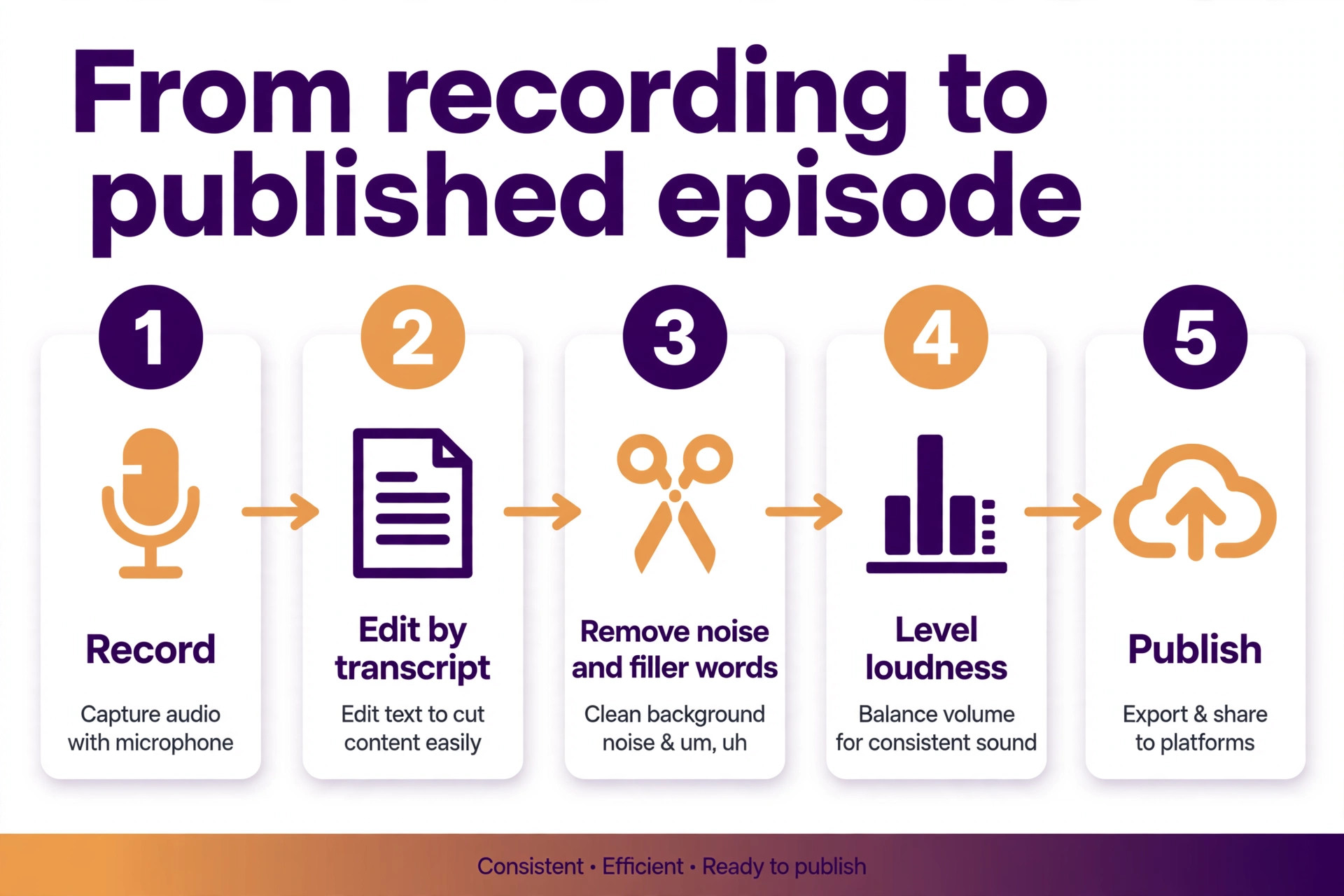
We scored each tool on six points, because a podcast tool is a workflow, not a feature list. Recording quality covered local recording, separate tracks for each voice, and the sample rate the tool captures. Editing style covered transcript editing, waveform editing, and how fast a typical episode can be cut. Remote recording covered guest invites, connection resilience, and video capture for shows that publish on video as well as audio.
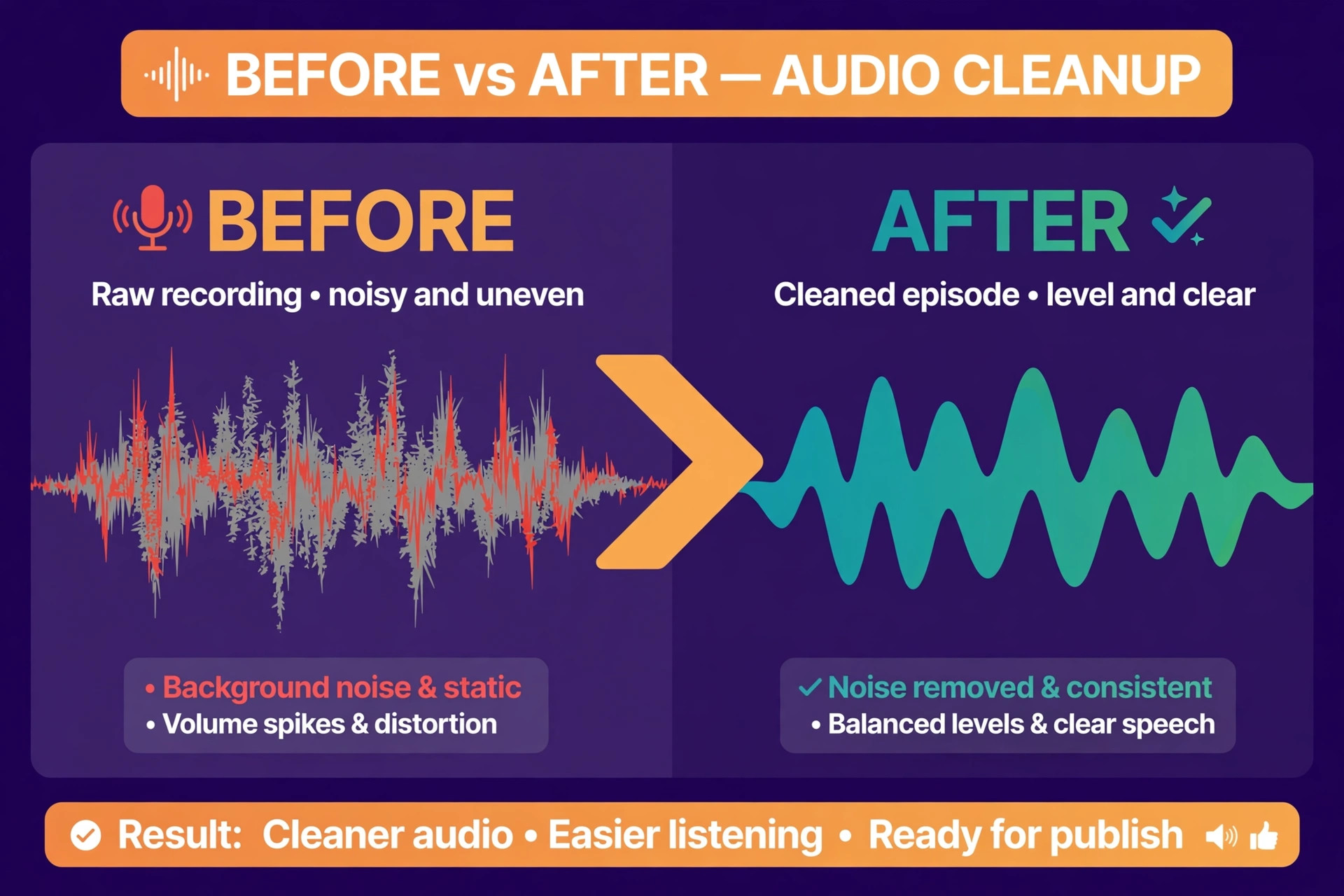
We also scored cleanup tools, because most home recordings need help. Noise removal, filler word removal, loudness levelling, and voice enhancement decide whether a bedroom recording sounds like a studio or a phone call. Pricing covered the true monthly cost on annual billing, the free plan limits, and the metered extras such as transcription hours and AI credits that can push the bill up without warning.
Finally, we scored learning curve. A full digital audio workstation can do everything, but a beginner who opens it for the first time faces a wall of faders, plugins, and routing menus. A tool built for podcasters hides that complexity and gets an episode out the door. That difference matters more than any single feature, because a show that never ships has no listeners.
The Best Pick for Each Job
| Job | Pick | Why it wins |
|---|---|---|
| Edit by transcript | Descript | Delete text to delete audio |
| Remote interviews and video | Riverside | Local recording on every track |
| A free editor on any computer | Audacity | Full editing at zero cost |
| A free editor on a Mac | GarageBand | Polished and simple |
| Spoken word and narrative shows | Hindenburg | Built for voice, not music |
| Beginners who want it done simply | Alitu | Automatic cleanup and publishing |
| AI voice tools and cloning | Podcastle | Magic Dust and Revoice |
| Automatic levelling and mastering | Auphonic | Set it and forget it |
| A full studio at a low price | REAPER | One time payment, endless depth |
Use this table as a shortcut, then read the full section for the tool you are leaning toward. The cheapest option is not the best value when it cannot record a remote guest cleanly, and the most expensive option is not the best choice when you only record solo episodes at your desk.
The Best Podcast Recording and Editing Tools, Ranked
The 10 tools below fall into three groups. The first group is all in one platforms that record and edit, and these are the strongest picks for most podcasters. The second group is dedicated editors, which suit a show with a fixed recording setup and a serious edit. The third group is free tools and automatic services, which suit a new show, a tight budget, or a workflow that needs cleanup rather than cutting. The best podcast recording and editing tools for your show depend on where your guests are and how much editing you are willing to do.
1. Descript
Descript is the tool that changed podcast editing, because it lets you edit audio by editing a transcript. Import a recording and Descript transcribes it. Delete a sentence in the text and the audio disappears with it. Move a paragraph and the audio moves too. For an interview show with long answers and false starts, this turns a two hour edit into 30 minutes of reading and deleting.
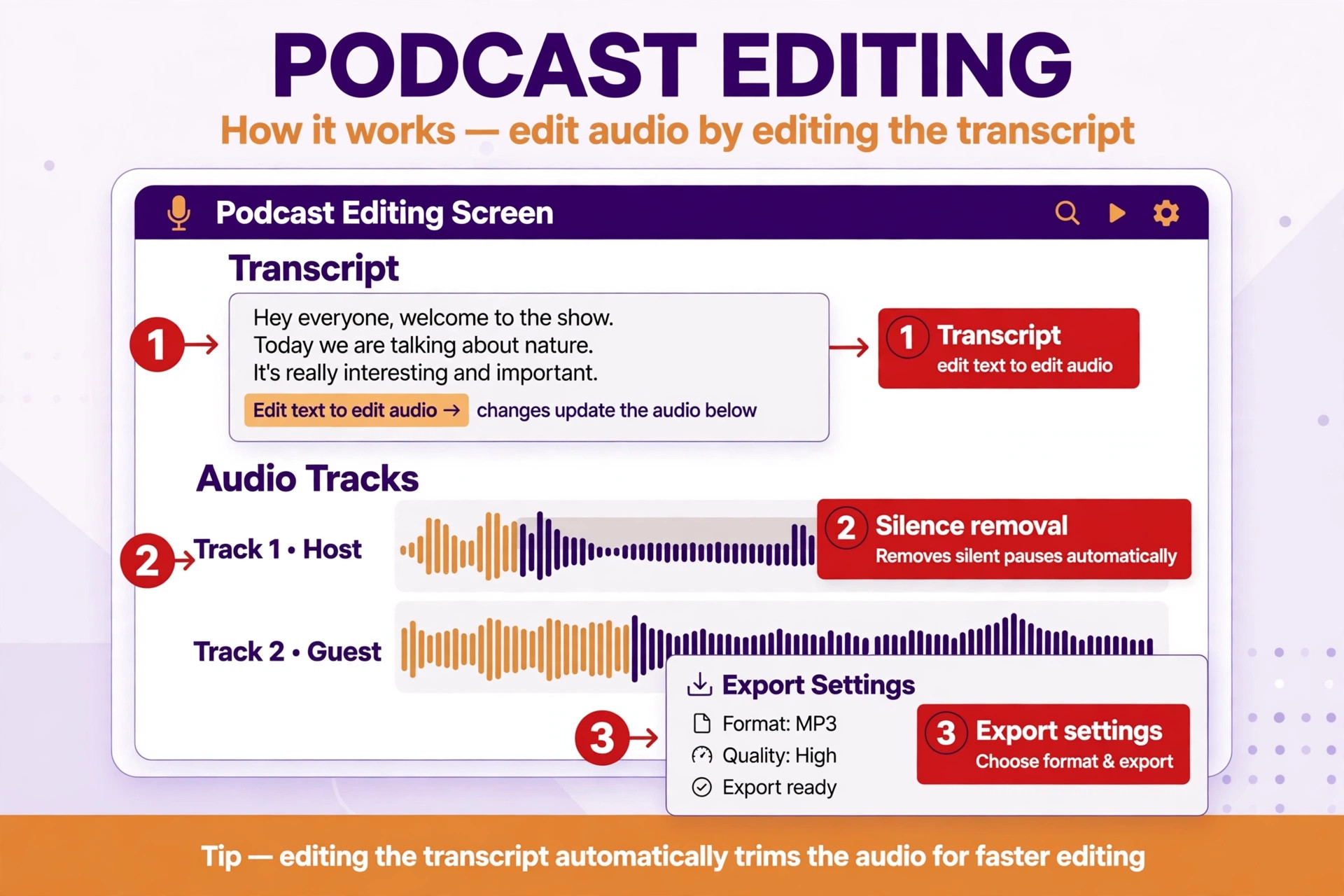
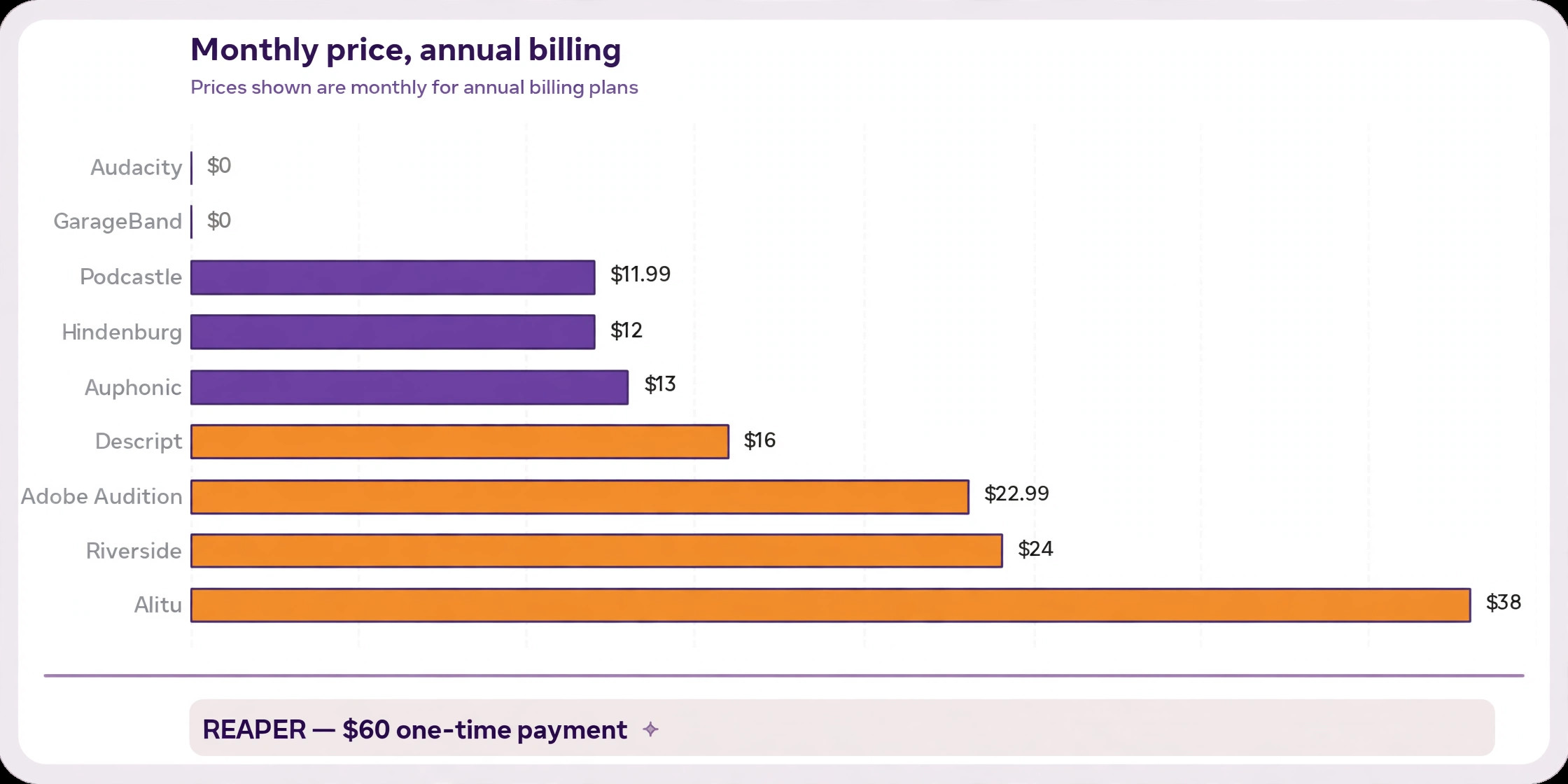
Pricing is per person. The free plan includes 1 media hour a month, a one time batch of 100 AI credits, and 720p export with a watermark. Hobbyist costs 24 dollars a month, or 16 dollars a month billed annually, with 10 media hours and AI credits each month. Creator costs 35 dollars a month, or 24 dollars billed annually, with 30 media hours, 4K export, and more AI credits. Studio Sound enhancement and filler word removal now consume AI credits, so watch the meter on long episodes.
Descript also records, including remote guests, and includes Overdub voice cloning on paid plans. It is the right choice when editing speed matters most and your show is built on talk. It is the wrong choice when you need detailed sound design or music mixing, because the transcript view hides the waveform controls a music producer needs.
2. Riverside
Riverside is the best pick for remote interviews and video podcasts, because it records each participant locally on their own device, in up to 4K video and 48 kHz audio, with each guest on a separate track. A bad internet connection during the call does not damage the recording, because the local file is what you download. That single design decision is why so many interview shows moved to Riverside.
The free plan includes a one time 2 hours of separate track recording, unlimited single track recording, 720p video, and a Riverside watermark. Pro costs 35 dollars a month, or 24 dollars billed annually, with up to 4K video, 48 kHz audio, no watermark, and 15 hours of separate track downloads. Grow costs 45 dollars a month, or 34 dollars billed annually, and adds live streaming and hosting for two shows.
Riverside also offers text based editing, filler word removal, and Magic Clips that cut highlight moments for social posts. It is the right choice when your guests are remote and your show publishes on video as well as audio. It is the wrong choice for an audio only solo show, because you pay for video recording you will never use.
3. Audacity
Audacity is the best free editor on any computer, and the most proven tool on this list. It is open source, it runs on Windows, Mac, and Linux, and it handles multitrack recording, cutting, noise reduction, and export in every common format. Millions of podcasters started here, and many never left, because the core job of cutting an episode does not need a subscription.
Audacity 4.0, released in September 2026, brought a cleaner interface and better built in effects, plus optional plugins for noise suppression and transcription. The learning curve is real, because Audacity is a waveform editor with menus rather than a guided podcast tool. There is no transcript view, no automatic levelling, and no remote recording. You record in Audacity or import a recording made elsewhere, then cut it by hand.
Audacity is the right choice when you want a free editor and you are willing to learn waveform editing. It is the wrong choice when you record remote guests or you want the edit to happen in minutes rather than hours, because both jobs need another tool alongside it.
4. GarageBand
GarageBand is the best free starting point on a Mac, and the easiest tool on this list to open for the first time. It is preinstalled on every Mac, it records multiple tracks, and its interface is clean enough that a beginner can record a first episode in an afternoon. The built in effects, loops, and voice presets are simple, and the export to a podcast ready file takes a few clicks.
There is no paid tier and no subscription, because GarageBand is part of macOS. The limit is the platform, because there is no Windows or Linux version, and no Android version either. There is also no remote recording, no transcript editing, and no automatic filler removal. It is a recorder and a simple editor, and it does those two jobs well.
GarageBand is the right choice when you own a Mac, you record solo or in the same room, and you want to start this week for free. It is the wrong choice when your guests are remote or you publish video, because you will outgrow it the moment a guest joins from another city.
5. Adobe Audition
Adobe Audition is the professional audio editor in the Adobe family, and the strongest choice when your show needs detailed sound design. It offers multitrack mixing, spectral editing that lets you paint away a cough or a siren, Essential Sound presets for voice, auto ducking that lowers music under speech, and Remix that shortens a music bed to fit a segment. No podcast only tool matches that depth.
Pricing is 22.99 dollars a month on an annual plan for Audition alone, or 54.99 dollars a month for the full Creative Cloud suite. There is a free trial, but no free plan. The learning curve is steep, and a beginner will spend the first week learning the interface before the first episode ships. Adobe Podcast, a separate free service, offers Enhance Speech to rescue a rough recording, and it pairs well with Audition for cleanup before the edit.
Adobe Audition is the right choice when you already pay for Adobe software or your show needs professional mixing. It is the wrong choice as a first tool, because the depth you pay for slows down a simple interview edit.
6. Hindenburg
Hindenburg PRO is an audio editor designed for spoken word, made for radio and podcast journalists, and it shows in every design decision. The interface is built around voice, with automatic levelling, loudness metering for broadcast standards, and a manuscript view that lets you edit by transcript as well as by waveform. A narrative show with many clips, ambience, and interview tape fits here better than in any music focused workstation.
Pricing is 12 dollars a month, or 99 dollars a year, for the Standard plan. Plus costs 15 dollars a month and Premium costs 30 dollars a month, adding monthly transcription hours and extra features. There is a free trial, but no free plan. The tool is audio only, so a video podcast needs a separate editor for the picture.
Hindenburg is the right choice when your show is narrative, journalistic, or built from many short clips. It is the wrong choice when you publish video or you want AI editing, because both are outside what Hindenburg is built to do.
7. Alitu
Alitu is the best pick for a beginner who wants the editing done simply, because it automates the parts of podcast production that scare new podcasters away. Upload your raw recording and Alitu cleans it up, levels the volume, removes noise, adds your intro and outro music, transcribes the episode, and publishes it to your host. The workflow is closer to a checklist than an editor.
Pricing is 38 dollars a month, or 380 dollars a year. There is a free trial, but no free plan. The trade off is control. Alitu decides much of the cleanup for you, and a podcaster who wants to cut a specific sentence or reshape a segment will find the editing tools thinner than Descript or Audacity. It is also audio only, so a video show needs another tool.
Alitu is the right choice when you want to publish a clean episode every week without learning audio editing. It is the wrong choice when you want fine control over the cut, because the automation that makes it easy also limits what you can change.
8. Podcastle
Podcastle is the best pick for a solo creator who wants AI voice tools, because it pairs recording and transcript editing with Magic Dust cleanup and Revoice voice cloning. Record a clean voice clone once, and you can fix a misspoken line by typing the correction instead of re-recording. That feature alone saves a solo podcaster hours across a season.
The free plan covers basic recording and editing with limits on hours and exports. Paid plans start at 11.99 dollars a month billed annually, with more recording hours, higher quality exports, and the full AI toolset. Podcastle records remote guests and edits by transcript, so it competes directly with Descript on workflow, but its strength is the voice toolset rather than the depth of the editor.
Podcastle is the right choice when you record solo or with one guest and you want AI tools to fix mistakes without re-recording. It is the wrong choice for a long video project or a large team show, because the editor and the export limits are built for shorter creator content.
9. Auphonic
Auphonic is the best pick for automatic levelling and mastering, because it does one job better than any tool on this list. Upload a finished edit and Auphonic levels the loudness to broadcast standards, removes noise and hum, cuts filler words and silences, and delivers a file that sounds consistent from the first minute to the last. It does not record and it does not cut episodes, so think of it as the final polish rather than the editor.
The free plan covers 2 hours of processed audio a month. Paid plans start at 13 dollars a month, with more hours and API access for automated workflows. The newer Studio Voice feature can rescue a thin or distant recording, which is useful when a guest records on a laptop microphone.
Auphonic is the right choice as a finishing step alongside any editor on this list, especially Audacity or GarageBand, which lack automatic mastering. It is the wrong choice as your only tool, because it cannot record a guest or cut a sentence.
10. REAPER
REAPER is the best value professional tool on this list, because a full digital audio workstation costs 60 dollars for a discounted personal licence, or 225 dollars for a commercial licence, as a one time payment with no subscription. It records, edits, mixes, and masters with a depth that matches workstations costing ten times more, and its customisation is unmatched, with scripts, themes, and routing that a power user can shape to any workflow.
The trade off is the learning curve. REAPER opens as a blank canvas with menus everywhere and no podcast template guiding you. A beginner will spend days setting up track templates, shortcuts, and export presets before the workflow feels fast. There is no built in AI editing, no transcript view, and no remote recording, so the podcast workflow is one you build yourself.
REAPER is the right choice when you want a professional workstation for a one time price and you enjoy shaping your own setup. It is the wrong choice as a first tool, because the freedom that makes it powerful also makes it slow to learn.
How to Choose the Right Podcast Setup
Start with where your guests are. A solo show recorded at your desk needs only an editor, and Audacity or GarageBand will do the job free. A remote interview show needs local recording on separate tracks, and Riverside is the tool built for that. A show with guests in the same room needs a multitrack recorder and a clean edit, and Descript or Hindenburg will carry it.
Next, decide how much editing you will actually do. A show that publishes raw conversation needs only cleanup, and Alitu or Auphonic will finish it. A show that cuts ums, false starts, and long pauses needs transcript editing, and Descript or Podcastle will save hours every week. A show with music, sound design, and layered clips needs a real workstation, and Adobe Audition or REAPER is the honest answer.
Then check the metered costs. Several tools on this list charge by media hours, transcription minutes, or AI credits, and a long episode can burn through a monthly allowance faster than you expect. Add up your episode count, your average episode length, and your guest count before you pick a plan, because the cheapest monthly price is not the cheapest bill when the meter runs out mid season.
What Your Recording Setup Needs
The tool is only half the setup. A quiet room matters more than an expensive microphone, because no software fully removes a noisy room. Record in a small room with soft furnishings, close the windows, and turn off anything that hums. A wardrobe full of clothes is a better recording booth than an empty office, and it costs nothing.
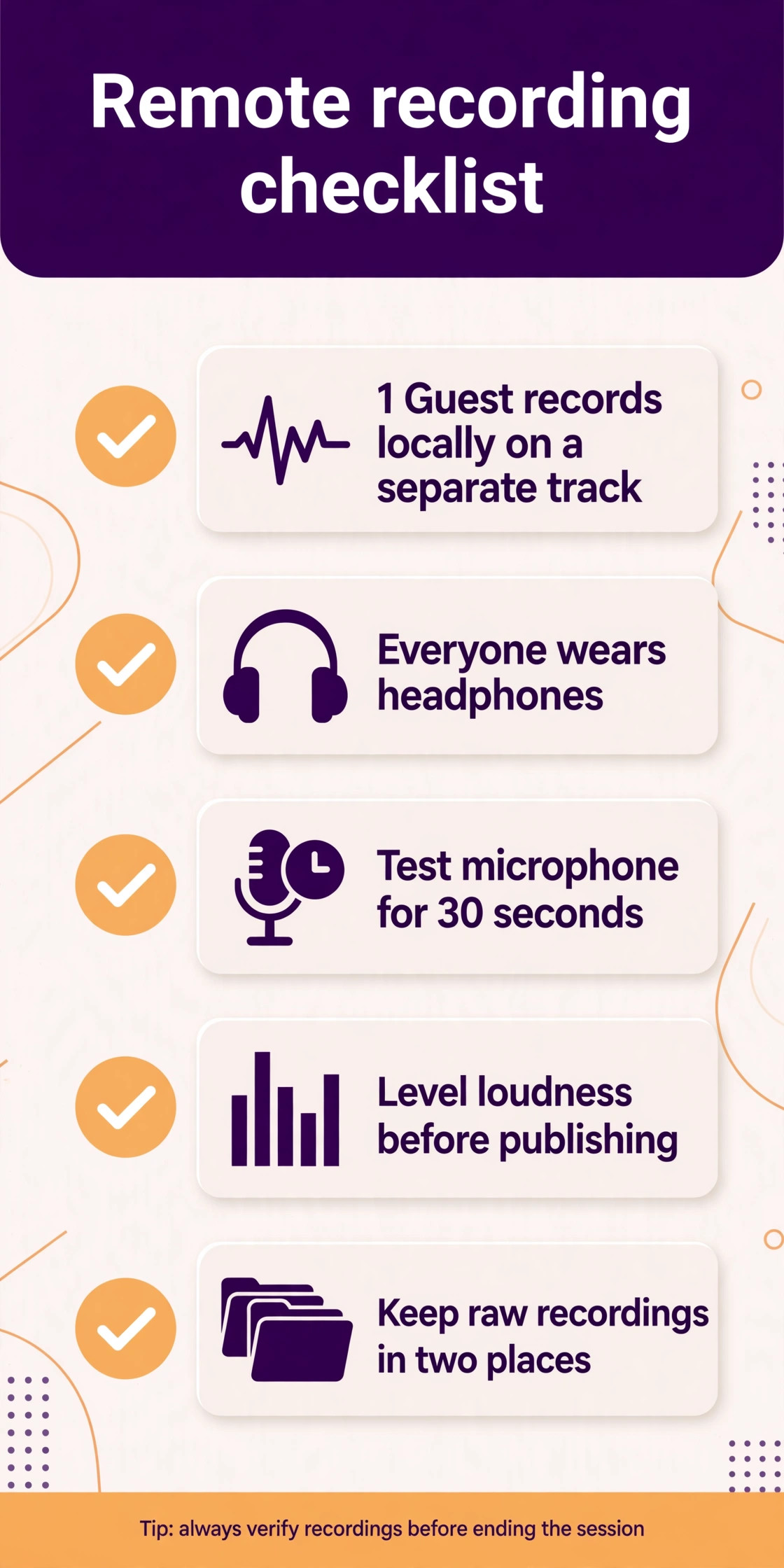
Each voice needs its own track, whether you record locally or remotely. A single mixed track means a cough from one guest ruins a sentence from another, and the edit becomes damage control instead of cutting. Riverside records separate tracks automatically. Descript records remote guests on separate tracks too. When you record in person, use one microphone per person and a recorder or interface that keeps the tracks apart.
Wear headphones while you record, and ask your guests to do the same. Headphones stop your speakers feeding back into the microphone, which is the most common cause of echo on remote recordings. Record a 30 second test before every session, listen to it, and fix the problem before the guest starts talking, because a test takes a minute and a ruined interview cannot be re-recorded.
The microphone matters less than the room, but it still matters. A USB microphone is enough for a solo show, and a dynamic microphone is the safer pick in a noisy room because it picks up less of the space around you. A condenser microphone sounds richer in a quiet treated room but hears everything else in the room too. Spend 100 dollars on a solid dynamic microphone and a boom arm before you spend money on software, because the recording you start with decides how good the edit can ever sound.
Mistakes That Waste Episodes
The fourth mistake is over editing. A show that removes every pause, breath, and hesitation sounds robotic, and listeners can hear the cuts. Keep the natural rhythm of the conversation, remove only the mistakes and the long dead air, and let the speaker sound human. The best edited episode is the one where the listener never notices the edit at all.
The most common mistake is recording a remote guest over a video call without local recording. A call recorder captures the compressed audio that arrives over the internet, with every dropout and glitch baked in. Local recording captures the clean audio on the guest device, and the difference is obvious the moment you listen back. Use Riverside, Descript, or Zencastr for every remote interview, even when the call app offers its own recording.
The second mistake is skipping the loudness check. An episode that is too quiet makes listeners turn the volume up, and the next episode in their feed then blasts them. Auphonic or Hindenburg levels every episode to the same loudness standard, so your show sounds consistent week after week. Run every finished episode through a levelling step before you publish.
The third mistake is publishing without a backup. A single hard drive failure has ended more shows than a bad review ever will. Keep the raw recordings in two places, the cloud and a local drive, until the episode is published and the files are archived.
- Record every remote guest locally on a separate track.
- Run every episode through loudness levelling before publishing.
- Keep raw recordings in two places until the episode is live.
- Test your microphone and room for 30 seconds before each session.
- Edit for pace, not perfection, and ship on schedule.
Our Verdict
Descript is the pick for most readers, because transcript editing is the single biggest time saver in podcast production, and the Creator plan at 24 dollars a month billed annually covers 30 media hours with 4K export. Start with the free plan, edit one full episode in it, and time yourself before you pay for anything. A show that edits by transcript publishes more often, and publishing often is what grows an audience.
Riverside is the pick when your guests are remote, because local recording on separate tracks protects every interview from a bad connection. Record your next episode with the tool you choose, publish it on schedule, and let the habit do the rest. Audacity is the pick when the budget is zero and you are willing to learn waveform editing. The best podcast recording and editing tools are the ones that match where your guests sit, how much editing you will do, and how often you can publish without burning out.
Frequently Asked Questions
Which of the best podcast recording and editing tools is best for beginners?
Descript is the best beginner pick when you can pay, because editing a transcript feels like editing a document and the learning curve is the shortest of any paid tool. Alitu is the best pick when you want the cleanup automated and you do not want to edit at all. A beginner with no budget should start with Audacity or GarageBand, learn the basics of cutting, and move to Descript when the edit starts eating too many evenings.
Do I need separate tools for recording and editing?
Not always. Descript, Riverside, and Podcastle record and edit in one tool, which suits most shows. Audacity, GarageBand, Adobe Audition, Hindenburg, and REAPER are editors first, so a remote interview needs a separate recorder such as Riverside or Zencastr. Auphonic is a finishing tool only, so it always pairs with an editor. Pick one tool that covers both halves of your workflow before you add a second one.
What is the best podcast recording and editing tools setup for remote interviews?
Riverside is the strongest setup for remote interviews, because each guest records locally in up to 4K video and 48 kHz audio on a separate track, so a bad connection cannot damage the recording. Descript is a close second, because it records remote guests and edits by transcript in the same tool. Add Auphonic after the edit for levelling, and the remote workflow is complete.
Is Audacity really free and good enough for a real show?
Yes. Audacity is open source and free, and it has produced thousands of professional sounding shows. The 4.0 release in September 2026 improved the interface and the built in effects. The limits are real, because there is no transcript editing, no remote recording, and no automatic levelling. Pair it with Auphonic for the finishing step and a remote recorder for guests, and the free setup is genuinely competitive.
How much should I pay per month for podcast software?
A solo show can start at zero dollars with Audacity or GarageBand, plus Auphonic free for 2 hours a month. A remote interview show should budget 24 dollars a month for Riverside Pro or Descript Creator on annual billing. A narrative show with heavy editing should budget 12 dollars a month for Hindenburg or 24 dollars for Descript. Watch the metered extras, because transcription hours and AI credits can add to the bill on long episodes.
Can I record a video podcast with these tools?
Yes, with the right pick. Riverside is built for video podcasts, with 4K recording, separate tracks, and Magic Clips for social posts. Descript edits video by transcript and exports in 4K on the Creator plan. Podcastle also records video. Audacity, GarageBand, Hindenburg, and REAPER are audio only, so a video show needs Riverside, Descript, or a separate video editor alongside them.