Square is the best overall pick among the best pos software for small business, because the software costs nothing to start, the card reader costs 59 dollars, and a shop can take its first payment the same day it signs up. Shopify POS is the better choice for a shop that already sells online, and Lightspeed Retail is the better choice for a shop with a large catalogue and more than one location. We compared 10 systems on the numbers that decide the real cost, the monthly software fee, the card rate, the hardware bill, the inventory depth and the contract terms.
This guide shows what each system actually costs at real sales volume, what it does well, and where it falls short, so you can stop comparing homepages and pick one.
A point of sale system is the till, the stock list, the sales report and the customer record in one place. When it works well, a sale takes seconds and the stock count updates itself. When it works badly, the queue grows and the stock count drifts from the shelf. That gap is why the choice matters more than the brand name on the terminal.
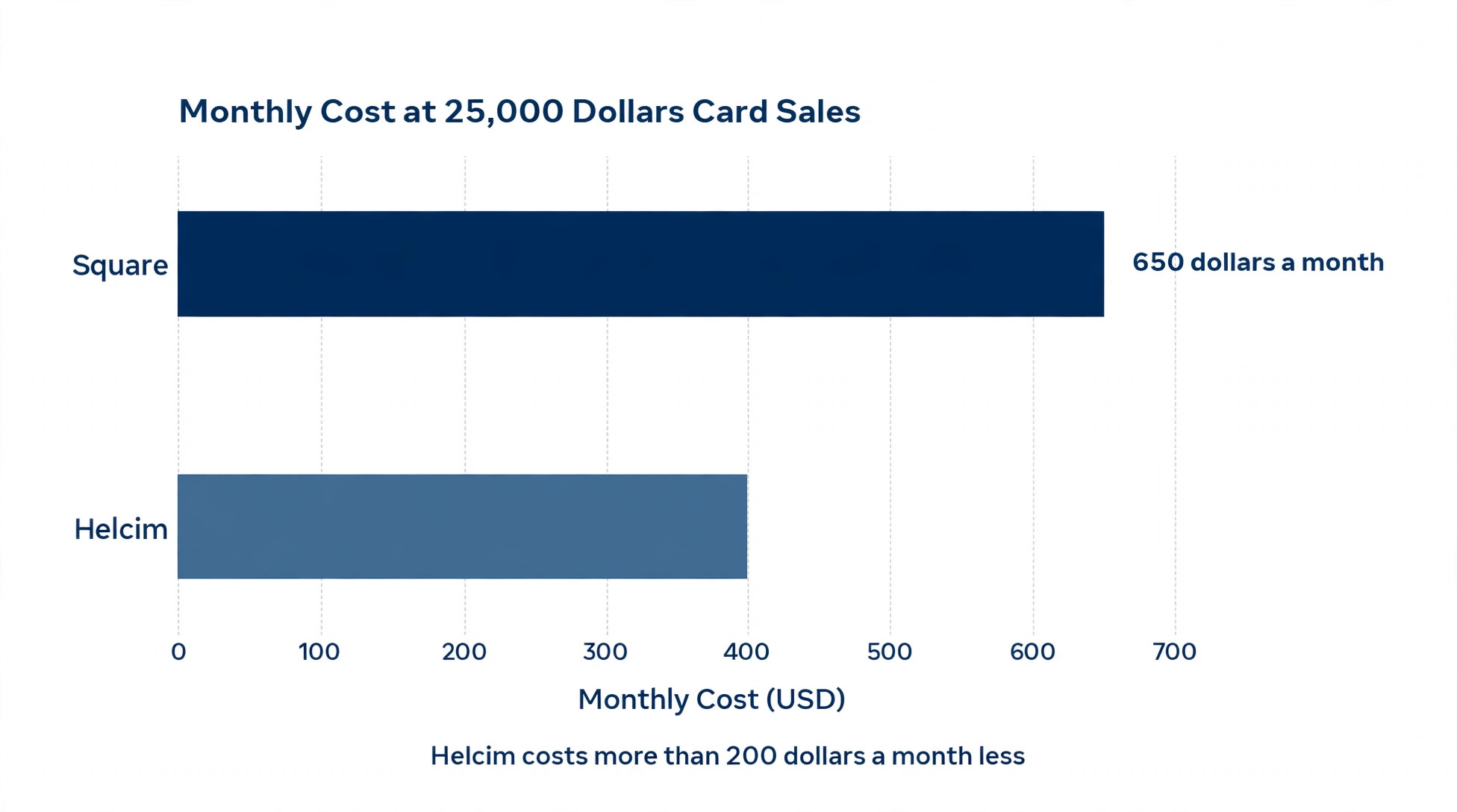
The largest cost is rarely the monthly software fee. A shop that takes 25,000 dollars a month in card payments pays about 650 dollars a month in processing at a 2.6 percent rate, and half a percent difference is worth 1,500 dollars a year. A free plan with a high card rate can cost more than a paid plan with a low rate once volume grows.
Prices in this guide were checked against vendor pricing pages and current 2026 roundups in November 2026. Card rates change often, and several vendors set the final rate through a reseller or a quote, so confirm the rate in writing before you sign.
How We Tested the Best POS Software for Small Business
We scored each system on five points, because a good till wins on total cost and daily speed. Price covered the monthly software fee plus the card rate at 10,000 dollars and at 25,000 dollars of monthly card sales. Hardware covered the cost of a reader, a terminal and a full counter setup. Inventory covered stock tracking, variants, purchase orders and multi location stock. Ease of use covered how fast a new member of staff can learn the till and how quickly a sale moves from scan to receipt. Contract terms covered lock in periods, early exit fees and whether you can use your own payment processor.
We also looked at what each system leaves out of the headline price, because the best pos software for small business must be judged on the total bill, not the headline fee. Loyalty tools, gift cards, kitchen displays, online ordering and extra registers are often paid add ons, and a system that looks cheap on the pricing page can turn expensive once those are added. Each tool section below names the add ons that matter, so the price you see here is closer to the price you will pay.
The Best Pick for Each Job
| Job | Pick | Why it wins |
|---|---|---|
| The best overall start | Square | Free software and a 59 dollar reader |
| Online plus in person selling | Shopify POS | One stock list for web and counter |
| A large catalogue or several shops | Lightspeed Retail | Deep inventory and purchase orders |
| A full service restaurant | Toast | Table, kitchen and online ordering in one |
| The lowest card fees at volume | Helcim | Interchange plus pricing with no monthly fee |
| A busy counter with premium hardware | Clover | Fast hardware and strong loyalty tools |
Use this table as a shortcut, then read the full section for the tool you are leaning toward. The cheapest software fee is not the best value when the card rate is high, and the lowest card rate is not the best choice when the hardware bill and the contract lock you in.
The Best POS Software for Small Business in 2026, Ranked
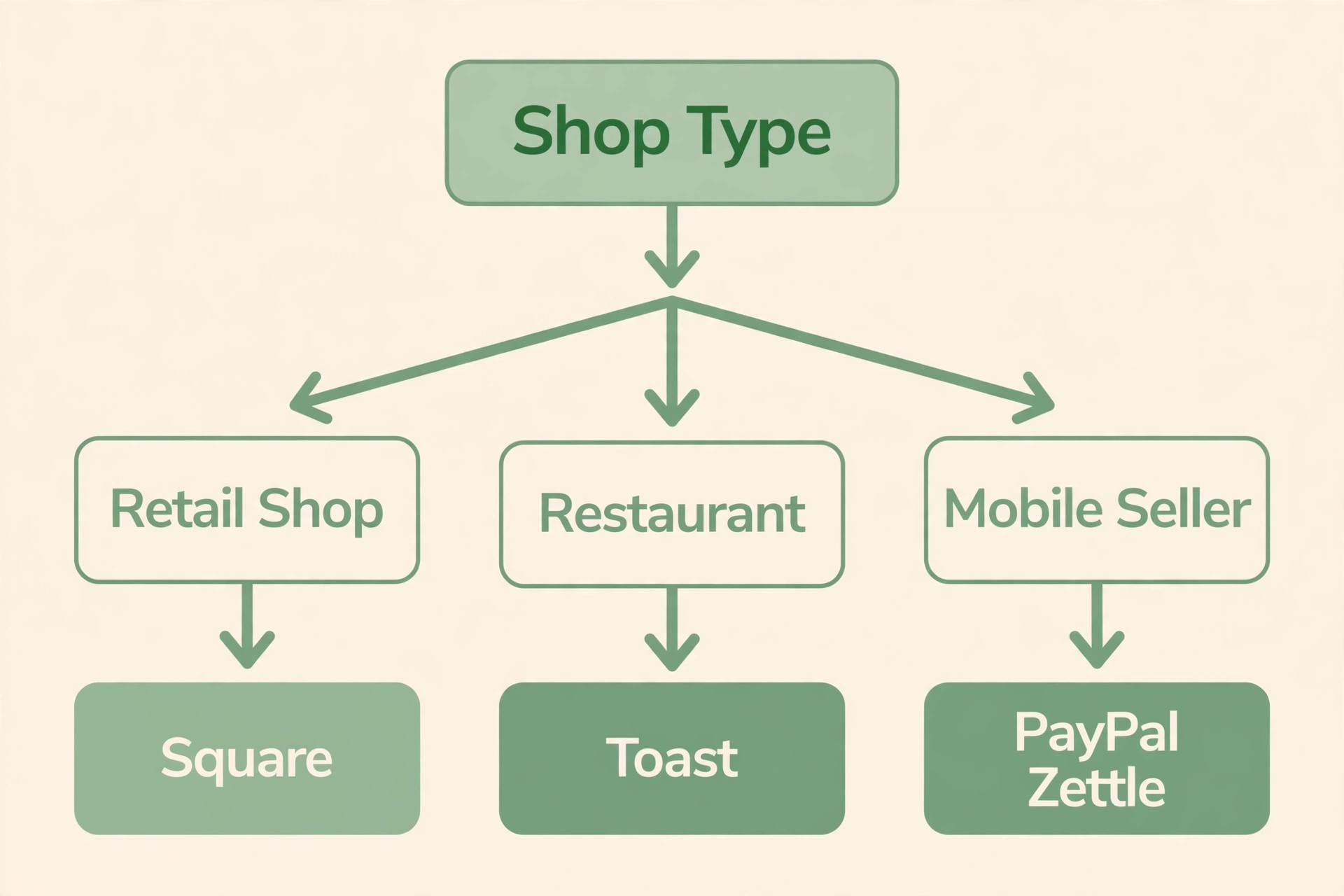
The 10 tools below fall into three groups. The first group suits general retail and services. The second group suits restaurants and food service, where table management and kitchen displays matter more than retail inventory. The third group suits a specific need, the lowest fees, the simplest mobile setup, or a large operation that needs deep control.
1. Square
Square remains the easiest place for a small business to start. The core point of sale software is free, there is no contract, and you can take a payment with Tap to Pay on a phone with no hardware at all, or with a Square Reader that costs 59 dollars. In person payments cost 2.6 percent plus 15 cents on the free plan, and online payments cost 3.3 percent plus 30 cents.
Paid plans add features and cut the rate a little. Square Plus costs 49 dollars a month per location and drops the in person rate to 2.5 percent plus 15 cents, with team management and more reporting. Square Premium costs 149 dollars a month per location and drops the rate to 2.4 percent plus 15 cents. The free plan online rate is high, so a shop that takes many online orders pays more than it would on a paid plan or on a rival. Loyalty costs extra, from 45 dollars a month, and the restaurant tools need the paid restaurant plan for course management and kitchen displays.
Even so, for a new shop, a market stall or a salon taking its first card payments, Square is the clearest starting point.
2. Shopify POS
Shopify POS is the counter side of a Shopify store, and it wins when online selling comes first. POS Lite is included with every Shopify plan, which starts at 39 dollars a month for Basic, and POS Pro adds full retail features for 89 dollars a month per location, or 79 dollars a month on annual billing. In person payments through Shopify Payments cost 2.6 percent plus 10 cents on Basic, falling to 2.5 percent and then 2.4 percent on higher plans. A product sold at the counter updates the online stock instantly, and a product sold online updates the counter stock the same way, so a shop never sells the same last item twice.
Customer records, discounts, gift cards and order history are shared across both channels, and staff can look up an online order at the till and complete a return or an exchange in person. That shared record is the reason online first retailers choose Shopify POS over a standalone till.
The limits follow from the same design. Shopify POS only makes sense when you run a Shopify store, because the 39 dollar a month plan is the entry ticket, and the software is weaker as a standalone till than Square or Clover for a shop with no online sales. POS Pro is needed for serious retail features such as smart inventory counts, unlimited registers and detailed staff permissions. Choose Shopify POS when the website already earns real sales, and choose a standalone till when it does not.
3. Lightspeed Retail
Lightspeed Retail suits shops whose complexity lives in inventory, many products, many variants, many suppliers and more than one location. Pricing starts at 89 dollars a month for Basic on annual billing, or 109 dollars a month paid monthly, rising to 149 dollars and 289 dollars a month for Core and Plus on annual billing. Purchase orders, supplier management, special orders, matrix variants for size and colour, and stock transfers between locations are built in rather than bolted on, and the reporting shows margin by product, by supplier and by location.
A bike shop, a clothing boutique, a garden centre or a gift shop with thousands of products will feel the difference within a week, because the system answers stock questions that simpler tills cannot answer at all.
The cost and the setup time are the trade offs. The entry price is high for a new shop, the hardware is an iPad plus peripherals that can reach 600 dollars a counter, and the learning curve is steeper than Square. Lightspeed absorbed ShopKeep and Vend, so former users of those systems will find a more capable platform here. Pick Lightspeed when inventory is the business, and skip it when the catalogue is small and the till only needs to take payments.
4. Clover
Clover suits a busy counter that wants premium hardware and strong loyalty tools. The retail Essentials plan starts at 29.95 dollars a month, and restaurant plans run from 79 dollars to 189 dollars a month for software before hardware and processing. In person rates run from 2.3 percent plus 10 cents to 2.6 percent plus 10 cents depending on the plan and the reseller. Clover terminals are fast, the screens are clear, and the card reader, the printer and the cash drawer work as one unit rather than a set of separate devices.
Loyalty and gift cards are stronger here than on most rivals, with built in rewards that keep regular customers coming back, and the app market adds tools for appointments, invoicing and employee scheduling. A cafe, a busy retail counter or a salon that takes many repeat customers will get real value from that loyalty system.
The catch is the sales channel. Clover is sold through banks and resellers, so the rate, the contract length and the termination fee can differ sharply between two shops buying the same hardware. Some contracts run for three years, and some resellers add fees that never appear on the Clover website. Get the full contract in writing, compare at least two resellers, and read the termination clause before you sign. With a clean contract, Clover is a strong counter system, and with a bad one it is an expensive lesson.
5. Toast
Toast is built for restaurants, and it is the best pick on this list for a full service dining room. Software plans start at 69 dollars a month per terminal, with a Starter Kit at zero dollars a month in software cost when you use Toast processing, though the processing rate on that tier is higher. Paid tier processing runs from about 2.49 percent plus 15 cents, and rates rise with add ons such as online ordering and loyalty, reaching 3.39 percent or more on the Starter Kit once those are switched on.
Table management, course firing, kitchen display screens, menu modifiers, split bills, online ordering and delivery dispatch sit in one system, and the reports show food cost, labour cost and server performance together. A 30 seat bistro, a busy cafe with table service or a bar with a food menu will run smoother on Toast than on a retail till adapted for food, because the workflow matches how a kitchen actually works.
The costs are the reason to pause. Toast locks you into its own payment processing, the hardware only works with Toast, and contracts often run for two to three years. The rate is not published in one place, so you must get a written quote for your volume and your add ons. Choose Toast when food service is the business, and choose Square or Clover when the restaurant is a small counter with a short menu.
6. Helcim
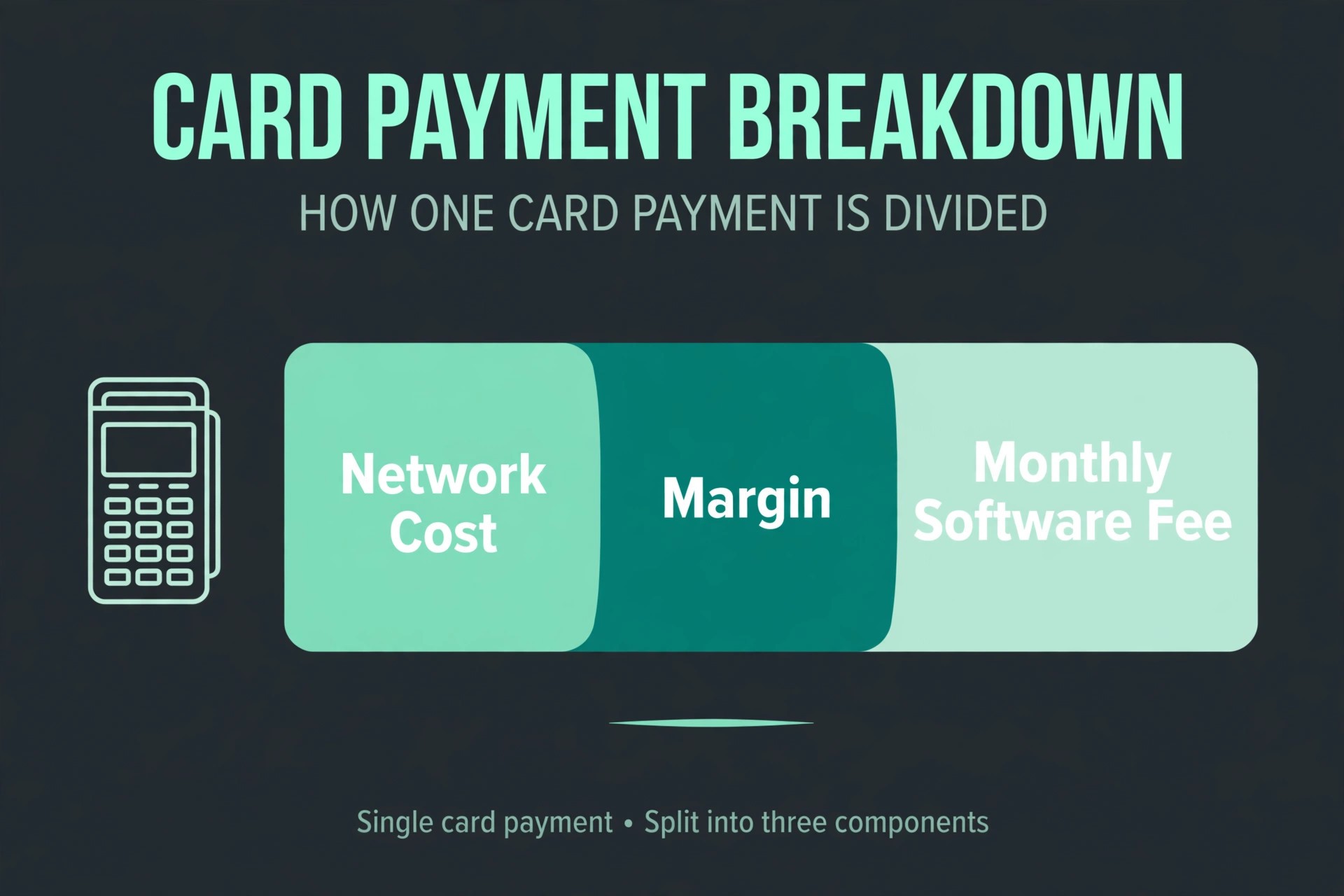
Helcim is the pick for a business that processes enough card volume for the rate to matter more than the software fee. The software costs nothing a month, there is no contract, and the pricing is interchange plus, which means you pay the card network cost plus a fixed margin of 0.4 percent plus 8 cents in person, or 0.5 percent plus 25 cents online. Tap to Pay works on a phone with a small extra fee per transaction, and the Helcim card reader costs 199 dollars. There is no monthly fee to keep the account open, so a seasonal business or a service business with uneven sales does not pay for quiet months.
Volume discounts apply automatically as sales grow, so the rate improves without a phone call to renegotiate.
The trade off is polish. Helcim has fewer integrations and a smaller app market than Square or Shopify, and the hardware range is narrower. A shop that needs a deep loyalty programme, a kitchen display or a large app ecosystem will find more choice elsewhere. But for a service business, a contractor, a repair shop or a retailer that already processes real volume and wants the lowest honest rate with no lock in, Helcim is the most direct way to cut the processing bill.
7. TouchBistro
TouchBistro is an iPad based restaurant till that suits table service in a small to mid size dining room. Pricing starts at 69 dollars a month per licence, with a higher tier at 119 dollars a month, and processing is quote based through partner processors rather than built in. Reservations, online ordering and loyalty are available as separate add ons, which lets a small restaurant buy only what it uses. The reports cover sales by server, by table and by menu item, which is enough for most independent restaurants to run the floor and the books.
The add on stack is also the weakness. Each extra feature is a separate subscription, so the total can climb past the headline price, and some reviewers report multi year auto renewing contracts that are hard to exit early, while others report month to month terms, so the contract you are offered matters more than the list price. Get the term, the renewal clause and the total for every add on in writing. Pick TouchBistro when you want iPad table service with your own hardware, and pick Toast when you want one vendor for software, processing and hardware.
8. SpotOn
SpotOn is a strong alternative to Toast for restaurants that want similar features without the same lock in. Software starts at zero dollars a month on the All In tier with a two year term, or 55 dollars a month per station on the paid tier with month to month terms. Processing runs from about 2.45 percent plus 15 cents to 2.79 percent plus 20 cents depending on the plan. SpotOn includes email and review management features that Toast charges extra for, and the loyalty programme is built to bring repeat diners back with automated offers. A neighbourhood restaurant that relies on regulars will get more from those tools than from a slightly lower card rate.
The limits are scale and clarity. SpotOn suits independent restaurants and small groups rather than large chains, and the zero dollar tier ties you to a two year term, so the free start is not free of commitment. Ask for the full two year cost, including processing at your volume, before you compare it with the month to month tier. Choose SpotOn when you want Toast style features with stronger marketing and a lower hardware bill, and compare the contract carefully before you sign.
9. PayPal Zettle
PayPal Zettle suits a mobile seller, a market trader or a service business that needs a till in a pocket. There is no monthly software fee, the card reader costs 29 dollars, and the card rate is 2.29 percent plus 9 cents per transaction in the United States, which is lower than Square on a small sale. The app runs on a phone or tablet, takes chip, tap and contactless payments, and sends digital receipts by email or text. Money lands in a PayPal account that many small sellers already use for online sales, and the same account can send invoices and take online payments.
Inventory is basic but workable for a small catalogue, with product photos, variants and low stock alerts, and sales reports show the day, the week and the best selling items without a separate accounting export.
The limits appear as the business grows. Zettle has no full counter terminal, no kitchen display, and weaker multi location and staff permission tools than Square or Clover. A shop that grows into a fixed counter with several staff will outgrow it, and the move to a fuller system will mean learning a new till. Pick Zettle for a stall, a van, a pop up or a mobile service, and pick a counter system when the business settles into one address with daily foot traffic.
10. Revel Systems
Revel Systems suits a larger small business that needs deep control, such as a multi location retailer, a franchise group or a high volume quick service chain. Pricing is quote based, and published comparisons place it at 99 dollars a month per terminal and above, with enterprise features priced by scope. Revel lets a business set granular staff permissions, build complex menus and modifiers, manage stock across locations, and run franchise reporting that shows each site separately and the group together. The open API connects to accounting, payroll and delivery tools, so a growing business can keep Revel as the centre of a wider system rather than replacing it.
For a group that has outgrown Square or Clover, Revel is a credible next step without moving to enterprise software priced for national chains.
The cost and the setup are the reasons most small businesses should skip it. Quote based pricing means a sales call before a number, implementation takes longer than a plug and play till, and the monthly cost per terminal is high for a single shop. A single location retailer will pay more and use less than half the features. Choose Revel when you run several locations or a franchise and need that control, and stay with Square or Lightspeed when one shop is the whole business.
How to Choose the Right POS System
Start with what you sell, because the best pos software for small business follows the business, not the other way round. A retail shop needs inventory depth, a restaurant needs table and kitchen tools, a service business needs invoicing and appointments, and a mobile seller needs a pocket reader with no monthly fee. Write down the three jobs the till must do every day, then check each system against those three jobs before you look at the price. A system that fails one of the three will cost you time every day, whatever it saves in fees.
Next, work out the total monthly cost at your real volume. Take your monthly card sales, multiply by the card rate, add the monthly software fee, and add the monthly share of the hardware bill. At 10,000 dollars a month in card sales, Square free costs about 275 dollars in processing, while Helcim costs about 190 dollars, a gap of 85 dollars a month. At 25,000 dollars a month, the gap grows to more than 200 dollars a month. Ask how long the term runs, what the early exit fee is, whether the rate can rise during the term, and whether you can use another payment processor.
A three year contract with a high exit fee is a real risk for a new business, and a reseller sold system can hide fees that the vendor website never mentions. A month to month system with no contract is worth a slightly higher rate for a business in its first year.
Finally, test the till with real staff. Run a busy hour through the trial, take a payment, refund a payment, split a bill, and check the stock count after a sale. The right system is the one your least technical member of staff can use on a busy Saturday without asking for help.
What to Check Before You Sign
A point of sale contract is a payment contract as much as a software contract, and the best pos software for small business still needs its terms read in full, because the terms differ more than the prices. Read the processing rate, the monthly fee, the hardware cost and the contract length together, and ask for the total in writing for your volume. When a vendor will not put the rate in writing, treat that as a warning, because the rate is the largest line on the bill.
Check the hardware ownership at the same time. Some systems sell the hardware outright, some lease it, and some give it free in exchange for a long term. Leased hardware that cannot be used with another system is a lock in, and a free terminal that must be returned on exit is a cost you will pay later. Ask who owns each device, what happens if it breaks, and what it costs to add a second register.
Check the add ons too. Loyalty, gift cards, kitchen displays, online ordering and extra locations are often billed separately. List every add on you need and add the total to the monthly fee before you compare systems.
- Confirm the in person card rate in writing for your volume.
- Confirm the monthly software fee and which features it includes.
- Confirm who owns the hardware and what the exit terms are.
- Confirm the price of every add on you need, including loyalty and gift cards.
- Confirm the contract length, the renewal clause and the early exit fee.
Mistakes That Waste Money
The most common mistake when picking the best pos software for small business is choosing on the software fee alone. A founder picks a free plan, processes 25,000 dollars a month, and pays 650 dollars a month in processing when a paid plan or an interchange plus system would have cost 200 dollars a month less. The monthly fee is visible, the processing bill is larger, and the comparison that matters is the total. Run the volume sum before you sign, not after the first bill.
The second mistake is signing a long contract through a reseller without reading it. A shop signs for three years, discovers the rate is higher than promised, and faces an exit fee larger than the saving from switching. Get two quotes, read the termination clause, and prefer month to month terms in the first year.
The third mistake is buying hardware before testing the software. A shop spends 1,500 dollars on a counter setup, then finds the software slow, the inventory shallow or the reports unusable, and the hardware only works with that one vendor. Test the software on a phone or a tablet first, run a real trading day through the trial, and buy the counter hardware only when the software has proved itself.
Our Verdict
Square is the pick for most readers among the best pos software for small business, because the free software, the 59 dollar reader and the absence of a contract let a small business start today and grow without changing systems. The card rate is not the lowest, so a shop processing more than 20,000 dollars a month should compare Helcim, where the interchange plus rate can save more than 200 dollars a month.
Shopify POS is the pick when online sales already matter, because one stock list for web and counter removes the most common stock error a growing retailer makes. Lightspeed Retail is the pick when inventory is the business, because its purchase orders, variants and multi location stock are the deepest on this list. Toast is the pick for a full service restaurant, and Clover is the pick for a busy counter that wants premium hardware and strong loyalty.
When the business is a stall, a van or a mobile service, start with PayPal Zettle, because the 29 dollar reader and the absence of a monthly fee match a business with no fixed counter. When the business runs several locations, look at Revel Systems and get a written quote first.
Frequently Asked Questions
Which POS system is cheapest for a small business?
Square is the cheapest way to start with the best pos software for small business, because the software is free, there is no contract, and the reader costs 59 dollars. At higher volume Helcim becomes cheaper overall, because its interchange plus rate of about 1.8 percent to 2 percent in person beats the flat 2.6 percent charged by Square once monthly card sales pass about 5,000 dollars. PayPal Zettle is also cheap for mobile sellers, with no monthly fee and a 29 dollar reader.
What card rate should a small business expect to pay?
Most small businesses pay between 2.3 percent and 2.9 percent plus 10 to 15 cents per in person transaction on a flat rate plan, with online rates higher. Interchange plus systems such as Helcim usually work out to about 1.8 percent to 2 percent in person. Always ask for the rate in writing, because resellers can set a higher rate than the vendor website shows.
Does a small business need a contract for a POS system?
No, and most new businesses should avoid one in the first year. Square, Shopify POS, Helcim and PayPal Zettle all work month to month with no contract, and Lightspeed offers month to month terms at a higher monthly price. Toast, Clover through some resellers, and TouchBistro can involve terms of two to three years, so read the renewal and exit clauses before you sign, and prefer a short term until the system has proved itself in your shop.
How much does POS hardware cost for a small shop?
A mobile setup costs very little, a 59 dollar reader from Square, a 49 dollar reader from Shopify, or a 29 dollar reader from PayPal Zettle, and Tap to Pay on a phone costs nothing at all. A counter terminal costs about 299 dollars, a full register setup costs 799 dollars and above, and a restaurant setup with kitchen displays can reach 1,500 dollars to 3,000 dollars. Budget for a receipt printer and a cash drawer on top of the terminal price.
Can one POS system handle online and in person sales together?
Yes, and Shopify POS does it best, because the online store and the counter share one stock list, one customer record and one set of discounts. Square also covers both channels, with a free online store included, though its online card rate is high on the free plan. Lightspeed covers online sales through its ecommerce add on, and Toast covers online ordering for restaurants. The key test is whether a sale in one channel updates stock in the other instantly.
Is Lightspeed worth the higher monthly price?
Lightspeed is worth the price when inventory is the hard part of the business, many products, many variants, purchase orders and more than one location. The reporting and the stock controls save hours a week for a shop with thousands of products, and the card rate through Lightspeed Payments can be low for qualifying merchants. It is not worth the price for a small catalogue or a service business, where Square or Helcim covers the same jobs for far less.