What if one hour of filming could fill a week of Shorts, with no extra shoot days and no editing marathons? That is the promise of a youtube shorts workflow for small business, and it works because a Short is not a small video. It is a small piece of a video you already made, cut vertical, captioned, and posted on a schedule. A shop owner who records one ten minute demo, a coach who records one weekly lesson, or a cafe that films one morning rush already owns the raw material for five Shorts. The workflow in this guide turns that material into a repeatable routine that takes about three hours a week, including filming.
A Short is a square or vertical video up to three minutes long, and the format that works best is vertical, nine by sixteen, built for a phone screen held upright. Shorts live in a dedicated feed where viewers swipe fast, so the first two seconds decide whether anyone stays, and captions decide whether anyone understands with the sound off. The good news for a small business is that a Short does not need a studio. It needs one clear idea, one honest hook, and a caption file, and the tools below handle the rest, from clipping to scheduling.
The One-Line Answer
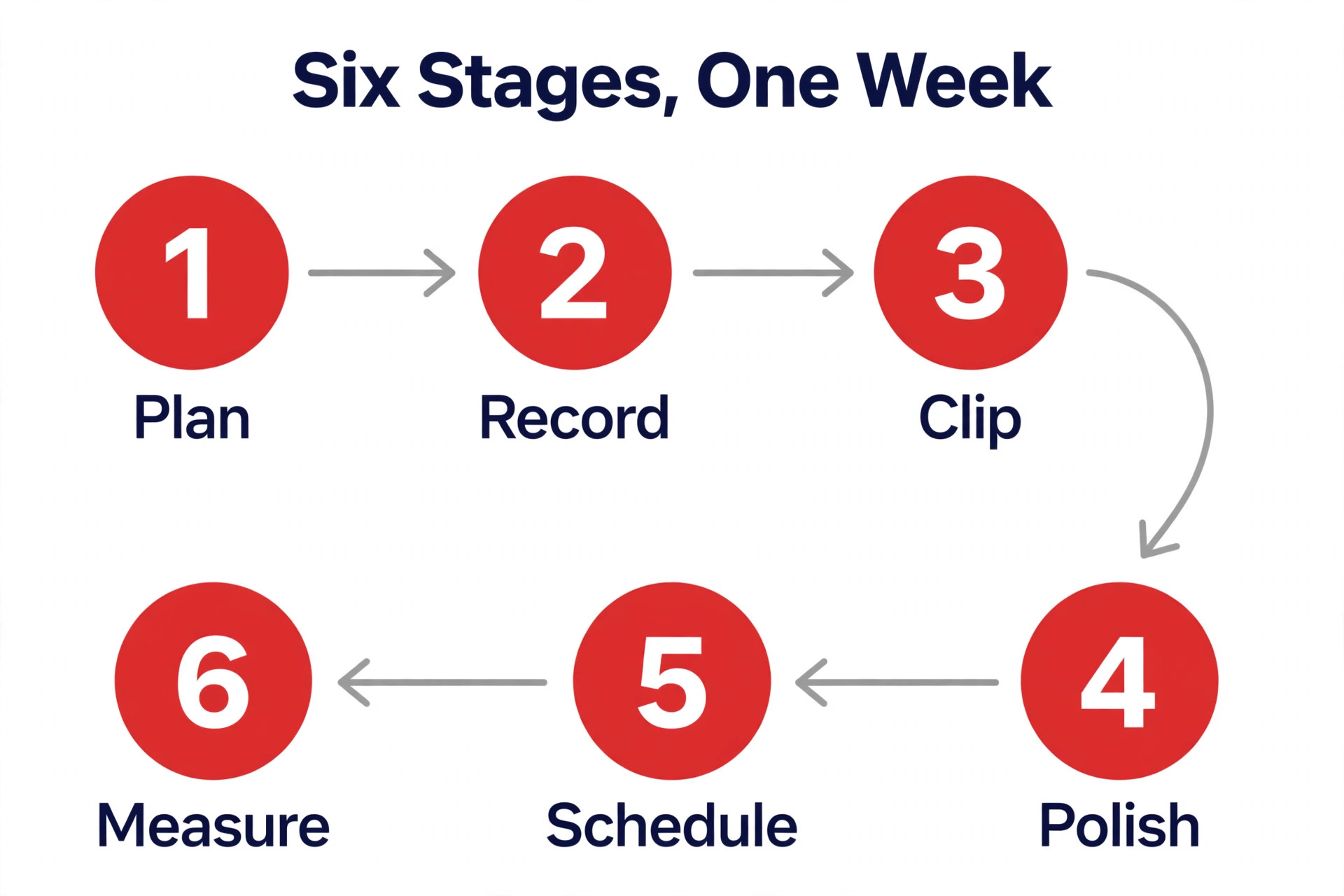
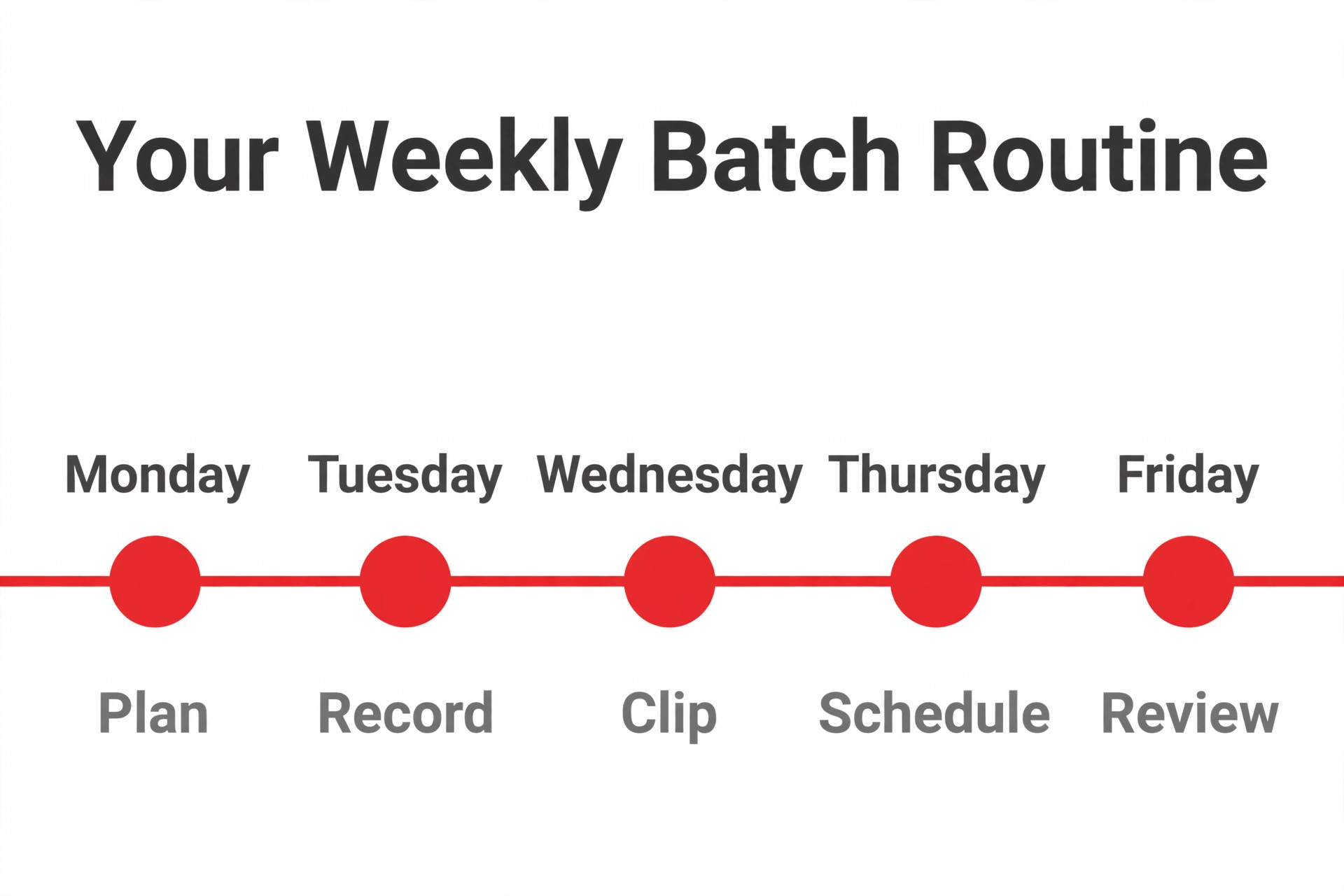
The fastest repeatable routine has six stages, and it fits in one weekly block. Plan five topics on Monday, record one long video or five short takes in a single session, run an AI clipper over the footage to find the strongest moments, polish the best clips with captions and your brand style, schedule them across the week, and check the numbers on Friday to pick next week topics. One long video becomes three to five Shorts, each under 60 seconds, and the whole loop takes about three hours once the templates exist.
Start free if you are testing the format. CapCut handles manual edits and captions at no cost, OpusClip free plan gives 60 credits a month with a watermark, and YouTube Studio schedules Shorts free. Pay when the routine proves itself, with OpusClip Starter at $15 a month for clipping and auto posting, Descript Hobbyist at $16 a month billed annually for transcript editing, or Metricool from $20 a month billed annually for scheduling across platforms. A small business does not need all of them. It needs one clipper, one editor, and one scheduler, and this guide shows which one fits which job.
Why Shorts Work for a Small Business
Shorts work for a small business because they solve the two problems that kill most video plans, which are cost and consistency. A Short costs almost nothing to make when it comes from footage you already shot, and a feed that rewards frequency finally favors the business that can post three times a week over the business that posts one polished video a month. Discovery is the other half of the value. Shorts reach viewers who never searched for your business, since the feed shows them to people based on interest rather than subscriptions, and a single useful Short can bring a week of profile visits.
The format also fits how customers actually decide. A 40 second tip, a before and after, a quick answer to a common question, or a behind the scenes moment gives a stranger enough reason to trust you, and trust is what turns a viewer into a visitor. A long video asks for twenty minutes of attention before it earns anything, while a Short earns attention in two seconds and asks for nothing in return. That low ask is why Shorts suit a shop, a service, and a local business better than any other video format, and why a simple weekly routine beats an occasional big production.
The Weekly YouTube Shorts Workflow for Small Business in 6 Stages
The six stages below run in order every week, and each one has a single output, so the routine never sprawls. A stage that has no output is a stage you can skip, and a stage that takes more than an hour is a stage that needs a template.
- Plan five topics in thirty minutes, using customer questions, comments, and search terms as the source. Pick topics that fit in one sentence, such as how to store fresh bread, three signs your roof needs checking, or what a first visit costs. Write one hook line per topic, which is the first sentence the viewer hears, and keep it under ten words.
- Record in one session, either as one long video of ten to twenty minutes or as five short takes of one minute each. Film vertical on a phone in good window light, with the camera at eye level and the background tidy. Talk to one customer, not to an audience, and leave mistakes in, since a clipper and an editor can cut them later faster than a reshoot can.
- Clip the footage with an AI clipper, which finds the strongest moments and cuts them into vertical clips with captions. Upload the long video to OpusClip or a similar tool, review the ranked clips, and keep the three to five with the best hooks. A clipper that scores each clip, such as the Virality Score from 0 to 99, helps you choose, but your judgment of the hook matters more than any score.
- Polish the best clips by hand, adding burned in captions, your brand colors and fonts, and a title card or end card that names the next step. Keep most clips under 60 seconds, cut every pause longer than a beat, and check the captions on mute, since most viewers watch without sound at first. Export in vertical nine by sixteen at 1080 pixels wide or better.
- Schedule the clips across the week, one per day or three to five per week, using YouTube Studio or a scheduler like Metricool or Buffer. Write a short title that leads with the keyword and the promise, add a description with one link to the full video or the booking page, and pick a thumbnail frame that shows a face or the result. Scheduling in one sitting is what makes the cadence sustainable.
- Measure on Friday and feed the results into next week plan. Watch the viewed versus swiped away rate, the average view duration, and the clicks to your channel or site, and note which hooks and topics held viewers past the first three seconds. A topic that holds viewers gets a second clip next week, and a topic that loses them in two seconds gets a new hook or gets dropped.
Tools for Each Stage
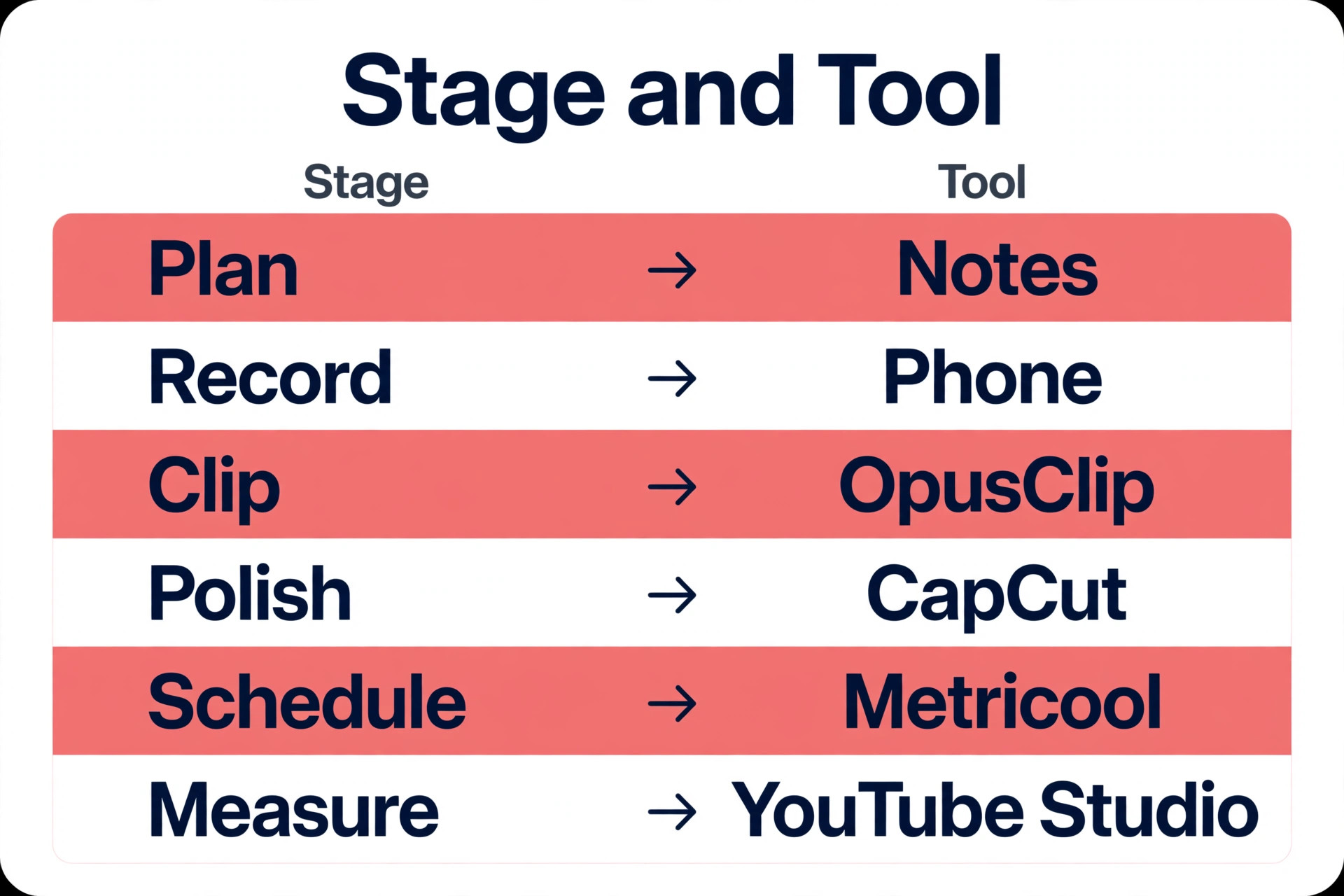
One tool per job keeps the routine cheap and fast, and the six tools below cover every stage without overlap. Prices are the published figures found in research, and they move, so confirm the current figure on the vendor page before you pay.
1. OpusClip
OpusClip is the clipper, and it turns a long recording into captioned vertical clips ranked by a Virality Score from 0 to 99. Paste a link to a YouTube video, Zoom call, or Drive file, and the tool finds the strongest moments, reframes them to vertical, adds animated captions in more than 20 languages, and gives each clip a score based on hook, flow, and trend.
The free plan gives 60 credits a month with a watermark, no editing, and exports that stop working after three days. Starter is $15 a month with 150 credits and auto posting to Shorts, TikTok, and Reels, while Pro is $29 a month, or $14.50 a month billed annually, with 300 credits, a scheduler, and six social account connections.
Choose OpusClip when you already record long videos and want Shorts without editing each one by hand.
2. Descript
Descript is the editor for talking head video, podcasts, and tutorials, and it works by editing the transcript rather than the timeline. Delete a sentence in the transcript and the video cuts itself, which makes it the fastest way to remove filler, mistakes, and pauses from a recording. The free plan gives 60 media minutes a month, and Hobbyist is $16 a month billed annually, or $24 monthly, per person. Descript also records remote interviews and screen captures, so one tool covers the record and edit stages for many small teams. Choose Descript when your footage is mostly you talking to camera and the edit is mostly cutting words.
3. CapCut
CapCut is the free manual editor, and it handles most of the tedious work without a subscription. The free version covers animated auto captions, auto reframe for horizontal footage, background removal, and templates, on phone, desktop, and browser. Pro is $19.99 a month with premium features and 1 TB of cloud storage. The limits are the free tier export caps and watermarks on some premium effects, so check before relying on it for client work. Choose CapCut when you film Shorts directly on your phone and want a fast, free edit with captions, or as the polish tool after a clipper has done the cutting.
4. Submagic
Submagic is the caption led tool for short vertical video, built around animated captions, zooms, and B-roll that keep viewers from swiping away. It suits a business that films its own Shorts and wants them to look fast and current without learning a full editor. Paid plans start from $12 a month, with a free trial to test the style, and the Starter plan covers about 15 videos a month at up to two minutes each. Choose Submagic when captions and pacing are the bottleneck, such as a shop tour or a quick demo that needs energy more than it needs cutting.
5. Metricool
Metricool is the scheduler for a business that posts to several platforms at once, and it covers YouTube, TikTok, and Instagram from one queue. The free plan allows 20 scheduled posts a month for one brand, and paid plans start from $20 a month billed annually, or $25 monthly, excluding tax. Metricool also reports on what worked, so the measure stage happens in the same tool as the schedule stage. Bulk scheduling covers YouTube well, and the analytics feed straight into next week planning. Choose Metricool when Shorts are part of a wider short video routine across three platforms and one queue saves an hour a week.
6. Buffer
Buffer is the simple scheduler, and it fits a business that wants scheduling without a learning curve. The free plan allows 10 scheduled posts per channel across three channels, which covers a three Short week on YouTube with room to spare. TikTok videos auto publish only when they meet the size and format limits, such as three seconds to ten minutes and 1 GB or less in MP4, MOV, or WEBM, and anything else falls back to a phone notification. Choose Buffer when you want a free, simple queue and you post mainly to YouTube, and move to Metricool when you need deeper analytics and multi platform scheduling in one place.
From One Long Video to 5 Shorts
The repurposing loop is the heart of a youtube shorts workflow for small business, because it turns work you already did into a week of posts. Start with a long video that has clear sections, such as a ten minute demo, a webinar, a customer interview, or a podcast episode. Run it through a clipper and review the ranked clips, then pick three to five that each make one point and open with a strong line. A good source episode gives you five Shorts, a great one gives you eight, and a rambling one gives you two, so the quality of the long video decides the yield.
Each clip needs a self contained idea, which means a viewer who sees only the clip still learns something. Cut the setup to one sentence, keep the payoff inside the clip, and end with a next step that points to the full video or the booking page. A clip that only makes sense after watching the long video will lose viewers in three seconds, and a clip that teaches one thing will earn a save and a follow. Check the clip length too, since most clips work best under 60 seconds, and a Short only needs its full three minutes when the content genuinely needs it, such as a step by step fix.
Hooks, Captions, and Retention
The first two seconds decide everything, so write the hook before you film, not after. A hook names the result, the audience, or the mistake, in under ten words, such as Stop storing bread like this, or Three signs your roof needs checking. Open on the result when you can, with the finished product, the fixed problem, or the number on screen, since a viewer who sees the payoff stays to learn how it happened. Avoid greetings, logos, and slow introductions, since the feed gives you no time for them.
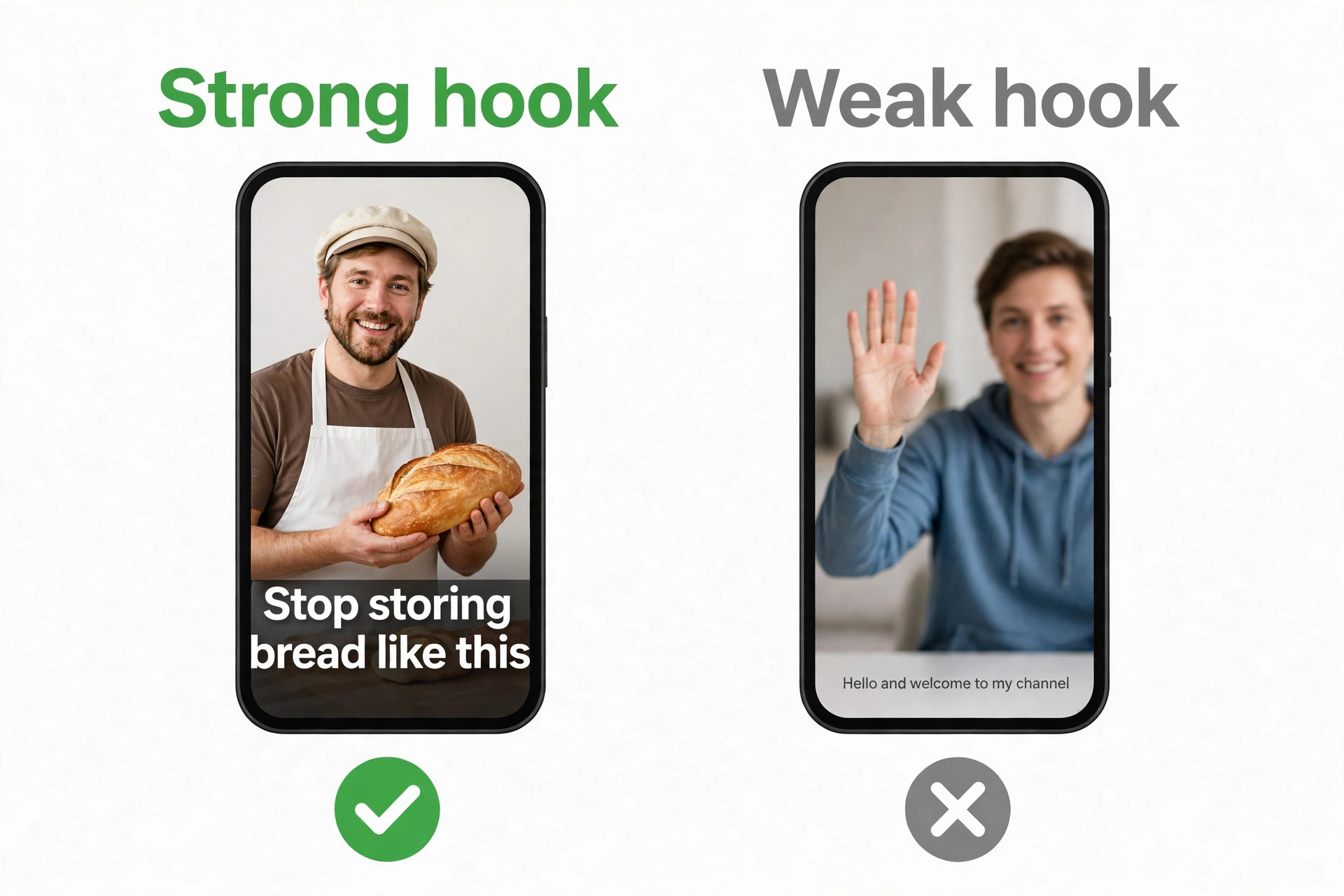
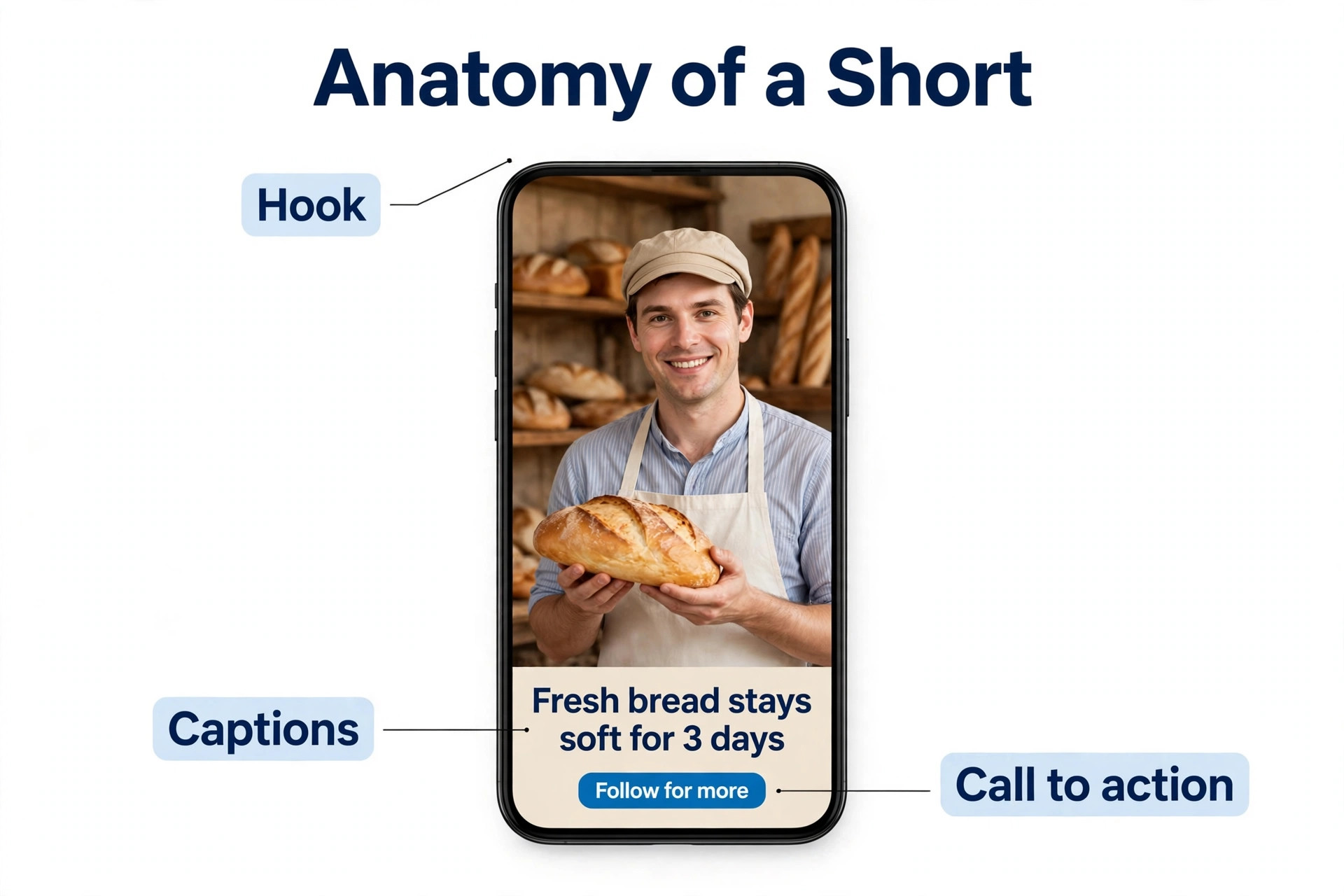
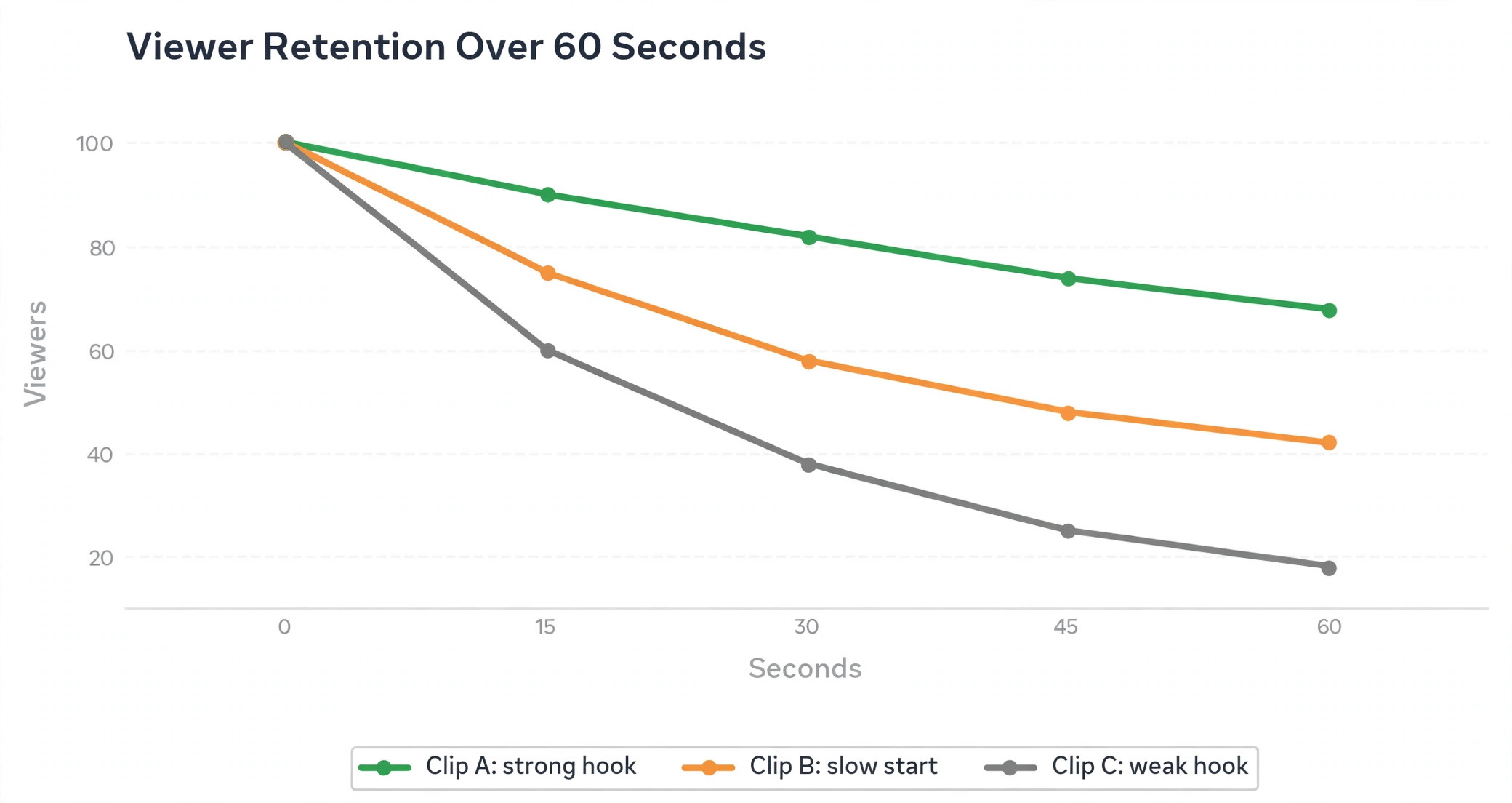
Captions carry the viewers who watch with sound off, and they also carry the viewers who watch with sound on, since reading along keeps attention. Use burned in captions in a large, high contrast font, keep each caption line to a few words, and check them on mute before publishing. Pacing matters as much as words, so cut every pause, add a zoom or a cut when the topic changes, and keep the camera moving with B-roll or a second angle when the shot runs long. Retention is the metric that tells you whether the hook and the pacing worked, so watch the average view duration and the point where viewers leave, then fix that exact moment next week.
Scheduling and Batching
Batching is what makes a youtube shorts workflow for small business sustainable past the first month, because filming and editing in one weekly block costs less willpower than doing a little every day. Record all five topics in one session, clip them in one sitting, polish them in one sitting, and schedule them in one sitting, then leave the routine alone until Friday measurement. A week of clips in one batch takes about three hours total, while the same five clips made one at a time take closer to five, since every setup and export repeats.
Post three to five Shorts a week to start, at times when your audience is awake and scrolling, and keep the cadence steady rather than perfect. YouTube Studio schedules Shorts free, which is enough when YouTube is the only platform, while Metricool and Buffer schedule across platforms from one queue when Shorts also go to TikTok and Reels. Queue one clip per day per platform for the week, and leave gaps for timely posts, such as a same day event or a customer story that will not wait. A steady three a week beats a frantic ten in one week followed by silence, since the feed rewards profiles that keep showing up.
A Realistic First Month Plan
A first month plan keeps the routine honest, because a workflow that looks good on paper still has to survive four real weeks. In week one, set up the pieces and publish the first three Shorts. Pick five topics from customer questions, film them as short takes in one session, edit them in CapCut with burned in captions, and schedule them with YouTube Studio. The goal for week one is not views. It is a finished batch, a working template, and proof that the routine fits in three hours.
In week two, record one long video and turn it into five Shorts. A ten minute demo, a lesson, or a customer interview gives the clipper enough material to find five strong moments, and the five clips fill the whole week. By week two, the youtube shorts workflow for small business starts paying back the setup time, since one recording session produces five posts and the editing is mostly review rather than construction. Watch which of the five holds viewers longest, and note the hook line that did it.
In week three, double down on the winner and test one new format. Make two more Shorts on the best topic from week two with a different hook, and try one format you have not used yet, such as a before and after, a quick answer, or a behind the scenes moment. A new format is a test, not a commitment, so judge it on retention rather than on how fun it was to film. If the new format holds viewers past ten seconds, it earns a place in the rotation. If it loses them in two, drop it without regret.
In week four, review the month and decide what to pay for. Open YouTube Studio, list the top five clips by view duration, and write down the hook, topic, and length of each one. If clipping saved real time, OpusClip Starter at $15 a month is the first purchase. If editing by transcript saved time, Descript Hobbyist at $16 a month billed annually is the pick. If scheduling across platforms is the pain, Metricool from $20 a month billed annually earns its place. Buy one tool, not three, and let the second month prove whether the routine deserves more.
Knowing Whether the Workflow Works
Measurement in a youtube shorts workflow for small business comes down to three numbers, which are the viewed versus swiped away rate, the average view duration, and the clicks to your channel or site. The viewed versus swiped away rate tells you whether the hook worked, since a viewer who swipes in two seconds never saw the content. Average view duration tells you whether the pacing held, since a 40 second clip watched for 30 seconds is working and one watched for 5 seconds is not. Clicks tell you whether the Short earned business, since a Short that entertains but never sends a visitor is a hobby, not marketing.
Check the numbers in YouTube Studio every Friday, and look at the pattern across the week rather than any single clip. A hook style that holds viewers across three topics is a style to repeat, and a topic that loses viewers in the first three seconds needs a new opening, not a new topic. Keep a simple log with the topic, the hook line, the view duration, and the swipe rate, and after a month the log will show you which five topics and which three hook styles deserve the next month. A workflow that measures beats a workflow that guesses, and the log is what turns five Shorts a week into a compounding asset.
Mistakes That Stall a Shorts Routine
Most Shorts routines stall for the same five reasons, and all of them are fixable in a week.
- Filming without a hook line written down first. A video that starts with a greeting loses the viewer before the point arrives, so write the first sentence on paper before you press record.
- Posting the same clip to every platform with no changes. A Short made for YouTube can work on TikTok and Reels, but the title, the description, and the call to action should fit each platform, since the audience and the link options differ.
- Making clips that only make sense after the long video. A Short must teach one thing on its own, or the viewer swipes and never comes back, so cut the setup and keep the payoff inside the clip.
- Skipping captions. Most viewers start with sound off, and a clip without captions is a clip they cannot understand, so burn captions in before you publish anything.
- Quitting after two weeks. Shorts compound slowly, and the first clear signal takes four to six weeks of steady posting, so a routine abandoned in week two never learns what works.
Best Pick by Job
Pick one tool per stage and the routine stays cheap. The table matches the job to the tool, and the cheapest tool that does the job properly is the right one, since a youtube shorts workflow for small business should spend money on filming time, not on software overlap.
| Job | Best pick | Why it wins |
|---|---|---|
| Clip long video to Shorts | OpusClip | Ranked clips, captions, auto posting |
| Edit by transcript | Descript | Cut words to cut video, $16 a month |
| Free phone editing | CapCut | Captions and templates, free tier |
| Caption led Shorts | Submagic | Animated captions, from $12 a month |
| Multi platform scheduling | Metricool | One queue, analytics, from $20 a month |
| Simple free scheduling | Buffer | Free 10 posts per channel |
Frequently Asked Questions
How long should a YouTube Short be?
Keep most Shorts under 60 seconds, and use the full three minutes only when the content genuinely needs it, such as a step by step fix. Shorts can run up to three minutes for square or vertical videos uploaded since October 15, 2024, but length is not the goal. Retention is the goal, and a 35 second clip watched to the end beats a two minute clip abandoned at ten seconds every time.
How many Shorts should a small business post per week?
Post three to five Shorts a week to start, with one per day on your best days if you can sustain it. A steady three a week beats a frantic ten in one week followed by silence, since the feed rewards profiles that keep showing up. Batch the whole week in one three hour block, and measure on Friday before planning the next week.
Do I need to film Shorts vertically?
Yes, film vertical in a nine by sixteen shape, since Shorts live in a feed built for a phone held upright. Horizontal footage can be reframed by CapCut or OpusClip, but a clip shot vertical looks better, fills the screen, and keeps captions readable. Set the phone upright, frame the subject in the center, and leave space at the edges for captions and buttons.
Can I turn a long video into Shorts?
Yes, and it is the fastest way to fill a week. Upload the long video to a clipper like OpusClip, review the ranked clips, and keep the three to five that each make one point and open with a strong line. Each clip needs to stand alone, so cut the setup to one sentence and keep the payoff inside the clip. A ten minute video with clear sections usually yields three to five usable Shorts.
What is the best free tool for YouTube Shorts?
CapCut is the best free starting point for manual editing and captions, and OpusClip free plan gives 60 credits a month for clipping with a watermark. YouTube Studio schedules Shorts free, which covers the whole routine at no cost while you test the format. Pay for OpusClip Starter at $15 a month or Descript Hobbyist at $16 a month billed annually once the routine proves itself and the free limits start costing time.
Do Shorts help a small business get customers?
Shorts help when each clip teaches one thing and points to one next step, such as a booking page, a full video, or a product page. The feed reaches people who never searched for your business, and a useful Short earns trust faster than an ad. Track clicks to your channel and site rather than views alone, since a Short that entertains but never sends a visitor is not doing business work.
Your First Week of Shorts
A Shorts routine is a weekly loop, not a campaign, and the loop has six stages, which are plan, record, clip, polish, schedule, and measure. One long video becomes three to five Shorts, one batch covers the week, and one Friday review picks next week topics, all in about three hours. Start free with CapCut and YouTube Studio, add OpusClip when clipping saves more time than it costs, and judge the work by retention and clicks rather than by views. That is a youtube shorts workflow for small business that survives past the first month, and it is the whole guide in one paragraph.
Film the first batch this week, even if the lighting is imperfect and the hook is rough, since a routine that exists beats a plan that does not. The fifth batch will look better than the first, the analytics will tell you what to fix, and the viewers who find you through a 40 second tip are the customers you were waiting for.