You open Instagram at 9 at night, realise you have posted nothing in four days, and throw up a blurry photo with a rushed caption. It gets twelve likes, no comments, and no enquiries. The next morning you promise yourself you will post every day, and by Thursday you have posted nothing again. That cycle is the real problem for most small businesses, and it has nothing to do with talent. An instagram content calendar for small business fixes the cycle by deciding what to post, when to post it, and who makes it, before the week starts.
A calendar is not a spreadsheet full of dates. It is a promise to your future self that the content will be ready when the slot arrives. With a good one, a small team can publish three to five strong posts a week, keep Stories alive most days, and still have time to run the actual business. This guide builds that calendar step by step, from pillars and frequency to batching, scheduling tools, and the monthly review that keeps it honest.
Instagram Content Calendar for Small Business Starts With Pillars
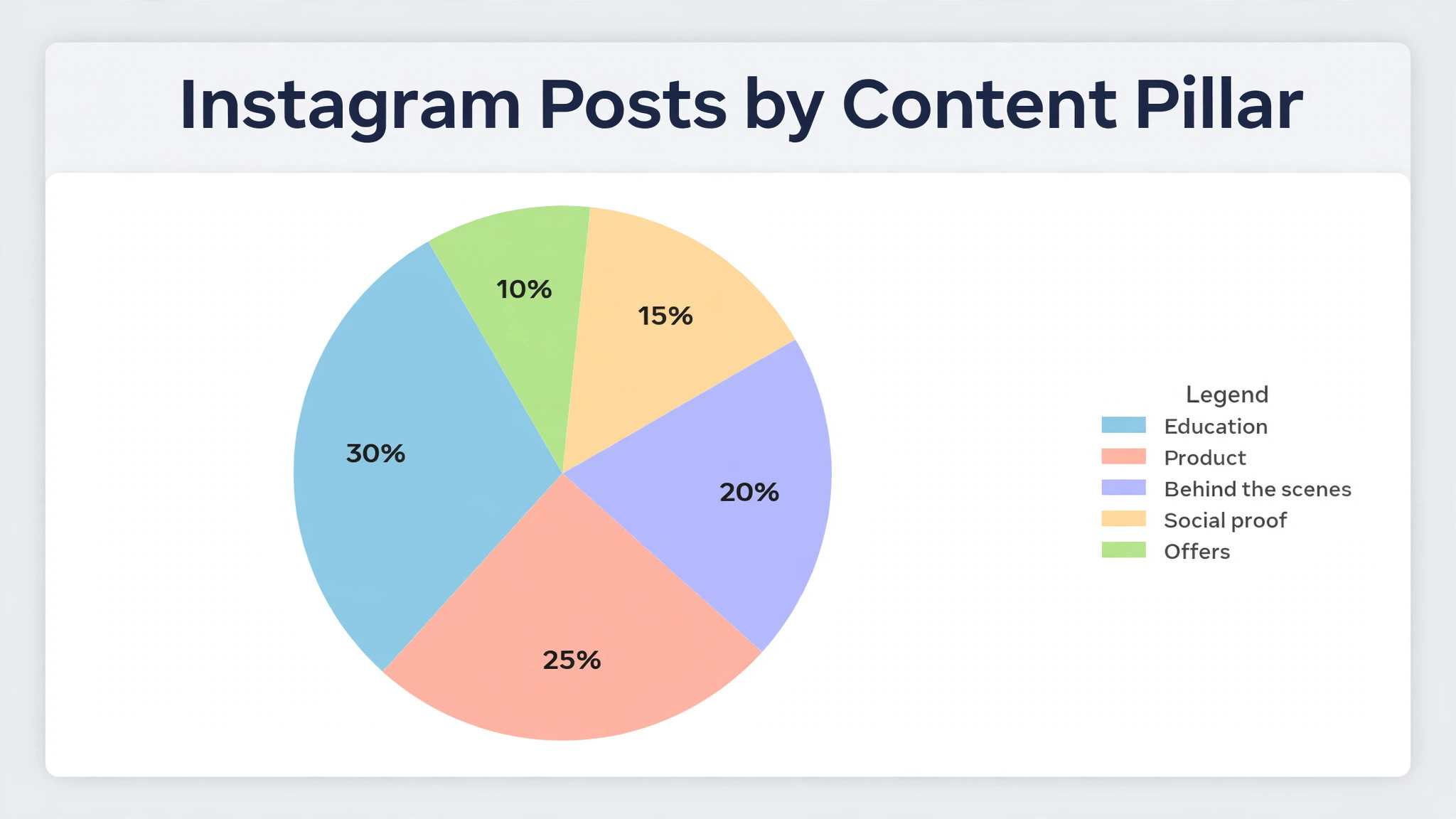
Content pillars are the three to five recurring themes your account stands for, and they are the backbone of every calendar that lasts. Without them, every week starts with a blank page and the question of what to post. With them, every week starts with a rotation you already know. Most small brands do well with education, product, behind the scenes, social proof, and offers, in proportions that match what their customers actually buy.
Education should take the largest share for most service and product businesses, because it is the content people save and share. A bakery can teach one decorating tip a week. A bookkeeper can explain one tax mistake a month. A florist can show how to keep cut flowers alive for a week. Teaching builds trust before it builds sales, and trust is what turns a follower into a customer when they finally need what you sell.
Product content shows what you sell, who it is for, and what makes it different, without shouting. One clear photo or short video, one line on who it is for, and one honest detail is enough. Social proof shows real customers, real reviews, and real results, with permission, because a customer saying it beats you saying it every time. Behind the scenes shows the people and the work, because people buy from people they feel they know. Offers have the smallest share, because an account that only sells trains its audience to ignore it.
| Pillar | Share of posts | Example for a bakery | Example for a service business |
|---|---|---|---|
| Education | 30 percent | One decorating tip a week | One common mistake and the fix |
| Product | 25 percent | New loaf, who it suits | Service explained in one minute |
| Behind the scenes | 20 percent | Morning bake, flour and ovens | A real workday, tools and team |
| Social proof | 15 percent | Customer photo with permission | Client result, quoted exactly |
| Offers | 10 percent | Weekend special, limited run | Seasonal package, clear deadline |
Set your pillar mix in writing before you plan a single week. A mix written down is a decision. A mix kept in your head is a mood, and moods change with the weather. Revisit the mix every quarter, and change it only when the data says a pillar is not working, not because you are bored of it. Your audience needs repetition to remember what you stand for, and repetition only works when the pillars stay steady.
How Often to Post Without Burning Out
Buffer analysis of more than 2 million posts puts three to five feed posts a week as the sweet spot for reach and growth, and Shopify lands on the same three to five range, plus Stories at least once a day. Posting three to five times a week yields about 12 percent more reach per post than posting once or twice a week, according to Buffer analysis of 100,000 plus users, and accounts that post consistently earn about five times more engagement per post than inconsistent posters. The lesson of an instagram content calendar for small business is not to post more. It is to post steadily, at a pace you can hold for months.
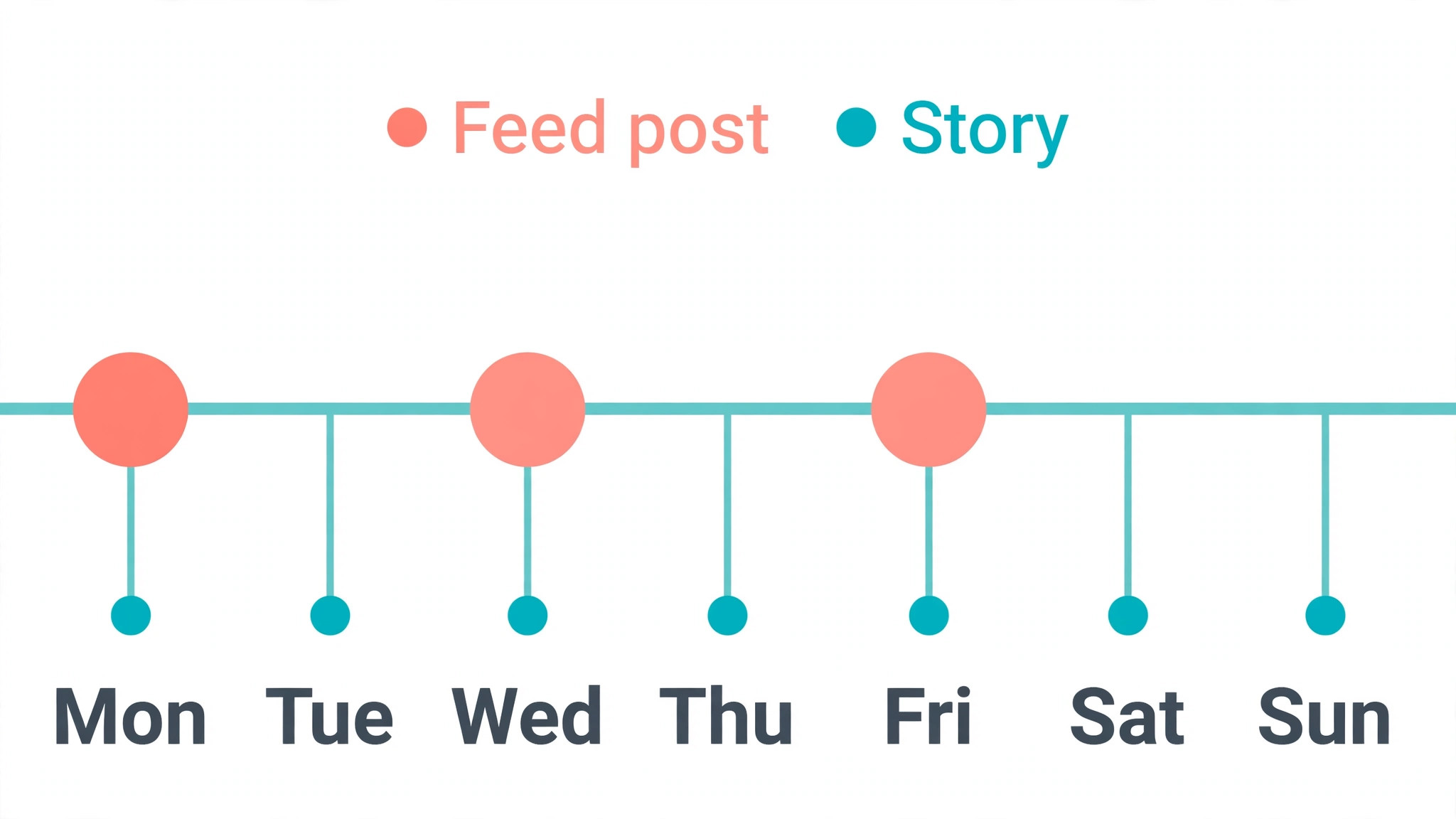
Start with three feed posts a week if one person does social after closing time. Monday can show the product, Wednesday can teach something, and Friday can show the people. That rhythm works for almost any kind of business, from a bakery to a bookkeeper, and it leaves room for Stories on the days between. Keep that pace for two months before you decide whether to add more, because two months of steady posting tells you more than two weeks of daily posting followed by silence.
Stories are a different job from feed posts. Feed is quality, and Stories are frequency. Aim for Stories on five or six days a week if you can reply to the messages they bring, and treat a Story as a conversation, not a broadcast. A poll, a question box, a sold out note, or a behind the scenes clip takes minutes to make and keeps the account alive between feed posts. If Stories feel like a chore, post fewer of them and post them well, because a Story no one replies to is just noise.
Reels deserve a fixed slot in the week, because they are the format that finds new followers. Three to four Reels a week is the working mix for a brand chasing discovery, paired with one or two carousels a week for engagement and saves. A Reel does not need to be a production. A 30 second clip of the work, filmed on a phone in good light, with a clear first three seconds, will outperform a polished video that starts slowly. The first three seconds decide whether anyone watches the rest, so put the promise there, not at the end.
Best Times to Post in 2026
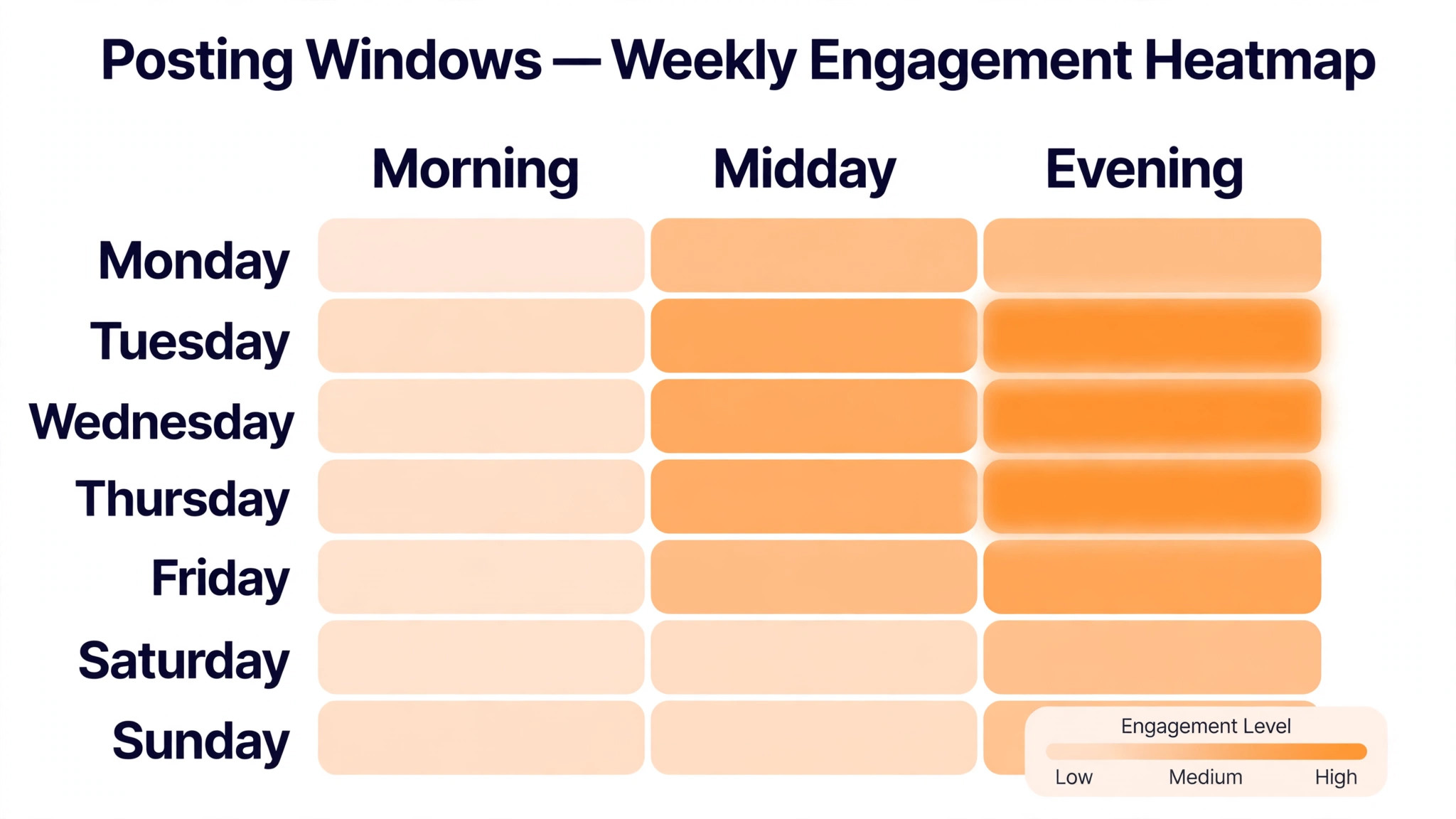
There is no single best time that fits every account, and any guide that promises one is selling certainty it does not have. Studies of millions of posts in 2026 agree on a broad pattern, and that pattern is a safe starting point. The strongest days are Tuesday, Wednesday, and Thursday. The strongest windows are roughly 7 to 9 in the morning, 12 to 1 at midday, and 6 to 9 in the evening. Friday, Saturday, and Sunday show lower engagement in most datasets, though a local shop with a weekend crowd is the exception that proves the rule.
Buffer analysis of 9.6 million posts found Wednesday from 11 in the morning to 1 in the afternoon as a strong window, and evening hours from 6 to 11 at night consistently outperformed other time slots, with Wednesday and Thursday showing the strongest overall performance. Use those windows as your first test in an instagram content calendar for small business, not as a permanent rule. After four to six weeks of consistent posting, open Instagram Insights, look at when your followers are actually online, and shift your slots to match them. Your audience data beats any general study, every time.
Test one change at a time. Move a Wednesday post from morning to evening for three weeks, and compare saves, shares, and profile visits, not just likes. Likes are the weakest signal on Instagram, because they cost the viewer nothing. Saves mean the post was useful enough to keep. Shares mean it was good enough to send to someone else. Profile visits mean it made someone curious about the business. Judge a time slot by those three numbers, and you will stop chasing likes that lead nowhere.
Build the Monthly Calendar in One Hour
An instagram content calendar for small business takes about an hour to build once the pillars are set, and it saves many more hours during the month. Open a spreadsheet or a free planner, write down four weeks of posting days, and assign one pillar and one format to each slot before you write a single caption. A month of Mondays, Wednesdays, and Fridays is twelve feed posts, and twelve posts planned in one sitting is far easier than twelve posts invented at 10 at night.
Start with the fixed dates. Put holidays, sales, launches, markets, and seasonal moments on the calendar first, because those are the posts with a deadline. Then fill the education slots, because they are the posts people save. Then fill the product and social proof slots, and leave the offer slots last, so offers never crowd out the content that earns attention. Leave one slot a week empty on purpose, because a business always has something unexpected worth posting, and a calendar with no room for it will break the first time something good happens.
Write the caption hook before you write the caption. The hook is the first line, and it decides whether anyone reads the second. A hook that names a specific problem, a specific result, or a specific mistake will outperform a hook that greets the audience. Write the hook, write the one point the post must make, and write the one action you want the reader to take. If a post has no clear action, it has no clear purpose, and it should not go on the calendar.
| Week | Monday feed post | Wednesday feed post | Friday feed post | Stories |
|---|---|---|---|---|
| Week 1 | Product showcase | Teaching carousel | Behind the scenes Reel | Open days, poll, sold out note |
| Week 2 | Education Reel | Customer story | Product photo, who it suits | Workday clips, question box |
| Week 3 | Behind the scenes | Teaching carousel | Offer, limited run | New arrival, countdown sticker |
| Week 4 | Customer story Reel | Product showcase | Education, common mistake | Month recap, best of Stories |
A calendar like this is a starting template, not a law. Change the days to match your working week, change the formats to match your strengths, and keep the rhythm. The rhythm is the asset. A follower who sees a teaching post every Wednesday starts to expect it, and expectation is the beginning of a habit. Habits are what turn a casual follower into a regular customer.

Batch Content So the Week Runs Itself
Batching is the habit that makes an instagram content calendar for small business survive contact with a real week. Designing one post at 10 at night every other day is what makes people quit, and quitting is what kills reach. Batching means making all twelve feed posts for the month in one or two sittings, then scheduling them, so the week runs itself while you run the business. The work is the same, but the stress is not, because the stress lives in the daily deadline, not in the total hours.
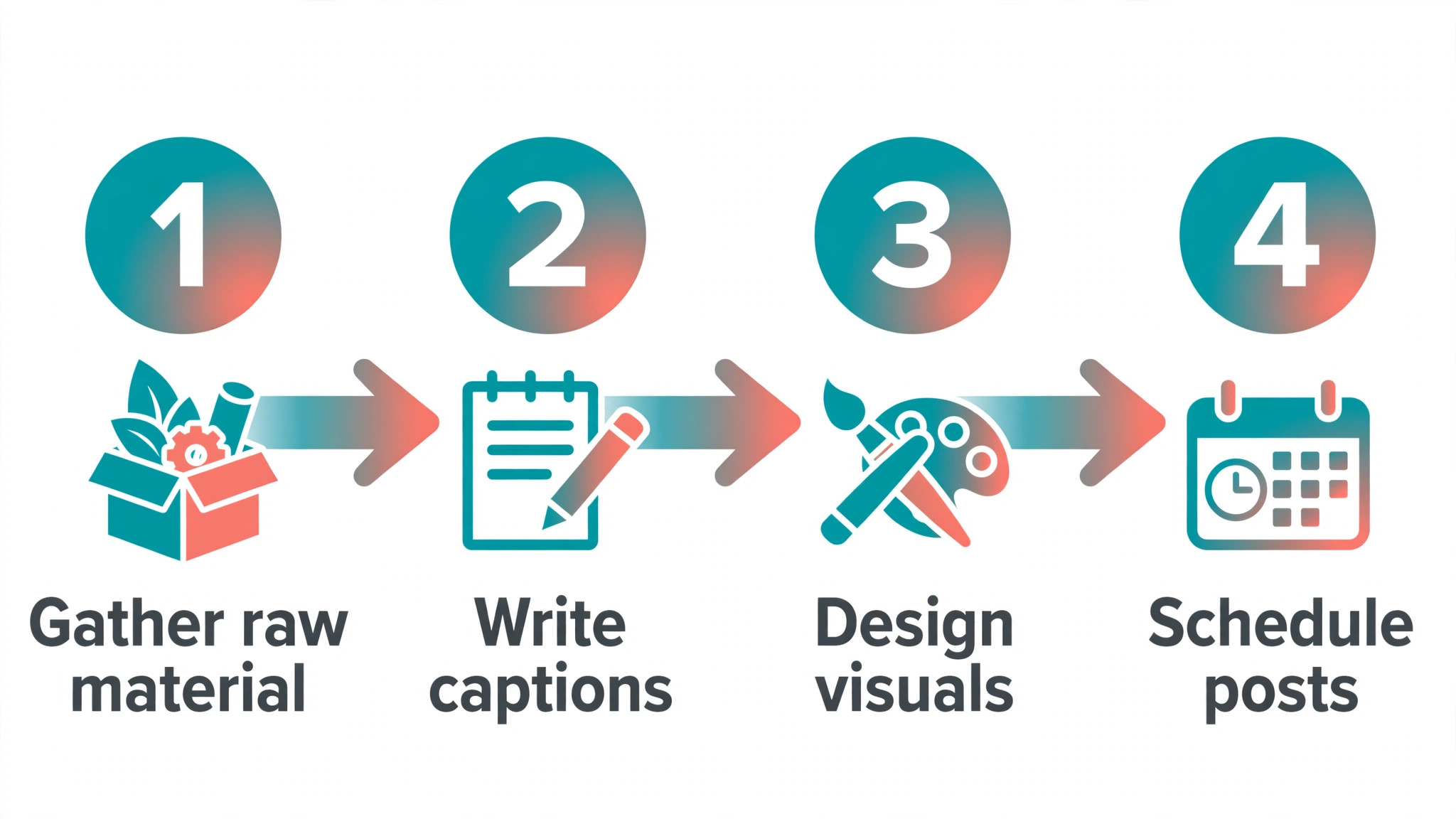
Run batching as a four step session. First, gather the raw material, which is photos, clips, customer quotes, and product details, in one folder. Second, write all the hooks and captions in one document, without opening the design tool. Third, design all the visuals in one session, using one template per format so the feed looks coherent. Fourth, schedule everything, then step away. A session like this takes three to four hours for a month of content, and it replaces twelve evenings of rushed posting.
Keep templates simple. One carousel template, one Reel cover template, and one static template is enough for most small businesses. A template is not a cage. It is a starting point that keeps fonts, colours, and spacing consistent, so the feed looks like one business made it. Change the photo, change the words, and keep the structure. Consistency is what makes a feed look professional, and professionalism is what makes a stranger trust a small business they have never visited.
Tools That Fit a Small Business Budget
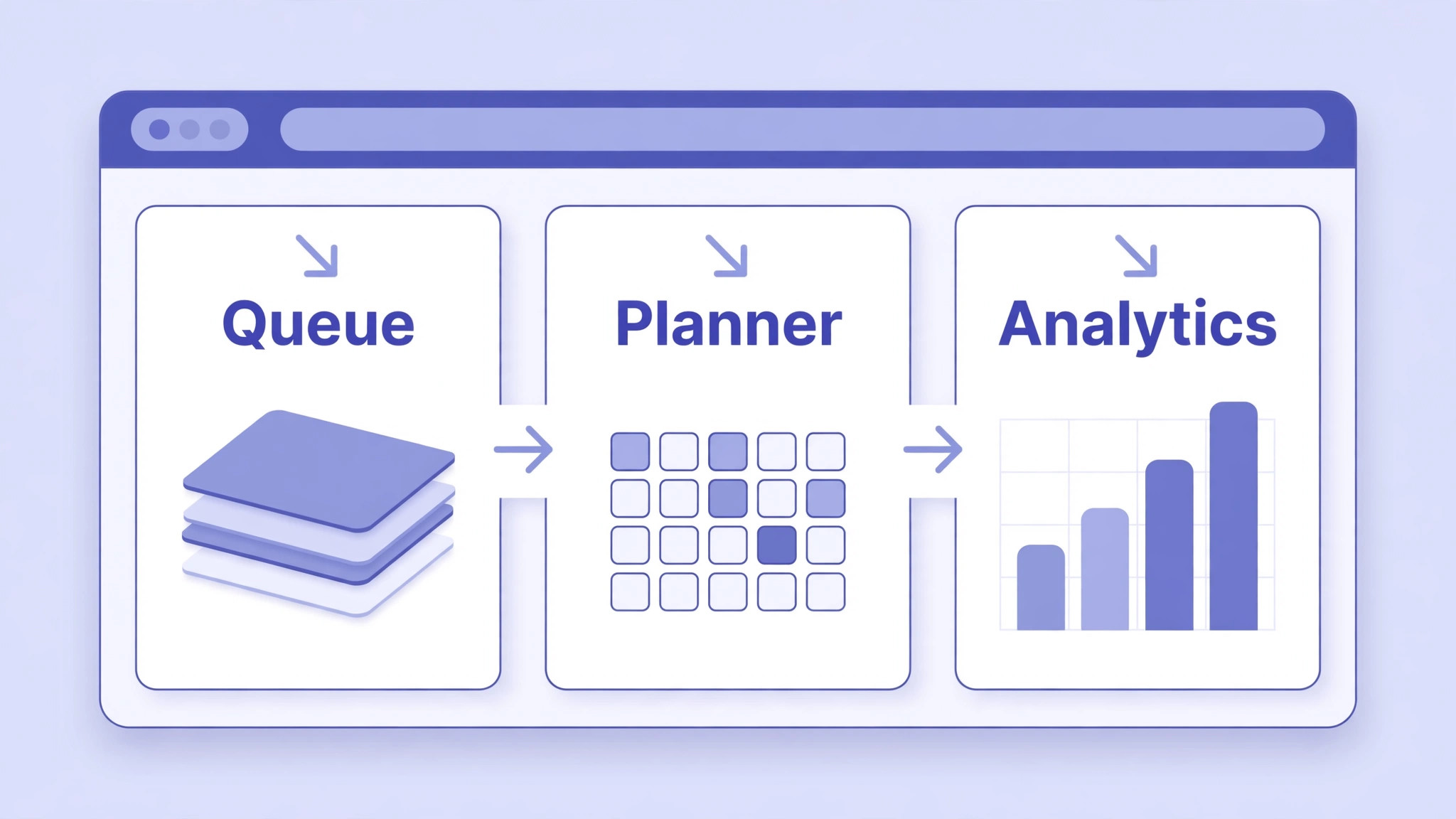
The right tool for an instagram content calendar for small business is the one you will actually open every week, not the one with the longest feature list. Meta Business Suite is free, and it schedules posts and Stories, shows basic Insights, and handles comments and messages in one place. For a business starting from zero, it is the honest first choice, because it costs nothing and does the core job. Its limits show when you need a visual planner, bulk scheduling, or deeper analytics, and that is when a paid tool earns its price.
Later starts from 25 dollars a month, and it suits small brands who care about how the grid looks. Its visual planner shows the feed before you publish, which matters when the grid is part of the brand. Buffer offers a free plan for three channels, with Essentials at 5 dollars a month per channel and Team at 10 dollars a month per channel. Buffer suits a business that wants a simple queue and a clean analytics view without paying for features it will never use. Metricool offers a free plan for 20 posts a month, with paid plans from 25 dollars a month, and it suits a business that wants scheduling plus competitor tracking in one place.
Hootsuite starts from 99 dollars per user a month when billed annually, and it suits a team that manages several accounts and needs approvals, assignments, and deeper reporting. For a one person business, that price is hard to justify, and a cheaper tool will do the same core job. Notion is free, and it suits a business that wants the calendar as a planning document, with ideas, drafts, and approvals in one workspace, while scheduling happens in Meta Business Suite. Google Sheets is free, and it suits anyone who wants a simple calendar with no learning curve at all.
| Tool | Starting price | Best for | Watch out for |
|---|---|---|---|
| Meta Business Suite | Free | First calendar, scheduling, messages | Weak visual planning |
| Later | From 25 dollars a month | Grid planning, visual brands | Paid from the start |
| Buffer | Free, Essentials 5 dollars a month per channel | Simple queue, clean analytics | Price grows per channel |
| Metricool | Free, from 25 dollars a month | Scheduling plus competitor tracking | Paid tiers add up fast |
| Hootsuite | From 99 dollars per user a month, billed annually | Teams, approvals, reporting | Too much for one person |
| Notion | Free | Planning, ideas, drafts, approvals | No scheduling built in |
| Google Sheets | Free | Simple calendar, no learning curve | No scheduling built in |
| Canva | Free, Pro 18 dollars a month | Designing posts fast | Scheduler is basic |
Choose one scheduler and one design tool, and stop shopping. A business that uses Buffer and Canva every week will outperform a business that owns five tools and uses none of them. The tool does not make the calendar work. The habit of planning, batching, and reviewing makes it work, and the tool only removes friction from that habit.
Captions, Hashtags, and Calls to Action
A caption has three jobs, and most captions only do one. It must earn the read with a strong first line, deliver one useful point in the body, and end with one clear action. The action can be a save, a share, a comment, a profile visit, or a message, but it must be one action, not three. A caption that asks the reader to like, comment, share, save, and visit the shop asks for everything and gets nothing, because a reader who faces five choices makes none.
Write captions the way you talk to a customer in the shop, in short sentences and plain words. A caption that sounds like a press release will be skipped, and a caption that sounds like a person will be read. Put the important information early, because Instagram hides the rest behind a read more link. If the offer, the date, or the price matters, put it in the first two lines, not at the end of a long paragraph no one reaches.
Hashtags are a discovery tool, not a magic trick. Use five to ten relevant hashtags that describe the post, the place, and the customer, and skip the generic tags with millions of posts, where a small business will never be seen. A local bakery will do better with a tag for its town and its craft than with a tag for food in general. Check which hashtags bring profile visits in Insights, keep the ones that work, and drop the ones that do not. Hashtags are a test, not a tradition.
Measure What Matters Every Month
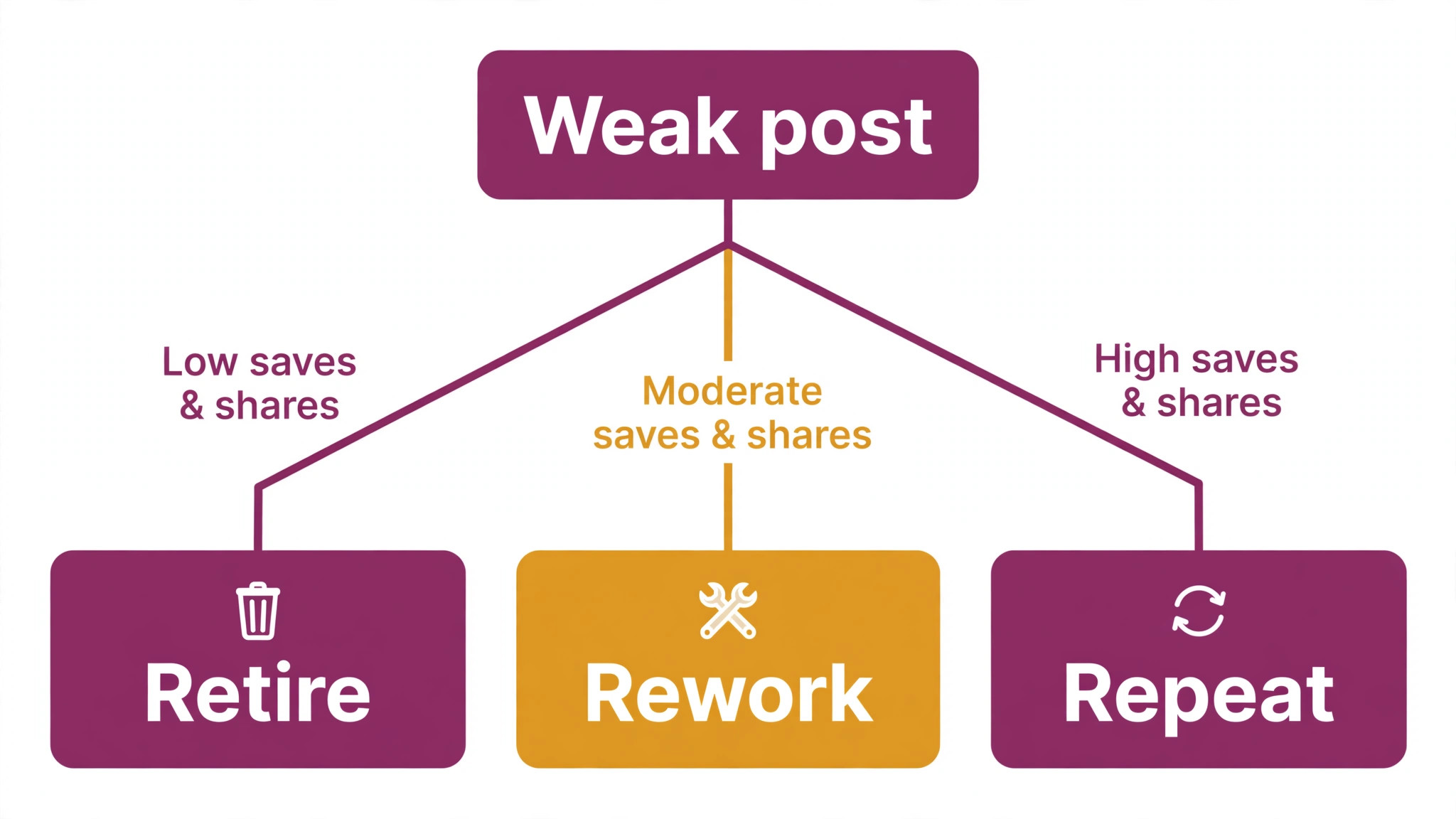
An instagram content calendar for small business without a monthly review is a diary, not a strategy. Once a month, open Insights and look at four numbers for each post, which are reach, saves, shares, and profile visits. Reach tells you how many people saw the post. Saves tell you it was useful. Shares tell you it was worth sending on. Profile visits tell you it made someone curious about the business. A post that scores well on all four is a post worth repeating in a new form. A post that scores well on none is a post worth retiring.
Compare formats, not just individual posts. If carousels earn twice the saves of static photos, make more carousels. If Reels earn the reach but not the profile visits, fix the call to action at the end of the Reel. If Stories earn replies on polls but silence on product slides, make more polls and fewer product slides. The data will tell you what your audience wants, but only if you look at it in groups, because one viral post can hide a month of weak ones.
Set one goal for the next month, and only one. It can be more saves, more profile visits, more messages, or more enquiries from Instagram, but it must be one goal, because a calendar chasing five goals chases none. Write the goal at the top of the next month calendar, and choose the pillars and formats that serve it. A month with a goal is a test. A month without one is just posting, and posting without a goal is how a business spends a year on Instagram with nothing to show for it.
Mistakes That Break a Small Business Calendar
The first mistake is planning a daily posting schedule you cannot hold. A daily plan looks ambitious on the first of the month and feels like a burden by the tenth, and the account goes silent by the twentieth. Silence hurts reach more than a modest pace ever will, because Instagram rewards accounts that show up steadily. Plan three posts a week you can hold for a year, not seven posts a week you can hold for a fortnight.
The second mistake is copying a big brand calendar. A big brand has a team, a budget, and a studio, and its calendar reflects that. A small business copying it will spend its week making content instead of serving customers, and the content will still look worse, because it was made by one tired person instead of a team. Build a calendar for the team you have, not the team you wish you had.
The third mistake is treating every post as a sales post. An account that only sells trains its audience to scroll past, and the algorithm notices. Keep offers to about one post in ten, and earn the right to sell with nine posts that teach, show, or entertain. The sale will come, but it will come from trust, not from repetition.
The fourth mistake is never reviewing the calendar. A calendar that is never measured becomes a habit, and a habit that is never questioned becomes a rut. Spend thirty minutes a month on the review, change one thing based on the data, and keep the rest steady. Small, monthly changes compound into a calendar that gets better every quarter, while a calendar that never changes gets worse every quarter.
Best Pick by Job
Different businesses need different setups, so choose by the job in front of you, not by the longest feature list. The table below matches the common jobs to the setup that fits each one, using the prices researched for this guide.
| Your job | Best pick | Why it fits | Starting price |
|---|---|---|---|
| Starting from zero | Meta Business Suite plus Google Sheets | Free, does the core job | Free |
| Visual brand, grid matters | Later plus Canva Pro | Visual planner, fast design | From 25 dollars a month |
| Simple queue, clean analytics | Buffer plus Canva | Easy scheduling, clear numbers | Free to start |
| Scheduling plus competitor tracking | Metricool | One place for planning and rivals | Free to start |
| Team with approvals | Hootsuite | Assignments, approvals, reporting | From 99 dollars a month |
| Planning in one workspace | Notion plus Meta Business Suite | Ideas, drafts, and approvals together | Free |
Check the price at checkout before you buy, because vendors change list prices during the year and regional prices vary. A tool that fits your weekly habit at a fair price is worth more than a cheaper tool you never open. Start free where you can, pay only when a limit actually blocks you, and keep the calendar simple enough that a busy week cannot break it.
Frequently Asked Questions
How many times a week should a small business post on Instagram?
Three to five feed posts a week is the sweet spot for most small businesses, according to Buffer analysis of more than 2 million posts and Shopify guidance. Start with three if one person does social, keep that pace for two months, and add more only if the quality holds. Add Stories on most days, because Stories are frequency while feed posts are quality.
What should go in an Instagram content calendar?
A good calendar lists the date, the pillar, the format, the hook, the caption, the visual, the hashtags, and the goal for every post, before the week starts. It also lists fixed dates such as holidays, sales, and launches first, so posts with a deadline never get missed. A calendar that only lists dates is a diary, and a calendar that lists the work is a plan.
How far ahead should I plan Instagram content?
Plan one month ahead for feed posts, one week ahead for Stories, and one day ahead for anything tied to the news or the weather. A month ahead is far enough to batch the work and close enough that the content still feels current. Planning further ahead usually means the content goes stale before it is published.
Do I need a paid scheduling tool for Instagram?
No. Meta Business Suite is free and it schedules posts and Stories, shows basic Insights, and handles messages in one place. Pay for a tool only when a free limit actually blocks you, such as visual planning, bulk scheduling, or deeper analytics. Most small businesses can run a strong calendar on free tools for months before a paid plan earns its price.
What are Instagram content pillars for a small business?
Content pillars are the three to five recurring themes your account stands for, such as education, product, behind the scenes, social proof, and offers. They stop every week starting with a blank page, because the rotation is already decided. Pick three to five pillars, set their share of posts in writing, and revisit the mix every quarter.
How do I know if my Instagram calendar is working?
Look at reach, saves, shares, and profile visits once a month, and compare formats in groups rather than judging single posts. A calendar is working when saves and shares rise, profile visits turn into messages or enquiries, and the posting pace holds for months without burnout. If reach is flat and saves are falling, change one thing, such as the format mix or the posting time, and test it for a month.
How much time does an Instagram calendar take each week?
A monthly batching session takes three to four hours, and a weekly check takes about thirty minutes for scheduling, replies, and Stories. That is far less than the daily scramble of inventing a post at night, and it produces better content, because the work is done when you have time to think, not when you are tired. The calendar does not add work. It moves the work to a time when you can do it well.
The Final Word
Start small, stay steady, and let the data decide what grows. Three posts a week, planned a month ahead, batched in one sitting, and reviewed once a month will beat a daily plan that collapses by the second week. Build the pillars, keep the rhythm, and give an instagram content calendar for small business a year to work. The businesses that win on Instagram are rarely the ones with the biggest budgets. They are the ones that show up, every week, with something useful to say.