Small businesses in the United States write off an estimated 40 billion dollars a year in unpaid invoices, and late payment is the most common reason a healthy small firm runs short of cash. The invoice itself is rarely the problem. The problem is the follow up, the payment link, and the record keeping around it. The best invoicing software for small business fixes all three at once, by sending a professional invoice, reminding the client automatically, and recording the payment against your books without a spreadsheet in between.
We compared 10 tools on published pricing pages, payment fees, free plan limits, and the features that decide whether you get paid on time. The list runs from free tools that cost nothing at all to full accounting platforms that charge 38 dollars a month and up. Prices in this guide were checked in November 2026, and you should confirm the price on the checkout page before you pay, because vendors change list prices and run short promotions.
How We Compared the Best Invoicing Software for Small Business
We started from the same question a small business owner actually asks. Which tool sends a professional invoice, gets the client to pay it, and leaves a clean record, for the lowest total cost. That total cost has two parts. The first is the monthly subscription. The second is the fee taken from every card payment, which is usually around 2.9 percent plus 30 cents. A free plan with a high card fee can cost more than a paid plan with a low one, once the invoices start flowing.
We scored each tool on six points. Invoice quality covered templates, branding, and whether the invoice looks professional on a phone. Payment options covered cards, bank transfer, and payment links. Automation covered recurring invoices, reminders, and late fees. Accounting depth covered whether the tool posts invoices to real books or only tracks them. Free plan value covered how far you get before paying. Support covered live help and the quality of the help centre.
We also read the fine print on free plans, because the limit is usually volume, not features. Zoho Invoice caps free use at 500 invoices a year. QuickBooks free plan allows only two invoices a month. Wave gives unlimited invoices free but charges for bank imports on the Pro plan. Those limits matter more than the headline price, and they are the reason two tools with a zero dollar price tag can feel very different in daily use.
The Best Pick for Each Job
| Job | Pick | Why it wins |
|---|---|---|
| Freelancers who bill by the hour | FreshBooks | Time tracking and invoicing in one flow |
| A free tool that does the whole job | Zoho Invoice | Full features at zero cost |
| Invoicing inside real accounting | QuickBooks Online | The standard your accountant knows |
| A team with many users | Xero | Unlimited users on every plan |
| In person and online payments | Square Invoices | Free start plus a card reader |
| No monthly subscription | Stripe Invoicing | Pay per invoice instead |
| A solo owner starting out | Wave | Free invoicing with built in books |
| Recurring client billing | Invoice Ninja | Free tier with recurring invoices |
Use this table as a shortcut, then read the full section for the tool you are leaning toward. The cheapest subscription is not the cheapest tool when the card fees are high, and the most expensive tool is not the best choice when you only send five invoices a month.
The Best Invoicing Software for Small Business, Ranked
The 10 tools below fall into three groups. The first group is invoicing first tools, built around sending invoices and getting paid. The second group is accounting platforms, where invoicing is one part of a full set of books. The third group is free and pay per use tools, which suit a new business or a side income that cannot justify a monthly bill yet. The best invoicing software for small business for you depends on which group matches how you work, not on which tool tops a feature list.
1. FreshBooks
FreshBooks is the best pick for freelancers and service businesses that bill for their time, because invoicing is the product here, not a side feature. You track hours against a client, turn the tracked time into an invoice in two clicks, and send it with a payment link attached. Estimates, expenses, and late payment reminders sit in the same flow, so a job moves from quote to paid invoice without retyping anything.
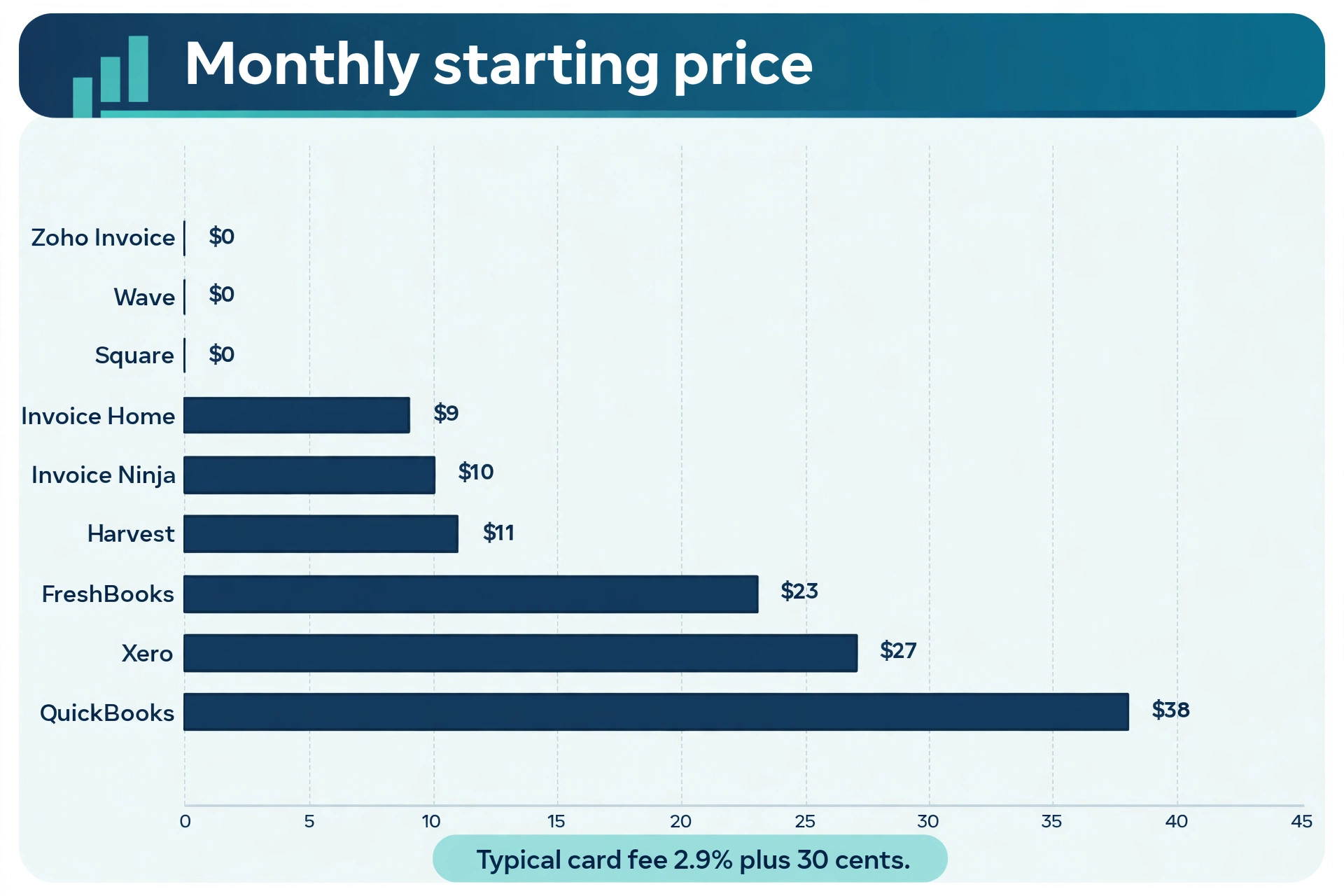
Pricing starts with Lite at 23 dollars a month for up to 5 billable clients, with unlimited invoices, estimates, expenses, and time tracking. Plus costs 43 dollars a month for up to 50 clients and adds bank reconciliation, double entry reports, and accountant access. Premium costs 70 dollars a month and removes the client cap entirely. Card payments cost 2.9 percent plus 30 cents per transaction.
The limit to watch is the client cap on Lite. Five billable clients sounds generous until a freelancer realises that every past client still counts. If your client list is growing, budget for Plus from the start. FreshBooks is the right choice when your work is hourly and your invoice is the end of a time tracking workflow.
2. QuickBooks Online
QuickBooks Online is the default answer when the invoice is only half the job and the books are the other half. Every invoice posts to your accounts automatically, bank feeds reconcile payments, and your accountant already works in the same system. That integration is the reason it remains the most used small business accounting platform in the United States, even though its invoicing alone is not the prettiest on this list.
Simple Start costs 38 dollars a month for one user, with invoicing, automated bank feeds, receipt capture, and basic reporting. Essentials costs 85 dollars a month and adds bill management and multiple users. A free plan exists at zero dollars a month but allows only two invoices a month, so treat it as a trial, not a plan. Card payments cost 2.99 percent per transaction.
QuickBooks is the right choice when you need real accounting behind the invoices and you expect an accountant to review your books. It is the wrong choice when you only need invoices and nothing else, because you pay for accounting depth you will never use.
3. Xero
Xero is the best pick when several people need access to the same books, because every plan includes unlimited users. A bookkeeper, a partner, and an accountant can all work in the same file without a per seat charge, which is rare in this category. The invoicing itself is clean and fast, with online payment links, recurring invoices, and automatic reminders.
Early costs 27 dollars a month and covers 20 invoices and 5 bills a month, which suits a small firm with steady but modest volume. Growing costs 47 dollars a month and removes the invoice cap while adding bulk reconciliation. Established costs 80 dollars a month and adds multi currency, project tracking, and expense claims. There is a 30 day free trial on paid plans.
The Early cap is the trap. Twenty invoices a month is enough for a consultant with a few retainers, but a business that invoices per job will hit it fast. Xero is the right choice for a team that shares the books and wants predictable pricing without counting seats.
4. Zoho Invoice
Zoho Invoice is the best free invoicing tool in this guide, and the only one that gives you a full feature set at zero cost with no paid tier waiting behind it. You get professional templates, a client portal, multi currency support, automated reminders, and recurring invoices, all free. Zoho made the product permanently free, and it stays free rather than expiring into a trial.
The limits are generous for a small business. The free plan covers up to 500 invoices a year and 2 users. There is no paid plan to upgrade to, which is both the strength and the limit. When you outgrow it, you move to Zoho Books, a separate paid product, rather than unlocking a higher tier in the same tool.
Zoho Invoice is the right choice when you want invoicing that costs nothing and does the whole job. It is the wrong choice when you want invoicing and full accounting in one subscription, because that is a different Zoho product with a different price.
5. Wave
Wave is the best free starting point for a very small business that wants invoicing and basic books together. The Starter plan costs nothing and includes unlimited invoices, estimates, and receipt scanning, with accounting built in. It is the only tool on this list that pairs free invoicing with a free ledger, which makes it a genuine one stop shop for a solo owner.
Pro costs 19 dollars a month and adds automatic bank transaction imports, receipt scanning at higher volume, and lower card fees on your first ten monthly payments. Card processing costs 2.9 percent plus 60 cents per transaction, or 3.4 percent for American Express. That 60 cent fixed fee is higher than the 30 cents most rivals charge, so it adds up on small invoices.
Wave is the right choice when you are starting out and want free invoicing with real books behind it. It is the wrong choice when you invoice in high volume, because the per transaction fee and the lack of advanced features start to cost more than a paid plan elsewhere.
6. Square Invoices
Square Invoices is the best pick when your clients pay in person as well as online, because it sits on top of the Square payment system that already runs in millions of shops, stalls, and service vans. You send an invoice from the same account that takes card payments at the counter, and the money lands in the same place. The free tier is genuinely usable, with online invoicing, estimates, and payment links at no monthly cost.
Square Plus costs 49 dollars a month per location and adds team management, advanced reporting, and a cap on ACH fees at 10 dollars. Card fees on the free tier are 3.3 percent plus 30 cents per invoice, which is higher than the 2.9 percent most rivals charge. That gap is the real cost of the free plan, and it is worth calculating against your average invoice size.
Square Invoices is the right choice when you already take Square payments or you sell in person and online. It is the wrong choice when your invoices are large and card only, because the higher card fee eats the saving from the free plan.
7. Stripe Invoicing
Stripe Invoicing is the best pick when you want no subscription at all and you would rather pay per invoice. There is no monthly fee. You pay 0.4 percent per paid invoice on top of standard payment processing at 2.9 percent plus 30 cents. A business that sends ten invoices a month pays a few dollars in invoicing fees, while a business that sends none pays nothing.
The invoices themselves are clean and professional, with payment links, hosted invoice pages, and automatic reminders. Stripe also handles tax calculation and multi currency billing, which makes it the strongest option on this list for an online business with customers in several countries. The trade off is that Stripe is a payments platform first, so there is no built in time tracking, no estimates workflow, and no accounting ledger.
Stripe Invoicing is the right choice for an online or developer led business that wants the best payment experience without a monthly bill. It is the wrong choice for a service business that bills hours and needs estimates and time tracking in the same tool.
8. Invoice Ninja
Invoice Ninja is the best pick for recurring client billing on a small budget, because the free tier includes recurring invoices, a client portal, and online payments. Many free plans hold recurring billing back for paid tiers, so this is a genuine difference. The interface is less polished than FreshBooks, but the feature list is long, with quotes, expenses, time tracking, and multi company support.
Paid plans start at 10 dollars a month for the Pro plan, which removes the client limit on the free tier and adds unlimited clients, custom branding on the client portal, and more automation. The free tier covers 20 clients, which is enough for a freelancer with a steady book of repeat customers. Card fees depend on the payment gateway you connect, because Invoice Ninja does not process payments itself.
Invoice Ninja is the right choice when you bill the same clients every month and you want that automation free. It is the wrong choice when you want a polished mobile app and a guided setup, because the interface expects you to know your way around invoicing already.
9. Harvest
Harvest is the best pick for freelancers and agencies who bill by the hour and want time tracking to be the centre of the tool. You start a timer, log the work against a project, and turn the tracked hours into an invoice without retyping. The reporting shows which clients and projects actually make money, which is the information a service business needs most.
The free tier covers 1 seat and 2 projects, which is enough to test the workflow. Pro costs 11 dollars per seat per month on annual billing and removes the project limit while adding unlimited clients, invoicing, estimates, and integrations with accounting tools. Harvest connects to QuickBooks Online and Xero, so the invoice can post to your books automatically.
Harvest is the right choice when time is your product and the invoice is the last step of tracking it. It is the wrong choice when you sell products or fixed price services, because the time tracking core adds nothing and the invoicing alone is thinner than FreshBooks.
10. Invoice Home
Invoice Home is the best pick for a freelancer who wants a professional invoice out in minutes with no learning curve at all. The tool is built around templates, with more than 100 invoice designs to choose from, and the flow is deliberately simple. Create the invoice, add your logo, send it, and track whether the client opened it.
The free plan covers up to 1,000 dollars in invoices per month with no credit card required. The Unlimited plan costs 9 dollars a month and removes the cap while adding recurring invoices and email sending. There is no accounting, no time tracking, and no estimates workflow, so Invoice Home is an invoicing tool and nothing else.
Invoice Home is the right choice when you want the fastest path from a blank page to a professional invoice. It is the wrong choice when your business needs the invoice to connect to books, time tracking, or a client workflow, because none of that exists here.
How to Choose the Right Invoicing Tool
Start with the total cost, not the subscription price. Add the monthly plan to the card fees on your expected invoice volume, and compare that total across two or three tools. A free plan at 3.3 percent can cost more than a 23 dollar plan at 2.9 percent once your monthly invoicing passes a few thousand dollars. Run that calculation with your real numbers before you commit, because it is the single most useful check in this guide.
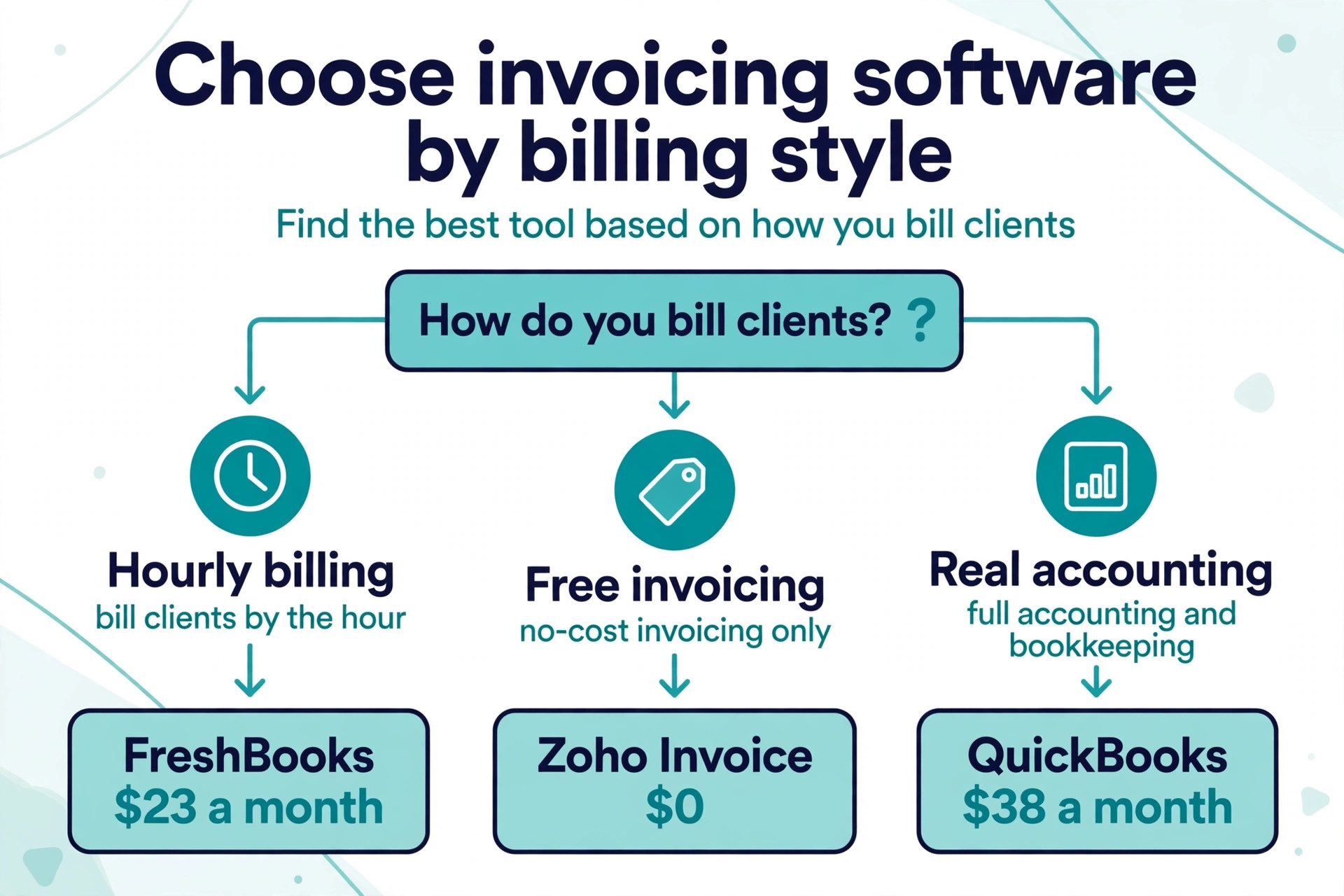
Next, match the tool to how you bill. Hourly work belongs in FreshBooks or Harvest, where time tracking feeds the invoice directly. Fixed price project work belongs in Zoho Invoice or Invoice Ninja, where the invoice is quick and the cost is low. Product sales belong in Square or Stripe, where the payment system is the strength. Full accounting belongs in QuickBooks Online or Xero, where the invoice posts to the books.
Then check the free plan limit against your real volume. Count your invoices per month and per year, count your active clients, and check whether the free tier covers both. A limit you hit in month three turns a free tool into a forced upgrade, and the upgrade price is rarely the one you planned for. The best invoicing software for small business is the one whose free or paid tier still fits a year from now.
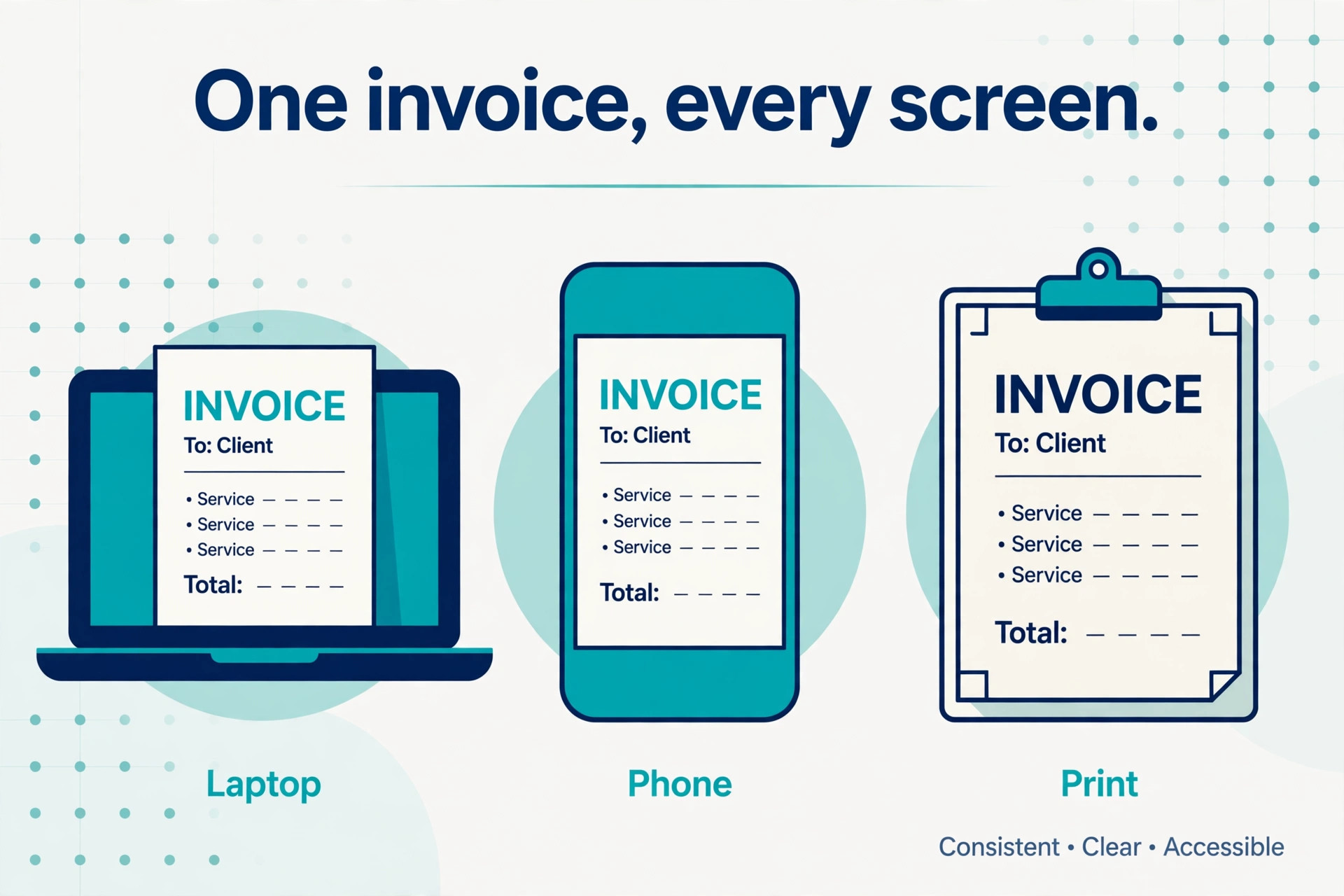
Finally, test the invoice on a phone before you commit. Most clients open an invoice on their phone, and a template that looks clean on a laptop can feel cramped on a small screen. Send yourself a test invoice from each tool on your shortlist, open it on your phone, and pay it with a test card if the tool allows it. The tool that is easiest for your client to pay is the tool that gets you paid fastest, and that test takes ten minutes.
What Your Invoice Must Include
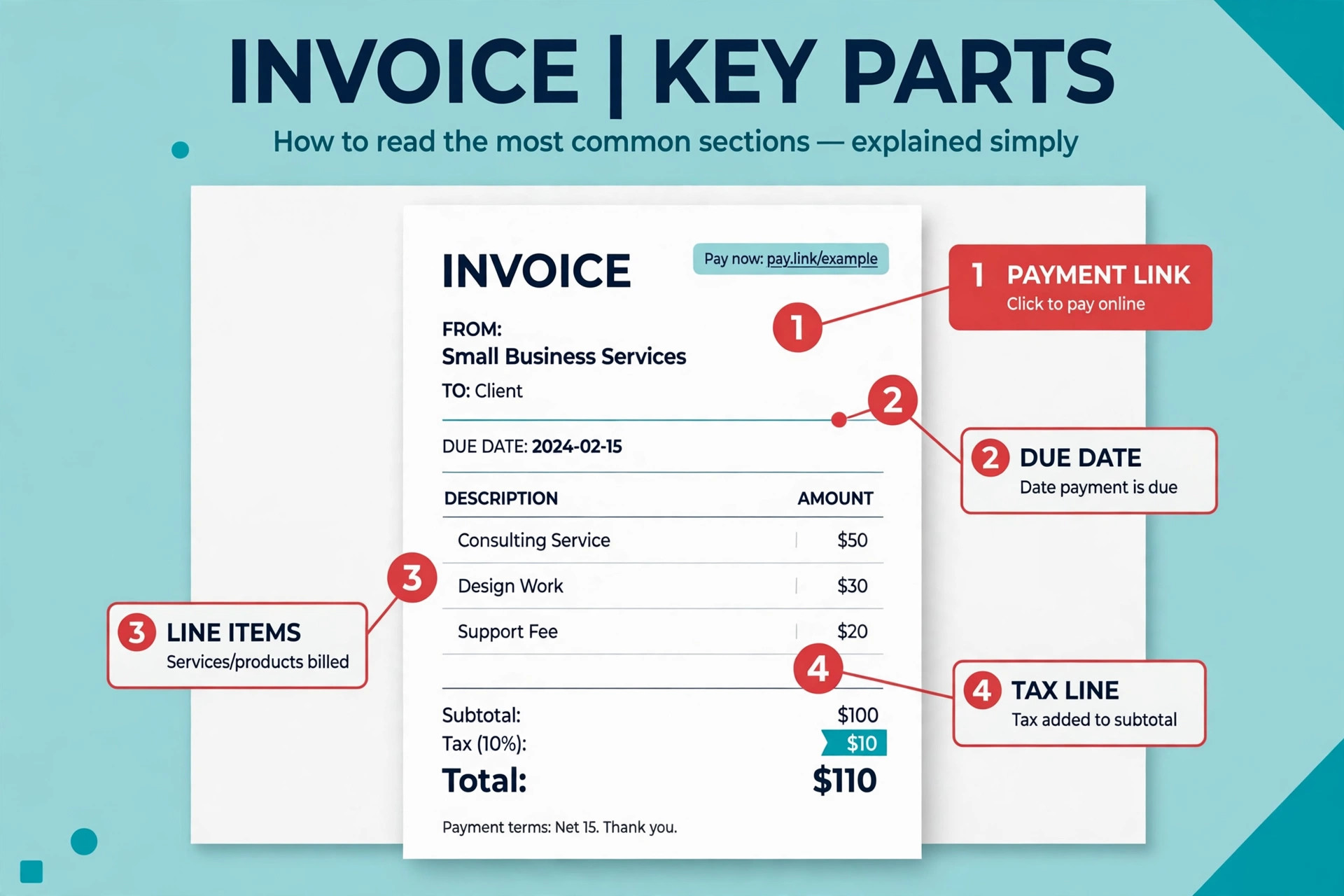
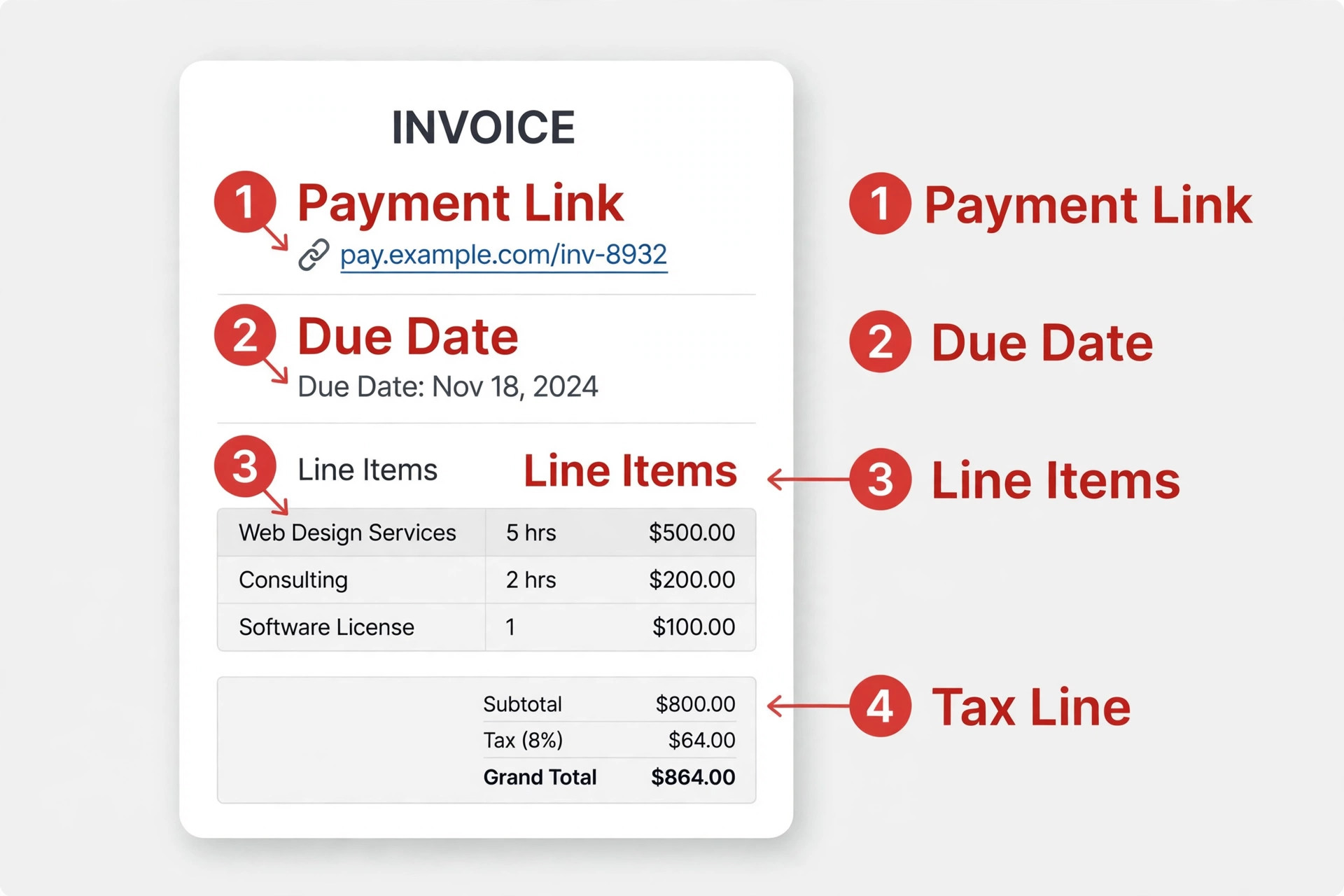
Every invoice needs the same core details, whichever tool you use. Your business name and contact details sit at the top, followed by the client name and address, a unique invoice number, the issue date, and the due date. Each line item needs a plain description of the work or product, the quantity, the rate, and the total. The tax line sits below the subtotal, and the grand total is the largest number on the page.
The payment section matters as much as the line items. Include a payment link or clear payment instructions, the accepted payment methods, and your late payment terms in plain words. A due date written as “due in 14 days” is clearer than a bare date, because the client sees the deadline without doing the maths. Add your bank details only when you accept bank transfer, and never put sensitive account numbers on an invoice sent by plain email without the protection of a payment link.
The details that prevent disputes are the ones people skip. Add the project name or purchase order number when the client uses one, because their accounts team needs it to approve the payment. Add a short note thanking the client and confirming the next step, because a friendly invoice gets paid faster than a cold one. Keep a copy of every invoice you send, and number them in sequence, because a gap in the numbering is the first thing an accountant asks about.
Mistakes That Cost Small Businesses Money
The fourth mistake is forgetting the payment link. An invoice sent as a plain PDF with no link forces the client to open their bank app, type in your details, and remember to do it later. Most of them will not do it today, and a surprising number will not do it at all. Every tool on this list can attach a payment link, so there is no reason to send an invoice that cannot be paid in one click.
The most common mistake is choosing on subscription price alone and ignoring card fees. A business that invoices 5,000 dollars a month at 3.3 percent pays 165 dollars in fees, while the same volume at 2.9 percent pays 145 dollars. That 20 dollar gap every month is more than the price of several paid plans on this list.
The second mistake is sending invoices without automatic reminders. A polite reminder three days after the due date recovers more late payments than any phone call, and every tool on this list can send one for free. Turn reminders on the day you set up the tool, not the day a client goes overdue.
The third mistake is invoicing late. Work finished on Monday and invoiced on Friday is work paid two weeks later than it should be. Send the invoice the day the work is done, while the value is fresh in the client mind.
- Calculate total cost including card fees before you choose.
- Turn on automatic payment reminders on day one.
- Send every invoice the day the work is finished.
- Add a payment link to every invoice you send.
- Reconcile paid invoices against your books every month.
Our Verdict
FreshBooks is the pick for most readers, because it covers the whole journey from tracked hours to a paid invoice at 23 dollars a month, and the Plus plan at 43 dollars covers a growing client list without a jump in complexity. It is the most complete invoicing first tool on this list, and the one we would choose for a service business that bills by the hour.
Zoho Invoice is the pick when the budget is zero, because it is a full invoicing tool at no cost with no paid tier hiding behind the free plan. Start with the free trial of your top pick, send a real invoice through it, and watch how fast the payment arrives. QuickBooks Online is the pick when the invoice must post to real books and your accountant works in the same system. The best invoicing software for small business is the one that matches how you bill, fits your volume a year from now, and charges the lowest total cost once card fees are counted.
Frequently Asked Questions
Which is the best invoicing software for small business for a freelancer?
FreshBooks is the strongest pick for a freelancer who bills by the hour, because time tracking feeds straight into the invoice and the Lite plan at 23 dollars a month covers 5 clients with unlimited invoices. A freelancer with a very low volume should start with Zoho Invoice instead, because it is free and covers up to 500 invoices a year, then move to FreshBooks when hourly billing becomes the main income.
What is the best invoicing software for small business with no monthly fee?
Zoho Invoice is the best no fee option, because the whole product is free with no paid tier, including automated reminders and recurring invoices. Square Invoices and Wave are also free to start, but both charge higher card fees than paid plans, so the real cost depends on how much you invoice. Stripe Invoicing has no monthly fee either, but it charges 0.4 percent per paid invoice plus processing.
How much does invoicing software cost per month?
Entry prices in this guide run from zero dollars for Zoho Invoice, Wave, and Square Invoices to 38 dollars a month for QuickBooks Online Simple Start. Most small businesses land between 10 and 43 dollars a month for a paid plan. Card fees add 2.9 percent plus 30 cents per payment on most tools, so a business invoicing 5,000 dollars a month pays roughly 145 dollars in card fees on top of the subscription.
Does free invoicing software really work for a real business?
Yes, when the volume fits the free plan limit. Zoho Invoice handles up to 500 invoices a year free, which covers most solo businesses. Wave handles unlimited invoices free with books built in. The limit to check is not the invoice count alone. Check the client count, the reminder automation, and the card fee, because those are the three places a free plan usually costs you later.
Should I use invoicing software or full accounting software?
Use invoicing software when the invoice is the job and your books are simple enough to track separately. Use full accounting software when you need bank reconciliation, tax reports, payroll, and an accountant working in the same file. QuickBooks Online and Xero are the accounting picks on this list. FreshBooks sits in between, with light accounting that suits a freelancer but not a business with inventory or payroll.
What payment methods should my invoices offer?
Offer card payment and bank transfer at minimum, because clients pay fastest when the invoice carries a payment link they can use in one click. Add a digital wallet option when your clients are consumers rather than businesses. Avoid asking for cheques or manual bank transfers as the only option, because every extra step between the invoice and the payment is a reason for the client to pay tomorrow instead of today.