
Canva will finish your certificate in ten minutes, Adobe Express will make it look like a studio produced it, VistaCreate will animate it for social media, and PosterMyWall will print a hundred of them and post them to your shop. That is the whole choice in one sentence, and the rest of this guide is about which of those four strengths matches the certificate you actually need to make. The best gift certificate makers are not ranked by how many templates they hold, because all four hold plenty, but by how fast they get a finished, printable, trustworthy voucher into your hands.
A gift certificate is a promise printed on paper or sent as a file, and the buyer is paying for the experience of giving it as much as for the value printed on it. A certificate that looks cheap makes the gift feel cheap, while a certificate that looks considered makes a twenty five dollar voucher feel like a thoughtful present. The tools below all start free, they all export print ready files, and they differ in template quality, print options, animation and bulk features. Prices were checked against vendor pages and independent checks from 2026, and you should confirm the current figure on the vendor page before you pay.
The Best Gift Certificate Makers at a Glance
| Tool | Best for | Free plan | Paid from |
|---|---|---|---|
| Canva | Fastest finished certificate | Yes | 120 dollars a year or 15 dollars a month |
| Adobe Express | Most polished look | Yes | 9.99 dollars a month |
| VistaCreate | Animated digital vouchers | Yes | 13 dollars a month |
| PosterMyWall | Print runs and social posts | Yes | Check the vendor page |
Best Pick by Job
| Job | Best pick | Why it wins |
|---|---|---|
| One certificate in ten minutes | Canva | Biggest template library, fastest editor |
| A certificate that looks premium | Adobe Express | Studio grade templates, stock photos included |
| A voucher for Instagram or email | VistaCreate | Animation, social sizes, quick layouts |
| A hundred printed certificates | PosterMyWall | Print ordering, bulk layouts, social scheduling |
| A certificate on a zero budget | Canva Free | Hundreds of free templates, PDF export |
| Matching tickets and vouchers | Adobe Express | Dedicated pages for both, one account |
The 4 Best Gift Certificate Makers in Detail
Canva
Canva is the baseline for gift certificates, and it is the tool most small businesses reach for first. The template library holds hundreds of certificate designs across occasions, from spa vouchers and restaurant gifts to birthday and holiday certificates, and the drag and drop editor lets you change the text, the fonts, the colours, the logo and the photos without any design training. You can start from a template or a blank page, and the finished file exports as a PDF for print or as a PNG or JPG for email and messaging.
The free plan covers the whole job for a single certificate, because most casual templates, fonts and elements are free, and the PDF export is included. Canva Pro costs 120 dollars a year or 15 dollars a month, and it adds the full template library, brand tools that save your logo and colours, background removal, Magic Resize for turning one design into many sizes, and a larger stock photo library. A shop that makes certificates regularly will feel the difference, because the brand tools keep every voucher looking like it came from the same business. A shop that makes one certificate a year will not miss them.
Canva has two real weaknesses for this job, and both are worth knowing before you commit. The first is that it has no bulk merge system, so making fifty certificates with different names and values means editing each one by hand, which is slow and error prone. The second is that the most popular templates are widely used, so a certificate built from the top template can look familiar to a customer who has seen the same design elsewhere.
The fix is to customise the template properly, with your own photo, your own colours and your own wording, rather than changing only the name and the amount. For a one off certificate, Canva is the fastest route to a finished design, and it is the pick for most readers of this guide.
Adobe Express
Adobe Express is the pick when the certificate has to look like a studio produced it, and it is the strongest of the four on visual quality. Its dedicated gift certificate maker page offers templates or a blank canvas, editable text and visual elements, and download, printing or online sharing, and the template set leans more refined than the Canva library, with quieter layouts and better typography. The stock photo library is a genuine advantage, because a certificate with a professional photograph of a spa, a meal or a garden looks more expensive than the same design with a free stock image.
Adobe Express is free to start, and the Premium plan costs 9.99 dollars a month, with a thirty day trial. The free tier covers templates and basic editing, while Premium adds the full stock library, premium templates and fonts, and the Firefly AI features for generating images and text effects. If you already pay for Adobe Creative Cloud, Express is included, which makes it free in practice for many designers and agencies. The price undercuts Canva Pro by about five dollars a month, and the output quality is at least as good, so the choice between the two comes down to which editor you prefer rather than which one is cheaper.
The weakness is the same as Canva, because Adobe Express has no bulk merge and no dedicated voucher system. It makes the artwork, and it does not create legally enforceable terms, a secure code system or a redemption tracker, so a shop that sells many certificates still needs a separate process for recording codes and checking them at the till. The editor is also slightly less familiar than Canva to most small business owners, which means the first certificate takes a little longer. For a business that values a premium look and already uses Adobe tools, Express is the natural choice, and the dedicated certificate and ticket pages make it easy to produce a matching set for an event.
VistaCreate
VistaCreate is the pick for a digital voucher that lives on social media or in an inbox, because it is the only tool here built around animation and social formats. The editor is template based, with a wide choice of themes, colours, fonts and backgrounds, and it lets you add motion to a voucher, which is genuinely useful for stopping a scroll on Instagram or Facebook. A static certificate gets ignored in a feed, while a short animated voucher with the value and the expiry date visible will be watched, and that difference matters when the certificate is also an advert for your business.
VistaCreate offers two pricing options, a free Starter tier and Pro at 13 dollars a month, with a fourteen day free trial of Pro. The free tier covers template based editing and standard exports, while Pro adds the full asset library, more fonts and animations, and background removal. One limit to know is that the platform cannot export a certificate as a vector SVG file, which matters if you send artwork to a professional printer, so a print focused shop should test the PDF export quality before committing to a large run. For most digital uses the exports are fine, and the print formats that can be sent to VistaPrint cover the common cases.
The template library is smaller than Canva, and the editor is less well known, so you will find fewer tutorials and fewer ready made certificate designs. What VistaCreate does well is speed on social sizes, because a voucher designed once can be resized for a story, a post and an email header without rebuilding it. If your certificates are mostly digital, and mostly shared on social media, VistaCreate is the most direct route to a voucher that looks alive. If your certificates are mostly printed and handed over in person, Canva or Adobe Express will serve you better, because their print templates and export options are deeper.
PosterMyWall
PosterMyWall is the pick for a shop that needs certificates in quantity, because it combines a design editor with print ordering and social scheduling in one account. The template library covers gift certificates, flyers, social posts and menus, so a cafe or a salon can design the certificate, the poster and the Instagram post from the same brand assets in one sitting. The editor is simpler than Canva, which suits a business owner who wants a finished design without learning a full design tool, and the social scheduling means the voucher can be posted to several channels from the same dashboard.
Pricing is the weak point of this recommendation, because PosterMyWall publishes its paid plans on its pricing page and the figure changes by region and billing choice, so this guide does not quote a number that may be wrong by the time you read it. The free plan covers basic design and export with limits, and the paid plans add higher quality downloads, more templates and scheduling. Check the vendor page for the current price before you buy, and compare it with Canva Pro at 120 dollars a year and Adobe Express Premium at 9.99 dollars a month, because the right comparison is the total cost of the certificates you will actually make, not the headline monthly figure.
The design quality sits a step below Canva and Adobe Express, with fewer premium templates and a smaller stock library, so a single certificate for a special occasion will look better from the other tools. Where PosterMyWall wins is the workflow for volume, because ordering finished physical vouchers through the platform, or through its print partner, removes the step of finding a printer and checking the file yourself. For a business that prints fifty or a hundred certificates for a holiday season, that saved step is worth more than a slightly prettier template. For a business that makes one certificate at a time, the other tools are the better pick.
What Makes a Gift Certificate Sell
The value should be the biggest number on the certificate, not the smallest, because the recipient reads the amount first and everything else second. Put the value in large type near the centre, with the currency symbol beside it, and avoid hiding it in small print at the bottom, because a certificate that makes the recipient hunt for the amount feels like a trick.
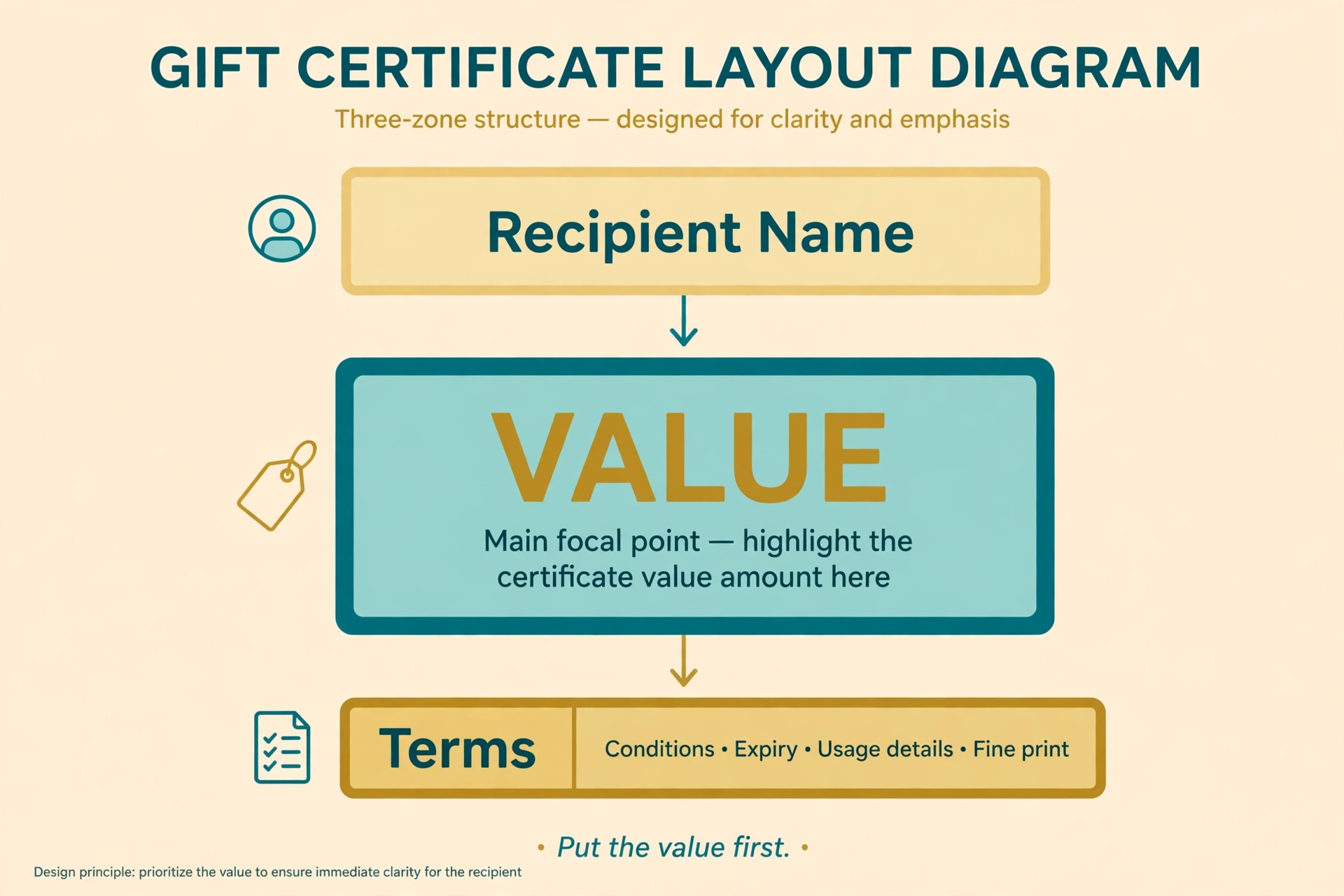
Round numbers sell better than odd ones, so a fifty dollar certificate feels like a gift while a forty seven dollar certificate feels like a receipt, and the same logic applies to any currency. If the certificate is for a service rather than an amount, name the service in large type instead, such as a one hour massage or a dinner for two, because the experience is the value.
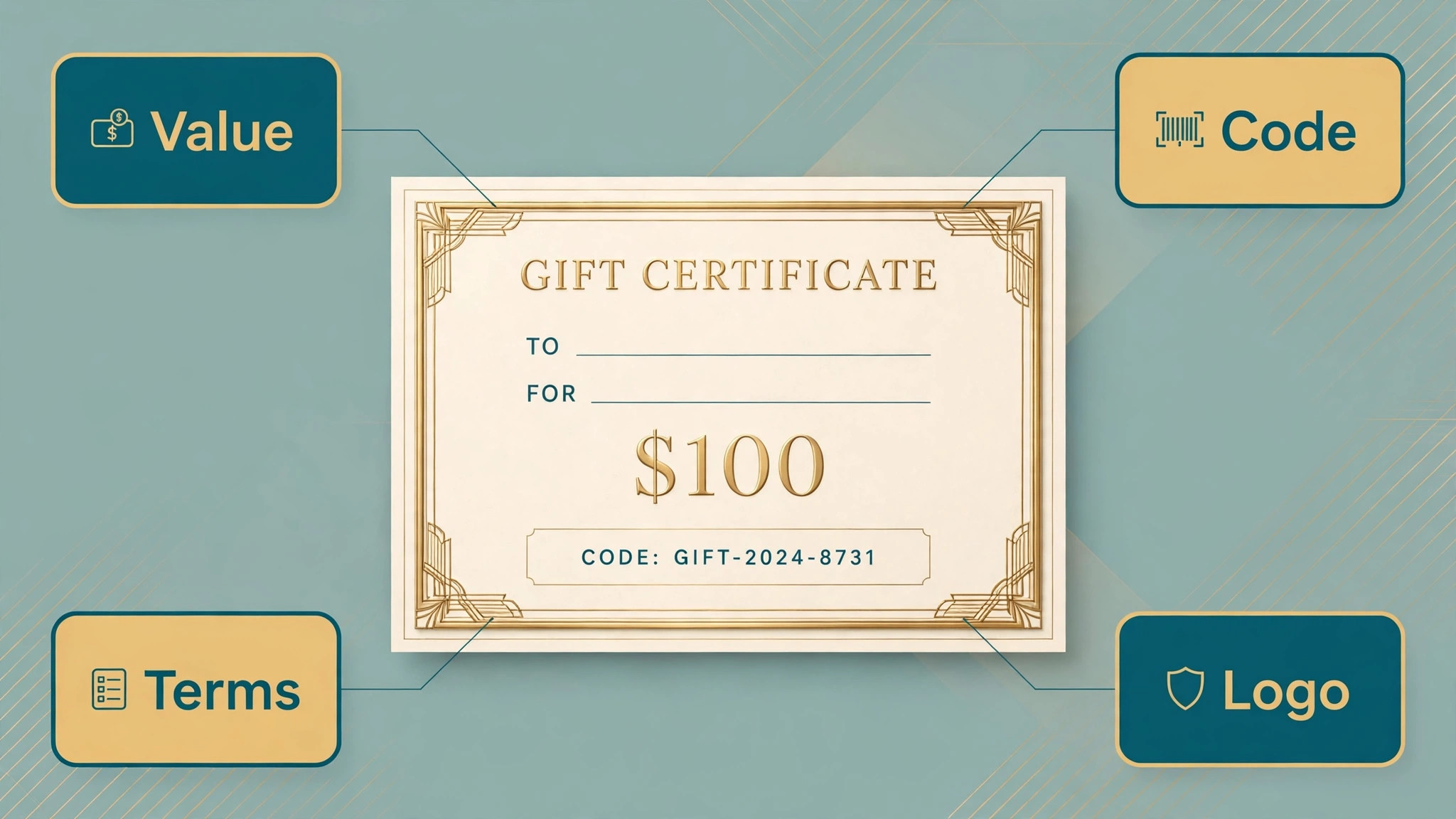
The recipient line matters more than most businesses think, because a certificate with a name on it feels personal and a blank certificate feels like a voucher bought in a hurry. Leave a clear space for the recipient name, the giver name and a short message, and print the certificate with those fields filled in rather than handing over a blank form. A handwritten message on a printed certificate is even better, because it shows the giver took a minute to think about the person, and that minute is part of the gift. The best gift certificate makers all leave space for these fields in their templates, so use the space rather than deleting it to fit more decoration.
The design should match the business, not the occasion alone. A spa certificate should feel calm, with soft colours and a single photograph, while a restaurant certificate should feel warm, with rich colours and a photo of food. A toy shop certificate can be bright and playful, while a law firm gift should be restrained and formal. The template you pick is a signal about your business, so choose one that a customer would recognise as yours even without the logo. That recognition is what makes a certificate feel like it came from a real place rather than a generic website, and it is what makes the recipient want to visit.
Print vs Digital Certificates
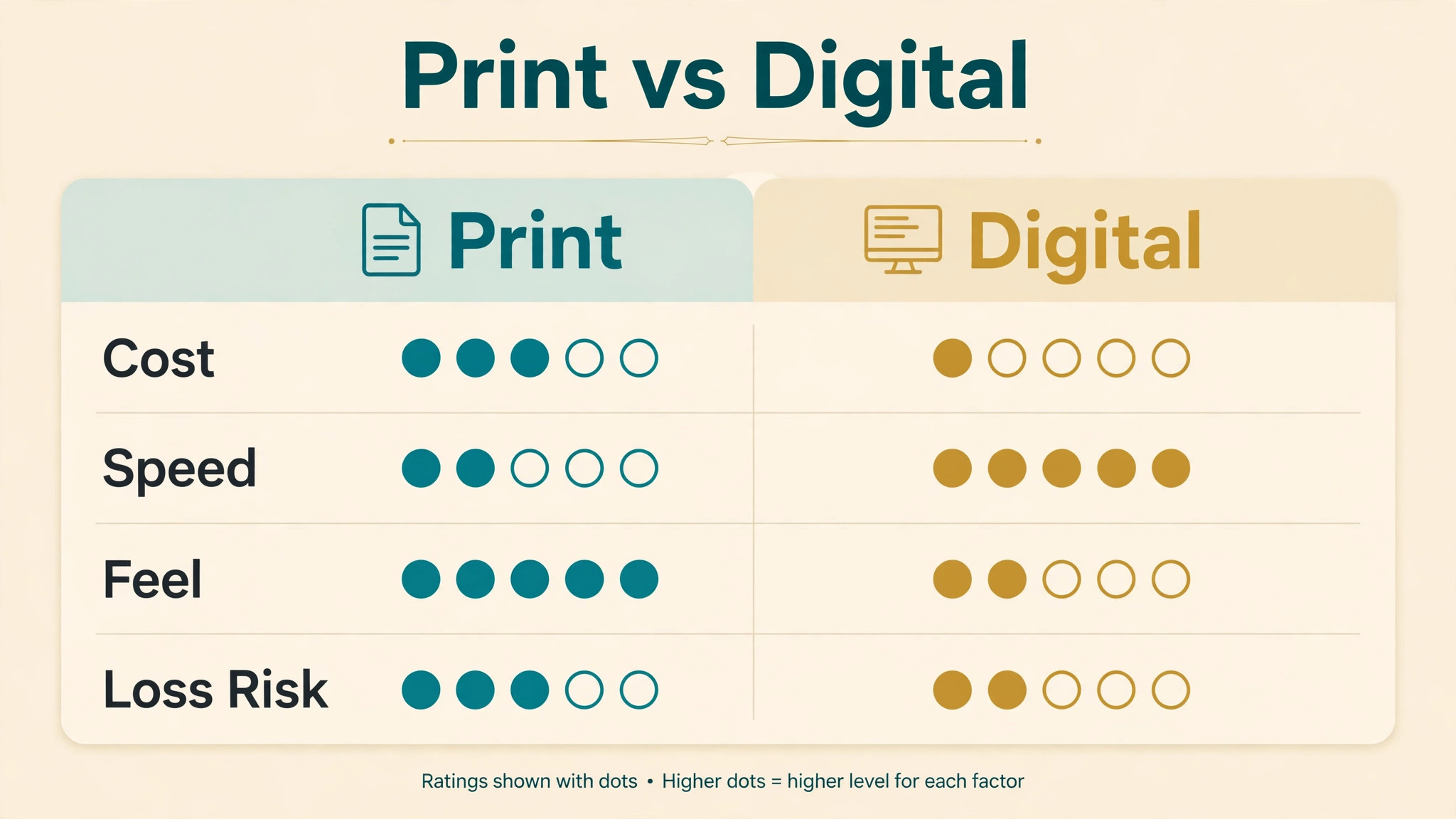
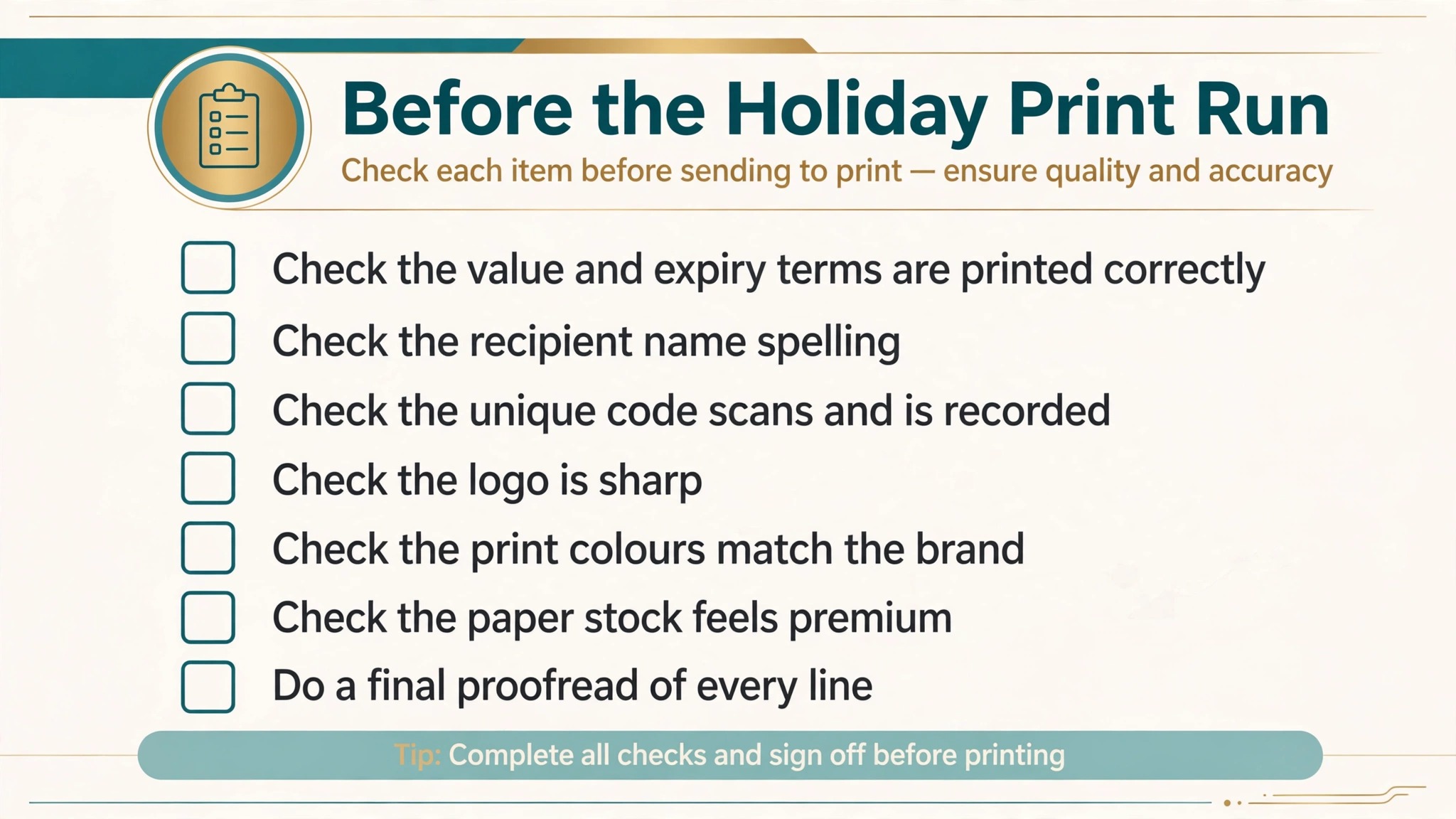
Printed certificates suit gifts that are handed over in person, because the physical object is part of the present. A thick card, a clean envelope and a handwritten message turn a voucher into something the recipient keeps on a fridge or a desk, which is also free advertising for your business every time they see it. Print at a proper size, usually A5 or half letter, on card stock rather than plain paper, and check the colours on a test print before ordering a run, because a screen colour and a printed colour are never identical. The cost of a test print is a few cents, and the cost of a hundred wrong prints is a wasted afternoon.
Digital certificates suit gifts sent at a distance, because they arrive in seconds and they cannot be lost in the post. Send the file as a PDF rather than a JPG, because a PDF prints cleanly at any size and cannot be edited by the recipient, while a JPG can be stretched, cropped or re saved at low quality.
Include the redemption instructions in the email itself, not only in the file, so the recipient does not have to open an attachment to find out how to use the gift. A digital certificate should also carry a unique code, printed clearly on the design, so your staff can check it at the till without asking the customer to forward an email thread.
Most businesses need both, and the tools in this guide handle the switch well. Design the certificate once, export a PDF for print and a JPG for email, and keep the design identical across both, so a customer who receives the digital version and prints it at home gets the same look as the shop printed version. The one difference should be the code, because a printed run needs a different code on each certificate, and a digital certificate needs a code generated for that sale. The best gift certificate makers export both formats from the same design, so the switch costs no extra work, and the only extra step is recording which code went to which customer.
Terms, Expiry and Fraud
Every certificate needs terms, and the terms should be short, honest and printed where the recipient can read them. State the expiry date, whether the certificate can be used in parts or must be spent in one visit, whether it can be exchanged for cash, and how to book or redeem it.
Keep the terms to four or five lines in small but readable type, because a wall of legal text makes the gift feel like a contract, while no terms at all invites arguments at the till. Check the consumer rules in your country before you set an expiry date, because some places limit how short an expiry can be, and a certificate that expires too soon can be illegal as well as unpopular.
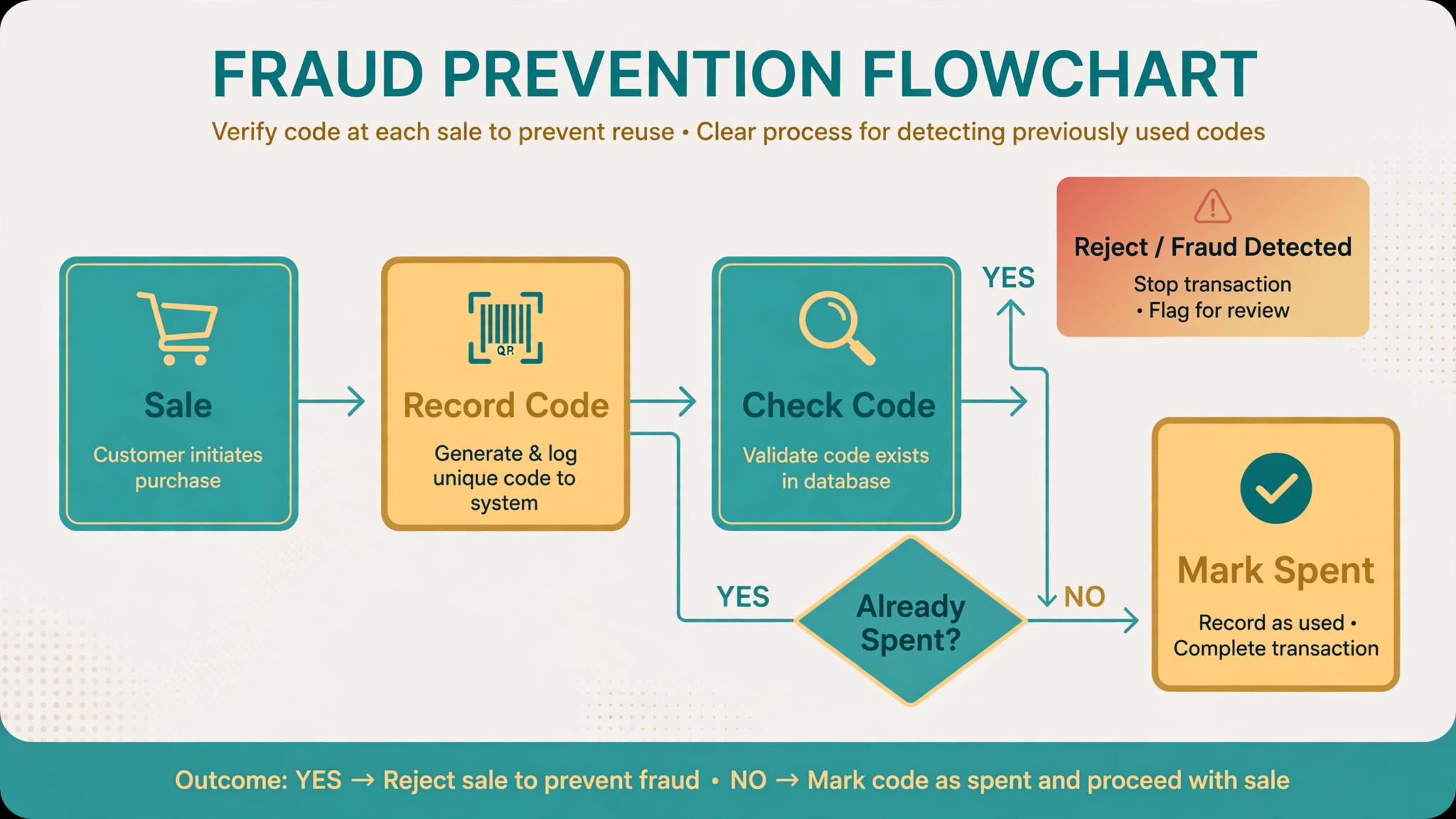
A unique code on every certificate is the simplest fraud protection available, and it costs nothing to add. Generate a code for each sale, record the code, the value, the buyer and the expiry date in a simple spreadsheet, and check the code off when it is redeemed. That record is what stops a certificate being photocopied and used twice, because the second copy will show a code that is already marked as spent.
The design tools in this guide do not generate or track codes, so the tracking is your job, and a spreadsheet is enough for a business selling dozens of certificates a month. A business selling hundreds a month should look at a dedicated gift card system instead, because a spreadsheet will not scale.
Expiry dates need care, because a short expiry pushes the recipient to visit soon, which is good for your cash flow, while a long expiry makes the gift feel generous, which is good for your reputation. Twelve months is the common middle ground, and it gives the recipient time to plan a visit without forgetting the certificate exists.
Send a reminder a month before expiry if you have the recipient email address, because a reminder that brings a customer back is worth more than the value of a certificate that expires unused. A certificate that is never redeemed is profit in the short term and a lost customer in the long term, so the reminder is good business as well as good manners.
How to Make a Gift Certificate in 6 Steps
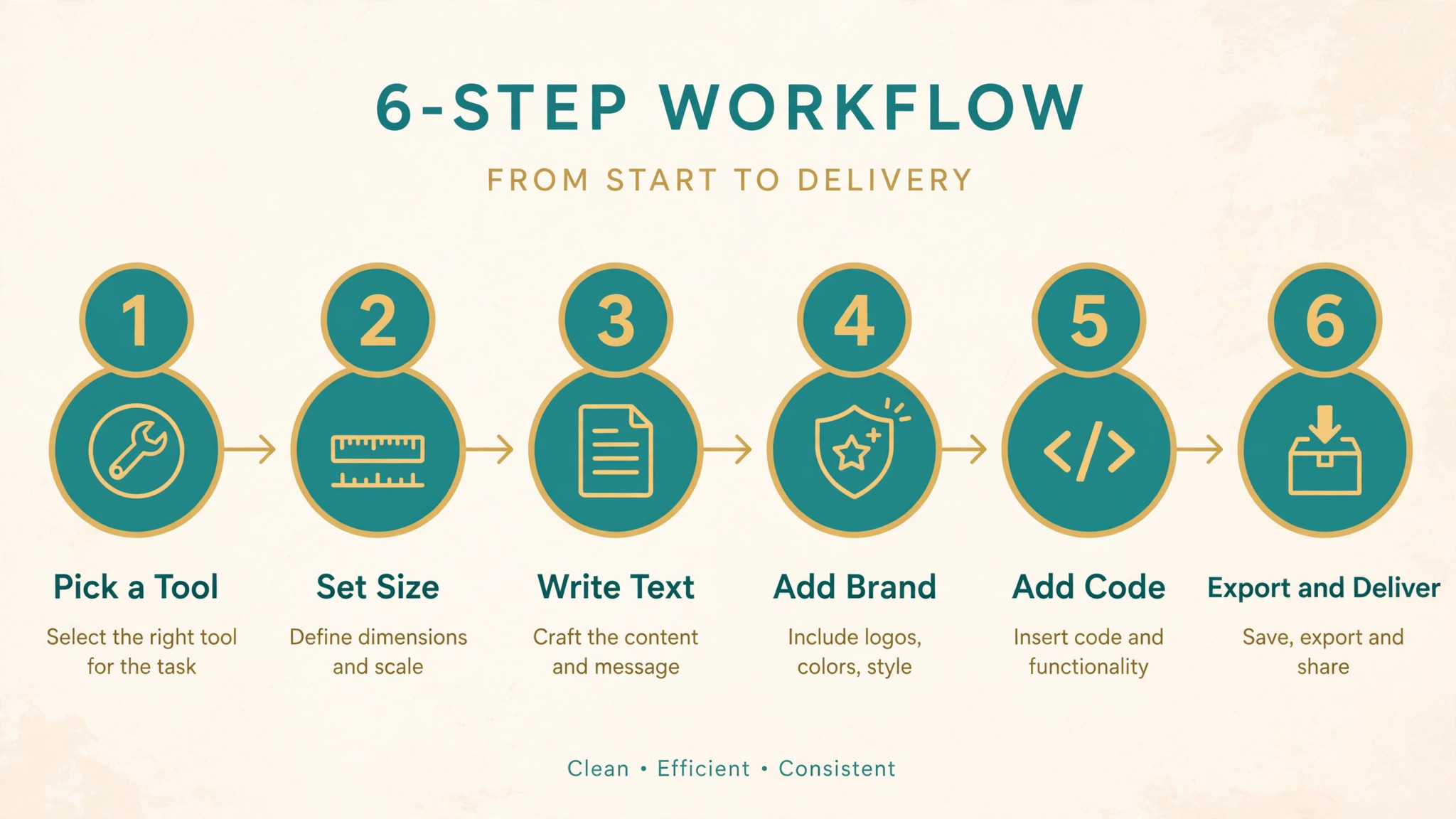
- Pick the tool that matches the job, not the tool with the most templates. Use Canva for a single certificate made fast, Adobe Express for a premium look, VistaCreate for an animated digital voucher, and PosterMyWall for a printed run. Open the tool, search its template library for gift certificate, and pick a design that matches your business colours and tone rather than the prettiest design on the page, because the template is a starting point and your branding will carry the result.
- Set the size and the format before you design anything. A printed certificate usually works at A5 or half letter size, while a digital certificate should be designed at the same ratio so it prints cleanly if the recipient prints it at home. Check the export settings now, not at the end, because a design built at screen resolution will look soft when printed, and a design built for print will look fine on screen. The best gift certificate makers export a print ready PDF, so confirm that option is available on your plan before you start.
- Replace every piece of placeholder text with your own words, and do not leave a single line of template text in the finished design. Write your business name, the certificate title, the value or the service, the recipient name, the giver name and a short message, then read the whole design aloud to catch spelling mistakes. The most common error on a finished certificate is a template line that nobody replaced, such as a sample name or a sample date, and that error is visible the moment the recipient opens the gift.
- Add your logo, your brand colours and a photo that fits the business, then remove any decoration that does not earn its place. A single strong photograph beats a collage of small images, and two brand colours beat five. Keep the value in large type near the centre, keep the terms in small type at the bottom, and leave white space around the important lines so the eye lands on them first. If the design feels crowded, remove one element rather than shrinking everything, because white space is what makes a certificate feel considered.
- Add a unique code and the redemption details, then record the code before you send or print the certificate. The code should be short and readable, such as a mix of letters and numbers that cannot be confused, and it should sit near the value so staff can find it quickly. Write the code, the value, the buyer, the recipient and the expiry date in a spreadsheet, and mark the code as spent when it is redeemed. A certificate without a code can be copied, and a code without a record cannot be checked, so both steps matter.
- Export, check and deliver the certificate in the right format for the buyer. Export a PDF for print and a JPG or PNG for email, open the exported file yourself and check the spelling, the value, the code and the expiry date one last time. Print a test copy if the certificate will be handed over in person, and check the colours on paper rather than on screen. Send the digital file with the redemption instructions in the email itself, and keep a copy of the finished design so you can reprint it if the recipient loses the original.
Mistakes That Ruin a Gift Certificate
The most common mistake is a certificate with no terms, because the argument at the till always comes from a term that was never stated. A customer who tries to spend a fifty dollar certificate in two visits, or to exchange it for cash, or to use it after expiry, will be unhappy if the answer is a rule they never saw. Print the terms on the certificate itself, in readable type, and keep them short enough that the recipient actually reads them. Four lines of clear terms prevent more arguments than any policy document ever will.
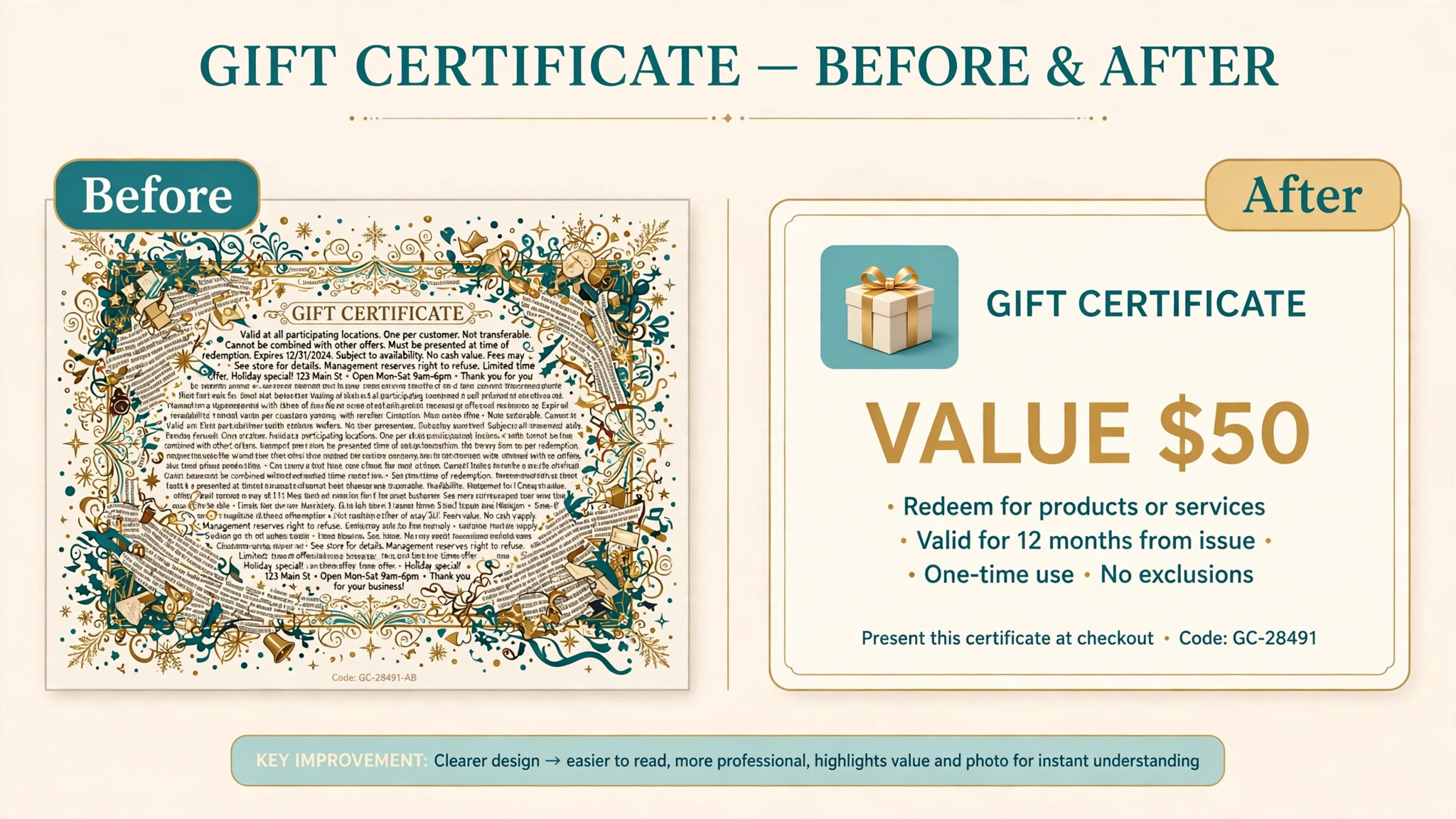
The second mistake is a design that hides the value, because the recipient should see the amount the moment they open the gift. Certificates that put the value in small type at the bottom, or that describe the gift in vague words without a number, make the recipient feel uncertain about what they received. Put the value or the service in large type near the centre, and say plainly what it covers, so the recipient knows exactly what to look forward to. A certificate that is clear about its value is a certificate that gets used, and a certificate that gets used brings a customer through your door.
The third mistake is making fifty certificates by hand instead of using a bulk process, because hand editing fifty files guarantees at least one mistake. A wrong name, a wrong value or a duplicated code will slip through, and the error will surface in front of a customer. The tools in this guide have no bulk merge, so a business that needs many personalised certificates should either use a dedicated certificate tool with CSV merge, such as Certifier, or accept a slower process and check every file twice. The time saved by rushing is never worth the cost of a wrong certificate handed to a customer.
Frequently Asked Questions
What is the best free gift certificate maker?
Canva is the best free option for most people, because its free plan includes hundreds of certificate templates and PDF export with no card required. Adobe Express is the best free option for a premium look, with a strong template set and stock photos on its free tier. VistaCreate is the best free option for an animated digital voucher. The best gift certificate makers all start free, so the right choice is the one whose templates match your business, and you should test two of them with the same design brief before deciding which editor you prefer.
How much does Canva Pro cost for making certificates?
Canva Pro costs 120 dollars a year or 15 dollars a month, and the free plan covers most single certificates without paying. Pro adds the full template library, brand tools that save your logo and colours, background removal, Magic Resize and a larger stock photo library. A business that makes certificates regularly will benefit from the brand tools, because they keep every voucher looking consistent. A business that makes one certificate a year should stay on the free plan, because the paid features will not be used enough to justify the price.
Can I print gift certificates made in Canva or Adobe Express?
Yes, both tools export a print ready PDF, and that file can be printed at home, at a copy shop or through a professional printer. Design at the size you intend to print, usually A5 or half letter, use card stock rather than plain paper, and print a test copy first to check the colours, because screen colours and printed colours are never identical. VistaCreate cannot export a vector SVG file, so its PDF export should be tested with your printer before a large run. PosterMyWall offers print ordering through its platform, which removes the step of finding a printer yourself.
Do gift certificate makers create the terms and codes for me?
No, and this is the most important limit to understand. The tools in this guide make the artwork, and they do not create legally enforceable terms, a secure code system or a redemption tracker. You must write the terms yourself, generate a unique code for each certificate, and record the code, the value and the expiry date in a spreadsheet or a dedicated system. The best gift certificate makers for a business selling hundreds of vouchers a month are dedicated gift card systems rather than design tools, because the tracking matters more than the artwork at that volume.
What size should a gift certificate be?
A printed gift certificate usually works at A5 or half letter size, which is large enough to feel like a present and small enough to fit in an envelope. A digital certificate should be designed at the same ratio, so it prints cleanly if the recipient prints it at home. Design at high resolution rather than screen resolution, because a file built for a phone screen will look soft on paper, while a file built for print will look fine on screen. Export as a PDF for print and as a JPG or PNG for email, and keep the design identical across both formats.
How long should a gift certificate last?
Twelve months is the common middle ground, because it gives the recipient time to plan a visit without forgetting the certificate exists, and it pushes them to come in sooner rather than later. Check the consumer rules in your country before you set an expiry date, because some places limit how short an expiry can be, and a certificate that expires too soon can be illegal as well as unpopular. Send a reminder a month before expiry if you have the recipient email address, because a reminder that brings a customer back is worth more than the value of a certificate that expires unused.