Predis.ai charges 24 dollars a month on yearly billing. Hootsuite charges 99 dollars per user a month on yearly billing. Both products describe themselves as AI help for social media, yet the gap between those two prices buys a different job entirely, and that gap is the reason most buyers pick the wrong tool first. The best AI social media generators are not ranked by how clever their writing sounds in a demo. They are ranked by what they finish for you, a finished post with an image or video, a caption in your voice, and a publish step that does not ask you to copy text into another app.
This guide tests seven generators that actually make social posts, not chatbots that only write sentences. Every tool below was checked against its own pricing page and feature pages in October and November 2026, and every price is quoted before tax because vendors change plans without notice. You will find a scored comparison table, a pick for each common job, a full review of each tool, a buying guide, a one week workflow, and answers to the questions buyers ask most. If you post alone for a small business, start with the verdict section. If you run client accounts, start with the comparison table and the scheduling limits.
How We Tested the Best AI Social Media Generators
We judged each tool on the work a small team actually does in a week. First we asked whether it writes the caption, makes the visual, and publishes the post, or whether it stops after one of those steps. A tool that writes well but publishes nothing forces you to keep a second subscription, so generation without publishing scored lower for solo operators and higher for teams that already own a scheduler they like.
Second we tested input range. The strongest tools start from a one line idea, a product link, an uploaded photo, or a past post, and they learn from your earlier posts. Tools that only accept a blank prompt produce generic copy, and generic copy is the fastest way to lose followers who expect your voice. We also checked brand voice controls, because a generator that cannot hold your tone will drift toward the same cheerful filler on every account.
Third we checked channel coverage and honest limits. We counted networks, social accounts on the entry plan, monthly credits, and whether auto publishing needs a higher tier. Predis.ai, for example, reserves auto publishing for its Rise plan, so its low entry price does not buy the full workflow. We recorded free plans and trials, including whether a card is required, because a three day trial that charges your card on day three is a different offer from a free plan you can keep.
Fourth we weighed price against output. A 29 dollar a month tool that makes 300 images is cheap per post. A 99 dollar per user a month tool that only writes captions is dear for a solo operator and reasonable for a team that needs approvals and listening. We did not test with a single prompt and declare a winner. We compared what each vendor publishes about its own limits, and we flag every place where a vendor page was silent, so you can check before you pay.
The Verdict at a Glance
For most readers, the best AI social media generators for daily use are Predis.ai for ad style creatives, ContentStudio for scheduling with AI writing inside it, and FeedHive for the lowest entry price with real publishing. If you only buy one tool and you post product and offer creatives every week, buy Predis.ai on its Core plan and upgrade to Rise only when you want auto publishing. If you manage several client accounts and you need approvals, buy ContentStudio, because its AI sits inside a scheduler your clients can approve work in.
Canva is the right buy when design matters more than writing, because its template library and Magic Studio tools are deeper than any generator here, and Pro adds scheduling. SocialBee suits a solo operator who wants unlimited AI captions and images for a flat monthly price. Ocoya suits a small team that posts to many networks, including newer ones such as Threads and Bluesky. Lately suits a marketer with a backlog of long articles, videos, or podcasts who wants that material cut into channel specific posts in a trained voice.
Do not buy on the size of a template library alone. A library of ten thousand templates is useless if the generator writes captions that sound like everyone else. Buy on three questions. Does it publish to your networks. Does it remember your voice. Does the entry plan include the volume you need. The seven reviews below answer those three questions for each tool, with prices checked on vendor pages in late 2026.
The 7 Tools Compared
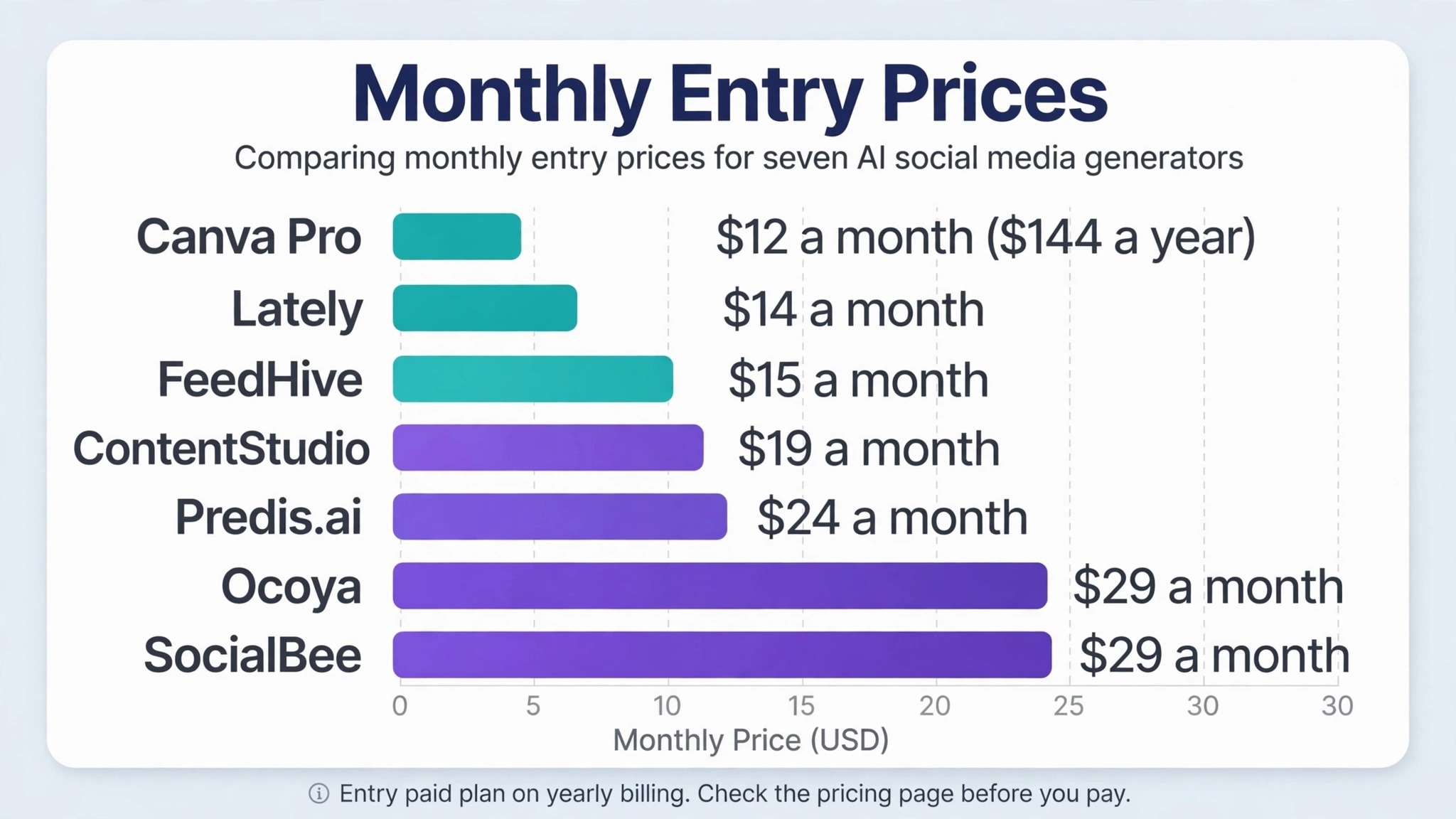
The table below compares the best AI social media generators on the four facts that decide most purchases, what each one makes, whether you can try it free, what the entry paid plan costs, and who it fits best. Prices are the published price before tax, and vendors change them without warning, so check the pricing page before you pay.
| Tool | Best for | Free option | Paid entry |
|---|---|---|---|
| Predis.ai | Ad style image, carousel and video posts | Trial, 3 days, card required | $24 a month, yearly |
| Ocoya | Many networks, captions plus visuals | Trial, 7 days, card required | $29 a month |
| ContentStudio | Scheduler first, AI captions inside | Trial, 7 days, no card | $19 a month, yearly |
| FeedHive | Low cost drafting and publishing | Trial, 7 days | $15 a month, yearly |
| Lately | Long content cut into many posts | Not stated | $14 a month, yearly |
| SocialBee | Unlimited AI captions and images | Trial, 14 days | $29 a month |
| Canva | Design first, AI across formats | Free plan | $144 a year, Pro |
Best Pick by Job
Use this table to match the best AI social media generators to your job before you read the full reviews. A tool that wins for a solo shop owner can lose for an agency, because the two jobs need different limits, and the table below keeps those jobs separate.
| Job | Pick | Why it wins |
|---|---|---|
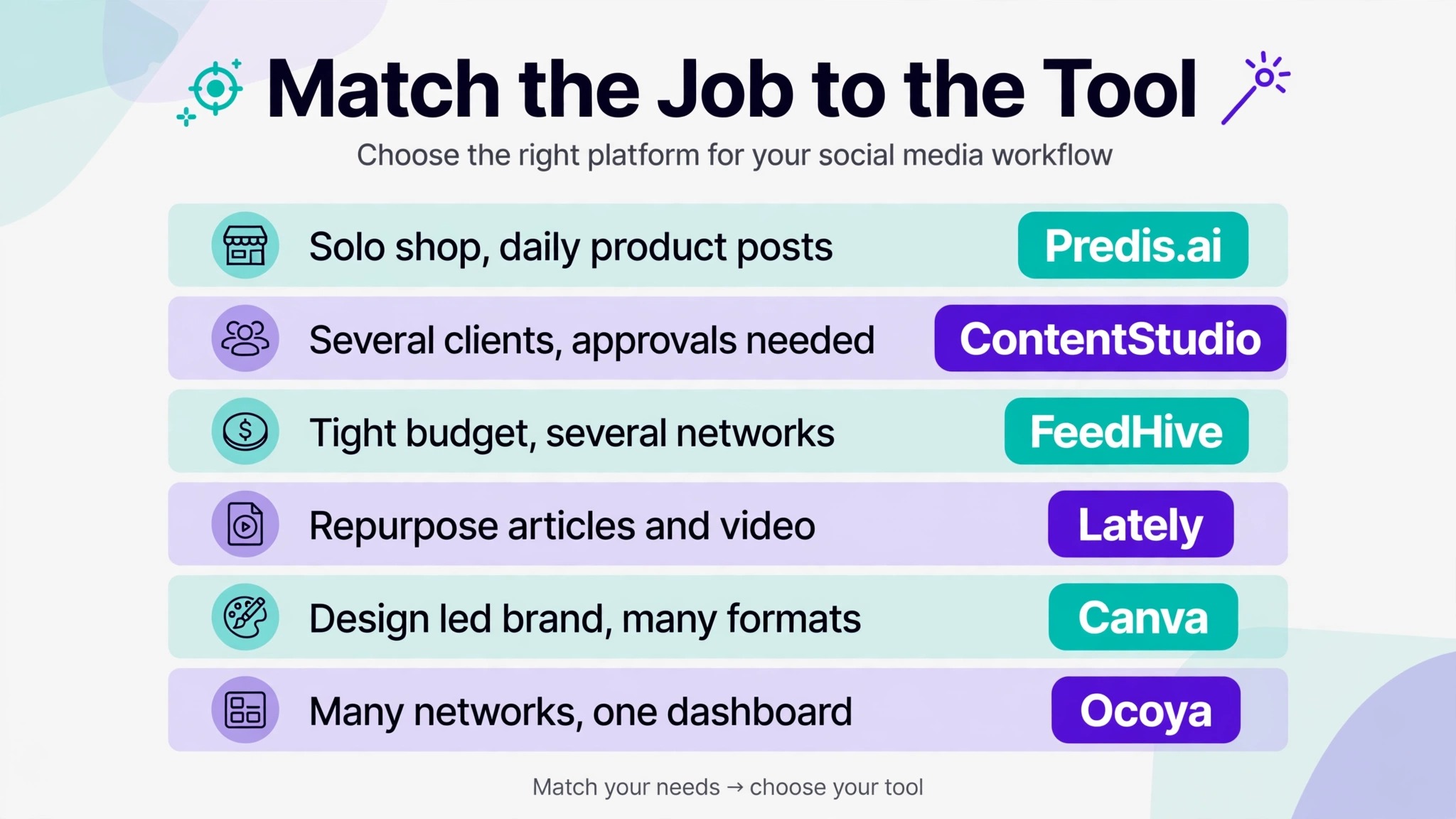
| Solo shop, daily product posts | Predis.ai | Images, video and captions from one brief |
| Several clients, approvals needed | ContentStudio | AI writing inside a scheduler with approvals |
| Tight budget, several networks | FeedHive | Lowest entry price with real publishing |
| Repurpose articles and video | Lately | Cuts long material into channel posts |
| Design led brand, many formats | Canva | Deepest templates and brand kits |
| Many networks, one dashboard | Ocoya | 28 integrations, captions plus visuals |
1. Predis.ai
Predis.ai is the strongest generator here for a business that sells with images. Give it a one line idea, a product link, an uploaded photo, or a link to your website, and it returns an image, a carousel, or a short video with a caption and hashtags. That matters because most social generators write text and leave the visual to you, which means the hard half of the post is still your job. Predis.ai does both halves, and it can publish the result to ten channels on its entry plan.
Pricing is credit based, so read the limits before you buy. Core costs 24 dollars a month on yearly billing, or 32 dollars on monthly billing, for 1,300 credits, which the vendor describes as about 325 images or 33 videos. Rise costs 55 dollars a month on yearly billing, or 79 dollars monthly, for 3,200 credits and up to four brands. Auto publishing starts on Rise, not Core, so a Core buyer still schedules by hand or pays for the higher tier. Every plan starts with a three day trial that requires a card, and the card is charged when the trial ends.
The limits are honest ones. Credits run out fast if you make video every day, because a video costs far more credits than an image, and a small shop that posts one video a day can burn a Core allowance in a week. The caption quality is good for offers, product news, and seasonal posts, and weaker for opinion pieces or stories that need a personal voice, so edit the first line of every caption yourself. For ad style creatives and product posts at volume, no other tool in this set finishes as much of the post in one place.
2. Ocoya
Ocoya is the pick for a small team that posts to many networks and wants captions, visuals, and scheduling in one dashboard. It generates text and images from a prompt, a link, a sentence about your business, or WooCommerce products, and it publishes to 28 integrations, including Bluesky, Threads, and Mastodon alongside the large networks. That breadth matters if your audience is split across newer networks, because most schedulers in this price range still cover only the big five.
Pricing starts at 29 dollars a month for 300 credits on the entry plan, with a seven day trial that requires a card. The credit model is the main thing to watch, because 300 credits is a modest allowance if you generate images every day, and the plan that suits a team posting daily will cost more than the headline price. Ocoya also sells automation features that repeat posting patterns for you, which saves time for a team but can make a feed feel mechanical if you automate everything.
The writing quality is solid for product updates, event posts, and short announcements, and the brand voice tools help it stay consistent across networks. Its weakness is depth. It does not cut long articles into posts the way Lately does, and it does not match Canva for design control. Buy Ocoya when your problem is breadth, many networks, one team, one dashboard, and buy a different tool when your problem is one network done brilliantly.
3. ContentStudio
ContentStudio is a scheduler first and a generator second, and that order is exactly why it fits agencies and small businesses with clients. Its AI writes captions from a prompt, from uploaded images, or from a saved brand voice, and the finished post lives in the same calendar where it will be published to 11 networks. Your client can approve the post in the same tool, which removes the screenshot and email loop that eats agency time every week.
Pricing is the most forgiving in this set for a new buyer. The entry plan costs 19 dollars a month on yearly billing, or 29 dollars on monthly billing, for five social accounts, with a seven day trial that needs no card. That is the lowest annual entry price among the schedulers here, and the no card trial means you can test the approval flow with a real client before you pay. Higher plans add accounts, users, and automation, so a growing agency can scale without moving tools.
The trade off is generation depth. ContentStudio writes good captions and suggests images, but it does not generate video the way Predis.ai does, and it does not design the way Canva does. If your posts are mostly text, links, and photos, that trade off costs you nothing. If your feed depends on video, pair ContentStudio with a video tool instead of forcing it to be one. For a small business or agency that wants one calendar, one approval flow, and AI help inside it, this is the safest buy in the set.
4. FeedHive
FeedHive is the cheapest way into AI drafting with real publishing, and it is built for a solo creator who posts to several networks every week. It drafts posts from a rough idea, recycles your existing posts into new versions, and learns your voice from what you have already published. It also generates images, predicts how a post may perform before you publish, and publishes to nine networks, which is more coverage than its price suggests.
Pricing starts at 15 dollars a month on yearly billing, or 19 dollars on monthly billing, for four social accounts, with a seven day trial that may require a card. The scheduling caps are tight on the entry plan, so a creator who queues a month of posts in one sitting will hit limits sooner than on ContentStudio or SocialBee. The account cap is also tight, because four accounts covers one person on four networks, and a second brand needs a higher plan or a second subscription.
What FeedHive does well is speed. A rough idea becomes a draft in seconds, the recycle feature turns one good post into a week of variants, and the performance prediction helps you pick between two hooks before you publish. What it does less well is design, because its image generation is simpler than Predis.ai or Canva, and its analytics are lighter than a full suite. Buy FeedHive when your budget is tight, your networks are few, and your bottleneck is writing, not design.
5. Lately
Lately solves a different problem from every other tool here, and for the right buyer it is the most valuable of the seven. It starts with long material you already own, an article, a podcast episode, a webinar recording, or a video, and it cuts that material into channel specific social posts in a voice it learns from your past writing. A single blog post can become twenty posts, each shaped for its network, instead of one link post that nobody clicks.
Pricing starts at 14 dollars a month on yearly billing, or 19 dollars on monthly billing, which makes it the lowest annual entry price in this set, and it publishes to five channel types. The vendor does not clearly state a free trial on its public pages, so treat the entry plan as the cost of testing it, and run a one month trial with a single long article before you commit for a year. That test will tell you quickly whether its voice training fits your writing, because the quality of its output depends on the quality of the material you feed it.
The limit is scope. Lately is weak when you start from a blank prompt, because it has no long source to learn from, and it does not design images the way Predis.ai or Canva do. A business with no backlog of articles or video will get little from it. A business with a library of useful material, a consultant, a coach, a B2B firm, a publisher, will get more finished posts per hour from Lately than from any other tool here, because the raw material already exists.
6. SocialBee
SocialBee is the flat price alternative to the credit based generators, and that difference matters for a solo operator who hates counting credits. Its Bootstrap plan costs 29 dollars a month for five social profiles and one user, with unlimited AI captions and images and a 14 day trial. Unlimited generation removes the mental tax of credits, so you can test ten caption variants for one post without wondering what each variant costs, and that freedom improves output more than most buyers expect.
The tool covers the full loop, generation, Canva visuals inside the workflow, scheduling, and AI suggestions for what to post next, with content categories that keep a feed balanced between promotion, education, and engagement. That category system is the feature most solo operators actually need, because the common failure is not a lack of posts but a feed that is all promotion. SocialBee sorts posts into buckets, so your week holds its shape even when you are busy.
The weakness is scale. Five profiles and one user fit a solo operator or a single brand, and a second brand or a teammate pushes you to a higher plan. Its AI images are useful for social posts but not as polished as Predis.ai for ads, and its analytics are solid without matching a full suite. Buy SocialBee when you want one flat price, unlimited AI help, and a feed that stays balanced without a manager watching it.
7. Canva
Canva is the design first entry in this set, and it belongs here because its Magic Studio tools now write, design, resize, translate, and schedule social content in one place. No other tool here matches its template library, its brand kits, or its range of formats, from a square feed post to a story, a reel cover, and a presentation, all from the same design. If your brand lives or dies on how it looks, Canva is the strongest foundation of the seven.
Pricing is simple and well documented. The free plan includes up to 20 AI uses and one Brand Kit, which is enough to test the workflow honestly. Pro costs 144 dollars a year for one person, with ten times more AI use than Free and five Brand Kits, and Business costs 250 dollars a year per person. Pro also adds social content scheduling, so a Pro buyer can design and schedule without a second tool, though the scheduling is lighter than ContentStudio or SocialBee.
The limit is writing depth. Magic Write produces good short captions and rewrites, but it does not learn your voice as deeply as Lately, and it does not generate a week of posts from a product link the way Predis.ai does. Treat Canva as the design engine and pair it with a writing first tool when captions are your bottleneck. For a small business that needs beautiful posts, consistent branding, and one tool the whole team can learn in an afternoon, Canva remains the default buy.
How to Choose
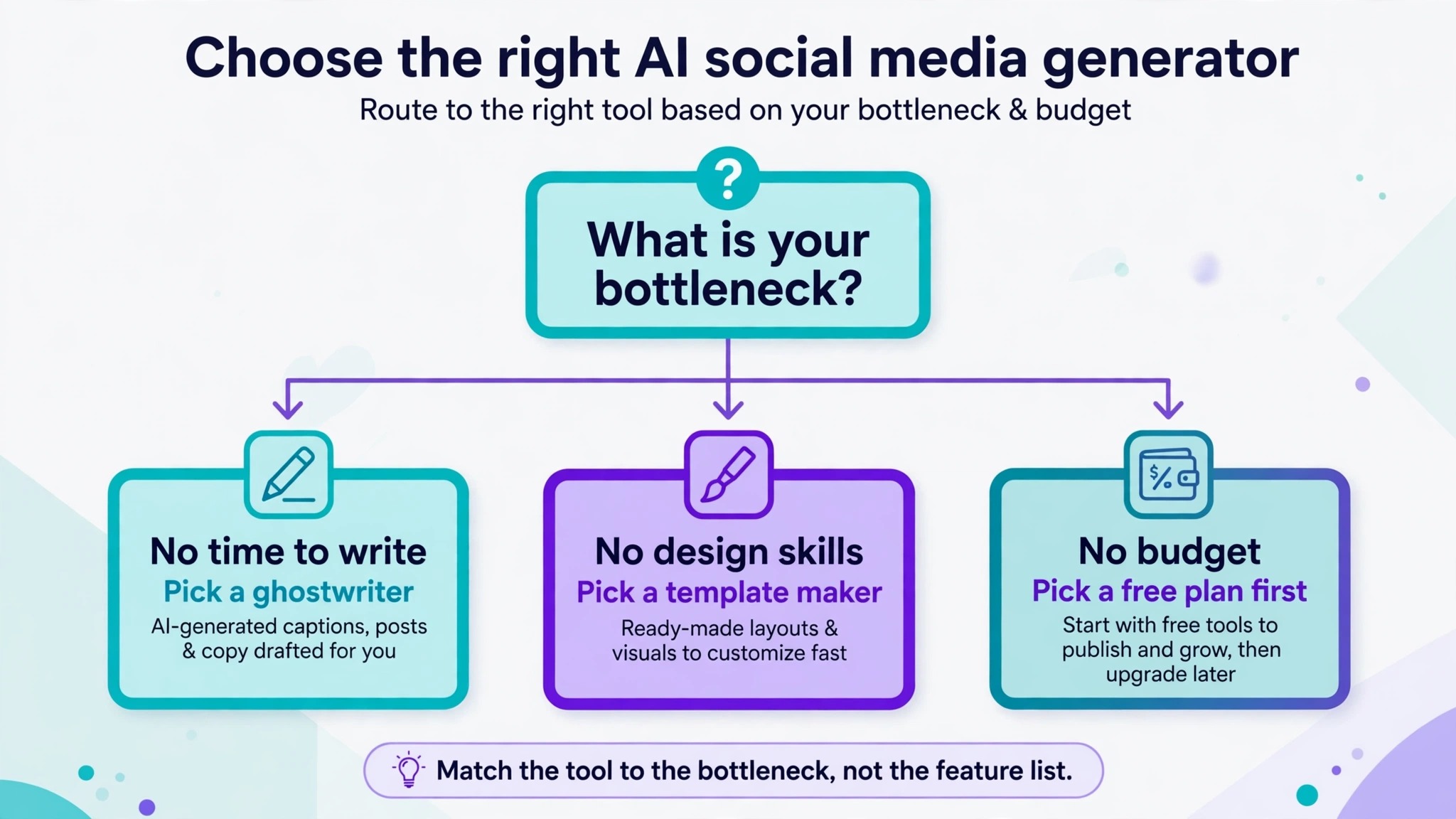
Start with your bottleneck, not with a feature list, because the best AI social media generators for your business are the ones that remove the step you skip most often. If you skip posting because writing takes too long, buy a writing first tool such as FeedHive or Lately. If you skip posting because the visual takes too long, buy Predis.ai or Canva. If you skip posting because scheduling and approvals take too long, buy ContentStudio or SocialBee. A tool that fixes your real bottleneck will earn its price in the first month, and a tool that fixes a problem you do not have will sit unused.
Next, count your real volume before you pay. A credit plan looks cheap until you count video, because one video can cost as much as ten images, and a daily video habit can empty a monthly allowance in a week. A flat price plan looks dear until you count the captions you test, because ten variants for one post cost nothing extra on SocialBee and cost credits everywhere else. Write down your week, how many posts, how many images, how many videos, how many networks, and match those numbers to the plan limits, not to the headline price.
Finally, test voice before you commit for a year. Generate five posts from the same brief in each finalist, publish none of them, and read them aloud the next morning. The tool whose drafts need the least editing is the tool you will actually use, because a generator that saves ten minutes of writing and costs fifteen minutes of fixing has saved you nothing. Pay monthly for the first month even when yearly billing is cheaper, and switch to yearly only after a month of real posts proves the fit.
Mistakes to Avoid
The first mistake is buying on template count. Ten thousand templates do not help when every caption sounds the same, and a feed of beautiful templates with flat captions still loses followers. Judge a generator on its worst caption, not its best template, because the worst caption is what your audience will remember.
The second mistake is ignoring the publishing tier. Several tools in this set generate on the entry plan and publish only on a higher plan, so the price that attracted you does not buy the workflow you imagined. Read the plan table for the words auto publishing, and add the higher tier to your budget before you compare prices.
The third mistake is automating everything on day one. Automation that repeats the same pattern every day makes a feed feel mechanical within two weeks, and followers notice repetition faster than any analytics dashboard will show it. Automate the scheduling, keep the ideas human, and review every post before it goes out for the first month.
The fourth mistake is feeding a generator nothing to learn from. A blank prompt returns average copy, because the tool has no voice, no product detail, and no audience to aim at. Give it your best past posts, your product page, and one sentence about who the post is for, and the output improves more than any plan upgrade will improve it.
The fifth mistake is judging a tool on one post. One good caption proves nothing, and one bad caption proves nothing either, because generation quality varies with the brief. Test each finalist on five different jobs, an offer, a product explainer, a customer story, an event reminder, and an opinion post, and buy the tool that is good at three or more of them.
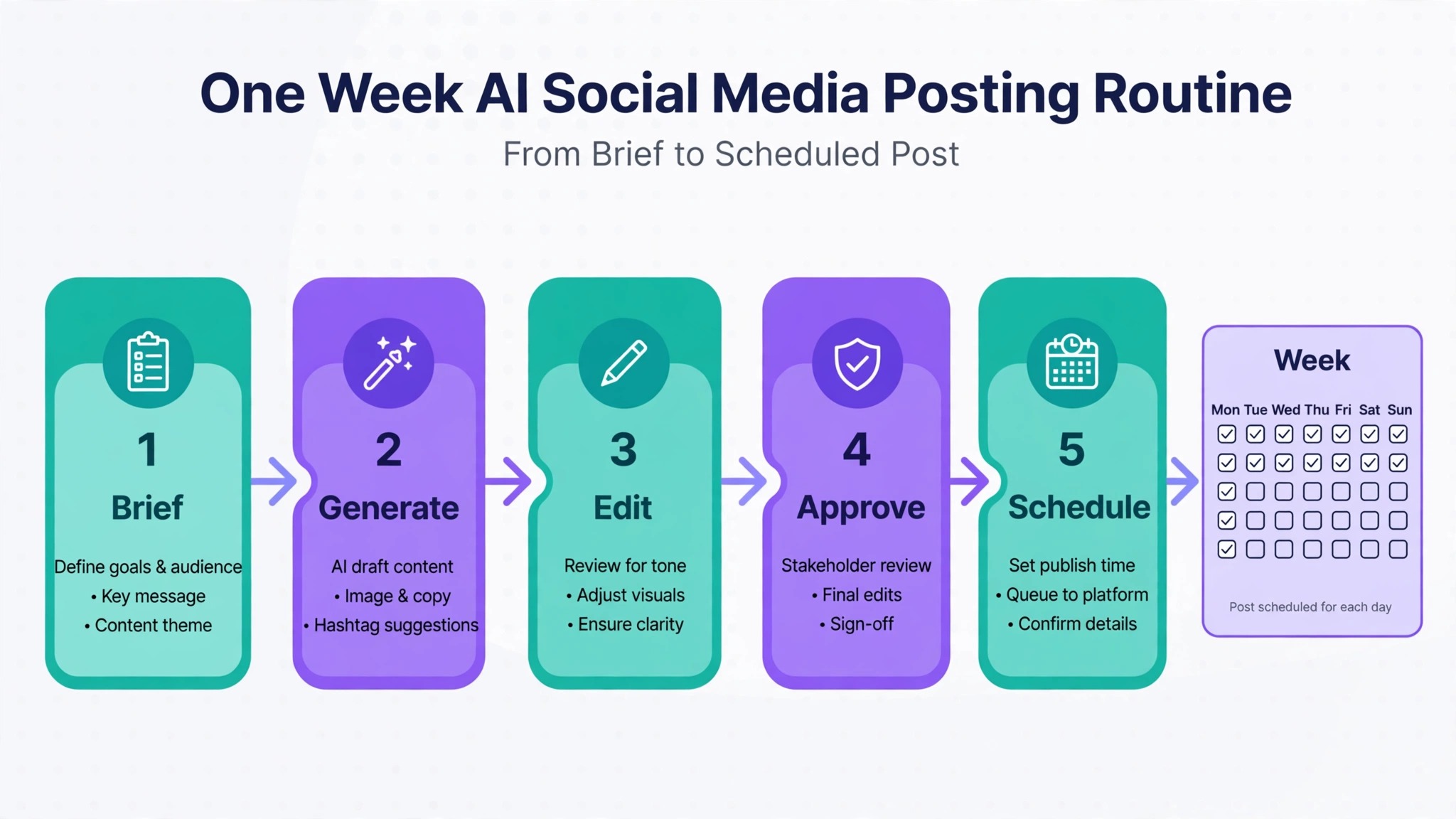
A One Week Workflow
A workable week with one of these generators takes about three hours once the system is running, and it produces twelve finished posts across your networks. The workflow below assumes a solo operator with one brand, and you can scale it by adding a second brand day.
- Monday, plan in one sitting. List the products, offers, and stories for the week, write one line briefs for each post, and pick the format for each one, image, carousel, or video. A week planned on Monday never depends on inspiration on Thursday.
- Tuesday, generate in one batch. Feed the briefs to your generator, make the images and videos in one session, and save the drafts in your scheduler. Batching matters because switching between writing, design, and scheduling five times a day wastes more time than the generation saves.
- Wednesday, edit with fresh eyes. Read every caption aloud, fix the first line of each post, check prices, dates, and links, and delete any post that sounds like a template. Editing a day after generation catches errors that same day editing misses.
- Thursday, schedule and approve. Queue the posts for their best times, check the preview on a phone, and confirm that each image crops cleanly on every network. A post that looks right on desktop and wrong on a phone is a post your audience will scroll past.
- Friday, reply and review. Answer comments in two short windows, note which hooks earned replies, and save the best performing post as a template for next week. The review takes twenty minutes and it is the step that makes next week better than this one.
Frequently Asked Questions
Which generator is best for a solo small business owner?
The best AI social media generators for a solo operator are Predis.ai for product and offer creatives and FeedHive for low cost drafting with publishing. Predis.ai finishes the visual and the caption together, which matters when you have no designer, while FeedHive drafts fast and publishes to nine networks for 15 dollars a month on yearly billing. If design matters more than speed, Canva Pro is the better solo buy, because its templates and brand kits keep a one person brand looking consistent.
Do these tools publish directly to social networks?
Most of them do, with limits that matter. Predis.ai publishes on its entry plan but reserves auto publishing for Rise. ContentStudio, FeedHive, SocialBee, and Ocoya publish from their entry plans. Lately publishes to five channel types. Canva Pro schedules social content, though its scheduling is lighter than a dedicated scheduler. Check the network list for your exact networks before you pay, because a missing network means a second tool.
Is there a genuinely free AI social media generator?
Canva has the only permanent free plan in this set, with up to 20 AI uses and one Brand Kit, which is enough to test the workflow. The other tools offer trials, usually seven days, and Predis.ai offers a three day trial that requires a card. A trial is not a free plan, and a card required trial will charge you if you forget to cancel, so set a reminder on the day you start it.
How much should a small business budget per month?
Budget 15 to 30 dollars a month for a solo operator, which covers FeedHive at 15 dollars, ContentStudio at 19 dollars, Predis.ai Core at 24 dollars, or SocialBee at 29 dollars on yearly billing. A team that needs approvals, many accounts, or heavy video should budget 50 to 100 dollars a month, because credits and seats add up fast. Start monthly, prove the fit for one month, then switch to yearly billing for the discount.
Will AI captions sound like everyone else?
They will if you accept the first draft. Every generator here produces average copy from a blank prompt, because average is what a blank prompt asks for. Give the tool your voice, feed it your best past posts, edit the first line of every caption, and delete filler words before you publish. The tools that learn from your past posts, Lately and FeedHive, drift less toward generic copy than the ones that start fresh each time.
Can one tool replace a designer and a scheduler?
No single tool in this set replaces both well. Predis.ai comes closest for ad style posts, because it makes visuals and captions and publishes, but it cannot match Canva for brand design. Canva comes closest for design, but its writing and scheduling are lighter than ContentStudio or SocialBee. Most small businesses end up with two tools, one for design and one for writing and scheduling, and that pair costs less than one hire.
The Bottom Line
Start with one of the best AI social media generators above, not with all seven, and give it a real month. If you sell products with images, start with Predis.ai. If you manage clients, start with ContentStudio. If your budget is tight, start with FeedHive. If you own a library of articles or video, start with Lately.
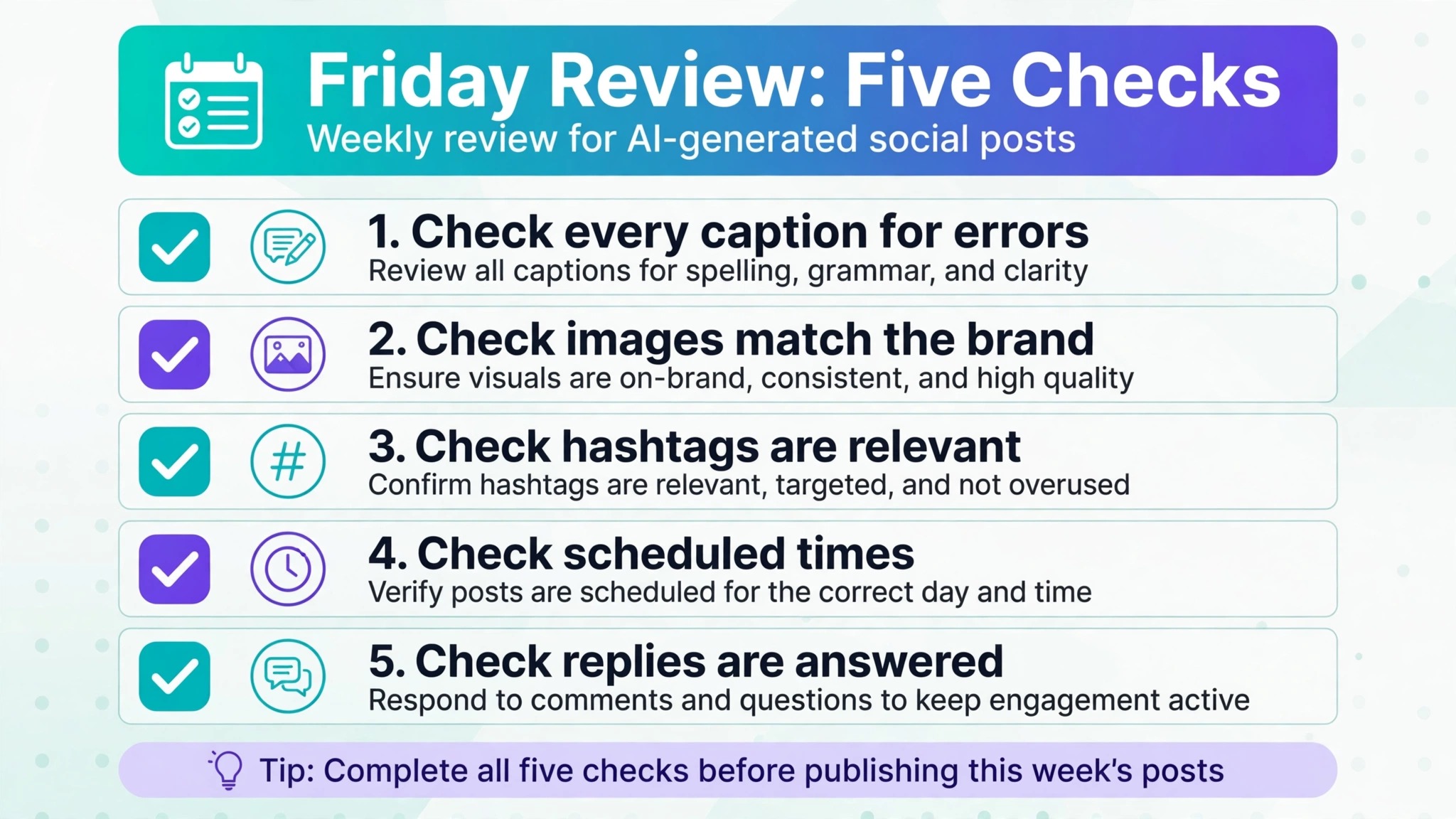
Run the one week workflow, edit every caption before it publishes, and review what earned replies on Friday. The tool that survives a month of real posts is the right one, and the price that matters is the price of the plan you actually need, not the price on the homepage.